
Introduction
AI automation platforms are moving beyond basic trigger-and-action workflows. Businesses increasingly need automations that can interpret unstructured information, make contextual decisions, use multiple tools, and adapt when a task does not follow a perfectly predictable path.
Gumloop is designed for this newer category of work. It combines a visual no-code workflow builder with AI agents that can use business applications, follow reusable instructions, conduct research, generate files, and complete open-ended tasks.
This makes Gumloop different from both traditional automation software and standalone AI assistants. You can create structured workflows when consistency matters, deploy autonomous agents when flexibility matters, or combine both approaches inside the same automation.
In this Gumloop review, you will learn how the platform works, which features are most useful, how its credit-based pricing operates, where the product still requires improvement, and how it compares with Zapier, Make, n8n, and Relevance AI.
What Is Gumloop?
Gumloop is an AI-native automation platform for building workflows and AI agents without managing the underlying infrastructure yourself.
The platform is organized around two main concepts. Workflows follow a visual sequence of connected nodes, while agents decide which tools to use and how to approach a task based on the instructions and context you provide.
This distinction is important. A structured workflow is suitable when every invoice, lead, form submission, or document must follow the same steps. An agent is more appropriate when the process involves interpretation, research, judgment, or changing sequences of actions.
Gumloop lets you use both models together. A workflow can collect and validate data before passing it to an agent, while the agent can evaluate the information and return a decision to the remaining workflow steps.
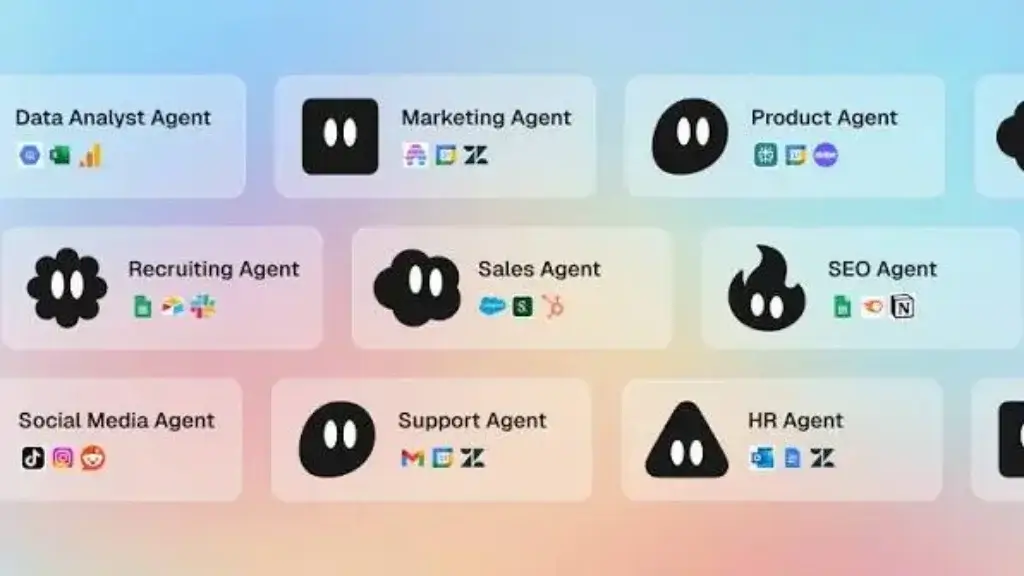
The platform is primarily aimed at marketing, sales, operations, support, research, and other business teams that want to automate AI-heavy processes without building custom applications from scratch.
Core Features
How Gumloop Works
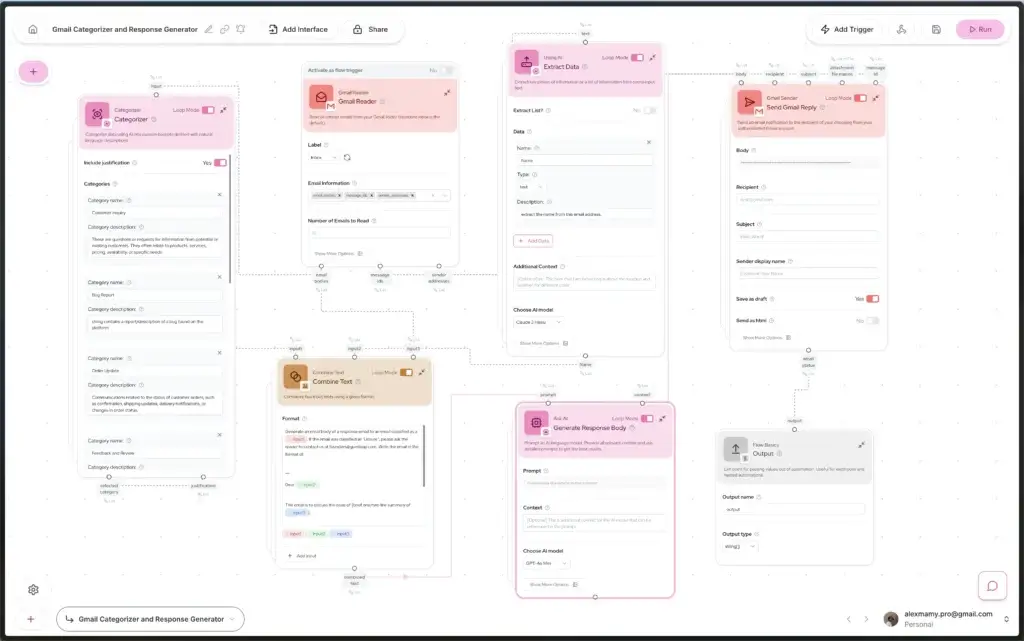
Gumloop gives you several ways to automate work. You can manually assemble a flow on the visual canvas, ask its AI assistant to build a flow from a natural-language description, or create an agent that dynamically chooses tools.
The best approach depends on how predictable your process is. You do not need to force every task into an autonomous agent when a structured workflow would be safer and easier to audit.
Visual AI Workflow Builder
The workflow builder uses a drag-and-drop canvas where you connect nodes to define how information moves through an automation.
Gumloop documents more than 100 prebuilt workflow nodes and integrations across categories such as AI processing, web scraping, files, PDFs, notifications, data enrichment, browser actions, APIs, and business applications.
You can create simple processes, such as summarizing a form submission and posting the result to Slack, or more sophisticated systems with branches, loops, subflows, webhooks, and several AI processing steps.
The canvas provides better visibility than a purely linear automation editor. You can see where data enters, which nodes process it, where conditions divide the workflow, and how the final result is delivered.
AI Agents
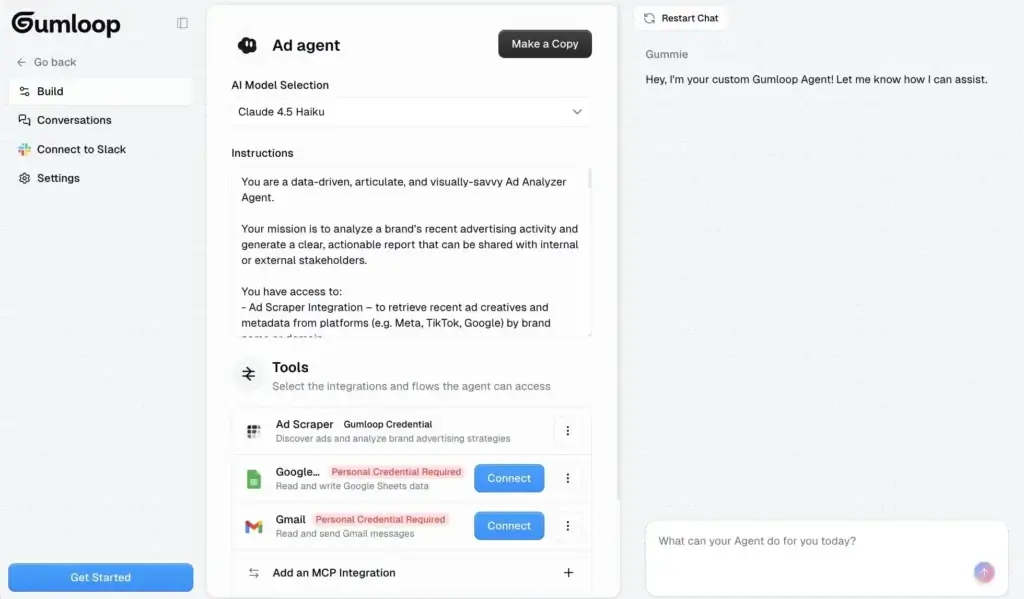
Gumloop agents are designed for open-ended tasks. Instead of following one fixed sequence, an agent analyzes your request and decides which connected tools it should use.
You can give an agent access to applications such as Gmail, Slack, Salesforce, Notion, Google Drive, or other supported connectors. The agent can then search, read, write, update, or generate information according to the permissions you configure.
For example, a sales agent could research a company, review CRM records, identify relevant account activity, create a meeting brief, and draft a follow-up message. The exact sequence can change depending on the available information.
Agents can also be embedded inside workflows. This gives you a practical hybrid model where deterministic nodes control sensitive or repetitive steps and the agent handles the work that requires interpretation.
Gummie AI Workflow Assistant
Gummie is Gumloop’s built-in AI assistant for creating and troubleshooting automations.
You can describe the result you want in natural language, and Gummie can propose a workflow plan, add nodes to the canvas, configure prompts, and help diagnose errors.
This lowers the initial barrier for non-technical users. Instead of learning the complete node library before creating anything, you can begin with a description such as, “Review new support emails, categorize each request, and send urgent issues to the correct Slack channel.”
Gummie does not eliminate the need to understand your process. You still need to verify credentials, field mappings, outputs, approval rules, and edge cases before relying on the workflow in production.
Agent Skills and Reusable Instructions
Skills let you teach an agent how your business performs recurring work. A skill can contain instructions, templates, scripts, formatting requirements, decision rules, and other process knowledge.
This is more useful than placing every rule inside one large system prompt. You can create separate skills for sales outreach, support escalation, content quality checks, weekly reporting, or customer onboarding.
Agents can update skills based on your feedback. When you correct a result, the agent can add the correction to the relevant playbook so the same rule is used in future interactions.
Subflows and Batch Processing
Subflows make larger automations easier to organize. You can build one reusable process and insert it into other workflows as a node.
This is particularly valuable for batch processing. You might create one subflow that analyzes a single company website, test it thoroughly, and then run it across a spreadsheet containing hundreds of domains.
Subflows reduce duplicated logic and make troubleshooting more manageable. They also help you standardize important processes across multiple departments or workflows.
Triggers, Schedules, and Webhooks
Gumloop workflows can start manually, on a schedule, through a webhook, or in response to an event inside a connected application.
Supported examples include new Gmail messages, Slack activity, Google Drive uploads, form submissions, Google Sheets changes, CRM events, and scheduled reporting cycles.
This lets you move from one-time AI assistance to continuous automation. A competitor-monitoring workflow, for example, can run on a schedule and alert your team only when meaningful changes are detected.
Web Research and Browser Automation
Gumloop includes tools for web search, website scraping, crawling, structured extraction, screenshots, and browser-based data collection.
The Chrome extension can capture the page you are viewing and pass its content into a workflow. Browser Replay can reproduce recorded actions on pages with a consistent layout and then extract the resulting information.
These capabilities are useful for lead research, competitor tracking, SEO analysis, product monitoring, recruitment research, directory collection, and document discovery.
You should still review website terms, privacy requirements, and data-use rules before deploying scraping or browser automation at scale.
Human-in-the-Loop Approvals
Autonomous actions create risk when agents can send messages, modify customer records, publish content, or delete data.
Gumloop lets you define approval requirements at the application or individual-tool level. Read-only actions can run automatically, while writing or deleting information can require your confirmation.
The agent displays the proposed tool, arguments, and intent before execution. You can approve or reject the action through the platform or supported notification channels.
This is one of the most important features for business use because it lets you automate routine work without giving the agent unrestricted control.
Evaluations and Reflections
Evaluations provide automated quality assurance for agent interactions. An evaluator can review completed conversations, assign grades, test criteria, analyze sentiment, apply tags, and extract structured information.
Reflections help agents examine their own performance and improve future behavior. These tools are especially relevant when you are deploying agents for customer support, sales operations, or other repeatable processes where consistency matters.
They do not replace human quality control, but they make it easier to identify weak outputs before problems spread across a larger workflow.
Gumloop Feature Overview
| Feature Area | What Gumloop Offers | Best For |
| AI Workflows | Visual automations with nodes, conditions, loops, and subflows | Repeatable and structured business processes |
| AI Agents | Adaptive assistants that choose tools and actions dynamically | Research, analysis, communication, and open-ended tasks |
| Gummie | Natural-language workflow creation and troubleshooting | Faster setup for non-technical builders |
| Integrations | 150+ agent connectors and 100+ workflow nodes and integrations | Connecting AI with existing business applications |
| Web Automation | Search, scraping, crawling, screenshots, and browser replay | Research, monitoring, enrichment, and data extraction |
| Governance | Approvals, evaluations, access policies, audit controls, and model governance | Teams deploying agents across sensitive processes |
Gumloop’s strongest feature is not any single node or integration. Its main advantage is the ability to move between predictable workflow logic and adaptable agent reasoning without operating separate platforms.
Use Cases and Benefits
Who Should Use Gumloop?
Gumloop is most useful when your process includes both repetitive actions and information that requires interpretation.
If you only need to copy a form submission into a spreadsheet, a simpler automation tool may be sufficient. Gumloop becomes more valuable when the workflow must also read, categorize, summarize, enrich, or make a contextual decision.
Best Use Cases for Gumloop
- Marketing operations: Research topics, repurpose content, audit pages, and automate campaign reporting.
- Sales automation: Enrich leads, prepare account briefs, qualify prospects, and update CRM records.
- Customer support: Categorize requests, analyze sentiment, draft replies, and escalate urgent cases.
- Business operations: Process documents, monitor inboxes, create reports, and route internal requests.
- Web research: Collect public information, monitor competitors, and structure findings automatically.
- AI agent deployment: Give teams access to reusable agents through Slack, email, or hosted interfaces.
Gumloop for Marketing and SEO Teams
Marketing is one of Gumloop’s strongest use cases because many marketing workflows combine structured data with unstructured content.
You can build automations that collect search results, extract competitor messaging, analyze customer reviews, create content briefs, classify keywords, update spreadsheets, or draft campaign assets.
For SEO work, Gumloop can support page audits, content inventory analysis, internal linking research, SERP summaries, and recurring competitor monitoring. It is most effective when the workflow includes clear editorial checks rather than publishing AI-generated content without review.
Gumloop for Sales and Revenue Operations
Sales workflows often require data from several disconnected sources. Gumloop can combine CRM records, enrichment tools, company websites, email history, calendars, and internal documents.
An agent can prepare a meeting brief or evaluate a lead, while a structured workflow controls how the result is written back to the CRM.
This combination is more flexible than a basic lead-routing automation. However, you should require approval before allowing an agent to send external messages or change important pipeline data.
Gumloop for Operations and Support
Operations teams can use Gumloop for document processing, request routing, reporting, onboarding, invoice extraction, quality checks, and recurring administrative work.
Support teams can classify tickets, detect sentiment, retrieve relevant information, prepare draft responses, and route complicated cases to a human agent.
Gumloop is not a replacement for a help desk or operations database. It works best as an automation and intelligence layer connected to those systems.
Who Gets the Most Value?
Gumloop is a strong fit for automation specialists, growth teams, revenue operations professionals, agencies, consultants, and business users who understand their processes but do not want to maintain custom AI infrastructure.
It can also work for enterprise teams that need stronger access controls, auditability, model governance, and security options.
The platform is less suitable when you need an on-premise open-source automation system, an extremely large long-tail application directory, or completely predictable costs for AI-intensive workloads.
Pros and Cons
Benefits and Limitations
Positive
✅ Hybrid agents and workflows
✅ Strong no-code AI builder
✅ 150+ agent connectors
✅ Free plan with 5,000 credits
Negative
❌ Credit usage can vary
❌ Learning curve for complex flows
❌ No self-hosted edition
❌ Free plan allows one active trigger
✅ Pros
Hybrid Agents and Workflows
Gumloop lets you choose between deterministic workflow logic and adaptive agent behavior. You can also combine them, which gives you more control than platforms focused exclusively on one automation model.
Strong No-Code AI Builder
The visual canvas and Gummie assistant make advanced AI automation accessible to users who do not write code. Natural-language workflow creation can substantially reduce the time required to build an initial prototype.
150+ Agent Connectors
Agents can connect with more than 150 applications and services, while workflows include over 100 prebuilt nodes and integrations. MCP support also provides additional options for extending the platform.
Free Plan With 5,000 Credits
The Free plan gives you enough capacity to test agents, workflows, triggers, and integrations before purchasing a subscription. Unlimited agents and flows are included, although execution limits apply.
❌ Cons
Credit Usage Can Vary
Credit consumption depends on the AI model, tokens, tools, conversation length, workflow steps, and external enrichment services used. This can make monthly costs difficult to predict until you test representative workloads.
Learning Curve for Complex Flows
Gummie makes the first workflow easier to create, but advanced automations still require an understanding of data types, loop behavior, subflows, credentials, error handling, and workflow architecture.
No Self-Hosted Edition
Gumloop is a managed cloud platform. Teams that require full infrastructure control or open-source self-hosting may prefer n8n or another platform that can run in their own environment.
Free Plan Allows One Active Trigger
You can create unlimited agents and flows on the Free plan, but only one trigger can be active. This restricts how many recurring or event-driven automations you can evaluate simultaneously.
Overall, Gumloop provides more depth than a simple no-code automation service. The tradeoff is that you need to invest more effort in testing, governance, and cost monitoring as your automations become more capable.
Ease of Use
User Interface and Experience
Gumloop has one of the more approachable interfaces in the AI automation category. The canvas is clean, nodes are searchable, and connected steps make workflow logic easier to follow visually.
The platform also avoids forcing every user to begin with a blank canvas. Templates and Gummie can help you create a starting structure before you refine the details manually.
Building Your First Workflow
Your first workflow can be created by selecting a template, dragging nodes onto the canvas, or explaining the process to Gummie.
Simple workflows are relatively easy to understand. You select an input, connect processing steps, add an output, authenticate the required applications, and test the flow.
The challenge appears when data does not match the expected format. Gumloop distinguishes between text, lists, nested lists, files, and other data types. You may need Loop Mode, list conversion nodes, or subflows to process the information correctly.
Testing and Debugging
Visual execution makes it easier to identify which node failed and inspect the information passed between steps.
Workflow checkpoints let you save versions and restore an earlier configuration. This is useful when you are editing a production automation and need a reliable rollback point.
Gummie can help troubleshoot errors, but you should still understand the intended inputs and outputs. An AI assistant can suggest changes, but it cannot always determine whether the underlying business logic is correct.
Agent Experience
Creating an agent is often faster than building a large workflow. You choose a model, connect the required applications, define instructions, and test the agent through conversation.
The more difficult work is refining permissions, skills, approval rules, and evaluation criteria. An agent may appear impressive during a demonstration but still require substantial testing before it can manage customer or operational data safely.
Overall Usability
Gumloop is easier than developer-focused agent frameworks and more flexible than basic no-code automation tools.
It is suitable for business users who are prepared to learn automation concepts. Users expecting every process to be created perfectly from a single prompt may find that production-ready workflows still require iteration.
Pricing and Plans
How Much Does Gumloop Cost?
Gumloop uses a credit-based pricing model. Credits are consumed by AI reasoning, certain integrations, workflow nodes, external data services, and other resource-intensive operations.
The official Gumloop pricing page currently lists Free, Pro, and Enterprise options.
Gumloop Pricing Overview
| Plan | Starting Price | Key Limits and Features |
| Free | $0 | 5,000 credits, 1 seat, 1 active trigger, 2 concurrent runs, unlimited agents and flows |
| Pro | From $37/month | 20,000+ credits, unlimited seats and teams, 5 concurrent runs, reflections, guardrails, and email support |
| Enterprise | Custom pricing | RBAC, SAML/SCIM, audit logs, VPC, model controls, retention policies, analytics, and dedicated support |
Free Plan
The Free plan includes 5,000 credits per month, one user seat, one active trigger, two concurrent workflow runs, and five concurrent agent interactions.
You can create unlimited agents and flows, making the plan suitable for exploring the interface and testing several ideas. The primary restriction is that only one automated trigger can be active.
Forum support is included. The Free plan is best for individual evaluation rather than operating several recurring business automations.
Pro Plan
Pro starts at $37 per month and includes at least 20,000 monthly credits. The final cost can increase as you select a larger credit allowance.
The plan includes unlimited seats, unlimited teams, five concurrent workflow runs, 25 concurrent agent interactions, unified billing, agent reflections, connector policies, guardrails, email support, and hosted MCP capacity.
Unlimited seats make Pro attractive for collaborative teams. However, you should estimate credit consumption carefully because the subscription price is only one part of the total usage equation.
Enterprise Plan
Enterprise pricing is customized according to your usage, security, governance, infrastructure, and support requirements.
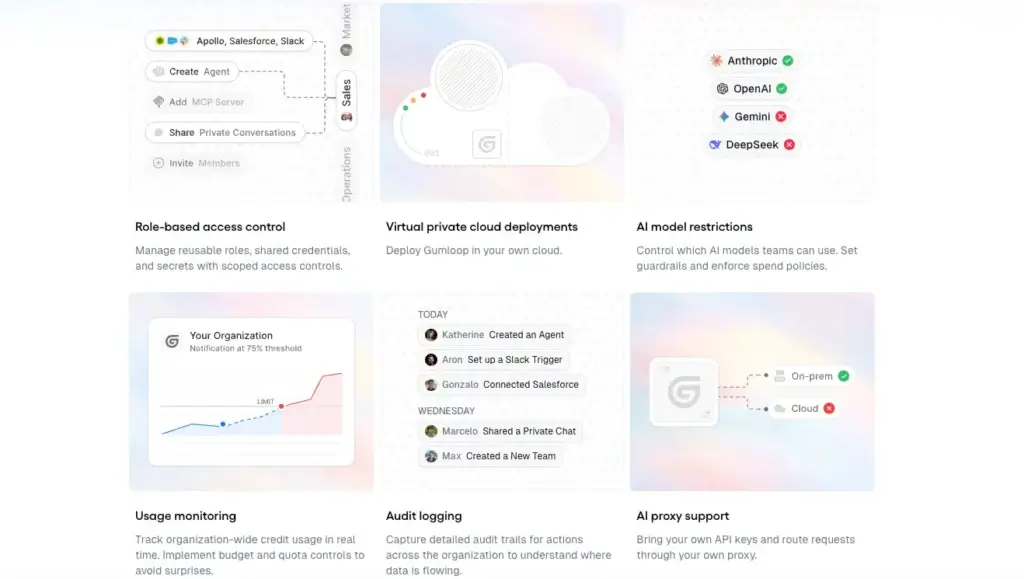
Additional capabilities include role-based access control, SAML and SCIM, audit logs, custom data-retention rules, AI model access controls, data exports, workflow queuing, a virtual private cloud, security reports, and advanced usage analytics.
Enterprise customers can also receive dedicated Slack support and implementation assistance from Gumloop specialists.
How Gumloop Credits Work
Agent costs are variable rather than fixed per conversation. Gumloop’s documentation gives examples ranging from a few credits for a short request to hundreds of credits for a deeper research task.
The cost depends on the selected model, input and output tokens, conversation history, tool calls, workflow execution, and whether an external enrichment provider charges for results.
Common app actions involving tools such as Gmail, Slack, or Google Sheets may not add separate tool credits. Enrichment, advanced research, scraping, and third-party data services are more likely to increase usage.
Bringing your own supported AI API key can reduce part of the model-related credit cost, although third-party tool charges still apply.
Is Gumloop Expensive?
Gumloop can provide good value when one automation replaces a high-effort manual process. It may feel expensive when AI-heavy workflows process large datasets, use premium models, or perform repeated enrichment calls.
The safest approach is to test several realistic workflows on the Free plan. Record the credit usage for each execution, estimate the expected monthly volume, and add a buffer for retries or longer inputs.
Business Readiness
Integrations, Security, and Governance
Gumloop Integrations
Gumloop supports more than 150 agent connectors, including common applications across email, CRM, collaboration, documents, databases, project management, sales, marketing, and customer support.
Examples documented by Gumloop include Gmail, Slack, Salesforce, Notion, Google Sheets, Google Drive, Airtable, Jira, Linear, and many other services.
Connectors can be used by agents, embedded through an Agent node in a workflow, or configured as custom MCP nodes for specific repeatable actions.
This flexibility is useful, but Gumloop does not match the integration breadth of Zapier. You should check the depth of each required connector rather than assuming every available application supports every action.
MCP and Custom Connections
Model Context Protocol support lets agents connect with hosted or custom tool servers. This can extend Gumloop beyond its native node library and give agents access to specialized services.
Technical users can also trigger workflows through webhooks, REST APIs, and supported developer tooling.
MCP makes the platform more extensible, but it introduces additional governance considerations. Administrators should define which tools agents can discover, what information they can access, and which actions require approval.
Gumloop Security
Gumloop states that it is SOC 2 Type II attested, HIPAA compliant, and aligned with GDPR requirements. Business Associate Agreements are available for eligible plans.
The company also states that customer data is not used to train its AI models. Its enterprise materials describe zero-data-retention arrangements and data-processing agreements with third-party AI model providers.
Enterprise controls include role-based access, audit logs, SAML and SCIM, AI model restrictions, custom retention policies, virtual private cloud options, and data exports.
These controls make Gumloop more suitable for business deployment than many experimental agent builders. However, your organization still needs to evaluate its own regulatory, privacy, data-residency, and vendor-risk requirements.
Connector Permissions and Guardrails
You can allow, deny, or require approval for individual agent tools. This gives administrators and builders more control than simply granting an agent complete access to a connected account.
A sensible default is to permit low-risk read operations while requiring approval for writing, publishing, sending, or deleting information.
You should also use dedicated service accounts when appropriate and avoid connecting an agent to more data than it genuinely needs.
How Gumloop Compares With Similar Tools
| Tool | Main Strength | Best Fit |
| Gumloop | Hybrid AI agents and visual workflows | Teams automating AI-heavy and open-ended processes |
| Zapier | Large integration ecosystem and easy setup | General app-to-app automation |
| Make | Detailed visual scenarios and data routing | Multi-step deterministic workflows |
| n8n | Technical flexibility and self-hosting | Developers and infrastructure-focused teams |
| Relevance AI | Structured AI workforce development | Teams deploying specialized business agents |
Comparison
Gumloop Alternatives
Gumloop vs Zapier
Zapier is easier to recommend when your priority is quickly connecting a large number of SaaS applications through familiar triggers and actions.
Gumloop is more AI-native. Its agents, skills, evaluations, web research capabilities, and hybrid workflow model make it better suited to processes involving unstructured information and contextual decisions.
Choose Zapier for broad, straightforward app automation. Choose Gumloop when AI reasoning is central to the process rather than an optional step.
Gumloop vs Make
Make provides an excellent visual scenario builder with detailed routing, transformations, filters, and data control.
Gumloop’s visual experience is also strong, but its differentiation is the closer integration between workflows and autonomous agents. Gumloop is generally the more natural choice for agentic automation, while Make remains highly capable for complex deterministic scenarios.
Choose Make when the workflow must follow carefully defined branches and transformations. Choose Gumloop when the process needs to interpret, research, or adapt.
Gumloop vs n8n
n8n offers greater technical flexibility, custom code options, and self-hosting. It is better suited to developers and teams that want control over infrastructure and execution.
Gumloop is easier for business teams and includes more guided agent-building capabilities. You do not need to maintain servers, model infrastructure, or a self-hosted deployment.
Choose n8n for customization, self-hosting, and developer control. Choose Gumloop for a managed no-code environment that lets business users build workflows and agents together.
Gumloop vs Relevance AI
Relevance AI is focused on building and managing specialized AI workforces. It provides tools for agent teams, knowledge, business integrations, and structured operational deployment.
Gumloop provides a particularly strong balance between a visual workflow canvas and conversational agents. It can be easier when your automation needs both rigid processing steps and agent decisions.
Choose Relevance AI when your strategy centers on role-based AI workforces. Choose Gumloop when you want visual process automation and agents inside one no-code platform.
Conclusion
Final Thoughts
Gumloop is one of the stronger options for teams that want to move beyond basic no-code automation and begin building practical AI agents.
Its central strength is the combination of structured workflows and adaptive agents. You can control predictable steps with visual nodes while allowing an agent to handle research, interpretation, and changing task sequences.
Gummie makes the platform more accessible, and the Free plan provides enough credits to evaluate real use cases. The expanding connector ecosystem, reusable skills, human approvals, evaluations, and enterprise controls also make Gumloop relevant for more than experimental personal projects.
The main limitation is cost predictability. Credit usage can change substantially according to the model, task complexity, workflow length, and external services involved. Complex automations also require more technical understanding than the no-code label may initially suggest.
Gumloop is best for marketing, sales, operations, support, and automation teams that need AI to understand information and take action across business applications.
Zapier may be better for basic app connections, Make may be stronger for detailed deterministic scenarios, and n8n remains the better choice when you require self-hosting or deeper developer control.
For most potential users, the practical approach is to begin with the Free plan and build one clearly defined workflow. Measure accuracy, time saved, credit consumption, and the amount of human review required before expanding Gumloop across additional processes.
Frequently Asked Questions
Have More Questions?
What is Gumloop?
Gumloop is a no-code AI automation platform for building visual workflows and AI agents. It helps you connect business applications, process information, conduct research, generate content, and automate multi-step tasks.
What is Gumloop used for?
Gumloop is used for marketing automation, lead research, sales operations, customer support, document processing, web research, reporting, data enrichment, and other workflows that combine business applications with AI reasoning.
Is Gumloop free?
Yes. Gumloop offers a Free plan with 5,000 monthly credits, one seat, one active trigger, two concurrent workflow runs, five concurrent agent interactions, and unlimited agents and flows.
How much does Gumloop cost?
Gumloop Pro starts at $37 per month with at least 20,000 credits. Larger credit allowances increase the price. Enterprise pricing is customized according to usage, governance, security, infrastructure, and support requirements.
How do Gumloop credits work?
Credits are consumed by AI model usage, workflow nodes, tool calls, external enrichment services, and other processing. The final cost depends on the model, tokens, task length, connected tools, and number of workflow steps.
Can Gumloop build AI agents?
Yes. You can create agents that use connected applications, reusable skills, knowledge, subagents, tools, and approval settings. Agents can work through chat, run from workflows, respond to events, or operate on a schedule.
What applications integrate with Gumloop?
Gumloop supports more than 150 agent connectors, including Gmail, Slack, Salesforce, Notion, Google Sheets, Google Drive, Airtable, Jira, and other business applications. It also supports webhooks, APIs, and MCP connections.
Is Gumloop safe for business data?
Gumloop states that it is SOC 2 Type II attested, HIPAA compliant, and GDPR aligned. Enterprise plans add controls such as SAML, SCIM, audit logs, model restrictions, custom retention policies, and virtual private cloud options.
Is Gumloop better than Zapier?
Gumloop is generally stronger for AI-native workflows, adaptive agents, web research, and processes involving unstructured information. Zapier is usually better when you prioritize a larger application directory and simple trigger-and-action automation.
Is Gumloop worth using?
Gumloop is worth considering when AI reasoning is central to your automation and you want workflows and agents in one platform. Start with the Free plan and measure accuracy, credit usage, and time savings before expanding to production processes.