Introduction
Choosing SAP is not a small ERP decision. SAP is one of the most established names in enterprise resource planning, and its software can support finance, supply chain, procurement, manufacturing, sales, service, analytics, HR, and industry-specific operations.
In this SAP review, you will get a practical look at what SAP offers, where it performs well, where it becomes complex, and which types of companies are most likely to benefit from it in 2026.
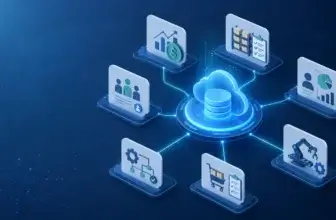
SAP is not one single ERP product. It is a broader enterprise software ecosystem that includes SAP S/4HANA Cloud Public Edition, SAP Cloud ERP Private, SAP Business One, SAP Business ByDesign, SAP SuccessFactors, SAP Ariba, SAP Fieldglass, SAP Business Technology Platform, SAP Analytics Cloud, and SAP Joule.
That breadth is both SAP’s biggest advantage and its biggest challenge. You can build a highly capable ERP environment around SAP, but you need to understand which SAP product fits your company size, process complexity, budget, industry, and implementation readiness.
What Is SAP?
SAP is a global enterprise software provider best known for ERP systems that help companies manage core business processes. Its ERP products are used to connect financial management, procurement, inventory, production, supply chain, sales, customer operations, compliance, and reporting.
For ERP buyers, the most relevant SAP products are usually SAP S/4HANA Cloud Public Edition, SAP Cloud ERP Private, SAP Business One, and SAP Business ByDesign. Larger organizations may also use SAP Business Technology Platform, SAP Analytics Cloud, SAP Ariba, SAP SuccessFactors, and SAP Joule to expand ERP capabilities.
Background and Positioning
SAP has a long history in enterprise ERP, especially among large companies with complex operational structures. It is commonly associated with multinational organizations, manufacturers, distributors, retailers, financial teams, procurement-heavy businesses, and companies that need rigorous process control.
However, SAP is no longer only an on-premise enterprise ERP vendor. Its current ERP strategy is focused heavily on cloud ERP, AI, standardization, embedded analytics, clean core architecture, industry best practices, and business transformation programs such as GROW with SAP and RISE with SAP.
Target Users and Use Cases
SAP is especially relevant for several buyer types:
- Large enterprises – SAP supports complex finance, supply chain, compliance, and global operations.
- Manufacturers – SAP is strong for production planning, procurement, inventory, quality, and logistics.
- Midmarket companies – SAP S/4HANA Cloud Public Edition and GROW with SAP support growing businesses.
- Small businesses – SAP Business One supports finance, inventory, sales, purchasing, and operations.
- SAP-first organizations – SAP is strongest when ERP, analytics, procurement, HR, and operations are connected.
SAP is not usually the best fit if you want the simplest ERP system, a low-cost tool you can implement without consultants, or a lightweight platform for a small team with basic accounting needs. It is strongest when you need structure, scalability, process depth, and long-term operational control.
Core ERP Features
How Does SAP Work?
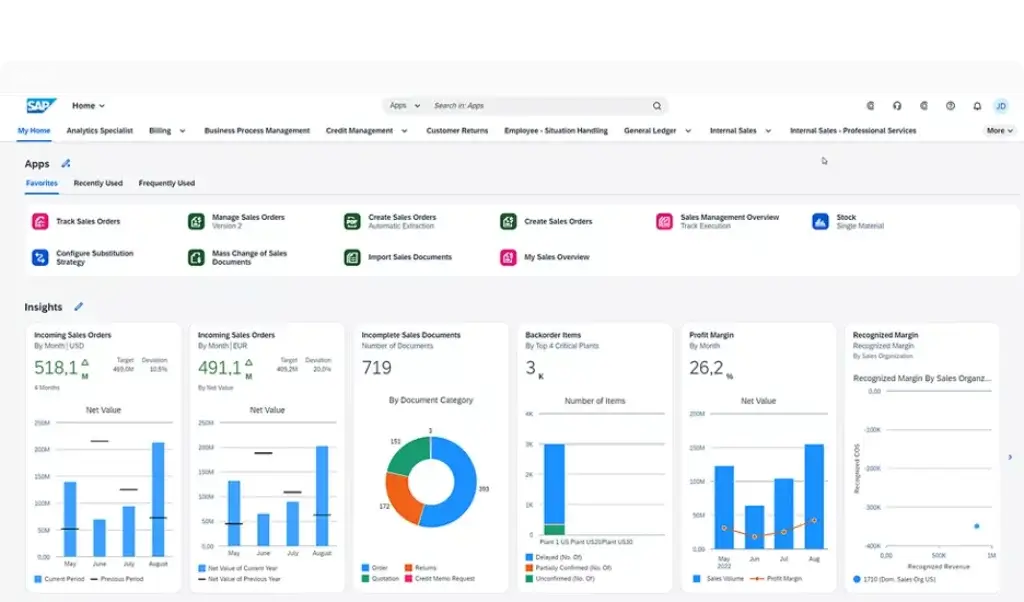
SAP works by giving companies a centralized ERP foundation for managing transactions, processes, data, reporting, and automation across departments. Instead of finance, procurement, inventory, production, sales, and reporting operating in separate systems, SAP helps connect these functions around shared business data.
The exact SAP setup depends on the product you choose. A small company may use SAP Business One. A growing business may start with SAP S/4HANA Cloud Public Edition through GROW with SAP. A large enterprise with existing SAP investments may choose SAP Cloud ERP Private through RISE with SAP.
Financial Management
Financial management is one of SAP’s strongest areas. SAP ERP products can support general ledger, accounts payable, accounts receivable, asset accounting, cash management, financial close, tax, compliance, consolidation, budgeting, and reporting.
For enterprise finance teams, SAP is especially valuable when financial operations are complex. This includes companies with multiple legal entities, multi-currency transactions, strict compliance requirements, intercompany processes, global reporting needs, and detailed audit controls.
Procurement and Spend Management
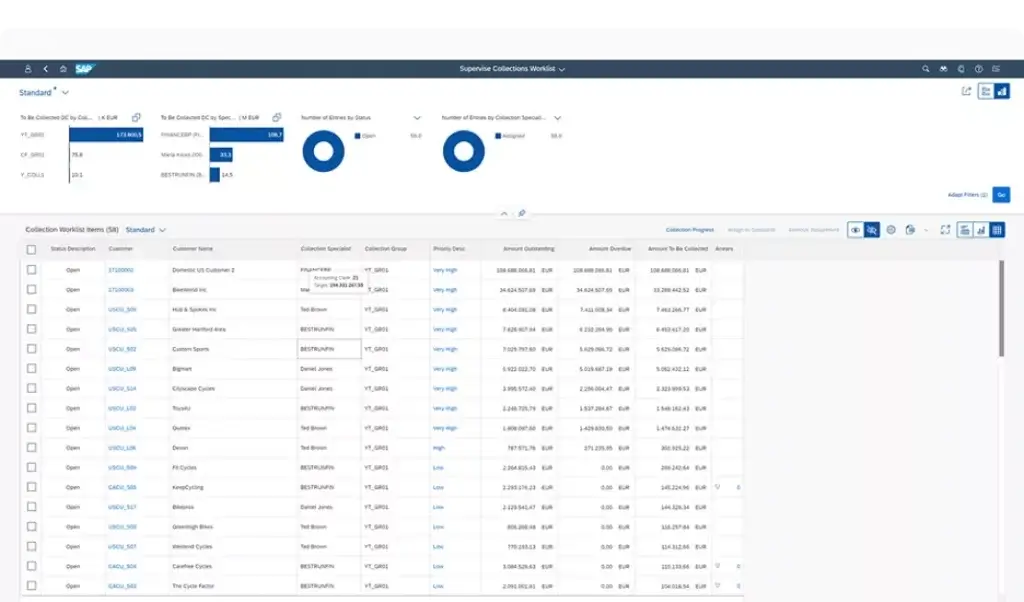
SAP is strong in procurement because it can connect purchasing, supplier management, contracts, approvals, purchase orders, goods receipts, invoice management, and spend visibility. Larger organizations may also extend SAP ERP with SAP Ariba for sourcing, supplier collaboration, and procurement network capabilities.
This is useful for businesses that need stronger control over spend, supplier relationships, procurement compliance, and approval workflows. SAP can help reduce disconnected purchasing processes and improve visibility into what is being bought, from whom, and under which terms.
Supply Chain Management
SAP supports supply chain processes across planning, inventory, procurement, production, warehousing, logistics, transportation, and order fulfillment. This is one of the reasons SAP is popular among manufacturers, distributors, wholesalers, and global product-based companies.
When implemented correctly, SAP can help teams connect demand, supply, production, purchasing, warehouse activity, and financial impact. This is important because supply chain decisions are rarely isolated. Inventory shortages, late supplier deliveries, production constraints, and logistics issues all affect cost, revenue, and customer satisfaction.
Inventory and Warehouse Management
SAP can support inventory management across locations, materials, warehouses, batches, serial numbers, stock transfers, replenishment, valuation, and fulfillment. Advanced warehouse needs may require additional SAP warehouse capabilities or integrations, depending on the selected ERP product and project scope.
For smaller companies, SAP Business One can provide inventory and warehouse visibility without the complexity of a full enterprise deployment. For larger organizations, SAP S/4HANA and related supply chain tools provide deeper controls for complex inventory networks.
Manufacturing and Production Planning
SAP is one of the strongest ERP ecosystems for manufacturing. It can support bills of materials, production orders, material requirements planning, shop floor activity, quality management, procurement, costing, inventory control, and supply chain coordination.
This makes SAP a strong fit for discrete manufacturing, process manufacturing, industrial products, consumer goods, food and beverage, chemicals, life sciences, automotive, and other production-heavy industries. The key advantage is not only production management, but the ability to connect production activity with finance, procurement, quality, and logistics.
Sales, Service, and Customer Management
SAP ERP systems can support sales orders, pricing, customer records, billing, delivery, returns, and service-related processes. Companies with more advanced customer experience needs may also use SAP Customer Experience products alongside ERP.
This is useful when sales and fulfillment need to be tightly connected. For example, a sales order can affect inventory availability, production planning, delivery schedules, invoicing, revenue recognition, and customer service activity.
Reporting, Analytics, and Business Intelligence
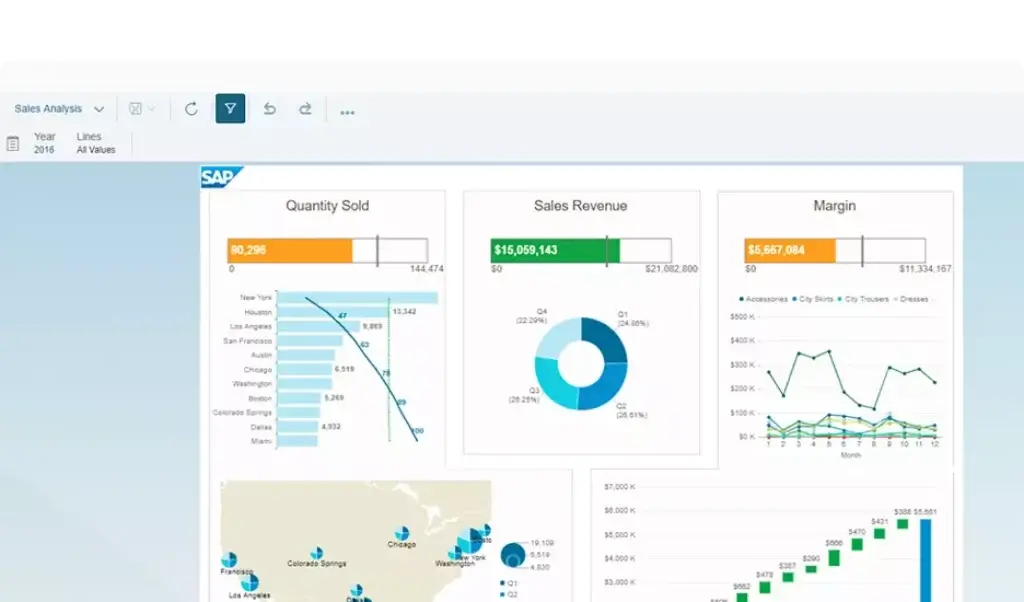
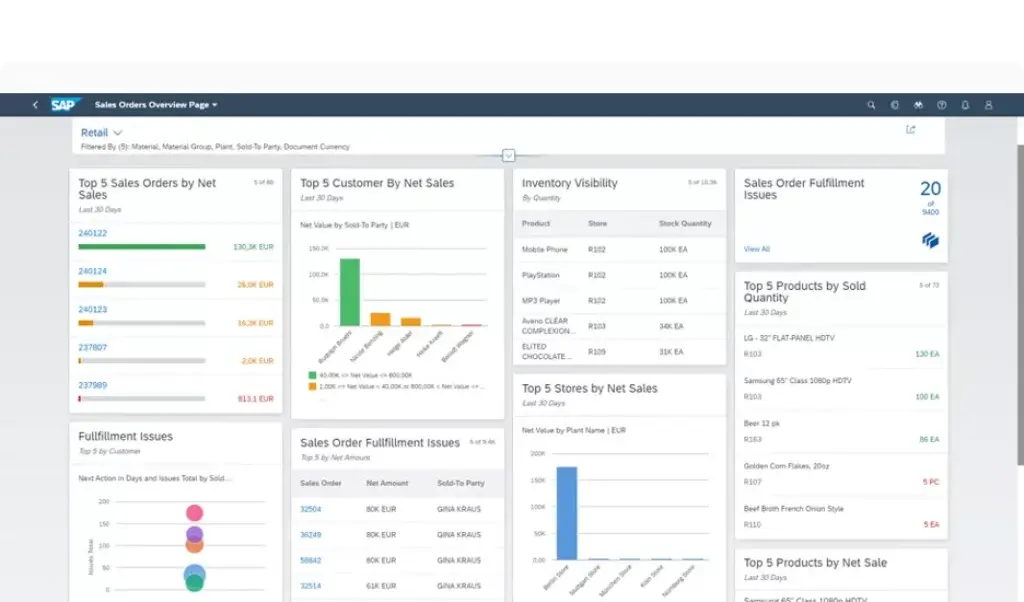
SAP provides strong reporting and analytics capabilities, especially when ERP is connected with SAP Analytics Cloud, embedded analytics, and SAP Business Technology Platform. Finance, operations, and executive teams can use SAP data to monitor performance, identify exceptions, and make better decisions.
Analytics is one of the main reasons companies invest in ERP. The real value is not only processing transactions, but having trusted business data available for planning, forecasting, compliance, margin analysis, and operational decisions.
Automation and AI with SAP Joule
SAP is investing heavily in AI through SAP Joule, its business AI assistant. Joule is designed to help users interact with SAP applications through natural language, access business information, support workflows, and improve productivity across enterprise processes.
AI should be treated as an accelerator, not a replacement for proper ERP design. SAP AI features are most valuable when your organization has clean data, standardized workflows, strong governance, and clear business rules.
Integrations and SAP Business Technology Platform
SAP Business Technology Platform, often called SAP BTP, helps companies extend SAP, integrate applications, build workflows, manage data, and create custom applications. It is especially important for companies that want to keep their ERP core clean while still adapting SAP to business needs.
This matters because many companies need more than standard ERP. SAP BTP can help connect SAP with external systems, automate processes, build extensions, and support analytics without over-customizing the core ERP environment.
Platform Structure
SAP ERP Products and Modules
Before choosing SAP, you need to understand the product structure. SAP is a broad ecosystem, and not every company needs the same ERP product.
The most important SAP ERP options are SAP S/4HANA Cloud Public Edition, SAP Cloud ERP Private, SAP Business One, and SAP Business ByDesign. In addition, many companies extend SAP ERP with SAP SuccessFactors, SAP Ariba, SAP Fieldglass, SAP Analytics Cloud, and SAP BTP.
SAP S/4HANA Cloud Public Edition
SAP S/4HANA Cloud Public Edition is SAP’s ready-to-run cloud ERP for companies that want standardized processes, faster deployment, regular innovation cycles, and a clean cloud ERP foundation.
This product is a strong fit for growing companies that want modern ERP without maintaining a heavily customized environment. It is also the foundation for GROW with SAP, which packages cloud ERP with adoption services, best practices, and a faster path to value.
SAP Cloud ERP Private
SAP Cloud ERP Private is designed for companies that need more flexibility, broader scope, and greater ability to adapt ERP to complex business requirements. It is especially relevant for enterprises moving from SAP ECC, SAP ERP, or older SAP environments into a cloud model.
This option is usually more suitable for large organizations with complex processes, industry-specific needs, existing SAP investments, custom workflows, and more demanding transformation requirements.
GROW with SAP
GROW with SAP is SAP’s cloud ERP offering for growing companies that want to start with SAP S/4HANA Cloud Public Edition. It is positioned around faster adoption, embedded best practices, AI-enabled cloud ERP, and scalable growth.
GROW with SAP is best for companies that are new to SAP or want to modernize from entry-level tools into a more structured ERP platform. It is less suitable for businesses that need heavy customization from day one.
RISE with SAP
RISE with SAP is designed for larger organizations that want to move to cloud ERP while managing transformation, migration, infrastructure, processes, and business modernization under a broader SAP program.
This is usually a better fit for established enterprises, especially those already using SAP systems. RISE with SAP can support a more complex cloud ERP transition, but it requires careful planning, executive sponsorship, and strong implementation governance.
SAP Business One
SAP Business One is SAP’s ERP solution for small and growing businesses. It supports finance, sales, purchasing, inventory, production, reporting, and customer management in a more approachable package than enterprise SAP ERP.
This is often the best SAP option for small businesses that need more structure than spreadsheets or basic accounting software, but do not need the full scale of SAP S/4HANA.
SAP Business ByDesign
SAP Business ByDesign is a cloud ERP solution for midmarket companies and subsidiaries. It can support finance, CRM, procurement, supply chain, project management, HR, and analytics in a cloud-based environment.
However, SAP’s current cloud ERP messaging is increasingly centered on SAP S/4HANA Cloud and GROW with SAP. If you are evaluating Business ByDesign, you should also compare it with SAP S/4HANA Cloud Public Edition to understand SAP’s long-term roadmap and fit.
SAP ERP Product Comparison
The table below summarizes the most relevant SAP ERP products for different buyer types.
| SAP Product | Best For | Main Capabilities |
| SAP S/4HANA Cloud Public Edition | Growing companies wanting standardized cloud ERP | Finance, supply chain, procurement, sales, manufacturing, analytics |
| SAP Cloud ERP Private | Large enterprises and existing SAP customers | Customizable cloud ERP, migration from SAP ECC, enterprise processes |
| GROW with SAP | Midmarket companies new to SAP | AI-enabled cloud ERP, best practices, faster adoption, scalable growth |
| RISE with SAP | Enterprises moving to cloud ERP | Cloud transformation, ERP modernization, migration support, managed services |
| SAP Business One | Small businesses and subsidiaries | Finance, sales, purchasing, inventory, production, reporting |
| SAP Business ByDesign | Midmarket companies and subsidiaries | Cloud ERP for finance, CRM, procurement, supply chain, projects, analytics |
Pros and Cons
Benefits and Limitations of SAP
Positive
✅ Enterprise-grade ERP
✅ Strong finance depth
✅ Advanced supply chain
✅ Broad industry coverage
Negative
❌ Complex implementation
❌ Quote-based pricing
❌ Requires expert partners
❌ Heavy for simple needs
Strengths & Benefits
SAP has several major advantages, especially for companies that need serious ERP depth and long-term scalability.
- Enterprise depth – Strong ERP coverage across finance, supply chain, procurement, and operations.
- Manufacturing strength – Excellent fit for production-heavy and supply chain-heavy companies.
- Global scalability – Supports complex entities, currencies, compliance, and reporting needs.
- Industry expertise – Strong coverage for manufacturing, retail, life sciences, utilities, and more.
- AI and analytics – SAP Joule, SAP Analytics Cloud, and SAP BTP improve decision support.
Limitations & Drawbacks
SAP is powerful, but it is not the easiest ERP system to evaluate, buy, or implement.
- Implementation complexity – SAP projects require careful planning, configuration, and change management.
- Cost uncertainty – Pricing is usually quote-based and depends on scope, users, modules, and services.
- Partner dependence – Project success often depends heavily on implementation partner quality.
- Learning curve – Users need training, process discipline, and strong internal ownership.
- Overkill risk – Smaller teams may find SAP too complex for basic accounting or inventory needs.
My opinion is that SAP is one of the best ERP ecosystems for companies with complex operations, especially in finance, manufacturing, procurement, supply chain, and global enterprise management. However, it should not be treated as a lightweight SaaS purchase. SAP works best when your business is ready to invest in process design, implementation quality, and long-term system governance.
Operational Fit
SAP User Experience, Support, and Security
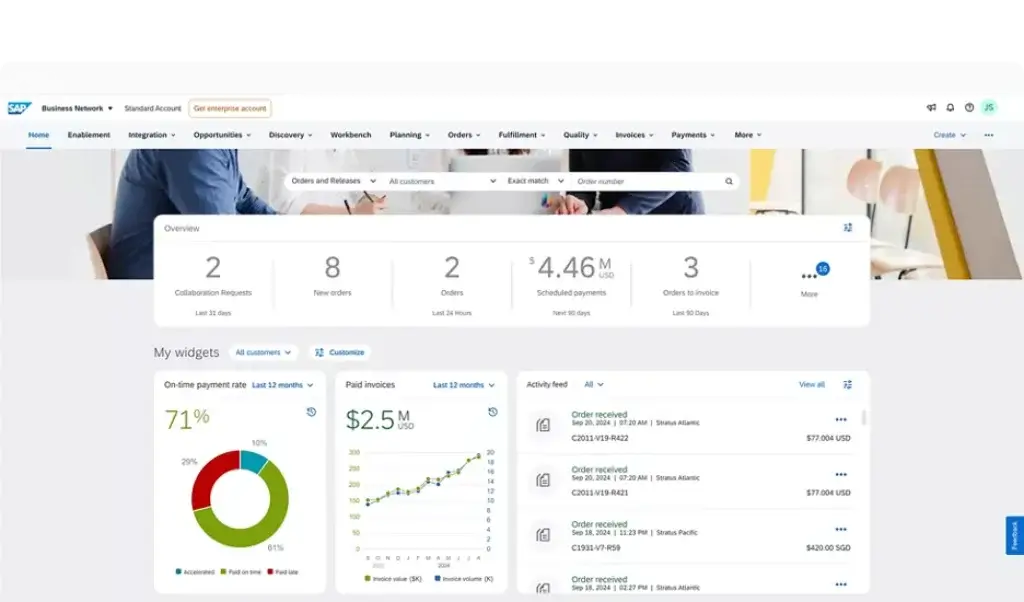
The SAP user experience depends heavily on the product, configuration, implementation quality, and role of the user. SAP Fiori has improved usability compared with older SAP interfaces, but SAP remains a process-heavy ERP environment.
Ease of Use
SAP can be easy to use for trained users working in well-designed workflows. For example, finance teams, procurement teams, warehouse staff, and production planners can complete structured tasks efficiently when roles, permissions, screens, and approvals are configured correctly.
However, SAP is not always intuitive for casual users. The platform is built for operational depth, which means users need proper onboarding, role-based training, and clear process documentation.
Implementation Experience
Implementation is one of the most important areas to evaluate before buying SAP. Even cloud ERP projects require discovery, fit-to-standard analysis, data migration, integrations, permissions, testing, reporting setup, training, and change management.
SAP S/4HANA Cloud Public Edition can be faster to implement when companies follow standard best practices. SAP Cloud ERP Private and RISE with SAP projects are usually more complex because they may involve existing SAP systems, custom processes, broader integrations, and enterprise transformation work.
Customer Support and Partner Network
SAP has a large global partner network, including implementation partners, consultants, managed service providers, industry specialists, and technology partners. This is a major advantage because SAP projects often require specialized expertise.
At the same time, partner selection can strongly influence the final experience. A strong partner can help you simplify scope, avoid unnecessary customization, manage timelines, and create a realistic adoption plan. A weak partner can make SAP feel more expensive and complicated than it needs to be.
Security and Compliance
SAP is built for organizations with serious security, compliance, governance, and audit requirements. It supports role-based access, segregation of duties, controls, approval workflows, logging, and enterprise-grade data protection practices.
Still, security is not automatic. You need to design user roles, permissions, approval workflows, integrations, and governance policies carefully. Poor access design can create risk, especially in finance, procurement, payroll, and inventory workflows.
AI Governance Considerations
SAP Joule and SAP Business AI can help users access information, navigate processes, and improve productivity. These capabilities are valuable, but they also require governance.
You should define which users can access AI features, what business data AI tools can reference, how outputs are reviewed, and how sensitive operational, financial, supplier, and employee data is protected.
Pricing
SAP Pricing & Plans
SAP pricing depends on the product, deployment model, number of users, modules, add-ons, implementation scope, integrations, support model, data migration, partner services, and contract terms. For most SAP ERP products, you should expect quote-based pricing rather than simple public pricing.
This is especially important when comparing SAP with ERP systems that publish clear monthly user prices. With SAP, software subscription cost is only one part of the total investment.
SAP S/4HANA Cloud Pricing
SAP S/4HANA Cloud pricing is typically quote-based. The final cost depends on whether you choose Public Edition or Private Edition, how many users you need, which capabilities are included, and how much implementation work is required.
Public Edition is generally more standardized and may be more predictable for companies willing to follow SAP best practices. Private Edition is typically more flexible, but implementation and transformation costs can be higher.
GROW with SAP Pricing
GROW with SAP is designed to give growing companies a more packaged entry point into SAP cloud ERP. Pricing still depends on scope, user requirements, selected capabilities, partner involvement, and services.
The main value of GROW with SAP is not only software access. It is the combination of SAP S/4HANA Cloud Public Edition, best practices, adoption services, embedded AI, and a faster path to cloud ERP.
RISE with SAP Pricing
RISE with SAP is usually evaluated as a broader cloud ERP transformation program. Pricing can include ERP software, infrastructure, migration support, services, and commercial terms under a broader SAP agreement.
This makes RISE with SAP relevant for larger organizations that want to move from legacy SAP systems to cloud ERP. It also means buyers need to evaluate contract scope carefully.
SAP Business One Pricing
SAP Business One pricing is also typically handled through SAP partners. Costs may vary based on licensing model, deployment, number of users, database choice, add-ons, implementation, integrations, and support.
For small businesses, SAP Business One can be a more practical SAP option than S/4HANA. However, it still requires implementation support and should be evaluated as a business system, not just accounting software.
Total Cost of Ownership
The total cost of SAP usually includes more than licenses. You should also budget for implementation, data migration, integrations, customization, testing, training, change management, reporting, support, upgrades, and ongoing optimization.
For SAP, the safest buying approach is to define your business processes first, then choose the SAP product and scope that fits those requirements. Buying too much too early can increase cost, delay adoption, and make the project harder to manage.
Pricing Overview
The table below summarizes how SAP pricing should be evaluated.
| SAP Product | Pricing Style | Best For |
| SAP S/4HANA Cloud Public Edition | Quote-based subscription | Growing companies wanting standardized cloud ERP |
| SAP Cloud ERP Private | Quote-based enterprise pricing | Enterprises needing flexible cloud ERP and migration from SAP systems |
| GROW with SAP | Packaged quote-based cloud ERP offer | Midmarket companies starting with SAP cloud ERP |
| RISE with SAP | Quote-based transformation package | Enterprises moving existing SAP landscapes to cloud ERP |
| SAP Business One | Partner-led pricing | Small businesses needing finance, inventory, sales, and operations |
| SAP Business ByDesign | Quote-based cloud ERP pricing | Midmarket companies and subsidiaries |
Use Cases
Who Should Use SAP?
SAP is best for companies that need more than basic accounting or simple inventory tracking. It is most valuable when your business has complex processes, multiple departments, operational dependencies, compliance needs, and a long-term ERP strategy.
Large Enterprises
SAP is one of the strongest ERP choices for large enterprises. It supports complex organizational structures, global operations, multi-entity finance, procurement controls, supply chain networks, compliance requirements, and advanced reporting.
If your company operates across countries, business units, currencies, tax rules, and product lines, SAP can provide the process discipline and enterprise architecture needed to manage that complexity.
Manufacturing Companies
SAP is an excellent fit for manufacturers that need to connect production planning, materials, procurement, inventory, quality, logistics, costing, and finance. It is especially valuable when production decisions have a direct impact on margins, inventory availability, and customer commitments.
Manufacturers should evaluate SAP carefully against alternatives such as Oracle Fusion Cloud ERP, Microsoft Dynamics 365, Infor CloudSuite, Epicor, NetSuite, SYSPRO, and Acumatica.
Distribution and Wholesale Businesses
SAP can support distributors and wholesalers that need inventory visibility, warehouse control, purchasing, order management, pricing, fulfillment, and supply chain analytics.
This is valuable for companies with multiple warehouses, supplier dependencies, high SKU counts, complex pricing, or strict delivery expectations.
Procurement-Heavy Organizations
SAP is a strong choice for companies where procurement is a major operational and financial function. It can help manage purchasing workflows, suppliers, spend control, approvals, invoices, and procurement compliance.
Organizations that need sourcing, supplier collaboration, and broader spend management may also evaluate SAP Ariba alongside SAP ERP.
Growing Midmarket Companies
Growing companies that are outgrowing entry-level accounting tools may consider SAP S/4HANA Cloud Public Edition through GROW with SAP. This can be a strong path when the company wants a structured ERP foundation but does not want to build a heavily customized system.
However, midmarket buyers should compare SAP with NetSuite, Microsoft Dynamics 365 Business Central, Sage Intacct, Acumatica, Odoo, and Infor before making a final decision.
Small Businesses
Small businesses that want SAP but do not need enterprise-level ERP should evaluate SAP Business One. It is more approachable than SAP S/4HANA and can support finance, inventory, sales, purchasing, production, and reporting.
That said, SAP Business One is still more serious than a basic accounting platform. It is best for small businesses that have operational complexity and expect to grow.
When SAP Might Not Be Right
SAP may not be the right choice if your company wants a very simple, low-cost, self-service ERP tool. It may also feel too heavy if your processes are informal, your team is small, or you do not have internal ownership for an ERP implementation.
SAP is also not ideal when leadership wants fast software adoption without process change. ERP success depends on clean data, clear workflows, executive sponsorship, and disciplined implementation.
User Feedback
SAP Customer Reviews
User feedback for SAP often reflects the same pattern: SAP is powerful, scalable, and trusted, but it can be complex and expensive to implement. This is typical for enterprise ERP systems, especially those used in large or process-heavy organizations.
What Users Like Most
Positive feedback usually focuses on SAP’s financial depth, process control, reporting capabilities, supply chain coverage, manufacturing functionality, compliance support, and ability to connect many parts of the business.
Many users value SAP because it creates a single source of truth. When implemented properly, finance, procurement, operations, inventory, and reporting teams can work from consistent data rather than disconnected spreadsheets and local tools.
Common Complaints
Common complaints usually focus on implementation complexity, customization difficulty, training requirements, cost, partner dependence, and the learning curve. Users may also find SAP difficult when processes are poorly designed or data migration is rushed.
These complaints are important because they show that SAP’s value depends heavily on implementation discipline. The software is capable, but the project must be scoped and managed carefully.
My Take on the Review Pattern
SAP is often loved by companies that need its depth and disliked by teams that bought more ERP than they were ready to manage. That does not make SAP weak. It means SAP should be matched to the right operational maturity level.
If your company needs advanced finance, manufacturing, supply chain, procurement, and enterprise controls, SAP can be one of the best ERP choices available. If your company only needs simple accounting and inventory, SAP may be too much.
Competitors
Competitor Alternatives to SAP
SAP competes with ERP systems such as Oracle Fusion Cloud ERP, Microsoft Dynamics 365, NetSuite, Infor CloudSuite, Epicor, Acumatica, Sage Intacct, and Odoo. The right alternative depends on company size, industry, budget, implementation resources, and process complexity.
| Feature Type | SAP | Oracle Fusion Cloud ERP | Microsoft Dynamics 365 | NetSuite |
| Core angle | Enterprise ERP with deep process and industry coverage | Cloud ERP for enterprise finance, procurement, and operations | Microsoft-based ERP and CRM ecosystem | Cloud ERP suite for growing companies |
| Best for | Large enterprises, manufacturers, and complex global operations | Enterprise finance and Oracle-first organizations | Microsoft-first SMB, midmarket, and enterprise teams | Growing companies needing unified cloud ERP |
| Pricing style | Quote-based pricing | Quote-based pricing | Published app pricing plus implementation | Quote-based pricing |
| Implementation complexity | High | High | Moderate to high | Moderate to high |
| Manufacturing strength | Very strong | Strong | Strong | Moderate to strong |
| Overall fit | Best for complex enterprise ERP | Best for Oracle cloud enterprise environments | Best for Microsoft ecosystem alignment | Best for standardized cloud ERP growth |
Compared with Oracle Fusion Cloud ERP, SAP is often stronger for manufacturing depth and long-established enterprise process coverage. Oracle can be highly attractive for companies that prefer a unified Oracle cloud stack across ERP, EPM, HCM, and database technologies.
Compared with Microsoft Dynamics 365, SAP is usually stronger for large enterprise process standardization and manufacturing complexity. Dynamics 365 may be more attractive for Microsoft-first companies that want ERP, CRM, Power BI, Teams, and Power Platform alignment.
Compared with NetSuite, SAP is typically better for complex enterprises and manufacturing-heavy organizations. NetSuite may be easier to evaluate for growing companies that want one cloud ERP suite with a more standardized midmarket orientation.
Compared with Odoo, SAP is more enterprise-ready and process-heavy. Odoo may be better for companies that want modular flexibility, lower starting costs, and more control over a lighter ERP setup.
Best Practices
Getting Started with SAP
Getting started with SAP requires more planning than buying a simple SaaS tool. The platform can deliver major value, but only if you choose the right SAP product, define scope clearly, and avoid unnecessary complexity.
Start with Business Requirements
Before evaluating SAP products, map your business requirements. Define what you need for finance, procurement, inventory, manufacturing, supply chain, sales, service, reporting, HR, and integrations.
This step prevents overbuying. Not every company needs SAP Cloud ERP Private, and not every company should start with a large transformation project. A focused SAP rollout often creates better results than a broad project with unclear goals.
Choose the Right SAP Product
If you are a small business, evaluate SAP Business One. If you are a growing midmarket company, evaluate SAP S/4HANA Cloud Public Edition and GROW with SAP. If you are a large enterprise or existing SAP customer, evaluate SAP Cloud ERP Private and RISE with SAP.
The right product depends on your current systems, process complexity, customization needs, data maturity, budget, timeline, and internal resources.
Work with the Right SAP Partner
Partner selection is critical. Look for a SAP partner with proven experience in your industry, company size, product scope, and implementation type.
Ask about methodology, references, data migration, integration strategy, reporting approach, change management, training, support, and scope control. The partner can make a major difference in cost, adoption, and long-term value.
Plan Data Migration Carefully
ERP data migration is often one of the hardest parts of a SAP project. You should clean customer records, vendor records, chart of accounts, material masters, inventory balances, open transactions, historical data, and reporting structures before migration.
If the data is poor, users may lose trust in the new system. Clean data improves reporting, automation, AI readiness, and overall ERP adoption.
Train Users by Role
SAP training should be role-based. Finance users, procurement teams, warehouse staff, production planners, executives, administrators, and managers do not need the same training.
Focus training on the workflows each group performs every day. ERP adoption improves when users understand how SAP helps them complete real work, not only how to navigate screens.
Roll Out in Phases
A phased rollout can reduce risk. You may start with finance and core operations, then add procurement, manufacturing, supply chain, reporting, automation, HR, or advanced analytics later.
This gives your team time to learn the system, improve processes, and adjust before expanding the SAP environment.
Conclusion
Final Thoughts
SAP is one of the strongest ERP ecosystems for companies that need deep operational control, enterprise-grade finance, supply chain visibility, manufacturing capabilities, procurement management, analytics, and long-term scalability.
Its biggest strengths are process depth, global scalability, manufacturing support, procurement control, financial management, compliance readiness, and the ability to connect ERP with analytics, AI, and broader enterprise applications.
It is not the simplest ERP system. Pricing is usually quote-based, implementation can be complex, partner selection matters, and users need proper training. Smaller companies with basic needs may find SAP too heavy unless they choose SAP Business One or a carefully scoped cloud ERP package.
Overall, SAP is easy to recommend for companies with complex operations and the maturity to support a serious ERP implementation. If your business needs a scalable ERP foundation for finance, supply chain, manufacturing, procurement, reporting, and enterprise transformation, SAP deserves a serious look in 2026.
Frequently Asked Questions
Have more questions?
What is SAP?
SAP is an enterprise software provider best known for ERP systems that help companies manage finance, supply chain, procurement, manufacturing, sales, service, analytics, HR, and business operations. Its main ERP products include SAP S/4HANA Cloud, SAP Cloud ERP Private, SAP Business One, and SAP Business ByDesign.
Is SAP an ERP system?
Yes. SAP is one of the most established ERP software providers. SAP ERP products help businesses manage core processes such as finance, procurement, inventory, manufacturing, supply chain, sales, reporting, and compliance.
Who is SAP best for?
SAP is best for companies with complex operations, especially large enterprises, manufacturers, distributors, procurement-heavy organizations, and growing companies that need scalable ERP software. Small businesses may be better suited to SAP Business One rather than SAP S/4HANA.
How much does SAP cost?
SAP pricing is usually quote-based and depends on the product, users, deployment model, modules, implementation scope, integrations, support, and partner services. Buyers should evaluate SAP based on total cost of ownership, not only software subscription cost.
What is SAP S/4HANA Cloud?
SAP S/4HANA Cloud is SAP’s modern cloud ERP system. Public Edition is designed for standardized cloud ERP with embedded best practices, while Private Edition is designed for companies that need more flexibility, customization, and migration support from existing SAP environments.
What is the difference between GROW with SAP and RISE with SAP?
GROW with SAP is mainly designed for growing companies that want to start with SAP S/4HANA Cloud Public Edition. RISE with SAP is more focused on larger organizations and existing SAP customers moving to cloud ERP through a broader transformation program.
Does SAP support manufacturing?
Yes. SAP is one of the strongest ERP ecosystems for manufacturing. It can support production planning, bills of materials, procurement, inventory, quality management, warehouse operations, costing, and supply chain coordination.
Is SAP easy to use?
SAP can be easy to use when it is configured well and users are properly trained. However, SAP has a learning curve because it supports complex business processes. Role-based training and strong implementation design are important for adoption.
What are the best SAP alternatives?
The best SAP alternatives include Oracle Fusion Cloud ERP, Microsoft Dynamics 365, NetSuite, Infor CloudSuite, Epicor, Acumatica, Sage Intacct, and Odoo. The right alternative depends on company size, industry, budget, implementation resources, and ERP complexity.
Is SAP worth it?
SAP is worth considering if your company needs a scalable ERP platform for finance, supply chain, manufacturing, procurement, reporting, and global operations. It may be too complex for very small teams with basic accounting or inventory needs.