Introduction
Managing hourly teams gets complicated fast. Between building rotas, tracking attendance, approving leave, covering open shifts, and keeping labour costs under control, it is easy for managers to end up juggling spreadsheets, texts, and disconnected systems. Deputy is designed to solve that problem with an all-in-one workforce management platform focused on employee scheduling, time tracking, communication, and operational control.
In this Deputy review, you will get a detailed look at the platform’s core features, pricing, user experience, strengths, weaknesses, and best-fit use cases. By the end, you should have a clear sense of whether Deputy is the right employee scheduling software for your business, and how it compares with other tools in this category.
Overview
What is Deputy
Deputy is a workforce management platform built for businesses that rely on hourly employees and shift-based operations. Its core focus is employee scheduling, time and attendance, timesheets, leave management, shift communication, compliance controls, and labour optimisation. Rather than acting as just a basic rota builder, Deputy aims to connect the full workflow from scheduling to payroll handoff.
The platform is especially relevant for hospitality, retail, healthcare, security, logistics, call centres, and multi-location operations where managers need to respond quickly to changing staffing needs. Deputy also stands out for combining strong scheduling tools with compliance support, demand forecasting, shift swaps, mobile time clocking, and an expanding AI layer.
One of the reasons Deputy remains popular is that it works well for both smaller teams and larger distributed workforces. A business can start with the entry plan for scheduling and time tracking, then move up into more advanced labour controls, analytics, permissions, and enterprise-style governance as needs grow.
Key Features
Deputy’s Software Specification
Employee Scheduling
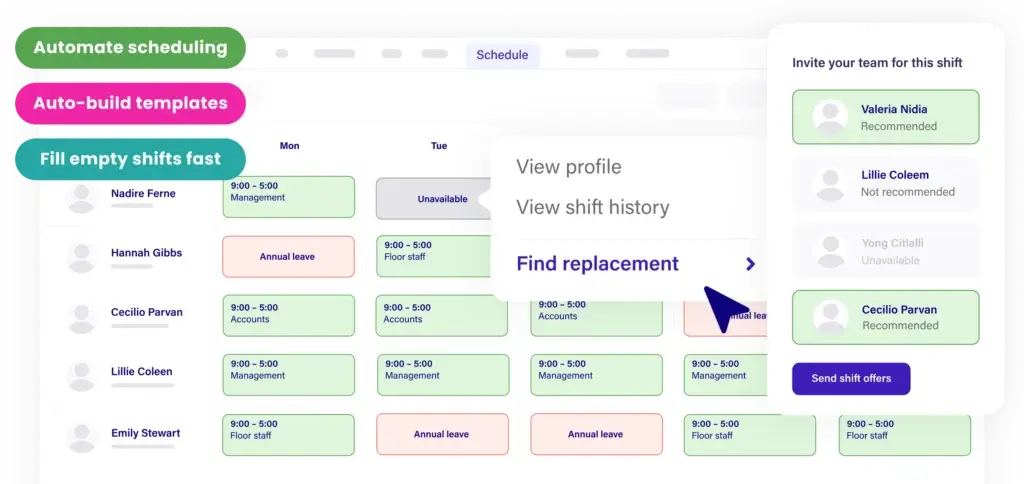
Scheduling is where Deputy is strongest. The software is built to help managers create shifts quickly, publish schedules across locations, and handle staffing changes without turning rota creation into a weekly bottleneck.
- Drag-and-drop schedule builder: Create, copy, edit, and publish shifts from a visual calendar.
- Shift swaps and replacements: Staff can swap shifts or pick up open shifts with manager controls.
- Advanced scheduling: Higher plans add auto-scheduling, micro-scheduling, and more advanced controls.
- Labour costing: Compare wage costs against sales and labour targets while building schedules.
- Break planning: Schedule meal and rest breaks with compliance in mind.
Deputy is not just about putting names into time slots. It is built to help you create cost-aware schedules with better visibility into availability, overtime risk, and demand patterns. That makes it more operationally useful than lightweight scheduling tools that only handle the calendar layer.
Time Clock and Attendance Tracking
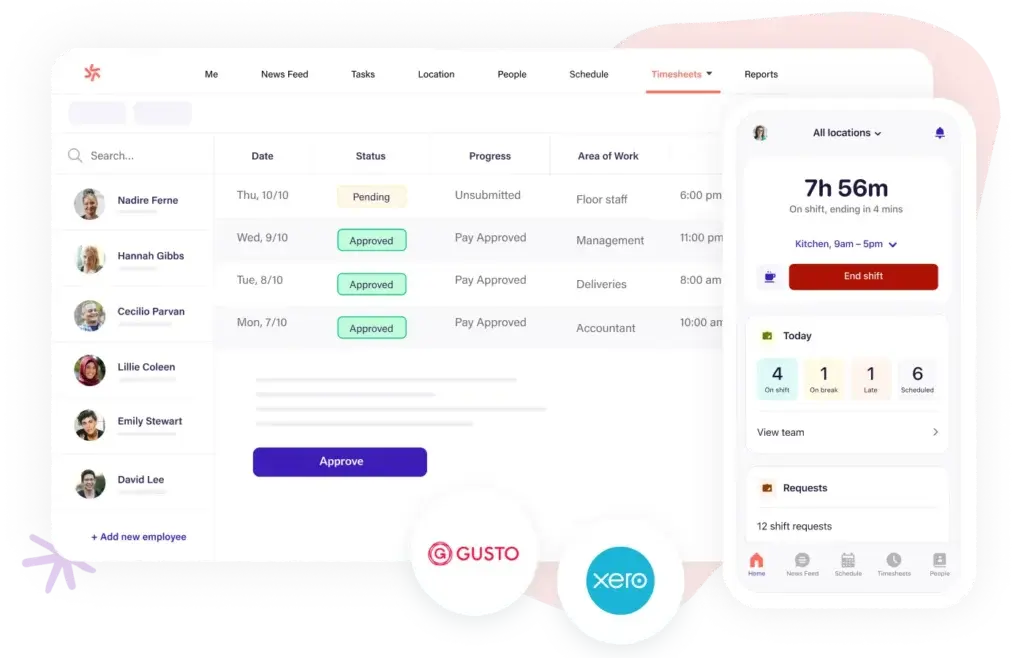
Deputy includes a digital time clock that supports phone, tablet, desktop, and kiosk-based attendance tracking. For many businesses, this is one of the most valuable parts of the platform because it reduces payroll errors and gives managers live visibility into who is on shift.
- Mobile clock in and clock out: Staff can use the mobile app with GPS location stamps.
- Deputy Kiosk: A shared on-site device can be used for clock-ins, with biometrics on supported plans.
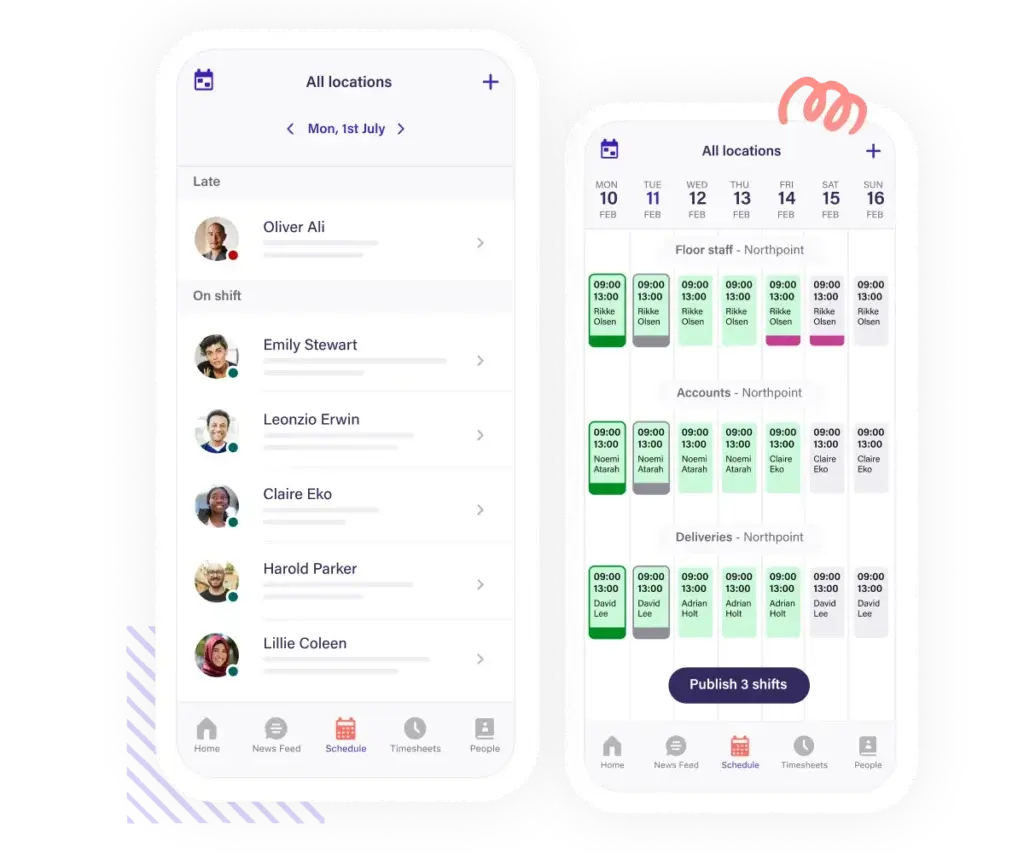
- Live attendance view: Managers can monitor who has started, who is late, and who missed clock-ins.
- Automatic time records: Finished shifts flow directly into timesheets for review and payroll.
Deputy’s attendance experience is especially useful for businesses that need location-aware clock-ins and fewer manual corrections at payroll time. It is a more complete setup than a simple punch app because it connects attendance directly to schedules, leave, and labour rules.
Timesheets and Payroll Handoff
Deputy automatically turns attendance activity into digital timesheets, which helps reduce manual payroll prep. Managers can review, edit, compare scheduled versus actual time, and approve records before export.
- Automatic timesheet creation: Clock-in data becomes a live attendance record.
- Timesheet auto approval: Available on higher plans for faster payroll workflows.
- Schedule versus actual comparison: Spot discrepancies, missed breaks, or overtime issues.
- Payroll integrations: Connect Deputy with payroll and HR systems for smoother downstream processing.
If payroll accuracy is a major pain point in your business, Deputy can save real admin time. This is one of the areas where the product moves beyond entry-level scheduling tools and starts functioning as a real workforce operations platform.
Leave, Availability, and Shift Flexibility
Deputy gives employees self-service tools to submit availability, request leave, and manage schedule changes from the app. This helps reduce the back-and-forth that often slows managers down.
- Availability management: Employees can submit recurring or one-off unavailability.
- Leave requests: Staff request time off directly in the system.
- Leave balance visibility: Managers can review requests alongside staffing coverage.
- Open shifts: Quickly fill gaps when someone is unavailable.
This self-service layer is important because it improves schedule accuracy and reduces reliance on text chains or informal communication. For teams with frequent schedule changes, that can significantly improve day-to-day operations.
Communication, Tasks, and Documents
Deputy is more than a scheduling and time clock tool. It also includes messaging, a news feed, task management, and document sharing, which makes it easier to keep teams informed inside the same platform they already use for shifts.
- Messaging and news feed: Share updates, announcements, and shift-related communication.
- Task management: Assign and track tasks within the same operational workflow.
- Document sharing: Distribute key documents and request confirmation that staff reviewed them.
- Employee records: Add job-related information and keep workforce data more organised.
This makes Deputy more appealing for frontline operations than tools that focus only on scheduling. It still is not a full HR suite by default, but it offers enough operational communication features to reduce tool sprawl for many businesses.
Compliance and Labour Controls
Deputy has a stronger compliance angle than many basic employee scheduling tools. Even the Lite plan includes labour law compliance features, and the higher plans add deeper controls such as advanced labour law compliance, budgets, and labour optimisation.
- Labour law compliance tools: Help reduce scheduling errors that create compliance risk.
- Break planning: Support meal and rest break compliance.
- Wage and labour budgets: Track spending against budget targets.
- Demand forecasting: Use labour demand insights to optimise coverage.
This is one of Deputy’s biggest competitive advantages. If you are managing hourly labour in a regulated environment, having compliance-oriented scheduling controls built into the system can be far more valuable than a prettier interface alone.
Deputy AI and Smart Scheduling
Deputy is actively adding AI to the product, and this is now a real differentiator worth highlighting. The platform offers AI-powered auto-scheduling and a newer Deputy AI conversational assistant in open beta for eligible manager and admin roles.
- AI auto-scheduling: Build AI-optimised schedules based on labour demand forecasts.
- Natural-language workflow: Managers can ask Deputy AI to create, edit, assign, or publish schedules via chat.
- Timesheet actions: Deputy AI can help find, edit, compare, create, and approve timesheets.
- Human-in-the-loop design: The AI does not finalise changes without confirmation.
I see this as a meaningful step forward for workforce management software. Many vendors talk about AI loosely, but Deputy is already tying it to concrete scheduling and timesheet workflows. That said, because the conversational assistant is still in beta, it is best treated as an emerging advantage rather than the sole reason to choose the platform.
Integrations
Deputy integrates with payroll, point-of-sale, and HR systems, which is essential for businesses that want accurate employee data sync and cleaner payroll workflows. The platform’s integration library is more mature than many SMB scheduling tools.
- Payroll integrations: Connect workforce data to downstream payroll systems.
- POS integrations: Use sales data to support smarter labour planning.
- HR integrations: Sync employee details and maintain better data consistency.
- Broader ecosystem: Deputy supports a range of operational integrations beyond the scheduling core.
If your business already depends on payroll, HR, or POS software, Deputy’s integration depth is a major advantage. It helps the platform fit into existing workflows instead of forcing teams into yet another isolated tool.
Mobile Experience
Deputy offers mobile apps that let managers and employees handle schedules, attendance, leave, and communication from anywhere. The mobile experience is one of the reasons the product works well for shift-based businesses where most workers are not sitting at a desk.
- Schedule access on the go: Staff can check shifts, updates, and changes from their phones.
- Mobile time clock: Clock-ins, clock-outs, and attendance actions happen in app.
- Leave and availability tools: Employees can submit requests without chasing managers.
- Manager mobility: Supervisors can approve requests and handle changes from anywhere.
For frontline teams, a strong mobile experience is not a bonus feature, it is essential. Deputy understands that well, and the mobile app is one of the reasons it remains competitive in this category.
Pros and Cons
Advantages and Disadvantages
Positive
✅ Powerful scheduling tools
✅ Reliable attendance tracking
✅ Good operational depth
✅ Useful integration ecosystem
✅ Forward-looking AI layer
Negative
❌ Feature gaps on lower plans
❌ Advanced analytics may require higher spend
❌ Not a full HR platform by default
❌ Some AI capabilities are still in beta
✅ Advantages
- Powerful scheduling tools: Deputy goes beyond simple rota creation with labour-aware scheduling and automation.
- Reliable attendance tracking: Mobile, kiosk, and timesheet workflows make payroll prep easier.
- Good operational depth: Messaging, tasks, leave, and compliance features create a more complete system.
- Useful integration ecosystem: Stronger integration coverage than many smaller scheduling tools.
- Forward-looking AI layer: AI scheduling and conversational workflow features show strong product direction.
❌ Disadvantages
- Feature gaps on lower plans: Some of the most valuable capabilities are reserved for Core and Pro.
- Advanced analytics may require higher spend: HR, payroll, and advanced analytics can raise total ownership cost.
- Not a full HR platform by default: Workforce operations are stronger than deep HR management.
- Some AI capabilities are still in beta: Deputy AI is promising, but still in beta and not yet a mature deciding factor for every buyer.
User Experience
User Experience and Ease of Use
Deputy does a good job balancing capability with usability. This matters because workforce management platforms can easily become cluttered when they try to combine scheduling, time tracking, compliance, and communication in one place. Deputy generally avoids that problem better than many broader workforce tools.
Onboarding and Setup
Getting started is fairly straightforward. Smaller businesses can begin with scheduling and attendance basics, while larger teams can expand into advanced labour controls and permissions over time. The platform is more structured than a simple scheduling app, but it does not feel overly technical during setup.
Interface Design
The interface is clearly built around the operational needs of managers. Schedule creation, shift editing, attendance review, and request approvals are all central workflows, not buried features. That makes Deputy easier to use day to day than some tools that try to do everything but make common tasks feel slower.
Employee Experience
Employees get a cleaner experience than with many legacy workforce tools. They can check shifts, request leave, set availability, read updates, view documents, and clock in from mobile. That level of self-service can reduce both manager admin and employee confusion.
Mobile and Frontline Readiness
This is one of Deputy’s biggest strengths. The mobile experience feels like a core part of the product, not an afterthought. For hospitality, retail, field teams, and other shift-based operations, that is a major reason to consider Deputy over more desktop-oriented workforce software.
Pricing
How Much Does Deputy Cost?
Deputy currently offers three main plans, plus optional add-ons for HR, payroll, and advanced analytics. Pricing is billed per user per month, which keeps the entry point reasonable for smaller teams while still allowing room to scale.
Lite
Deputy Lite starts at $5 per user per month. It is designed for businesses that need the essentials for scheduling and time tracking without the more advanced optimisation layer.
- Basic scheduling
- Basic timesheets
- Basic time clocking
- Labour law compliance
- Shift swap and find replacement
- Leave and availability management
- Basic reporting
- Messaging and news feed
- Payroll and HR integrations
Core
Deputy Core costs $6.50 per user per month and is the most balanced plan for businesses that want stronger workforce controls.
- Everything in Lite
- Advanced scheduling
- Timesheet auto approval
- Biometrics time clocking
- Advanced labour law compliance
- Micro-scheduling
- Auto-scheduling
- Demand forecasting
- Labour optimisation
- Wage and labour budgets
Pro
Deputy Pro costs $9 per user per month and is built for businesses that need more automation, governance, and reporting depth.
- Everything in Core
- Custom access levels
- Advanced timesheets
- Location hierarchies
- Pay centers
- Single sign-on
- Sandbox environment
- 24/7 live chat
- Analytics+ included
- Messaging+ included
Add-ons
Deputy also offers optional add-ons that can change the effective price materially depending on your needs:
- HR: $2 per user per month
- Deputy Payroll enabled by Paycor: $8 per user per month plus $49 monthly base fee
- Analytics+: included in Pro, or available as an added cost on other eligible plans
Deputy Pricing Comparison Table
| Feature / Plan | Lite ($5/user/month) | Core ($6.50/user/month) | Pro ($9/user/month) |
| Scheduling | Basic | Advanced | Advanced |
| Timesheets | Basic | Auto approval | Advanced |
| Time Clocking | Basic | Biometrics supported | Biometrics supported |
| Labour Compliance | Included | Advanced | Advanced |
| Auto-Scheduling | Not included | Included | Included |
| Demand Forecasting | Not included | Included | Included |
| Wage & Labour Budgets | Not included | Included | Included |
| Custom Access Levels | Not included | Not included | Included |
| SSO | Not included | Not included | Included |
| Analytics+ | Add-on | Add-on | Included |
| Messaging+ | Not included | Not included | Included |
In my view, Core will be the best-fit plan for many businesses because it unlocks the scheduling intelligence that makes Deputy more than just a shift calendar. Lite is fine for basic teams, but Core is where Deputy starts to show its real value.
Common Use Cases
Best Use Cases and Industries
Deputy works best in industries where scheduling, attendance, and labour cost control are ongoing operational priorities rather than occasional admin tasks.
- Restaurants and hospitality: Good for fast-paced shift changes, break planning, and mobile team coordination.
- Retail: Useful for labour-aware schedules tied to changing demand.
- Healthcare and care teams: Helpful where coverage, compliance, and attendance visibility matter.
- Security and field operations: Strong fit when mobile clock-ins and location-aware attendance are important.
- Multi-location businesses: Better than simpler schedulers for teams managing several sites.
- Call centres and service teams: Works well where staffing levels shift frequently and managers need live visibility.
Deputy is especially compelling if your business needs a real workforce operations platform, not just a place to post shifts.
Compare with Others
Alternatives to Deputy
Deputy competes in a crowded category, but its positioning is fairly clear. It sits between simple scheduling apps and broader frontline workforce systems. It is more advanced than entry-level schedulers, but usually easier to adopt than full-scale enterprise workforce suites.
Below is a clearer look at how Deputy compares to Connecteam, 7shifts, and QuickBooks Time.
| Parameter | Deputy | Connecteam | 7shifts | QuickBooks Time |
| Core Purpose | Workforce management for scheduling, attendance, timesheets, and labour control | All-in-one frontline operations platform | Restaurant scheduling, payroll, and labour tools | Time tracking and payroll-focused workforce management |
| Scheduling Depth | Strong, with labour costing, forecasting, and AI-assisted automation | Strong, with broad operational workflows | Excellent for restaurants | Included, but secondary to time tracking |
| Time Tracking | Mobile, kiosk, biometrics, and auto timesheets | Strong mobile time clock with broader team management | Integrated time clocking for hospitality teams | Excellent GPS and geofencing strength |
| Compliance Focus | Very strong for scheduling and labour rules | Good, but broader than scheduling alone | Strong for restaurant labour compliance | More time and payroll centric |
| Industry Focus | Cross-industry shift-based businesses | Frontline teams across many industries | Restaurants and hospitality | Field, mobile, and payroll-heavy teams |
| Integrations | Payroll, POS, HR, and more | Broad ecosystem | Restaurant-centric ecosystem | Best inside QuickBooks environment |
| Mobile Experience | Very strong | Very strong | Strong | Very strong |
| Best For | Businesses that need operationally serious scheduling and attendance tools | Teams that want broader operations, comms, and HR in one app | Restaurants needing industry-specific workflows | Businesses prioritising GPS time tracking and payroll sync |
Deputy vs Connecteam
Connecteam is broader than Deputy in some ways, especially for companies that want team chat, forms, checklists, training, and operations workflows bundled together. It is a strong all-in-one platform for frontline teams.
Deputy is the better choice when scheduling, time tracking, compliance, and labour optimisation are the center of your workflow. Connecteam feels broader. Deputy feels more purpose-built for workforce scheduling and attendance control.
Deputy vs 7shifts
7shifts is a very strong choice for restaurants. Its labour compliance, tip management, payroll, and restaurant-specific design make it one of the most targeted tools in the category.
Deputy is the better fit if you want something more flexible across multiple industries. If you run restaurants only, 7shifts has the sharper vertical focus. If you manage mixed operations or want more cross-industry workforce management, Deputy is usually the more versatile choice.
Deputy vs QuickBooks Time
QuickBooks Time is strongest when your business revolves around GPS-heavy time tracking, payroll sync, and workforce visibility in the field. It includes scheduling, but scheduling is not really the product’s main identity.
Deputy is the better option if schedule creation, shift planning, leave coordination, compliance, and labour-aware optimisation matter as much as timesheets. QuickBooks Time is a time-tracking-first tool. Deputy is a scheduling-and-workforce-management-first tool.
Overall Takeaway
Deputy stands out because it combines strong scheduling, reliable attendance tracking, labour compliance controls, mobile usability, and growing AI capabilities in one platform. It is not the cheapest lightweight scheduler on the market, but it offers more real operational value than many simpler alternatives.
If your business lives and dies by shift coverage, time accuracy, and payroll-ready attendance data, Deputy is one of the stronger options in this category.
Setup and Support
Get Started & Tips for Best Use
Getting Started
The best way to evaluate Deputy is to set it up around a real scheduling cycle, not just browse the dashboard. Add locations, import employees, define pay rates where relevant, set availability rules, and run at least one schedule end to end. That will show you quickly whether the platform fits your team’s operating style.
Customer Support and Rollout
Deputy’s higher-tier packaging includes stronger support options, including 24/7 live chat on Pro. For larger teams, that matters. If your business is moving away from spreadsheets or a legacy workforce tool, the rollout experience can have a bigger impact on success than the feature list alone.
Tips for Maximising Your Use of Deputy
- Start with scheduling rules: Clean availability and labour settings improve everything else downstream.
- Use mobile self-service: Encourage staff to manage leave and availability in the app.
- Audit timesheets early: Catch clock-in behaviour issues before payroll week.
- Connect your integrations: Payroll, POS, and HR sync unlock more of Deputy’s value.
- Move to Core if scheduling gets complex: This is where Deputy’s optimisation features start to matter.
- Test Deputy AI carefully: It can speed up manager workflows, but it is still best used with review and oversight.
Conclusion
Final Thoughts
Deputy is one of the more complete workforce management tools in the employee scheduling category. It combines strong rota building, time clocking, timesheets, leave management, communication, and compliance controls in a way that feels practical for real-world shift-based businesses.
What I like most about Deputy is that it does not stop at schedule creation. It connects staffing decisions to labour budgets, attendance accuracy, and operational workflows. That makes it a much stronger option than a basic scheduling app for businesses that need more than a digital calendar.
The main trade-off is cost and feature packaging. Lite is good for basics, but Core is really where Deputy becomes compelling. Pro adds more governance and reporting value for larger businesses. If your team relies heavily on hourly workers, multi-location staffing, or tight payroll accuracy, Deputy is a serious option that deserves a spot on your shortlist.
Have more questions?
Frequently Asked Questions
What is Deputy used for?
Deputy is used for employee scheduling, time tracking, timesheets, leave management, shift communication, and labour compliance. It is built mainly for shift-based businesses that manage hourly staff.
How much does Deputy cost?
Deputy starts at $5 per user per month for Lite, $6.50 for Core, and $9 for Pro. Some HR, payroll, and analytics capabilities are available as add-ons or included only on higher plans.
Does Deputy have a free trial?
Yes. Deputy offers a free trial period, which makes it easier to test scheduling, time tracking, and mobile workflows before committing to a paid plan.
Is Deputy good for small businesses?
Yes, especially if your business has shift workers and needs more than a basic rota app. Lite can work for simple needs, while Core is usually the better fit once scheduling gets more operationally complex.
Does Deputy include time tracking?
Yes. Deputy includes time clocking, attendance tracking, and automatic timesheet creation. Higher plans add more advanced controls like biometrics time clocking and timesheet automation.
Can employees swap shifts in Deputy?
Yes. Deputy supports shift swaps and replacement workflows, which helps managers fill gaps faster while keeping approval controls in place.
Does Deputy work on mobile?
Yes. Deputy has mobile apps that let employees and managers view schedules, clock in, request leave, manage availability, and stay informed on the go.
What industries is Deputy best for?
Deputy is best for hospitality, retail, healthcare, security, logistics, service teams, and other businesses with shift-based or hourly workforces.
Does Deputy integrate with payroll and POS systems?
Yes. Deputy supports integrations across payroll, point-of-sale, and HR categories, which helps businesses sync employee and labour data more efficiently.
Does Deputy have AI features?
Yes. Deputy offers AI-powered auto-scheduling and a newer Deputy AI conversational assistant in beta that can help managers with scheduling and timesheet tasks using natural language.