Introduction
Choosing payroll and HR software is not only about getting employees paid on time. It affects how efficiently you onboard new hires, how accurately you track time, how easily employees access pay and benefits information, and how much compliance risk your business carries as it grows. In this Paychex Flex review, you will get a practical look at what the platform offers, where it stands out, where it falls short, and which types of businesses are most likely to benefit from it.
Paychex Flex is one of the better-known payroll and HR platforms in the U.S. market, and its appeal comes from a combination of breadth and service. It is not just software. Paychex also wraps the platform with payroll support, compliance resources, benefits options, and broader HR services. That makes it very different from newer payroll tools that focus mostly on software simplicity. If you want a platform that combines payroll, HR, time tracking, benefits administration, and advisory support in one ecosystem, Paychex Flex is still a serious contender in 2026.
What Is Paychex Flex?
Paychex Flex is a cloud-based payroll and HR platform designed to help businesses pay employees, manage payroll taxes, track time, administer benefits, onboard hires, and handle day-to-day workforce administration from one system. Depending on the package you choose, it can function as a payroll solution, a broader HR platform, or the foundation for a more service-heavy HR and PEO relationship.
Its biggest advantage is that it scales in layers. Smaller teams can start with payroll and core HR tools, while larger or more demanding organizations can move into stronger reporting, employee management, compliance support, benefits administration, and more hands-on HR services. That flexibility is one of the main reasons Paychex Flex remains relevant even as newer payroll software vendors continue to enter the market.
Background and Positioning
Paychex positions Flex as a unified HCM platform rather than just a payroll app. That matters, because the product is no longer competing only with basic payroll processors. It is clearly trying to win buyers who want one environment for payroll, HR, employee self-service, time and attendance, hiring, and benefits. Paychex also continues to add newer capabilities, including AI-assisted tools and a more proactive admin experience, which shows that the platform is still evolving rather than standing still.
Target Users and Use Cases
Paychex Flex is especially relevant for several buyer types:
- Small businesses – You can start with payroll and core HR without jumping into a heavyweight enterprise suite.
- Growing companies – Pro and Enterprise packages give you more reporting, HR tooling, and employee management depth.
- Businesses that want service along with software – Paychex is stronger than many software-only vendors when support matters.
- Teams managing hourly workers – Time tracking, time off, scheduling support, and payroll connectivity are meaningful strengths.
- Organizations that need compliance help – Tax filing, HR guidance, and compliance resources are central parts of the value proposition.
That said, Paychex Flex is not always the best choice if you want highly transparent pricing, a very modern UI-first experience, or an internationally focused payroll platform for distributed global hiring. It is strongest when your needs center on U.S.-based payroll, HR administration, time tracking, and service-backed support.
Core Features of Paychex Flex
How Does Paychex Flex Work?
Paychex Flex stands out because it connects payroll, tax administration, time tracking, employee records, hiring, onboarding, and benefits inside one platform. The main value is not just that it processes payroll. It reduces the number of separate systems you need to manage routine workforce operations.
Payroll Processing and Tax Administration
Payroll is still the heart of Paychex Flex. The platform is designed to let you run payroll quickly, automate tax calculations, and handle filing and payments with fewer manual steps. That makes it a practical option for employers that want to spend less time on repetitive payroll work while lowering the risk of avoidable errors.
This is one of Paychex Flex’s clearest strengths. The company has decades of payroll experience, and the software is backed by service teams rather than being left entirely to self-service support. For many businesses, especially those without a large internal HR or finance team, that service layer is a real advantage.
Employee Self-Service
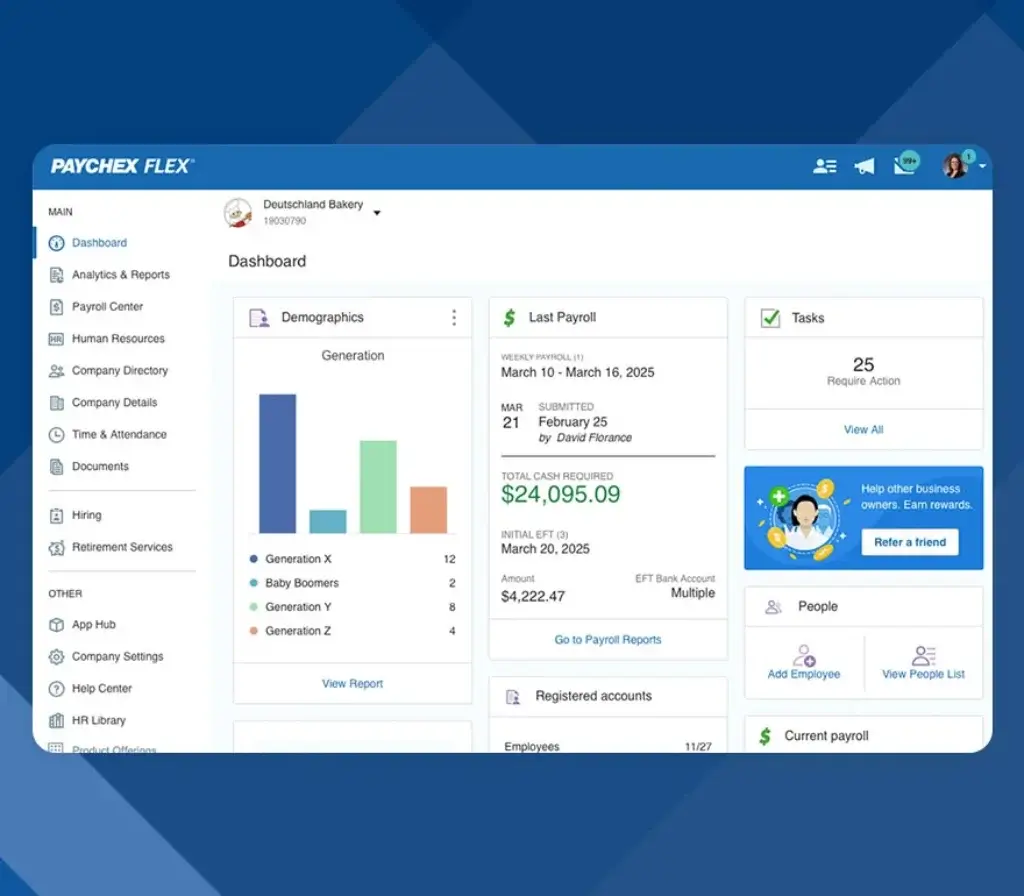
Paychex Flex includes employee self-service for accessing pay stubs, tax documents, time-off balances, benefits details, and personal information. Employees can also use the mobile app, which matters because payroll software often feels easier for admins than for employees. A strong self-service experience reduces the number of small requests HR and payroll teams have to answer every week.
Time and Attendance
Time tracking is another important part of the platform. Paychex Flex supports employee timekeeping, time-off requests, schedule visibility, and payroll-connected attendance workflows. If you manage hourly employees, this is where the platform becomes much more valuable, because separate time systems often create payroll errors, admin friction, and compliance risk.
Paychex also supports more advanced workforce management needs through time clocks, mobile tracking, and tools meant to reduce manual entry and common issues like buddy punching. That makes the platform more operationally useful than payroll systems that stop at simple hours entry.
Hiring and Onboarding
Paychex has expanded further into hiring and onboarding. Its recruiting and onboarding tools are designed to centralize candidate workflows, new-hire tasks, communication, and documentation. This matters because many growing businesses eventually want their payroll and employee setup process to connect directly with hiring instead of relying on disconnected workflows.
Onboarding is not necessarily the deepest part of the product compared with specialized talent tools, but it is strong enough for many SMB and mid-market buyers who want a more connected employee journey from hire to first paycheck.
HR Administration and Employee Management
Beyond payroll, Paychex Flex supports everyday HR administration such as employee records, document management, policy access, and workforce administration. This broader scope is one reason Paychex now frames Flex as a unified HCM solution rather than only a payroll tool.
Recent updates also suggest Paychex is leaning more into AI-assisted HR workflows, including an intelligent admin dashboard and AI-powered handbook and HR library tools. These additions do not transform the product into an AI-first platform, but they do show that Paychex is modernizing the admin experience rather than relying only on legacy payroll strength.
Benefits Administration
Paychex Flex also includes benefits administration capabilities, with payroll integration and employee self-service as major advantages. If your team offers health benefits, retirement options, or other programs, keeping benefits and payroll closer together can reduce duplicate entry and make open enrollment much easier to manage.
Paychex’s broader benefits and advisory ecosystem is part of the appeal here. Buyers that want software plus access to benefits support will usually see more value in this model than buyers who only want a low-cost software subscription.

Business Operations Features
Paychex Flex Payroll, HR, and Workforce Management
One of the most important things to understand about Paychex Flex is that the platform is designed to grow in stages. You can start with a more payroll-focused package and then move into broader HR, benefits, and compliance support as your business becomes more complex.
Paychex Flex Select
Select is the most entry-level Paychex Flex package. It is aimed at small teams or businesses with more standard payroll needs. At this level, the focus is mainly on payroll processing, automated tax administration, and a smaller set of HR tools. It is a reasonable entry point if your biggest priority is getting payroll right without buying more platform than you currently need.
Paychex Flex Pro
Pro is designed for growing teams and adds more payroll support, reporting, and HR functionality beyond the Select tier. This is often where Paychex Flex starts to look more competitive as an HR platform, not only as a payroll service. For businesses scaling their headcount, this tier will usually feel more realistic than the entry option.
Paychex Flex Enterprise
Enterprise is meant for established businesses with more detailed payroll and employee management needs. This tier includes fuller payroll and tax administration support, job costing, labor distribution, employee engagement tools, performance support, documentation features, and 24/7 service. For organizations with more moving parts, this is where Paychex Flex becomes much more robust.
HR Pro and HR PEO
Paychex also pushes buyers toward HR Pro and HR PEO when they need more than software. HR Pro adds advisory support, compliance help, benefits access, and stronger HR services. HR PEO goes even further into a more comprehensive outsourced HR model. These are important to understand because they show Paychex is not only selling software. It is selling a broader people-operations relationship.
Mobile Experience
Paychex offers mobile apps for payroll, time tracking, HR access, and other employee and admin tasks. This is more important than it may sound, because payroll software adoption often rises or falls based on how easy it is for employees to check hours, pay data, tax forms, and PTO from their phones. Mobile is one of the areas where Paychex has clearly invested.
Integrations and Connected Operations
Paychex supports integrations with other business systems and positions Flex as a platform that can connect payroll, benefits, timekeeping, and broader workflows. While it is not the most open-ended platform on the market for power users who want extensive automation, it is broad enough for most businesses that want fewer disconnected systems and cleaner data flow across workforce operations.
Pros and Cons
Benefits and Limitations of Using Paychex Flex
Positive
✅ Strong payroll and tax administration
✅ Service-backed model
✅ Broad feature set
✅ Scales well from small teams to more complex needs
✅ Useful for hourly teams
Negative
❌ No public pricing
❌ Cost structure can frustrate some buyers
❌ UI feels less modern
❌ Better suited to U.S. payroll than global workforce needs
Strengths & Benefits
Paychex Flex gets a lot right when you evaluate it as a payroll-first HR platform rather than as a flashy modern HR app.
- Strong payroll and tax administration – Payroll processing, tax administration, and related compliance support remain core strengths.
- Service-backed model – Paychex offers more hands-on support than many software-only payroll competitors.
- Broad feature set – Payroll, time tracking, HR, onboarding, and benefits can all sit inside one ecosystem.
- Scales well from small teams to more complex needs – The package structure makes it easier to grow from standard payroll into broader HR support.
- Useful for hourly teams – Time and attendance features add real value for operational businesses.
Limitations & Drawbacks
Paychex Flex is capable, but it is not the cleanest fit for every buyer.
- No public pricing – You need a quote to understand total cost.
- Cost structure can frustrate some buyers – Add-ons, annual changes, or service complexity may affect value perception.
- UI feels less modern – Competitors like Gusto or Rippling may feel more modern in daily use.
- Better suited to U.S. payroll than global workforce needs – Businesses with international payroll needs may prefer a more globally oriented provider.
Operational Fit
Paychex Flex User Experience, Support, and Security
Software fit is not only about features. It also depends on how easy the platform is to use, how reliable support feels when payroll issues arise, and whether the vendor provides credible security and compliance safeguards.
Ease of Use
Paychex Flex is generally seen as usable and practical, especially for core payroll tasks and employee self-service. It is not as polished as the most modern design-led payroll tools, but it is broad enough to keep many routine workflows in one place. For many businesses, that breadth outweighs the fact that some screens feel more functional than elegant.
My take is that Paychex Flex is easier to respect than to love. It usually makes sense operationally, even if it does not always feel especially modern.
Implementation Experience
Implementation complexity depends heavily on your package and the number of services you are rolling out. Basic payroll setups are far easier than full implementations that include time tracking, benefits, onboarding, and HR services. The upside is that Paychex has a more guided model than some purely self-serve tools. The downside is that complexity can increase quickly as you expand scope.
Customer Support
Support is one of the more debated parts of the Paychex experience. Some customers praise responsiveness, payroll guidance, and onboarding help. Others report frustration with billing clarity, issue resolution, or uneven service quality. This pattern is common with larger service-backed vendors, where the experience can vary more than with a pure software product.
That means support should be viewed as a real strength in concept, but something you should validate carefully during the sales process. Ask about service structure, escalation paths, and what level of support is included in your package.
Security and Compliance
Paychex makes a solid case on security and compliance. The company publicly states that it maintains SOC 1 Type 2 and SOC 2 Type 2 reports across various products and services, and it also highlights ISO 27001 certification. For payroll and HR buyers handling sensitive employee information, these are meaningful trust signals.
Compliance support is also a central part of the broader Paychex value proposition. Payroll tax automation, compliance resources, and optional advisory support are some of the clearest reasons buyers choose Paychex over lighter payroll-only platforms.
Mobile Access
Paychex’s mobile capabilities are a practical benefit for both employees and managers. Mobile access makes it easier to review pay data, track time, handle time-off activity, and access workforce information without forcing every task through desktop-only admin workflows. This helps the product feel more current than some people may assume based on Paychex’s legacy brand reputation.

Pricing
Paychex Flex Pricing & Plans
Paychex Flex pricing is one of the least transparent parts of the platform. The company does not publish standard public pricing for Flex packages. Instead, it offers custom quotes based on business size, selected services, and implementation needs. That approach is common in the payroll industry, but it still creates more friction than software buyers usually prefer.
What Paychex Offers
The current package structure includes Paychex Flex Select, Pro, and Enterprise, with higher-service options such as HR Pro and HR PEO available for businesses that want deeper support. In practice, this means Paychex is not selling one simple plan. It is selling a ladder of payroll, HR, and service combinations.
What Affects Total Cost
Your total cost will likely depend on employee count, payroll complexity, tax and compliance requirements, time tracking needs, benefits administration, onboarding services, and the level of human support included. Two businesses can look at the same vendor and end up with very different pricing outcomes.
What to Ask Before You Buy
If you are considering Paychex Flex, make sure you ask about implementation fees, payroll processing fees, year-end form handling, tax services, benefits administration costs, support levels, reporting access, time tracking pricing, and how pricing changes as you add employees or services. This matters because value is harder to judge when pricing is not public.
Pricing Table
The table below gives a practical view of how Paychex Flex’s current packaging works.
| Feature Type | Paychex Flex | What it means for buyers |
| Pricing model | Custom pricing | You need to speak with sales for a tailored quote |
| Entry package | Flex Select | Best for standard payroll needs and smaller teams |
| Growth package | Flex Pro | Adds broader payroll, reporting, and HR tools |
| Advanced package | Flex Enterprise | Better for detailed payroll and employee management needs |
| Service-led options | HR Pro and HR PEO | Useful if you want advisory support, benefits, and compliance help |
| Best for | U.S.-based SMBs and growing teams | Especially strong when payroll and support matter more than UI polish |
For many buyers, the real question is not whether Paychex Flex has enough features. It usually does. The real question is whether the service model, package structure, and pricing approach fit the kind of payroll and HR relationship you want. If you prefer software simplicity and clear flat pricing, Paychex may feel old-school. If you want software plus guidance, its value proposition becomes much stronger.
Use Cases
Who Should Use Paychex Flex?
Paychex Flex is not for every business, but it fits several types of buyers especially well.
Small Businesses That Need Reliable Payroll
If your main priority is dependable payroll processing, payroll tax handling, and employee self-service, Paychex Flex is a solid option. It is especially relevant if you want more guidance than many basic payroll apps provide.
Growing Teams That Need More Than Payroll
If your business is moving beyond simple payroll into time tracking, onboarding, employee administration, and benefits coordination, Paychex Flex becomes more compelling. This is where the platform starts to justify its broader package model.
Hourly and Operational Workforces
Businesses in retail, hospitality, healthcare, field services, and other hourly environments may get more value from Paychex Flex than from payroll systems that are less connected to timekeeping and workforce administration.
Businesses That Want Service Alongside Software
Paychex Flex makes more sense when you value access to payroll help, compliance support, and optional HR guidance. If you want a vendor relationship rather than just a login, Paychex is stronger than many newer software-only alternatives.
When Paychex Flex Might Not Be Right
Paychex Flex may not be the best choice if you want simple public pricing, a very modern interface, or a platform built primarily for global payroll and international hiring. In those cases, another payroll or HR provider may fit more naturally.
User Feedback
Paychex Flex Customer Reviews
Paychex Flex reviews show a familiar pattern for a mature payroll platform. Many users like the ease of payroll processing, employee self-service, and the convenience of having pay, hours, and HR information in one place. Positive reviews also often mention responsive support and the usefulness of the mobile app.
What Users Like Most
The most common positives in public reviews include ease of use for payroll and employee access, strong payroll functionality, the ability to centralize time and attendance with HR workflows, and the convenience of accessing paystubs, W-2s, and related records in one place. For mid-sized businesses, some reviewers also say the platform is well-rounded enough to support both admin and employee needs without feeling overly fragmented.
Common Complaints
The most common drawbacks are fairly consistent as well. Some users complain about billing complexity, price increases, hidden or unclear fees, reporting limitations, or support inconsistency. There are also reviews that describe the interface as dated or clunky compared with newer payroll systems. That does not make Paychex Flex a weak platform, but it does mean you should expect a more traditional payroll-software experience in some areas.
My Take on the Review Pattern
The user feedback suggests that Paychex Flex performs best when a buyer values reliability, payroll depth, and support more than product elegance. In other words, the platform is often appreciated for being practical and comprehensive, but not always admired for being especially modern. That is a useful distinction if you are comparing it against newer software-led competitors.
Competitors
Competitor Alternatives to Paychex Flex
Paychex Flex is often compared with Gusto, ADP Workforce Now, Rippling, and Paylocity. The right alternative depends on whether you care most about payroll service, UI simplicity, IT automation, or broader HCM flexibility.
| Feature Type | Paychex Flex | Gusto | Rippling | Paylocity |
| Core angle | Payroll-first HCM with service support | Modern SMB payroll and HR software | HR, payroll, and IT operations platform | Payroll and HR suite for growing businesses |
| Best for | SMBs wanting payroll depth and support | Smaller teams wanting simplicity | Ops-heavy teams wanting automation | Mid-market businesses needing broader HR tools |
| User experience | Practical, broad, less modern | Very approachable and clean | Modern and powerful | Solid, but can feel feature-dense |
| Payroll strength | Very strong | Strong for SMBs | Strong and highly configurable | Strong for mid-market needs |
| Support model | Software plus service | More software-led | Software-led with strong admin control | Balanced platform and service approach |
| Overall angle | Best for supported payroll operations | Best for software simplicity | Best for all-in-one operational control | Best for broader HR depth in the mid-market |
Compared with Gusto, Paychex Flex usually makes more sense when payroll service, timekeeping depth, and compliance support matter more than interface simplicity. Compared with Rippling, Paychex feels more payroll-service-centric, while Rippling is stronger if you want a more modern platform with deeper automation and IT management. Compared with Paylocity, Paychex is often the better choice for businesses that want a more service-backed payroll relationship, while Paylocity can appeal more to teams looking for a broader HR experience with a somewhat more modern feel.
If I had to summarize it simply, Paychex Flex is one of the better choices for businesses that want dependable payroll and HR operations with real human support, but it is not the most exciting platform if product design and pricing transparency are your top priorities.
Best Practices
Getting Started with Paychex Flex
To get the most out of Paychex Flex, you should make a few smart decisions before rollout.
Define the Scope Early
Decide whether your main priority is payroll only, payroll plus time tracking, or a broader HR rollout that includes onboarding, benefits, and advisory support. Paychex Flex can do a lot, but the platform becomes more valuable when you implement it with a clear operating model rather than adding services gradually without a plan.
Clarify Fees and Support Levels
Because pricing is custom, it is important to understand exactly what is included. Ask about implementation, payroll runs, year-end forms, benefits setup, support access, and any service-related fees that may not be obvious in an initial quote.
Connect Timekeeping Carefully
If you have hourly employees, make sure time tracking, time clocks, PTO policies, and payroll rules are mapped correctly from the beginning. This is one of the areas where Paychex Flex can save a lot of work, but only if the setup is done carefully.
Use Employee Self-Service Fully
Paychex Flex becomes more efficient when employees use the app and self-service portal for documents, pay details, and time-off visibility. That reduces administrative back-and-forth and improves adoption across the company.
Evaluate It for the Next Stage of Growth
If you are choosing Paychex Flex, do not evaluate it only for your current payroll needs. Think about whether you will need stronger HR support, benefits administration, or compliance help as you grow. The platform makes more sense when you buy it with that broader trajectory in mind.
Conclusion
Final Thoughts
Paychex Flex remains a strong payroll and HR platform because it solves a real problem for many businesses. A lot of employers do not just need software. They need payroll reliability, tax support, employee self-service, and access to help when something goes wrong. Paychex understands that better than many newer vendors.
Its biggest strengths are payroll depth, tax administration, time tracking, benefits connectivity, and the fact that it combines software with service. Its biggest drawbacks are limited pricing transparency, mixed feedback on billing and reporting, and a user experience that feels more practical than modern.
Overall, Paychex Flex is a strong option for SMBs and growing businesses that want dependable payroll and broader HR support from one provider. If your priority is operational reliability and service-backed payroll, it is well worth considering. If your priority is the cleanest UI and the simplest software buying experience, another platform may fit better.
Have more questions?
Frequently Asked Questions
What is Paychex Flex best used for?
Paychex Flex is best used for payroll processing, payroll tax administration, employee self-service, time tracking, and broader HR workflows in one connected platform.
Is Paychex Flex good for small businesses?
Yes. It is a strong option for small businesses that want reliable payroll and the ability to grow into more HR and workforce tools over time.
Does Paychex Flex include time tracking?
Yes. Paychex Flex supports time and attendance workflows, including timekeeping, time off, and payroll-connected workforce management tools.
Does Paychex Flex handle payroll taxes?
Yes. Payroll tax administration is one of the platform’s main strengths and a core part of the Paychex value proposition.
How much does Paychex Flex cost?
Paychex Flex uses custom pricing. You need to request a quote based on your business size, services, and support needs.
Does Paychex Flex have a mobile app?
Yes. Paychex offers mobile apps so employees and managers can access payroll, time tracking, HR tools, and related tasks from mobile devices.
Is Paychex Flex easy to use?
It is generally easy to use for core payroll and employee tasks, though the interface feels more traditional than some newer payroll platforms.
What are the main Paychex Flex alternatives?
The main alternatives usually include Gusto, Rippling, ADP Workforce Now, and Paylocity, depending on whether you prioritize simplicity, automation, or service-backed payroll.
Does Paychex Flex include HR tools beyond payroll?
Yes. Depending on the package, it can include hiring, onboarding, employee management, time and attendance, benefits administration, and broader HR support.
Is Paychex Flex worth it overall?
Yes, for the right buyer. If you want dependable payroll, solid HR breadth, and access to real support, Paychex Flex is worth serious consideration.