Introduction
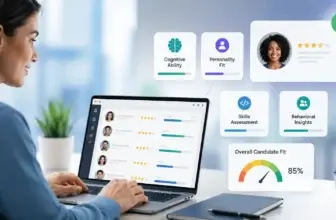
Choosing recruiting software is not only about tracking candidates through a hiring pipeline. It affects how your team sources talent, nurtures passive candidates, coordinates interviews, evaluates applicants, communicates with hiring managers, and measures recruiting performance. In this Lever review, you will get a practical look at what Lever offers, where it performs well, where it may feel limited, and which hiring teams are most likely to benefit from it in 2026.
Lever is best understood as a combined applicant tracking system and candidate relationship management platform. That combination matters because many recruiting teams no longer want separate systems for applicants, sourced candidates, nurture campaigns, and hiring analytics. They want one recruiting workspace where recruiters can manage active hiring while also building long-term talent relationships.
Lever is especially relevant for companies that have outgrown spreadsheets, email-based hiring, or a very lightweight ATS. It gives you more structure than basic applicant tracking software, but it is still easier to adopt than some highly complex enterprise recruiting suites. That makes it a strong option for scaling startups, mid-market companies, and larger organizations that want a recruiting platform focused on pipeline visibility, collaboration, and candidate engagement.
What Is Lever?
Lever is a talent acquisition platform that combines applicant tracking, recruiting CRM, sourcing, candidate nurturing, interview management, reporting, automation, and integrations in one system. The company refers to its main platform as LeverTRM, which reflects its focus on talent relationship management rather than applicant tracking alone.
The product is designed to help you manage both active applicants and passive prospects. That is one of Lever’s most important strengths. Instead of treating recruiting as a sequence of individual job openings, Lever helps your team build a reusable talent database that can support future hiring needs.
Background and Positioning
Lever positions itself as a modern recruiting platform for growing and enterprise teams. Its main angle is that ATS and CRM capabilities should work together inside one hiring workflow. That means recruiters can source candidates, track applications, manage interview stages, run nurture campaigns, collaborate with hiring managers, and analyze hiring outcomes without constantly switching tools.
Lever is now part of Employ, a broader talent acquisition software group that also includes JazzHR and Jobvite. This positioning is useful to understand because Lever sits in the middle of the Employ portfolio. JazzHR is more focused on foundational hiring, Jobvite is positioned for more sophisticated enterprise recruiting, and Lever is positioned for scalable hiring teams that want a strong ATS plus CRM experience.
Target Users and Use Cases
Lever is especially relevant for several buyer types:
- Scaling hiring teams – You get stronger workflows than a basic ATS without excessive enterprise complexity.
- Recruiters focused on passive talent – Lever’s CRM and nurture capabilities support longer-term candidate relationships.
- Mid-market companies – The platform fits teams that need structure, collaboration, and reporting as hiring volume increases.
- Companies with multiple hiring stakeholders – Recruiters, hiring managers, interviewers, and coordinators can work in one system.
- Data-driven talent teams – Visual reporting and analytics help you monitor pipeline performance and hiring activity.
Lever is not the best fit if you only hire occasionally and want the cheapest possible ATS. It is also not a full HRIS, payroll system, or employee management platform. Its strength is talent acquisition, especially where applicant tracking and candidate relationship management need to work together.
Core Features of the Platform
How Does Lever Work?
Lever works by centralizing your recruiting workflow into one platform. You can create job postings, collect applications, source passive candidates, organize prospects, move candidates through stages, schedule interviews, collect feedback, automate communication, and report on hiring performance.
The product’s main value is that it connects applicant tracking with relationship-based recruiting. That makes Lever particularly useful when your team wants to manage hiring as an ongoing pipeline strategy rather than a series of disconnected requisitions.
Applicant Tracking and Pipeline Management
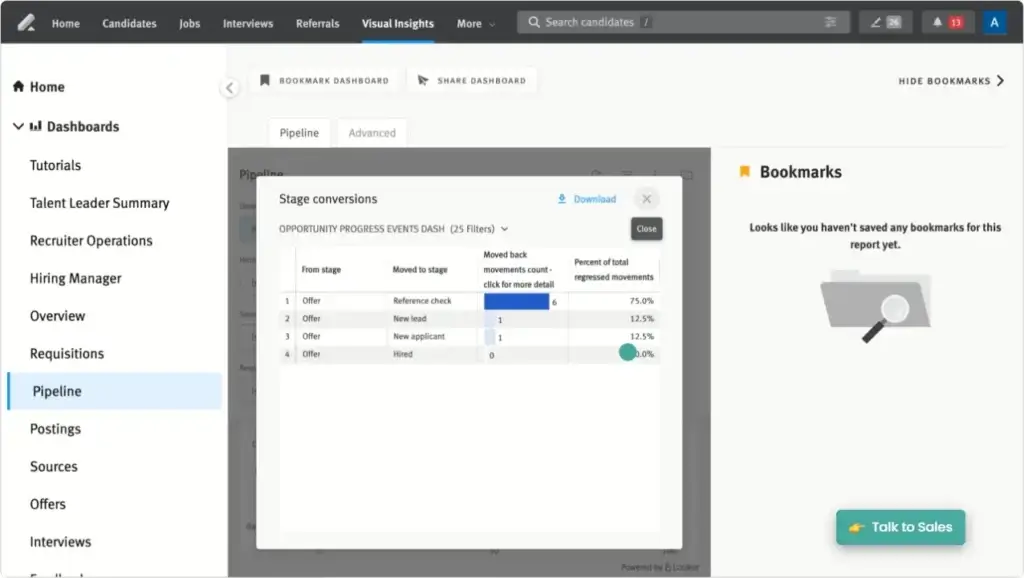
Lever gives you the core ATS functionality you need to manage open roles, job postings, applications, candidate profiles, interview stages, hiring team feedback, and offer workflows. Recruiters can see where each candidate stands, which actions are needed, and how the pipeline is progressing.
The pipeline view is one of the most practical parts of Lever. It helps you keep hiring activity organized without forcing your team into an overly rigid interface. For growing teams, that balance is important. You need enough process control to prevent candidates from falling through the cracks, but not so much complexity that hiring managers stop using the system.
Candidate Relationship Management
Lever’s CRM functionality is one of its biggest differentiators. You can manage passive candidates, organize sourced prospects, build talent pools, send nurture messages, and re-engage candidates when relevant roles open later.
This is valuable because many hiring teams lose strong candidates simply because they lack a reliable way to maintain relationships. Lever helps you avoid treating every hiring search as a fresh start. Instead, you can turn your candidate database into a long-term recruiting asset.
Sourcing and Nurture Campaigns
Lever supports candidate sourcing and outreach workflows that help recruiters build proactive pipelines. With nurture capabilities, your team can send personalized email sequences, track engagement, and keep prospects warm over time.
This is especially helpful for competitive roles where inbound applicants are not enough. Engineering, product, sales leadership, and specialized operations roles often require proactive outreach. Lever gives recruiters a stronger system for managing that work than a basic ATS would provide.
Interview Management and Feedback
Lever helps teams coordinate interviews, manage interviewer participation, collect feedback, and keep hiring managers aligned. Interviewers can submit notes and evaluations inside the platform, giving recruiters a clearer view of candidate progress and decision quality.
The platform does not feel as heavily built around structured hiring methodology as Greenhouse, but it still provides useful tools for collaboration and evaluation. For many teams, Lever’s simpler and more approachable interface may be easier to adopt across non-recruiting stakeholders.
Reporting and Visual Insights
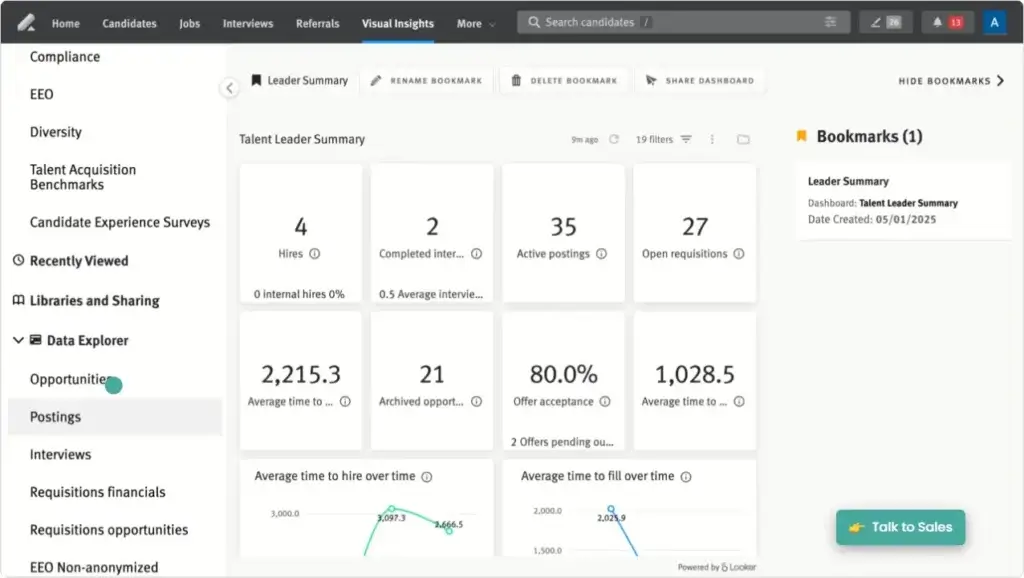
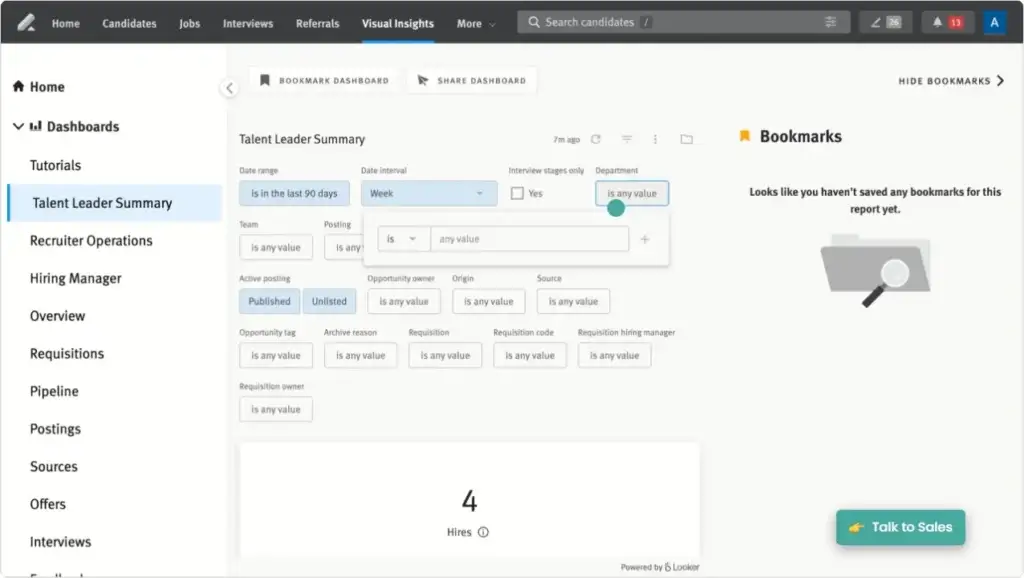
Lever includes reporting and analytics through Visual Insights and related analytics capabilities. You can use these tools to review recruiting metrics, understand hiring bottlenecks, evaluate source performance, and track pipeline movement.
Reporting is valuable, but it is also one of the areas where buyer expectations should be realistic. Lever gives you useful talent acquisition visibility, but some users still describe advanced reporting as more complex than expected or not as flexible as they would like. If analytics is a major buying reason, make sure you test the exact reports your team needs before committing.
Automation and Workflow Configuration
Lever includes workflow automation that can reduce repetitive recruiting work. This can include candidate communication, process reminders, stage-based actions, approvals, and other hiring workflow steps depending on your setup and plan.
Automation is useful because recruiting teams often lose time on small manual actions. When configured well, Lever can help coordinators and recruiters spend less time chasing updates and more time improving candidate quality, hiring manager alignment, and pipeline health.
AI Recruiting Capabilities
Lever has expanded its AI capabilities through features such as Talent Fit, AI-supported screening, and AI Interview Companion. These tools are designed to help teams identify promising candidates faster, summarize interview insights, support feedback collection, and make the interview process more consistent.
The most important point is that AI in recruiting should not replace judgment. Lever’s AI capabilities are most valuable when they help recruiters prioritize, summarize, and standardize work while keeping humans responsible for final hiring decisions.
Integrations and API Flexibility
Lever integrates with HRIS, sourcing, assessment, background check, productivity, scheduling, and communication tools. This matters because recruiting rarely happens in isolation. You may need to connect Lever with calendars, job boards, HR systems, assessment tools, background screening platforms, onboarding tools, and analytics workflows.
Lever also supports APIs and webhooks, which makes it more flexible for recruiting operations teams that need custom workflows or data movement across systems. For mid-market and enterprise buyers, this can be a major advantage.
Business Operations Features
Lever ATS, CRM, AI, and Integrations
Lever’s strength is not just that it has a long feature list. Its value comes from how it connects the core parts of talent acquisition. You can move from sourcing to nurturing, from interview coordination to reporting, and from hiring manager collaboration to candidate communication without rebuilding the same information in multiple tools.
ATS Plus CRM in One Platform
The ATS plus CRM model is Lever’s clearest selling point. Many hiring platforms are strong at tracking applicants, but weaker at managing passive talent relationships. Lever is built for both.
This makes it a strong fit if your recruiting team cares about long-term pipeline development. If you often source candidates months before a role opens, or if you regularly return to past applicants, Lever’s CRM layer can help you manage that process with more discipline.
Recruiting Automation for Busy Teams
Lever’s automation tools are useful for teams that need to reduce administrative work. You can automate parts of candidate communication, process movement, reminders, and repetitive recruiting tasks.
The practical benefit is not just speed. Automation also helps standardize the candidate experience. When every candidate receives timely communication and every hiring manager gets clearer prompts, the hiring process becomes easier to manage at scale.
AI Interview Companion and Talent Fit
Lever’s AI Interview Companion is designed to support interview consistency, feedback collection, and interview summaries. It can help interviewers focus on the conversation instead of manual note-taking, while giving recruiting teams better documentation after the interview.
Talent Fit is designed to help identify candidates who appear aligned with job requirements and provide explanations behind those matches. This can help recruiters prioritize review queues, but it should still be used as decision support rather than automatic decision-making.
Visual Insights and Hiring Analytics
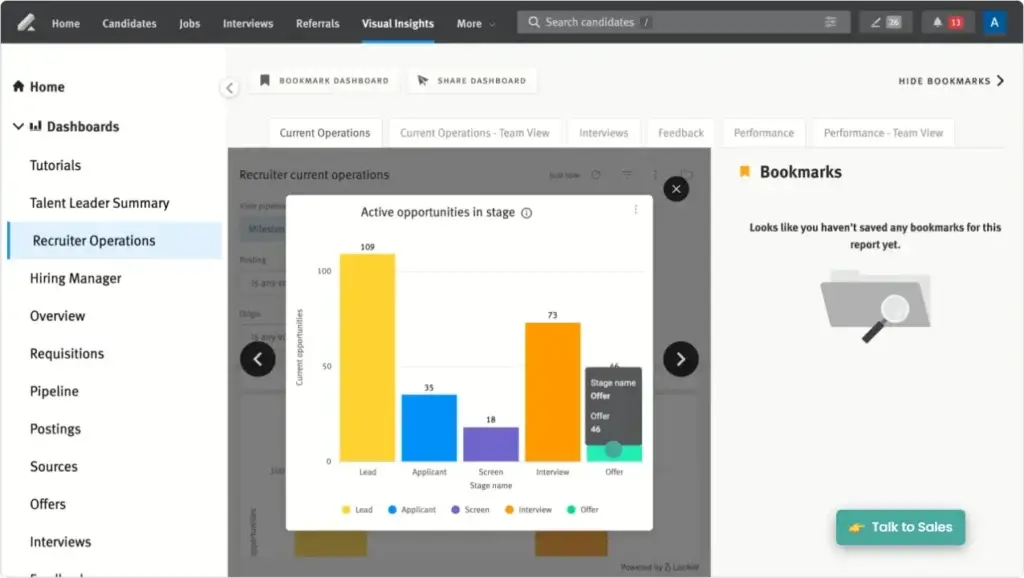
Lever’s analytics capabilities help teams measure what is happening across the recruiting funnel. You can use reporting to evaluate pipeline health, source performance, interview activity, hiring speed, and other operational recruiting questions.
This is valuable for talent leaders who need to move beyond anecdotal hiring updates. Instead of only asking recruiters what is happening, leaders can review trends and bottlenecks more consistently.
Candidate Experience and Communication
Candidate experience is one of the areas where Lever can make a meaningful difference. The platform helps recruiters manage communication, automate follow-ups, and keep candidates moving through the process with fewer delays.
This matters because candidates often judge employers by the quality of the hiring process. A slow, unclear, or inconsistent process can hurt employer brand even when the job opportunity itself is attractive.
Recruiting Operations and Data Quality
Lever can also support recruiting operations teams that need cleaner workflows, better handoffs, and more reliable data. When job postings, candidate records, interview notes, nurture campaigns, and hiring reports live in one system, your recruiting operation becomes easier to manage.
However, Lever still requires careful configuration. If your stages, fields, templates, integrations, and reporting logic are poorly designed, the platform will not automatically solve process problems. Like most strong ATS platforms, Lever works best when your recruiting operations foundation is already thoughtful.
Pros and Cons
Benefits and Limitations of Using Lever
Positive
✅ ATS and CRM combined
✅ Strong candidate nurturing
✅ Easy hiring collaboration
✅ Useful automation and analytics
Negative
❌ Pricing is not public
❌ Reporting can feel complex
❌ Not a full HRIS
❌ Advanced setup needs planning
Strengths & Benefits
Lever is a strong recruiting platform for teams that want to manage active applicants and long-term candidate relationships in one system.
- ATS and CRM combined – Lever helps you track applicants and nurture passive talent from one workspace.
- Strong candidate nurturing – Outreach and nurture workflows help recruiters build future pipelines.
- Approachable user experience – Many users find Lever easier to adopt than more complex recruiting suites.
- Good hiring collaboration – Recruiters and hiring managers can share candidate context and feedback more easily.
- Useful analytics – Visual Insights gives talent teams better visibility into hiring activity and pipeline trends.
Limitations & Drawbacks
Lever is a strong platform, but it is not perfect for every hiring team.
- Pricing is not public – You need a custom quote to understand your actual cost.
- Reporting can feel complex – Some users want simpler dashboards or more flexible reporting options.
- Not a full HRIS – Lever focuses on recruiting, not payroll, benefits, or employee lifecycle management.
- Setup quality matters – Workflows, integrations, fields, and reports need thoughtful implementation.
- Some integrations may need validation – Test your specific HRIS and recruiting stack before buying.
Operational Fit
Lever User Experience, Support, and Security
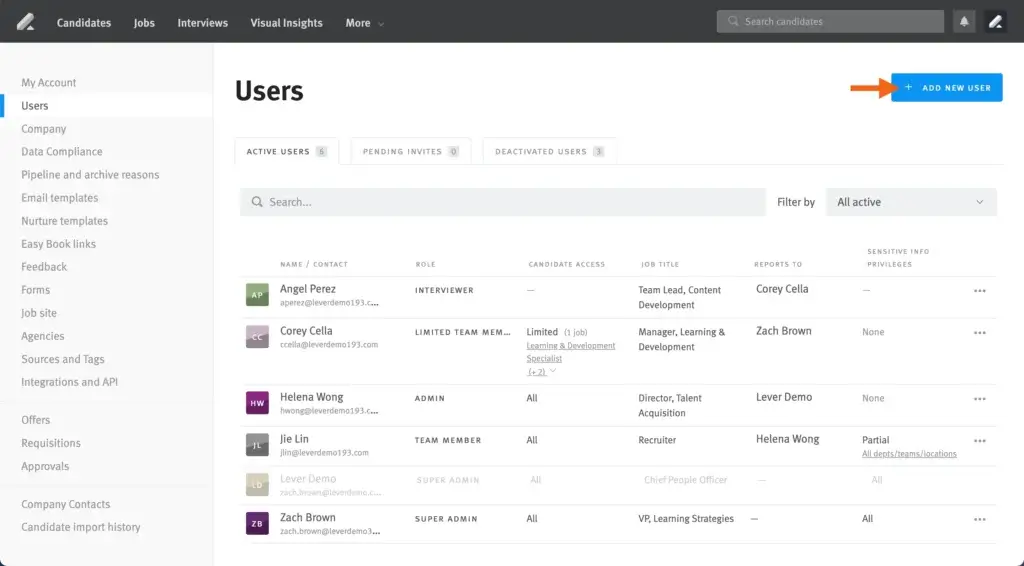
Feature depth matters, but operational fit matters just as much. Recruiting software needs to be easy enough for hiring managers to use, structured enough for recruiters to trust, and secure enough to store sensitive candidate data.
Ease of Use
Lever generally performs well on ease of use. Its interface is designed to be approachable for recruiters, coordinators, and hiring managers. This is important because recruiting systems often fail when non-recruiters avoid the tool and continue giving feedback through email or chat.
Lever’s usability is one reason it can be attractive for growing teams. It gives you stronger capability than a very basic ATS, but it does not feel as heavy as some enterprise recruiting platforms.
Implementation Experience
Lever’s implementation should be easier than a broad HR suite rollout, but it still requires planning. You should define job approval flows, hiring stages, scorecard expectations, nurture templates, reporting needs, integrations, and user permissions before launch.
The biggest mistake is treating implementation as a technical setup only. Lever becomes much more valuable when your team also standardizes process behavior, hiring manager expectations, communication rules, and candidate ownership.
Customer Support
Customer support sentiment is mixed but generally serviceable. Many users report positive implementation and support experiences, while some public reviews mention slower support or frustration with specific issues.
This is common in mid-market SaaS, but it is still worth addressing during the buying process. Ask what support level is included, whether you get implementation guidance, how response times work, and whether support differs by plan or account size.
Security and Compliance
Lever publishes security and compliance information through Employ. Its security page references SOC 2 reporting, ISO 27001 certification, penetration testing materials, information security policies, GDPR support, and CCPA support.
For talent acquisition teams, this is important because recruiting platforms store sensitive candidate information. Before buying, ask for the latest security package, data retention controls, privacy documentation, subprocessors, and regional compliance details that apply to your business.
AI Governance and Responsible Use
AI in hiring requires extra scrutiny. Lever positions its AI tools as ways to improve efficiency, consistency, and insight, but your team should still define clear rules for how AI outputs are reviewed and used.
In practice, this means recruiters should treat AI match explanations, interview summaries, and screening support as helpful inputs. They should not treat them as automatic hiring decisions. This is especially important for companies with strict compliance, DEI, or audit requirements.
Pricing
Lever Pricing & Plans
Lever does not publish standard pricing on its website. Pricing is available upon request and is customized based on your company size, hiring needs, feature requirements, implementation needs, and support level.
How Lever Structures Pricing
Lever’s pricing model is quote-based rather than transparent per-user pricing. According to Lever, pricing scales with team size and hiring needs. Lever also says every plan includes core applicant tracking, candidate relationship management, advanced reporting and analytics, and key integrations.
This makes Lever more similar to Greenhouse, Ashby, iCIMS, and other mid-market or enterprise recruiting platforms than low-cost ATS tools with fixed monthly plans.
What Affects Total Cost
Your final Lever quote may depend on factors such as company size, hiring volume, number of users, implementation scope, add-on capabilities, integrations, analytics needs, AI features, and support requirements.
If your team only needs simple applicant tracking, Lever may feel expensive compared with lightweight ATS tools. If your team needs ATS, CRM, automation, nurturing, analytics, and integrations in one system, the value case becomes stronger.
What to Ask Before You Buy
Before signing a Lever contract, ask for detailed answers on implementation fees, contract length, included features, AI availability, reporting limits, integration costs, API access, data migration, training, and support response expectations.
You should also ask whether features such as Advanced Analytics, Data Warehouse Sync, AI Interview Companion, AI Screening Companion, or advanced automation are included in your quote or priced separately.
Pricing Table
The table below summarizes how Lever pricing works from a buyer’s perspective.
| Pricing Factor | Lever | What it means for buyers |
| Pricing model | Custom quote | You need to contact Lever for exact pricing |
| Core platform | LeverTRM | Combines ATS and CRM capabilities |
| Included capabilities | ATS, CRM, analytics, integrations | Useful for teams that need more than applicant tracking |
| AI tools | Available through Lever and Employ AI products | Confirm which AI capabilities are included in your quote |
| Implementation | Guided setup available | Ask about timeline, migration, training, and fees |
| Best fit | Growing and mid-market hiring teams | Most valuable when recruiting volume and complexity are increasing |
Lever’s pricing transparency is a drawback, but it is not unusual in this category. The key is to evaluate cost against recruiting maturity. If you only need a simple candidate tracker, Lever may be more than you need. If your hiring process depends on proactive sourcing, relationship nurturing, automation, analytics, and hiring collaboration, Lever becomes easier to justify.
Use Cases
Who Should Use Lever?
Lever is not the right recruiting platform for every company. It fits best when your talent acquisition process is becoming more proactive, collaborative, and data-driven.
Growing Companies Building a Recruiting Function
Lever is a strong fit if your company is moving from ad hoc hiring to a more structured recruiting operation. It gives you better pipeline visibility, candidate records, collaboration tools, and reporting than spreadsheets or email-based workflows.
This is especially relevant for companies hiring across multiple departments where recruiters and hiring managers need a shared system of record.
Teams Focused on Passive Candidate Pipelines
If your team actively sources candidates, Lever’s CRM and nurture tools are a major advantage. You can organize prospects, run outreach campaigns, track engagement, and re-engage candidates later.
This makes Lever stronger than ATS tools that only focus on people who apply to active job postings.
Mid-Market Talent Acquisition Teams
Lever is a natural fit for mid-market teams that need more recruiting structure without the weight of a full enterprise HCM suite. It gives you a focused recruiting system while still supporting integrations with the rest of your HR technology stack.
Recruiting Teams That Need Better Hiring Collaboration
Lever can help when hiring feedback is scattered across emails, documents, Slack messages, and calendar notes. By centralizing candidate context and feedback, it gives recruiters and hiring managers a clearer process.
When Lever Might Not Be Right
Lever may not be the best option if you hire only a few people per year, need a low-cost fixed-price ATS, or want recruiting software bundled directly into a broader HR platform with payroll and employee management.
It may also be less ideal if your team wants the most rigid structured hiring methodology in the category. In that case, Greenhouse may be a stronger fit. Lever is usually better when you want a balanced ATS and CRM experience with a more approachable workflow.
User Feedback
Lever Customer Reviews
Lever reviews are generally positive, especially around ease of use, candidate management, collaboration, and recruiting workflow organization. Public review platforms show that users often appreciate Lever’s clean interface, hiring manager usability, and ability to centralize candidate activity.
What Users Like Most
Users commonly praise Lever for being intuitive, easy to navigate, and practical for recruiter and hiring manager collaboration. Many reviewers also like that Lever combines candidate tracking, sourcing, communication, job posting, and scheduling-related workflows in one platform.
This matters because adoption is one of the biggest risks in recruiting software. A powerful ATS is not useful if hiring managers do not use it. Lever’s user experience is one of the reasons it remains competitive in the ATS market.
Common Complaints
The most common complaints are around reporting complexity, occasional bugs or workflow friction, support inconsistency, and limitations with specific integrations or advanced functionality. Some users also say Lever can feel too simple in certain areas once hiring operations become more complex.
These complaints do not make Lever a weak product, but they do show where buyers need to test carefully. Reporting, integrations, and support expectations should be validated before purchase.
My Take on the Review Pattern
The review pattern suggests that Lever’s biggest strength is usability combined with ATS and CRM depth. Its biggest limitation is that it can sit between two categories. It is more advanced than a simple ATS, but not always as deeply structured or enterprise-heavy as some larger recruiting systems.
That is not necessarily a problem. For many growing teams, that middle position is exactly what makes Lever attractive.
Competitors
Competitor Alternatives to Lever
Lever is most often compared with Greenhouse, Ashby, Workable, iCIMS, and Workday Recruiting. The best alternative depends on whether you prioritize structured hiring, analytics flexibility, ease of use, affordability, or enterprise HR alignment.
| Feature Type | Lever | Greenhouse | Ashby | Workday Recruiting |
| Core angle | ATS plus recruiting CRM | Structured hiring platform | Analytics-heavy recruiting platform | Recruiting inside enterprise HCM |
| Best for | Teams focused on talent pipelines and nurturing | Teams focused on consistent hiring decisions | Data-driven startups and recruiting ops teams | Large companies already using Workday |
| User experience | Approachable and recruiter-friendly | Clear but more process-driven | Powerful but can feel dense | Broad but often more complex |
| CRM strength | One of its strongest areas | Available but less central to positioning | Strong, especially for operations-heavy teams | Depends on broader HCM setup |
| Analytics | Solid Visual Insights and reporting | Strong and improving | Often a standout strength | Useful within enterprise HR reporting |
| Overall fit | Best for balanced ATS and CRM needs | Best for structured hiring consistency | Best for flexible recruiting operations | Best for enterprise HR standardization |
Compared with Greenhouse, Lever usually makes more sense when candidate relationship management and nurture workflows are a top priority. Greenhouse usually has the edge when you want a more disciplined structured hiring framework.
Compared with Ashby, Lever may feel easier and more approachable for general recruiting teams, while Ashby may appeal more to highly analytical recruiting operations teams. Compared with Workday Recruiting, Lever is more focused on talent acquisition usability, while Workday is more attractive if recruiting must sit inside a full enterprise HR system.
If you are comparing multiple platforms, you may also want to review our guide to best recruitment software and our broader guide to best HR software.
Best Practices
Getting Started with Lever
To get the most out of Lever, you should prepare your recruiting process before implementation. The platform can support better hiring, but it will not fix unclear ownership, inconsistent stages, or weak candidate communication by itself.
Define Your Hiring Workflow First
Start by mapping your current hiring process. Define stages, ownership, approvals, interview steps, rejection reasons, communication templates, and handoff rules.
This gives your Lever implementation a clear foundation. It also prevents the platform from becoming a digital version of an already messy process.
Clean Your Candidate Data
If you are migrating from another ATS, spreadsheet, or manual workflow, clean your candidate data before import. Duplicate records, incomplete fields, and inconsistent source labels will make reporting less useful later.
Build CRM and Nurture Workflows Early
Do not use Lever only as a basic ATS. The platform’s CRM value is one of its biggest strengths, so build nurture workflows, talent pools, and re-engagement processes early.
This is especially important if your team hires for hard-to-fill roles or regularly needs to revisit past candidates.
Train Hiring Managers on Feedback Quality
Lever works better when hiring managers understand how to submit timely and useful feedback. Train them on what good feedback looks like, where to submit it, and how quickly decisions should be made.
The software can organize the process, but your team’s behavior determines whether hiring becomes faster and more consistent.
Validate Reports Before Launch
Before going live, define the recruiting questions you need Lever to answer. These may include source quality, time-to-hire, stage conversion, recruiter activity, offer acceptance, and pipeline diversity.
Then confirm that your fields, workflows, and dashboards support those questions. Reporting quality depends heavily on setup quality.
Connect Lever to Your Recruiting Stack
Finally, connect Lever with the tools your team already uses. Calendar tools, HRIS platforms, job boards, assessment tools, background checks, sourcing platforms, and onboarding systems can all improve the end-to-end workflow when connected properly.
Conclusion
Final Thoughts
Lever remains one of the stronger recruiting platforms for teams that want applicant tracking and candidate relationship management in one system. Its biggest advantage is that it helps you manage both active hiring and long-term talent pipelines without forcing recruiters to work across disconnected tools.
The platform is especially strong for scaling companies, mid-market talent teams, and organizations that rely on proactive sourcing. Its CRM, nurture workflows, hiring collaboration, automation, analytics, and AI-supported capabilities make it more strategic than a simple applicant tracker.
Its main drawbacks are pricing transparency, reporting complexity for some users, support variability, and the fact that it is not a full HRIS. You should also test your must-have integrations before buying, especially if your HR tech stack already includes payroll, HRIS, onboarding, assessment, or background check systems.
Overall, Lever is a strong recommendation for companies that want a balanced ATS and recruiting CRM. If your team cares about candidate relationships, pipeline visibility, and recruiter productivity, Lever deserves a serious place on your shortlist.
Frequently Asked Questions
Have more questions?
What is Lever best used for?
Lever is best used for applicant tracking, candidate relationship management, proactive sourcing, nurture campaigns, interview collaboration, recruiting analytics, and hiring workflow automation.
Is Lever an ATS or CRM?
Lever is both an applicant tracking system and recruiting CRM. Its LeverTRM platform combines active applicant tracking with passive candidate relationship management.
How much does Lever cost?
Lever uses custom pricing. You need to contact Lever for a quote based on your company size, hiring needs, features, implementation scope, and support requirements.
Does Lever have AI recruiting features?
Yes. Lever offers AI-supported capabilities such as Talent Fit, AI screening support, and AI Interview Companion features through Lever and Employ’s broader AI product set.
Does Lever support candidate nurturing?
Yes. Candidate nurturing is one of Lever’s strongest use cases. Recruiters can organize prospects, run outreach campaigns, and re-engage passive candidates over time.
Is Lever easy to use?
Lever is generally considered easy to use, especially for recruiters and hiring managers who need a clear interface for candidate tracking, communication, and collaboration.
Does Lever integrate with HR tools?
Yes. Lever integrates with many HRIS, sourcing, assessment, background check, productivity, scheduling, and recruiting tools. Buyers should validate their required integrations before purchasing.
Is Lever good for small businesses?
Lever can work for smaller companies with active hiring needs, but it is usually a better fit for growing and mid-market teams that need ATS, CRM, automation, and analytics capabilities.
What are the main Lever alternatives?
The main Lever alternatives include Greenhouse, Ashby, Workable, iCIMS, and Workday Recruiting. The best choice depends on your hiring structure, CRM needs, reporting depth, and HR tech stack.
Is Lever worth it overall?
Lever is worth considering if your team needs a balanced ATS and recruiting CRM with strong candidate nurturing, hiring collaboration, automation, and analytics. It may be more than you need for occasional hiring.