Introduction
SEO and competitive research can quickly become overwhelming when you are working across keyword research, rank tracking, backlink monitoring, technical SEO, and competitor analysis. Moz positions itself as a long-established SEO platform that helps you manage these tasks from one place, with a stronger emphasis on usability, trusted metrics, and practical SEO workflows than on broader marketing intelligence. In this review, you will get a detailed look at Moz’s core capabilities, pricing, strengths, limitations, and the types of users who will benefit most from it. By the end, you should have a clear understanding of whether Moz fits your workflow and budget.
What Is Moz?
Moz is an SEO software platform focused on keyword research, rank tracking, backlink analysis, site audits, on-page optimization, and competitor research. It is widely used by marketers, agencies, consultants, publishers, and in-house teams that need reliable SEO data and a more approachable interface than some enterprise-heavy alternatives. Over time, the platform has expanded beyond its original SEO toolkit and now also includes products like Moz Local, STAT, Moz API, and additional data solutions for more advanced users.
Background and Evolution
Moz was founded in 2004 and became one of the most influential brands in the SEO industry through its software, educational resources, and widely recognized proprietary metrics such as Domain Authority. What once centered mainly on link metrics and foundational SEO tools has expanded into keyword tracking, site crawling, on-page optimization, competitor analysis, local SEO, and enterprise SERP monitoring. In 2026, Moz continues to position itself as a trusted SEO platform for businesses that want dependable search data and clear workflows without the complexity of a broader all-in-one marketing suite.
Target Users and Use Cases
Moz is suitable for several types of users:
- SEO professionals and consultants – You can use it for keyword research, technical audits, backlink analysis, on-page optimization, and rank tracking across multiple projects.
- Marketing teams and agencies – The platform is especially useful when you need accessible reporting, campaign-based site monitoring, and SEO workflows that are easy to adopt across teams.
- Content teams and publishers – Moz helps you find keyword opportunities, prioritize target terms, and build more structured content plans.
- Small businesses and in-house marketers – Moz is often easier to learn than more complex platforms, which makes it attractive if you need solid SEO tools without unnecessary clutter.
If you need one platform for core SEO research, tracking, and site monitoring, Moz remains one of the most respected options in the market. If you need deeper PPC intelligence, broader traffic analytics, or the most advanced backlink research available, however, another tool may be a better fit.
Key Features
How Does Moz Work?
Moz covers the core SEO and search visibility workflows most teams need. Below are the main capabilities that define the platform.
Domain Overview and Competitive Research
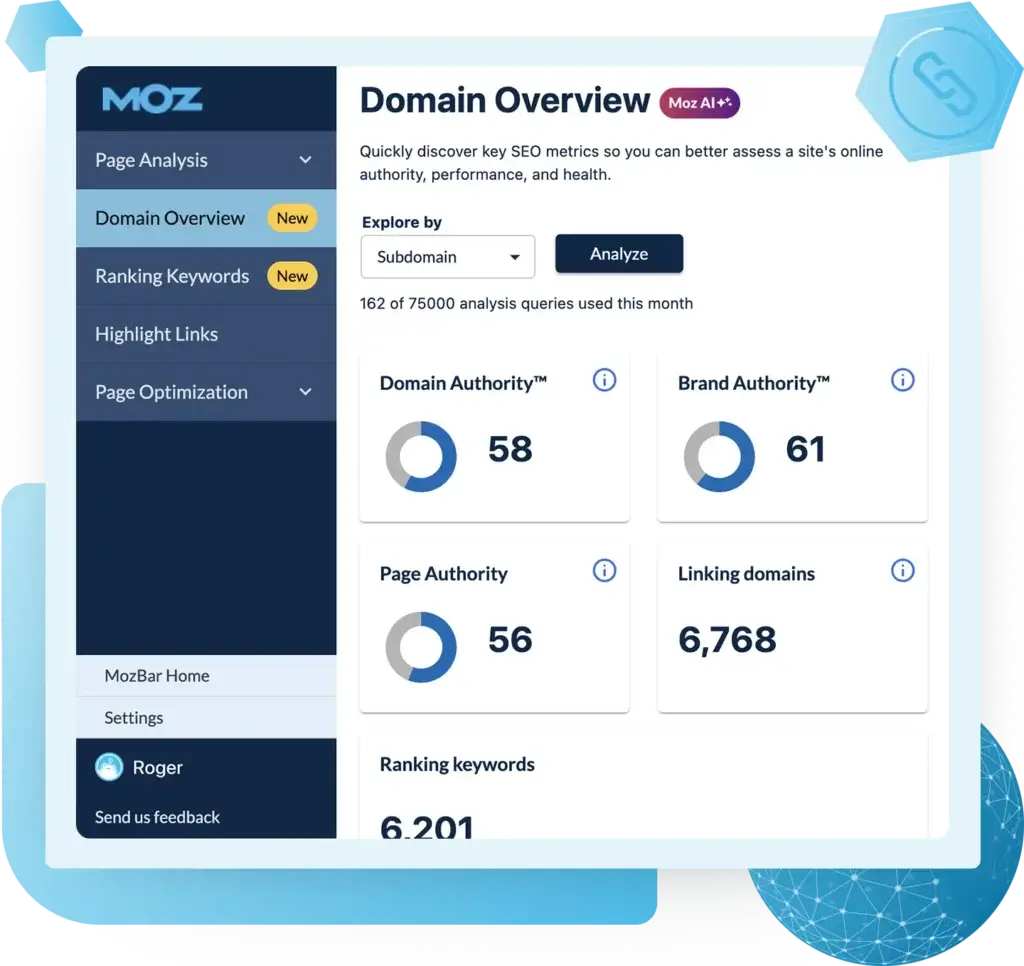
One of Moz’s most useful entry points is its Domain Overview functionality. You can enter your own site or a competitor’s domain and quickly review ranking keywords, top pages, backlink signals, and authority-related metrics. This makes it useful for both benchmarking your current SEO performance and understanding where competitors may have an advantage.
Moz also adds recognized proprietary metrics such as Domain Authority, Page Authority, and Brand Authority, which many marketers still use as quick directional indicators during competitor research and link evaluation. While Moz is not the broadest platform for market intelligence, it gives you enough visibility to compare search performance and identify realistic opportunities.
Keyword Research and Keyword Explorer
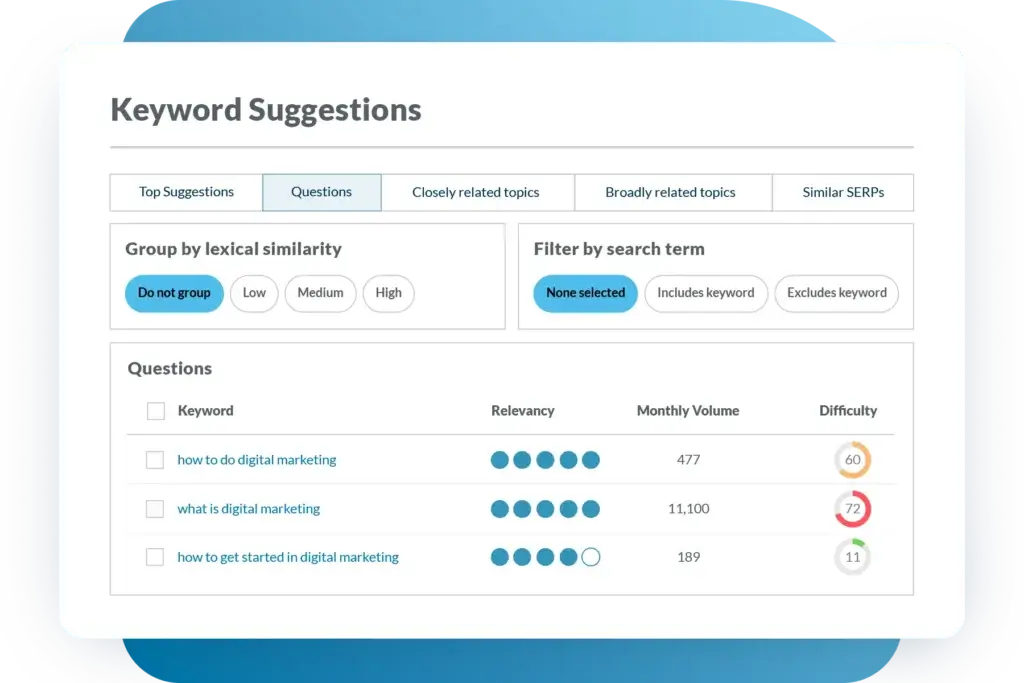
Moz’s Keyword Explorer is one of the main reasons many marketers still subscribe. You can discover keyword ideas, review search volume, estimate difficulty, analyze organic CTR potential, and prioritize opportunities using Moz’s scoring model. The interface is clean and easy to use, which makes large keyword sets easier to work with than in some more complicated tools.
A major advantage of Moz’s keyword workflow is clarity. Instead of overwhelming you with too many filters and overlapping reports, it helps you move from keyword discovery into prioritization faster. This is especially useful when building content calendars, improving category pages, or choosing realistic targets for a growing site.
Backlink Analytics and Link Explorer
Backlink analysis is another core area where Moz remains highly relevant. You can review linking domains, anchor text patterns, top-linked pages, discovered links, lost links, and authority-related signals. This helps you understand how strong a site’s off-page profile is and where competitors may be building stronger authority.
Moz’s Link Explorer is useful for ongoing link monitoring and prospect evaluation, especially if you already rely on Domain Authority during outreach or competitive reviews. That said, some users may still prefer Ahrefs when backlink analysis is their top priority because it often feels deeper and more link-centered overall.
Site Crawl and Technical SEO Tools
For technical SEO, Moz provides a solid Site Crawl tool that helps you uncover crawl issues, broken links, duplicate content, missing tags, redirect problems, and other errors that can affect search visibility. The reporting is structured clearly, making it easier to prioritize fixes without needing a deeply technical background.
This is especially useful if you manage growing websites or publish content frequently. Instead of relying on multiple lightweight tools for every technical check, you can centralize much of your ongoing site health monitoring inside Moz. For teams that want one platform for both content planning and site maintenance, this is a meaningful advantage.
MozBar and On-Page SEO Analysis
Moz also offers supporting tools like MozBar, which helps you review pages and search results directly from your browser. You can inspect link metrics, page elements, and other on-page details while researching competitors or evaluating opportunities. This adds practical value for day-to-day SEO work, especially during prospecting and page-level audits.
Moz’s broader educational ecosystem is another strength that supports these workflows. Between its software, guides, and training resources, the platform tends to feel more approachable than some rivals, especially for growing teams that want to build repeatable SEO processes.
Local SEO, API, and Broader Ecosystem
Moz goes beyond basic SEO software by offering related products such as Moz Local, STAT, Moz API, and broader data solutions. This makes the platform more suitable for businesses that start with core SEO and later need local search management, enterprise SERP tracking, or data integrations.
If you only need standard SEO data, some of these products may feel secondary. But if your business grows and your needs become more specialized, Moz’s ecosystem gives you room to expand without fully changing platforms.
Rank Tracking and SERP Monitoring
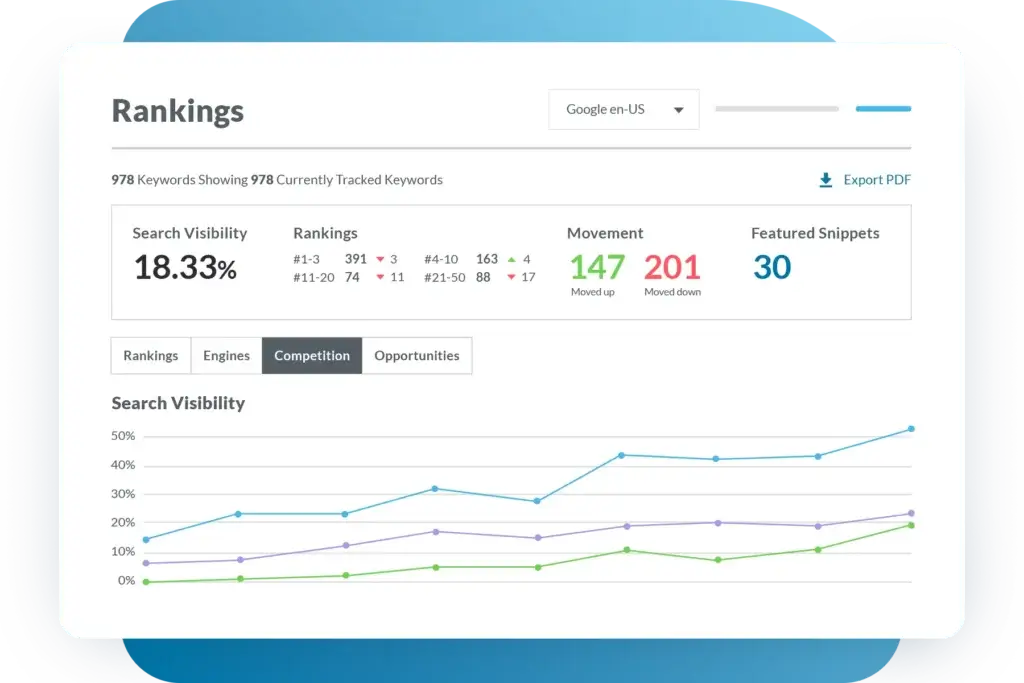
Moz includes rank tracking within its campaign workflows, allowing you to monitor target keywords over time and review how visibility changes after content updates, technical fixes, or link-building efforts. This is important if you need clear SEO reporting and want to understand whether your optimization work is actually improving rankings.
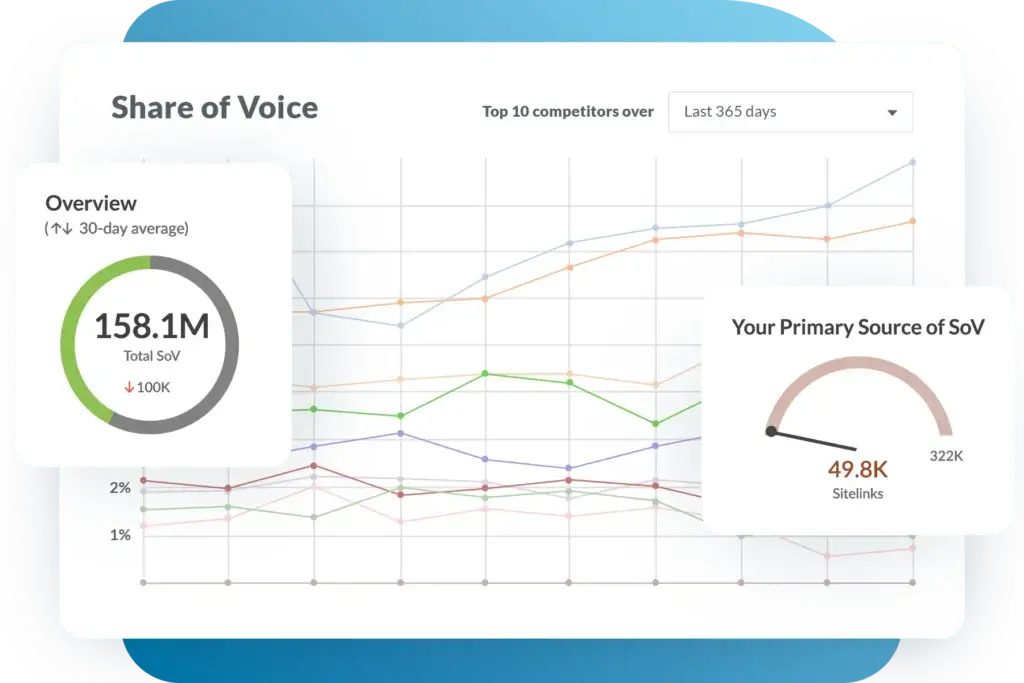
For many teams, Moz’s rank tracking is sufficient for ongoing SEO management. If you need much deeper enterprise-level SERP monitoring, Moz also offers STAT as a separate product. That gives Moz a useful upgrade path for organizations that outgrow basic campaign tracking.
Pros and Cons
Benefits and Limitations of Using Moz
Positive
✅ Easy to use for core SEO
✅ Strong keyword research workflow
✅ Trusted authority metrics
✅ Solid site crawl and rank tracking
Negative
❌ Less broad competitive intelligence
❌ Not the deepest backlink tool
❌ Plan limits can matter
❌ Pricing is not entry-level cheap
Strengths and Benefits
Moz’s biggest advantage is clarity. It combines keyword research, rank tracking, backlink monitoring, technical SEO, and reporting into one platform without feeling as bloated as some broader competitors. This makes it particularly attractive if you want dependable SEO workflows and an easier learning curve.
- Easy to use for core SEO – Moz is easier to learn than many all-in-one competitors, which makes it attractive for smaller teams and growing in-house departments.
- Strong keyword research workflow – Keyword Explorer is practical, clear, and well suited to content planning and SEO prioritization.
- Trusted authority metrics – Domain Authority and related scores still provide useful directional context for comparing sites and evaluating links.
- Solid site crawl and rank tracking – Site Crawl gives you ongoing visibility into common SEO issues without requiring a highly technical workflow.
Limitations and Drawbacks
Moz is powerful, but it is not the perfect fit for everyone. Here are the main issues to keep in mind:
- Less broad competitive intelligence – Compared with Semrush, Moz offers less depth for PPC research, traffic analytics, and broader market visibility.
- Not the deepest backlink tool – Moz is useful for link analysis, but Ahrefs is still often preferred for more advanced backlink-first workflows.
- Plan limits can matter – Lower tiers may feel restrictive if you manage many sites, large campaigns, or wide keyword sets.
- Pricing is not entry-level cheap – Depending on your needs, Moz can still feel expensive compared with lighter SEO tools aimed at beginners.
Competitors
Competitor Alternatives to Moz
Moz competes with several well-known SEO and competitive intelligence tools. Semrush and Ahrefs are two of the most common alternatives, each with a different emphasis.
| Feature Type | Moz | Semrush | Ahrefs |
| Core focus | SEO workflows and trusted metrics | SEO, PPC, content, competitor intelligence | SEO and backlink analysis |
| Best for | Teams wanting a simpler SEO platform | Teams needing broader marketing insight | Users focused on backlinks and SEO depth |
| Keyword research | Strong and easy to use | Strong filters and gap analysis | Strong keyword database and content analysis |
| Backlink tools | Good | Very good | Excellent |
| PPC data | Not a major focus | Strong | Limited compared to Semrush |
| Site audit | Useful for basic to mid-level needs | Robust | Strong |
| Pricing feel | Mid-market | Premium | Premium |
Choose Moz if you want a more accessible SEO platform with trusted metrics and cleaner workflows. Choose Semrush if you want a broader platform that goes beyond core SEO into competitive intelligence, traffic insight, and paid search research. Choose Ahrefs if backlink analysis and a more SEO-focused workflow matter most.
Pricing
Moz Pricing and Plans
Moz uses professional-tier pricing, and that is one of the main factors to consider before subscribing. The platform typically offers several core plans aimed at solopreneurs, growing marketing teams, agencies, and larger organizations. Each step up expands campaign limits, crawl capacity, keyword tracking, and access to more advanced workflows.
Starter or Entry-Level Plan
The lowest tier is designed for freelancers, consultants, and smaller businesses that need core SEO functionality such as keyword research, domain analysis, site audits, link tracking, and basic reporting. It can be enough if you are managing only a few websites and do not need broader scale.
Mid-Tier Plan
The middle plans are often the better value for serious SEO work because they expand campaign limits and make the platform more practical for ongoing content strategy, site monitoring, and multi-project reporting. If you manage several sites or need more ranking data, these tiers are usually more realistic than the entry level plan.
Advanced or Larger Plans
Higher-end plans are geared toward agencies, larger in-house teams, and businesses that need broader limits, more tracking capacity, and access to a wider SEO workflow. These plans can be powerful, but the price point means they are best suited to teams that will actively use Moz across several recurring SEO activities.
Pricing Table
Below is a simplified overview of how Moz pricing is generally positioned in the market.
| Plan | Best For | Main Value |
| Starter / Entry-level | Freelancers and small sites | Core SEO workflows |
| Mid-tier | Content teams and growing businesses | Better limits and more practical campaign use |
| Advanced / Larger | Agencies and larger teams | Higher capacity and broader SEO reporting |
Moz can offer strong value if you actively use several of its tools together. If you only need one or two lightweight SEO workflows, however, the platform may be more expensive than necessary. The real value improves when you use it for keyword research, link analysis, technical SEO, and performance monitoring together.
Use Cases
Who Should Use Moz?
Moz can be highly valuable, but the best fit depends on your goals, budget, and level of SEO maturity.
SEO Specialists and Content Teams
If your work depends on keyword discovery, topic planning, rank tracking, and structured SEO reporting, Moz is a strong option. It gives you enough depth to support editorial strategy while also helping you identify practical ranking opportunities without overwhelming your workflow.
Consultants and Smaller Agencies
Moz is especially well suited to consultants and smaller agencies because it supports multiple SEO workflows in one place without becoming too complex. Instead of relying on one tool for rankings, another for keyword research, and another for site crawling, you can centralize much of that work in a single platform.
In-House Marketing Teams
Because Moz is easier to learn than many broader competitors, it works well for in-house teams that need dependable SEO processes and reporting without a steep onboarding burden. If you care mainly about organic growth rather than paid competitor research, that simplicity can be a real advantage.
When Moz Might Not Be the Right Fit
Moz may not be ideal if you need advanced PPC research, broader traffic intelligence, or the most backlink-focused workflow possible. In those cases, platforms like Semrush or Ahrefs may offer better value. It may also be a weak fit if your SEO needs are very basic and your budget is extremely limited.
Best Practices
Getting Started with Moz
To get the most out of Moz, follow these best practices:
Set Up Campaigns Properly
Start by creating campaigns for your domain and key competitors. This helps you organize site crawls, keyword tracking, and ongoing SEO monitoring more effectively. A clean initial setup saves time later and makes reporting much easier.
Build a Keyword Workflow
Use Moz not only to find target keywords, but also to identify practical opportunities through difficulty, CTR, and priority scoring. Group keywords by topic cluster so your content strategy becomes more scalable and easier to manage.
Use Authority Metrics Carefully
One of Moz’s biggest advantages is its authority-based metrics, but they work best as directional indicators rather than final answers. Combine Domain Authority and related scores with rankings, relevance, and page quality to make better SEO decisions.
Run Site Crawls Consistently
Run technical crawls regularly instead of treating them as one-time checks. This is especially important if your site grows quickly, publishes frequently, or depends heavily on organic traffic. Ongoing monitoring helps you catch issues before they affect visibility at scale.
Avoid Feature Overlap
Moz provides enough data for most core SEO workflows, so stay focused on the tools that directly support your goals, such as keyword research, rank tracking, and site crawling. Expand into adjacent products only when your needs genuinely require them.
Conclusion
Final Thoughts
⭐ Overall Rating: 7.8/10
Moz is one of the most established SEO platforms available. It stands out because it combines strong keyword research, trusted authority metrics, practical backlink analysis, technical SEO tools, and clear reporting in one product. This makes it especially valuable if your work depends on reliable organic search workflows but does not require the broadest possible competitor intelligence stack.
At the same time, Moz is not always the strongest option for every use case. Its simplicity is a major strength, but it also means it is less expansive than Semrush in broader competitive intelligence and less backlink-centered than Ahrefs. If you need a dependable, easier-to-use platform for serious SEO work, Moz is a strong choice. If your needs are more advanced, broader, or more specialized, a rival may offer better value.
Have more questions?
Frequently Asked Questions
1. What is Moz mainly used for?
Moz is mainly used for keyword research, rank tracking, backlink analysis, site audits, on-page SEO, and competitor research. It is designed for marketers who want to improve search visibility and manage core SEO workflows in one platform.
2. Is Moz only for SEO?
Moz is primarily an SEO platform. While its broader ecosystem includes tools for local SEO, enterprise tracking, and API access, its core strength remains search visibility and SEO performance management.
3. Is Moz good for competitor analysis?
Yes. Moz is useful for competitor analysis, especially for keyword overlap, authority comparison, backlink research, and search visibility benchmarking. It is more SEO-focused than broader intelligence platforms.
4. Is Moz worth it for small businesses?
It depends on your goals and budget. If your business depends on organic search growth and you want a reliable SEO workflow, Moz can be worth the investment. If your needs are very basic, a lighter tool may be enough.
5. How does Moz compare to Semrush?
Moz is generally easier to use and more focused on core SEO workflows, while Semrush is stronger as a broader platform for SEO, PPC, and competitive intelligence.
6. Does Moz help with content strategy?
Yes. Moz can support content planning through keyword research, priority scoring, ranking data, and competitor insights. It is especially helpful when building topic clusters and choosing realistic targets.
7. Can agencies manage multiple clients in Moz?
Yes. Agencies can use Moz to manage multiple campaigns, monitor rankings, track site health, and report on performance. The main limitation is usually plan capacity rather than core capability.
8. Is Moz difficult to learn?
Moz is generally easier to learn than many competing SEO platforms. Its interface is cleaner, and its educational resources make onboarding more manageable for newer users.
9. Does Moz include technical SEO tools?
Yes. Its Site Crawl tools help identify crawl issues, broken pages, duplicate content, missing tags, and other technical SEO concerns that can affect rankings and site health.
10. Who should not choose Moz?
You may want to skip Moz if you need advanced PPC research, broader traffic intelligence, or the deepest backlink-focused workflow possible. In those cases, another platform may be a better match.