Introduction: Why Start a Podcast
Podcasting has evolved from a niche hobby into one of the most trusted mediums for building an audience and sharing ideas. By speaking directly into your listener’s ear, you forge a personal connection that text and social media struggle to match. Whether you want to generate leads for a business, build a personal brand, explore a hobby, or simply connect with like‑minded people, a podcast offers an accessible path.
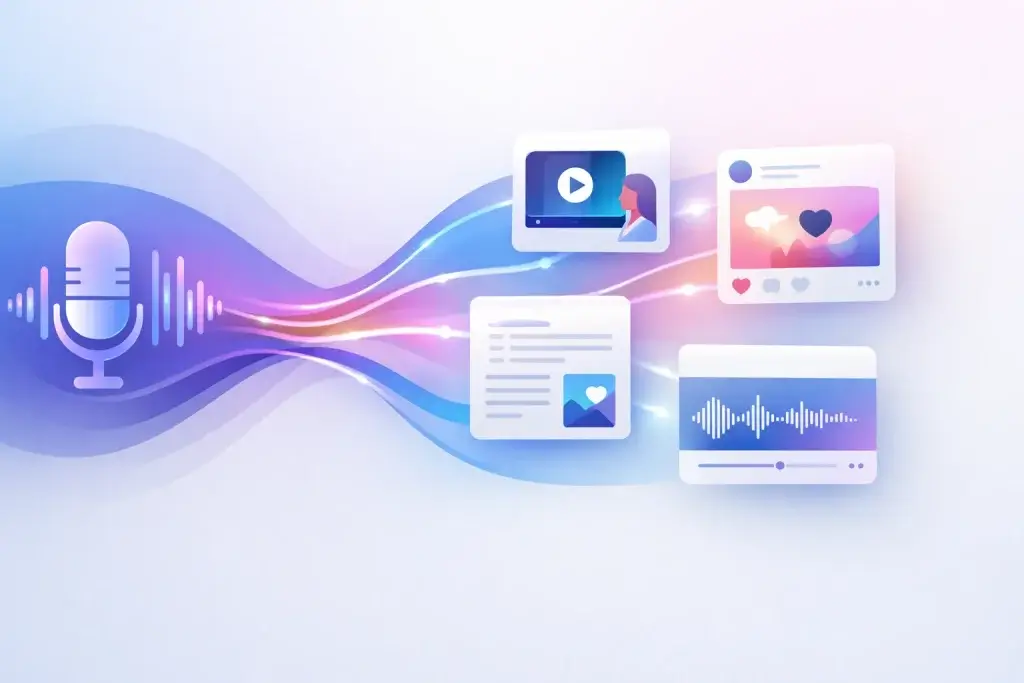
Beyond audience engagement, podcasts provide a library of evergreen content that works for you long after publishing. Episodes can be repurposed into blog posts, social media clips, newsletters, and even video content, amplifying your reach without extra work. Starting a podcast in 2026 is easier than ever, thanks to affordable gear and intuitive software. This guide breaks down each step so you can launch confidently and sustainably. A downloadable checklist appears later in this article to keep you organised.
Plan Your Podcast
Define Your Mission and Goals
Every successful podcast starts with a clear mission. Ask yourself why you want to create a show and what you hope listeners will gain. Examples include educating new designers about pricing, sharing wellness tips for busy parents, or interviewing experts in a niche industry. Keeping a single‑sentence mission statement visible during planning will keep you focused and motivated when downloads plateau.
Next, decide what success looks like for you. Goals might include attracting leads for your service, establishing thought leadership, building a supportive community, or simply having fun with friends. When you know your mission and goals, you can make strategic decisions about content, promotion, and monetization.
Identify Your Niche and Target Listener
A broad topic can feel appealing, but niche podcasts attract more loyal listeners. Research existing studies in your area of interest to find gaps you can fill. Use tools like Apple Podcasts’ search and “People Also Ask” on search engines to discover questions people are asking. Draft ten episode ideas. If you struggle after a few, narrow your topic.
Create an ideal listener persona. Outline their age, occupation, preferred social channels, and pain points. For example, “a 35‑year‑old freelance designer who wants to price projects confidently but dislikes sales tactics.” Tailoring each episode to this persona helps you speak directly to your audience’s needs and build trust.
Brainstorm and Validate Episode Ideas
Before recording, brainstorm a list of potential topics. Aim for at least ten to ensure sustainability. Consider solo lessons, guest interviews, Q&A sessions, or narrative storytelling. Validate ideas by asking potential listeners or peers whether the topics interest them. Validate further by researching keywords and search volume around your themes; this also informs future SEO efforts.
Name, Brand & Artwork
Picking a Memorable Podcast Name
Your podcast name is often the first impression listeners get. Keep it short, specific, and searchable; four words or fewer is ideal. Include a keyword your target audience might type into a search bar. Avoid inside jokes or overly clever titles that fail to convey the show’s purpose.
Once you have a name, check domain registries and social media handles to ensure availability. Matching names across platforms simplifies branding. Running your chosen name through a name checker helps avoid conflicts with existing shows or trademarks.
Writing a Concise, SEO‑Friendly Description
Write a description that summarises your podcast in the first 120 characters. This space appears prominently in directories and search results, so state your unique promise and incorporate one or two relevant keywords naturally. For example: “The Design Pricing Podcast helps freelance designers charge what they’re worth with practical lessons and interviews.” Use clear language and avoid jargon; a reader should know immediately whether the show is for them.
Designing Cover Art That Stands Out
Podcast cover art must be attractive at both large and tiny sizes (e.g., 3000 × 3000 pixels and 55 × 55 pixels). Opt for high‑contrast colours, avoid tiny text, and skip generic microphone graphics that make the show blend into a sea of similar covers. Online tools like Canva provide templates sized for podcast directories. When selecting images, ensure you have the right to use them.
Establishing Tone and Branding
Branding extends beyond visuals. Decide on your podcast’s tone: informal and conversational, formal and educational, or somewhere in between. This choice affects your script writing, intro music, and on‑air style. Consistency in tone helps listeners know what to expect and fosters loyalty. Consider commissioning a short intro jingle that matches your brand personality and use it consistently.
Choose Your Format & Structure
Comparison of Common Podcast Formats
Choosing the right format ensures your podcast matches your strengths and time commitment. Common formats include:
- Solo narrative: One host shares expertise or tells stories; low editing effort.
- Co‑hosted conversations: Two hosts discuss topics or react to news; requires coordination but adds chemistry.
- Interview: A host interviews guests; medium editing effort and good for networking.
- Scripted fiction or storytelling: Narrated stories with sound design; high production effort but highly engaging.
- Panel shows: Multiple participants discuss topics or answer questions; higher coordination but offers varied perspectives.
Choose a format that energises you and fits your schedule. If you love connecting with guests, an interview format might suit you; if you prefer control, solo episodes work well. Keep the group small for multi‑host shows to avoid scheduling headaches.
Determining Episode Length and Release Schedule
Match your episode length to your audience’s routines. Commuters might prefer 10‑to‑15‑minute micro‑lessons, whereas deep‑dive topics can run 30 to 45 minutes. True crime or narrative podcasts often exceed one hour to build tension. Pick a length you can sustain consistently rather than aiming for arbitrary numbers.
Consistency is critical. Decide on a release schedule – weekly, biweekly or monthly – and commit to it. Listeners develop habits around their favourite shows; erratic schedules lead to lost momentum. Batch recording episodes can help you maintain consistency, particularly around busy seasons.
Structuring Episodes to Keep Listeners Engaged
Plan your episodes to guide listeners smoothly. A typical structure includes a hook that teases the value of the episode, a brief intro with music, the main content broken into clear sections, and a closing segment with a call to action. Outline each episode to avoid rambling; even bullet points provide structure without sounding scripted. For interviews, prepare a loose question list while leaving room for organic conversation.
Gather Equipment & Prepare Your Recording Space
Essential Gear: Microphone, Headphones & Pop Filter
You don’t need a studio to sound professional; start with a basic setup and upgrade later. Essential equipment includes:
- Microphone: A dynamic USB microphone like the Samson Q2U strikes a balance between affordability and quality. Dynamic mics pick up less room noise, making them ideal for untreated spaces.
- Headphones: Closed‑back wired headphones prevent sound bleed and allow you to monitor your levels.
- Pop filter or foam windscreen: Placed in front of the mic, these reduce plosive sounds (such as “p” and “b”) that can cause spikes in your audio.
- Boom arm or mic stand: Keeps the microphone stable and at the correct height.
A simple desk and comfortable chair complete the setup. Don’t worry if you only have earbuds and a laptop mic to start; focus on your content and upgrade as you grow.
Budget, Mid‑Range and Premium Setup Options
| Setup Level | Recommended Gear | Approximate Cost |
| Budget | USB microphone (e.g., Samson Q2U), basic closed‑back headphones, pop filter, free editing software | Under $100 |
| Mid‑Range | Dynamic microphone with both USB/XLR (e.g., Shure MV7), audio interface, boom arm, monitoring headphones, entry‑level lighting for video | $300–$500 |
| Premium | Multiple dynamic microphones, professional mixer or recorder, treated recording room, HD camera for video podcasts | $1,000+ |
This table shows typical equipment stacks. Begin with the budget setup and invest more once you’re confident in your workflow and committed to long‑term podcasting.
Preparing a Quiet Space and Optimizing Acoustics
The room you record in matters as much as your gear. Hard surfaces cause sound reflections and echoes, so choose a space with carpets, curtains, and furniture to absorb sound. Walk‑in closets, small offices, or your car parked in a garage can all provide surprisingly good acoustics. Soft furnishings and rugs reduce reverberation; you can also hang blankets or foam panels on walls.
Place the microphone close, about 2–4 inches from your mouth, and maintain a consistent distance. Shut windows, silence phones, and turn off noisy appliances like refrigerators or air conditioning. For video, face natural light or use a simple ring light. A tidy background helps keep viewers focused on you.
Optional Extras for Video Podcasts
If you plan to record video podcasts, invest in an HD or mirrorless camera, a tripod, and basic lighting. A ring light or softbox positioned at eye level helps you appear clear and professional. Use the same microphone chain as your audio podcast to maintain sound quality. Remember that video adds editing and storage demands, so keep the workflow manageable.
Select Recording & Editing Software
Free and Paid Recording Tools
Recording quality depends largely on capturing separate audio tracks and avoiding compression. Popular tools include:
- Riverside, SquadCast, or Descript Rooms: Browser‑based services that record each participant locally and upload high‑quality files. They usually offer free plans with limitations and paid tiers for longer sessions or additional features.
- Zoom: Widely familiar and available, but the default settings compress audio. Turn on “original sound” and enable separate tracks to improve quality.
- Cleanfeed: Free, browser‑based and great for remote interviews.
- Smartphone apps: Many podcast hosting platforms offer mobile apps to record and upload directly, handy for on‑the‑go content.
For in‑person recording, you can connect USB microphones directly to your computer or use a portable recorder like the Zoom PodTrak P4 for multiple microphones.
Options for Remote Interviews
Remote interviews require reliable connections and clear audio. In addition to Riverside and SquadCast, consider sending your guest a simple USB microphone or headset if audio quality is critical. Always perform a short mic check with your guest before the session and remind them to wear wired earbuds. Encourage them to find a quiet space with minimal echo.
Editing Software and AI Tools
Editing shapes the listening experience. Choose software you feel comfortable using:
- Audacity: Free and open source, available on Windows, macOS and Linux. It offers robust features but has a steeper learning curve.
- GarageBand: Free for macOS and iOS users, with a user‑friendly interface.
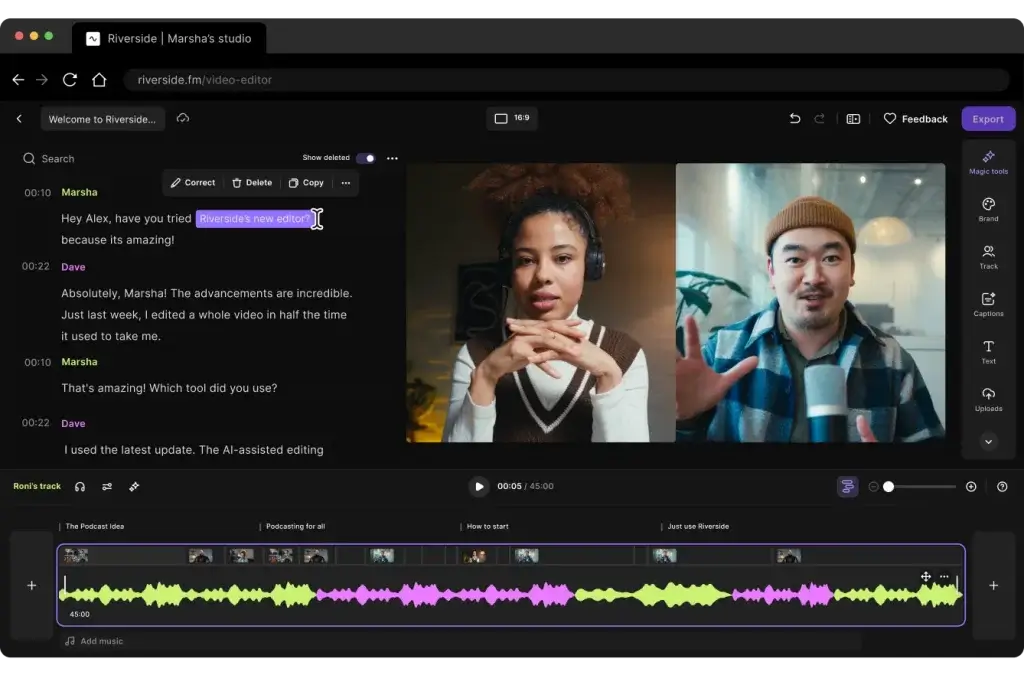
- Descript: A paid all‑in‑one tool that transcribes audio, allowing you to edit by cutting text. It’s powerful for creating clips and removing filler words.
- Adobe Podcast: Provides local recording and a clean interface with AI‑powered editing; free and paid plans available.
- Hindenburg Pro or Adobe Audition: Professional digital audio workstations for experienced editors seeking advanced control.
AI tools such as Auphonic automatically level audio, reduce noise, and enhance clarity. Use them as a first pass before manual editing.
Building a Repeatable Workflow
A repeatable workflow keeps you consistent. After recording, import files into your editor, label tracks, trim unwanted sections, and remove obvious mistakes. Use EQ and compression sparingly; your goal is to sound natural. Add intro and outro music, balance volumes, and export in WAV for archival and MP3 (128 kbps joint stereo) for distribution. Save presets to speed up future edits. Finally, upload the episode to your host, complete the show notes, and schedule the release.
Record Your First Episode
Crafting Outlines and Scripts
Rambling is a common pitfall for new podcasters. An outline helps you stay focused and maintain a logical flow. Create a brief list of key points or questions rather than a word‑for‑word script; this keeps your delivery natural. If you’re working with a co‑host, share the outline in advance to coordinate. For story‑driven podcasts, script your narrative to ensure pacing and clarity.
Mic Technique and Voice Coaching
Speak directly into your microphone at a consistent distance of 2-4 inches. Use a pop filter to reduce plosives. Maintain good posture to improve breath control and clarity. Warm up your voice before recording by humming or reading aloud for a few minutes. Avoid tapping the table or making rustling noises that the mic can pick up.
Tips for Solo Shows, Co‑Hosts and Guests
For solo shows, imagine speaking to a specific person; this keeps your tone conversational and engaging. For co‑hosted shows, practise active listening, avoid interrupting, and build on each other’s points. Establish hand signals or cues if you’re in the same room, so you know when to speak. When interviewing guests, research their background, prepare questions, and allow space for follow‑up questions. Provide guests with guidelines on audio quality and send them an outline of the conversation.
Running Test Recordings and Backups
Always record a short test before starting your episode. Check levels, listen for hums or background noise, and adjust accordingly. Record separate tracks for each participant and save backups locally in case of connection issues. For remote interviews, ask guests to record a local audio file on their end if possible. Backups prevent lost episodes and reduce stress.
Edit and Polish Your Podcast
Cleaning Up Audio and Reducing Noise
Editing begins with removing distractions. Use noise reduction tools sparingly to eliminate hiss or background hum. Apply gentle compression and equalization to balance your voice and make it more pleasant to listen to. Tools like Auphonic or built‑in noise filters in your editor can automate some of this process.
Adding Intro/Outro Music and Transitions
Intro and outro segments set expectations and reinforce your brand. Use royalty‑free or custom‑composed music that matches your podcast’s mood. Keep intros short, under 30 seconds, and clearly state the episode’s value. Use simple transitions, such as a short stinger or musical cue, to signal topic changes. Avoid overusing sound effects; subtlety maintains professionalism.
Creating Transcripts and Show Notes
Transcripts improve accessibility for hearing‑impaired audiences and enhance search visibility. Many editing tools, like Descript, generate transcripts automatically. Publish transcripts alongside show notes on your website. In your notes, summarise key takeaways, list resources mentioned, and include links. Well‑structured show notes encourage sharing and improve SEO.
Keeping Edits Minimal Yet Professional
While you want clean audio, over‑editing can strip out authenticity. Leave natural breaths and occasional imperfections that make you sound human. Focus on removing dead air, filler words, and obvious mistakes. The goal is a polished yet organic listening experience.
Host & Publish Your Podcast
Choosing a Podcast Host and Generating an RSS Feed
A podcast host stores your audio files, creates your RSS feed, and distributes your show to directories. Popular hosts include Buzzsprout, Libsyn, RSS.com, Spreaker, Anchor (Spotify for Podcasters), and Podigee. Evaluate hosts based on storage limits, analytics, pricing, and ease of use.
Set up your show in the hosting dashboard by entering your podcast name, description, categories, and cover art. Upload your audio file, add episode titles and descriptions, and set the release date. The host generates an RSS feed URL – a machine‑readable file that podcast directories use to fetch your episodes.
Submitting to Directories like Apple Podcasts, Spotify, and YouTube
Podcast discoverability depends on listing your show on major platforms. Sign in to Apple Podcasts Connect with an Apple ID, submit your RSS feed, and verify ownership. In Spotify for Podcasters, claim your show or set up your feed within the platform. For YouTube, you can upload audio episodes with a static image or use RSS ingestion if available in your region. Validate your RSS feed using the tools provided by hosts to avoid errors.
Understanding RSS and Metadata Requirements
An RSS feed contains metadata such as your podcast title, author name, description, episode titles, publication dates, and file URLs. Keep metadata consistent and accurate; changes to your feed may take time to propagate across platforms. If you ever switch hosts, set up a 301 redirect to preserve subscribers and avoid breaking links.
Scheduling Releases and Maintaining Consistency
Use your hosting platform’s scheduling tools to publish episodes at optimal times for your audience. Check analytics to determine when listeners engage the most and adjust release times accordingly. Maintaining a consistent schedule builds trust and keeps listeners returning. Avoid frequently changing your schedule without notice; if you need to take a break, inform your audience.
Optimize for SEO & LLM Search
Incorporating Keywords into Titles and Descriptions
Search engine optimization helps new listeners discover your podcast. Include your primary keyword, such as “how to start a podcast,” in your show title, H1 tags, and the first 100 words of your descriptions. Use secondary keywords naturally in headers, episode titles, and show notes. Avoid keyword stuffing; readability always comes first.
Using Transcripts and Alt Text for Accessibility
Publishing full transcripts alongside each episode improves accessibility and gives search engines more content to index. Include descriptive alt text for images used on your website, summarising the image’s content with relevant keywords. If you embed audio players, ensure they have accessible controls.
Implementing Schema Markup for FAQs
Structured data helps search engines understand your content. Use the FAQPage schema on pages with frequently asked questions. Include clear questions and concise answers so language models and search engines can feature them in rich snippets. Use the same markup for how‑to content if you break down complex processes.
Building Backlinks and Cross‑Linking Episodes
Backlinks from reputable sites boost your search ranking. Pitch guest posts on related blogs, appear on other podcasts and share your episodes across communities with a link back to your site. Within your own site, link related episodes and relevant articles to encourage deeper engagement and signal topic relevance to search engines.
Promote & Grow Your Podcast
Repurposing Episodes into Blog Posts and Clips
Repurposing content maximises your reach. Turn each episode into a blog post summarising key points; embed the audio player and transcript to cater to different preferences. Create short video or audio clips (30–60 seconds) highlighting memorable moments for social media. Tools like Descript or Canva make it easy to create captions and resize clips for platforms like TikTok, Instagram, and LinkedIn.
Leveraging Social Media and Email Newsletters
Social media platforms help you reach new audiences and remind existing listeners about new episodes. Share behind‑the‑scenes photos, episode teasers, and quotes. Use relevant hashtags and tag guests to increase exposure. Build an email list to alert subscribers when new episodes drop. Include exclusive insights or tips to incentivise sign‑ups and maintain engagement.
Collaborating with Guests and Other Shows
Invite guests who resonate with your target audience. Guests often share episodes with their networks, introducing your show to new listeners. Similarly, cross‑promote with similar‑sized podcasts by swapping trailers or appearing on each other’s shows. Collaboration broadens your network and adds credibility.
Encouraging Reviews and Listener Engagement
Ask listeners to leave reviews and ratings on platforms like Apple Podcasts and Spotify. Positive reviews improve visibility and social proof. Engage with listeners by answering questions, reading listener feedback on air or hosting Q&A episodes. Building a community around your podcast fosters loyalty and word‑of‑mouth referrals.
Monetize & Scale
Advertising and Sponsorship Options
Monetization usually follows audience growth, but planning early helps you capitalise when ready. Dynamic ads inserted by your host allow you to sell your own slots or join ad marketplaces. Sponsorships pay you to read an ad for a relevant product or service; rates often depend on your audience size and niche. Always disclose sponsorships to maintain trust.
Affiliate Marketing and Product Sales
Affiliate marketing involves promoting products or services and earning a commission on sales generated through your unique link. Choose affiliates that align with your content and provide value to listeners. You can also sell your own products, such as e‑books, courses or merchandise, to diversify revenue streams.
Memberships and Premium Content
Platforms like Patreon or Supercast enable listeners to pay for bonus episodes, early releases or community access. Offering ad‑free versions or exclusive Q&A sessions incentivises membership. Clearly communicate the benefits and price points, and consistently deliver promised content.
Tracking Analytics and Adjusting Strategy
Use your host’s analytics and external tools to measure downloads, listener retention and geographic distribution. Note which episodes perform best and adjust your content accordingly. Track conversion metrics for ads or affiliate links to evaluate monetization strategies. Data‑driven decisions will help you refine topics, format and marketing.
Launch Day Checklist
Launching a podcast involves many moving parts. Use this checklist to stay on track:
- Mission statement defined and ten episode ideas outlined.
- Podcast name, description, and cover art finalised.
- Equipment tested, recording space prepared, and pop filter installed.
- Recording and editing software selected with a preset workflow.
- First three episodes recorded, edited, and exported in WAV and MP3.
- RSS feed created with chosen host and metadata filled out.
- Accounts set up on Apple Podcasts, Spotify and YouTube; RSS feed submitted.
- Trailer or teaser episode uploaded and scheduled.
- Show website or landing page created with transcripts and episode notes.
- Social media graphics, email newsletter and promotional clips prepared.
- Backup copies of audio files stored locally and on external drives.
- Celebrate your launch and start planning episode four!
Free Checklist & Resources
To simplify your journey, download our free printable checklist (link at the end). It summarises the steps above in a single page, which you can tick off as you progress. Below is a table comparing equipment setups to help you choose the right gear:
| Feature Type | Budget Setup | Mid‑Range Setup | Premium Setup |
| Microphone | USB dynamic mic (Samson Q2U) | USB/XLR hybrid (Shure MV7) | Multiple dynamic mics with mixer |
| Headphones | Basic closed‑back wired | Studio monitoring (Audio‑Technica M50x) | Professional studio monitors |
| Recording Device | Computer or smartphone | Audio interface plus computer | High‑end recorder and treated room |
| Software | Audacity or GarageBand | Descript or Adobe Podcast | Hindenburg Pro or Adobe Audition |
| Video Equipment | Not included | Entry‑level ring light | HD camera and lighting kit |
Conclusion: Start Your Podcast Today
Starting a podcast is an achievable goal with the right preparation. By defining your mission, choosing a sustainable format, securing basic equipment, and following a repeatable workflow, you can produce professional‑sounding episodes that resonate with your audience. Plan, record, edit, publish, and promote using the steps outlined here, and refer back to the checklist whenever you feel overwhelmed. Remember, the value you provide matters more than perfect audio or fancy gear. Start today, share your voice, and watch your community grow.
Want to explore the best podcast recording tools in more detail? Compare features, pricing, and AI capabilities in our comprehensive guide.
FAQ
What equipment do I need to start a podcast?
At a minimum, you need a microphone, headphones, a pop filter, and a computer or smartphone to record. A dynamic USB microphone like the Samson Q2U is an affordable choice. Invest in a boom arm and closed-back headphones as you grow.
How much does it cost to start a podcast?
You can start for free or under $100 by using a simple USB mic, free recording software, and a quiet room. Costs increase if you add interfaces, mixers, cameras, or paid software. Start small and upgrade once you’re committed.
How long should podcast episodes be?
Episode length depends on your content and audience. Micro-lessons can be 10–15 minutes, while interviews and deep dives often run 30–45 minutes. The key is consistency in choosing a length you can sustain.
Do I need a website for my podcast?
While not mandatory, a website provides a central hub for episodes, show notes, transcripts, and subscription links. It improves discoverability and gives you full control over your brand. Many hosts offer simple website builders if you don’t want to build from scratch.
What is a podcast host, and why do I need one?
A podcast host stores your audio files, creates an RSS feed, and distributes your show to directories. Hosts manage storage, bandwidth, and analytics, so you don’t need to handle technical setup. Popular hosts include Buzzsprout, Libsyn, and Podigee.
How do I record remote interviews?
Use platforms like Riverside, SquadCast, or Zoom with “original sound” enabled to capture each participant locally. Ask guests to use wired headphones and find a quiet space. Consider having them record a backup audio file on their end.
Do I need to write a script?
Scripts help you stay organised, but can sound stiff if read verbatim. Instead, create a detailed outline or bullet list of key points. For narrative podcasts, a full script ensures pacing and clarity; for interviews, prepare questions but leave room for spontaneity.
How do I promote my podcast after launching?
Repurpose episodes into blog posts and short clips for social media, build an email list to notify listeners of new releases, and collaborate with guests and other podcasters to expand your reach. Encourage listeners to leave reviews and share episodes.
When should I monetize my podcast?
Focus on building a loyal audience before pursuing monetization. Once you have consistent downloads, explore sponsorships, affiliate partnerships, membership programs, or selling your own products. Always prioritise value for your listeners.
What’s the ideal release schedule?
Choose a schedule you can maintain, weekly, biweekly, or monthly. Consistency is more important than frequency. Batch record episodes to stay ahead and avoid last-minute stress, and communicate your schedule clearly to listeners.