Introduction
If you are looking for an AI meeting assistant that can record meetings, transcribe conversations, summarize key points, and push follow-up notes into your workflow, Fireflies.ai is one of the strongest tools to consider.
Fireflies is not only a basic AI note taker. In 2026, it is better described as a meeting intelligence platform for teams that want searchable transcripts, automated summaries, CRM-ready notes, collaboration features, and AI-powered workflow automation.
That broader positioning matters. If your meetings include sales calls, customer success check-ins, interviews, internal project updates, recruiting conversations, or research sessions, Fireflies can help you turn spoken conversations into organized business knowledge.
In this Fireflies Review 2026, you will learn how Fireflies works, where it performs best, how much it costs, what its AI credits mean, how secure it is, and how it compares with tools like ClickUp Note Taker, Fathom, and Krisp.
Quick Overview
What is Fathom
Fireflies.ai is an AI-powered meeting assistant that records, transcribes, summarizes, searches, and analyzes conversations across popular meeting platforms. It works with tools like Zoom, Google Meet, Microsoft Teams, Webex, calendars, CRMs, collaboration apps, and file uploads.
The platform was launched in 2016 by Krish Ramineni and Sam Udotong. The original goal was straightforward: help professionals avoid manual note-taking and make meeting information easier to find after the call ends.
Since then, Fireflies has grown beyond transcription. It now includes AI summaries, AskFred, AI Skills, conversation intelligence, topic tracking, CRM automation, mobile recording, desktop recording, and Voice Agents for structured business conversations.
Where Fireflies Fits in the AI Note-Taking Space
The AI note-taking market is crowded, but Fireflies stands out because it combines meeting capture with workflow automation. Many AI notetakers can generate summaries, but fewer tools connect meeting content deeply with CRMs, collaboration platforms, team analytics, and searchable knowledge bases.
Fireflies is especially strong when you need more than a recap. It helps you build a meeting archive that your team can search, share, comment on, and reuse across sales, support, operations, product, recruiting, and research workflows.
Its main strengths include:
- Automatic meeting recording and transcription
- AI summaries, action items, and smart search
- CRM, calendar, and collaboration integrations
- Team workspaces, comments, channels, and analytics
- AskFred, AI Skills, and Voice Agents for advanced workflows
Ideal Use Cases for Fireflies.ai
Fireflies works well for several types of users, but it is strongest when meetings are frequent, information-rich, and tied to follow-up work.
- Sales teams can log call notes, track objections, and improve handoffs.
- Customer success teams can document customer issues, renewals, and next steps.
- Remote teams can create a shared record of decisions and action items.
- Recruiters can capture interviews and review candidate conversations.
- Researchers and creators can transcribe interviews, podcasts, and field notes.
If your meetings create important information that people need later, Fireflies can help you capture it more consistently.
Key Features
AI Notes, Transcription, Search, and Automation
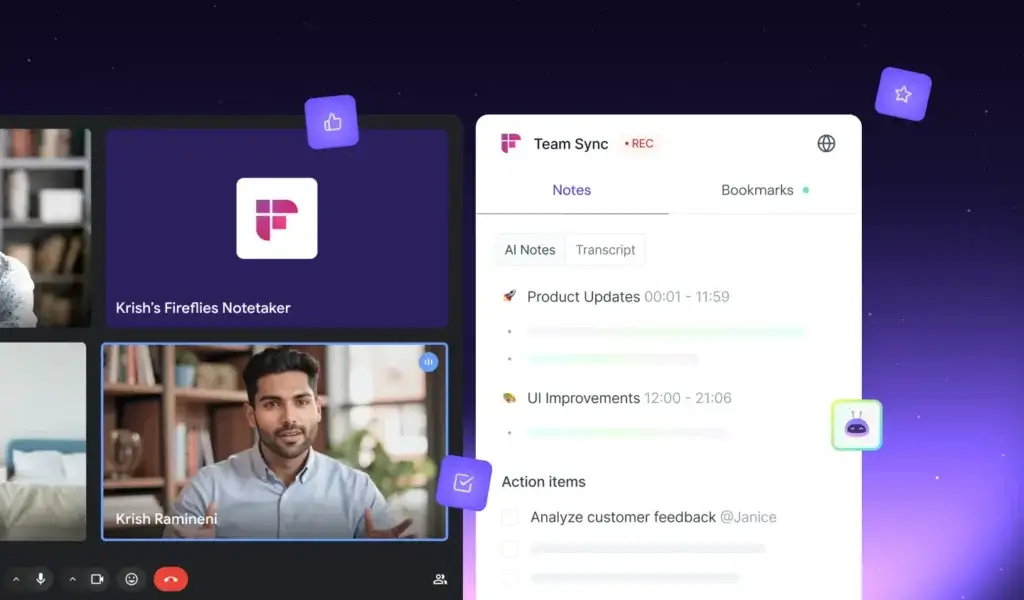
Fireflies is designed to reduce the manual work that happens before, during, and after meetings. It can join scheduled calls, record conversations, generate transcripts, summarize decisions, extract action items, and help your team search old conversations later.
Real-Time Transcription and Speaker Identification
Fireflies can transcribe conversations from online meetings, uploaded files, mobile recordings, dialer calls, and browser-based meetings. It supports popular platforms such as Zoom, Google Meet, Microsoft Teams, and Webex.
Fireflies claims high transcription accuracy, but real-world quality still depends on your audio setup. Background noise, overlapping speakers, strong accents, poor microphones, and industry-specific vocabulary can still affect results.
Key transcription features include:
- Live meeting capture across major video conferencing platforms
- Speaker labels to help you understand who said what
- Searchable transcripts with timestamps and playback
- Custom vocabulary for names, acronyms, and technical terms
- Support for multilingual meeting transcription
Practical note: You should still review important transcripts before sending them to clients, prospects, legal teams, or executives. AI transcription is useful, but it should not replace human review for sensitive content.
AI Summaries, Action Items, and Meeting Recaps
Fireflies automatically generates meeting summaries so you do not need to rewatch full recordings or scan long transcripts manually. This is one of its biggest productivity advantages.
The AI can identify:
- Key decisions made during the meeting
- Action items and owner-related commitments
- Important timestamps and discussion highlights
- Questions, objections, and next steps
- Short summaries for fast stakeholder updates
This is particularly valuable for recurring client calls, product meetings, sales demos, and internal syncs where the follow-up matters as much as the conversation itself.
AskFred: Search and Ask Questions Across Meetings
AskFred is Fireflies’ AI assistant for asking questions about your meeting content. Instead of opening a transcript and searching manually, you can ask questions such as “What were the next steps from the sales call?” or “What concerns did the customer mention?”
This turns Fireflies into more than a storage system. It becomes a searchable meeting knowledge base.
For teams, this is especially useful when you want to understand what was discussed across multiple customer conversations, interviews, or internal meetings without reading every transcript from start to finish.
AI Skills for Meeting Workflow Automation
Fireflies also includes AI Skills, which are pre-built and customizable AI workflows that can turn meeting content into practical outputs. These can help generate follow-up emails, reports, scorecards, meeting summaries, customer insights, and structured notes.
For example, a sales manager can use AI Skills to analyze discovery calls, while a product team can use them to extract recurring feature requests from research interviews.
This is one of the more important changes in Fireflies because it moves the tool beyond passive note-taking. Instead of only documenting what happened, Fireflies can help you create useful business outputs from the conversation.
Integrations and Supported Platforms
Fireflies connects with a wide range of tools across video conferencing, calendars, CRM, collaboration, storage, and productivity. This makes it easier to move meeting information into the systems your team already uses.
Common integrations include:
- Video conferencing: Zoom, Google Meet, Microsoft Teams, Webex
- Calendars: Google Calendar and Outlook Calendar
- CRM tools: Salesforce, HubSpot, Pipedrive, and related sales tools
- Collaboration: Slack, Notion, Trello, and other team platforms
- Storage: Dropbox, OneDrive, Box, and Google Drive
Once integrations are configured, Fireflies can help automate workflows such as sending summaries to Slack, logging notes in your CRM, storing recordings in cloud drives, or pushing action items into task management systems.
Collaboration, Channels, and Note Sharing
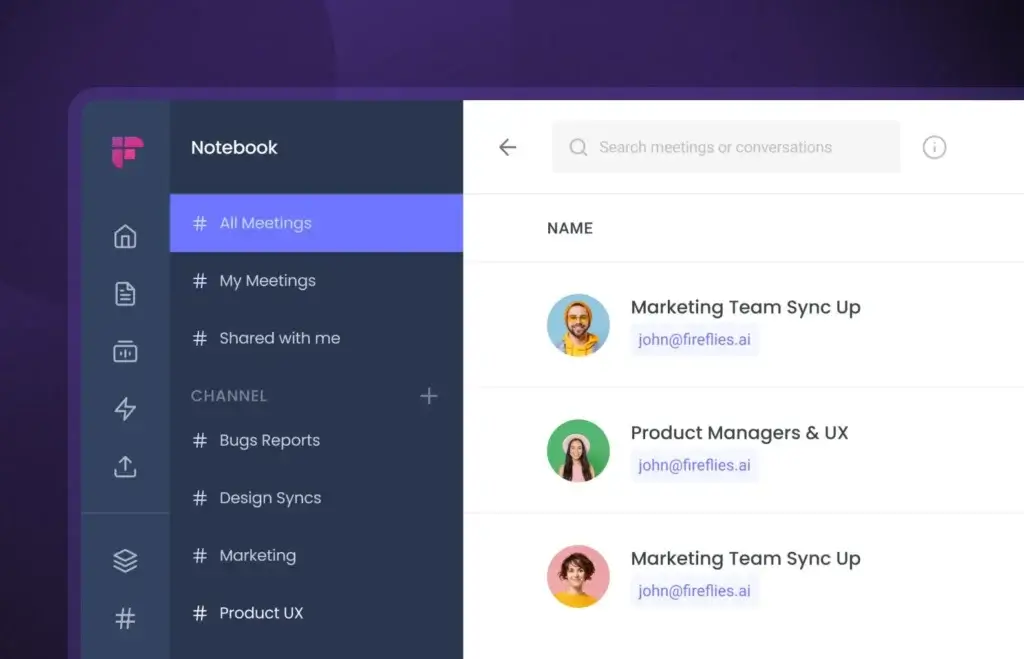
Fireflies works well for teams because meeting notes are not trapped inside one person’s inbox. You can organize meetings, share transcripts, comment on important moments, and collaborate on follow-up actions.
Team collaboration features include:
- Shared workspaces for team meeting libraries
- Channels for organizing conversations by team, client, or project
- Comments, highlights, and timestamps
- Transcript and recording sharing
- Exports to formats such as PDF, DOC, or shareable links
This is helpful when a stakeholder misses a meeting, a manager wants to review a customer conversation, or a sales team needs a clean record of what was promised during a call.
Voice Agents: A Newer Fireflies Capability
Fireflies Voice Agents are designed for structured conversations such as sales discovery, inbound lead qualification, recruiting screens, and user research interviews. Instead of only recording a meeting, a Voice Agent can help conduct a repeatable conversation based on predefined logic.
This is not necessary for every user. If you only need meeting summaries, you may not use Voice Agents at all. But for teams running repeatable workflows, this feature shows where Fireflies is heading: from AI notetaker to AI conversation automation platform.
Voice Agents are best suited for workflows where you already know the questions, need consistent documentation, and want to reduce repetitive manual calls.
User Experience and Interface
How Does Everyday Work with Fireflies Look?
Fireflies is built to stay out of the way during meetings and become useful immediately after the conversation ends. The experience is fairly simple: connect your calendar, choose which meetings Fireflies should join, review the transcript, and share or export the summary.
Dashboard and Meeting Library
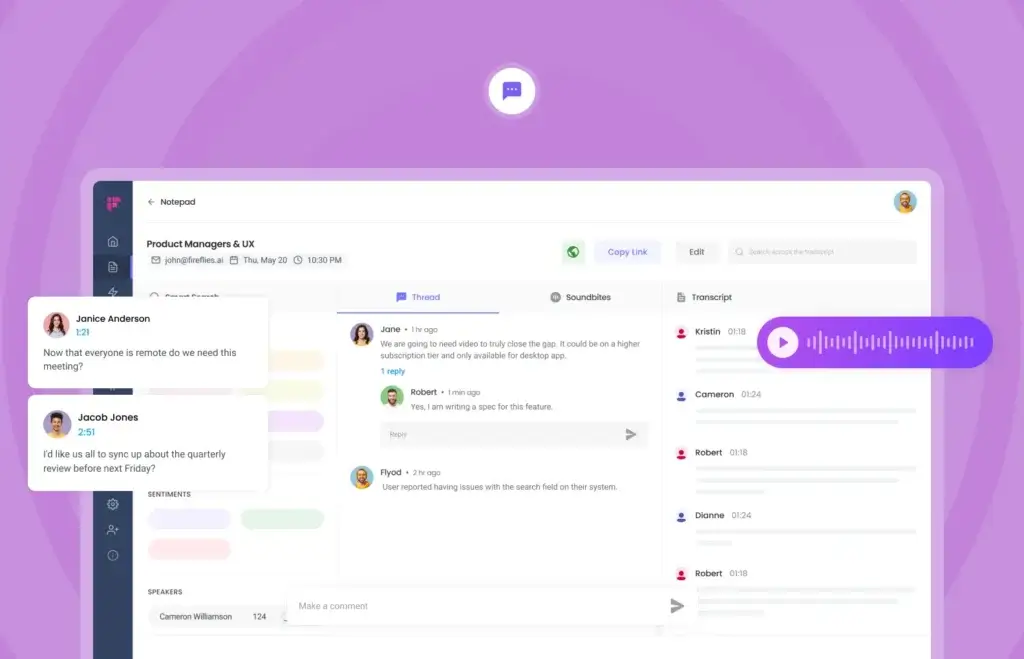
The Fireflies dashboard gives you a central place to manage your conversations. You can view past meetings, upcoming meetings, transcripts, summaries, action items, topic trackers, and shared channels.
The most useful part is search. Once your meetings are inside Fireflies, you can search by keyword, speaker, topic, or meeting. This is useful when you need to remember what a customer said three weeks ago or find a decision from a previous internal meeting.
Web, Chrome Extension, Desktop App, and Mobile App
Fireflies is available across multiple access points, which makes it flexible for different meeting styles.
- Web app: Best for reviewing transcripts, summaries, channels, and integrations.
- Chrome extension: Useful for browser-based meetings and quick recording workflows.
- Desktop app: Helpful for users who want more control over meeting capture.
- Mobile apps: Useful for in-person meetings, voice notes, lectures, interviews, and field work.
The mobile app is particularly useful if you capture conversations outside your normal video meeting stack. For example, journalists, consultants, students, and researchers can record conversations and sync them into the Fireflies workspace later.
Meeting Bot and Auto-Join Controls
Fireflies can automatically join scheduled meetings from your connected calendar. This is convenient for busy users, but it also means you should configure auto-join rules carefully.
You can control which meetings Fireflies joins, when it should stay out, and how attendees are informed. This is important for sensitive meetings, internal HR conversations, legal discussions, or calls where recording consent must be clearly handled.
Learning Curve
Fireflies is easy to start using, but teams will get more value if they spend time setting up channels, integrations, folders, sharing rules, consent preferences, and CRM workflows.
For a solo user, setup can be quick. For a team, the first week should include basic governance decisions, such as who can access recordings, which meetings should be recorded, how long data should be retained, and where summaries should be sent.
Pros and Cons
Fireflies Advantages and Disadvantages
Fireflies is one of the more complete AI meeting assistants, but it is not the simplest or cheapest option for every user. Its biggest strength is workflow depth. Its biggest limitation is that advanced features, storage, team controls, and AI credit usage require closer plan evaluation.
Positive
✅ Strong AI summaries and searchable transcripts
✅ Useful CRM and collaboration integrations
✅ AskFred and AI Skills add workflow depth
✅ Good fit for sales, CS, recruiting, and research teams
✅ Strong privacy and admin controls on higher plans
Negative
❌ AI credits make pricing harder to evaluate
❌ Some advanced features require Business or Enterprise
❌ Transcript quality still depends on audio quality
❌ Bot-based recording may not fit every meeting culture
❌ Sensitive teams need clear recording policies
Fireflies Pros
1. Strong AI summaries and meeting search
Fireflies makes it easy to capture conversations and return to important details later. This is valuable when your team handles many calls and cannot rely on memory or scattered notes.
2. Excellent fit for business workflows
The platform is especially useful for teams that want meeting notes connected to CRMs, Slack, Notion, project tools, or shared documentation systems.
3. AskFred adds real knowledge-base value
AskFred helps you ask questions about meeting content instead of manually digging through transcripts. This can save meaningful time for managers, sales teams, and customer-facing roles.
4. AI Skills increase automation potential
AI Skills help turn meetings into follow-up emails, reports, scorecards, and other structured outputs. This makes Fireflies more useful than a simple transcript generator.
5. Stronger enterprise controls than basic notetakers
Fireflies offers compliance, admin, retention, and privacy features that make it more suitable for larger teams and regulated workflows.
Fireflies Cons
1. AI credits need careful attention
Some advanced features use AI credits, so the subscription price may not tell the full cost story for teams that plan to use Voice Agents, Sales Assist, CRM Autofill, or advanced AI workflows heavily.
2. Advanced features are not evenly available across all plans
Basic users can get started quickly, but teams that want deeper analytics, conversation intelligence, and enterprise controls will likely need Business or Enterprise.
3. Transcripts may still require cleanup
Fireflies is accurate enough for many business uses, but names, technical terms, acronyms, accents, and overlapping conversations can still require manual correction.
4. Meeting bots can feel intrusive
Some companies and clients are uncomfortable with AI bots joining calls. If that is your environment, you need to be intentional about consent, recording notices, and meeting settings.
5. It may be too much for simple personal note-taking
If you only need a free personal AI note taker, Fireflies may feel more complex than necessary. Fathom may be a better fit for that narrow use case.
Pricing and Plans
How Much Does Fireflies Cost?
Fireflies uses a freemium pricing model with Free, Pro, Business, and Enterprise plans. Pricing is competitive in the AI meeting assistant category, but you should evaluate both plan limits and AI credits before choosing a tier.
Here is the current Fireflies pricing structure to use as a practical reference. You should always confirm the latest details on the official Fireflies pricing page before publishing or making a purchase decision.
| Plan | Price | Best For | Key Features |
| Free | $0 | Individuals testing Fireflies | Unlimited transcription, AI summaries, limited storage, AskFred, mobile app, Chrome extension, file uploads |
| Pro | $10/seat/month annually or $18 monthly | Solo professionals and small teams | 8,000 minutes of storage per seat, downloads, smart search, integrations, custom vocabulary, AI Skills, 20 AI credits |
| Business | $19/seat/month annually or $29 monthly | Growing teams | Unlimited storage, video recording, conversation intelligence, team analytics, unlimited integrations, priority support, 30 AI credits |
| Enterprise | $39/seat/month annually | Large teams and regulated organizations | SSO, SCIM, audit logs, HIPAA compliance, private storage, custom retention, dedicated support, 50 AI credits |
What Is Included in the Free Plan?
The Free plan is no longer best described as a plan with only limited transcription minutes. It is more useful than that. Fireflies currently positions the Free plan around unlimited transcription and AI summaries, with restrictions around storage and advanced features.
This makes it a good starting point if you want to test the interface, record a few meetings, review the summary quality, and understand whether the meeting bot fits your workflow.
However, the Free plan is not ideal for serious team usage. If your meeting volume is high or you need storage, integrations, analytics, or stronger admin controls, you will likely need a paid plan.
Which Fireflies Plan Should You Choose?
Choose Free if you are testing Fireflies or only need occasional meeting notes.
Choose Pro if you are a solo consultant, freelancer, recruiter, or small-team user who wants more storage, downloads, search, and integrations.
Choose Business if you manage a team and need unlimited storage, conversation intelligence, team analytics, video recording, and stronger collaboration features.
Choose Enterprise if you need SSO, SCIM, audit logs, HIPAA support, private storage, custom retention, and enterprise governance.
Fireflies AI Credits Explained
AI credits are an important part of Fireflies pricing. They power advanced AI features beyond standard transcription and summaries.
According to Fireflies, AI credits can be used for features such as Voice Agents, Sales Assist, Slack Assistant, AI Skills, custom summary sections, AskFred on Live Assist, and CRM Autofill. Credits are shared within the team and do not automatically multiply with every teammate.
This matters because a team using Fireflies only for transcripts may not care much about credits. A sales team using Voice Agents, Sales Assist, and CRM Autofill should estimate expected usage before choosing a plan.
For example, if your team runs many structured sales calls through Voice Agents, AI credits can become a more important part of the cost calculation than the base subscription price alone.
Privacy, Compliance, and AI Data Handling
Is Fireflies Secure?
Security is one of the most important evaluation points for any AI meeting assistant. Fireflies may capture sensitive information from customer calls, sales calls, internal strategy meetings, HR conversations, healthcare discussions, or legal updates.
Fireflies states that it supports major compliance and security standards, including SOC 2 Type II, GDPR, HIPAA, and privacy-focused enterprise controls. It also offers features such as private storage, custom data retention, a Rules Engine, Super Admin controls, and vendor retention policies for enterprise customers.
Security features to review include:
- SOC 2 Type II compliance
- GDPR support
- HIPAA support for eligible enterprise use cases
- Private storage options
- Custom retention policies
- Audit logs and admin controls on enterprise plans
- Access controls for transcripts, recordings, and shared workspaces
You can review more details on the official Fireflies security page and Fireflies Trust Center.
Does Fireflies Use Your Meeting Data to Train AI Models?
This is a critical question for businesses. Fireflies states in its public materials that customer data is not used to train shared AI models. That is important for companies concerned about confidential meeting content becoming part of a broader AI training set.
Still, you should review Fireflies’ latest data processing terms, trust documentation, and plan-level controls before using it for highly sensitive conversations. This is especially important if you work in healthcare, finance, legal services, enterprise sales, or regulated industries.
Meeting Consent and Recording Laws
Even if Fireflies is technically secure, your team is still responsible for using it appropriately. Recording laws vary by location, industry, and meeting context.
For best practice, notify attendees when Fireflies is recording, avoid auto-joining sensitive meetings without review, and create internal policies that define which meetings can be recorded and who can access the transcripts.
Who Should Use It?
Is Fireflies The Right Fit For Your Workflow?
Fireflies is best for users and teams that treat meetings as important business records. If your conversations include decisions, requirements, objections, customer feedback, commitments, or follow-up tasks, Fireflies can save time and reduce information loss.
Best for Sales and Customer Success Teams
Fireflies is very strong for sales and customer success because these teams need accurate notes, fast follow-ups, CRM updates, and searchable customer history.
Sales teams can use Fireflies to:
- Capture discovery calls and demos
- Track objections, pricing concerns, and next steps
- Auto-log notes into CRMs like Salesforce or HubSpot
- Improve handoffs from sales to customer success
- Coach reps using conversation intelligence
For revenue teams, Fireflies is more valuable when it is connected to the CRM and not used as a standalone transcript archive.
Best for Remote and Hybrid Teams
Remote teams often struggle with meeting documentation. Fireflies helps create a shared record of what was discussed, what was decided, and what needs to happen next.
This is useful when team members work across time zones, miss meetings, or need to revisit decisions later. It can also reduce the need for repeated status updates because people can review summaries instead of asking for a recap.
Best for Recruiters, Researchers, and Content Creators
Recruiters can use Fireflies to capture interview notes. Researchers can use it for qualitative conversations and user interviews. Content creators can use it to transcribe podcasts, expert interviews, and brainstorming sessions.
The key benefit is speed. Instead of listening to an entire recording again, you can search the transcript, highlight useful sections, and export the content for your next workflow.
Who Should Not Use Fireflies?
Fireflies may not be the best fit if you only need a lightweight free personal notetaker, if your company does not allow meeting bots, or if your work requires fully offline transcription.
It may also be too advanced if you do not need integrations, CRM logging, team collaboration, AI Skills, or searchable meeting intelligence. In that case, a simpler tool may be easier to adopt.
Fireflies Alternatives
Comparison With Other AI Note Takers
Fireflies competes in a fast-growing market that includes AI meeting assistants, transcription tools, audio enhancement tools, and project management platforms with built-in AI notes. The best choice depends on whether you need simple notes, sales intelligence, project workflows, or better audio quality.
| Tool | Best For | Main Strength | Main Limitation |
| Fireflies.ai | Teams needing searchable meeting intelligence and automation | Transcripts, AI summaries, CRM workflows, AskFred, AI Skills, Voice Agents | AI credits and advanced plan features need careful review |
| ClickUp Note Taker | Teams already managing work in ClickUp | Meeting notes connected to tasks, docs, and projects | Not as strong as a standalone meeting transcription platform |
| Fathom | Individuals and teams wanting a generous free AI notetaker | Free unlimited recordings, transcription, and summaries | Less workflow-heavy than Fireflies for sales and team automation |
| Krisp | Professionals who prioritize call audio quality | Noise cancellation plus meeting notes | Not as deep for searchable meeting intelligence or CRM workflows |
Fireflies.ai vs ClickUp Note Taker
ClickUp Note Taker is a good option if your team already lives inside ClickUp and wants meeting notes connected directly to tasks, docs, and project workflows.
Its strength is not standalone transcription depth. Its strength is that meeting-related work can stay inside the same project management ecosystem where your team already plans and executes tasks.
👉🏼 Read Full ClickUp Note Taker review or visit ClickUp Note Taker directly
Choose Fireflies if you want stronger meeting transcription, a searchable meeting library, CRM workflows, and dedicated AI meeting intelligence. Choose ClickUp Note Taker if your priority is keeping meeting outputs inside your project management system.
Fireflies vs Fathom
Fathom is one of the strongest Fireflies alternatives for users who want a generous free AI notetaker. It offers unlimited recording, transcription, and summaries on its free individual plan, making it very attractive for solo users.
The comparison has changed. Fathom is no longer only a Zoom-focused tool. It now supports major meeting platforms including Zoom, Google Meet, and Microsoft Teams.
👉🏼 Read Full Fathom review here or visit Fathom website
Choose Fathom if you want a simple, generous, and fast free AI notetaker. Choose Fireflies if you need deeper CRM integrations, AskFred, AI Skills, team analytics, admin controls, and more advanced meeting intelligence.
Fireflies vs Krisp
Krisp is best known for AI noise cancellation, and that remains its biggest advantage. It is a strong option when poor audio quality is your main problem and meeting notes are a secondary need.
👉🏼 Read Full Krisp review or visit Krisp here
Choose Krisp if your meetings suffer from background noise and call clarity issues. Choose Fireflies if your main goal is to capture, organize, search, analyze, and reuse meeting content.
Which Fireflies Alternative Should You Choose?
Choose Fireflies if you want a full AI meeting assistant for teams, CRM workflows, searchable transcripts, and meeting automation.
Choose Fathom if you want a strong free AI note taker with unlimited recording and summaries.
Choose ClickUp Note Taker if your meeting notes should live directly inside your project management workspace.
Choose Krisp if your biggest issue is meeting audio quality, not meeting documentation.
Setup Guide
Getting Started with Fireflies
Getting started with Fireflies is straightforward, especially if you already use Google Calendar, Outlook Calendar, Zoom, Google Meet, or Microsoft Teams.
Step 1: Sign Up and Connect Your Calendar
Go to Fireflies.ai and create an account. You can sign up with Google, Microsoft, or an email address.
After that, connect your calendar so Fireflies can detect upcoming meetings. You can choose whether it should join all calendar meetings, only specific meetings, or meetings where you manually invite it.
Step 2: Choose How Fireflies Records Meetings
You can use Fireflies in several ways depending on your meeting style:
- Let the Fireflies bot join scheduled meetings automatically
- Use the Chrome extension for browser meetings
- Use the desktop app for native meeting workflows
- Upload audio or video files manually
- Use the mobile app for in-person conversations and voice notes
Step 3: Review Your Summary After the Meeting
After the meeting ends, Fireflies generates a transcript, summary, action items, timestamps, and playback access. From there, you can edit the transcript, share the summary, add comments, or push the notes into connected tools.
Step 4: Set Up Integrations and Rules
Fireflies becomes more valuable when it is connected to your real workflow. For example, you can send sales notes to your CRM, share summaries in Slack, save recordings in cloud storage, or organize meetings by team channels.
For teams, this setup step matters. Without clear rules, AI meeting notes can become another information silo. With the right setup, they can become part of your daily operating system.
Tips and Best Practices
How To Get The Most Out of Fireflies
Fireflies works best when you treat it as a system, not only as a recording tool. These tips will help you get cleaner summaries, better transcripts, and stronger team adoption.
1. Prepare Meetings With Clear Agendas
Fireflies can summarize meetings better when the conversation has structure. Add a short agenda to your calendar invite and use clear topic transitions during the call.
This helps the AI understand what was discussed and makes the final summary easier to scan.
2. Use Custom Vocabulary
If your team uses product names, customer names, acronyms, or technical terms, add them to your custom vocabulary. This can improve transcript quality and reduce cleanup time.
3. Review Important Transcripts Quickly
Do not let important meeting transcripts pile up. Review them shortly after the call, fix critical errors, highlight key moments, and confirm that action items are accurate.
4. Connect Fireflies to Your CRM
If you work in sales or customer success, CRM integration is one of the best ways to get value from Fireflies. It can reduce manual data entry and keep customer conversations connected to deals, contacts, and accounts.
5. Create Clear Recording and Consent Policies
Before rolling Fireflies out to a team, decide which meetings should be recorded, how participants should be notified, who can access transcripts, and how long recordings should be retained.
This is especially important for regulated industries and client-facing teams.
6. Use AskFred for Follow-Up Questions
AskFred can help you answer questions across meeting content without manually searching. Use it to find customer objections, missed commitments, recurring pain points, or decisions from previous meetings.
7. Test AI Skills Before Rolling Them Out Team-Wide
AI Skills can be very useful, but they should match your workflow. Test them on a few meeting types first, then create repeatable templates for sales, onboarding, interviews, or internal updates.
Conclusion
Final Thoughts – Is Fireflies Worth It in 2026?
Fireflies.ai is worth considering if your meetings produce information that needs to be captured, shared, searched, or turned into follow-up work.
Its biggest advantage is that it goes beyond basic AI note-taking. Fireflies combines transcription, summaries, AskFred, AI Skills, integrations, team collaboration, CRM workflows, security controls, and Voice Agents into one platform.
That makes it a strong option for sales teams, customer success teams, remote teams, recruiters, researchers, consultants, and managers who want a more reliable record of conversations.
However, Fireflies is not the simplest choice for everyone. If you only need a free personal AI notetaker, Fathom may feel easier. If you mainly need noise cancellation, Krisp may be the better fit. If your team already runs everything through ClickUp, ClickUp Note Taker may be more convenient.
For business users who want searchable meeting intelligence and workflow automation, Fireflies remains one of the most complete AI meeting assistants in 2026.
Try Fireflies.ai for Yourself
You can start with the Free plan, test transcription quality, review the dashboard, and see whether the meeting bot fits your workflow.
If you want deeper integrations, storage, CRM workflows, AI Skills, conversation intelligence, or enterprise controls, compare the paid plans carefully before upgrading.
For most business teams, the Business plan is likely the most practical option because it unlocks unlimited storage, conversation intelligence, team analytics, video recording, and unlimited integrations.
Frequently Asked Questions
Have more questions?
What is Fireflies.ai?
Fireflies.ai is an AI meeting assistant that records, transcribes, summarizes, searches, and analyzes meetings. It works with platforms like Zoom, Google Meet, Microsoft Teams, Webex, calendars, CRMs, collaboration tools, and file uploads.
Is Fireflies.ai free?
Yes. Fireflies offers a Free plan that lets individuals test the platform with transcription, AI summaries, limited storage, AskFred, mobile recording, Chrome extension support, and file uploads. Paid plans unlock more storage, integrations, analytics, admin controls, and advanced AI features.
How much does Fireflies cost?
Fireflies has four main plans: Free, Pro, Business, and Enterprise. Pro starts at $10 per seat per month when billed annually, Business starts at $19 per seat per month when billed annually, and Enterprise starts at $39 per seat per month when billed annually. Monthly billing is higher for Pro and Business.
What are Fireflies AI credits?
Fireflies AI credits are used for advanced AI features beyond basic transcription and summaries. They can apply to features such as Voice Agents, Sales Assist, Slack Assistant, AI Skills, custom summary sections, AskFred on Live Assist, and CRM Autofill.
How accurate is Fireflies transcription?
Fireflies can produce strong transcription results, especially when audio quality is clear. However, accuracy depends on factors such as microphone quality, speaker overlap, background noise, accents, and industry-specific terminology. Important transcripts should still be reviewed before sharing externally.
Does Fireflies work with Zoom, Google Meet, and Microsoft Teams?
Yes. Fireflies works with major meeting platforms including Zoom, Google Meet, Microsoft Teams, and Webex. It can also support calendar-based recording, Chrome extension recording, desktop workflows, mobile recording, and file uploads.
Is Fireflies secure for business meetings?
Fireflies offers business and enterprise security features such as SOC 2 Type II compliance, GDPR support, HIPAA support for eligible use cases, private storage, custom retention, admin controls, and access management. Teams should still review security documentation and configure consent, access, and retention policies carefully.
Does Fireflies use meeting data to train AI models?
Fireflies states in its public materials that customer data is not used to train shared AI models. Businesses handling sensitive information should still review the latest Fireflies data processing terms, trust documentation, and plan-level controls before using it for confidential meetings.
What is AskFred in Fireflies?
AskFred is Fireflies’ AI assistant that helps you ask questions about meeting content. Instead of manually searching a transcript, you can ask questions about decisions, objections, action items, customer feedback, or previous discussions.
Is Fireflies better than Fathom?
Fireflies is better if you need deeper team workflows, CRM integrations, searchable meeting intelligence, AI Skills, admin controls, and automation. Fathom may be better if you want a simple and generous free AI note taker with unlimited recording, transcription, and summaries.
“`