

Introduction
If your emails are landing in spam, getting ignored, or failing to reach the primary inbox, the problem may not be your offer. It may be your sender reputation.
For cold email teams, recruiters, SaaS companies, agencies, and outbound sales teams, deliverability is now one of the most important parts of email performance. Gmail, Outlook, Yahoo, and other inbox providers evaluate authentication, engagement, spam complaints, sending patterns, and domain reputation before deciding where your emails should land.
That is where Warmy comes in.
Warmy is an AI-powered email warm-up and deliverability platform designed to help you improve inbox placement, build sender trust, monitor deliverability, and reduce the risk of your outreach emails going to spam.
Unlike general inbox management tools, Warmy is not built to clean your own inbox or organize personal email. It is built for senders who need their emails to reach other people’s inboxes.
In this Warmy review, you will learn how the platform works, what features matter most, how pricing is structured, who should use it, who should avoid it, and how it compares with real email warm-up alternatives.
By the end, you should have a clear view of whether Warmy is the right email deliverability tool for your outreach strategy in 2026.
Benefits and Core Features
What Is Warmy and How Does It Work?
Warmy is an AI-powered email warm-up and deliverability platform that helps you improve sender reputation, inbox placement, and overall email health.
The platform is mainly built for people and teams that send outbound emails, including cold email campaigns, sales sequences, recruiting outreach, affiliate campaigns, agency client campaigns, and marketing emails from new or underused domains.
At the center of Warmy is its AI engine, Adeline. Adeline manages warm-up activity, adjusts sending patterns, monitors inbox placement, and helps create more natural email engagement across Warmy’s network.
How Warmy actually works
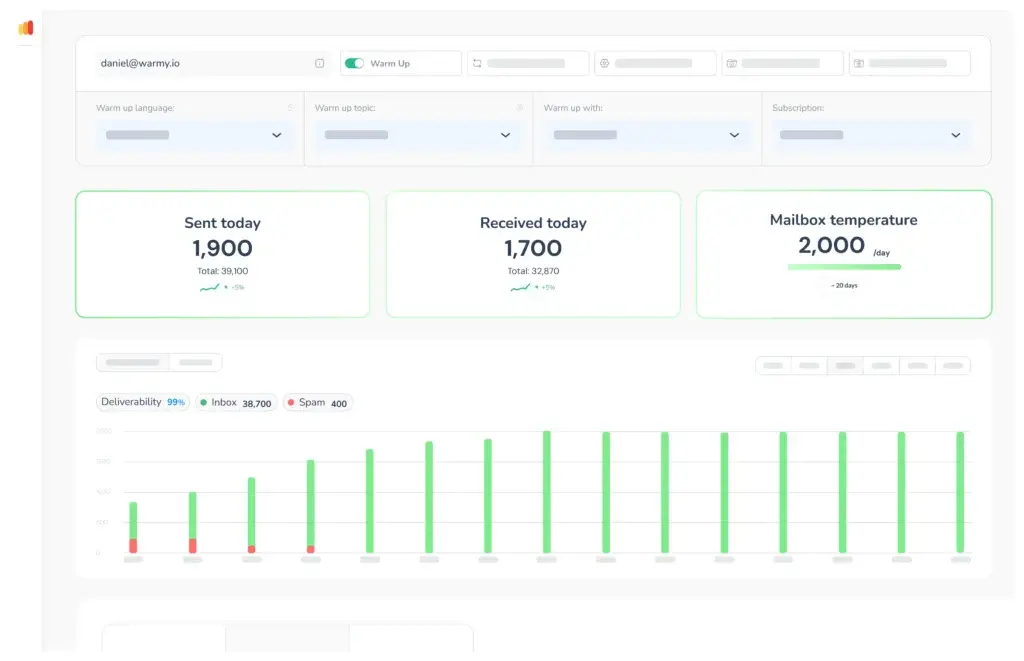
Warmy works by connecting your mailbox to a controlled warm-up system. Once connected, it begins sending and receiving warm-up emails between real inboxes in its network. These interactions are designed to look natural to inbox providers.
- Mailbox connection: You connect Gmail, Outlook, Yahoo, Zoho, SMTP, IMAP, or a custom domain mailbox.
- Automated warm-up: Warmy starts sending and receiving emails gradually.
- AI pacing: Adeline adjusts volume, timing, and engagement signals based on mailbox behavior.
- Spam recovery: Warmy can detect when warm-up emails land in spam and move them back to the inbox.
- Deliverability monitoring: You can track inbox placement, spam placement, and domain health signals.
This matters because inbox providers do not only look at whether an email is technically sent. They also evaluate whether a sender looks trustworthy, whether recipients engage, whether the domain is authenticated, and whether complaint rates stay low.
Compatible with major email platforms
Warmy supports common business email setups, making it flexible enough for solo founders, sales teams, agencies, and larger outbound teams.
- Gmail and Google Workspace
- Outlook and Microsoft 365
- Yahoo and AOL
- Zoho Mail
- SMTP and IMAP-based systems
- Custom domain mail servers
For most users, the biggest advantage is that Warmy turns a technical deliverability process into a more guided workflow. You do not need to manually send warm-up emails or track inbox placement in spreadsheets.
Warmy is valuable because it combines email warm-up, deliverability testing, AI-based optimization, and domain health monitoring in one platform.
That makes it more useful than a simple warm-up tool if you want to understand why your emails are going to spam and what you can do to improve placement.
Full feature breakdown
Warmy is not only a background warm-up tool. It gives you several features that help you manage sender reputation more carefully.
- Adeline AI engine: Manages warm-up speed, engagement, and reputation-building activity.
- Smart warm-up automation: Creates natural email interactions using real inboxes.
- Inbox placement testing: Helps you understand where your emails are landing.
- Spam folder recovery: Detects spam placement and uses engagement actions to improve trust signals.
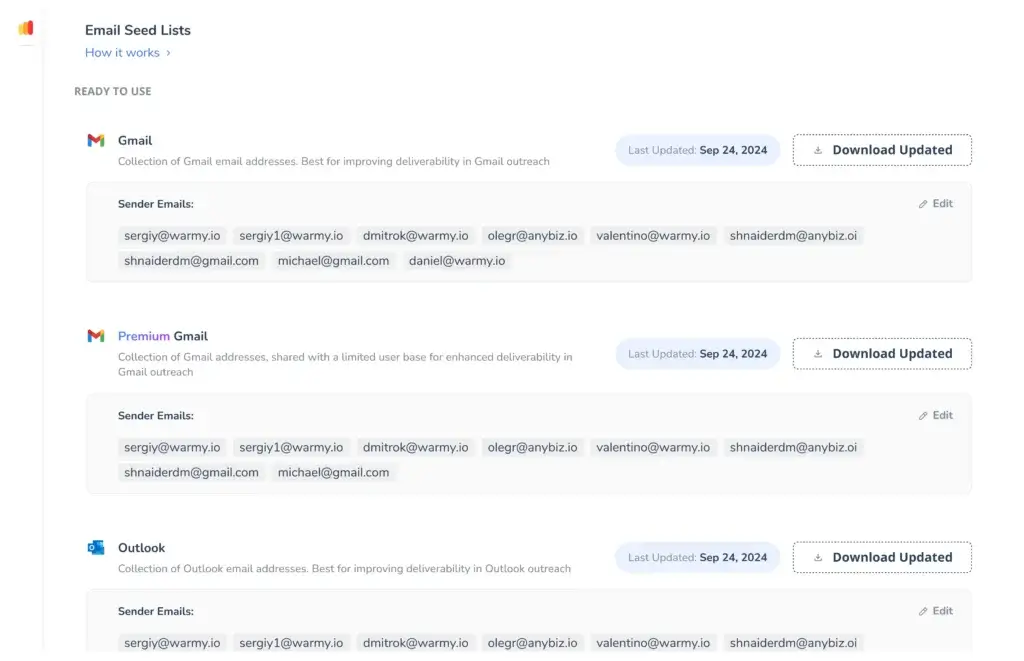
- Seed list testing: Tests deliverability across different mailbox environments.
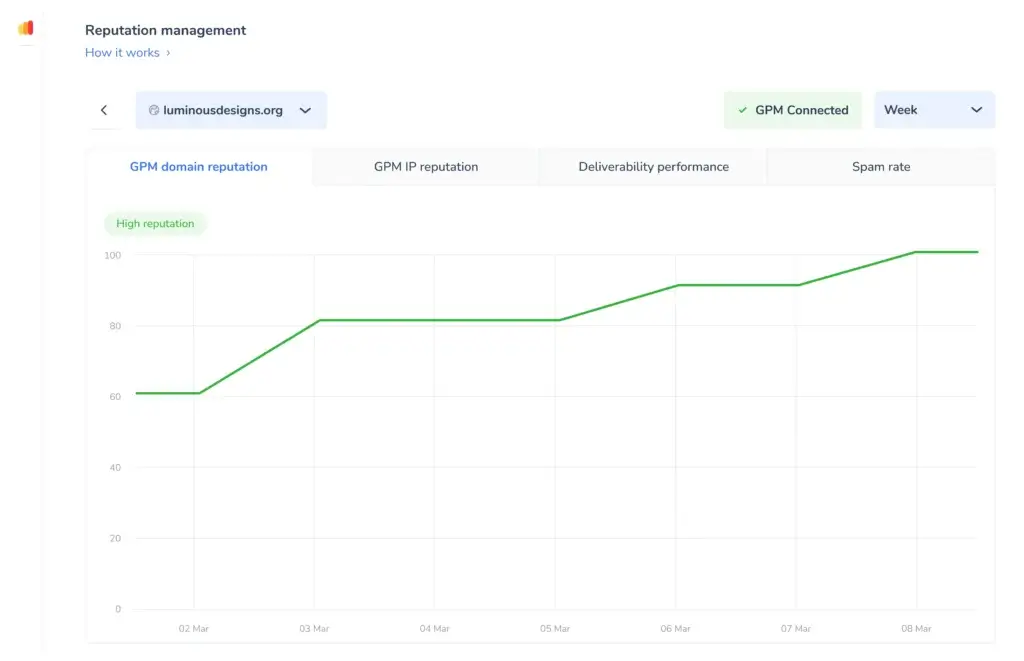
- Google Postmaster integration: Adds reputation visibility for Gmail-focused senders.
- Template and spam checks: Helps identify email content issues that may hurt deliverability.
- SPF, DKIM, and DMARC guidance: Helps you understand key authentication records.
- Team and agency workflows: Supports multiple inboxes, reporting, and client management.
In my opinion, the most important feature is not simply that Warmy warms up inboxes. Many tools can do that. The stronger value is the combination of automation, deliverability monitoring, Google Postmaster visibility, and practical diagnostics.
Top benefits of Warmy
- Automated email warm-up: Warmy sends, receives, and engages with warm-up emails without manual work.
- AI-driven optimization: Adeline adjusts activity based on mailbox and domain behavior.
- Inbox placement insights: You can see whether emails reach the inbox, spam, or promotions tab.
- Google Postmaster support: Warmy connects deliverability insights with Google-specific reputation data.
- Multi-mailbox management: Teams and agencies can monitor multiple inboxes from one dashboard.
- Free testing tools: Warmy offers deliverability-related tools that help diagnose sender issues before or during warm-up.
Expert tip: Warm-up should not replace good email practices. Use Warmy alongside proper authentication, clean lead lists, low bounce rates, relevant messaging, and compliant unsubscribe options.
Pros and Cons
Advantages and Limitations of Using Warmy
Positive
✅ Fully automated email warm-up
✅ Strong fit for cold email and sales outreach
✅ Google Postmaster and deliverability visibility
✅ Useful for teams, agencies, and multiple inboxes
✅ Includes testing tools beyond basic warm-up
Negatives
❌ Pricing can rise with multiple inboxes
❌ Not a complete cold email platform
❌ Cannot fix poor targeting or bad lists
❌ DNS setup may still require technical support
❌ Mobile dashboard is less practical than desktop
Pros
1. Fully automated warm-up
Warmy handles the warm-up process after you connect your mailbox. It sends, receives, replies, and builds engagement signals without forcing you to manage warm-up manually.
2. Strong for cold email deliverability
If you use cold email for lead generation, recruiting, partnership outreach, or sales development, Warmy helps reduce the risk of sending from a cold or untrusted domain.
3. Google Postmaster integration
Warmy’s Google Postmaster support is useful because many outbound teams send heavily to Gmail and Google Workspace recipients. This gives you better visibility into Gmail-related reputation signals.
4. Helpful deliverability diagnostics
Warmy gives you more than warm-up activity. You can also use deliverability tests, spam checks, template checks, and domain-related guidance to identify issues before they hurt campaigns.
5. Good fit for agencies and teams
If you manage several domains, inboxes, or client accounts, Warmy gives you a more centralized way to monitor deliverability performance.
6. Beginner-friendly experience
Email deliverability can get technical quickly. Warmy simplifies many of the moving parts, especially for users who do not want to manage warm-up manually.
Cons
1. Pricing can become expensive across many inboxes
Warmy can be a strong investment if email is a revenue channel. However, the cost may become more noticeable if you manage many mailboxes or need advanced support.
2. It is not a full outbound platform
Warmy helps with deliverability and warm-up, but it is not a complete cold email platform like Smartlead, Instantly, Lemlist, or Reply.io. You may still need a separate tool for sequences, prospecting, and campaign management.
3. Warm-up cannot fix poor email strategy
Warmy can improve reputation signals, but it cannot save campaigns built on purchased lists, weak personalization, irrelevant offers, high bounce rates, or non-compliant sending behavior.
4. Technical setup still matters
SPF, DKIM, DMARC, DNS records, sending domains, and tracking settings still need to be handled correctly. Warmy can guide you, but some teams may still need help from their domain provider or IT team.
5. Best managed from desktop
Warmy’s dashboard is more useful on a larger screen, especially when reviewing placement reports, multiple inboxes, and domain-level data.
Why Warm-Up Matters More in 2026
Sender Reputation Is Changing
Email warm-up has become more important because inbox providers are stricter about authentication, spam complaints, and sender behavior.
Google requires senders to authenticate email, and bulk senders need SPF, DKIM, and DMARC. Yahoo also expects senders to authenticate mail, maintain low complaint rates, and keep spam complaint rates below strict thresholds.
This means Warmy should not be viewed as a shortcut around good sending practices. It should be part of a broader deliverability system.
What to check before using Warmy
- SPF: Confirms which mail servers can send email for your domain.
- DKIM: Adds a cryptographic signature that helps prove the email was not altered.
- DMARC: Tells receiving servers what to do when SPF or DKIM checks fail.
- Google Postmaster: Helps monitor Gmail-related domain reputation signals.
- List quality: Reduces bounces, complaints, and negative engagement.
- Unsubscribe handling: Keeps outreach and marketing emails cleaner and safer.
If you skip these foundations, warm-up alone will not be enough. From my experience, the best deliverability results usually come from combining warm-up, authentication, clean targeting, conservative sending volume, and strong email copy.
User Experience
Warmy Every Day User Experience
Warmy is designed to make a complicated deliverability process easier to manage. The platform is especially helpful if you want to avoid manually checking spam folders, sending warm-up emails, or trying to understand inbox placement without clear reports.
Dashboard and interface
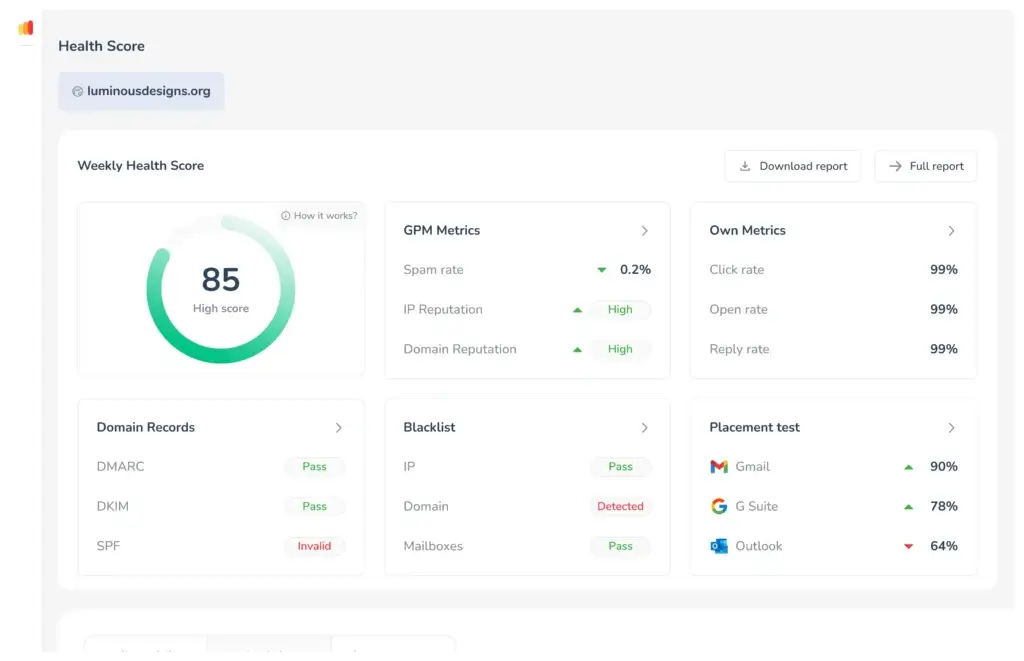
The Warmy dashboard gives you a visual overview of inbox performance, mailbox activity, spam placement, and warm-up status. This is useful because deliverability is hard to manage if you only look at open rates or reply rates.
- Mailbox-level warm-up status
- Inbox, spam, and promotions placement insights
- Domain and reputation visibility
- Daily warm-up activity data
- Multi-account monitoring for teams and agencies
The interface is approachable enough for non-technical users, but detailed enough for marketers and deliverability-focused teams.
Onboarding experience
Warmy’s onboarding is straightforward. You sign up, connect a mailbox, choose warm-up settings, review authentication guidance, and let the platform begin warming the inbox gradually.
- Create your Warmy account.
- Connect your mailbox using the available provider options.
- Choose language, warm-up speed, and sending preferences.
- Review authentication and domain health recommendations.
- Monitor deliverability and adjust your sending strategy over time.
The setup is not difficult, but I recommend reviewing your DNS records before relying on warm-up results. A warm domain with poor authentication can still struggle with inbox placement.
Team and agency management
Warmy is especially useful for agencies, consultants, and outbound teams that manage multiple inboxes. You can monitor more than one mailbox without switching between accounts manually.
This is a strong use case because agency deliverability problems often happen across many clients, domains, and campaigns at once. A centralized dashboard can save time and help you detect issues faster.
Minor UX drawbacks
The mobile experience is less ideal for serious analysis. You can access key information, but placement reports and multi-mailbox monitoring are more practical on desktop.
Also, users who are new to email deliverability may still need time to understand the difference between warm-up activity, authentication, sender reputation, bounce rate, and campaign engagement.
Pro tip: Check deliverability before launching a large campaign, not after the campaign fails. Warmy is most useful when used proactively.
Pricing and Plans
How Much Does Warmy Cost?
Warmy pricing is structured around email deliverability needs, mailbox volume, warm-up usage, and support level. The official Warmy pricing page promotes a 7-day trial with no credit card required, but exact pricing details may change over time.
Because of that, I recommend treating any pricing table as a planning guide and checking Warmy’s official pricing page before purchasing.
| Plan Type | Best For | What to Check Before Buying |
| Starter or Entry Plan | Solo users warming one inbox | Mailbox limits, daily warm-up volume, deliverability tests |
| Business or Team Plan | Small sales and marketing teams | Number of connected inboxes, reporting depth, support access |
| Premium or Advanced Plan | Teams managing several domains | Seed testing, Google Postmaster data, spam diagnostics |
| Custom or Enterprise | Agencies and high-volume senders | Dedicated support, API access, custom reporting, larger mailbox volume |
What is usually included?
Warmy plans commonly focus on core deliverability features rather than general email productivity. Depending on the plan, you may get access to:
- AI-powered mailbox warm-up
- Inbox placement monitoring
- Spam recovery workflows
- Deliverability testing
- Google Postmaster integration
- SPF, DKIM, and DMARC guidance
- Multi-mailbox management
- Team or agency reporting
Is there a free trial?
Yes. Warmy promotes a 7-day free trial with no credit card required. This is useful because deliverability tools are easier to evaluate when you can test your own mailbox rather than relying only on screenshots or feature lists.
Pro tip: Before starting the trial, check SPF, DKIM, DMARC, and your domain’s sending history. This gives you a better baseline for judging Warmy’s impact.
Is Warmy worth the price?
Warmy is worth considering if email deliverability directly affects revenue. For example, if your team books meetings, generates leads, recruits candidates, or manages client campaigns through email, even a small inbox placement improvement can matter.
However, if you send very few emails or only use email for internal communication, Warmy may be more than you need.
From my experience, Warmy makes the most financial sense when the cost of missed replies, lost leads, or damaged sender reputation is higher than the subscription cost.
Warmy VS Alternatives
How Does Warmy Compare To Other Tools?
Warmy should be compared with other email warm-up and deliverability tools, not only with inbox cleanup tools.
In your previous version, Warmy was compared with SaneBox and Clean Email. Those tools are still useful, but they solve a different problem. SaneBox and Clean Email help you manage your own inbox. Warmy helps your outbound emails reach other people’s inboxes.
So, for better SEO and search intent, this section should focus on tools like Lemwarm, Mailreach, Warmup Inbox, InboxAlly, Mailivery, and cold email platforms with built-in warm-up features.
Warmy vs email warm-up alternatives
| Tool | Best For | Main Strength | Potential Limitation |
| Warmy | Teams that want AI warm-up and deliverability monitoring | AI engine, Google Postmaster support, testing tools, multi-mailbox workflows | May cost more than basic warm-up tools |
| Lemwarm | Lemlist users and simple outbound workflows | Good fit if your sales workflow already runs through Lemlist | Less attractive if you do not use Lemlist |
| Mailreach | Teams that want warm-up and placement testing | Strong focus on inbox placement and reputation signals | May require more manual interpretation |
| Warmup Inbox | Basic email warm-up needs | Simple warm-up setup for new senders | Less advanced for broader deliverability operations |
| InboxAlly | Senders focused heavily on inbox placement | Placement-focused workflows and reputation recovery | Can be more specialized than some teams need |
| Mailivery | Agencies and teams managing multiple inboxes | Scalable warm-up approach for multiple mailboxes | May not offer the same AI positioning as Warmy |
Warmy vs Lemwarm
Warmy is the better option if you want a broader deliverability platform with AI warm-up, Google Postmaster visibility, and testing tools.
Lemwarm may be the simpler choice if your outbound process already runs inside Lemlist and you mainly need native warm-up inside that ecosystem.
Warmy vs Mailreach
Warmy is stronger if you want a more guided, AI-led deliverability workflow. Mailreach is a strong alternative for teams that want warm-up and placement testing with a focused deliverability approach.
If you are comparing the two, the main question is whether you want Warmy’s broader AI and Google Postmaster positioning or a more direct placement-testing workflow.
Warmy vs SaneBox and Clean Email
SaneBox and Clean Email are not direct Warmy alternatives, but they may still be useful if you are also trying to improve your personal inbox productivity.
SaneBox helps organize and prioritize incoming email, so it is better for professionals who want less inbox noise.
👉🏼 Read Full SaneBox review here
Clean Email helps clean old emails, unsubscribe from newsletters, and automate inbox cleanup.
👉🏼 Read Full Clean Mail Review Here
Neither tool is designed to warm up your sending domain or improve outbound inbox placement. If your goal is deliverability, Warmy is the more relevant choice.
Summary tip: Use Warmy for outbound deliverability. Use SaneBox or Clean Email for personal inbox management.
Is Warmy For You?
Who Should Use Warmy?
Warmy is best for people who rely on outbound email performance and cannot afford to have campaigns silently disappear into spam folders.
Best use cases for Warmy
1. Cold email marketers
If you send prospecting campaigns, Warmy can help protect sender reputation before and during outreach.
2. Sales teams and SDRs
Sales teams need consistent inbox placement to book meetings. Warmy is useful when launching new inboxes, new domains, or higher-volume outbound motions.
3. Agencies managing client inboxes
Agencies can use Warmy to monitor multiple client mailboxes, identify deliverability problems, and reduce manual warm-up work.
4. SaaS companies and startups
If you depend on email for lead generation, onboarding, demos, or partnerships, Warmy can help prepare inboxes before scaling campaigns.
5. Recruiters
Recruiters often send cold outreach to candidates. Warmy can help improve trust signals and reduce the risk of outreach landing in spam.
6. Affiliate and partnership teams
If you contact partners, vendors, creators, or affiliates by email, deliverability directly affects your response rate.
Who might not need Warmy?
Warmy is powerful, but it is not necessary for every email user.
- You only send internal company emails.
- You rarely send outreach or campaign emails.
- You need inbox cleanup, not outbound deliverability.
- You already have strong deliverability and low sending volume.
- You are not willing to fix DNS, list quality, or email content issues.
If your main problem is a messy personal inbox, you are better off reading our best email management tools guide instead.
Expert tip: If you plan to launch cold outreach within the next month, start warming your mailbox before the campaign begins. Waiting until emails land in spam is usually more expensive and harder to fix.
Getting Started with Warmy
Setup Guide
Warmy is relatively easy to set up, but you will get better results if you prepare your email domain first.
Step-by-step setup
Step 1: Sign up for a free trial
Visit warmy.io and start the trial. Warmy promotes a 7-day trial with no credit card required.
Step 2: Connect your mailbox
Choose your email provider and connect Gmail, Outlook, Yahoo, Zoho, SMTP, IMAP, or a custom domain mailbox.
Step 3: Review DNS and authentication
Before relying on warm-up, check whether your domain has proper SPF, DKIM, and DMARC records.
Step 4: Choose warm-up settings
Select your language, warm-up speed, daily sending settings, and mailbox preferences.
Step 5: Start warming gradually
Let Warmy begin slowly. Avoid launching high-volume cold email campaigns on the same day you connect a new inbox.
Step 6: Monitor deliverability reports
Review inbox placement, spam placement, and warm-up activity regularly. Use these insights to adjust campaign volume, targeting, and copy.
Warmy setup checklist
- Check SPF, DKIM, and DMARC.
- Use a business domain, not a personal free email address.
- Avoid sending large campaigns from a brand-new inbox.
- Clean your lead list before outreach.
- Keep bounce rates and spam complaints low.
- Use one-click unsubscribe where required.
- Review Google Postmaster data when available.
How long does warm-up take?
Warm-up timing depends on your domain history, mailbox age, sending volume, and current sender reputation.
For a new domain or new inbox, you should usually think in weeks, not days. Warmy can start generating warm-up activity quickly, but reputation building is gradual.
If your domain already has spam issues, blacklisting problems, poor authentication, or high complaint rates, you may need a longer recovery period and a broader deliverability cleanup process.
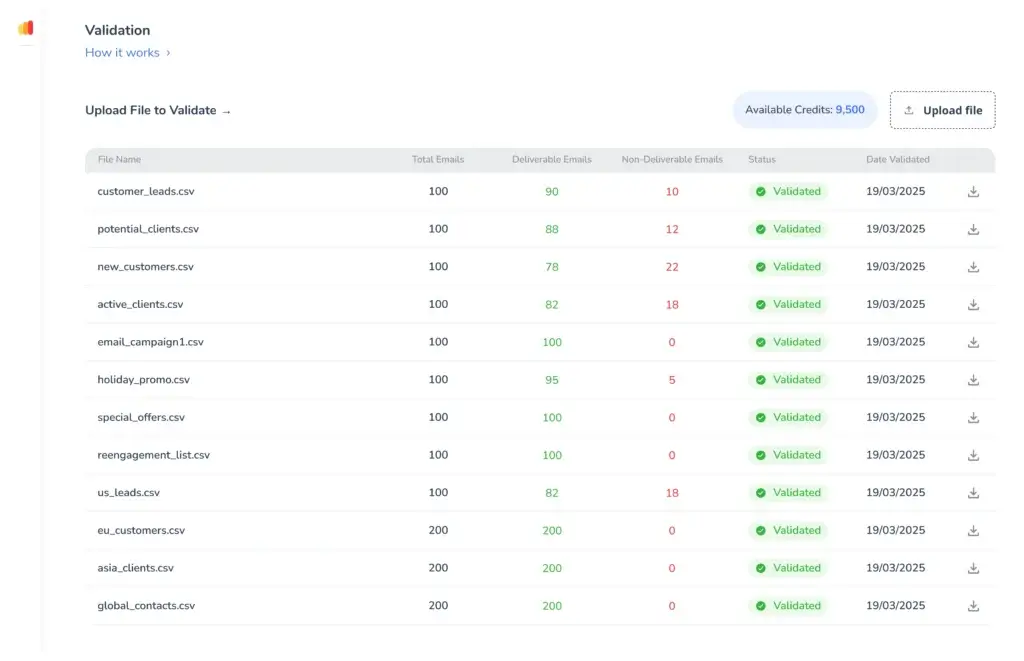
Warmy Free Tools
What You Can Test Before Paying
One of Warmy’s stronger SEO and user-value angles is its set of free deliverability tools. These can help you diagnose problems before committing to a paid plan.
Depending on availability, Warmy’s free tools may include:
- Email deliverability test
- Email spam checker
- Email template checker
- SPF generator
- DMARC generator
- Email signature generator
- Cold email sequence builder
These tools are especially useful if you are not sure whether your issue is domain reputation, email content, DNS configuration, or sending behavior.
In my opinion, this section should stay in the article because it captures informational search intent. Some users are not ready to buy an email warm-up tool yet, but they are actively searching for ways to test deliverability.
Conclusion
Final Thoughts: Should You Try Warmy?
Warmy is a strong option if email deliverability is directly connected to your business results.
It is especially useful for cold email teams, sales teams, agencies, SaaS companies, recruiters, and partnership teams that need a structured way to warm inboxes, protect sender reputation, and monitor inbox placement.
Our take
Warmy is not the cheapest email warm-up tool, and it is not a complete outbound sales platform. But it does offer a strong mix of AI warm-up, deliverability monitoring, Google Postmaster support, testing tools, and multi-mailbox workflows.
That makes it a better fit for serious senders than casual users.
If you only need inbox organization, tools like SaneBox or Clean Email are more relevant. If you need your outbound emails to reach prospects, Warmy is much closer to the right category.
My recommendation is simple: use Warmy if email is a meaningful acquisition, sales, recruiting, or partnership channel for your business. Skip it if you send low-volume personal emails or are not ready to fix the fundamentals of deliverability.
Recommended for: cold email, sales outreach, agencies, recruiters, SaaS teams, and senders managing multiple inboxes.
Not recommended for: casual email users, internal-only communication, or users who only need inbox cleanup.
Want to compare more tools before deciding? Read our guide to the best email management tools.
FAQ
Frequently Asked Questions
What is Warmy used for?
Warmy is used to improve email deliverability by warming up mailboxes, monitoring inbox placement, and helping senders build a stronger reputation before or during outreach campaigns.
Is Warmy an email warm-up tool or an email deliverability tool?
Warmy is both. Its core function is email warm-up, but it also includes deliverability testing, inbox placement insights, Google Postmaster support, and tools that help diagnose sender reputation issues.
How does Warmy improve email deliverability?
Warmy improves deliverability by creating natural inbox activity, including sending, opening, replying, and moving warm-up emails from spam to the inbox. These actions help build stronger engagement signals over time.
Does Warmy work with Gmail and Outlook?
Yes. Warmy supports major email providers such as Gmail, Google Workspace, Outlook, Microsoft 365, Yahoo, Zoho, and custom SMTP or IMAP-based mailboxes.
Does Warmy support Google Postmaster?
Yes. Warmy promotes Google Postmaster support, which is useful for monitoring Gmail-related sender reputation and deliverability signals from inside a broader warm-up workflow.
How much does Warmy cost?
Warmy pricing depends on mailbox volume, warm-up needs, deliverability features, and support level. Warmy promotes a 7-day free trial with no credit card required, but you should confirm current pricing directly before buying.
Is Warmy good for cold email?
Yes. Warmy is especially useful for cold email teams that need to prepare new inboxes, protect sender reputation, and monitor whether emails are reaching the inbox instead of spam folders.
Can Warmy fix emails landing in spam?
Warmy can help improve sender reputation and inbox placement signals, but it cannot fix every spam issue on its own. You still need proper SPF, DKIM, DMARC, clean contact lists, compliant unsubscribe handling, and strong email copy.
What are the best Warmy alternatives?
Popular Warmy alternatives include Lemwarm, Mailreach, Warmup Inbox, InboxAlly, Mailivery, Instantly, and Smartlead. The best option depends on whether you need standalone warm-up, inbox placement testing, or a full outbound email platform.
Is Warmy worth it for agencies and sales teams?
Warmy can be worth it for agencies and sales teams that rely heavily on outbound email. It is less suitable for casual users or businesses that only send low-volume internal emails.








