Introduction
MeisterTask has grown from a simple Kanban-style task management app into a broader work management platform for teams that want visual project tracking, process documentation, automation, reporting, and secure collaboration in one place.
In 2026, MeisterTask is especially relevant if you want an approachable alternative to heavier project management software. It gives you a clean board-based experience, but it also adds features such as project timelines, recurring tasks, custom fields, time tracking, reports, roles and permissions, and MeisterTask AI for searching and summarizing team notes.
That combination makes it a strong option for teams that need more structure than a basic to-do list, but do not want the complexity of enterprise project portfolio management software.
What is MeisterTask?
MeisterTask is a task management and work management platform developed by MeisterLabs. It helps teams organize work with visual Kanban boards, assign responsibilities, manage deadlines, track progress, collaborate on tasks, and centralize project documentation.
The platform is particularly strong for teams that prefer a clear board-based workflow. You can create projects, divide work into sections, move tasks through stages, add checklists, attach files, track time, automate repetitive steps, and use reports to understand where work stands.
MeisterTask also connects naturally with MindMeister, which makes it useful if your team likes to move from brainstorming and mind mapping into structured task execution.
If you want to compare it with other platforms in this category, you can also read our guide to the best task management software.
Software specification
Core Features of MeisterTask
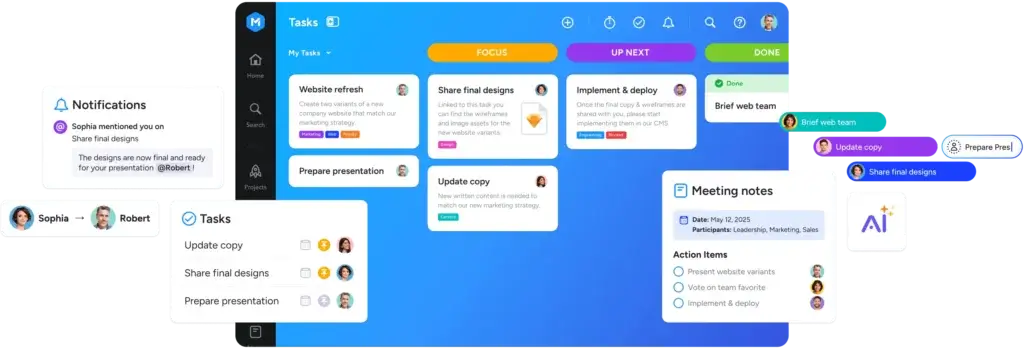
MeisterTask’s main strength is that it keeps work visually simple while still giving teams enough structure to manage real projects. It is not trying to be the most complex project management platform on the market. Instead, it focuses on clarity, adoption, and practical day-to-day task execution.
That makes it particularly useful for marketing teams, agencies, operations teams, product teams, HR teams, and smaller departments that want a clean way to manage shared work.
1. Visual Kanban boards for task management
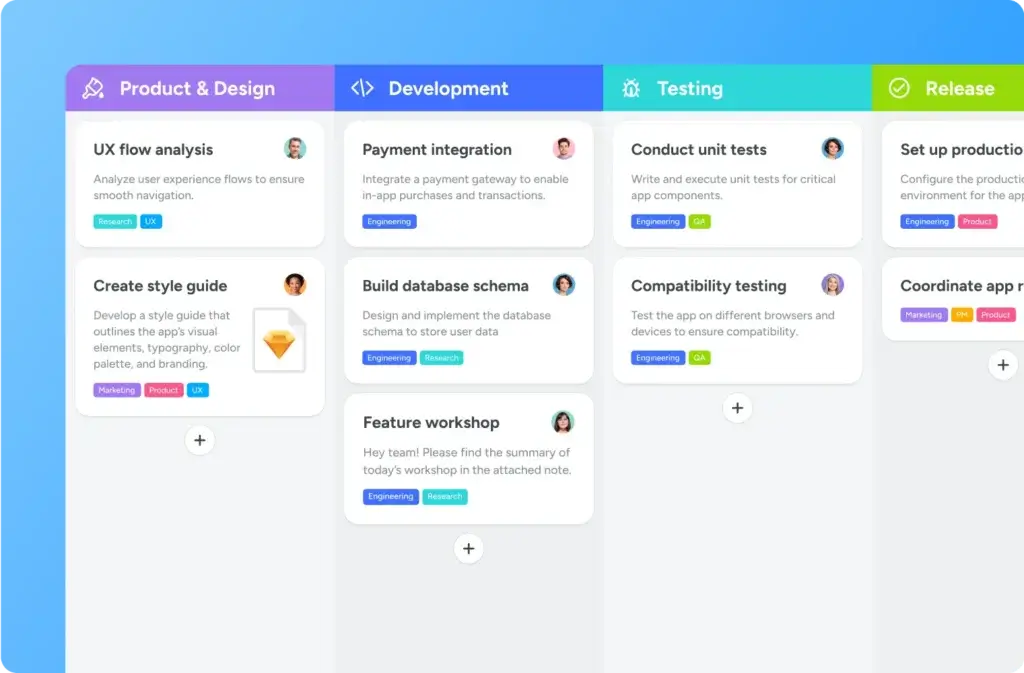
MeisterTask is built around Kanban boards. Each project can be organized into sections that represent workflow stages, such as Open, In Progress, Review, and Done.
This makes work easy to understand at a glance. You can see what is waiting, what is active, who owns each task, and where bottlenecks are forming.
For teams that dislike overly complex project management tools, this is a major advantage. The board view feels familiar, fast, and easy to explain to new users.
2. Task details, checklists, comments, tags, and attachments
Each task in MeisterTask can hold the information your team needs to complete the work. You can add descriptions, due dates, assignees, watchers, checklists, comments, tags, file attachments, and time tracking.
This helps reduce scattered communication. Instead of keeping context in chat tools, email threads, and documents, you can keep task-related details inside the task itself.
That is especially useful for recurring team workflows, such as content production, campaign launches, client onboarding, bug triage, internal approvals, and weekly operations.
3. Recurring tasks and workflow automations
Automation is one of the best reasons to upgrade beyond the free plan. MeisterTask lets you automate recurring steps and actions inside your workflow.
For example, you can use automations to assign tasks, move tasks between sections, send notifications, update due dates, or create recurring tasks for routine work.
This is not enterprise-grade workflow automation like you would find in a full ITSM or process automation platform. However, for everyday teamwork, it is practical and easy to use.
4. Timeline views for planning deadlines
MeisterTask Business includes timeline views that help you visualize tasks or projects in a Gantt-style layout. This is important because Kanban boards are excellent for workflow visibility, but they are not always enough for deadline planning.
With timelines, you can see schedules, overlaps, dependencies, and project timing more clearly. This makes MeisterTask more useful for teams that need to plan campaigns, launches, deliverables, or cross-functional projects.
It still does not replace advanced portfolio management software, but it gives smaller teams a stronger planning layer than a simple board alone.
5. Time tracking and reports
MeisterTask includes built-in time tracking, which lets users track time directly from tasks or add entries manually. This is useful for agencies, consultants, service teams, and internal teams that want better visibility into where effort is going.
Reports can help you understand project progress, task completion, team workload, tracked time, tags, custom fields, and other task data. You can also export report data as CSV or Excel files.
This gives MeisterTask an operational advantage over simpler to-do list apps. You are not only managing tasks, but you can also review how work is moving through the system.
6. MeisterTask Notes and documentation
One of MeisterTask’s more interesting developments is its stronger focus on documentation. The platform supports notes and pages that can be used to create process documentation, internal knowledge bases, project notes, and team resources.
This matters because many teams struggle to connect tasks with the knowledge needed to complete them. MeisterTask helps bring documentation closer to execution.
For example, a marketing team could keep campaign briefs, content standards, approval processes, and project tasks in the same broader workspace.
7. Ask MeisterTask AI for Notes
MeisterTask AI is not positioned like a full AI work assistant for every possible productivity use case. Its most practical use is inside Notes, where it can help users search, retrieve, and summarize information from shared documentation.
This is a sensible AI implementation. Instead of adding AI only as a writing gimmick, MeisterTask uses it to make team knowledge easier to access.
That said, MeisterTask is not as AI-native as tools such as Taskade or ClickUp AI. If AI agents, AI workflow generation, or AI app building are your top priorities, you may want to compare MeisterTask with more AI-heavy alternatives.
8. Integrations with popular business tools
MeisterTask integrates with tools such as Slack, Microsoft Teams, Google Calendar, Outlook Calendar, Gmail, Outlook, Google Drive, Dropbox, MindMeister, Zendesk, and more. It also supports broader automation through Zapier.
This is important if your team already uses email, chat, calendars, cloud storage, and support tools. MeisterTask can fit into that workflow instead of forcing your team to move everything into a single closed system.
One point to watch is that some integrations can change over time. For example, users should always verify the current status of specific integrations before building a critical workflow around them.
9. Roles, permissions, and team controls
On higher plans, MeisterTask gives teams more control over who can access, view, and edit projects. Business and Enterprise teams can benefit from roles, permissions, user groups, private projects, and stronger admin controls.
This makes it more suitable for organizations where external collaborators, departments, clients, or contractors need access to selected work without seeing everything.
For small teams, this may not be a deciding factor. For agencies, regulated companies, and larger departments, it becomes much more important.
10. Cross-platform access
MeisterTask is available across the web, desktop, and mobile. This makes it practical for teams that move between office work, remote work, and mobile updates.
The mobile experience is particularly useful for checking task updates, capturing work on the go, and keeping projects moving without needing to open a full desktop workspace.
Overall, MeisterTask’s feature set is strongest when you want a clean, secure, and structured task management platform that your team can actually adopt. It is less suitable if you need deep enterprise resource planning, complex dependencies, or highly advanced analytics.
Pros and Cons
Advantages and Disadvantages
Positive
✅ Very clean Kanban task management experience
✅ Strong EU-based security and privacy positioning
✅ Useful automations, time tracking, and reports
✅ Good fit for teams that want fast adoption
Negatives
❌ Advanced project management depth is limited
❌ Best features require paid plans
❌ AI features are useful but not industry-leading
❌ Pricing can feel high for simple task tracking
MeisterTask’s biggest advantage is not that it has the longest feature list. Its advantage is that it makes team task management easier to adopt. That is valuable because many project management tools fail not because they lack features, but because teams avoid using them consistently.
Pros:
- Very clean Kanban task management experience: MeisterTask is easy to understand, which makes it a strong choice for teams that want visual workflows without heavy setup.
- Strong EU-based security and privacy positioning: With GDPR compliance, ISO 27001 certification, German hosting, 2FA, SAML SSO, and role-based access controls, MeisterTask is appealing for privacy-conscious teams.
- Useful automations, time tracking, and reports: The platform goes beyond basic boards by adding recurring tasks, workflow automations, built-in time tracking, custom reports, and exports.
- Good fit for teams that want fast adoption: The interface is approachable, templates help teams get started faster, and the workflow is easy to explain to non-technical users.
Cons:
- Advanced project management depth is limited: MeisterTask is not the best choice for teams that need complex portfolio management, budget planning, advanced resource forecasting, or deep dependency management.
- Best features require paid plans: Features such as unlimited projects, automations, integrations, timeline views, subtasks, roles, permissions, and custom reports are tied to paid tiers.
- AI features are useful but not industry-leading: Ask MeisterTask AI is helpful for working with Notes, but the platform is not as AI-native as some newer productivity tools.
- Pricing can feel high for simple task tracking: If you only need basic boards and checklists, cheaper tools or free task management apps may be enough.
In short, MeisterTask is strongest when you value usability, visual workflow management, secure collaboration, and practical task execution. It is weaker when you need a highly advanced project management system with enterprise-grade planning depth.
User Experience
User Interface and Workflow Experience
MeisterTask’s user experience is one of its strongest selling points. It is visually clean, easy to navigate, and less intimidating than many all-in-one project management platforms.
That matters because task management software only works when people actually use it. MeisterTask is designed for adoption, not just administration.
Clean interface for everyday task management
The board layout is simple. Users can open a project, understand the workflow, drag tasks between sections, and see task status without needing much training.
This makes MeisterTask a good fit for cross-functional teams where not everyone is a project management expert. Marketing, HR, operations, admin, education, and client-facing teams can usually understand the platform quickly.
Home and Agenda help users focus
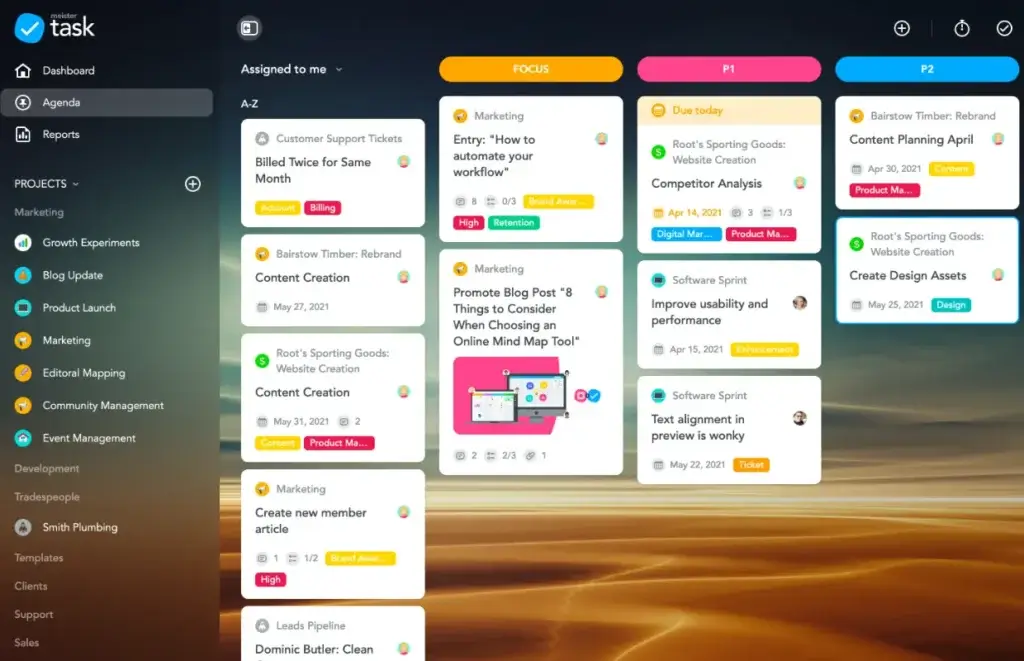
MeisterTask’s Home screen brings together upcoming tasks, notifications, and personal to-dos. This helps users start the day with a clearer view of what needs attention.
The Agenda feature is also useful because it lets you pin important tasks from multiple projects into a personal dashboard. This is helpful when you are assigned work across several boards and do not want to jump between projects constantly.
Good balance between simplicity and structure
Many task management tools become messy as teams grow. MeisterTask handles this better than very basic to-do list apps because it offers private projects, automations, custom fields, roles, permissions, reports, and timelines on paid plans.
At the same time, it avoids the heavy feel of tools that are built mainly for project managers, PMOs, or enterprise administrators.
Documentation improves team alignment
The ability to create notes and documentation inside the Meister ecosystem makes the user experience more complete. Your team can document processes, project guidelines, onboarding steps, and team knowledge without separating documentation from work execution.
This is especially useful for teams that want to reduce repetitive questions and keep standard operating procedures accessible.
Where the experience can feel limited
The same simplicity that makes MeisterTask attractive can also become a limitation. If your team needs complex hierarchy, deep dependencies, workload balancing, budget tracking, or advanced portfolio dashboards, the product may feel too lightweight.
It is best viewed as a clean task and workflow management platform, not a full enterprise project management suite.
Pricing and Plans
How much does MeisterTask cost?
MeisterTask offers a free plan and several paid plans. The main paid tiers are Pro, Business, and Enterprise. Pricing can vary by billing cycle, currency, location, and future updates, so you should always check the official pricing page before purchasing.
Based on the current public pricing page, the paid plans are structured around team size, workflow complexity, admin controls, and security requirements.
- Free: Best for individuals or small teams testing basic task management.
- Pro: Best for small teams that need unlimited projects, unlimited notes, integrations, private projects, recurring tasks, and automations.
- Business: Best for teams that need timeline views, subtasks, roles and permissions, custom reports, and stronger workflow oversight.
- Enterprise: Best for organizations that need advanced security, support, procurement flexibility, and enterprise-level controls.
For most teams, the real decision is between Pro and Business. Pro is the more practical starting point if you mainly need collaborative task management and automations. Business is the better option if you need timelines, subtasks, permissions, custom reports, and stronger management controls.
Comparison Table: MeisterTask Pricing Plans
| Plan | Who It’s Best For | Pricing | Main Highlights | Best Reason to Choose It |
| Free | Individuals and very small teams | Free | Basic task management, project boards, mobile access | Testing MeisterTask before upgrading |
| Pro | Small teams managing active workflows | From around €13.50 per user/month | Unlimited projects, unlimited notes, integrations, private projects, recurring tasks, automations | Best entry point for serious team use |
| Business | Growing teams and departments | From around €24 per user/month | Timeline views, subtasks, roles and permissions, custom reports | Best for structured workflow management |
| Enterprise | Larger organizations and regulated teams | Custom pricing | Advanced security, support, administration, and enterprise controls | Best for procurement and security requirements |
My opinion is that Pro is enough for many small teams, especially if the goal is to move away from scattered spreadsheets, email requests, or basic Kanban boards. Business becomes more attractive when managers need better visibility, more control, and a clearer planning layer.
Security and Privacy
Security and Compliance in MeisterTask
Security is one of MeisterTask’s strongest differentiators, especially compared with many lightweight productivity tools. The platform is made in the EU, GDPR compliant, ISO 27001 certified, and hosted in Germany.
That positioning makes MeisterTask especially interesting for European organizations, privacy-conscious companies, and teams that want stronger data protection language than they usually get from basic task apps.
Core security protections
- ISO 27001 certification: MeisterTask states that it is ISO 27001 certified and uses ISO-certified data center infrastructure.
- Hosting in Germany: MeisterTask highlights German hosting as part of its privacy and security approach.
- GDPR and CCPA compliance: The platform states compliance with GDPR and CCPA requirements.
- DDoS protection: MeisterTask references DDoS protection through Cloudflare servers in the EU.
Access and identity controls
- SAML SSO: Enterprise teams can connect MeisterTask with a SAML 2.0 identity provider.
- Two-factor authentication: Admins can add an extra layer of account protection with 2FA.
- Role-based access control: Teams can restrict access to certain features and projects through permissions.
- Password leak checks: MeisterTask includes checks designed to help users avoid compromised passwords.
Business continuity and reliability
- Daily backups: MeisterTask states that it performs daily incremental backups and full backups every 30 days.
- Status transparency: The company provides platform status visibility for current and historical reliability.
- Enterprise support: Enterprise customers can access additional support and success management.
What this means in practice
For small and mid-sized teams, MeisterTask’s security posture is stronger than what you typically see from lightweight task management apps. It is especially appealing if your organization cares about EU hosting, GDPR compliance, ISO certification, and administrative access controls.
For highly regulated organizations, procurement teams should still verify the latest security documentation, DPA, certifications, and contractual terms directly with MeisterTask before purchase.
Overall, security is one of the clearest reasons to consider MeisterTask over simpler task apps. It is not just a productivity tool with basic login protection. It has a more serious privacy and compliance story.
Alternatives
MeisterTask Alternatives
MeisterTask is a strong task management tool, but it is not the best choice for every team. The right alternative depends on whether you need simpler personal task management, broader work management, stronger AI, or deeper enterprise project controls.
MeisterTask vs monday.com
monday.com is more customizable and more powerful for operational workflows, dashboards, forms, databases, and multi-department work management.
MeisterTask is simpler and cleaner. It is usually a better fit if you do not want to spend time building a customized system and mainly need a task management platform your team can start using quickly.
MeisterTask vs ClickUp
ClickUp offers more features, more views, more customization, stronger AI coverage, and broader project management depth. It is better for teams that want an all-in-one workspace.
MeisterTask is better if ClickUp feels too busy. It gives you a more focused task management experience with fewer distractions and a gentler learning curve.
MeisterTask vs Todoist
Todoist is better for personal productivity, simple task lists, and lightweight daily planning. It is faster for individual task capture and less focused on team workflow management.
MeisterTask is better for team collaboration, project boards, automations, roles, reports, documentation, and structured workflows.
MeisterTask vs Trello
Trello is one of the closest alternatives because both tools are strongly associated with Kanban-style boards. Trello is often better if you want a very flexible, lightweight board system with a large ecosystem of Power-Ups.
MeisterTask is the better fit if you want a cleaner EU-based work management platform with stronger privacy positioning, built-in time tracking, integrated documentation, and a more structured team experience.
MeisterTask vs Asana
Asana is stronger for teams that need multiple project views, cross-functional project tracking, goals, portfolios, and more advanced work management structure.
MeisterTask is easier to adopt and better for teams that prefer a simpler visual workflow. If your team mainly wants boards, tasks, automations, and documentation without heavier project layers, MeisterTask may feel more comfortable.
If you are still comparing options, our roundup of the best task management tools gives you a wider side-by-side view.
Conclusion
Final Thoughts
MeisterTask is a strong choice if you want task management software that is visual, secure, easy to adopt, and practical for everyday team workflows. It does not try to overwhelm you with endless customization. Instead, it focuses on helping teams organize work clearly and move tasks forward with less friction.
The platform is especially compelling if you value Kanban boards, recurring tasks, workflow automation, time tracking, reports, documentation, and EU-based security. It is also a good fit for teams that want a more polished alternative to spreadsheet-based task tracking or basic to-do list apps.
Is MeisterTask Worth It?
MeisterTask is worth considering if your team wants a clean, reliable task management platform with stronger privacy and compliance credentials than many lightweight tools.
It stands out for its:
- Visual Kanban workflow that makes team tasks easy to understand.
- Built-in automations that reduce repetitive workflow steps.
- Time tracking and reports that support better operational visibility.
- EU-based security posture with GDPR compliance and ISO 27001 certification.
However, it is not the best option if your team needs advanced portfolio management, extensive resource planning, complex dependencies, or highly customizable dashboards. In those cases, tools like monday.com, Asana, ClickUp, or Wrike may be better fits.
Who Should Choose MeisterTask?
- Teams that want simple, visual Kanban task management.
- Organizations that care about GDPR, EU hosting, and ISO certification.
- Agencies and service teams that need time tracking and reports.
- Departments that want task management and documentation in one workflow.
- Teams that find tools like ClickUp or monday.com too complex.
Who Should Consider Alternatives?
- Teams that need advanced portfolio management and resource planning.
- Users who want the cheapest possible personal to-do list app.
- Companies that need deep AI workflow automation or AI agents.
- Large PMOs that require complex dependencies, budgets, and governance.
My overall recommendation is simple: choose MeisterTask if your priority is clean team task management with strong privacy credentials. Choose a heavier project management platform if your team needs deep planning, portfolio controls, and enterprise-level customization.
Frequently Asked Questions
Have more questions?
What is MeisterTask best used for?
MeisterTask is best used for visual task management, Kanban workflows, team collaboration, project tracking, recurring tasks, time tracking, reports, and process documentation.
Is MeisterTask a project management tool or a task management tool?
MeisterTask is primarily a task management and work management tool. It supports project workflows, but it is not as advanced as full project portfolio management software.
Does MeisterTask offer a free plan?
Yes. MeisterTask offers a free plan for basic task management. Paid plans unlock more advanced features such as unlimited projects, automations, integrations, timelines, subtasks, permissions, and custom reports.
Which MeisterTask plan is best for small teams?
For most small teams, the Pro plan is the best starting point because it includes unlimited projects, unlimited notes, integrations, private projects, recurring tasks, and automations.
Does MeisterTask have time tracking?
Yes. MeisterTask includes built-in time tracking, so users can track time directly from tasks or add manual time entries. This is useful for agencies, service teams, and workload analysis.
Does MeisterTask support Gantt charts?
MeisterTask Business includes timeline views that work like Gantt-style planning views. They help teams visualize tasks, project schedules, overlaps, and timing.
Is MeisterTask good for remote teams?
Yes. MeisterTask is a good fit for remote and hybrid teams because it centralizes tasks, comments, deadlines, files, documentation, notifications, and workflow status in one shared workspace.
How secure is MeisterTask?
MeisterTask has a strong security and privacy position for a task management tool. It is GDPR compliant, ISO 27001 certified, hosted in Germany, and supports controls such as 2FA, SAML SSO, and role-based access permissions.
What are the main limitations of MeisterTask?
The main limitations are its lighter project management depth, limited advanced portfolio features, paid-plan dependency for the best tools, and AI features that are useful but not as advanced as AI-native work platforms.
What are the best MeisterTask alternatives?
The best MeisterTask alternatives include Trello, Asana, monday.com, ClickUp, and Todoist. Trello is closest for Kanban, Asana and monday.com are stronger for broader work management, ClickUp is more feature-rich, and Todoist is better for personal tasks.