
Introduction
Motion is no longer just another to-do list app with a scheduling layer on top. It has evolved into an AI-powered productivity platform that combines tasks, projects, calendars, meetings, notes, and workflow automation in one place.
If your biggest challenge is not capturing tasks, but actually finding time to complete them, this is where Motion becomes interesting. Instead of giving you a static task list, it actively builds your schedule around deadlines, priorities, available time, and changing workloads. That makes it especially appealing to founders, managers, client-facing professionals, and teams that live inside their calendars.
Why Read This Review?
This review looks at what Motion does well, where it still falls short, how its pricing compares to the value it offers, and who should seriously consider it. If you are comparing it with other tools in our top to-do list apps guide, this breakdown will help you decide whether Motion is the right fit for your workflow.
Software specification
Core Features of Motion
What makes Motion different is that it treats your task list, calendar, meetings, and work documentation as connected parts of the same system. Instead of forcing you to manually maintain everything, it uses AI to organize and continuously re-prioritize your work.
AI Task Planner and Automatic Prioritization
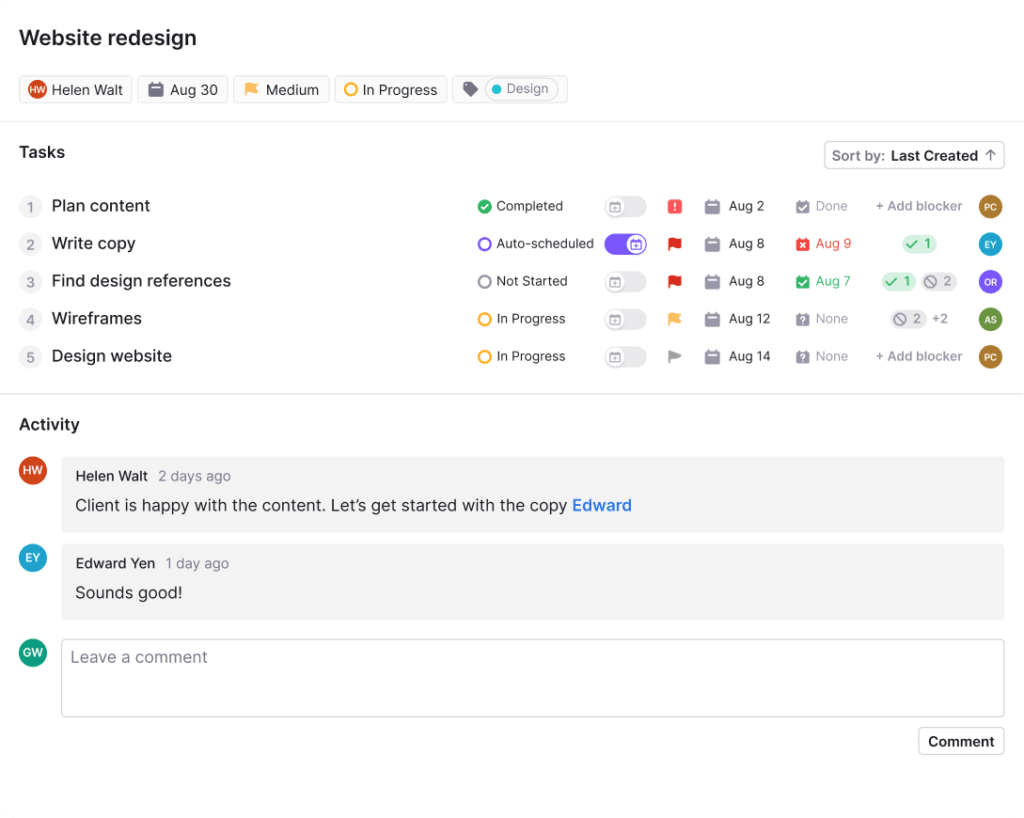
The strongest feature is still the AI task planner. You can add tasks with deadlines, durations, priorities, and dependencies, and the platform builds a realistic work plan for you.
- Automatically schedules tasks into open calendar slots
- Re-prioritizes work when deadlines, meetings, or workloads change
- Highlights at-risk work before it turns into missed deadlines
AI Calendar and Meeting Scheduling
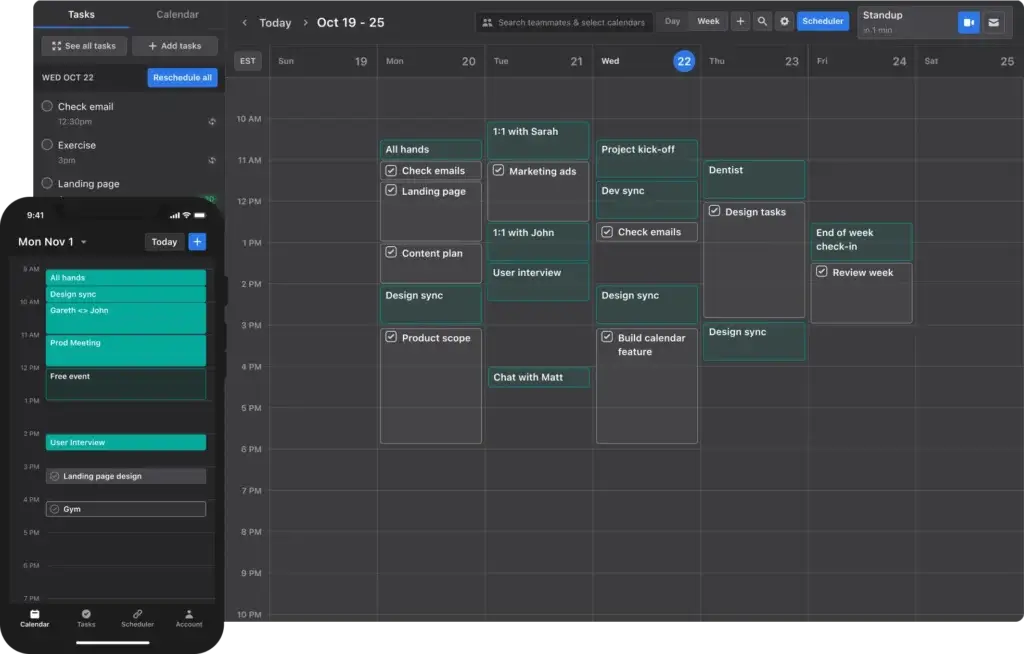
Motion is built around the idea that productivity should live on your calendar, not in a disconnected list. That makes its calendar engine one of the most compelling parts of the product.
- Builds your day around deadlines, duration, and capacity
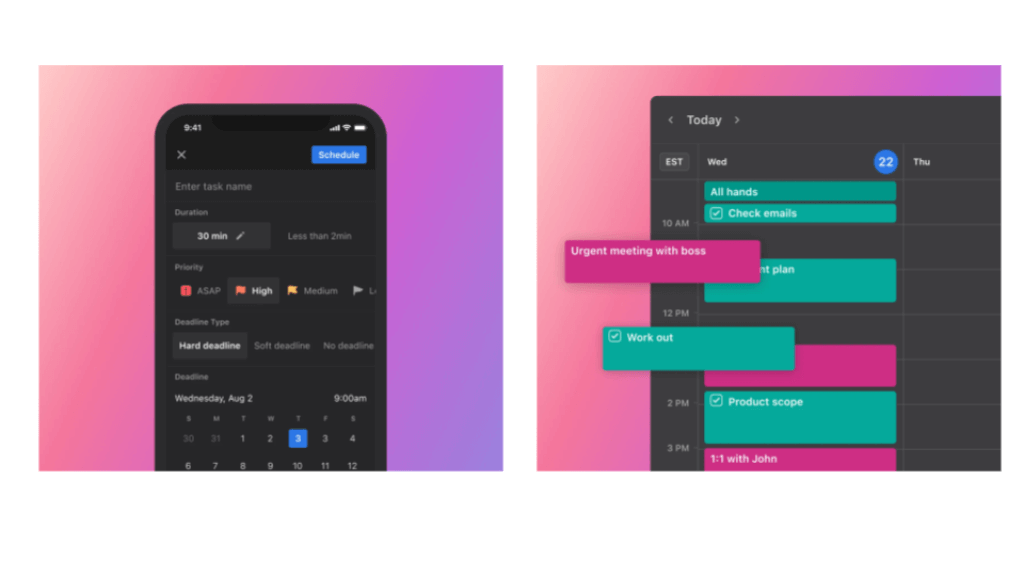
- Automatically reschedules work when interruptions happen
- Supports meeting booking pages and optimized meeting placement
AI Projects, Workflows, and Team Planning
Motion has expanded far beyond individual task management. It now includes project planning capabilities designed for teams that want visibility without constant manual follow-up.
- Creates and manages projects with AI assistance
- Supports timelines, dependencies, and workload planning
- Helps managers reduce manual coordination and status chasing
AI Docs, Notes, and Writing Assistance
This is one of the biggest reasons the platform feels more complete than older Motion reviews suggest. It now includes AI-powered support for docs, notes, and writing, which makes it more useful as a daily work hub.
- Drafts and organizes documents faster
- Turns meeting notes and written inputs into actionable work
- Keeps tasks, context, and documentation closer together
Integrations That Support Real Workflows
Motion also benefits from a practical integration layer. Native support for calendars, video meetings, email, and automation helps it fit into real business workflows rather than forcing teams to start from scratch.
For users who want a scheduler, project tool, and AI planning assistant in one place, this feature set is genuinely compelling. It is not the cheapest option in the category, but it is one of the more ambitious ones.
Pros and Cons
Advantages and Disadvantages
Positive
✅ Excellent AI auto-scheduling
✅ Strong calendar-first productivity model
✅ Useful for deadline-heavy professionals
✅ Expanding AI docs and project features
Negatives
❌ Premium pricing
❌ Best experience is on desktop
❌ Can feel rigid for manual planners
❌ Overkill for simple personal to-do lists
Motion has clear strengths, but it is not universally the best choice for every type of user. Its value depends heavily on how much scheduling friction you deal with during a typical week.
✅ Pros
- AI-driven scheduling saves real planning time: The software’s biggest advantage is that it does not just store tasks. It decides when you should actually do them and adjusts when your day changes.
- Excellent for calendar-heavy professionals: If you juggle client calls, internal meetings, deadlines, and deep work, the calendar-based workflow feels far more practical than a traditional task list.
- Broader than a typical to-do app: AI projects, docs, notes, and writing features give it more long-term potential as a unified work platform.
- Better visibility into workload and priorities: Instead of guessing what to do next, users get a clearer sense of what matters most and what may slip.
❌ Cons
- Pricing is premium: Motion costs more than many basic task managers, so it needs to replace enough manual planning to justify the spend.
- The workflow is not for everyone: Users who like complete manual control may find the auto-scheduling approach too opinionated.
- Desktop is where it shines most: The mobile app is helpful, but the overall experience is better suited to users who manage work from a computer.
- Too much tool for simple use cases: If you only need a lightweight personal checklist, cheaper and simpler apps may be a better fit.
Integrations and Compatibility
Benefits of Using Motion
The biggest benefit of Motion is not simply that it helps you organize work. It helps you execute work with less manual planning. That distinction matters, especially if your current system looks good on paper but constantly breaks down once real meetings and shifting priorities hit your calendar.
Less Manual Planning, More Realistic Execution
Traditional task apps often depend on you to decide what to do, when to do it, and how to reshuffle everything when your day changes. Motion reduces that overhead significantly. It is one of the better choices for users who lose time every day to re-planning.
- Automatically rebuilds schedules when something changes
- Protects time for focused work more effectively than static lists
- Helps expose overloaded schedules before deadlines are missed
Useful Native Integrations
Motion supports several integrations that make it more practical in real-world business use. Rather than functioning as an isolated planner, it connects to the tools professionals already rely on.
- Google Calendar, Outlook, and iCloud for calendar sync
- Zoom, Microsoft Teams, and Google Meet for meetings
- Gmail and Outlook 365 for email-connected workflows
- Zapier for broader workflow automation
Cross-Platform Access, with a Desktop-First Reality
The platform is available on web, desktop, iOS, and Android, which gives users flexibility across devices. That said, this is not a mobile-first to-do list app. The experience is more compelling on desktop, where planning, reviewing, and adjusting work feels more complete.
Strong Fit for Professional and Team Work
Motion is especially effective when your work has deadlines, dependencies, and calendar pressure. For executives, agency teams, consultants, and fast-moving managers, the software can remove a surprising amount of daily admin work.
That does not mean it is right for every audience. Students, casual users, and people who simply want a free checklist app may find it more complex and more expensive than necessary. But for professionals who need AI-assisted scheduling, it offers real value.
User Experience
User Interface and Operational Simplicity
The interface is modern, clean, and built around the idea that your calendar is the center of your workday. That gives the product a distinctive feel compared with tools that rely mainly on lists, boards, or folders.
Calendar-First Design
The layout is built to make scheduled work visible at all times. That is excellent for users who think in time blocks and deadlines, but it also changes how you interact with your tasks. You are not simply storing work, you are placing it into a live schedule.
Fast Once You Understand the Logic
There is a learning curve, but it is not caused by confusing design. The real adjustment is philosophical. You need to get comfortable letting the software help decide when work gets done. Once that clicks, the product becomes much more intuitive.
Best Experience on Desktop
The desktop and web experience is where the platform feels most complete. Planning projects, reviewing workload, managing meetings, and adjusting priorities all feel more natural on a larger screen.
Mobile App Is Helpful, Not the Main Event
The mobile app is useful for checking your day, reviewing tasks, and making lightweight updates on the go. Still, users should not expect the same depth or comfort they would get from a dedicated mobile-first task app. This is better understood as a companion experience.
Good Fit for Structured Professionals
If you like flexible freeform planning, the interface may feel a bit strict. If you want a guided, more opinionated system that turns chaos into a realistic schedule, the design works in Motion’s favor. In that sense, the user experience is closely tied to the kind of planner you are.
Pricing and Plans
How much does Motion cost?
Motion uses premium pricing, and that is important to mention upfront. This is not priced like a basic to-do list app. It is priced more like an AI productivity platform for professionals and teams that want scheduling, planning, collaboration, and automation in one place.
Pro AI
At the time of writing, Motion’s pricing page shows Pro AI at $19 per seat per month on annual billing. This plan is aimed at professionals and small teams that want the core Motion experience without stepping into heavier business operations.
- AI Chat
- AI Projects & Tasks
- AI Calendar & Meetings
- AI Docs, Wiki, & Notes
- AI Task Planner and AI Writer & Editor
- Integrations, apps, and 7,500 credits per seat per month
Business AI
The pricing page also shows Business AI at $29 per seat per month on annual billing. This tier is better suited to power users, service teams, and businesses that need more visibility, reporting, and control.
- Everything in Pro AI
- Team capacity planning
- Advanced dashboards and reports
- Timeline and Gantt charts
- Time tracking
- Permissions, central billing, and priority support
Which Plan Is Best for You?
- Choose Pro AI if you are a solo professional, founder, or small team that mainly wants AI scheduling and task execution.
- Choose Business AI if you manage multiple people, need reporting, or want a stronger operational layer around projects and resources.
Motion also promotes a free trial, which is useful because this is the kind of product you really need to experience in your own calendar before deciding whether the price is justified.
| Feature Type | Pro AI | Business AI |
| Starting price | $19/seat/month on annual billing | $29/seat/month on annual billing |
| Core AI planning tools | Included | Included |
| AI docs, notes, and writer | Included | Included |
| Credits | 7,500 credits/seat/month | 15,000 credits/seat/month |
| Team capacity planning | Not included | Included |
| Dashboards and reports | Basic use case fit | Advanced dashboards and reports |
| Timeline and Gantt charts | Not highlighted | Included |
| Permissions and central billing | Limited fit for solo or small team use | Included |
| Best for | Professionals and small teams | Power users and businesses with complex needs |
Best Motion Alternatives
Compare Motion to Other Popular To-do List Tools
If you are considering Motion, there is a good chance you are not only looking for a to-do list app. You are probably trying to decide whether you need AI scheduling, a simpler task manager, or a broader work management platform. That is why comparing Motion to its closest alternatives is so important.
Motion is strongest when your biggest problem is not capturing tasks, but finding realistic time to complete them. However, that does not automatically make it the best choice for every workflow. Some users will be better off with a simpler and cheaper task app, while others may need a more robust project management platform.
| Feature Type | Motion | Todoist | Any.do | monday.com | ClickUp |
| Best use case | AI scheduling and calendar-based execution | Simple task management for personal use and small teams | Personal planning, reminders, and family organization | Structured team and project management | All-in-one work and project management |
| Core strength | Automatic task scheduling around real calendar time | Fast, clean, low-friction task capture | Everyday reminders and life organization | Visual workflows, dashboards, and collaboration | Deep feature set across tasks, docs, dashboards, and automations |
| Complexity level | Moderate | Low | Low | Moderate | High |
| Best for teams | Yes, especially calendar-heavy teams | Small teams | Limited compared to work management platforms | Yes | Yes |
| Best for personal use | Yes, but premium for casual users | Excellent | Excellent | Usually more than most individuals need | Good, but can feel heavy |
| Mobile-first experience | More desktop-first overall | Strong | Strong | Good | Good |
| Overall fit | Best for users who want AI to plan their day | Best for users who want simplicity and speed | Best for users who want reminders and personal organization | Best for teams managing complex workflows | Best for users who want maximum flexibility and depth |
Motion vs Todoist
Todoist is the better choice if you want simplicity, speed, and a clean task management experience. It is easier to learn, more affordable, and better suited to users who want to manually organize projects, labels, and recurring tasks without handing control over to an AI scheduler.
Motion, on the other hand, is better when your calendar is the real source of truth. If your day is full of shifting meetings, deadlines, and rescheduled work, Motion offers more value because it actively places tasks into time slots and updates your day as things change.
Choose Todoist if you want a lightweight, polished task manager.
Choose Motion if you want the software to decide when work should happen.
Motion vs Any.do
Any.do is more lifestyle-friendly. It works especially well for users who want reminders, recurring tasks, grocery-style checklists, personal planning, and a more casual blend of work and life organization. It is simpler, easier to get started with, and generally a better fit for personal productivity than high-pressure work planning.
Motion is more business-oriented and execution-focused. It is far better for professionals who manage deadlines, meetings, and structured workloads, but it can feel excessive if your needs are mostly personal reminders and basic daily planning.
Choose Any.do if you want personal organization with minimal friction.
Choose Motion if you want AI-driven work planning tied to your calendar.
Motion vs monday.com
This comparison is less about which tool is better and more about what kind of problem you are solving. monday.com is a broader work management platform built for teams, processes, dashboards, workflows, and collaboration across multiple functions. It is stronger when you need visibility across projects, departments, owners, and status updates.
Motion is more focused and more personal in the way it drives execution. It does not try to be a full-scale work operating system in the same way. Instead, it helps individuals and teams actually schedule and complete work in real calendar time.
Choose monday.com if you need broader project and work management across a team or business.
Choose Motion if your biggest pain point is turning tasks into a realistic daily schedule.
Motion vs ClickUp
ClickUp is the most feature-rich alternative in this group. It offers tasks, docs, dashboards, automations, whiteboards, goals, reporting, chat, and extensive customization. That makes it incredibly flexible, but also more demanding to set up and maintain well.
Motion is much more opinionated. It gives you less freedom, but more guidance. For many users, that is actually an advantage. Instead of building your own productivity system, you get one that is ready to start organizing work around time and priorities.
Choose ClickUp if you want a highly customizable all-in-one workspace.
Choose Motion if you want a more focused system that emphasizes AI scheduling and daily execution.
Which Alternative Is Best?
There is no single best Motion alternative for everyone. The right choice depends on what you value most.
- Todoist is the best alternative for simple, elegant task management.
- Any.do is the best alternative for personal planning and reminders.
- monday.com is the best alternative for structured team workflows and project visibility.
- ClickUp is the best alternative for users who want maximum power and flexibility.
Motion remains the strongest option in this group if your priority is AI-assisted planning that automatically turns your task list into a workable schedule. That is still its clearest differentiator, and the main reason to choose it over the alternatives above.
Security and Compliance
Enhanced Security Features in Motion
Security is one of the areas where the review needed the most updating. Motion now presents a clearer and more credible security profile, and it is best to focus on the claims the company publicly documents rather than broad generic language.
SOC 2 Type II and Structured Security Practices
Motion states that it has completed a SOC 2 Type II audit and follows an internal information security program aligned with the SOC 2 framework. For many business buyers, that is one of the most important trust signals on the page.
Encryption and Cloud Hosting
The company states that its services are hosted on Google Cloud Platform. It also notes that databases are encrypted at rest and that application traffic is encrypted in transit using TLS/SSL.
Third-Party Testing and Monitoring
Motion says it undergoes independent third-party assessments and performs third-party penetration testing at least annually. It also mentions vulnerability scanning and active threat monitoring.
Security Kit for Business Buyers
For teams with deeper procurement requirements, Motion offers a security kit on request. According to the security page, that kit can include the latest SOC 2 report, penetration test report, company policies, and standard security questionnaire responses.
What This Means in Practice
For most individual users and SMB teams, Motion’s security posture appears strong enough for professional use. The platform is clearly taking security more seriously than many lightweight productivity apps. Still, larger organizations with strict procurement requirements should review the official documentation directly before purchasing.
Conclusion
Final thoughts
Motion is one of the more distinctive productivity tools in this category because it tries to solve a deeper problem than task capture. It is designed to help you decide what to do, when to do it, and how to adapt when your day inevitably changes.
That makes it a strong choice for busy professionals who feel buried under deadlines, meetings, and competing priorities. It also makes it more ambitious than a standard to-do list app, especially now that AI docs, projects, notes, workflows, and reporting are becoming a bigger part of the platform.
Is Motion Worth It?
Yes, for the right user. If you regularly lose time to manual planning, calendar juggling, and shifting priorities, Motion can justify its price. It is especially valuable when you already work in a calendar-heavy environment and need your tasks, meetings, and priorities to stay connected.
Who Should Choose Motion?
- Founders, executives, and managers with packed calendars
- Consultants, agencies, and service teams handling deadline-heavy work
- Professionals who want AI to reduce manual planning and rescheduling
- Teams that want more structure without spending all day updating projects
Who Should Consider Alternatives?
- Users who want a cheap or free basic to-do list app
- People who prefer full manual control over scheduling
- Users who mainly work from mobile and want a mobile-first experience
- Anyone whose needs stop at simple personal checklist management
Overall, Motion is not the best fit for everyone, but it is one of the strongest options if your goal is to combine planning, scheduling, and execution in one AI-assisted system. If you want to explore the platform directly, visit Motion. If you are still comparing options, our guide to the best to-do list apps is the best next step.
Have more questions?
Frequently Asked Questions
What is Motion best used for?
Motion is best for professionals and teams that want AI to plan their day, schedule tasks automatically, and keep priorities aligned with real calendar time. It is especially useful for people dealing with frequent meetings, deadlines, and changing workloads.
Is Motion just a to-do list app?
No. Motion goes beyond task lists by combining AI scheduling, project planning, calendar management, meeting coordination, notes, and document support in one platform.
Does Motion have a free plan?
Motion mainly promotes a free trial rather than a long-term free plan. That means you can test the product before committing, but most serious use requires a paid subscription.
Is Motion good for teams?
Yes, especially for teams that need better workload visibility, shared planning, and fewer manual scheduling decisions. The higher-tier plan adds features like capacity planning, reporting, permissions, and central billing.
Does Motion work well on mobile?
The mobile app is useful for checking schedules, reviewing tasks, and making quick updates, but the overall experience is stronger on desktop and web. Users who want a mobile-first app may prefer simpler alternatives.
What calendars can Motion sync with?
Motion supports major calendar platforms including Google Calendar, Outlook, and iCloud, which helps users bring work and personal scheduling into one planning environment.
Can Motion help with meetings too?
Yes. Motion includes meeting scheduling functionality and supports integrations with tools like Zoom, Microsoft Teams, and Google Meet, which makes it easier to place meetings around focused work.
Is Motion worth the price?
For users who spend a lot of time manually reshuffling tasks and calendars, it can be worth it. For people who only need a basic checklist, the pricing may feel too high compared with simpler tools.
Is Motion secure enough for business use?
Based on the company’s public documentation, the platform offers a solid security posture for professional use, including SOC 2 Type II, encryption at rest and in transit, and regular third-party testing.
What are the best alternatives to Motion?
That depends on your needs. Todoist is a better fit for simple task management, Sunsama is strong for daily planning, and tools like ClickUp or monday.com can be better for broader project management use cases.