
Introduction
Email is still one of the most important tools you use every day, but it can quickly become one of the biggest drains on your productivity. Between Gmail, Outlook, iCloud, client messages, newsletters, follow-ups, and sensitive conversations, your inbox can easily turn into a noisy workspace instead of a useful communication hub.
Canary Mail is designed to solve that problem with a mix of AI email assistance, privacy-first security, and multi-account inbox management. It is not just another email app with a cleaner interface. It is a full email client built for people who want to manage email faster while keeping sensitive communication protected.
In this Canary Mail review, you will learn what Canary Mail does, how its AI features work, how secure it really is, what the latest pricing looks like, and how it compares with alternatives like Sanebox, Clean Email, Spark, Superhuman, and Proton Mail.
By the end, you should have a clear answer to one question: is Canary Mail the right email client for the way you work?
Quick Review Summary
Canary Mail at a Glance
If you want the short version, Canary Mail is best for users who want a smarter email client with AI assistance, strong privacy controls, and one unified inbox for multiple accounts. It is especially appealing if you use Gmail, Outlook, iCloud, Exchange, or IMAP and want a better daily email experience without fully switching providers.
| Category | Canary Mail Details |
| Best For | Privacy-focused professionals, consultants, founders, freelancers, and productivity-focused email users |
| Starting Price | Free plan available, paid plans start at $36/year |
| Core Strength | AI email productivity with secure sending and multi-account inbox management |
| AI Features | AI Copilot, smart drafts, email summaries, natural language search, and inbox triage |
| Security Features | PGP, SecureSend, phishing protection, impersonation detection, and tracker blocking |
| Platforms | macOS, iOS, Windows, and Android |
| Main Limitation | Not ideal if you need deep third-party workflow integrations or a full helpdesk system |
What Is Canary Mail?
AI Email Client for Productivity and Privacy
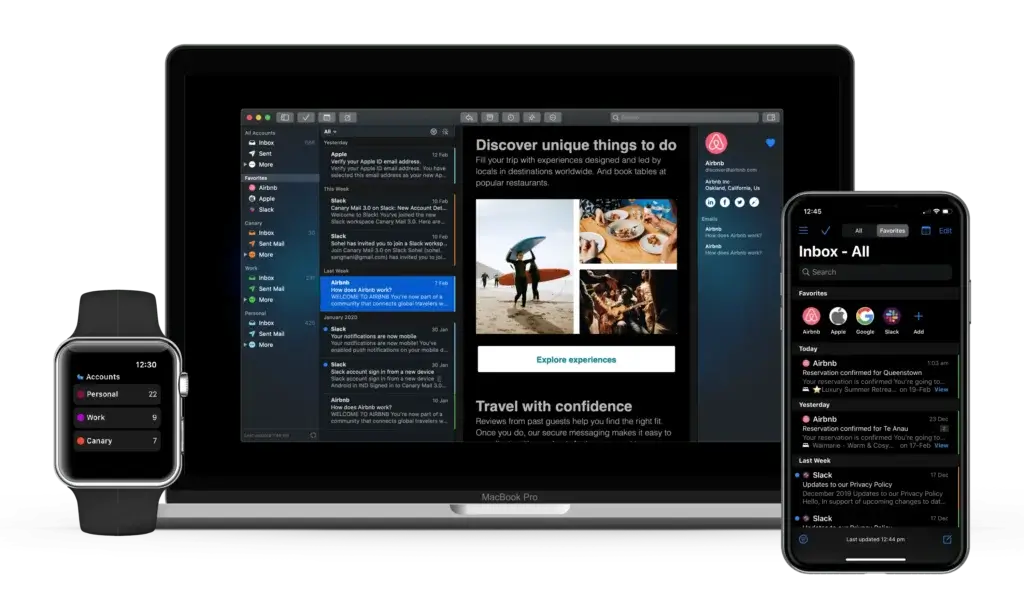
Canary Mail is an AI-powered email client that helps you manage multiple inboxes from one app. Instead of replacing your actual email provider, it connects to your existing accounts and gives you a cleaner, smarter, and more secure way to handle daily communication.
You can connect accounts from providers like Gmail, Outlook, iCloud, Exchange, Yahoo, and IMAP-based services. Once connected, Canary brings your messages into one unified inbox and gives you tools for drafting, summarizing, searching, snoozing, scheduling, and protecting emails.
The main difference between Canary Mail and a basic email client is that Canary combines three things in one place:
- AI productivity for writing, summarizing, searching, and prioritizing emails
- Security through PGP, SecureSend, phishing protection, and tracker blocking
- Inbox management through snooze, read receipts, templates, send later, and unified accounts
This makes it a good fit if your current inbox feels too manual, too cluttered, or too exposed from a privacy perspective.
How Canary Mail Works
Canary Mail works by connecting to your existing email accounts and creating a more advanced layer on top of them. You do not need to abandon Gmail, Outlook, iCloud, or your business email provider. You simply use Canary as the app where you read, write, organize, and secure your emails.
Once your accounts are connected, you can use features such as AI Copilot, natural language search, SecureSend, read receipts, snooze, templates, and inbox cleanup tools from the same interface.
In my opinion, this is the strongest positioning for Canary Mail. It is not trying to be a full productivity suite, CRM, or helpdesk. It is trying to make the email client itself smarter, faster, and more secure.
Supported Email Providers and Devices
Canary Mail supports common email providers and protocols, including Gmail, Outlook, iCloud, Exchange, Yahoo, and IMAP. It is also available across macOS, iOS, Windows, and Android.
That matters because many professionals do not operate from one inbox anymore. You may have a personal Gmail account, a business Outlook account, an iCloud account, and a client email address. Canary gives you one interface to manage all of them instead of constantly switching between browser tabs and apps.
Key Features
AI, Inbox Management, and Productivity Tools
Canary Mail’s feature set is built around a clear promise: spend less time processing email and more time acting on the messages that matter. It does this through AI assistance, unified inbox management, read receipts, scheduling, templates, and security features.
AI Copilot and Smart Drafts
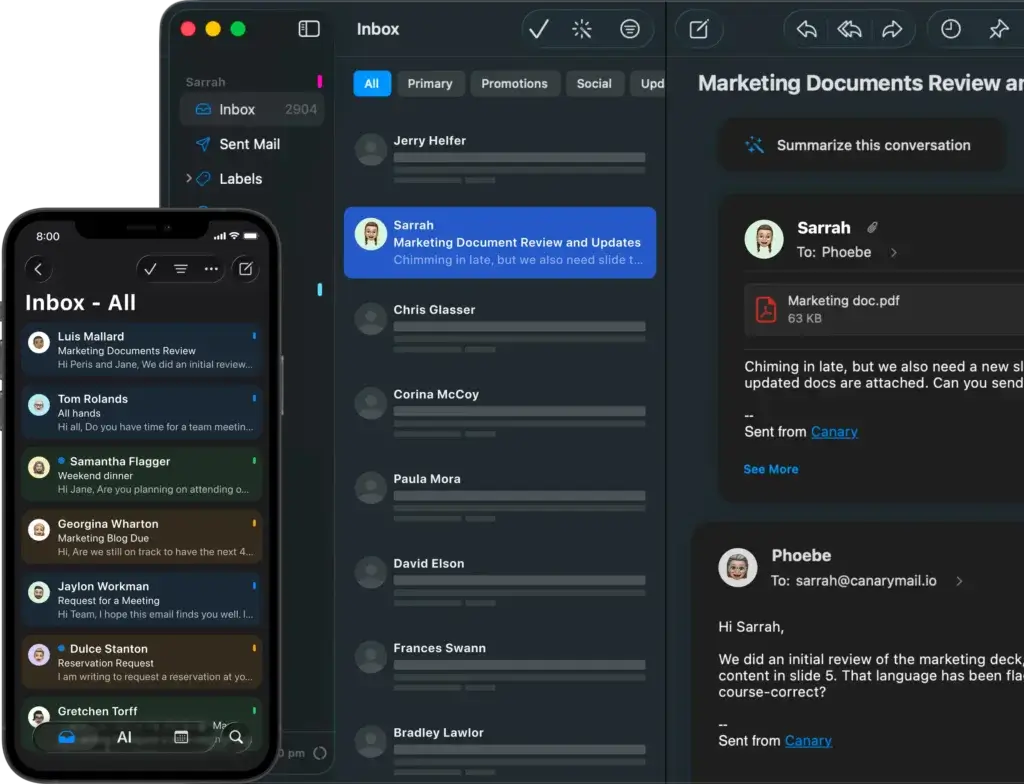
AI Copilot is one of Canary Mail’s most important features. It helps you draft replies, improve tone, summarize long threads, and reduce the time you spend writing repetitive responses.
This is especially useful if you send similar types of emails often. For example, consultants can use it to respond to client updates, sales professionals can draft follow-ups faster, and founders can keep up with investor, hiring, and customer conversations without starting from a blank page.
The key advantage is that the AI is built into the email workflow. You do not need to copy a message into another AI writing tool, write the response there, and paste it back into your inbox. Canary keeps the workflow inside the email client.
AI Email Summaries
Long email threads are one of the most frustrating parts of modern communication. Canary Mail can summarize long conversations so you can understand the context before replying.
This is helpful when you are added late to a thread, returning from time off, or trying to understand a client conversation before a meeting. Instead of scanning 15 messages manually, you can use a summary to find the main points and next steps faster.
Natural Language Search
Canary Mail also supports natural language search. Instead of relying only on exact keywords, you can search in a more conversational way, such as asking for invoices from last month, emails from a specific person about a project, or files related to a previous conversation.
For users managing multiple inboxes, this can be a major productivity benefit. Search is one of the weakest areas in many email workflows, especially when information is scattered across accounts. Canary’s AI search makes email retrieval feel more practical.
AI Triage and Inbox Prioritization
Email overload is not only about the number of messages you receive. It is also about knowing which messages deserve attention first. Canary Mail uses AI to help surface important messages and reduce the noise around low-priority email.
This is useful for professionals who receive newsletters, notifications, client messages, calendar updates, and team emails in the same inbox. Canary helps you focus on messages that are more likely to require action.
Unified Inbox for Multiple Accounts
Canary Mail lets you connect multiple email accounts and manage them from one interface. This is a major advantage if your communication is split across personal, business, and client accounts.
Instead of opening several tabs or apps, you can process messages in one place while still keeping accounts organized. This makes Canary a good option for freelancers, consultants, agency owners, and executives who handle several inboxes during the day.
Snooze, Send Later, and Read Receipts
Canary Mail includes practical email productivity tools such as snooze, send later, read receipts, and follow-up reminders. These features help you control timing and reduce forgotten conversations.
Snooze is helpful when a message matters but cannot be handled right now. Send later is useful when you want to write outside normal hours but deliver messages at a better time. Read receipts can help with sales follow-ups, client communication, and important approvals.
Email Templates and Reusable Replies
If you write the same kinds of messages repeatedly, Canary Mail’s templates can save time. You can create reusable responses for outreach, onboarding, support, follow-ups, scheduling, and internal updates.
This is a small feature, but it can have a big impact if you send a high volume of similar emails every week.
Inbox Cleaner and Inbox Zero Tools
Canary Mail includes inbox cleanup features that help you reduce clutter and move closer to Inbox Zero. These tools are useful for removing unnecessary emails, managing non-essential messages, and keeping the inbox easier to process.
That said, if your primary need is bulk cleanup of thousands of old emails, a tool like Clean Email may still be stronger. Canary is better for ongoing daily email management, while Clean Email is stronger for deep decluttering.
Pros and Cons
What Stands Out and What Needs Improvement
Canary Mail has a strong feature set, but it is not the right fit for every email workflow. The biggest advantage is the way it combines AI, privacy, and inbox productivity in one app. The biggest limitation is that it does not replace a true team inbox, helpdesk, or deeply integrated workflow platform.
Positive
✅ Strong AI Copilot for email productivity
✅ SecureSend and PGP support
✅ Clean multi-account inbox experience
✅ Useful free plan for basic use
✅ Good fit for privacy-focused professionals
Negatives
❌ Pro+ is needed for the strongest security features
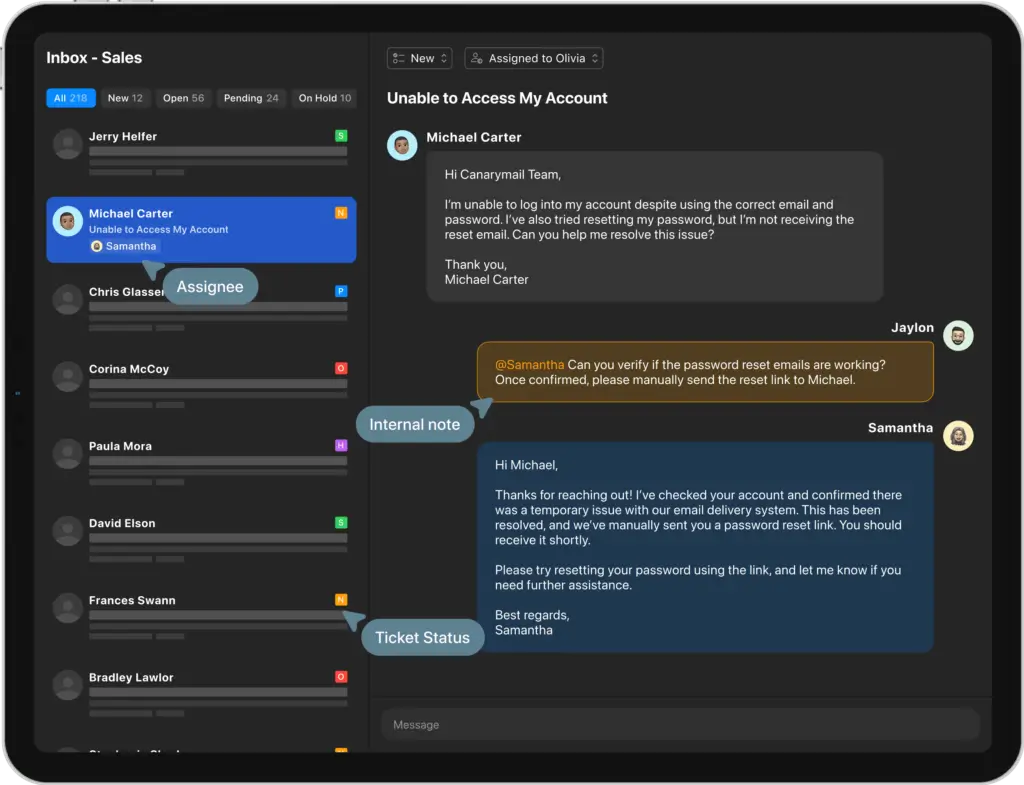
❌ Not a full shared inbox or helpdesk replacement
❌ Limited deep workflow integrations
❌ Advanced rule-based automation is limited
❌ Users should test platform performance before upgrading
What I Like About Canary Mail
The biggest advantage of Canary Mail is that it brings useful AI into an email client without ignoring privacy. Many AI email tools focus heavily on writing assistance, but they do not always give users enough confidence around sensitive communication. Canary’s combination of AI Copilot, SecureSend, PGP, and tracker blocking gives it a more balanced position.
I also like that Canary Mail works across existing email accounts. You do not need to move away from Gmail or Outlook. For many users, that lowers the switching cost and makes adoption easier.
Where Canary Mail Could Improve
Canary Mail is not the best option if you need a team-based shared inbox, customer support queue, CRM-style collaboration, or advanced automation rules across multiple business apps. It also may not satisfy users who want highly customizable labels, filters, and third-party workflow integrations.
In my opinion, Canary is strongest as a secure AI email client for individual professionals and small teams. It is less compelling if your inbox is part of a larger operational workflow that depends on tools like Slack, Asana, Notion, Trello, or a dedicated helpdesk platform.
User Experience
Design, Setup, and Daily Workflow
Using Canary Mail feels like moving from a basic inbox into a more focused workspace. The interface is clean, modern, and built around helping you process email faster.
The experience is especially appealing if you want fewer distractions. Canary does not overwhelm you with unnecessary panels or complex menus. You can move between accounts, read threads, draft replies, schedule messages, and use AI assistance without feeling like you are managing a complicated system.
Mac and iOS Experience
Canary Mail has traditionally been especially strong for Apple users. On macOS and iOS, the design feels polished and familiar. If you already like clean Apple-style apps but want more power than Apple Mail, Canary is easy to understand.
The AI tools, unified inbox, and security features fit naturally into the workflow. You can use Canary as your main email client without needing much setup time.
Windows and Android Experience
Canary Mail is also available for Windows and Android, which makes it more flexible than Apple-only email clients. However, if you are a Windows-first or Android-first user, it is worth testing the free plan or trial before committing to a paid plan.
From my experience with productivity software, cross-platform support is valuable, but the user experience can vary by platform. Before upgrading, test sync speed, search, notifications, compose, and account switching on the exact devices you use every day.
Setup and Onboarding
Setting up Canary Mail is straightforward. You download the app, connect your email accounts, allow the necessary permissions, and then customize your inbox settings. You can also decide whether to enable AI features and security tools based on your plan.
The setup process is simple enough for non-technical users, but the security features may require more attention if you plan to use PGP or SecureSend regularly.
Daily Workflow
In daily use, Canary Mail is best when you treat it as your main email command center. The unified inbox helps you avoid app switching, AI summaries reduce thread review time, and templates can speed up repetitive replies.
The strongest workflow is simple: use Canary to identify important messages, summarize longer threads, respond faster with AI assistance, schedule or snooze messages, and secure sensitive communication when needed.
Pricing and Plans
How Much Does Canary Mail Cost?
Canary Mail offers a free plan and two main paid tiers: Growth and Pro+. The pricing is simple, but the plan choice matters because the AI productivity tools and the strongest security features sit on different paid tiers.
Canary also offers a 7-day trial of paid features with no credit card required. According to Canary’s help documentation, Growth and Pro+ are available as annual or lifetime licenses, and purchases are completed inside the app.
| Plan | Price | Best For | Key Features |
| Free | $0 | Basic personal email management | Unified inbox, lite read receipts, snooze, pin, templates, Inbox Zero, basic customization, unlimited mail accounts |
| Growth | $36/year | AI email productivity for individuals and growth teams | Everything in Free, plus AI Copilot, full read receipts, Send Later, calendar and scheduling, Inbox Cleaner, integrations, and advanced customization |
| Pro+ | $100/year | Security-focused professionals and teams | Everything in Growth, plus PGP encryption, SecureSend, phishing and ransomware protection, impersonation detection, misdirection prevention, and priority support |
| Trial | 7 days | Testing paid features before upgrading | No credit card required, with access to paid features during the trial period |
Free Plan
The Free plan is more useful than many basic email app free tiers because it supports unlimited mail accounts and includes core inbox management features. It is a good starting point if you want to test the interface, connect your inboxes, and see whether Canary fits your daily workflow.
However, the Free plan is not where Canary Mail shows its full value. The strongest reasons to use Canary, especially AI Copilot and advanced security features, require a paid plan.
Growth Plan
The Growth plan is the best fit for users who mainly want AI productivity. It unlocks AI Copilot, full read receipts, Send Later, calendar and scheduling, Inbox Cleaner, integrations, and advanced customization.
In my opinion, this is the most relevant plan for most individual professionals. If your main problem is email overload, repetitive writing, long threads, and missed follow-ups, Growth gives you the best balance of features and price.
Pro+ Plan
The Pro+ plan is best if security is the main reason you are considering Canary Mail. It includes PGP encryption, SecureSend, phishing and ransomware protection, impersonation detection, misdirection prevention, and priority support.
This plan makes the most sense for users in healthcare, legal, finance, consulting, executive communication, or any field where confidential email matters.
Is Canary Mail Worth the Price?
Canary Mail is worth it if you want a modern email client that combines AI productivity with stronger privacy controls. The Growth plan is the better value for most productivity-focused users. The Pro+ plan is the better choice if secure communication is a serious requirement for your work.
If you only want to clean up an old inbox, Clean Email may be more direct. If you want automatic filtering without switching email apps, Sanebox may be easier. But if you want one secure AI email client for daily work, Canary Mail is a strong option.
Canary Mail Alternatives
Canary Mail vs Sanebox, Clean Email, Spark, Superhuman, and Proton Mail
Canary Mail competes in a crowded email productivity market, but not every alternative solves the same problem. Some tools are full email clients. Some are inbox cleanup tools. Others focus on automatic filtering, team collaboration, or privacy-first email hosting.
The right choice depends on whether you want to replace your email app, clean up your current inbox, automate filtering, improve speed, or move to a privacy-first email provider.
| Tool | Best For | How It Compares to Canary Mail |
| Canary Mail | AI email productivity with secure inbox management | Best balance of AI, privacy, encryption, and multi-account email client features |
| Sanebox | Automatic inbox filtering without switching email apps | Better if you want invisible filtering inside your current inbox, but it is not a full email client |
| Clean Email | Bulk inbox cleanup and unsubscribe management | Better for cleaning old inboxes, but weaker for daily AI-assisted email work |
| Spark Mail | Smart inbox organization and collaborative email workflows | Often better for team-friendly email, while Canary is stronger for privacy and encryption |
| Superhuman | Fast email processing for power users | Better for speed and keyboard-driven workflows, but Canary is more privacy-focused and affordable |
| Proton Mail | Privacy-first encrypted email hosting | Better as a secure email provider, while Canary is better as a secure client for existing accounts |
Canary Mail vs Sanebox
Canary Mail and Sanebox solve different email problems. Canary Mail replaces your email client with a smarter and more secure app. Sanebox works in the background with your existing email provider and automatically filters less important messages into folders.
Choose Canary Mail if you want AI writing, email summaries, secure sending, read receipts, and a unified inbox. Choose Sanebox if you want to keep using Gmail, Outlook, Apple Mail, or another current email app while adding smarter filtering.
👉🏼 Read Full review here
Canary Mail vs Clean Email
Clean Email is better for bulk inbox cleanup. If you have thousands of unread emails, newsletters, promotions, and old messages, Clean Email gives you strong tools for organizing and deleting messages in bulk.
Canary Mail is better for ongoing daily email management. It helps you write, search, summarize, secure, snooze, and schedule emails from one inbox. In other words, Clean Email is better for cleanup, while Canary is better for daily productivity.
👉🏼 Read Full review here
Canary Mail vs Spark
Spark is one of the closest alternatives to Canary Mail because both tools focus on improving the email client experience. Spark is often a strong choice for users who want smart inbox organization and collaborative email workflows.
Canary Mail is the stronger fit if security, encryption, and privacy-first AI are more important to you. Spark may appeal more to teams that want collaboration, while Canary is better for professionals who want secure AI-powered email management across existing accounts.
Canary Mail vs Superhuman
Superhuman is built for speed. It is known for fast email processing, keyboard shortcuts, premium workflows, and a polished user experience for power users.
Canary Mail is usually the better choice if you want a more affordable AI email client with stronger security positioning. Superhuman is better for users who prioritize speed above everything else. Canary is better for users who want AI productivity and privacy in the same tool.
👉🏼 Read Full review here
Canary Mail vs Proton Mail
Proton Mail and Canary Mail are often mentioned together because both connect to secure email, but they are not the same type of product.
Proton Mail is a privacy-first email provider. It is best if you want to host your email inside a secure email ecosystem. Canary Mail is a secure email client. It is best if you want to keep using Gmail, Outlook, iCloud, Exchange, or IMAP while improving the way you manage and protect those inboxes.
If you want to change where your email lives, consider Proton Mail. If you want to improve how you manage your existing inboxes, Canary Mail is the more relevant choice.
👉🏼 Read Full review here
Security and Privacy
PGP, SecureSend, Tracker Blocking, and Phishing Protection
Security is one of the strongest reasons to consider Canary Mail. Many email apps focus on speed and design, but Canary also puts meaningful emphasis on privacy, encryption, and protection against risky messages.
PGP Encryption
Canary Mail supports PGP encryption for users who need more secure email communication. PGP is especially relevant for professionals who handle confidential information, legal communication, healthcare-related messages, finance conversations, or sensitive client data.
The main benefit is that Canary makes encryption more accessible inside the email client. You do not need to rely on a separate encryption workflow for every message.
SecureSend
SecureSend is designed to make secure communication easier, even when the recipient does not use Canary Mail. This is important because encryption often fails in real life when both parties do not use the same secure email system.
With SecureSend, Canary gives you a more practical way to send protected messages to external contacts. For professionals who deal with clients, patients, legal contacts, or finance teams, this can be a major advantage.
Phishing and Impersonation Protection
Canary Mail includes protection against phishing and impersonation risks. This matters because many inbox threats do not look like obvious spam. They can appear as fake invoices, spoofed senders, suspicious links, or urgent messages designed to create pressure.
Canary’s security tools help users identify risky messages before they turn into business problems. This does not replace broader cybersecurity training, but it gives your inbox an extra layer of protection.
Tracker Blocking
Email trackers can collect information about when you open a message, where you open it, and what device you use. Canary Mail’s tracker blocking helps protect your privacy by limiting invisible tracking pixels inside emails.
This is useful for anyone who wants more control over email privacy, but it is especially relevant for executives, consultants, journalists, healthcare professionals, and privacy-conscious users.
Is Canary Mail Safe?
For most users, Canary Mail is a strong option if you want a more secure email client. It gives you practical privacy features without forcing you into a highly technical workflow.
However, it is important to understand the difference between a secure email client and a secure email provider. Canary helps you manage and protect email across existing accounts. If you want a full privacy-first email provider, Proton Mail may be a better fit. If you want a secure client that works with Gmail, Outlook, iCloud, and IMAP, Canary Mail is more relevant.
Best Use Cases
Who Should Use Canary Mail?
Canary Mail is best for users who want a more capable email client without moving into a complex enterprise system. It is especially useful if you care about privacy, write a lot of emails, manage multiple accounts, or need a faster way to process important messages.
Privacy-Focused Professionals
Canary Mail is a strong fit for professionals who handle sensitive conversations. This includes consultants, legal professionals, finance teams, healthcare professionals, executives, and anyone who regularly communicates with clients about confidential topics.
The combination of PGP, SecureSend, phishing protection, impersonation detection, and tracker blocking gives Canary a stronger security profile than many standard email clients.
Consultants, Freelancers, and Founders
If you manage multiple clients, projects, or business relationships, Canary Mail can help you keep communication organized. The unified inbox, read receipts, templates, and AI summaries are especially useful when your work depends on fast, clear follow-up.
For freelancers and consultants, the value is practical. You can respond faster, avoid missing messages, and keep communication more secure without adding another complex tool to your stack.
Mac and iPhone Users
Canary Mail is particularly appealing if you like Apple-style software but want more power than Apple Mail provides. It feels clean, focused, and modern while adding AI and security features that native email clients may not offer in the same way.
Users Managing Multiple Email Accounts
Canary Mail is useful if you have several inboxes and want to manage them from one place. It works well for users who have personal, business, client, and project-specific accounts.
Instead of checking each inbox separately, you can bring them into one workflow and use Canary’s tools to prioritize, search, and respond more efficiently.
Who Should Not Use Canary Mail?
Canary Mail is not the best choice for every user. You may want a different tool if you need:
- A full customer support helpdesk or ticketing platform
- Deep integration with project management tools
- Advanced rule-based automation and complex labels
- Bulk cleanup of a very old or messy inbox
- A full privacy-first email provider instead of an email client
If your goal is to compare broader inbox tools, you may also want to review our guide to the best email management tools.
Setup Guide
Getting Started with Canary Mail
Canary Mail is relatively easy to set up. You do not need technical knowledge to connect your inboxes, but it is worth taking time to configure AI, security, and notification settings properly.
Step-by-Step Setup
- Download the app
Go to canarymail.io and choose the version for macOS, Windows, iOS, or Android. - Install and open Canary Mail
Launch the app and follow the onboarding flow. - Connect your email accounts
Add Gmail, Outlook, iCloud, Exchange, Yahoo, or IMAP accounts. - Review your unified inbox
Check whether your folders, messages, and accounts are syncing correctly. - Enable AI Copilot if you are on a paid plan
Use AI for drafting, summaries, natural language search, and prioritization. - Configure security settings
Review SecureSend, PGP, phishing protection, tracker blocking, and privacy settings. - Customize notifications and inbox behavior
Set your preferences for snooze, read receipts, templates, send later, and message handling.
Best Practices for Using Canary Mail
To get more value from Canary Mail, start with a focused setup. Connect only the accounts you actually need, create templates for repetitive messages, and use snooze carefully so messages do not disappear from your attention.
You should also test the AI features with real email threads. Try summaries, draft replies, and natural language search during the trial. This will help you decide whether the Growth plan is worth it for your workflow.
If security is your main reason for using Canary Mail, test SecureSend before relying on it for sensitive client or business communication. Make sure you understand how recipients receive and access secure messages.
Final Recommendation
Should You Try Canary Mail?
Canary Mail is one of the more compelling email clients if you want AI productivity and security in the same tool. It gives you a clean unified inbox, helpful AI writing and summarization features, practical search, secure sending, PGP support, phishing protection, and tracker blocking.
In my opinion, the strongest reason to choose Canary Mail is not one single feature. It is the combination of useful AI and privacy-focused email management. Many tools help you write faster. Others help you clean your inbox. Some focus on encryption. Canary brings those ideas together inside one daily email client.
Choose Canary Mail if you want:
- A secure AI email client for daily work
- One inbox for Gmail, Outlook, iCloud, Exchange, and IMAP
- AI summaries, smart drafts, and natural language search
- PGP, SecureSend, phishing protection, and tracker blocking
- A cleaner alternative to traditional email apps
Consider another option if you need a shared support inbox, deep project management integrations, advanced workflow automation, or a full privacy-first email provider.
Bottom line: Canary Mail is a strong choice for privacy-conscious professionals who want email to feel faster, smarter, and more secure. The Growth plan is the best fit for AI productivity, while Pro+ is the better option if secure communication is your main priority.
FAQs
Frequently Asked Questions
Is Canary Mail worth it?
Canary Mail is worth it if you want an AI email client that combines smart drafts, summaries, natural language search, secure sending, and multi-account inbox management. It is strongest for privacy-focused professionals who want a better daily email workflow.
Is Canary Mail free?
Yes. Canary Mail offers a free plan with core email features, including unified inbox, lite read receipts, snooze, pin, templates, Inbox Zero, basic customization, and unlimited mail accounts. The strongest AI and security features require a paid plan.
How much does Canary Mail cost?
Canary Mail offers a Free plan, a Growth plan at $36/year, and a Pro+ plan at $100/year. Growth is best for AI productivity, while Pro+ is best for advanced security features like PGP, SecureSend, phishing protection, and impersonation detection.
Does Canary Mail use AI?
Yes. Canary Mail includes AI Copilot features such as smart drafts, email summaries, natural language search, and inbox triage. These tools help you write faster, understand long threads, and find important messages across connected accounts.
Is Canary Mail secure?
Canary Mail is a secure email client with privacy features such as PGP encryption, SecureSend, phishing protection, impersonation detection, misdirection prevention, and tracker blocking. It is a strong option for users who handle sensitive communication.
Does Canary Mail work with Gmail?
Yes. Canary Mail works with Gmail and lets you manage Gmail alongside other accounts in one unified inbox. It can also add AI writing, summaries, search, read receipts, and security features to your Gmail workflow.
Does Canary Mail work with Outlook?
Yes. Canary Mail supports Outlook and Microsoft email accounts, along with iCloud, Gmail, Exchange, Yahoo, and IMAP accounts. This makes it useful if you manage both personal and business inboxes.
What is the best Canary Mail alternative?
The best Canary Mail alternative depends on your goal. Sanebox is better for automatic filtering without switching apps, Clean Email is better for bulk cleanup, Spark is better for collaborative email, Superhuman is better for speed, and Proton Mail is better as a secure email provider.
Is Canary Mail better than Spark?
Canary Mail is better than Spark if privacy, PGP, SecureSend, and security features are your top priorities. Spark may be better if you want stronger collaborative email workflows and team-friendly inbox organization.
Is Canary Mail better than Proton Mail?
Canary Mail is better if you want a secure AI email client for existing accounts like Gmail, Outlook, iCloud, Exchange, and IMAP. Proton Mail is better if you want a full privacy-first email provider where your email is hosted inside Proton’s secure ecosystem.