
Introduction
B2B sales teams need more than a list of names. You need accurate contact data, strong company context, timely buying signals, and a workflow that helps you move from prospect research to outreach without wasting hours on manual work.
That is where Lusha has become one of the better-known names in B2B sales intelligence. In this Lusha review, you’ll see how the platform works, what has changed in 2026, how its pricing and credits work, where it performs well, and where it may not be the best fit.
Lusha is especially useful if you rely on LinkedIn prospecting, CRM enrichment, outbound sales, recruiting, or targeted account research. It gives you a fast way to find verified emails, direct dials, company data, and buyer signals from one platform.
What is Lusha?
Lusha is a B2B sales intelligence and contact enrichment platform built for sales, marketing, RevOps, and recruiting teams. You can use it to find verified business emails, phone numbers, company profiles, buyer intent data, and decision-maker information.
The platform works through a web app, Chrome extension, CRM integrations, workflow automations, and API access. This makes it useful for individual prospecting as well as larger GTM workflows that need continuous data enrichment.
Lusha started as a contact data tool, but it has expanded into a broader prospecting and revenue intelligence platform. Today, its product includes AI recommendations, Prospect Playlists, buying signals, automated enrichment, email sequencing, and tools for keeping CRM data cleaner.
The biggest appeal is speed. Instead of jumping between LinkedIn, Google, company websites, spreadsheets, and your CRM, you can use Lusha to find contacts, reveal details, save leads, enrich records, and push data into your sales workflow.
Quick Overview
Lusha Review Summary
| Category | Lusha Review Summary |
| Best For | SDRs, sales teams, recruiters, agencies, and RevOps teams that need verified B2B contact data. |
| Main Use Case | Finding business emails, direct dials, company data, and buyer signals for prospecting and CRM enrichment. |
| Free Plan | Available with up to 40 credits per month. |
| Starting Paid Plan | Starter plan starts at $37.45 per month when billed yearly. |
| Credit Model | Email reveal costs 1 credit, while phone number reveal costs 10 credits. |
| Main Strength | Fast prospecting through the Chrome Extension, AI Prospect Playlists, CRM sync, and easy contact reveals. |
| Main Limitation | Credits can run out quickly for phone-heavy outbound teams. |
| Best Alternatives | Apollo.io, ZoomInfo, Cognism, RocketReach, UpLead, and Lead411. |
Key Features
Lusha Software Specification
Lusha’s main value is that it brings contact discovery, enrichment, buyer intelligence, and workflow automation into one platform. Instead of using one tool for emails, another for phone numbers, and another for CRM updates, you can manage most of your prospecting workflow from Lusha.
Verified B2B Contact Data
Lusha helps you find business emails, direct phone numbers, job titles, company names, company size, location, and other firmographic details. This is useful when you are building prospect lists, enriching inbound leads, cleaning CRM records, or finding the right decision-makers inside target accounts.
The platform is most useful when you already know who you want to target. For example, you can search for VP-level sales leaders in SaaS companies, marketing directors in mid-market firms, or HR leaders in specific regions.
Because Lusha uses a credit-based system, you should be selective about what you reveal. Email-first outreach is usually more credit-efficient, while phone-heavy prospecting requires more planning because phone numbers cost significantly more credits.
Chrome Extension for LinkedIn and Website Prospecting
The Lusha Chrome Extension is one of the platform’s strongest features. It lets you find contact information while browsing LinkedIn profiles, LinkedIn company pages, company websites, Gmail, and other online sources.
This makes Lusha practical for daily prospecting. You can research a prospect, reveal verified contact details, save the contact to a list, and push the data to your CRM without moving through multiple tools.
For sales reps and recruiters, this browser-based workflow can save a lot of time. It is also easier to adopt than enterprise sales intelligence platforms that require a longer implementation process.
Prospecting Database and Advanced Search
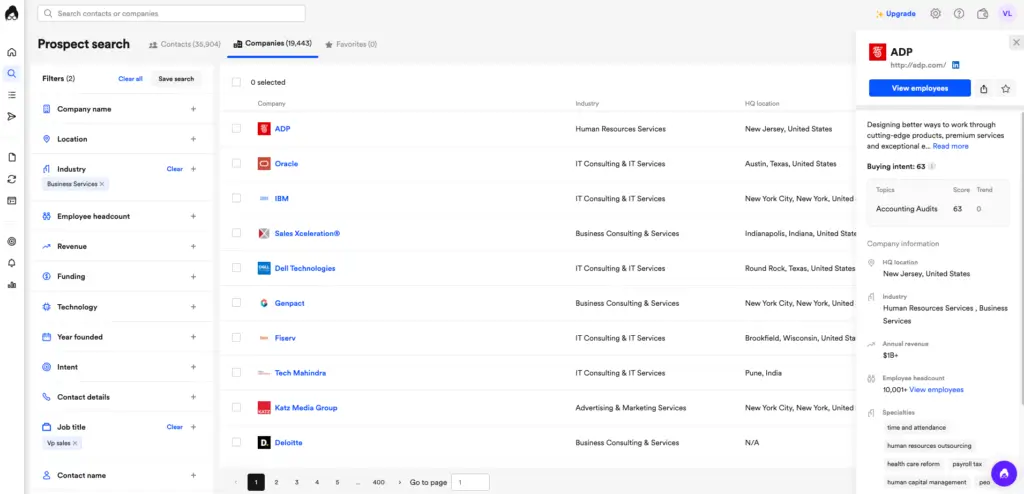
Lusha’s prospecting platform lets you search for contacts and companies using filters such as job title, seniority, department, location, industry, company size, revenue, and technologies used.
This helps you move beyond simple email lookup. You can build more targeted lists based on your ideal customer profile and then save those contacts into dedicated prospect lists for outreach, enrichment, or CRM export.
Strong prospecting depends on relevance. A smaller list of highly relevant prospects is usually more valuable than a large list of weak-fit contacts. Lusha’s filters help you narrow your audience before spending credits.
AI Prospect Playlists
Lusha Prospect Playlists are AI-powered lists that automatically update with qualified contacts and companies. Instead of rebuilding static lists every week, you can create a list around your ICP and let Lusha suggest similar prospects over time.
This is one of the most important updates to Lusha’s positioning. It moves the platform beyond basic contact lookup and closer to ongoing prospect stream generation.
You can use AI Prospect Playlists for several practical sales motions:
- Lookalike prospecting: Find contacts similar to your best saved prospects.
- Job-change tracking: Identify decision-makers who recently moved into relevant roles.
- Technology-based targeting: Find companies using specific software or tech stacks.
- Account expansion: Discover similar buyers inside existing customer accounts.
- Competitor displacement: Build lists of accounts likely to use competing tools.
This feature is helpful for SDR teams that want a fresher pipeline without manually searching from scratch. You should still review AI-suggested prospects before outreach, but it can reduce repetitive list-building work.
Buyer Intent Signals and Sales Intelligence
Lusha includes buyer intelligence features that help you identify which companies may be more likely to engage. These signals can include job changes, growth indicators, hiring trends, technology signals, and intent topics.
For sales teams, this matters because timing is often the difference between a cold message and a relevant message. If a company is hiring aggressively, adopting new tools, growing a department, or showing intent around a topic, your outreach can be more specific.
Instead of sending a generic email, you can reference a relevant business trigger. This improves personalization and can help you prioritize accounts that are more likely to respond.
CRM Enrichment and Workflow Automation
Lusha integrates with popular CRMs and sales tools, including Salesforce, HubSpot, Pipedrive, Zoho, Outreach, Salesloft, and other platforms. You can use these integrations to push enriched contacts into your pipeline and reduce manual data entry.
The most practical CRM use cases include:
- Lead enrichment: Add missing emails, phone numbers, job titles, and company data.
- CRM hygiene: Update stale records with fresher contact details.
- Sales handoff: Send qualified prospects from Lusha into sales workflows.
- Segmentation: Improve targeting with firmographic and technographic fields.
For RevOps teams, this is where Lusha becomes more valuable. It is not only a prospecting tool, it can also support data quality across your revenue stack.
API, Webhooks, and Automation Support
Lusha also offers API access and automation options for teams that want more control over how data moves between systems. This is useful for companies that want to enrich inbound leads, update internal databases, automate prospect research, or connect Lusha data to custom workflows.
API access is more relevant for RevOps, sales operations, and technical GTM teams. If you only need occasional contact reveals, the browser extension may be enough. If you need ongoing enrichment at scale, API access becomes much more important.

Pros and Cons
Benefits and Limitations of Using Lusha
Positive
✅ Easy Chrome Extension workflow
✅ Verified emails and direct dials
✅ AI Prospect Playlists
✅ CRM enrichment and integrations
✅ Strong privacy and compliance positioning
Negative
❌ Phone reveals use many credits
❌ Free plan is limited
❌ Advanced features require higher plans
❌ Data accuracy varies by market
❌ Not as complete as some all-in-one outbound tools
✅ Pros
Lusha has several strengths that make it appealing for sales, marketing, RevOps, and recruiting teams.
- Fast contact discovery: The Chrome Extension makes LinkedIn and website prospecting much faster.
- Verified contact data: Lusha helps you find business emails and phone numbers without manual searching.
- Easy user experience: The platform is simple enough for individual reps and recruiters to adopt quickly.
- AI Prospect Playlists: Auto-refreshing lists help reduce repetitive prospect research.
- CRM enrichment: Integrations and workflow tools help improve data quality inside your CRM.
- Compliance focus: Lusha highlights GDPR, CCPA, ISO, and SOC 2 controls.
❌ Cons
Lusha is strong, but it has limitations you should consider before choosing a plan.
- Phone credits run out quickly: Revealing phone numbers consumes more credits than email reveals.
- Free plan is mostly for testing: The credit allowance is too limited for serious prospecting.
- Advanced features cost more: API access, team controls, and deeper workflows may require higher tiers.
- Accuracy can vary: Some regions, niche markets, and smaller companies may have less complete data.
- Not a full sales engagement suite: Apollo.io may be stronger if you want prospecting and outbound execution in one place.
User Experience
User Experience and Ease of Use
Interface and Navigation
Lusha is designed for speed. The interface is clean, the search experience is straightforward, and the browser extension keeps the workflow practical for daily prospecting.
You can move from search to reveal to list building without a steep learning curve. This matters because many SDRs and recruiters do not want a heavy enterprise platform just to find email addresses and phone numbers.
The dashboard makes it easy to view saved lists, credit usage, enrichment tools, and integration options. The overall experience feels lightweight, which is one of Lusha’s main advantages over more complex sales intelligence platforms.
Workflow and Automation Tools
Lusha supports bulk enrichment, CRM sync, workflow automations, and API-based processes. This means you can use it for both manual prospecting and automated data enrichment.
For example, you can upload a CSV of partial contacts and enrich missing fields. You can also push contacts into your CRM or use automation to enrich leads that enter your sales funnel.
The more advanced your workflow becomes, the more important plan selection is. Smaller teams can often work well with the Chrome Extension and CRM export, while larger teams may need API access, team controls, and credit allocation.
Customer Support and Resources
Lusha offers help center content, onboarding resources, and support options based on plan level. If your team needs priority support, custom workflows, SSO, or dedicated success resources, you will likely need to evaluate a higher-tier or Scale plan.
For most small teams, the documentation and basic onboarding should be enough to get started. For larger revenue teams, I recommend asking detailed questions during the demo about support response times, CRM implementation, data governance, and credit management.
Data and Security
Data Accuracy, Privacy, and Compliance
Email and Phone Data Accuracy
Lusha is generally known for strong email lookup and contact discovery, especially when used with LinkedIn and company profiles. However, like every B2B data platform, accuracy varies by region, seniority, company size, and how recently the person changed roles.
You should treat Lusha as a strong data source, not as a perfect source. For high-value accounts, it is still wise to verify critical contacts manually or use secondary validation before launching high-volume outreach.
The most important practical point is that phone data should be used carefully. Because phone number reveals consume more credits, you should reserve direct dials for higher-priority accounts instead of revealing phone numbers for every contact.
Privacy Regulations and Compliance
Lusha positions itself strongly around privacy and compliance. It highlights GDPR and CCPA compliance, third-party validation, ISO 27701, SOC 2 Type 2, ISO 27001, and ISO 27018.
This is a major advantage compared with lower-quality email finder tools that provide little transparency around data sourcing. For B2B teams, compliance is not only a legal concern, it is also a brand trust issue.
That said, using a compliant data provider does not automatically make every outreach campaign compliant. You still need to manage opt-outs, suppression lists, consent rules, regional cold email laws, and internal data retention policies.
Security Measures
Lusha’s security posture is stronger than many lightweight prospecting tools. Features such as access controls, enterprise security options, SSO on higher-tier plans, and documented security certifications make it more suitable for serious sales and RevOps teams.
If you work in a regulated industry or target European prospects, you should review Lusha’s trust and privacy documentation before rollout. You may also want your legal or compliance team to review how Lusha data will be used inside your outreach process.
Pricing and Plans
How much does Lusha cost?
Lusha uses a credit-based pricing model. Credits are used to reveal data and access certain actions across the platform. This makes pricing flexible, but it also means you need to understand how credits are consumed before choosing a plan.
Lusha Plans and Credits
Lusha currently offers Free, Starter, Pro, Premium, and Scale plans. The Free plan is mainly for testing. Starter and Pro are better for individual users and small teams. Premium is designed for larger teams that need more credits and management features. Scale is custom-priced for organizations that need flexible credit volume, priority support, SSO, and advanced controls.
| Plan | Best For | Key Details |
| Free | Testing Lusha before upgrading | $0 plan with up to 40 credits per month, browser extension, and basic prospecting access. |
| Starter | Solo prospectors and light users | Starts at $37.45/month billed yearly, with 4,800 credits per year. |
| Pro | Small sales teams that need more workflow support | Starts at $52.45/month billed yearly, with 7,200 credits per year and additional features. |
| Premium | Growing teams with larger credit needs | Starts at $299.95/month billed yearly, with 40,800 credits per year and team management features. |
| Scale | Enterprise and high-volume GTM teams | Custom pricing with flexible credits, advanced compliance, SSO, priority support, and dedicated success resources. |
How Lusha Credits Work
Lusha credits are the most important part of pricing. A verified email reveal costs 1 credit, while a phone number reveal costs 10 credits. This difference matters because a plan that looks generous for email outreach may feel much smaller if your team relies on direct dialing.
For example, 400 credits can reveal 400 email addresses, but only 40 phone numbers. If you reveal both email and phone for the same contact, your credit usage increases quickly.
Monthly plans allow unused credits to roll over up to twice the plan’s credit limit, as long as your subscription remains active. Annual plans provide credits upfront, but unused credits reset at the end of the annual cycle.
Value for Money and Cost Considerations
Lusha can be cost-effective when you use it strategically. If your workflow is email-first, the credit model can support a meaningful volume of prospecting. If your workflow is phone-first, you need a higher credit plan or a custom package.
For small teams, I recommend starting with the Free or Starter plan to test data quality in your market. For active outbound teams, Pro or Premium will usually be more realistic. For larger teams, Scale is worth discussing because credit allocation, governance, and support become more important.
Lusha Pricing Compared to Competitors
Lusha sits between simple email finder tools and enterprise sales intelligence platforms. It is usually easier and cheaper to adopt than ZoomInfo, but it may not offer the same enterprise depth. It is simpler than Apollo.io, but Apollo.io may be stronger if you want built-in sales engagement, sequencing, and a broader outbound workflow.
| Category | Lusha | Apollo.io | ZoomInfo |
| Best For | Contact lookup, LinkedIn prospecting, and CRM enrichment | Prospecting plus outbound engagement | Enterprise account intelligence and large GTM teams |
| Free Plan | Available | Available | Limited or quote-based options may vary |
| Contact Data | Strong verified emails and phone numbers | Large contact database with sequencing tools | Deep company and contact intelligence |
| Sales Engagement | Available, but not the main strength | Strong built-in sequencing | Often used with broader sales stack |
| Ease of Use | Very easy for reps and recruiters | Moderate, more features to manage | More complex enterprise setup |
| Best Fit | Small to mid-sized teams that need fast data access | Outbound teams wanting one prospecting and engagement platform | Enterprises with bigger data, intent, and account intelligence needs |
Competition
Lusha Alternatives and Competitors
Lusha is a strong option, but it is not the only sales intelligence tool worth considering. The best alternative depends on whether you care most about contact accuracy, outbound automation, enterprise account data, European compliance, or budget.
Lusha vs Apollo.io
Apollo.io is usually the better choice if you want sales intelligence and sales engagement in one platform. It combines contact data, email sequencing, workflow automation, analytics, and outreach tools.
Lusha is better if your main goal is fast contact discovery, LinkedIn prospecting, and CRM enrichment. It is often easier to adopt, but it may not replace a full outbound platform for teams that need advanced sequencing and campaign management.
Lusha vs ZoomInfo
ZoomInfo is stronger for larger companies that need deep account intelligence, advanced segmentation, intent data, and enterprise GTM workflows. It is often a better fit for mature revenue teams with bigger budgets.
Lusha is more accessible and easier to use. If you are a smaller team that mainly needs verified emails, direct dials, and quick prospecting, Lusha may be a more practical choice.
Lusha vs Cognism
Cognism is a strong alternative for teams that prioritize European prospecting and compliance-first phone data. It is often considered a strong option for UK and EMEA sales teams.
Lusha is still easier for many users and can be a better fit if you want browser-based prospecting and AI list generation at a lower entry point.
Lusha vs RocketReach
RocketReach is a broad contact lookup tool used by sales teams, recruiters, and freelancers. It can be useful when you need wide contact search across many industries and individual professionals.
Lusha feels more sales-workflow oriented because of its CRM enrichment, Chrome Extension, buyer signals, and AI Prospect Playlists. If your use case is GTM prospecting rather than general contact lookup, Lusha may feel more focused.
Lusha vs UpLead
UpLead is often compared with Lusha because both focus on B2B contact data and lead generation. UpLead is a good option if you want transparent filtering, real-time email verification, and a straightforward prospecting workflow.
Lusha may be stronger if you rely heavily on LinkedIn prospecting, AI recommendations, and CRM enrichment. UpLead may be worth comparing if your top priority is email verification and predictable list building.
Best Practices
How to Use Lusha Effectively
Step-by-Step Workflow
- Define your ICP: Decide which industries, job titles, company sizes, regions, and technologies matter most.
- Install the Chrome Extension: Use it while browsing LinkedIn, company websites, and prospect profiles.
- Build targeted lists: Use filters to create focused prospect lists instead of broad, low-quality lists.
- Reveal selectively: Use email reveals for broader outreach and phone reveals for higher-priority contacts.
- Sync with your CRM: Push enriched contacts into Salesforce, HubSpot, Pipedrive, or your preferred system.
- Use Prospect Playlists: Let AI refresh relevant lists based on your best-fit prospects.
- Monitor credits: Track usage so your team does not run out during active campaigns.
Best Practices for Better Results
- Start narrow: Build smaller, high-fit lists before scaling your outbound volume.
- Use triggers: Prioritize job changes, hiring growth, technology changes, and intent signals.
- Personalize outreach: Use Lusha data to make your messaging more relevant.
- Clean your CRM: Use enrichment to reduce missing fields and outdated records.
- Protect credits: Reveal phone numbers only when a contact is worth calling.
Who Should Use Lusha?
Lusha is best for teams that need a simple, fast, and reliable way to find verified B2B contact information. It is especially useful for SDRs, account executives, recruiters, agencies, RevOps teams, and founders doing founder-led sales.
It is also a good fit if your sales team already works heavily inside LinkedIn and your CRM. The Chrome Extension and CRM sync make it easy to add data into your normal workflow.
Who Should Not Use Lusha?
Lusha may not be the best fit if you need a complete outbound sales engagement platform, advanced enterprise account intelligence, or very high-volume phone number reveals at a low cost.
If your team needs built-in sequencing, analytics, dialers, and campaign management, compare Lusha with Apollo.io. If your team needs enterprise-level account data, intent, org charts, and broader GTM intelligence, compare it with ZoomInfo.

Conclusion
Is Lusha the Right Sales Intelligence Tool for You?
⭐ Overall Rating: 8.7/10
Lusha is a strong B2B sales intelligence tool for teams that want verified emails, direct dials, company data, AI-powered prospecting, and CRM enrichment in a clean and easy-to-use platform.
Its biggest strengths are the Chrome Extension, simple prospecting workflow, AI Prospect Playlists, CRM integrations, and clear focus on contact discovery. These features make it practical for teams that need faster research and cleaner outbound data.
The main concern is the credit model. Email reveals are efficient, but phone number reveals can consume credits quickly. If your team runs high-volume cold calling, you should calculate your expected usage before committing to a plan.
My Opinion on Lusha
Lusha is one of the better choices if you want a lightweight, reliable contact data tool that your team can adopt quickly. It works well for prospecting, recruiting, list building, and CRM enrichment, especially when your team already uses LinkedIn and a CRM daily.
I would recommend Lusha for small and mid-sized teams that need speed and usability. I would be more cautious for large outbound teams that need heavy phone data, advanced sales engagement, or enterprise account intelligence.
If your goal is simple contact discovery and enrichment, Lusha is a strong option. If your goal is a full outbound operating system, compare it with Apollo.io. If your goal is enterprise-level sales intelligence, compare it with ZoomInfo.
Final Thoughts
Choosing the right lead generation tool comes down to your workflow. If you need accurate B2B contact data, fast prospecting, and easier CRM enrichment, Lusha can deliver strong value.
Just make sure you understand the credit model before you buy. The platform is most cost-effective when you reveal data selectively, prioritize high-fit leads, and combine Lusha’s contact data with smart targeting and personalized outreach.
FAQs
Frequently Asked Questions
What is Lusha used for?
Lusha is used for B2B prospecting, contact discovery, CRM enrichment, recruiting, and sales intelligence. It helps you find verified business emails, phone numbers, company details, and buyer signals so your team can reach decision-makers faster.
Is Lusha free?
Yes. Lusha offers a free plan with up to 40 credits per month. The free plan is useful for testing the platform, but active sales teams usually need a paid plan for more credits and advanced features.
How does Lusha pricing work?
Lusha uses a credit-based pricing model. You spend credits when revealing contact data or using certain features. A verified email reveal costs 1 credit, while a phone number reveal costs 10 credits.
How many credits does Lusha give for free?
Lusha’s Free plan includes up to 40 credits per month. This is enough for light testing, but it may not be enough for regular outbound prospecting or phone-heavy sales workflows.
Is Lusha accurate?
Lusha is generally considered reliable for B2B email and phone data, but accuracy can vary by region, industry, company size, and contact seniority. For high-value prospects, it is smart to verify key contacts before outreach.
Does Lusha work with LinkedIn?
Yes. Lusha’s Chrome Extension works with LinkedIn and helps you reveal contact details while viewing profiles or company pages. This is one of its most popular prospecting workflows.
Does Lusha integrate with Salesforce and HubSpot?
Yes. Lusha supports CRM integrations with platforms such as Salesforce, HubSpot, Pipedrive, Zoho, and other sales tools. These integrations help you sync enriched contacts and improve CRM data quality.
What are Lusha Prospect Playlists?
Lusha Prospect Playlists are AI-powered prospect lists that update automatically with contacts and companies that match your ideal customer profile. They help reduce manual list building and keep your pipeline fresher.
Is Lusha GDPR compliant?
Lusha states that it is GDPR and CCPA compliant and highlights privacy and security certifications such as ISO 27701, SOC 2 Type 2, ISO 27001, and ISO 27018. Your own outreach process still needs to follow applicable privacy and email rules.
What are the best Lusha alternatives?
The best Lusha alternatives include Apollo.io, ZoomInfo, Cognism, RocketReach, UpLead, and Lead411. Apollo.io is strong for sales engagement, ZoomInfo is strong for enterprise account intelligence, and Cognism is strong for compliance-focused EMEA prospecting.