
Introduction
Podcasting has exploded in popularity in recent years, and with it, the number of tools promising to help you record, edit, and publish professional audio or video without a studio. As a creator, marketer, or teacher in the digital era, you want a workflow that doesn’t bog you down with technical hurdles. You need a solution that lets you focus on your message while still delivering polished episodes to your audience.
Podcastle positions itself as an all‑in‑one podcasting studio that harnesses artificial intelligence to make content creation faster and more accessible. Instead of stitching together multiple applications for recording, editing, transcription, and hosting, you can work entirely inside your browser. In this review, you will learn what Podcastle offers, how its AI features can streamline your workflow, what it costs, and whether it’s the right choice for your projects.
What Is Podcastle?
Podcastle is a browser‑based platform for recording, editing, and publishing podcasts and videos. Founded by Arto Yeritsyan and a team who wanted to democratize professional audio production, the service launched, intending to give anyone the tools to create high‑quality content without expensive equipment or complex software. Podcastle’s mission is to combine intuitive design with cutting‑edge AI so that both amateurs and professionals can produce studio‑grade podcasts from anywhere.
At its core, Podcastle provides three key services:
- Recording studio: Capture audio and video locally on each participant’s device to ensure high‑resolution exports even if the internet connection drops. Up to 10 remote guests can join your session with separate tracks recorded for each speaker.
- AI‑powered editing: Use automated transcription, text‑based editing, and one‑click audio cleanup tools to reduce manual work. Features such as Magic Dust audio enhancement, noise reduction, and silence trimming help you polish your recordings without specialist knowledge.
- Publishing and hosting: Export your finished episode in multiple formats or publish directly through Podcastle’s hosting hub. You can distribute your podcast to major directories and monitor performance from one dashboard.
Podcastle caters to a diverse audience. New podcasters appreciate its generous free plan and gentle learning curve, while seasoned creators use its advanced AI voices and voice cloning to speed up production. Businesses, educators, and marketers leverage its collaboration features to create training materials, internal communications, and branded content.
Recording and Production
Key Features for Recording and Production
Browser‑Based Studio and Local Recording
Working in a web browser gives you flexibility, but it can also raise concerns about reliability. Podcastle addresses this by recording audio and video locally on each participant’s device before uploading to the cloud. This dual‑recording approach ensures that temporary internet hiccups do not ruin your session. You can record up to 4K video and 48 kHz WAV audio, then download separate tracks for each speaker. This setup offers the same control you would expect from professional desktop software, without any installation.
For creators on the go, Podcastle also offers mobile apps for iOS and Android. Guests can join from their phones and still record separate tracks, making it easy to collaborate with people who are not in front of a computer.
Multi‑Track Audio and Video Recording
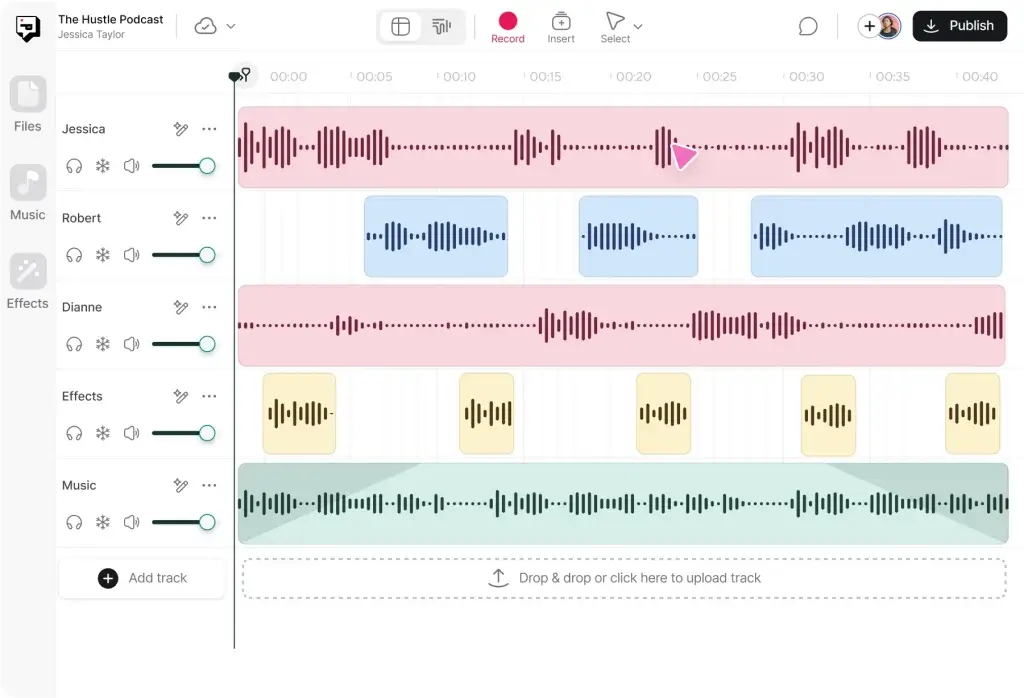
Multi‑track recording is critical for professional post‑production. When each participant’s audio and video are captured on a separate track, you can fine‑tune levels, remove background noise, and cut mistakes without affecting other speakers. Podcastle automatically syncs these tracks for you. During recording, you can see individual levels and adjust settings such as microphone choice and camera resolution.
For creators who mix in‑person and remote guests, Podcastle supports hybrid setups. You can connect additional microphones or cameras and integrate them into a single project. This flexibility is particularly useful for panel discussions or live events where some participants are in a studio, and others join remotely.
Remote Interviews and Collaboration
Remote interviews are the lifeblood of many podcasts. Podcastle simplifies this process by generating a unique recording link that your guests can join without creating an account. Once inside the virtual studio, you have control over when the recording starts and stops, and you can monitor each guest’s audio quality. The platform supports up to 10 participants, making it suitable for roundtable discussions or multi‑host shows.
For larger teams, role‑based access allows you to assign producer roles that can manage guests, trigger media, and monitor the session without appearing on the recording. This separation of duties helps maintain a smooth workflow and reduces the risk of accidental interruptions.
AI‑Powered Editing
AI‑Powered Editing and Repurposing Tools
Text‑Based Editing and Automatic Transcription
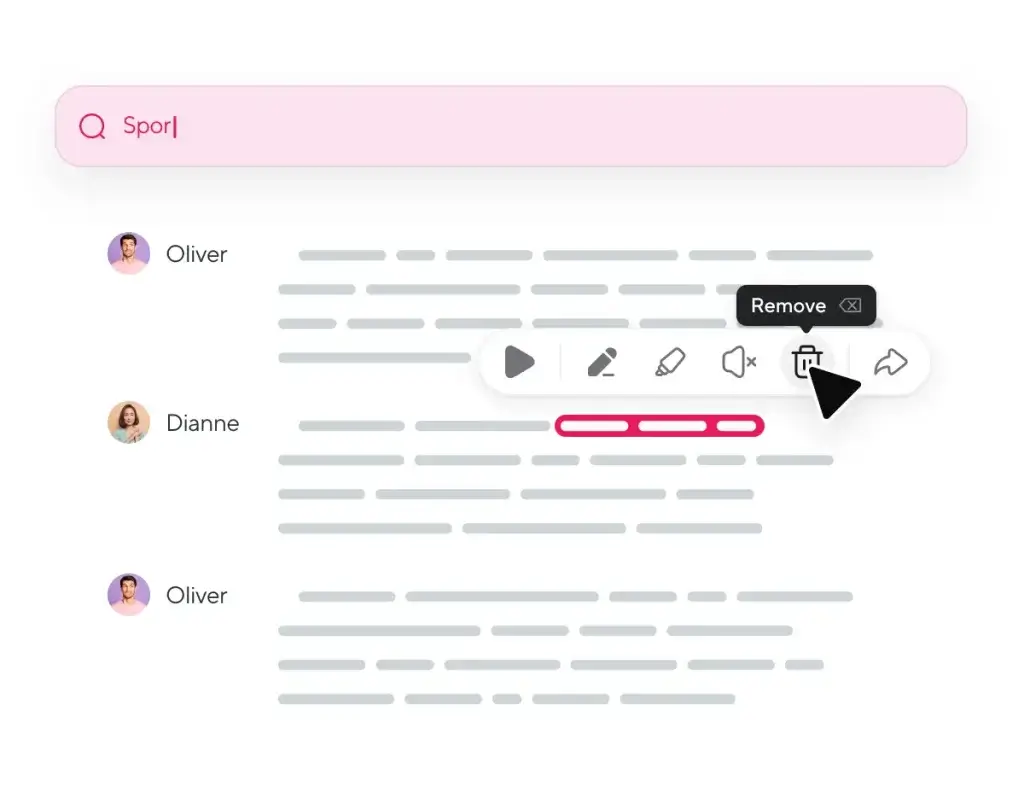
After recording, Podcastle automatically transcribes your audio and video into text. The transcript appears alongside a timeline, allowing you to edit your episode by cutting or rearranging sentences in the transcript. When you delete a sentence, the corresponding audio and video are removed from the timeline. This text‑based editing is intuitive if you are more comfortable editing documents than waveforms.
Automatic transcription also unlocks additional benefits. You can search the transcript to find specific moments, create captions or subtitles, and repurpose your episode into blog posts or social media copy. Transcripts are speaker‑labeled and can be downloaded in common formats such as SRT or VTT.
Magic Dust Audio Enhancement, Noise Removal, and Silence Trimming
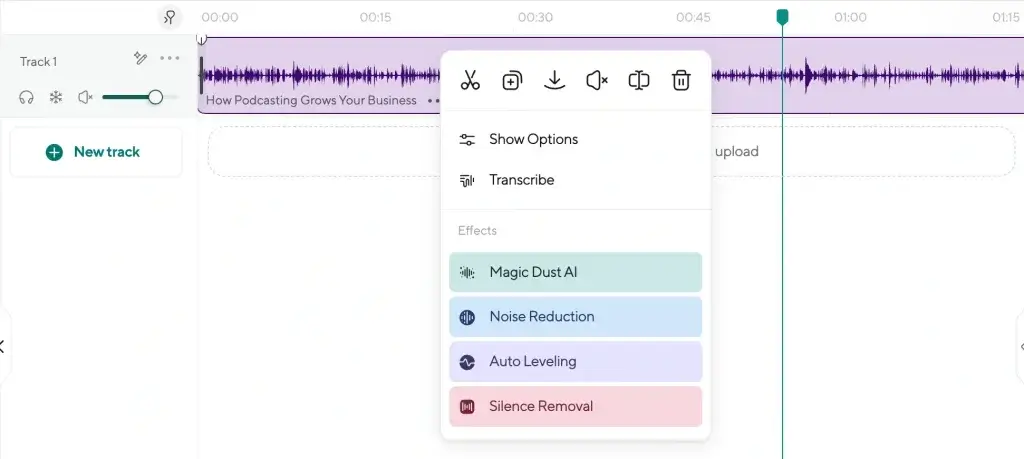
Podcastle’s Magic Dust tool applies one‑click audio enhancement to your recordings. With this feature, AI analyzes each track and removes background noise, balances volume levels between speakers, and applies equalization settings to improve clarity. If you record in a non‑ideal environment, Magic Dust can elevate your audio from “good enough” to professional quality.
In addition to Magic Dust, Podcastle offers tools for noise reduction, silence removal, and auto‑leveling. Silence trimming automatically detects long pauses and cuts them down to keep your episode’s pacing tight. Auto‑leveling balances loud and quiet segments, which is especially helpful when guests use different microphones or speak at different volumes. These features save you time during editing and help maintain a consistent listening experience.
Voice Cloning, Text‑to‑Speech, and Revoice
One of Podcastle’s most innovative offerings is its suite of AI voice tools. You can choose from a library of over 450 lifelike voices in multiple languages and accents to generate narration from text. This text‑to‑speech feature is useful for creating intros, ads, or narrating articles without recording your own voice.
If you prefer to maintain a personal touch, the Revoice tool lets you clone your own voice. By providing a short sample (as little as a few seconds), Podcastle’s AI creates a digital copy that you can use to generate speech by typing. This is ideal for replacing mistakes, recording additional lines, or producing content in multiple languages without re‑recording entire sections.
The Speech‑to‑Speech feature goes one step further. You record your voice, and the AI transforms it into a different voice from the library. This is perfect for creating character voices in storytelling podcasts or dubbing content for different audiences. It also includes a voice design tool that allows you to describe a custom voice (“wise old man,” “calm and youthful,” etc.) and receive options tailored to your description.
Additional Features
Video Editing and 4K Support
Beyond audio, Podcastle includes a video editor that supports up to 4K resolution. You can trim clips, adjust aspect ratios, add lower‑thirds and captions, and apply cinematic blur or background removal to focus viewers on the subject. Text‑based editing works for video as well, meaning you can remove sentences from the transcript and watch the edits ripple through your video timeline.
Music and Sound Effects Library
A podcast’s mood often depends on its soundtrack. Podcastle provides access to more than 7,000 royalty‑free music tracks and sound effects. You can search by genre, tempo or mood and drag tracks into your project. The library is included in paid plans, and even the free tier offers a curated selection. This removes the need to hunt for music on separate sites and ensures you have the right to use the sounds in your work.
Hosting Hub and Publishing Options
When your episode is ready, you can export it in audio‑only, video, or both. The hosting hub allows you to publish directly to major podcast directories, including Apple Podcasts, Spotify, and Google Podcasts. You receive an RSS feed, analytics on downloads and listener locations, and the ability to import existing shows. Publishing from within the same platform streamlines your workflow and reduces the chance of errors when moving files between services.
If you prefer to host your podcast elsewhere, Podcastle still provides high‑quality exports in formats such as MP3, WAV, and MP4, so you can upload them to any hosting provider or video platform.
Team Collaboration and Role‑Based Access
For businesses and teams, Podcastle offers shared workspaces with role‑based permissions. Multiple creators can work on the same project, leave comments, and track changes in real time. Producers can manage sessions and review edits without altering the content, while editors have full access to cut and arrange clips. This collaborative approach makes it easier for marketing departments, educational institutions, or agencies to manage audio and video projects at scale.
Pros and Cons
Advantages and Limitations
Positive
✅ All‑in‑one workflow
✅ Generous free plan
✅ AI voices and cloning
✅ Text‑based editing
Negative
❌ Storage caps
❌ Browser requirements
❌ Learning curve
❌ Buggy experiences
✅ Pros
- All‑in‑one workflow: Record, edit, transcribe and publish from one web interface. There’s no need to juggle multiple apps or transfer large files between services.
- Generous free plan: Beginners can produce audio‑only podcasts and test AI tools without spending money. You can upgrade only when you need more features.
- AI voices and cloning: The library of 450+ voices and the ability to clone your own voice set Podcastle apart. These tools let you generate narration, fix mistakes or create multilingual versions quickly.
- Text‑based editing: Editing audio or video by modifying a transcript is intuitive, especially if you are new to waveform editors.
- Magic Dust and noise removal: One‑click cleanup tools save hours of manual audio editing and provide a professional polish.
- Multi‑track local recording: Recording each participant locally and syncing to the cloud protects against internet dropouts and ensures high‑quality exports.
- Team collaboration: Role‑based access and shared workspaces support collaborative projects and agency workflows.
❌ Cons
- Storage caps: Lower tiers include limited cloud storage (5 GB on the Storyteller plan). You may need to download and archive older projects or upgrade to a higher tier.
- Browser requirements: Podcastle works best in Chrome or Edge. Using Safari or Firefox can lead to lags or unsupported features.
- Learning curve: Although the interface is streamlined, features such as voice design and advanced video editing require some experimentation. New users may need time to become proficient.
- Buggy experiences: Some users report occasional glitches or slow uploads, particularly when processing long videos. Future updates may improve stability.
- Customer support variability: Response times can vary depending on your plan. Business users receive priority support, while free users may wait longer for assistance.
Pricing and Plans
How much does Podcastle cost?
Podcastle’s pricing structure is designed to grow with you. All plans include unlimited audio recording and basic editing tools. Higher tiers add more transcription hours, video recording time, AI voice credits, and advanced features such as voice cloning.
| Plan | Key Features | Recommended For |
| Free | 3 hours lifetime video recording, 1 hour transcription, limited royalty‑free music, 160 kbps MP3 downloads with watermark | Hobbyists testing Podcastle and short audio‑only projects |
| Storyteller | 8 hours monthly video recording at up to 4K, 10 hours monthly transcription, Magic Dust AI, unlimited royalty‑free music, 400 k characters of text‑to‑speech | Solo creators and small teams producing regular episodes |
| Pro | 20 hours monthly video recording, 25 hours monthly transcription, Revoice voice cloning, 1 million text‑to‑speech characters | Professional podcasters and video creators who need voice cloning |
| Business | 50 hours monthly video recording, unlimited transcription and AI voice generation, team collaboration tools, dedicated hosting | Agencies and companies producing multiple shows with teams |
While the Free plan lets you experiment with Podcastle’s core features, it includes watermarks on video exports and limited transcription. The Storyteller tier (about $11.99 per month when billed annually) removes watermarks, increases video hours, and unlocks Magic Dust and a larger music library. The Pro tier (around $23.99 per month) introduces Revoice for voice cloning and extends transcription hours. Businesses or organizations needing collaboration and high quotas can contact sales for a Business plan.
Keep in mind that annual billing offers a lower monthly rate compared with paying month to month. Storage caps are an important consideration: entry‑level tiers include only 5 GB of cloud storage, while Pro offers up to 120 GB. If you produce lots of video content, you may need to manage storage carefully by downloading completed projects and deleting older files.
Best Use Cases
Who Should Use Podcastle
Solo Creators and Interview Shows
If you host a solo podcast or regularly interview guests, Podcastle’s ability to record high‑quality audio locally and manage multiple participants makes it an attractive choice. The AI transcription and Magic Dust tools help you produce polished episodes quickly, even if you are new to audio editing. Revoice voice cloning is useful for fixing small errors or recording short voiceovers without bringing guests back for retakes.
Educators, Marketers, and Business Teams
Beyond entertainment, podcasts and videos have become valuable channels for education, marketing, and internal communication. Educators can record lectures, interviews with experts, or tutorials and then use automatic transcription to create captions or study guides. Marketers benefit from the ability to turn one recording into multiple content formats, blog posts, social clips, and newsletters, using transcripts and Magic Clips. Businesses can use Podcastle’s hosting hub to create private podcasts for employees or clients.
When to Consider Alternatives
Podcastle excels at making podcasting accessible, but it may not be the best fit for everyone. If you require high‑end cinematic video editing, motion graphics, or color grading, you will still need a dedicated video editor like Adobe Premiere or Final Cut. Similarly, if you want unlimited storage or more robust collaboration features, tools such as Riverside or Descript might be better aligned with your needs. For audio engineers seeking granular control over effects and routing, traditional digital audio workstations may remain essential.
Set Up and Best Practices
Best Practices for Using Podcastle
Signing Up and Setting Up Your First Project
Creating an account is straightforward. Sign up with an email or social login and choose your intended use: podcasting, audiobooks, video creation, or education. The platform guides you through a short onboarding sequence and suggests a plan based on your needs. You arrive at a dashboard where you can create a new project, choose between recording, uploading existing files, or generating content with text‑to‑speech, and invite collaborators.
When you start a new project, set the recording quality (audio sample rate and video resolution) according to your plan. Generate a unique recording link and share it with your guests. Remind participants to join from a quiet space, use headphones to avoid echo, and use Chrome or Edge for the best experience. Encourage them to run the equipment check before joining to ensure their microphones and cameras are properly configured.
Preparing Guests and Optimizing Your Recording Environment
Even though Podcastle records locally, the quality of the initial recording still matters. Prepare your guests by sending them a brief checklist:
- Use a headset or external microphone to reduce echo and improve clarity.
- Find a quiet room with minimal background noise.
- Close unnecessary applications to free up system resources.
- Use a wired internet connection if possible, or position yourself close to your Wi‑Fi router.
As the host, position yourself in a space with soft furnishings (curtains, carpets) to dampen reflections. Test your setup before each session. If you are recording video, consider lighting and camera placement so that participants are well-lit and framed.
Tips for Efficient Editing and Content Repurposing
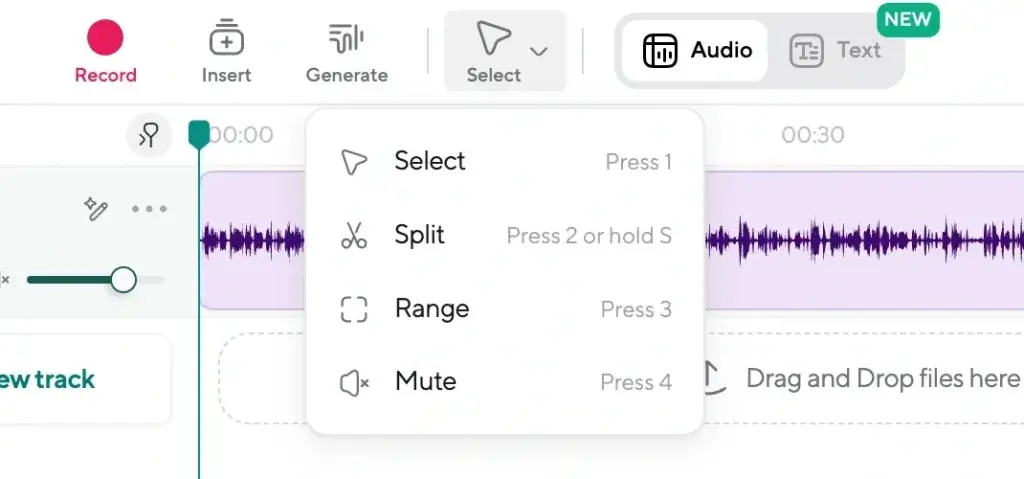
Once the recording is finished, allow time for all participants’ local files to upload. Then dive into the transcript. Use text‑based editing to remove filler words, long pauses, or off‑topic tangents. Apply Magic Dust and noise reduction early so you are working with clean audio. Add royalty‑free music and sound effects thoughtfully, short cues for transitions, and longer tracks for intros or outros.
Take advantage of automatic captions and subtitles when exporting video. Captions improve accessibility and searchability on platforms like YouTube and LinkedIn. For marketing purposes, use the transcripts to create show notes, social media captions, and blog posts. Consider generating short highlight clips using the built‑in tools; these can be published on social platforms to drive listeners back to the full episode.
Competitors
Alternatives to Podcastle
While Podcastle is a strong choice for AI-assisted podcast creation, it is not always the best fit for every workflow. Depending on whether you prioritize studio-grade recording, advanced video editing, live streaming, or podcast hosting, several alternatives may better match your needs.
The comparison below focuses on the most common Podcastle alternatives searched by users, helping you quickly evaluate where each platform excels.
Quick Comparison: Podcastle vs Leading Alternatives
| Platform | Best For | Key Strength | Main Limitation |
| Podcastle | AI-driven podcast creation | Voice cloning and AI audio cleanup | Limited advanced production control |
| Riverside | Professional remote recording | Local audio and video capture up to 4K | Higher cost for advanced plans |
| Descript | Script-based editing workflows | Text-based audio and video editing | Can feel complex for beginners |
| StreamYard | Live podcasts and broadcasts | Browser-based live streaming simplicity | Limited post-production editing |
| Podbean | Podcast hosting and monetization | Distribution and monetization tools | Basic recording and editing features |
| SquadCast | High-quality remote interviews | Reliable local audio capture | No built-in hosting or AI voices |
Riverside – Best for Studio-Quality Remote Recording
If your main priority is audio and video quality, Riverside is a strong alternative. It records each participant locally, preserving high-resolution audio even with unstable internet connections. This makes it ideal for interview-heavy podcasts and professional video content.
Riverside is less focused on AI voice generation, but it offers more control over raw production quality than Podcastle.
Descript – Best for Text-Based Editing and Repurposing
Descript appeals to creators who prefer editing audio and video like a document. Its transcript-based workflow makes it easy to remove mistakes, generate clips, and repurpose content.
Compared to Podcastle, Descript offers deeper editing flexibility, but it requires more setup time and feels less automated for voice generation.
StreamYard – Best for Live Podcasting and Streaming
StreamYard is optimized for live shows, interviews, and simulcasting to platforms like YouTube and LinkedIn. If your podcast strategy relies heavily on live audience interaction, StreamYard is easier to manage than Podcastle.
However, its editing and AI features are limited, making it less suitable for polished post-production workflows.
Podbean – Best for Hosting and Monetization
Podbean is not a direct Podcastle replacement for editing, but it excels as a podcast hosting and monetization platform. It works well if you already record elsewhere and need reliable distribution, analytics, and monetization tools.
Creators looking for an all-in-one AI studio may find Podbean too basic on the production side.
SquadCast – Best for Reliable Remote Interviews
SquadCast focuses on one core job: capturing clean, local audio for remote podcast interviews. It integrates well with advanced editors and is trusted by creators who value reliability over automation.
Compared to Podcastle, SquadCast lacks AI voice features and hosting, but it offers dependable raw recordings.
Which Podcastle Alternative Should You Choose?
Your ideal alternative depends on how you create content:
- Choose Podcastle if you want AI-powered voice generation and fast audio cleanup.
- Choose Riverside for studio-grade recording and video quality.
- Choose Descript for advanced editing and content repurposing.
- Choose StreamYard for live podcasting and broadcasts.
- Choose Podbean for hosting and monetization.
- Choose SquadCast for reliable remote interviews.
Conclusion
Final thoughts
Podcastle aims to simplify podcasting by bringing recording, editing, AI voice generation, and publishing into one browser‑based platform. Its generous free tier makes it accessible to newcomers, while advanced features like Magic Dust audio enhancement, voice cloning, and a vast library of AI voices provide plenty of room for growth. Multi‑track local recording ensures high‑quality results, and text‑based editing reduces the friction of post‑production.
No single tool fits every creator. Podcastle’s storage limits, browser requirements, and occasional bugs may be problematic for some users, and those requiring cinematic video editing or unlimited storage might gravitate toward competitors. Still, for many podcasters, educators, and marketers, Podcastle offers a compelling balance of convenience and capability. If you value a streamlined workflow and want to experiment with AI voices and voice cloning, Podcastle is well worth trying.
Have more questions
Frequently Asked Questions
Does Podcastle have a free plan?
Yes. The Free plan lets you record unlimited audio, provides 3 hours of lifetime video recording, and 1 hour of automatic transcription. Videos are watermarked, and the library of royalty-free music is limited, but it is a good way to test the platform before upgrading.
Can I record video podcasts with Podcastle?
Absolutely. Podcastle supports video recording up to 4K resolution. You can record up to 10 participants with separate tracks and edit the video using the same text-based tools you use for audio.
How accurate is Podcastle’s transcription?
The automatic transcription is quite accurate for clear speech recorded in quiet environments. You may need to review and correct technical terms or names, especially in noisy recordings. The transcripts are speaker-labeled and can be exported for captions or show notes.
What is Magic Dust?
Magic Dust is Podcastle’s one-click audio enhancement tool. It analyzes your recordings, removes background noise, balances volume levels, and applies equalization to improve clarity. It is particularly useful for podcasters recording outside a studio environment.
Can I clone my own voice?
Yes. With the Revoice feature, you provide a short recording of your voice. The AI creates a digital clone that you can use to generate new speech by typing text. This is useful for correcting mistakes or creating voiceovers without re-recording full sections.
Does Podcastle offer built-in hosting?
Yes. Podcastle’s hosting hub allows you to publish your podcast directly to major directories. You receive an RSS feed and basic analytics. If you prefer to host elsewhere, you can still export high-quality files and upload them to another service.
How many AI voices does Podcastle have?
Podcastle offers a library of over 450 AI voices in multiple languages and accents. You can also design custom voices by describing desired characteristics or use speech-to-speech to transform your voice into another style.
Is Podcastle suitable for team projects?
Yes. Higher-tier plans include shared workspaces, role-based permissions, and real-time collaboration features. Producers can manage sessions without appearing on the recording, and multiple editors can work on the same project simultaneously.
What equipment do I need to use Podcastle?
You need a computer or mobile device with a modern browser (Chrome or Edge is recommended), a microphone (a USB headset works well for beginners), and, for video, a camera. The platform records locally, so a stable internet connection helps with uploading files.
Are there any hidden costs?
Most features are included in your plan, but keep an eye on storage limits and transcription quotas. If you exceed the included hours or storage, you may need to purchase additional credits or upgrade your plan. Using certain AI features extensively, such as large volumes of text-to-speech characters, might require a higher tier.