
Introduction
Managing social media at scale can quickly become messy. You need to publish consistently, reply to messages fast, track performance across channels, monitor brand mentions, and increasingly handle reviews and customer conversations in one place. Vista Social positions itself as a broad social media management platform built for teams, agencies, and multi-location brands that need more than a basic scheduler. In this review, you’ll see what Vista Social does well, where it falls short, how it compares with alternatives, and whether it fits your needs in 2026.
Key Features
Vista Social’s Software Specification
Vista Social has grown into a multi-layered platform that combines social publishing, analytics, engagement, review management, listening, and automation. It is designed for social teams that want to centralize more of their workflow instead of stitching together separate tools.
Publishing and Scheduling
Publishing is one of Vista Social’s strongest areas. The platform supports planning, scheduling, approval workflows, media management, and boosting from one dashboard. It is built for teams that manage multiple brands, content calendars, and campaign variations across channels.
- Multi-network publishing: Schedule and publish content across major networks from one workspace, including support for formats such as reels, stories, shorts, videos, posts, documents, and threads depending on the network.
- Shared content calendar: Organize campaigns visually, move posts around with less friction, and keep your publishing cadence clear across clients or brands.
- Approval workflows: Route drafts through internal approvals before they go live, which is especially helpful for agencies and larger teams.
- Boosting tools: Promote selected posts directly through supported connected ad accounts, which helps bridge organic and paid workflows.
- Media library: Store creative assets in one place, label them, and make them easier to reuse across campaigns.
- Canva integration: Create or edit visuals without leaving your social workflow entirely.
Inbox, Engagement, and Automations
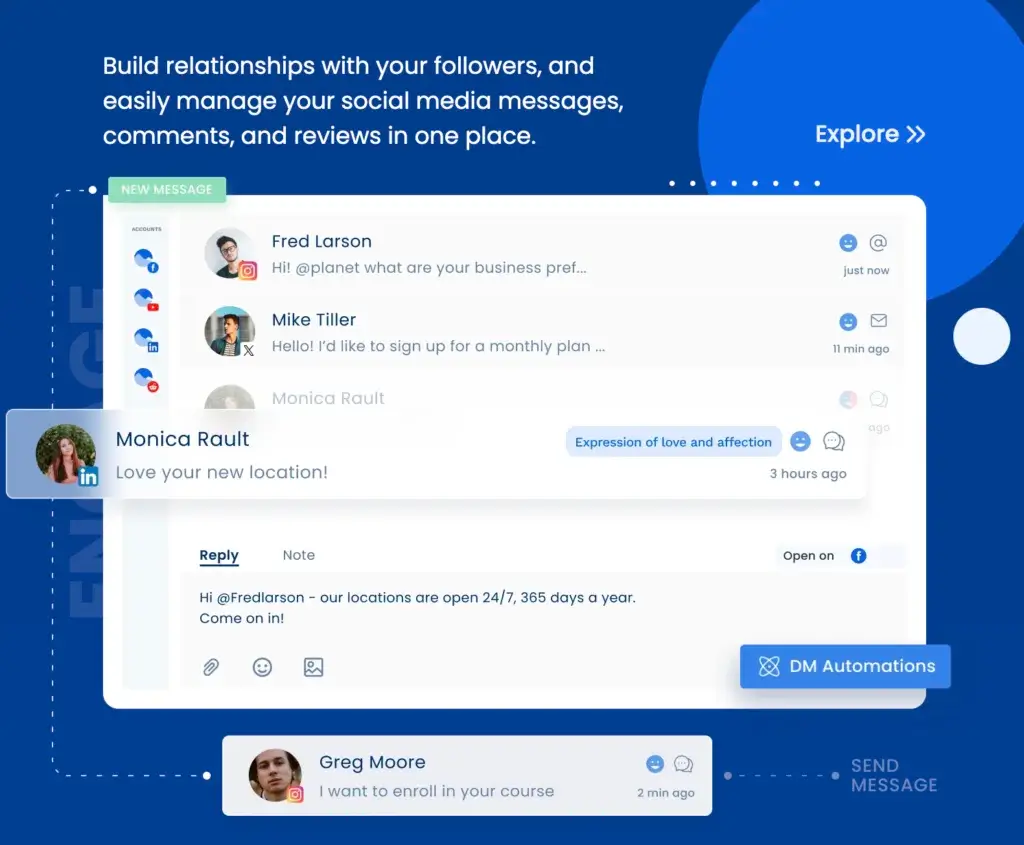
Vista Social goes beyond simple post scheduling by placing a lot of weight on engagement. Its inbox and automation tools make it more relevant for teams that treat social as both a publishing channel and a customer communication channel.
- Unified social inbox: Manage comments, messages, mentions, and engagement from one place instead of switching between native apps.
- DM automations: Set up automated replies and workflow triggers to respond faster and reduce repetitive manual work.
- Internal collaboration: Assign conversations, manage replies as a team, and keep response workflows more organized.
- Mobile inbox access: The platform also supports inbox use on mobile, which is useful for community managers who work on the go.
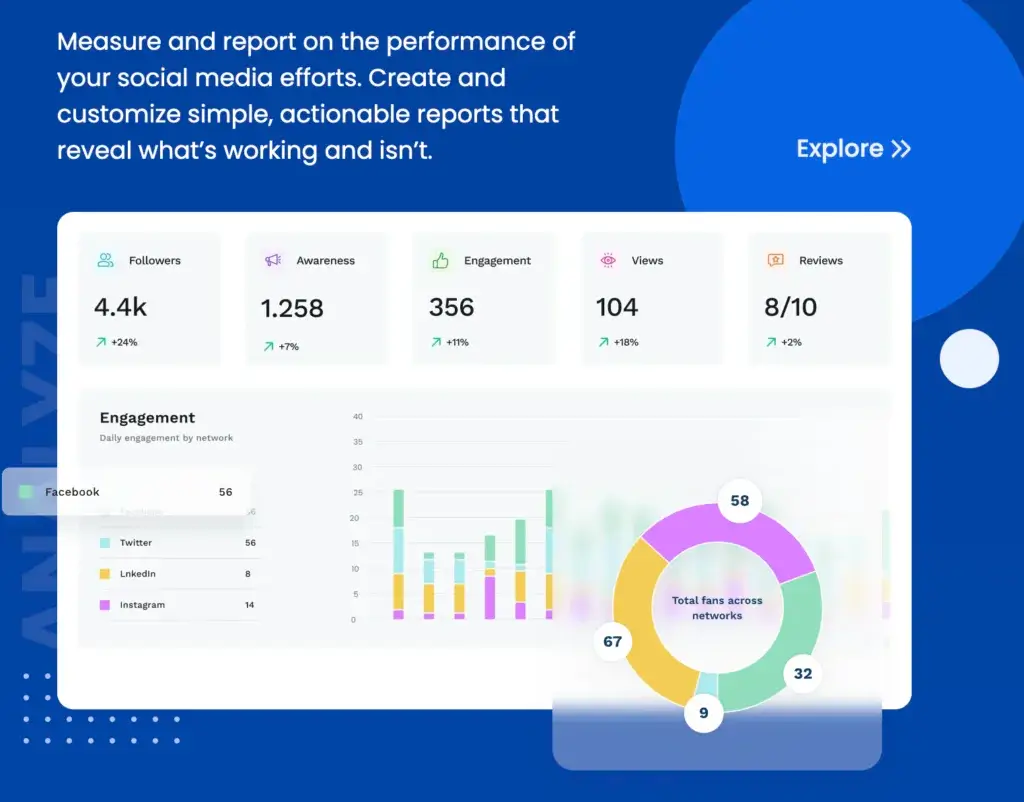
Analytics and Reporting
Vista Social offers a solid analytics and reporting layer that should appeal to agencies, in-house marketing teams, and brands that need to communicate results clearly to stakeholders. While some competitors still separate publishing from reporting, Vista Social keeps them closely connected.
- Cross-channel reporting: Track social profile performance and compare results across connected accounts.
- Post-level insights: Review what content formats, themes, and campaigns drive the strongest engagement and reach.
- Competitor reporting: Benchmark your performance against competitors to understand where you are gaining or losing ground.
- Team performance reporting: Measure response times and engagement productivity for teams handling messages and comments.
- Scheduled reports: Automate recurring reports to save time and keep clients or internal teams updated.
- API add-on: More advanced users can connect Vista Social data into BI tools or custom reporting environments.
AI Tools and Workflow Enhancements
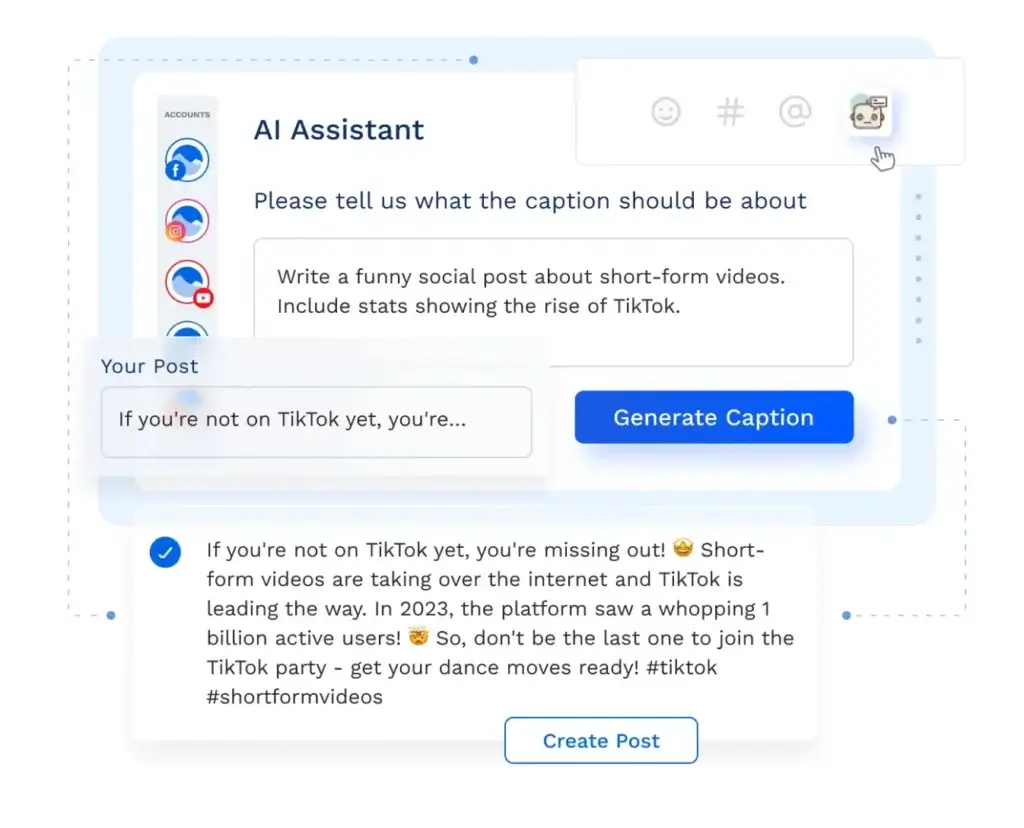
Vista Social has invested heavily in AI features, and these are not limited to writing captions. The platform increasingly frames AI as a workflow assistant across publishing, engagement, and knowledge-based responses.
- AI content generation: Generate captions and social copy faster.
- AI reply assistance: Draft responses for messages, comments, and reviews to help teams move faster.
- AI Training & Knowledge: Train the system on your business information so responses are more grounded and aligned with your brand context.
- Premium AI options: Higher tiers add more advanced AI support and workflow capabilities.
Integrations and Supported Networks
Vista Social supports a wider set of social networks than many legacy social media management tools. That makes it appealing if your strategy extends beyond the usual Instagram, Facebook, and LinkedIn mix.
- Supported social networks: Vista Social supports major channels such as Instagram, Facebook, LinkedIn, TikTok, X, Pinterest, YouTube, Threads, Reddit, Snapchat, Bluesky, and more.
- Review and reputation channels: It also covers multiple review networks for brands that care about customer feedback management.
- Workflow integrations: API and broader integrations give more flexibility to advanced teams that want to connect social data with external systems.
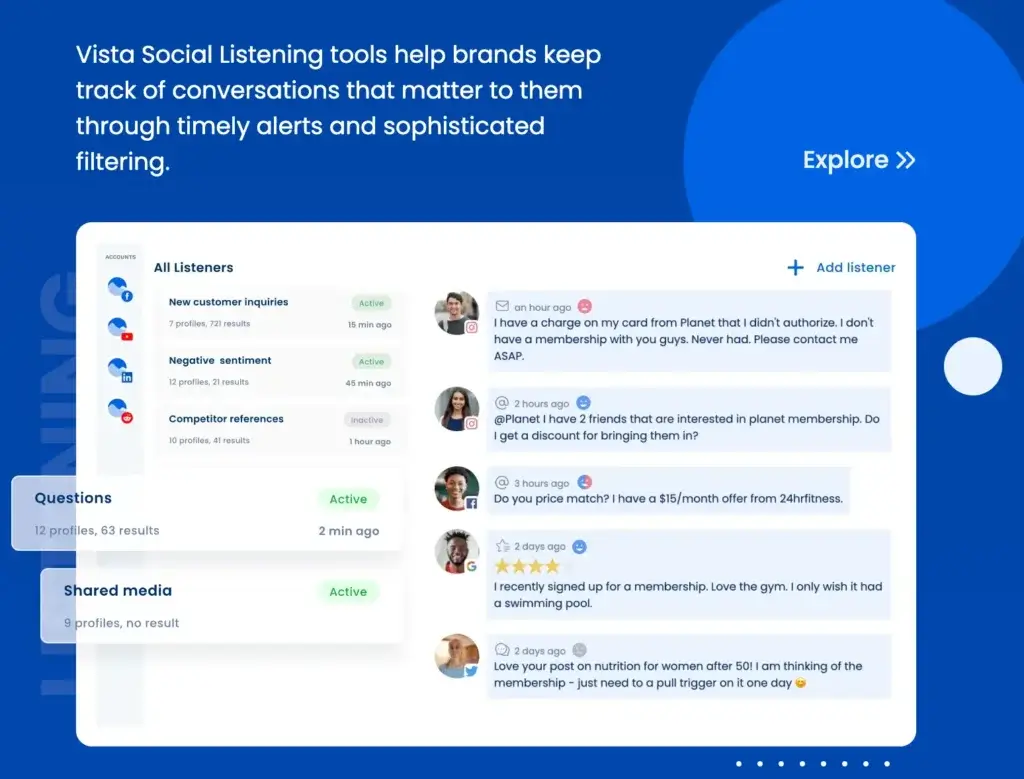
Listening and Review Management
This is where Vista Social stands out from lighter social media schedulers. It combines social listening and review management in a way that makes it more attractive for service businesses, franchises, local brands, and agencies managing reputation alongside publishing.
- Listening add-on: Track what people are saying about your brand, competitors, and industry across social, web, and news sources.
- Review monitoring: Monitor reviews across sites like Facebook, Google Business, Yelp, TripAdvisor, OpenTable, and TrustPilot.
- Review response workflow: Reply to Facebook and Google Business reviews directly from Vista Social, while using links out for other review platforms where direct native response is limited.
- Alerts and reporting: Stay on top of new reviews and analyze trends in your reputation data over time.
Pros and Cons
Benefits and Limitations of Vista Social
Positive
✅ Broad feature set
✅ Strong engagement tools
✅ Review management included
✅ Wide network coverage
Negative
❌ Listening is an add-on
❌ Can feel feature-heavy
❌ Best value starts above entry-level
❌ Some advanced features depend on plan
Vista Social is a capable platform, but it is not the lightest or simplest option on the market. Its main value comes from centralizing several workflows that many teams otherwise manage with separate tools.
✅ Pros
- Broad all-in-one feature set: Vista Social combines publishing, inbox, analytics, listening, review management, AI, and automation in one platform.
- Strong engagement focus: The unified inbox and DM automation features are meaningful advantages for teams that actively manage conversations.
- Review management support: Many social media tools do not go as far on reputation workflows, so this is a genuine differentiator.
- Wide channel support: It supports a broad mix of social networks, including newer and less commonly supported platforms.
- Good for agencies and multi-brand teams: Collaboration tools, approvals, reporting, and higher-capacity plans make it suitable for more complex use cases.
- API availability: The API add-on is useful for teams with more advanced reporting or custom workflow needs.
- Solid value perception from users: Recent user feedback tends to be especially positive around ease of use, scheduling, automation, and value for money.
❌ Cons
- Listening is not fully bundled at the lowest level: More advanced listening across social, web, and news requires an add-on.
- Feature depth can create complexity: Teams that only need basic scheduling may find the platform broader than necessary.
- Pricing rises with scale: As you add more social profiles, users, and advanced functionality, the total cost becomes more relevant.
- Some advanced workflows depend on tier: Higher-end AI, white-labeling, and scale-oriented features are not universal across every plan.
- Not the simplest fit for solo users: If your main need is just lightweight scheduling, a smaller tool may feel easier.
User Experience
User Interface and Experience
Onboarding and Setup
Vista Social is relatively approachable considering how many functions it covers. You can get started by connecting social profiles, setting up your workspace, and creating your first posts fairly quickly. Still, because the platform spans publishing, inbox, reviews, analytics, and automation, it takes some time to understand how everything fits together if you want to use it fully.
Interface and Navigation
The platform is designed to centralize several workflows that are often spread across different tools. That is a major strength, but it also means the interface is denser than a minimalist scheduler. For experienced marketers and agencies, that should feel like depth rather than clutter. For smaller teams, there may be a short learning curve.
Support and Resources
Vista Social provides a 24/7 help center with onboarding materials, feature guides, and troubleshooting resources. This is useful because some of its workflows, especially automation and review management, benefit from setup guidance.
Pricing and Plans
How Much Does Vista Social Cost?
Vista Social has pricing tiers that scale based on users, social profile limits, and advanced capabilities. It is not positioned as a bare-bones budget scheduler. Instead, it aims to cover more of the social media operations stack.
| Plan | Main Audience | Included Capacity |
| Professional | Professionals and small teams | 15 social profiles, core publishing, engagement, reports, review tools, DM automations |
| Advanced | Teams and agencies needing power tools | 30 social profiles, 6 users, AI Training & Knowledge, broader scale for collaboration |
| Scale | Agencies managing multiple brands and clients | 70 social profiles, 10 users, white-label reporting, client profile connect, more AI and automation capacity |
| Enterprise | Larger organizations | Custom plan with enterprise support, integrations, and tailored setup |
Vista Social also offers optional add-ons. Listening across social, web, and news starts at an additional monthly cost, and employee advocacy starts at a higher add-on price for larger programs. If your workflow depends heavily on listening, advocacy, or advanced AI support, your final cost can be noticeably higher than the base entry point.
Is Vista Social good value?
For a team that needs only a posting calendar, Vista Social may feel more expensive than necessary. For teams that also need inbox management, review monitoring, reporting, AI assistance, and workflow automation, the value proposition is much stronger because it can replace multiple separate subscriptions.
Use Cases & Suitable Users
Who Should Use Vista Social
Vista Social is best for teams that want a wider social operations platform instead of a single-purpose scheduling tool.
- Marketing agencies: A strong fit for agencies managing multiple brands, approvals, reporting, and client-facing social workflows.
- Multi-location businesses: Especially useful if social management overlaps with review management and local reputation monitoring.
- In-house marketing teams: A good option for brands that want publishing, engagement, and analytics in one system.
- Service businesses: Helpful if customer feedback, review response, and fast social engagement matter to your brand experience.
- Growing social teams: Better for organizations that expect their workflow to expand beyond basic scheduling over time.
It is less compelling if you are a solo creator who mainly wants a simple, low-cost content queue and minimal analytics.
Comparison with Alternatives
How is Vista Social Compared to the Alternatives
Vista Social competes in a crowded market, but it has a distinct position. It is broader than lightweight schedulers and more affordable than some enterprise-heavy social suites. The right comparison depends on what matters most to you.
Vista Social vs Buffer
Buffer remains one of the cleaner and easier tools for straightforward social publishing. If your priority is simple scheduling with a lighter interface, Buffer is often easier to adopt. Vista Social is stronger when you need a social inbox, review management, broader workflow automation, and more advanced operational depth. In my view, Vista Social is the better choice for teams with serious engagement and reputation workflows, while Buffer is better for simpler publishing needs.
Vista Social vs SocialBee
SocialBee is a strong option if you care most about content organization, category-based scheduling, and evergreen posting workflows. Vista Social feels broader operationally because it pushes further into inbox, reviews, automation, and multi-channel customer interactions. SocialBee is compelling for content-heavy teams, but Vista Social is the more rounded platform if your social strategy includes service, monitoring, and collaboration at scale.
Vista Social vs Sprout Social
Sprout Social is often the benchmark for premium social media management, especially for enterprise-oriented analytics and brand credibility. Vista Social does not carry the same enterprise legacy, but it offers a more flexible value proposition for many teams, especially if budget matters. If you want a powerful feature set without jumping immediately into premium enterprise pricing, Vista Social is a very attractive middle ground.
Vista Social vs Hootsuite
Hootsuite remains one of the most recognized names in this category, but many buyers now judge tools more on workflow value than brand familiarity. Vista Social feels more modern in how it combines inbox, review workflows, AI assistance, and flexible channel support. Hootsuite still has enterprise recognition, but Vista Social can be the smarter option for teams that want strong capabilities without paying mostly for legacy brand position.
Best Use Tips
Tips & Best Practices When Using Vista Social
To get stronger ROI from Vista Social, use it as a workflow hub rather than just a scheduler.
- Use approval workflows early: Even small teams benefit from clear publishing approvals once more people touch content.
- Set up the inbox properly: Centralizing engagement is one of the platform’s biggest strengths, so do not ignore this section.
- Activate review monitoring if reputation matters: This is especially important for local businesses, hospitality brands, and service providers.
- Build recurring reports: Scheduled reporting saves time and makes performance reviews more consistent.
- Train AI carefully: If you use AI-generated captions or responses, guide them with your brand tone and internal knowledge.
- Review add-ons before committing: Make sure the final package reflects your true needs, especially for listening and advocacy.
- Use competitor reporting strategically: Benchmarking is most useful when you translate insights into content and engagement decisions.
Conclusion
Final thoughts
Vista Social is one of the more interesting social media management platforms for teams that want depth without immediately moving into a high-cost enterprise suite. Its real strength is not just publishing. It is the way it brings together scheduling, engagement, analytics, reviews, automation, and AI into a more complete social operations workflow.
That makes it a strong option for agencies, growing in-house teams, and multi-location brands. In particular, I think Vista Social is more compelling than many simpler schedulers if your team actively manages conversations and brand reputation, not just content calendars.
It is not the lightest tool in the category, and it may be more platform than some smaller users need. But if you want a social media management platform that can grow with your workflow, Vista Social is absolutely worth a serious look in 2026.
Have more questions