
Introduction: Why Odoo Finance Deserves a Serious Look
If you are evaluating finance software, you are probably not looking for another isolated accounting tool. You need a system that helps you manage invoices, bills, expenses, reporting, approvals, documents, and business data without constantly switching between separate apps.
This is where Odoo Finance becomes especially interesting.
Odoo Finance is part of the broader Odoo ERP ecosystem. Instead of offering accounting as a standalone product only, Odoo connects finance with invoicing, expenses, documents, spreadsheets, e-signatures, inventory, CRM, sales, projects, subscriptions, and more.
That makes it different from simpler cloud accounting platforms like QuickBooks, Xero, or FreshBooks. Odoo is not only built to record financial activity. It is designed to connect financial activity with the operational work that creates it.
For example, a sales order can become an invoice, a supplier bill can connect with purchasing and inventory, an employee receipt can become an expense report, and a financial report can pull live data into a spreadsheet-style dashboard.
This Odoo Finance review explains what the platform does well, where it becomes more complex, how the pricing works, and which types of businesses should consider it.
We will cover the areas that matter most when you are choosing finance software:
- Accounting and general ledger capabilities
- Invoicing, billing, payments, and collections
- Expense management and receipt capture
- Spreadsheet BI and financial dashboards
- Documents and electronic signatures
- Pricing, implementation, pros, cons, and alternatives
By the end, you should have a clear view of whether Odoo Finance is the right finance platform for your business or whether a simpler accounting tool would be a better match.
What Is Odoo Finance?
A connected finance suite
Odoo Finance is the finance category inside Odoo’s business software suite. It includes several connected apps that cover accounting, invoicing, expense management, financial analysis, document management, and digital signatures.
The finance area includes the exact capabilities shown in the attached Odoo website screenshot:
- Accounting for bookkeeping, reconciliation, reporting, taxes, and financial controls
- Invoicing for customer invoices, payments, reminders, and billing workflows
- Expenses for employee spending, receipt capture, approvals, and reimbursements
- Spreadsheet (BI) for live reporting, dashboards, and spreadsheet-based analysis
- Documents for storing, organizing, and routing finance-related files
- Sign for electronic signatures, templates, and approval-ready documents
The key advantage is integration. Odoo Finance is strongest when your accounting data needs to connect with the rest of the business.
For example, a company that uses Odoo Sales, Inventory, Purchase, and Accounting can connect the entire order-to-cash and procure-to-pay cycle. That is harder to achieve when accounting, CRM, inventory, documents, and approvals all live in separate tools.
How Odoo Finance differs from traditional accounting software
Many accounting tools focus mainly on the finance department. Odoo Finance is broader. It works more like a modular ERP system where finance becomes one part of a larger operating platform.
This gives Odoo more long-term flexibility, but it also means the setup can be more involved. If you only need simple invoicing and expense tracking, Odoo may feel heavier than necessary. If you want a finance system connected to business operations, it can deliver strong value.
Who Is Odoo Finance Best For?
The businesses that get the most value from Odoo Finance
Odoo Finance is best for companies that want finance, operations, documents, and reporting to work together in one environment.
It is especially useful when your finance team needs better visibility into how transactions are created, approved, billed, paid, and reported.
✅ Best fit for:
- Small and mid-sized businesses that want accounting plus ERP flexibility
- Growing companies outgrowing entry-level accounting software
- Product-based businesses that need finance connected to inventory and purchasing
- Service businesses that need expenses, invoicing, projects, and approvals
- Multi-app Odoo users that want finance inside the same system
- International businesses that need multi-currency and localized accounting options
🚫 Less ideal for:
- Solopreneurs that only need basic invoicing and expense tracking
- Teams wanting instant setup with minimal configuration
- Companies without implementation resources for ERP-style workflows
- Users who prefer accountant-led simplicity over operational customization
- Businesses needing advanced enterprise consolidation without customization
💬 Practical example
A wholesale business can use Odoo to manage purchases, inventory, vendor bills, customer invoices, payments, and financial reports in one connected system. That is where Odoo Finance becomes more valuable than a standalone accounting tool.
A freelance consultant who only sends five invoices per month, however, may find FreshBooks, Wave, or Xero easier to manage.
Odoo Finance Core Features
The finance modules that make Odoo more than a bookkeeping tool
Odoo Finance is built around several connected apps rather than one isolated accounting module.
This structure gives you flexibility. You can start with one finance workflow, then expand into more finance and ERP capabilities as your business grows.
📘 Accounting
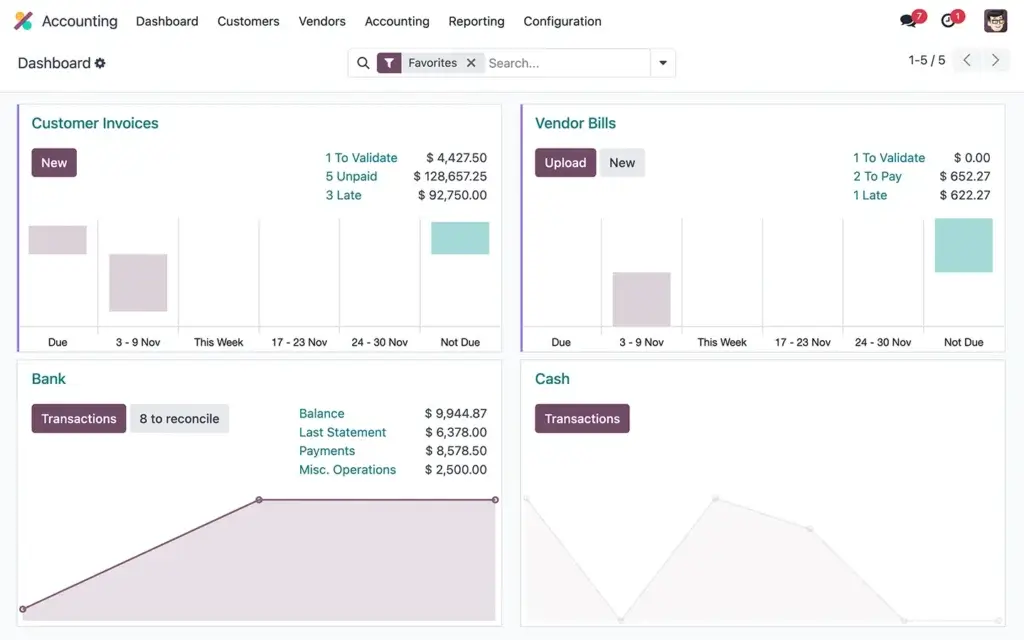
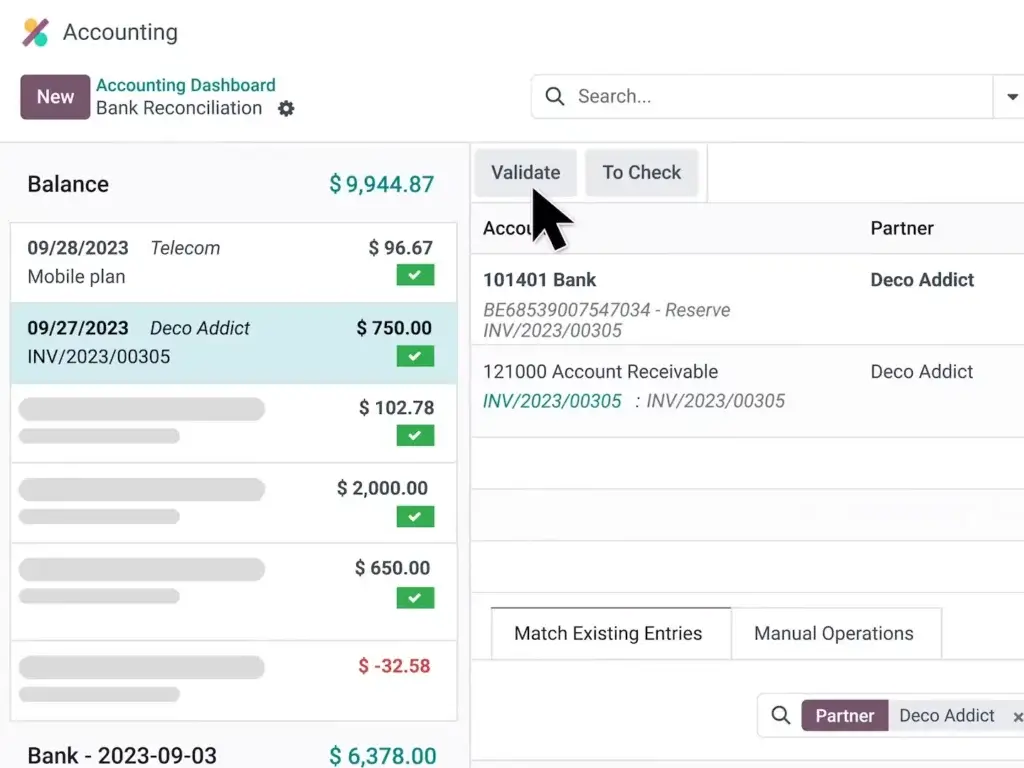
Odoo Accounting is the core finance app. It covers the main accounting workflows you would expect from a modern cloud accounting system, including journal entries, bank reconciliation, accounts receivable, accounts payable, tax reporting, and financial statements.
The stronger point is how deeply accounting connects to operational data. Sales, purchase, inventory, subscriptions, projects, expenses, and documents can all feed into the accounting workflow.
- Double-entry accounting and journal entries
- Accounts receivable and accounts payable
- Bank synchronization and reconciliation
- Real-time financial reporting
- Multi-currency and tax localization
- Deferred revenue and expense handling
Odoo also emphasizes automation. Its accounting interface is designed to reduce manual entry, especially around vendor bills, invoices, and bank matching.
🧾 Invoicing
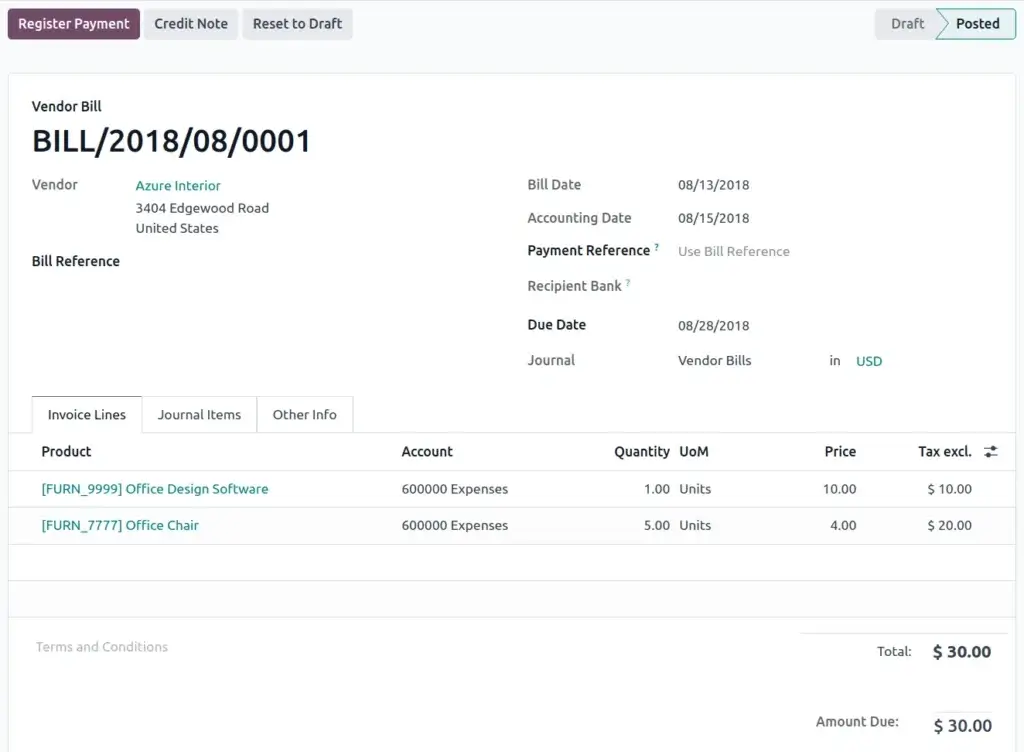
Odoo Invoicing helps you create, send, manage, and collect customer invoices. You can use it as a standalone app or as part of the full accounting workflow.
This is useful for companies that want sales and finance to stay connected. A sales order, subscription, timesheet, delivery order, or project-related billing item can trigger invoice creation based on your setup.
- Customer invoices and credit notes
- Recurring invoices and automated billing
- Online payment options
- Customer portal access
- Payment reminders and follow-ups
- QR code and direct payment options where supported
The customer portal is a practical advantage. Customers can view invoices, download them, pay online, and interact with related business documents without needing internal access to your Odoo database.
💳 Expenses
Odoo Expenses helps employees submit expenses, upload receipts, create reports, and send them through approval and reimbursement workflows.
This is valuable for companies that still manage expenses through spreadsheets, email, or disconnected reimbursement tools. When expenses live inside Odoo, they can connect directly to accounting, projects, payroll workflows, and reinvoicing rules.
- Receipt uploads and expense logging
- Expense reports and manager approvals
- Employee reimbursements
- Expense categories and policies
- Reinvoicing expenses to customers
- Expense analysis by employee or category
For service businesses, the reinvoicing capability is especially useful. You can capture client-related expenses and pass them through to the customer instead of manually tracking them in a separate sheet.
📊 Spreadsheet (BI)
Odoo Spreadsheet gives you spreadsheet-style analysis connected directly to live Odoo data. This is one of the most interesting parts of the finance suite because it reduces the need to export accounting data into Excel or Google Sheets for every report.
You can create dashboards, pivot tables, charts, financial views, and custom reports while keeping the data connected to your Odoo database.
- Spreadsheet reports using live Odoo data
- Pivot tables and formulas
- Custom dashboards and visual reports
- Financial and operational reporting
- Templates for repeat analysis
- Shared dashboards for teams
This is not a full enterprise BI platform like Power BI or Tableau, but it is very useful for finance teams that want flexible reporting inside the ERP environment.
📁 Documents
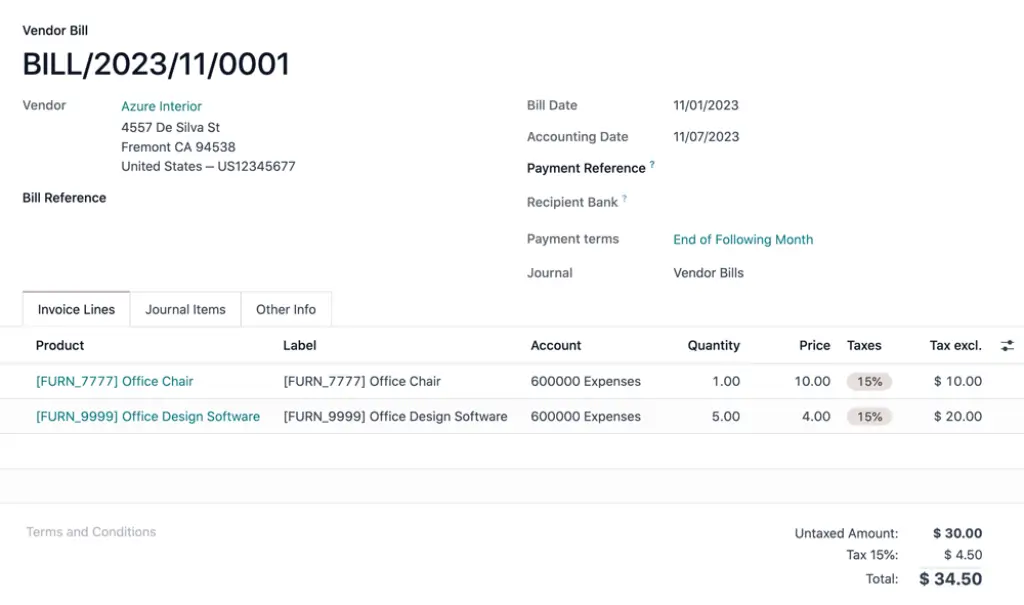
Odoo Documents allows you to store, manage, organize, and share files inside Odoo. For finance teams, this can reduce the scattered file problem that often happens when invoices, bills, contracts, receipts, bank documents, and approvals are stored across email, drives, and local folders.
Odoo can centralize documents and connect them with related records. This means a vendor bill, invoice, HR record, purchase order, or signed agreement can stay connected to the workflow where it belongs.
- Centralized document storage
- Folders and shared workspaces
- Accounting document organization
- File access rights and sharing
- Document activity tracking
- Connection with Odoo Sign and other apps
For finance operations, this is important because documentation is part of audit readiness. A transaction is easier to trust when the supporting invoice, approval, contract, or receipt is attached and easy to retrieve.
✍️ Sign
Odoo Sign lets you send, approve, and sign documents online. It supports drag-and-drop fields, signing templates, one-off signature requests, document envelopes, and signing from related Odoo records.
This is useful for finance and operations teams that need signed quotes, vendor agreements, internal approvals, employment documents, purchase agreements, or client contracts.
- Electronic signatures
- Drag-and-drop signature fields
- Reusable signing templates
- Multi-document envelopes
- Signing from Odoo records
- Authentication options for signers
The best use case is not only collecting a signature. It is collecting a signature inside the same system where the customer, vendor, invoice, contract, or approval already exists.
Main Benefits
Where Odoo Finance feels strongest in daily use
Odoo Finance is strongest when you use it as part of a connected business system.
Its value is not only the list of accounting features. The real benefit is the way those features interact with sales, purchasing, inventory, expenses, documents, approvals, and reporting.
1. Finance connects with operations
This is the biggest reason to consider Odoo Finance. Standalone accounting tools can manage the books, but they often depend on integrations to understand the business activity behind the numbers.
Odoo can connect finance with the source workflow. That can mean fewer exports, fewer duplicated entries, and better traceability from transaction to document to report.
2. Modular setup gives you room to grow
You do not need to use every Odoo app on day one. A business can start with Accounting or Invoicing, then later add Expenses, Documents, Sign, Inventory, CRM, Sales, Subscriptions, or Project.
This makes Odoo more scalable than many basic accounting tools, especially for businesses that expect their workflows to become more complex.
3. Reporting is more flexible than basic accounting dashboards
Odoo’s standard financial reports are useful, but the Spreadsheet and Dashboards tools add another layer. You can build spreadsheet-style analysis using live business data instead of constantly exporting CSV files.
This helps finance teams that want custom views without immediately buying a separate BI platform.
4. Document handling is built into the workflow
Finance work depends on documents. Vendor bills, contracts, receipts, payment proof, purchase records, and signed agreements all need to be stored somewhere.
Odoo Documents gives the finance team a more structured way to manage those files inside the same business system.
5. Pricing can be attractive for multi-app users
Odoo’s paid plans include access to all apps under a per-user pricing model. That can be compelling if you plan to use multiple apps, such as Accounting, Expenses, Documents, Sign, CRM, Inventory, and Sales.
For a business using only accounting, the pricing may not always look as attractive. For a business replacing several disconnected tools, the value becomes more convincing.
Pros and Cons
Strong flexibility, but not the simplest path for every business
Positive
✅ Full finance suite
✅ Integrated ERP ecosystem
✅ Strong document workflows
✅ Flexible BI spreadsheets
✅ One App Free option
Negative
❌ Setup can be complex
❌ Requires configuration
❌ Partner help may be needed
❌ Can feel heavy for freelancers
❌ Advanced workflows need planning
✅ What stands out positively
All-in-one finance coverage
Odoo Finance covers accounting, invoicing, expenses, BI-style spreadsheets, documents, and e-signatures. That gives you a broader toolkit than most small-business accounting platforms.
Strong operational connection
The finance workflow connects naturally with sales, purchasing, inventory, projects, and other Odoo apps. This is where Odoo becomes more powerful than standalone bookkeeping software.
Useful document and signature tools
Documents and Sign are practical additions for finance teams. They help reduce the gap between a financial transaction and the supporting paperwork behind it.
Scalable modular structure
You can start with a narrow use case and expand into more apps later. This is helpful for companies that want software that can grow with the business.
Attractive pricing for all-app use
Odoo’s all-app pricing can be strong value when you use several modules. It is less compelling if you only need one narrow finance function, but very compelling if it replaces multiple tools.
👎 Where it can fall short
Implementation is not always simple
Odoo is flexible, but flexibility creates setup decisions. Chart of accounts, taxes, approval flows, user permissions, documents, and integrations all need careful configuration.
Too much platform for very simple needs
If you only want basic invoicing and expense tracking, Odoo may feel too broad. Simpler tools like FreshBooks, Wave, or QuickBooks Solopreneur may be easier for very small users.
Customization can require expertise
Odoo can be customized deeply, especially on the Custom plan. However, custom development, Odoo.sh hosting, external API work, and implementation services can increase total cost.
User experience depends on setup quality
A clean Odoo implementation can feel efficient. A poorly planned one can feel confusing. The product is powerful, but the implementation quality matters.
Advanced finance needs may need configuration
For complex consolidation, industry-specific compliance, or highly customized reporting, you may need expert support, localization modules, or partner-led implementation.
User Experience
A modern interface
Odoo’s interface is generally modern and clean compared with older ERP systems. It feels more approachable than many enterprise finance platforms, especially when you use a limited number of apps.
However, the user experience changes as your setup becomes more complex. Accounting alone can be straightforward. Accounting plus inventory, sales, purchasing, projects, custom fields, approval workflows, and multiple companies requires more training.
Dashboard and navigation
Odoo uses an app-based navigation model. Users can move between Accounting, Invoicing, Expenses, Documents, Sign, Spreadsheets, and other modules from the same environment.
This is useful for cross-functional work, but it can also require discipline. Admins should configure user roles carefully so employees only see the apps and menus relevant to their responsibilities.
Mobile experience
Odoo supports mobile workflows, which are useful for expense capture, approvals, document access, and quick business checks. For finance teams, mobile access is particularly helpful for receipt capture and manager approvals.
Learning curve
The learning curve is moderate. Users with basic accounting experience can learn the core finance functions, but administrators and finance managers should expect a more structured onboarding process.
Odoo works best when you document your process before implementation. That includes who creates invoices, who approves bills, how expenses are reimbursed, what reports matter, and where documents should be stored.
Pricing and Plans
Odoo’s pricing model
Odoo pricing is one of its most important advantages, but you need to understand the full cost picture.
Odoo offers a One App Free option and two main paid plans: Standard and Custom. Pricing can vary by region, billing term, and promotions, so always confirm the latest rate on Odoo’s pricing page before buying.
Odoo Pricing Plans
| Plan | Best For | Typical Pricing Direction | Main Value |
| One App Free | Businesses using one Odoo app only | $0 | One app with unlimited users on Odoo Online |
| Standard | Teams that want all apps without custom development | Per user/month | All apps on Odoo Online |
| Custom | Businesses needing Studio, API, multi-company, Odoo.sh, or on-premise | Higher per user/month | All apps plus customization and advanced deployment options |
What can increase the real cost?
The subscription price is only one part of the decision. Odoo can require implementation, configuration, training, data migration, custom development, or partner support.
- Implementation: setup, training, workflow design, and migration
- Custom development: custom modules, fields, automation, or reports
- Odoo.sh hosting: relevant for custom development environments
- In-app credits: services such as SMS or AI document scanning may add cost
- Partner services: useful for more complex implementations
Which plan makes the most sense?
- Choose One App Free if you only need one finance app and want to test Odoo deeply
- Choose Standard if you want all apps on Odoo Online without custom modules
- Choose Custom if you need multi-company, Studio, API access, Odoo.sh, or on-premise
For many growing businesses, Standard is the best starting point. Custom becomes more relevant once the business needs multi-company management, API-driven integrations, custom development, or advanced deployment control.
Odoo Finance Alternatives
How Odoo Finance compares with alternatives
Odoo Finance competes in two directions. It competes with small-business accounting tools when buyers compare accounting features, and it competes with ERP platforms when buyers compare operational scalability.
That is why the right alternative depends on what you need most: simple accounting, stronger accountant adoption, enterprise financial management, or full ERP flexibility.
QuickBooks Online
Best for: Small businesses that want familiar cloud accounting with broad accountant support.
QuickBooks Online is easier to adopt for many small businesses, especially in the U.S. It has strong reporting, payroll options, and accountant familiarity. Odoo is better when you need accounting connected to ERP-style operations.
Xero
Best for: Small businesses that want clean accounting, bank reconciliation, and accountant collaboration.
Xero is usually simpler than Odoo for core accounting. It is a better choice if you want fast onboarding and do not need a full ERP suite. Odoo is stronger when finance needs to connect with inventory, documents, approvals, and operations.
Zoho Books
Best for: Cost-conscious businesses already using Zoho apps.
Zoho Books is a strong value option for SMB accounting. It is easier to manage than Odoo in many cases, but Odoo offers broader ERP customization and a more open modular environment.
NetSuite
Best for: Mid-market and enterprise companies that need advanced cloud ERP financials.
NetSuite is more mature for enterprise finance, multi-subsidiary consolidation, and complex financial operations. Odoo is usually more affordable and flexible for SMBs, but NetSuite is stronger for finance-led enterprise scalability.
Microsoft Dynamics 365 Business Central
Best for: Microsoft-centric businesses that need finance and operations in one ERP.
Business Central is a strong ERP alternative if your company already depends on Microsoft 365, Power BI, and the Microsoft partner ecosystem. Odoo can be more cost-effective and flexible, while Business Central may be better for companies that want deeper Microsoft integration.
| Feature Type | Odoo Finance | QuickBooks Online | Xero | Zoho Books | NetSuite |
| Best fit | SMBs wanting finance plus ERP flexibility | Small businesses needing familiar accounting | SMBs focused on clean cloud accounting | Value-focused Zoho users | Mid-market and enterprise finance teams |
| Core strength | Modular all-in-one business suite | Accountant adoption and reporting | Usability and reconciliation | Affordability and automation | Advanced ERP financial management |
| Complexity | Medium to high | Low to medium | Low to medium | Low to medium | High |
| Documents and e-signatures | Built into the broader suite | Usually handled through integrations | Usually handled through integrations | Usually handled through integrations | Available through ERP ecosystem |
| Best advantage | Finance connected to operations | Ease of adoption | Clean accounting workflow | Price-to-feature value | Enterprise scalability |
Security and Compliance
Security, access control, and audit readiness
Finance software stores sensitive business data, so security and access control are essential. Odoo supports role-based permissions, user access control, document sharing rules, accounting audit trails, and controlled access to records.
For finance teams, the practical value is separation of duties. Not every user should be able to approve expenses, edit accounting entries, view payroll-related data, or access all company documents.
Access rights and user roles
Odoo lets administrators configure what users can see and do across apps. This matters because finance workflows often include employees, managers, accountants, sales teams, external users, and vendors.
Auditability
Odoo’s accounting and document workflows can support better traceability when configured correctly. Records, documents, approvals, and related chatter can help teams understand what changed and why.
Document control
Odoo Documents adds another layer of control by keeping finance documents attached to the right workflows. This helps reduce the risk of missing support files during review, audit, or month-end close.
Electronic signature validity
Odoo Sign is designed for online signing and approval workflows. It can help businesses reduce paper-based approvals and keep signed records tied to business processes.
As with any finance system, compliance depends on setup, region, internal controls, and your accounting advisor’s guidance. Odoo gives you the tools, but you still need to configure them responsibly.
User Sentiment
What users tend to like, and where expectations need to be managed
User sentiment around Odoo usually follows a consistent pattern. Users like the flexibility, integrated apps, affordability compared with larger ERP systems, and the ability to customize workflows.
The complaints usually focus on implementation complexity, the need for partner support, configuration effort, and the learning curve once many apps are active.
👍 Common praise
- Broad suite of connected business apps
- Strong value for companies using several modules
- Flexible customization and workflow design
- Good fit for growing SMBs that need ERP features
- Useful finance, documents, and reporting integration
⚠️ Common complaints
- Setup can require expert implementation support
- Customization can increase project cost
- Some workflows need careful configuration
- Training is important for larger deployments
- Support experience can depend on plan and partner
This does not make Odoo weak. It means Odoo should be evaluated as an ERP platform, not only as a plug-and-play accounting app.
Conclusion
Is Odoo Finance the right finance platform for you?
Odoo Finance is a strong option for businesses that want accounting, invoicing, expenses, BI spreadsheets, documents, and e-signatures inside one connected system.
Its biggest strength is not just accounting functionality. It is the way finance connects with the rest of the company.
That makes Odoo especially attractive for growing SMBs, product-based businesses, service firms, and companies already planning to use several Odoo apps.
The main trade-off is complexity. Odoo gives you more flexibility than many accounting tools, but that flexibility requires better planning, setup, and training.
Choose Odoo Finance if you want:
✅ Accounting connected to business operations
✅ Invoicing, expenses, documents, and signatures in one suite
✅ Spreadsheet BI with live Odoo data
✅ Modular ERP functionality that can scale
✅ Better long-term flexibility than basic bookkeeping tools
Consider another option if you want:
❌ The simplest possible accounting setup
❌ A tool mainly for freelancers or solo businesses
❌ Minimal configuration and no implementation work
❌ A finance system your accountant already uses by default
❌ Advanced enterprise financial consolidation out of the box
Overall, Odoo Finance is best for businesses that see finance as part of a larger operating system. If you only need bookkeeping, it may be more than you need. If you want finance, operations, documents, and reporting to work together, it deserves a serious place on your shortlist.
Want to compare more accounting platforms before choosing? Visit our Top Accounting Software guide for side-by-side comparisons.
Frequently Asked Questions
Have more questions?
What is Odoo Finance?
Odoo Finance is the finance category inside Odoo’s ERP suite. It includes accounting, invoicing, expenses, spreadsheets, documents, and e-signature tools that connect with other Odoo apps such as sales, inventory, purchase, CRM, and projects.
Is Odoo Finance accounting software?
Yes. Odoo Finance includes a full accounting app with double-entry accounting, bank reconciliation, accounts receivable, accounts payable, reporting, taxes, journal entries, multi-currency support, and related financial workflows.
Is Odoo Finance good for small businesses?
Odoo Finance can be a strong choice for small businesses that need more than basic bookkeeping. It is best for growing companies that want accounting connected with sales, inventory, expenses, documents, and operations.
Does Odoo Finance include invoicing?
Yes. Odoo includes invoicing tools for customer invoices, recurring billing, payment collection, automated follow-ups, customer portal access, credit notes, and online payment workflows.
Does Odoo Finance manage expenses?
Yes. Odoo Expenses lets employees upload receipts, create expense reports, submit them for approval, post expenses to accounting, reimburse employees, and reinvoice billable expenses to customers.
What is Odoo Spreadsheet BI?
Odoo Spreadsheet BI is a spreadsheet-style reporting tool that connects directly with Odoo data. It helps teams build dashboards, pivot tables, charts, and custom analysis using live business information.
Does Odoo Finance include document management?
Yes. Odoo Documents lets users store, organize, share, and manage files inside Odoo. It is useful for finance teams that need to keep invoices, bills, receipts, contracts, and approvals connected to business records.
Does Odoo include electronic signatures?
Yes. Odoo Sign supports electronic signatures, drag-and-drop signing fields, reusable templates, one-off signing requests, document envelopes, and signing from related Odoo records.
How much does Odoo Finance cost?
Odoo offers a One App Free option and paid Standard and Custom plans with per-user pricing. The Standard plan includes all apps on Odoo Online, while the Custom plan adds options such as Studio, multi-company, API access, Odoo.sh, and on-premise deployment.
What are the best Odoo Finance alternatives?
The best alternatives depend on your needs. QuickBooks Online and Xero are better for simpler SMB accounting, Zoho Books is strong for value-focused teams, Business Central is strong for Microsoft-centric ERP, and NetSuite is better for advanced mid-market and enterprise finance.