
Perk is a travel and spend management platform designed to help businesses manage corporate travel, employee expenses, company cards, invoices, approvals, and reporting from one central system. Formerly known as TravelPerk, the platform has expanded beyond business travel into a broader finance operations category.
That shift matters. If you only need a travel booking tool, Perk may offer more functionality than you need. But if your finance team is dealing with scattered bookings, delayed receipts, manual expense reviews, unclear travel policies, invoice routing, and disconnected card spend, Perk can become a practical operating layer between employees, finance teams, suppliers, and your accounting system.
In this Perk review, you will learn what Perk does well, where it fits in your finance stack, how its pricing works, which companies should consider it, and how it compares with alternatives such as SAP Concur, Navan, Ramp, Expensify, BILL Spend & Expense, and Payhawk.
Perk Overview and Where It Fits in Your Finance Stack
What Perk Does for Businesses
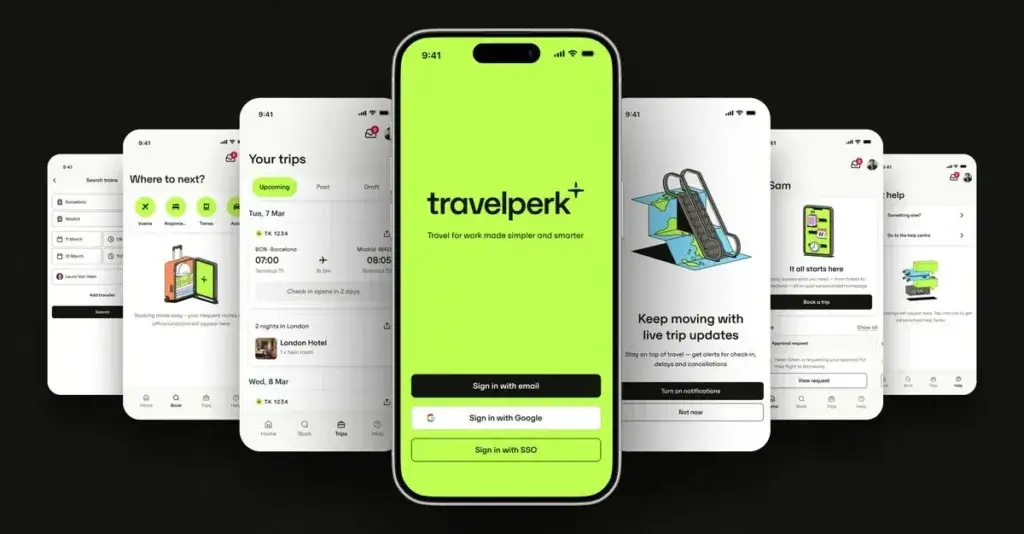
Perk is best described as an integrated travel and spend management platform. It brings together business travel booking, expense management, receipt matching, invoice automation, corporate cards, travel policies, approval workflows, reporting, and finance integrations.
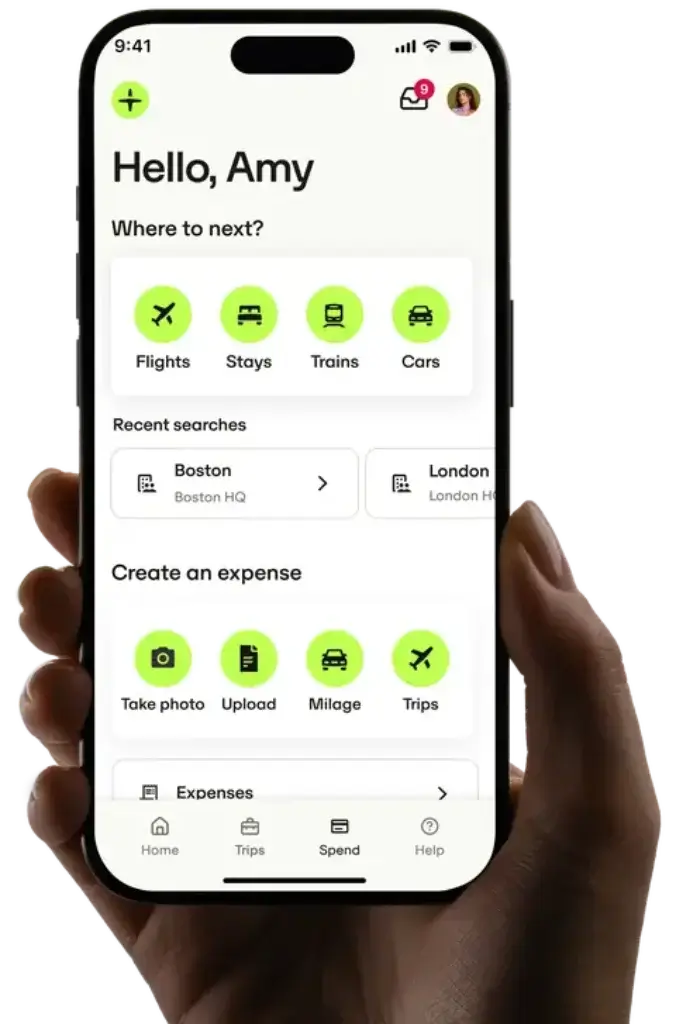
For employees, Perk creates one place to book travel, submit expenses, capture receipts, request approvals, and manage spend. For finance teams, it creates better visibility over travel costs, card activity, out-of-policy spending, invoice approvals, and budget usage.
This makes Perk especially relevant for businesses that want to manage travel and spend before they become month-end accounting problems. Instead of relying only on after-the-fact reports, Perk helps finance leaders build policy, approval, and compliance rules into the daily workflow.
Perk vs Traditional Accounting Software
Perk is not accounting software in the traditional sense. It does not replace QuickBooks, Xero, NetSuite, Sage Intacct, Microsoft Dynamics 365, or another ERP.
Its role is different. Perk helps capture, approve, categorize, and control spend before that data reaches the accounting system. This includes travel bookings, card transactions, expense receipts, invoice details, and approval trails.
If your accounting team spends too much time chasing receipts, cleaning expense data, checking policies, exporting CSV files, or reconciling travel invoices, Perk can reduce that manual workload. However, you still need a proper accounting or ERP system as your financial system of record.
Software specification
Key Features of Perk
Business Travel Booking and Itinerary Management
Perk’s original strength is business travel. The platform lets employees book flights, hotels, trains, and car rentals from a centralized travel inventory while keeping bookings connected to company policy.
This is useful for companies that want employees to book independently without losing financial control. Instead of asking travelers to use consumer booking sites, submit receipts manually, and wait for finance approval after the trip, Perk puts travel policy and approval logic directly inside the booking process.
For finance and operations teams, the value is visibility. You can see who is traveling, what has been booked, which trips are within policy, and how travel costs affect budgets.
Travel Policies and Approval Workflows
Perk allows companies to create travel policies and approval processes. Depending on the plan, you can manage one policy, several policies, or unlimited policies for different teams, entities, cost centers, regions, or seniority levels.
This is one of the most important capabilities for growing businesses. A single travel rule may work for a small team, but larger companies usually need different rules for sales, executives, consultants, field teams, and regional offices.
Policy-based booking also improves compliance. Employees can see what is allowed before they book, while managers can review exceptions when a trip falls outside the approved rules.
Expense Management and Receipt Matching
Perk includes expense management tools that help employees submit and approve expenses through the web or mobile app. Employees can capture receipts, submit claims, and connect transactions to the right trip or spend category.
The platform also uses AI to match receipts with transactions, extract data, categorize expenses, and flag discrepancies. This can reduce one of the most frustrating parts of expense management: manually chasing missing receipts and checking every transaction line by line.
For finance teams, the main benefit is cleaner data earlier in the process. When receipts, categories, policies, and approvals are captured automatically, month-end reconciliation becomes less reactive.
Perk Pay and Corporate Cards
Perk Pay gives companies a way to manage employee spending through physical and virtual cards. Admins can issue cards, set spending limits, monitor transactions, and freeze cards from the platform.
This is valuable for teams that want to reduce out-of-pocket reimbursements and control spend as it happens. Instead of giving employees broad spending access and reviewing later, finance teams can apply granular limits and track activity in real time.
Perk’s card features are especially useful for recurring travel costs, team budgets, event spend, subscriptions, and distributed employee expenses. The platform also supports cashback on card spend in eligible plans, which can help offset some platform costs for companies with meaningful card usage.
Invoice Automation and AP Workflows
Perk has expanded into invoice management and accounts payable automation. The platform can help capture invoice data, match invoices with purchase orders or goods receipt data, route invoices for approval, and improve visibility over supplier spend.
This does not make Perk a full AP automation platform for every complex payables use case. However, it can be a strong option if you want travel, expenses, cards, and invoice approvals to live in one spend management environment.
For companies that still manage invoices through email inboxes, spreadsheets, and manual approvals, Perk can introduce a more structured process without forcing finance teams to manage another isolated AP tool.
Reporting, Budgets, and Spend Visibility
Perk gives finance teams reporting tools to track travel and spend activity. Depending on the plan, reporting can range from simplified travel reporting to advanced or custom reporting.
Budget tracking is also important. Premium and Pro tiers support cost objects and budget visibility, helping companies understand spend by team, project, entity, department, or other finance dimensions.
This is where Perk becomes more useful than a basic travel booking platform. You are not only booking trips, you are connecting those trips and expenses to finance controls, budgets, and reporting workflows.

How Perk Works
Setup and Uses
Setup and Onboarding
Perk setup usually starts with defining your travel and spend structure. This includes users, teams, entities, travel policies, approval flows, cost objects, payment methods, card settings, and accounting integrations.
Smaller companies can start with basic travel rules and simplified reporting. Larger companies should plan the setup more carefully because approval workflows, entities, HR integrations, ERP connections, and card controls need to reflect the real finance process.
The onboarding workload depends on how much of the platform you use. Travel-only setups are typically simpler, while Travel + Spend deployments require more finance configuration.
Managing Business Travel Day to Day
For daily travel management, employees can use Perk to search, book, modify, and manage trips. Admins and managers can monitor bookings, apply policies, and approve exceptions.
This makes Perk useful for teams that travel frequently enough to need structure, but still want a modern booking experience. It is particularly relevant for sales teams, consultants, field operations, leadership travel, and distributed teams that meet in person throughout the year.
Managing Expenses and Cards
For spend management, Perk helps centralize employee expenses, card transactions, receipts, and approvals. Employees can use the mobile app to capture receipts and submit expenses, while finance teams can review policy compliance and categorize spend.
Card controls make the workflow stronger because they give finance teams more control before money is spent. This can reduce reimbursement delays, overspending, and manual transaction cleanup.
Managing Invoices and Supplier Spend
Perk’s invoice management tools are useful for companies that want to bring AP-related workflows into the same environment as travel and employee spend. You can use invoice capture, approval routing, and spend visibility to reduce manual work.
That said, businesses with very complex supplier onboarding, tax compliance, global mass payments, or procurement sourcing may still need a dedicated AP or procurement platform. Perk is strongest when invoice management is part of a broader travel and spend control strategy.
Pros and Cons
A balanced view: what you’ll love and what to consider
Perk is a strong option if your company wants to bring business travel, expenses, corporate cards, invoices, approvals, and reporting into one system. Its main strength is the connection between travel behavior and finance control.
The main limitation is that Perk may be too broad if you only need one narrow workflow. It is also not a full accounting system, and some important capabilities are only available on higher tiers.
Positive
✅ Strong travel booking tools
✅ Unified travel and spend control
✅ Useful AI receipt matching
✅ Good for global teams
Negative
❌ Not full accounting software
❌ Booking fees apply
❌ Best features need paid tiers
❌ May be broad for simple needs
✅ Benefits of Perk
Strong travel booking tools
Perk remains particularly strong for business travel. It gives employees a modern booking experience while giving finance and operations teams more control over travel policies, approvals, and reporting.
This makes it a practical option for companies that want to avoid unmanaged travel bookings across consumer travel sites.
Unified travel and spend control
Perk’s biggest advantage is that travel and spend are connected. A business trip can generate bookings, card transactions, receipts, expenses, invoices, approvals, and reports. Perk keeps more of that activity in one workflow.
This is more efficient than using one tool for travel, another for expenses, another for cards, and another for finance exports.
Useful AI receipt matching
Receipt collection is one of the most common problems in expense management. Perk’s AI-supported receipt matching can help reduce missing documentation, manual checks, and delayed reimbursements.
This is valuable for finance teams that want to move from manual review to exception-based review.
Good for global teams
Perk is well suited for companies with international travel needs, multiple entities, and distributed teams. Higher plans support more advanced reporting, unlimited policies, legal entities, ERP connectors, OpenAPI access, and HR integrations.
For global finance teams, this can help create a more consistent operating process across regions.
❌ Potential Drawbacks and Limitations
Not full accounting software
Perk is not a general ledger, tax platform, payroll platform, or ERP. You still need accounting software to manage official books, reporting, tax, and compliance.
The best way to think about Perk is as a travel and spend management layer that feeds cleaner data into your accounting system.
Booking fees apply
Perk’s Travel plans include booking fees in addition to platform fees. Starter has no monthly platform fee but uses a higher booking fee, while Premium and Pro include platform fees and lower booking fees.
This means the real cost depends on your booking volume, not only the monthly subscription.
Best features need paid tiers
Many of Perk’s stronger capabilities sit in Premium or Pro plans. This includes multiple travel policies, advanced reporting, SSO, HR integrations, budget tracking, legal entity support, ERP connectors, custom workflows, and OpenAPI access.
Smaller teams should check whether Starter is enough or whether the features they need require a paid plan.
May be broad for simple needs
If you only need basic expense tracking, Perk may feel more advanced than necessary. A small company with limited travel and simple reimbursements may get enough value from a lighter expense app.
Perk is most compelling when travel, expenses, approvals, cards, and finance reporting are all part of the problem.
Pricing and Plans
How much does Perk cost?
Perk pricing depends on whether you need Travel, Spend, or the combined Travel + Spend package. The platform also uses different pricing models depending on the product area.
For Travel, Perk offers Starter, Premium, and Pro. Starter has no monthly platform fee but includes a higher booking fee. Premium and Pro include monthly platform fees and lower booking fees.
For Spend, pricing is per user per month, with Premium and Pro tiers. The combined Travel + Spend package uses per-user pricing and may provide preferential pricing when both products are used together.
Travel Plans
Perk’s Travel Starter plan has no platform fee and is designed for companies that want to start booking business travel through Perk with a lighter setup. It includes access to travel inventory, travel restriction alerts, one travel policy and approval process, simplified reporting, cost objects, and access to Perk Events.
Premium adds more control, including 10 travel policies and approval processes, advanced reporting, budget tracking for up to 5 budgets, SSO, HR integrations, and additional onboarding and support resources.
Pro is designed for companies that need unlimited policies, custom travel reporting, unlimited budget tracking, advanced HR integrations, and custom integrations.
Spend Plans
Perk Spend Premium starts at $13 per user per month. It is designed for companies that want intuitive expense management, standard approval workflows, legal entity support, standard per diems, SSO, HR integrations, Spend Export File, DATEV and Xero ERP connectors, and Perk Visa Debit Card cashback.
Perk Spend Pro starts at $15 per user per month. It adds customizable approval workflows, unlimited legal entities, custom per diems, advanced HR integrations, all supported ERP connectors, OpenAPI, higher card cashback, and an expense sandbox.
Travel + Spend Plans
The combined Travel + Spend package starts at $11 per user per month for Premium and $13 per user per month for Pro. This can be attractive if you want to manage both travel and employee spend in one platform.
For businesses with frequent travel and growing finance workflows, the combined package is usually the most relevant comparison point.
Pricing Comparison Table
| Plan Type | Starting Price | Best For |
| Travel Starter | $0/month + 5% booking fee | Small teams that need basic business travel booking and one approval policy |
| Travel Premium | $99/month + 3% booking fee | Growing teams that need advanced reporting, SSO, HR integrations, and more travel policies |
| Travel Pro | $299/month + 3% booking fee | Larger organizations needing unlimited policies, custom reporting, and custom integrations |
| Spend Premium | From $13/user/month | Teams that need expense workflows, legal entities, SSO, HR integrations, and ERP exports |
| Spend Pro | From $15/user/month | Companies that need custom workflows, unlimited entities, OpenAPI, and advanced integrations |
| Travel + Spend Premium | From $11/user/month | Businesses that want travel and spend management in one package |
| Travel + Spend Pro | From $13/user/month | Global teams needing advanced travel, spend, cards, integrations, and reporting |
Pricing takeaway: Perk can be affordable for small teams starting with travel, but costs can rise as booking volume grows or as you add spend management, advanced workflows, integrations, entities, and custom reporting. You should compare plans based on your real travel volume, number of users, number of entities, approval complexity, and integration requirements.
Business Fit
Who Should Use Perk?
Companies With Frequent Business Travel
Perk is an excellent fit for companies where business travel is frequent enough to require structure. This includes sales teams, consulting firms, professional services firms, field teams, and executive teams.
If travel is currently booked through disconnected websites, personal cards, manual approvals, and scattered invoices, Perk can create a much cleaner workflow.
Finance Teams That Want Better Expense Control
Perk is also a strong fit for finance teams that want tighter control over expenses. It helps manage receipts, expense approvals, card transactions, policy checks, and reporting in one place.
This is especially helpful when your finance team wants to reduce manual review and move toward exception-based expense management.
Global and Multi-Entity Businesses
Perk becomes more valuable as organizational complexity increases. Features such as multiple legal entities, custom approval workflows, HR integrations, ERP connectors, OpenAPI access, and advanced reporting are especially relevant for international businesses.
If you operate across several countries or entities, you should evaluate Perk’s Pro plan carefully because it provides more flexibility for complex finance structures.
Who Might Need Something Else
If your company only needs basic bookkeeping, Perk is not the right primary tool. You should start with accounting software such as QuickBooks, Xero, Zoho Books, Sage, or NetSuite.
If your main problem is complex supplier onboarding, tax form collection, global mass payments, or procurement sourcing, a dedicated AP or procurement platform may be better. Tipalti, Coupa, Airbase, or BILL may be more suitable depending on the workflow.
If your main need is only simple employee reimbursement with minimal travel, Expensify or another lightweight expense tool may be easier to adopt.
Alternatives
Perk Alternatives & Competitors
Perk competes across several categories, including business travel management, expense management, spend management, corporate cards, and invoice automation. The best alternative depends on which workflow matters most to your business.
Comparison Table: Perk vs Competitors
| Feature | Perk | SAP Concur | Navan | Ramp |
| Primary focus | Travel, expenses, cards, invoices, and spend control | Enterprise travel and expense management | Travel, expenses, and corporate cards | Spend management, cards, AP, and procurement |
| Travel booking | Very strong | Very strong | Very strong | Available, but not always the main reason to choose it |
| Expense management | Strong with AI receipt matching | Strong but often more enterprise-heavy | Strong travel-connected expenses | Strong finance automation and controls |
| Corporate cards | Perk Pay with physical and virtual cards | Available through ecosystem and integrations | Strong card-led workflow | Very strong card and spend controls |
| Best fit | Companies that want travel and spend in one modern platform | Large enterprises needing mature travel and expense governance | Companies prioritizing travel, traveler experience, and card workflows | Finance teams prioritizing spend control, AP, procurement, and savings |
SAP Concur:
SAP Concur is one of the most established travel and expense platforms. It is a strong fit for large enterprises with mature compliance processes, but it can feel heavier than Perk for smaller and mid-sized teams.
Navan:
Navan is a close competitor because it also combines travel, expenses, and corporate cards. It is a strong option for companies that prioritize traveler experience and card-connected travel workflows.
Ramp:
Ramp is usually stronger if your main priority is finance automation, corporate cards, AP, procurement, and spend savings. Perk is stronger if travel booking and travel policy management are central to your needs. You can also compare options in our Ramp review.
Expensify:
Expensify is a practical option for expense tracking, receipt scanning, reimbursements, and smaller finance teams. Perk is broader because it connects business travel, cards, invoices, and spend controls.
BILL Spend & Expense:
BILL is a good choice if your company already uses BILL for AP or wants expense management connected to a familiar payables ecosystem. Perk may be more attractive when travel is a major part of the spend workflow.
Integrations and Ecosystem
Connect Perk to your favourite apps
Accounting and ERP Integrations
Perk connects with finance systems so approved spend can flow into your accounting process with less manual entry. Depending on plan and configuration, integrations may include ERP connectors, Spend Export File, DATEV, Xero, and broader supported ERP connectors in higher tiers.
This is important because Perk’s value depends heavily on clean downstream accounting. If approved expenses, invoices, and card transactions still require heavy rework, you lose a major benefit of the platform.
HR and Identity Integrations
Perk supports HR integrations and SSO on paid plans. These integrations matter because employee roles, departments, approval chains, and entities often determine how spend should be approved.
For fast-growing companies, HR integrations can help ensure that new employees, role changes, and departures are reflected more accurately in spend permissions.
OpenAPI and Custom Integrations
Perk Pro includes access to broader integrations and OpenAPI capabilities. This is useful for companies with more complex finance stacks or custom data flows.
If your company uses a custom ERP, BI tool, data warehouse, procurement system, or finance workflow, OpenAPI access can make Perk more flexible. However, you should validate integration depth during a demo, especially if you have strict reporting or compliance requirements.
Security and Compliance
Security and Compliance in Perk
Security is an important part of evaluating Perk because the platform handles employee information, travel data, expense records, invoices, card activity, approvals, and accounting exports.
Security Documentation
Perk provides a Trust Center where businesses can review security documentation and policies. This is useful for procurement and finance teams that need vendor due diligence before approving software that touches financial workflows.
Access Controls and Approval Trails
Perk supports workflows, roles, approval rules, and finance-related permissions. These controls are important because travel and expense platforms should not only make employee spending easier, they should also make it auditable.
From a finance perspective, you want to know who booked the trip, who approved the expense, which policy applied, which receipt was attached, how the transaction was categorized, and when the data was exported.
Compliance Considerations
Perk can support better expense compliance through policy rules, pre-approval flows, receipt capture, invoice workflows, audit trails, and reporting. This is especially useful for businesses operating across multiple countries, entities, and tax environments.
However, you should still confirm whether Perk supports your specific local tax, VAT, invoice, and reimbursement requirements before rollout. Global spend management is highly dependent on regional rules.
Conclusion
Final Thoughts
Perk is a strong choice for businesses that want to manage corporate travel and company spend in one platform. Its biggest advantage is the way it connects travel booking, expenses, receipts, cards, invoice workflows, approvals, reporting, and finance integrations.
For companies with regular business travel, Perk can replace fragmented workflows where employees book travel in one place, submit receipts somewhere else, use personal cards, and leave finance teams to clean up the data later.
Its limitations are worth noting. Perk is not a full accounting platform, booking fees can affect total cost, and the best finance automation capabilities are found in paid plans. Businesses with very advanced AP, procurement, or supplier compliance requirements may also need a more specialized tool.
Overall, Perk is a compelling option if your company wants a modern travel and spend management platform that improves policy control, employee experience, expense visibility, and finance automation. It is less ideal if you only need basic bookkeeping or a simple reimbursement app, but it is highly relevant for growing and global teams that want to reduce manual travel and spend work.
Have more questions?
Frequently Asked Questions
What is Perk?
Perk is a travel and spend management platform that helps businesses manage corporate travel, expenses, cards, invoices, approval workflows, policies, and reporting in one system.
Is Perk the same as TravelPerk?
Yes. Perk is the newer brand name for TravelPerk. The company expanded from business travel management into a broader travel and spend management platform.
Is Perk accounting software?
No. Perk is not a full accounting platform. It helps manage travel, expenses, invoices, cards, and spend approvals before approved data is synced or exported to accounting software.
Who is Perk best for?
Perk is best for companies with regular business travel, growing expense workflows, distributed teams, multiple entities, or finance teams that need better visibility over travel and employee spend.
Does Perk include expense management?
Yes. Perk includes expense management features such as receipt capture, expense approvals, AI receipt matching, policy checks, card transaction matching, and spend reporting.
Does Perk offer corporate cards?
Yes. Perk Pay supports physical and virtual cards, spending limits, transaction visibility, card controls, and cashback on eligible card spend depending on the plan.
How much does Perk cost?
Perk pricing depends on the product. Travel has Starter, Premium, and Pro plans with booking fees. Spend starts from $13 per user per month, while Travel + Spend starts from $11 per user per month.
Does Perk support invoice automation?
Yes. Perk includes invoice automation features such as AI-based invoice data capture, matching, coding, approval routing, and visibility over supplier spend.
What are the best Perk alternatives?
The best Perk alternatives include SAP Concur, Navan, Ramp, Expensify, BILL Spend & Expense, Payhawk, and Emburse. The right choice depends on whether your priority is travel, expenses, cards, AP, or procurement.
Is Perk good for small businesses?
Perk can work for small businesses with frequent travel or growing expense needs. However, very small teams with simple reimbursements may prefer a lighter expense tool before moving to a broader travel and spend platform.