
Introduction
Choosing the right ERP system is especially important when your business depends on production accuracy, inventory control, supply chain visibility, quoting, scheduling, and financial discipline. In this Epicor Kinetic review, you will get a practical look at how the platform works, what it does well, where it can become complex, and which companies are most likely to benefit from it in 2026.
Epicor Kinetic is a cloud ERP system built primarily for manufacturers. It brings together finance, production management, supply chain management, planning and scheduling, product data, quality, projects, analytics, customer management, and workflow automation in one platform.
Unlike general ERP systems that try to serve every industry equally, Epicor Kinetic is strongly positioned around manufacturing and adjacent operational environments. That makes it especially relevant for make-to-order, engineer-to-order, mixed-mode, discrete manufacturing, industrial equipment, fabricated metals, electronics, automotive suppliers, and other companies where production complexity is a daily challenge.
What Is Epicor Kinetic?
Epicor Kinetic is an enterprise resource planning platform designed to help manufacturers manage core business processes from quote to cash, procure to pay, plan to produce, and financial close. It supports operational workflows such as production planning, job management, inventory control, material requirements planning, procurement, shop floor execution, quality management, project costing, financial reporting, and business intelligence.
The platform can be deployed in the cloud and is designed to support modern ERP needs such as real-time visibility, configurable workflows, low-code customization, connected manufacturing data, and AI-assisted operations.
Background and Positioning
Epicor has long been known in the ERP market for manufacturing, distribution, and industry-specific business software. Kinetic is the modern version of Epicor’s manufacturing ERP, with a stronger cloud experience, updated interface, embedded analytics, automation capabilities, and deeper support for operational decision-making.
Its positioning is clear: Epicor Kinetic is not trying to be the lightest accounting system or the simplest business app suite. It is built for companies that need serious operational control, especially where manufacturing, production costing, supply chain visibility, and scheduling directly affect margins.
Target Users and Use Cases
Epicor Kinetic is especially relevant for several types of businesses:
- Manufacturers – Strong fit for production, scheduling, inventory, and shop floor control.
- Engineer-to-order companies – Useful for complex products, projects, and costing.
- Make-to-order teams – Supports quoting, jobs, materials, and production planning.
- Mixed-mode manufacturers – Helps manage different production models in one ERP.
- Industrial suppliers – Good fit for companies with complex supply chains and quality needs.
Epicor Kinetic is less suitable for very small companies that only need simple accounting, basic inventory, or a low-cost ERP that can be implemented quickly without process redesign. It is strongest when manufacturing complexity justifies a deeper ERP investment.
Core ERP Features
How Does Epicor Kinetic Work?
Epicor Kinetic works by connecting manufacturing operations with finance, supply chain, product data, scheduling, quality, projects, reporting, and customer workflows. Instead of managing production data in one system, accounting in another, and inventory in spreadsheets, Kinetic gives teams a more unified ERP environment.
The platform is modular, so companies can use the capabilities that match their operational model. A manufacturer may begin with financials, inventory, production, and purchasing, then expand into advanced planning, quality management, manufacturing execution, project accounting, business intelligence, ecommerce, or connected worker tools.
Financial Management
Epicor Kinetic includes financial management tools for general ledger, accounts payable, accounts receivable, cash management, allocations, taxes, currencies, rounding, reporting, and financial controls. For manufacturers, this matters because operational activity needs to connect directly with costing, margins, revenue, purchasing, and profitability.
The strength of Epicor’s financial module is that it is not isolated from production. Costs from jobs, materials, labor, projects, and supply chain activity can support better financial visibility when the system is configured correctly.
This makes Kinetic especially useful for finance teams that need to understand not only what was spent, but why costs moved, which jobs are profitable, where production inefficiencies appear, and how operational decisions affect financial performance.
Production Management
Production management is one of the most important reasons to evaluate Epicor Kinetic. The system supports job management, scheduling, production tracking, batching, costing, shop floor visibility, and reporting on manufacturing activity.
Manufacturers can use Kinetic to manage production workflows from planning through execution. This includes understanding material requirements, assigning resources, tracking jobs, monitoring progress, and reviewing costs against expectations.
For companies that rely on accurate production timing, job costing, and order fulfillment, this is where Epicor Kinetic becomes more valuable than a general-purpose business management platform.
Planning and Scheduling
Epicor Kinetic includes planning and scheduling capabilities such as forecasting, material requirements planning, master production scheduling, resource management, advanced planning, and multi-site visibility.
This is important because manufacturing performance depends on how well a company can balance demand, capacity, materials, labor, equipment, and delivery commitments. Poor scheduling can create missed deadlines, excess inventory, overtime, and lower margins.
Kinetic is a strong option if your team needs more than a simple production calendar. It can support more advanced planning environments where customer demand, material availability, resource constraints, and shop floor capacity must be managed together.
Supply Chain Management
Epicor Kinetic supply chain management helps manufacturers manage sourcing, procurement, purchase orders, suppliers, inventory, shipping, receiving, warehouse activity, and material flow. It is designed to improve visibility from raw materials through finished goods delivery.
This is a valuable area for manufacturers because supply chain disruption can quickly affect production schedules and customer commitments. Kinetic helps teams connect purchasing, inventory, production, and fulfillment so they can respond faster when demand or supply conditions change.
For companies with complex supplier networks, long lead times, or multi-site operations, Kinetic’s supply chain tools can provide the structure needed to reduce manual work and improve operational control.
Inventory and Warehouse Management
Epicor Kinetic supports inventory management across parts, materials, finished goods, locations, warehouses, replenishment, and transactions. The value is strongest when inventory is tied directly to production planning, purchasing, customer orders, and job costing.
Manufacturers often struggle with inventory accuracy because materials move quickly across purchasing, receiving, production, quality, shipping, and returns. Kinetic can help reduce that disconnect by keeping inventory data closer to the actual operational workflow.
For warehouse operations, Kinetic can support receiving, shipping, material movement, and inventory visibility. Companies with more advanced warehouse needs may need to evaluate specific configuration requirements, integrations, mobile workflows, and implementation scope.
Product Data Management
Epicor Kinetic includes product data management capabilities that help manufacturers control bills of material, routings, specifications, product history, and engineering-related information.
This is especially important for manufacturers that deal with complex products, frequent engineering changes, custom orders, or strict production requirements. Product data errors can create incorrect costs, material shortages, production delays, and quality problems.
Kinetic helps centralize product information so engineering, sales, purchasing, production, and quality teams work from a more consistent source of truth.
Quality Management
Epicor Kinetic can support quality management through capabilities such as document control, compliance tracking, supplier oversight, quality processes, and manufacturing quality workflows.
This is useful for manufacturers in industries where quality standards, traceability, supplier performance, and regulatory requirements matter. Quality should not be treated as a separate after-the-fact process. In a strong ERP setup, quality connects with purchasing, production, inventory, suppliers, and customer requirements.
Epicor Kinetic is a good fit for teams that need quality visibility inside the broader manufacturing ERP workflow rather than relying only on standalone quality spreadsheets or disconnected systems.
Project Management and Job Costing
Epicor Kinetic includes project management capabilities for manufacturers that need to manage costs, schedules, estimates, materials, and project status. This is especially useful for engineer-to-order, make-to-order, and project-based manufacturing businesses.
Project visibility matters when customer work is complex and margins depend on accurate estimates, labor tracking, material control, and financial reporting. Kinetic can help teams understand where project costs stand and how work is progressing against expectations.
Business Intelligence and Analytics
Epicor Kinetic includes business intelligence and analytics capabilities that help manufacturers turn ERP data into dashboards, reports, operational insights, and performance tracking.
Analytics are important because ERP value depends on decision-making, not only transaction processing. If leaders cannot see production performance, inventory trends, financial results, supplier issues, customer demand, and margin changes, the ERP system is not delivering its full value.
Kinetic can support real-time reports, dashboards, and data discovery workflows that help teams identify issues earlier and make better decisions across departments.
AI, Automation, and Workflow Tools
Epicor has been adding AI and automation capabilities across its ERP ecosystem, including tools designed to support supplier communication, RFQ workflows, recommendations, and operational productivity. These capabilities should be viewed as a productivity layer on top of ERP data and business processes.
AI is most useful when your ERP data is clean and your workflows are well defined. If data quality is poor, AI-assisted recommendations may not produce reliable operational value.
For manufacturers, the most practical AI value is likely to come from reducing manual work, improving visibility, accelerating communication, supporting planning, and helping teams identify exceptions before they become larger operational problems.
Low-Code Customization and Extensibility
Epicor Kinetic supports customization through low-code and no-code tools, business activity queries, functions, workflows, and application configuration. This matters because manufacturing companies often have unique processes that do not fit perfectly into a standard ERP template.
The advantage is flexibility. The risk is complexity. Customization should be controlled carefully so the ERP remains maintainable, upgrade-friendly, and aligned with business goals.
Platform Structure
Epicor Kinetic Modules and Capabilities
Epicor Kinetic is best understood as a manufacturing ERP platform with multiple modules and extensions. The exact setup depends on your industry, production model, company size, and implementation scope.
Before evaluating cost, you should define which capabilities are required from day one and which can be added later. This prevents overbuying and makes implementation more realistic.
Core ERP Modules
The core ERP modules in Epicor Kinetic typically cover finance, production, supply chain, inventory, purchasing, sales, product management, reporting, and operational workflows.
For many manufacturers, the practical starting point is finance plus production plus inventory plus procurement. Once the foundation is stable, companies can expand into advanced scheduling, quality, manufacturing execution, ecommerce, AI tools, or deeper analytics.
Manufacturing-Focused Extensions
Epicor Kinetic can be extended with additional capabilities such as advanced MES, advanced planning, document management, commerce, CPQ, connected worker tools, EDI, service management, asset management, and more.
This modular approach gives manufacturers room to grow. However, each added capability should be tied to a measurable business need, such as reducing production delays, improving quote accuracy, increasing schedule reliability, or improving supplier performance.
Epicor Kinetic Module Comparison
The table below summarizes the main Epicor Kinetic capability areas.
| Capability Area | What It Supports | Best For |
| Financial Management | GL, AP, AR, cash, currencies, taxes, allocations, reporting | Manufacturers needing financial control and cost visibility |
| Production Management | Jobs, scheduling, batching, labor, cost tracking, shop floor reporting | Manufacturing teams managing production execution |
| Planning and Scheduling | Forecasting, MRP, MPS, resource planning, advanced scheduling | Companies with capacity, demand, and material constraints |
| Supply Chain Management | Procurement, suppliers, purchasing, receiving, shipping, inventory flow | Manufacturers with complex material and supplier networks |
| Product Management | BOMs, routings, specifications, engineering data, product history | Companies with complex or configurable products |
| Quality Management | Document control, compliance, supplier oversight, quality processes | Regulated or quality-sensitive manufacturers |
| Project Management | Estimates, costs, materials, schedules, status, project visibility | Engineer-to-order and project-based manufacturers |
| Business Intelligence | Dashboards, analytics, reporting, data discovery, performance tracking | Leaders needing better operational and financial insight |
Pros and Cons
Benefits and Limitations of Epicor Kinetic
Positive
✅ Strong manufacturing focus
✅ Deep production tools
✅ Advanced scheduling options
✅ Strong quality support
Negative
❌ Quote-based pricing
❌ Complex implementation
❌ Learning curve
❌ Less ideal for simple needs
Strengths and Benefits
Epicor Kinetic has several strong advantages, particularly for companies where manufacturing operations are too complex for lighter ERP systems.
- Manufacturing depth – Strong support for production, scheduling, materials, and costing.
- Industry focus – Built around practical manufacturing and operational workflows.
- Planning tools – Useful for MRP, forecasting, capacity, and resource scheduling.
- Product data control – Helps manage BOMs, routings, and engineering information.
- Quality visibility – Supports compliance, document control, and supplier oversight.
The biggest benefit is that Kinetic understands manufacturing complexity. It is not simply an accounting system with inventory added. It is designed for businesses where production, materials, suppliers, quality, costs, and customer commitments are all connected.
Limitations and Drawbacks
Epicor Kinetic is powerful, but it is not the easiest ERP system to evaluate, buy, or implement.
- Pricing clarity – Public pricing is limited and usually requires a custom quote.
- Implementation effort – Setup can require significant planning, consulting, and training.
- Process complexity – Teams need disciplined workflows and clean data.
- Customization risk – Too much customization can increase long-term maintenance.
- SMB fit – Very small businesses may find it heavier than necessary.
My opinion is that Epicor Kinetic is a strong ERP choice when manufacturing depth matters more than simplicity. If your company needs better production control, quality visibility, scheduling, costing, and supply chain alignment, it deserves serious consideration. If you only need basic financials and simple inventory, it may be too much system for your current stage.
Operational Fit
Epicor Kinetic User Experience, Support, and Security
The user experience of Epicor Kinetic depends heavily on implementation quality, role-based setup, data structure, and user training. Like most serious ERP systems, it can feel powerful when configured well and frustrating when workflows are poorly designed.
Ease of Use
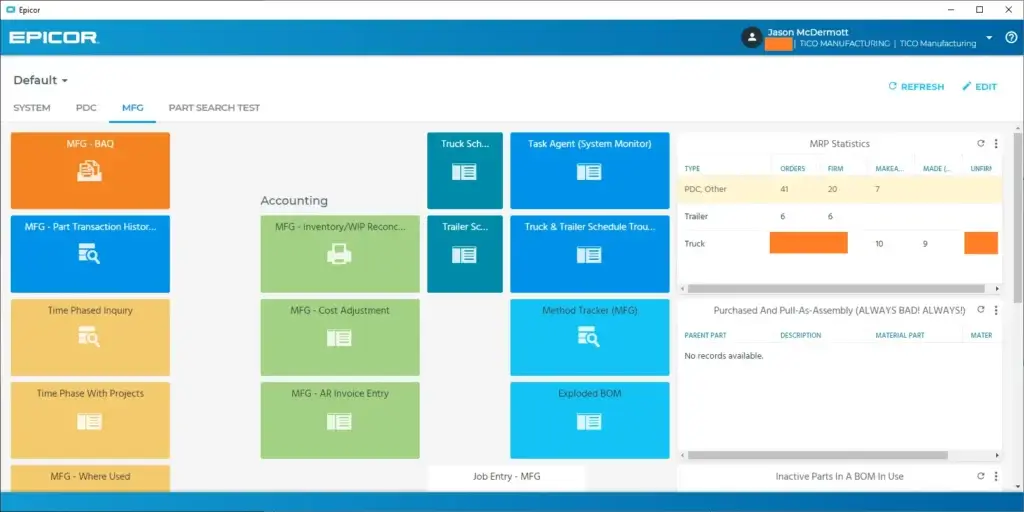
Epicor Kinetic has a modern interface compared with older ERP systems, but it is still an enterprise-grade manufacturing ERP. Users should expect a learning curve, especially in areas such as production planning, scheduling, costing, financial reporting, and system administration.
The platform becomes easier to use when screens, dashboards, workflows, and permissions are tailored to each role. A shop floor user, planner, buyer, finance manager, quality manager, and executive should not be forced to work through the same experience.
Implementation Experience
Implementation is one of the most important areas to evaluate before buying Epicor Kinetic. A proper implementation usually includes process discovery, solution design, data migration, configuration, integrations, testing, training, and phased rollout.
Manufacturing ERP projects can become complex because they touch nearly every part of the business. Bills of material, routings, inventory records, suppliers, customer data, open jobs, costing methods, finance rules, and reporting structures all need careful review.
The safest approach is to prioritize the workflows that drive the most business value first. For many manufacturers, that means finance, inventory, purchasing, production, and core reporting before expanding into advanced extensions.
Customer Support and Partner Network
Epicor provides support, professional services, education resources, and partner options. However, your experience will depend on the quality of the implementation team and the clarity of your internal project ownership.
When evaluating Epicor partners, ask about industry experience, manufacturing mode experience, data migration methodology, customization philosophy, timeline control, training plan, and post-launch support.
Security and Compliance
Epicor Kinetic supports role-based access, cloud deployment options, workflow controls, document management, compliance-related processes, and quality management needs. These capabilities can help manufacturers create better governance around sensitive business data and operational processes.
Still, security depends on implementation discipline. You should define user roles, approval workflows, segregation of duties, audit requirements, integrations, and data access rules before go-live.
AI Governance Considerations
Epicor Kinetic’s AI and automation capabilities can improve productivity, but manufacturers should apply governance around AI usage. This is especially important when AI tools interact with supplier communications, financial data, customer data, pricing, quotes, production plans, or sensitive operational information.
Before adopting AI-assisted workflows, define who can use them, what data they can access, how recommendations are reviewed, and how exceptions are handled.
Pricing
Epicor Kinetic Pricing and Plans
Epicor Kinetic pricing is typically quote-based. Final pricing depends on company size, number of users, required modules, deployment model, implementation scope, integrations, data migration, customization, training, and ongoing support.
This means you should evaluate Epicor Kinetic as a total cost of ownership project, not just a software subscription. The license cost is only one part of the investment.
Software Licensing
Epicor Kinetic pricing is usually built around users, modules, and deployment requirements. Because manufacturing needs vary widely, most buyers will need to request a custom quote rather than rely on a fixed public pricing page.
This is common in mid-market and enterprise ERP. A simple manufacturer with standard processes will usually have a very different cost profile from a multi-site manufacturer with advanced scheduling, quality, MES, EDI, ecommerce, and heavy integrations.
Implementation Costs
Implementation costs can be significant because Epicor Kinetic needs to be configured around your processes. You should budget for consulting, discovery, configuration, data migration, integrations, testing, training, documentation, and post-launch support.
Manufacturing ERP implementation is rarely just a software setup. It often becomes a process improvement project that forces your team to clean data, standardize workflows, define ownership, and improve operational discipline.
Ongoing Costs
Beyond licensing and implementation, you should consider ongoing costs such as support, additional modules, customizations, report development, integrations, user training, process optimization, and internal administration.
The most successful ERP buyers usually plan beyond go-live. They treat ERP as an operating platform that needs continuous improvement rather than a one-time IT project.
Pricing Table
The table below summarizes the main Epicor Kinetic cost categories you should evaluate.
| Cost Area | What It Includes | What to Consider |
| Software Licensing | Users, modules, deployment model, subscriptions | Usually quote-based and depends on required scope |
| Implementation | Discovery, setup, migration, testing, training, rollout | Often the largest upfront cost after software commitment |
| Customization | Workflows, fields, reports, integrations, business logic | Useful when controlled, risky when overused |
| Data Migration | Customers, vendors, inventory, BOMs, routings, open transactions | Clean data is critical for ERP trust and adoption |
| Training | Role-based training for finance, operations, production, warehouse, quality | Directly affects adoption and process discipline |
| Ongoing Support | Partner support, optimization, admin work, new modules | Should be planned as part of long-term ERP ownership |
For most buyers, the best way to evaluate Epicor Kinetic pricing is to build a requirements document first. Define your users, sites, production model, finance needs, inventory complexity, integrations, reporting requirements, quality needs, and implementation timeline before requesting a quote.
Use Cases
Who Should Use Epicor Kinetic?
Epicor Kinetic is best for companies that need manufacturing ERP depth and are ready to invest in implementation, process standardization, and user training.
Discrete Manufacturers
Discrete manufacturers are one of the strongest fits for Epicor Kinetic. The platform can support production workflows where companies build physical products from parts, assemblies, materials, routings, and labor.
If your business needs better visibility into jobs, costs, schedules, materials, quality, and delivery commitments, Kinetic is highly relevant.
Engineer-to-Order Manufacturers
Engineer-to-order companies often need stronger control over product data, estimates, engineering changes, project costs, materials, and production execution. Epicor Kinetic can support these workflows better than lighter ERP tools.
The platform is useful when every customer order carries some level of complexity and profitability depends on accurate estimating, controlled execution, and clear project visibility.
Make-to-Order and Mixed-Mode Manufacturers
Make-to-order and mixed-mode manufacturers need flexibility because production may vary by customer, product line, material availability, or plant capacity. Epicor Kinetic can help connect quoting, planning, inventory, scheduling, production, and costing.
This makes it a strong fit for companies that cannot manage operations effectively with a basic accounting system and disconnected spreadsheets.
Manufacturers with Quality and Compliance Needs
Epicor Kinetic is also relevant for companies that need stronger quality processes, documentation, supplier oversight, traceability, and compliance controls.
For manufacturers in regulated or quality-sensitive industries, having quality data connected with production, suppliers, inventory, and customer requirements can reduce risk and improve operational consistency.
Multi-Site Manufacturers
Companies with multiple plants, warehouses, or operating locations may benefit from Epicor Kinetic’s ability to support multi-site visibility and operational coordination.
Multi-site ERP requires careful design. You need to define how each site handles inventory, production, purchasing, reporting, finance, and shared processes before implementation.
When Epicor Kinetic Might Not Be Right
Epicor Kinetic may not be the best option if your business is very small, has simple accounting needs, does not manufacture physical products, or wants a low-cost ERP with minimal implementation effort.
It may also be too complex if your team is not ready to clean data, redesign processes, assign internal ownership, and support a structured ERP rollout.
User Feedback
Epicor Kinetic Customer Reviews
User feedback for Epicor Kinetic is generally strongest around manufacturing functionality, production visibility, configurability, operational depth, and the ability to centralize business processes.
What Users Like Most
Positive review patterns often focus on Kinetic’s manufacturing fit, job costing, production management, inventory visibility, reporting options, and ability to support complex operational workflows.
Users also tend to value the fact that Epicor Kinetic is not a generic ERP. It is designed around the realities of manufacturing, where decisions about materials, labor, capacity, quality, and delivery dates affect financial results.
Common Complaints
Common complaints around Epicor Kinetic usually relate to implementation complexity, learning curve, customization, reporting setup, and the need for experienced administrators or consultants.
These complaints are not unusual for manufacturing ERP. The more deeply a system touches production, finance, supply chain, and quality, the more important implementation quality becomes.
My Take on the Review Pattern
The review pattern suggests that Epicor Kinetic works best for manufacturers that know what they want from ERP and are willing to invest in a proper rollout.
If your team expects a plug-and-play system, Kinetic may feel heavy. If your team needs a serious manufacturing ERP that can support complex production and operational control, it can deliver strong value.
Competitors
Competitor Alternatives to Epicor Kinetic
Epicor Kinetic competes with other ERP systems such as NetSuite, Microsoft Dynamics 365, SAP S/4HANA Cloud, Oracle Fusion Cloud ERP, Infor CloudSuite, Acumatica, Odoo, and SYSPRO. The right alternative depends on your company size, industry, manufacturing complexity, budget, and implementation resources.
| Feature Type | Epicor Kinetic | NetSuite | Microsoft Dynamics 365 | Acumatica |
| Core angle | Manufacturing-focused ERP | Cloud ERP suite for growing companies | Microsoft-based ERP and CRM ecosystem | Flexible cloud ERP for mid-market companies |
| Best for | Manufacturers with complex production needs | Companies wanting broad cloud financials and operations | Microsoft-first businesses needing ERP depth | Growing companies needing flexible licensing and industry editions |
| Manufacturing depth | Strong | Moderate to strong | Strong with the right modules | Moderate to strong |
| Pricing style | Quote-based | Quote-based | Published app pricing plus implementation | Quote-based resource-style pricing |
| Implementation complexity | Moderate to high | Moderate to high | Moderate to high | Moderate |
| Overall fit | Best for manufacturing operations | Best for unified cloud ERP breadth | Best for Microsoft ecosystem alignment | Best for flexible mid-market ERP deployments |
Compared with NetSuite, Epicor Kinetic is usually stronger for manufacturing-specific depth. NetSuite may be more attractive for companies that want a broader cloud ERP suite across finance, CRM, ecommerce, and operations.
Compared with Microsoft Dynamics 365, Epicor Kinetic is more manufacturing-centered out of the box. Dynamics 365 is stronger for companies that are deeply invested in Microsoft tools and want ERP, CRM, Power BI, Teams, and Power Platform alignment.
Compared with Acumatica, Epicor Kinetic may be better for manufacturers that need deeper production capabilities, while Acumatica may appeal to companies that want flexible licensing, modern usability, and broader mid-market ERP coverage.
Compared with SAP S/4HANA Cloud, Epicor Kinetic is typically more approachable for mid-market manufacturing companies. SAP is better suited for larger global enterprises with extensive standardization, governance, and multinational complexity.
Best Practices
Getting Started with Epicor Kinetic
Getting started with Epicor Kinetic requires careful planning because the platform touches finance, production, supply chain, inventory, quality, and reporting. The goal should not be to copy old workflows into a new system. The goal should be to improve how the business operates.
Start with Manufacturing Requirements
Before requesting a quote, document your manufacturing requirements. Define your production model, job types, BOM complexity, routing needs, scheduling challenges, inventory problems, supplier workflows, quality requirements, and reporting gaps.
This helps you avoid buying modules you do not need and makes the vendor or partner conversation more productive.
Map Finance and Operations Together
Manufacturing ERP only works well when finance and operations are aligned. Your chart of accounts, costing methods, job structures, inventory valuation, purchasing workflows, and project reporting should support both operational control and financial accuracy.
Do not let finance and production design the system separately. The best ERP outcomes happen when both teams agree on how data should flow.
Clean Your Data Before Migration
Data migration can make or break an ERP implementation. You should clean customer records, supplier records, part masters, BOMs, routings, inventory balances, open purchase orders, open sales orders, job data, and financial balances before migration.
If bad data enters the new ERP, users will lose trust quickly. Clean data improves adoption, reporting accuracy, and operational decision-making.
Choose the Right Implementation Partner
Partner selection is critical. Look for a partner with Epicor Kinetic experience in your manufacturing mode, not just general ERP experience.
Ask about previous implementations, manufacturing references, customization approach, integration experience, training methodology, data migration process, and post-launch support.
Train Users by Role
Role-based training is essential. A buyer, planner, shop floor employee, finance user, quality manager, engineer, and executive each need different workflows and dashboards.
Training should focus on real work, not only software navigation. Users need to understand how their actions affect inventory, jobs, costs, purchasing, quality, and reporting.
Roll Out in Phases
A phased rollout is often safer than trying to launch every module at once. Many companies should start with core financials, inventory, purchasing, production, and reporting, then expand into advanced scheduling, quality, MES, ecommerce, or AI workflows.
This approach reduces risk and gives your team time to improve processes before adding more complexity.
Conclusion
Final Thoughts
Epicor Kinetic is one of the strongest ERP options for manufacturers that need deeper control over production, materials, scheduling, supply chain, quality, finance, and operational performance. Its biggest strengths are manufacturing focus, production management depth, planning and scheduling, product data control, quality capabilities, and analytics.
It is not the simplest ERP system. Pricing is usually quote-based, implementation requires careful planning, and the platform can feel complex if your team is not ready for process discipline and training. For very small companies with basic accounting and inventory needs, a lighter ERP may be more practical.
Overall, Epicor Kinetic is easy to recommend for manufacturers that have outgrown spreadsheets, entry-level accounting tools, or disconnected systems. If your business needs a serious manufacturing ERP that connects the shop floor with finance, supply chain, inventory, quality, and reporting, Epicor Kinetic deserves a strong place on your ERP shortlist in 2026.
Frequently Asked Questions
Have more questions?
What is Epicor Kinetic?
Epicor Kinetic is a manufacturing-focused ERP system that helps companies manage finance, production, inventory, supply chain, planning, scheduling, product data, quality, projects, and reporting in one platform.
Is Epicor Kinetic an ERP system?
Yes. Epicor Kinetic is an ERP system designed mainly for manufacturers. It supports core enterprise workflows such as accounting, procurement, production, inventory, supply chain, quality management, project control, analytics, and business process automation.
Who is Epicor Kinetic best for?
Epicor Kinetic is best for manufacturers that need stronger control over production, scheduling, materials, job costing, quality, supply chain, and operational reporting. It is especially relevant for discrete, make-to-order, engineer-to-order, and mixed-mode manufacturers.
How much does Epicor Kinetic cost?
Epicor Kinetic pricing is usually quote-based. Final cost depends on users, modules, deployment model, implementation scope, integrations, customization, data migration, training, and support. Buyers should evaluate total cost of ownership, not only license cost.
Does Epicor Kinetic support manufacturing?
Yes. Manufacturing is one of Epicor Kinetic’s strongest areas. It supports production management, job tracking, planning and scheduling, MRP, product data, inventory, quality, supply chain workflows, and manufacturing analytics.
Does Epicor Kinetic support supply chain management?
Yes. Epicor Kinetic includes supply chain management capabilities for procurement, supplier management, purchase orders, inventory flow, receiving, shipping, warehouse activity, and operational visibility from raw materials to finished goods delivery.
Is Epicor Kinetic cloud-based?
Epicor Kinetic is available as a modern cloud ERP platform. Deployment options and requirements should be confirmed directly with Epicor or an implementation partner based on your business size, region, compliance needs, and IT strategy.
Is Epicor Kinetic easy to use?
Epicor Kinetic has a modern interface, but it is still a deep manufacturing ERP system. It becomes easier to use when configured properly with role-based dashboards, clean workflows, accurate data, and structured user training.
What are the best Epicor Kinetic alternatives?
The best Epicor Kinetic alternatives include NetSuite, Microsoft Dynamics 365, SAP S/4HANA Cloud, Oracle Fusion Cloud ERP, Infor CloudSuite, Acumatica, Odoo, and SYSPRO. The right option depends on your industry, manufacturing complexity, budget, and implementation resources.
Is Epicor Kinetic worth it?
Epicor Kinetic is worth considering if your company needs a serious manufacturing ERP with strong production, scheduling, inventory, quality, supply chain, and financial visibility. It may be too complex for very small businesses with simple accounting or inventory needs.