Introduction
Choosing a password manager is not only about storing passwords in one encrypted vault. You also need a tool that helps you create stronger credentials, fill logins safely, share access securely, monitor exposed accounts, support passkeys, and reduce password-related risk across your devices.
That is where LastPass becomes an interesting, but more complicated, option.
LastPass is one of the most recognizable password managers in the market. It offers password storage, autofill, password generation, dark web monitoring, emergency access, secure sharing, passkey support, family plans, business admin controls, SSO options, and MFA capabilities.
However, this LastPass review needs to address the question many users still ask in 2026: should you trust LastPass after its 2022 security incident?
The short answer is that LastPass is still a capable password manager, especially if you want broad features, a free plan, business options, and familiar usability. But it is no longer the automatic recommendation it once was. Its breach history means you should compare it carefully against alternatives like 1Password, NordPass, and Keeper before deciding.
In this LastPass review, you will get a practical breakdown of:
- How LastPass works for individuals, families, and businesses
- Its core password manager features and security tools
- What to know about the LastPass breach history
- How LastPass compares with 1Password, NordPass, and Keeper
- Whether LastPass is still worth using in 2026
For personal users, LastPass can help you stop reusing weak passwords, store sensitive information securely, and access your credentials from supported devices. Its free plan is useful, but the one-device-type limitation makes the paid Premium plan more realistic for most users.
For families, LastPass Families gives you six user accounts, shared folders, and a family manager dashboard. This makes it safer than sharing passwords through messages, spreadsheets, browser sync, or notes apps.
For businesses, LastPass includes shared folders, admin controls, security policies, user management, SSO options, MFA, reporting, and SaaS visibility features on higher-tier plans. That makes it more than a basic password vault, especially for small and mid-sized teams that need centralized credential management.
If you are still comparing options, you can also read our full guide to the Best Password Managers to see how LastPass compares with other leading tools.
Overview
What Is LastPass?
LastPass is a cloud-based password manager that stores passwords, passkeys, secure notes, payment cards, addresses, identities, files, and other sensitive information inside an encrypted vault.
Instead of remembering every password yourself, you remember one master password. LastPass then helps you generate strong passwords, save logins, autofill credentials, share access, and monitor password health.
LastPass works across major desktop browsers, mobile devices, and operating systems. Paid users can access LastPass across all device types, while free users are limited to one device type, either computer or mobile.
At a basic level, LastPass helps you solve four common password problems:
- You can stop reusing the same password across accounts
- You can generate stronger passwords without memorizing them
- You can share logins more safely than through messages or spreadsheets
- You can monitor weak, reused, or exposed credentials
LastPass is also used by businesses that need centralized password management. Business plans include shared folders, user management, policies, security dashboards, reporting, SSO options, MFA, and app visibility features on higher-tier plans.
The product is easy to understand, which is one reason LastPass became so widely adopted. The main challenge is not usability. The bigger question is trust, especially for security-conscious users who remember the 2022 breach.
| Category | LastPass Details |
| Product type | Password manager and credential security platform |
| Best for | Individuals, families, small businesses, and teams that want simple password management |
| Main strengths | Free plan, autofill, password sharing, dark web monitoring, business controls |
| Free plan | Yes, but limited to one device type |
| Security model | Zero-knowledge architecture with local encryption and a master password |
| Main concern | Trust impact from the 2022 security incident |
Software Specification
Core Features
LastPass includes the core features you would expect from a mature password manager. It is not the newest or most visually modern tool in the category, but it covers password storage, autofill, sharing, monitoring, and business administration well.
Password Vault and Secure Storage
The encrypted vault is the center of LastPass. You can store logins, secure notes, Wi-Fi passwords, payment cards, bank details, addresses, documents, and other sensitive records.
This is useful because many people store sensitive information in unsafe places, including browser notes, email drafts, screenshots, spreadsheets, and chat apps. LastPass gives you a more structured and secure place to keep that information.
For businesses, vault storage becomes more important because employee credentials are often spread across browsers, personal notes, shared documents, and informal team chats. LastPass helps centralize those credentials into managed folders and user accounts.
Password Generator and Autofill
LastPass includes a password generator that can create strong, random passwords for new accounts. This helps you avoid weak passwords, predictable patterns, and password reuse.
Autofill is one of the most important daily features. When you visit a saved website or app, LastPass can fill your username and password so you do not need to type complex credentials manually.
The browser extension is especially useful for everyday workflows. It can detect login forms, save new credentials, update existing passwords, and give you quick access to your vault while browsing.
Password Sharing and Shared Folders
LastPass lets you share passwords more safely than sending them through email, Slack, WhatsApp, spreadsheets, or SMS. Personal users can share selected items, while families and businesses can use shared folders.
Shared folders are particularly useful for households, agencies, startups, support teams, marketing teams, and operations teams that need access to the same tools.
For example, a family can share streaming, utility, travel, and household accounts. A business can share vendor portals, social media accounts, client software, admin tools, and internal systems.
Dark Web Monitoring and Security Dashboard
LastPass includes dark web monitoring and a security dashboard to help you identify risky credentials. The platform can alert you when monitored email addresses appear in known breach data.
This matters because password management should not only be about storage. A good password manager should also help you improve password hygiene over time.
After importing passwords from a browser or another password manager, you can use LastPass to identify reused, weak, or exposed credentials that should be replaced first.
Passkey Support
LastPass supports passkeys, which are becoming a more common way to sign in without relying on traditional passwords. Passkeys can help reduce phishing risk because they are tied to the legitimate service and are harder to reuse or steal like passwords.
For personal users, passkeys make LastPass more future-ready. For businesses, they create a path toward passwordless authentication while still managing the passwords employees already use.
Emergency Access
Emergency access allows you to assign trusted people who can request access to your vault in specific situations. This can be helpful for families, estate planning, and account continuity.
For example, you may want a spouse, parent, adult child, or business partner to access certain credentials if you are unavailable. This is a practical feature that many users overlook until they need it.
Business Admin Controls
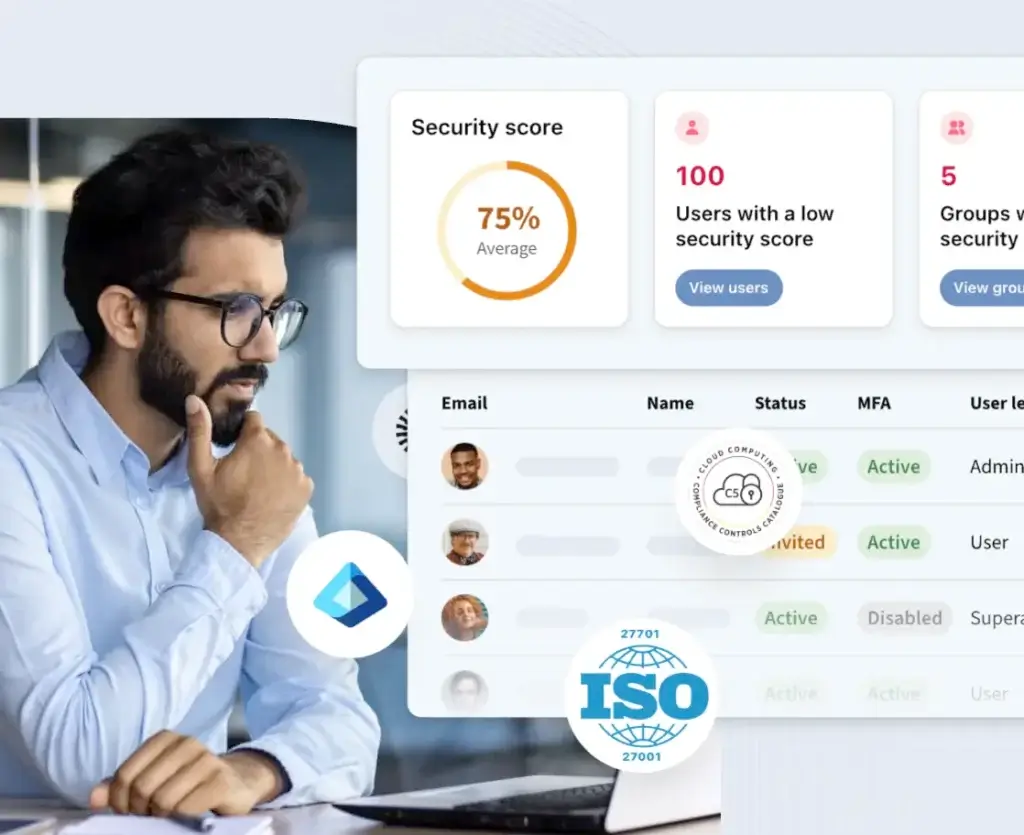
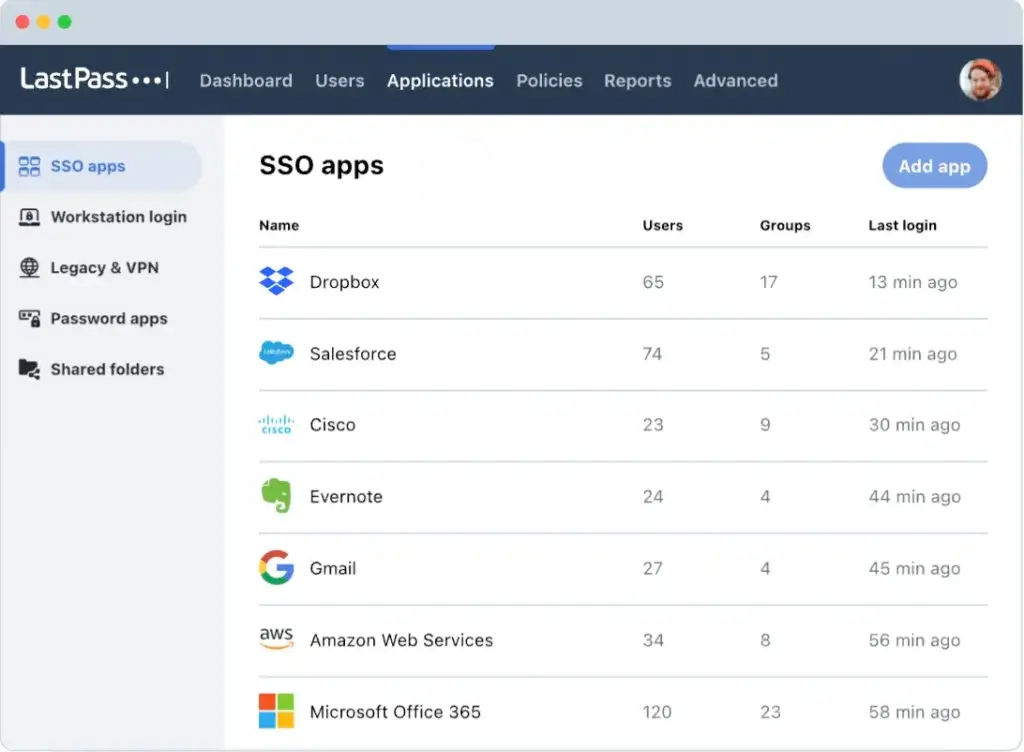
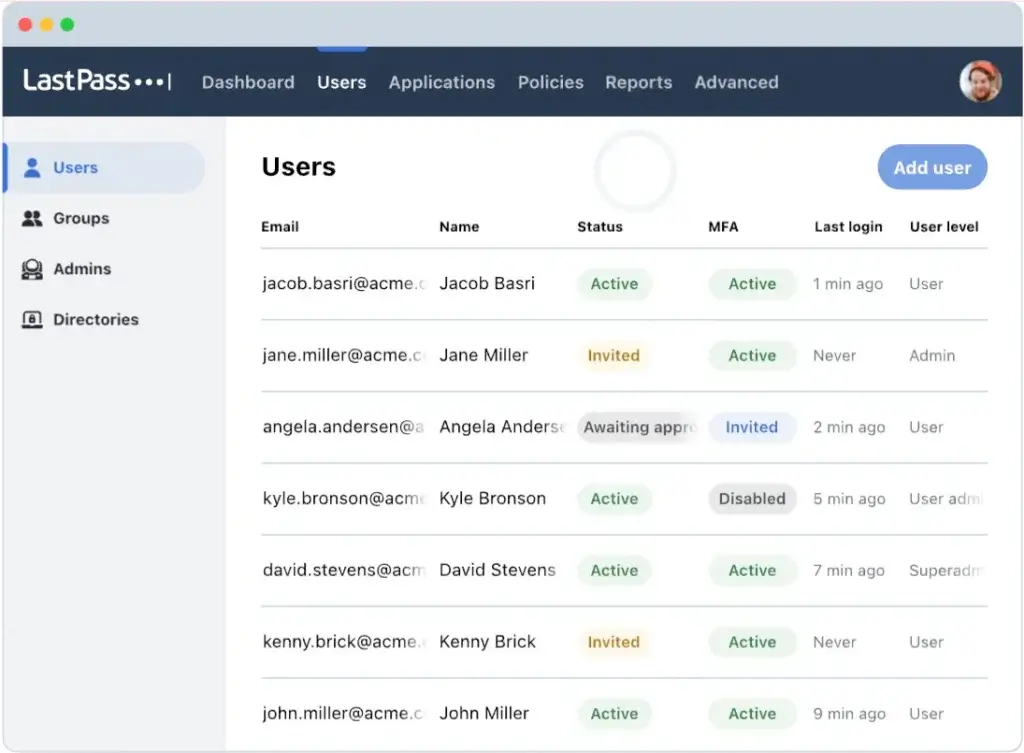
LastPass Business gives admins tools to manage users, apply policies, create shared folders, monitor security, and control access across the organization.
Higher-tier business plans add stronger access management capabilities, including SSO features, MFA capabilities, SaaS monitoring, and SaaS protection. This makes LastPass more useful for companies that want password management and broader access security in one platform.
Small teams may find the Teams plan enough. Larger organizations should compare Business and Business Max because policy depth, integrations, and visibility become more important as the number of employees grows.
Pros and Cons
Advantages and Disadvantages
LastPass has a strong feature set, a recognizable brand, and a practical free plan. Its biggest weakness is not the product interface or feature coverage. It is the trust gap created by its past security incident.
Positive
✅ Broad password manager feature set
✅ Useful free plan for basic use
✅ Strong family and business options
✅ Dark web monitoring and security dashboard
Negatives
❌ Past security incident affects trust
❌ Free plan is limited to one device type
❌ Interface is less polished than some rivals
❌ Better alternatives exist for security-first buyers
LastPass Pros
1. Broad password manager feature set
LastPass includes password storage, autofill, password generation, passkeys, dark web monitoring, emergency access, secure sharing, shared folders, and business controls. You get a complete password manager rather than a narrow vault-only tool.
2. Useful free plan for basic use
LastPass still offers a free plan, which makes it accessible if you want basic password storage without paying immediately. The limitation is that free users must choose one device type, so it is not ideal if you regularly use both desktop and mobile.
3. Strong family and business options
LastPass Families supports six users, while business plans add admin controls, shared folders, security policies, user management, SSO options, and MFA capabilities. That gives LastPass more flexibility than many personal-only password managers.
4. Dark web monitoring and security dashboard
The security dashboard helps you find weak, reused, and potentially exposed passwords. This makes LastPass useful not only for storing credentials, but also for improving your security habits over time.
LastPass Cons
1. Past security incident affects trust
The biggest concern with LastPass is its 2022 security incident. Even though LastPass has published details and security updates since then, many users still compare it more cautiously against competitors with cleaner recent reputations.
2. Free plan is limited to one device type
The free plan sounds generous because it includes unlimited passwords, but the one-device-type restriction makes it less practical for users who need passwords on both computer and mobile.
3. Interface is less polished than some rivals
LastPass is functional, but it does not feel as refined as 1Password or as modern as NordPass. If user experience is your top priority, you may prefer a competitor.
4. Better alternatives exist for security-first buyers
LastPass is still usable, but security-first buyers may feel more comfortable with 1Password, Keeper, or another password manager depending on their risk tolerance and requirements.
Security
Security, Encryption, and Breach History
Security is the most important part of this LastPass review. A password manager can have excellent features, but trust is essential because the tool stores the keys to many of your online accounts.
LastPass uses a zero-knowledge security model, which means your master password is not supposed to be known to LastPass. Your vault data is encrypted locally, and your master password is used to help derive the encryption key that protects your vault.
Zero-Knowledge Encryption
LastPass states that vault data is encrypted before it is stored in the cloud. This means your sensitive vault contents should not be readable by LastPass in plain text.
The practical benefit is that your data is not simply sitting on LastPass servers as readable passwords. It is encrypted, and your master password plays a central role in unlocking it from your device.
This is the standard model you should expect from a serious password manager. It does not remove all risk, but it is much safer than storing passwords in a spreadsheet, browser note, or unencrypted document.
AES-256 Encryption and PBKDF2
LastPass uses AES-256 encryption and PBKDF2-SHA-256 hashing. The company states that it uses 600,000 PBKDF2 iterations, which is designed to make password guessing more computationally expensive.
This matters because users with weak master passwords are more exposed if encrypted vault data is ever targeted. A strong, unique master password remains essential.
If you use LastPass, your master password should be long, random, and not reused anywhere else. A passphrase made of several unrelated words can be easier to remember while still being much stronger than a short password.
The 2022 LastPass Security Incident
No LastPass review in 2026 should ignore the 2022 security incident. LastPass disclosed that attackers accessed certain cloud-based storage environments and obtained backups that included customer vault data in encrypted form, along with some unencrypted metadata.
LastPass later published additional updates and recommended actions for customers. The incident did not mean every user’s passwords were instantly exposed, but it was serious enough to damage trust and push many users to reconsider their password manager.
The practical lesson is clear: if you use LastPass, you should use a very strong master password, enable multifactor authentication, review your security dashboard, update weak or reused passwords, and replace high-value credentials if you have not done so since the incident.
Should You Trust LastPass Now?
LastPass has taken steps to strengthen security, improve communication, and expand its security controls. That is important, but trust is not rebuilt only through feature updates.
In my opinion, LastPass is still a viable password manager for users who value convenience, free access, and a broad feature set. However, it is not the first tool I would recommend to security-first businesses or users who want the strongest reputation in the category.
If you already use LastPass and follow strong security practices, you may not need to switch immediately. If you are choosing a new password manager from scratch, I would compare it closely against 1Password and Keeper before committing.
Security Best Practices for LastPass Users
If you decide to use LastPass, do not treat the tool as a set-and-forget solution. Your configuration matters.
- Use a long, unique master password
- Enable multifactor authentication
- Review weak and reused passwords
- Replace passwords for high-value accounts
- Remove old shared access you no longer need
- Keep your recovery settings current
For businesses, the biggest risks often come from poor rollout rather than the password manager itself. Admins should plan shared folders, permission groups, offboarding workflows, recovery policies, and security reporting before deploying LastPass widely.
Use Cases
Who LastPass Is Best For
LastPass can work for several user types, but it is not equally strong for every situation. Its best fit is users who want familiar password management, easy sharing, a free option, and business scalability without choosing a highly technical product.
LastPass for Personal Use
For individuals, LastPass helps you replace weak password habits with stronger, unique credentials. You can save logins, generate passwords, autofill accounts, monitor breach exposure, and store secure notes.
The free plan can work if you primarily use one device type. For example, if you only use passwords on a laptop or only on a phone, the free plan may be enough.
However, most users will want passwords on both desktop and mobile. In that case, Premium is the more realistic plan.
- Best for users who want familiar password management
- Useful for basic storage, autofill, and monitoring
- Less ideal if you want the most polished interface
LastPass for Families
LastPass Families is a practical option for households that need shared access. It supports six users and gives family members their own accounts while also allowing shared folders.
This is useful for streaming accounts, household utilities, travel portals, insurance accounts, school logins, shared payment details, and emergency access planning.
Compared with informal password sharing, LastPass Families is a major improvement. You can reduce the risk of sending passwords through insecure channels and make account access easier to manage.
LastPass for Small Businesses
LastPass Teams and Business plans are designed for companies that need to stop employees from storing and sharing passwords informally.
Teams can use shared folders, admin controls, security policies, dashboards, and user management to improve credential hygiene.
Small businesses will benefit most if they currently rely on browser password managers, spreadsheets, shared documents, or informal chat messages to manage credentials.
LastPass for Larger Teams
Larger teams should look beyond basic password storage and evaluate LastPass Business or Business Max. These plans are more relevant if you need stronger policies, advanced MFA, SSO, SaaS visibility, or broader access protection.
That said, larger organizations should compare LastPass against Keeper and 1Password carefully. Keeper may offer stronger enterprise security depth, while 1Password may offer a more refined employee experience and stronger developer workflows.
User Experience
How LastPass Feels in Daily Use
LastPass is generally easy to use. The product is familiar, the browser extension is practical, and most users can understand the basics quickly.
The experience is not as elegant as some newer password managers, but it remains functional and accessible.
Browser Extension Experience
The browser extension is where many users spend most of their time with LastPass. It helps save credentials, fill login forms, generate new passwords, and access vault items while browsing.
For personal users, this reduces friction because you do not need to open the full vault every time you log in. For business users, it helps employees adopt safer password habits without adding too many steps.
Autofill can vary depending on the site, browser, and device, but LastPass is generally reliable for mainstream websites and apps.
Desktop and Mobile Access
Paid LastPass users can access passwords across computers and mobile devices. This is important because most people now manage accounts across laptops, phones, tablets, and browser sessions.
The free plan limitation is one of the biggest usability drawbacks. If you save a login on desktop and need it on mobile, you will likely need to upgrade.
Importing Passwords
LastPass supports importing credentials from browsers and other password managers. This makes migration easier if your passwords are currently stored in Chrome, Safari, Edge, Firefox, or another password manager.
After importing, you should immediately review your weak and reused passwords. Many users discover that they have reused the same login across multiple accounts for years.
Admin Experience for Businesses
LastPass Business gives admins a centralized place to manage users, shared folders, policies, and security visibility.
The admin experience is practical, especially for small and mid-sized organizations. However, larger companies should take time to design folder structure, policy settings, access groups, and offboarding workflows.
A messy password manager rollout can create a false sense of security. The tool is only effective if permissions are maintained and employees actually use it.
Pricing
Plans and Value
LastPass pricing is competitive, especially for families and small teams. The free plan is also useful, although the one-device-type restriction makes it less attractive than some free alternatives.
Pricing can change based on billing cycle, region, promotions, taxes, and plan updates, so you should always check the official LastPass pricing page before buying.
LastPass Personal and Family Pricing
| Plan | Typical Price | Best For |
| Free | $0 | Basic password management on one device type |
| Premium | About $3/month, billed annually | One user who needs access across all device types |
| Families | About $4/month, billed annually | Households that need up to six accounts and shared folders |
The Free plan is useful if you want to test LastPass or manage passwords on only one device type. However, the Premium plan is better for most users because it supports access across device types.
The Families plan is strong value because it includes six accounts for a relatively small price increase over Premium. If you are protecting a household, it is usually the better choice.
LastPass Business Pricing
| Plan | Typical Price | Best For |
| Teams | About $4.25/user/month, billed annually | Small teams that need shared folders and basic admin controls |
| Business | About $7/user/month, billed annually | Growing businesses that need stronger policies and user management |
| Business Max | About $9/user/month, billed annually | Businesses that need advanced MFA, SSO, and SaaS protection features |
The Teams plan is a reasonable starting point for small businesses that need shared passwords and basic administration.
The Business plan is better if you need more policies, group user management, and a more scalable structure. Business Max is the better fit when password management is part of a broader access security strategy.
Is LastPass Worth the Price?
LastPass is reasonably priced for the features you get. The Families plan is especially cost-effective if you want to protect several people under one subscription.
For businesses, LastPass is also priced competitively compared with premium business password managers. The question is less about cost and more about trust, security requirements, and whether your team prefers LastPass over 1Password or Keeper.
In my opinion, LastPass offers good value for users who want a known password manager with a free plan and broad features. It is less compelling for users who are willing to pay more for a cleaner reputation or a more polished user experience.
Alternatives Comparison
LastPass vs Other Password Managers
LastPass is still a capable password manager, but it faces strong competition. The right choice depends on whether you prioritize price, usability, trust, family sharing, business controls, or enterprise security.
For this comparison, I would focus on 1Password, NordPass, and Keeper because they represent three different decision paths: premium usability, simplicity, and business security depth.
Best LastPass Alternatives by Use Case
| Use Case | Best Option | Why |
| Best for broad affordability | LastPass | Free plan, low family pricing, and practical business options |
| Best premium experience | 1Password | More polished interface, strong sharing, excellent security reputation, and developer tools |
| Best simple alternative | NordPass | Modern interface, easy setup, and strong personal password management |
| Best business security depth | Keeper | Strong admin controls, compliance-focused features, and enterprise security options |
Alternative 1: 1Password
1Password is one of the best LastPass alternatives if you want a more polished and security-focused password manager.
It has strong vault organization, excellent family sharing, business controls, passkey support, Watchtower alerts, and developer tools such as SSH key management and secrets workflows.
Choose 1Password if: you want a premium password manager with a stronger reputation, better interface, and broader advanced use cases.
Choose LastPass if: you want a cheaper family plan, a free plan, and a familiar password manager with strong mainstream features.
Alternative 2: NordPass
NordPass is a strong alternative if you want a clean, modern password manager that is easy to set up and use.
NordPass is especially appealing for users who want simple password storage, autofill, password health, data breach scanning, passkeys, and a modern interface without too much complexity.
Choose NordPass if: you want a simpler, more modern interface and do not need heavy business administration.
Choose LastPass if: you want broader family and business plan options, emergency access, and a more established password manager ecosystem.
Alternative 3: Keeper
Keeper is a strong LastPass alternative for businesses that care about security controls, compliance, reporting, and advanced enterprise features.
Keeper is often a better fit for organizations that want stronger governance, granular controls, secure record sharing, secrets management options, and enterprise-grade administration.
Choose Keeper if: you want a business-first password manager with strong security administration and compliance-oriented controls.
Choose LastPass if: you want a more familiar password manager with personal, family, and business plans at accessible pricing.
Comparison Summary
| Feature Area | LastPass | 1Password | NordPass | Keeper |
| Ease of use | Good | Excellent | Excellent | Good |
| Free plan | Yes, limited to one device type | No permanent free plan | Yes, limited | Trial-focused personal model |
| Family value | Excellent | Excellent | Good | Good |
| Business controls | Strong | Strong | Good | Very strong |
| Security reputation | Mixed due to past incident | Very strong | Strong | Very strong |
| Best fit | Affordable all-around use | Premium users and teams | Simple personal use | Security-heavy businesses |
Overall, LastPass is best if you want a recognizable password manager with a useful free plan, affordable family pricing, and broad business features. 1Password is better for premium usability and trust. NordPass is better for simplicity. Keeper is better for security-heavy businesses.
Conclusion
Is LastPass Right for You?
LastPass remains a capable password manager in 2026, but it is no longer a simple recommendation for every user.
Its strengths are clear. It offers password storage, autofill, password generation, secure sharing, dark web monitoring, passkeys, emergency access, family plans, and business controls. It also has a free plan, which many premium competitors do not offer.
At the same time, the 2022 security incident still matters. A password manager depends heavily on trust, and LastPass has more reputation rebuilding to do than some of its rivals.
Who Should Use LastPass?
You should consider LastPass if you want an affordable, familiar password manager with broad features and a usable free plan.
LastPass is especially relevant for:
- Individuals who want simple password management
- Families that need shared folders and six accounts
- Small teams moving away from spreadsheets and browser storage
- Businesses that need admin controls and security policies
- Users who want dark web monitoring and emergency access
LastPass may not be the best fit if you are highly security-sensitive, uncomfortable with its breach history, or looking for the most polished password manager experience.
Is LastPass Worth It?
Yes, LastPass can be worth it if you want a practical password manager with good pricing and broad features. The Families plan is particularly strong value, and the Business plans can help teams reduce unsafe password sharing.
However, if you are choosing a new password manager from scratch, I would compare LastPass carefully with 1Password and Keeper before buying.
For most personal users, LastPass is good. For security-first users, 1Password may be more reassuring. For business security teams, Keeper may be the stronger option. For users who want a simpler modern interface, NordPass is worth considering.
Overall Assessment
LastPass is still a strong password manager on features and pricing, but weaker on trust compared with the best alternatives. It is a good fit for users who value affordability, free access, family sharing, and familiar password management.
It is not my top recommendation for security-first buyers, but it remains a serious option if you use strong security practices and are comfortable with its history.
Have more questions?
Frequently Asked Questions
Is LastPass safe to use in 2026?
LastPass can still be safe to use if you follow strong security practices, including a unique master password, multifactor authentication, and regular password health checks. However, its 2022 security incident means security-conscious users should compare it carefully with alternatives like 1Password and Keeper.
Does LastPass have a free plan?
Yes. LastPass has a free plan with unlimited password storage, autofill, dark web monitoring, and basic sharing. The main limitation is that free users are restricted to one device type, either computer or mobile.
What happened in the LastPass breach?
LastPass disclosed a serious 2022 security incident involving access to certain development and cloud storage environments, including encrypted customer vault backup data and some unencrypted metadata. The incident damaged trust and remains an important factor when evaluating LastPass.
Is LastPass better than 1Password?
LastPass may be better if you want a free plan or lower family pricing. 1Password is generally better if you want a more polished interface, stronger security reputation, better family experience, and more advanced developer tools.
Is LastPass better than NordPass?
LastPass has broader family and business features, while NordPass feels more modern and simpler to use. NordPass is often better for users who want a clean personal password manager, while LastPass is better for users who want more plan flexibility.
Is LastPass good for families?
Yes. LastPass Families is a strong value plan because it supports up to six users, shared folders, private vaults, and family management features. It is much safer than sharing household passwords through messages or spreadsheets.
Is LastPass good for businesses?
Yes. LastPass can work well for small and mid-sized businesses that need shared folders, admin controls, security policies, user management, reporting, SSO options, and MFA features. Larger businesses should compare it with Keeper and 1Password before choosing.
Does LastPass support passkeys?
Yes. LastPass supports passkeys, helping users sign in to supported websites and apps with a passwordless method that can reduce phishing and password reuse risks.
Can LastPass store more than passwords?
Yes. LastPass can store secure notes, payment cards, addresses, identities, files, passkeys, Wi-Fi credentials, bank details, and other sensitive information inside your encrypted vault.
Is LastPass worth it in 2026?
LastPass is worth considering if you want an affordable password manager with a free plan, strong family value, dark web monitoring, and business options. It is less ideal if your top priority is a cleaner security reputation or the most polished user experience.