Introduction
Choosing a password manager is not only about saving passwords in one place. You need a secure system that helps you create stronger credentials, autofill logins safely, manage passkeys, share sensitive data, monitor risky passwords, and protect your accounts across every device you use.
That is where Bitwarden stands out.
Bitwarden is one of the most respected password managers on the market because it combines strong security, open-source transparency, cross-platform support, and one of the most generous free plans available. It is used by individuals, families, developers, nonprofits, small businesses, and enterprise teams that want secure password management without paying premium prices for basic protection.
In this Bitwarden review, you’ll get a practical breakdown of how the platform performs in 2026, including:
- How Bitwarden works for personal, family, and business use
- Its core password manager features and security tools
- Why open-source transparency matters for password security
- Where Bitwarden stands out compared to 1Password, NordPass, and Keeper
- Whether Bitwarden is the right password manager for your needs
For personal users, Bitwarden is one of the best password managers if you want strong protection without a high monthly cost. Its free plan covers unlimited passwords across unlimited devices, which makes it much more useful than many limited free password managers.
For families, Bitwarden offers affordable shared password management, private vaults, secure sharing, and emergency access. It may not feel as polished as some premium alternatives, but it delivers excellent value.
For businesses, Bitwarden has grown into a serious team password management platform. It supports shared collections, role-based access controls, audit logs, directory integrations, SCIM provisioning, SSO options, policies, self-hosting, and enterprise security controls.
If you are still comparing options, you can also explore our full guide to the Best Password Managers to see how Bitwarden compares to other leading tools.
Overview
What Is Bitwarden?
Bitwarden is an open-source password manager that stores your passwords, passkeys, secure notes, payment cards, identities, SSH keys, authentication codes, and other sensitive information inside an encrypted vault.
Instead of remembering dozens of unique passwords, you only need to remember your Bitwarden master password. Bitwarden then helps you generate, store, autofill, and share strong credentials across your devices.
Bitwarden is available for Windows, macOS, Linux, iOS, Android, and major browsers such as Chrome, Firefox, Safari, Edge, Brave, Opera, Vivaldi, and Tor Browser. It also offers a web vault, command-line tools, business integrations, and self-hosting options.
At a basic level, Bitwarden helps you solve four major problems:
- You can stop reusing weak passwords across multiple accounts
- You can access your logins across all major devices
- You can share credentials without using unsafe channels
- You can improve password health with alerts and reports
Bitwarden’s biggest differentiator is its balance of affordability, security, and transparency. Many password managers are secure, and many are easy to use. Bitwarden adds a generous free plan, open-source code, third-party audits, and optional self-hosting, which makes it especially appealing to security-conscious users.
It is not the most visually polished password manager in the category. If you want the smoothest premium interface, 1Password may feel more refined. If you want the cleanest beginner experience, NordPass may feel simpler. But if you want the best mix of security, value, openness, and platform coverage, Bitwarden is one of the strongest options available.
| Category | Bitwarden Details |
| Product type | Open-source password manager and secure credential platform |
| Best for | Individuals, families, developers, small teams, nonprofits, and businesses |
| Main strengths | Free plan, low pricing, open-source transparency, self-hosting, business controls |
| Free plan | Yes, with unlimited passwords across unlimited devices for personal use |
| Platforms | Windows, macOS, Linux, iOS, Android, web vault, CLI, and major browsers |
Software Specification
Core Features
Bitwarden includes the essential password manager features you would expect, but its real advantage is how much functionality it makes available at a low cost. The free plan is unusually capable, while the paid plans add advanced authentication, sharing, security reports, business controls, and administrative features.
Encrypted Password Vault
The encrypted vault is the center of Bitwarden. You can store logins, passkeys, secure notes, cards, identities, authentication codes, SSH keys, and other sensitive records.
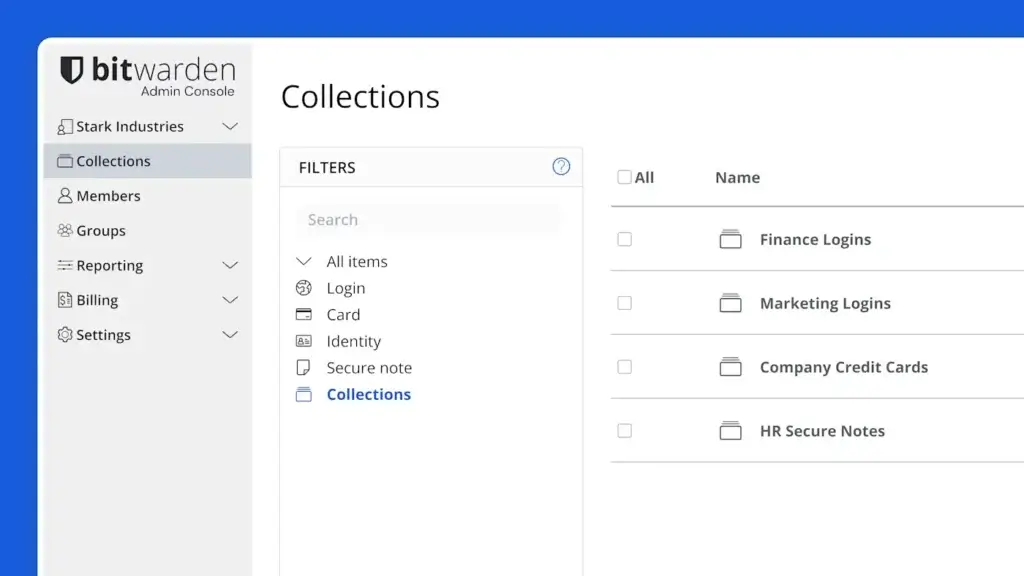
You can organize items into folders for personal use or collections for shared business access. This makes Bitwarden flexible enough for simple personal password storage and more structured team credential management.
For example, a personal user might create folders for finance, shopping, work, and travel. A business might create collections for marketing tools, finance software, IT systems, client accounts, and shared admin logins.
Password Generator and Username Generator
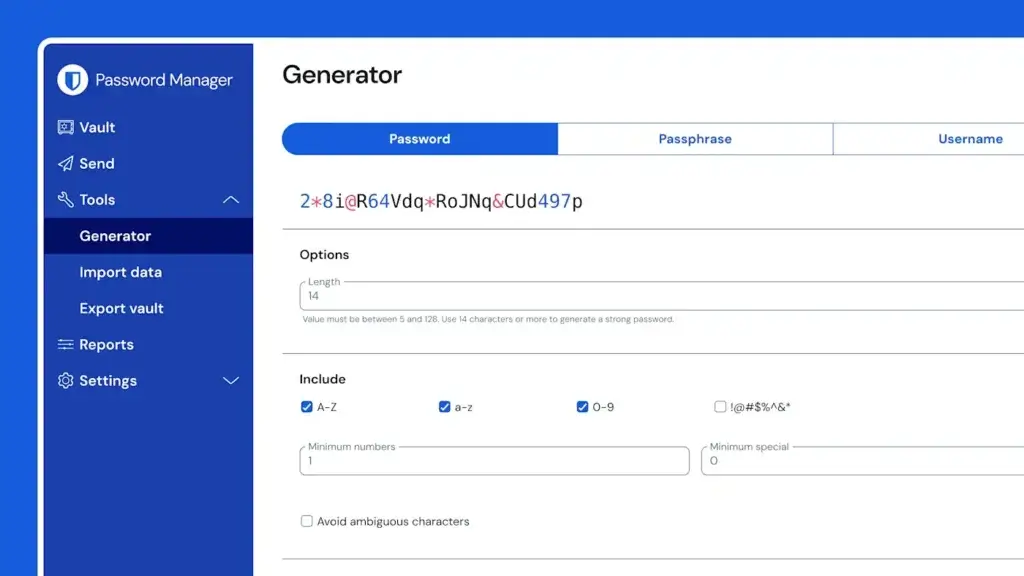
Bitwarden includes a password generator that helps you create strong, unique credentials for every account. You can customize password length, character types, passphrases, and other settings.
It also includes a username generator, which is useful if you want to reduce account linkage across websites. For privacy-conscious users, this can be a meaningful advantage.
The main benefit is practical. Instead of trying to invent memorable passwords, you can let Bitwarden generate secure passwords and store them automatically.
Autofill Across Browsers and Devices
Bitwarden can autofill saved logins across browsers, desktop apps, and mobile devices. The browser extension is the easiest way to save new accounts, fill passwords, generate credentials, and access your vault while browsing.
The autofill experience is reliable, but it is not always as polished as 1Password or NordPass. Some users may need a little time to adjust to Bitwarden’s interface and shortcut behavior.
Once configured properly, however, Bitwarden becomes fast and efficient. This is especially true for users who value keyboard shortcuts, browser extensions, and cross-platform flexibility.
Passkey Support
Bitwarden supports passkeys, which are becoming an important part of passwordless authentication. You can save and autofill passkeys for supported websites and services, and Bitwarden also supports passkey-based login features for accessing your vault.
This helps make Bitwarden more future-ready. Passwords are not disappearing immediately, but passkeys are becoming more common across major platforms, apps, and websites.
For personal users, passkeys can simplify secure logins. For businesses, passkey support helps teams begin moving toward more phishing-resistant authentication methods without abandoning traditional password management.
Bitwarden Send
Bitwarden Send is a secure sharing feature that lets you share encrypted text or files with another person, even if they do not use Bitwarden.
This is useful when you need to send a password, API key, private note, temporary access detail, or sensitive file without relying on email, chat, or spreadsheets.
You can set expiration dates, deletion dates, access limits, and optional passwords. This gives you more control than simply pasting sensitive data into Slack, WhatsApp, email, or a shared document.
Authenticator and Two-Step Login
Bitwarden supports two-step login for protecting your Bitwarden account. Depending on your plan and setup, you can use methods such as authenticator apps, email, FIDO2 WebAuthn, security keys, Duo, and other options.
Paid plans also unlock more advanced authentication and reporting features. For users who store highly sensitive accounts, enabling strong two-factor authentication is essential.
Bitwarden can also store verification codes for supported accounts, which makes logins more convenient. However, some security-conscious users may prefer keeping password storage and authentication codes in separate apps for stronger separation.
Emergency Access
Emergency Access lets you designate trusted contacts who can request access to your vault in an emergency. You can approve or reject the request before the waiting period ends.
This feature is especially useful for families, couples, business owners, and people who store important financial, legal, or account recovery details in their password manager.
Without emergency access, loved ones or business partners may struggle to access critical accounts if something happens to the vault owner.
Self-Hosting Option
Bitwarden is one of the few mainstream password managers that supports self-hosting. This means organizations with the right technical resources can run the Bitwarden server application on their own infrastructure.
Self-hosting is not necessary for most personal users or small businesses. Bitwarden’s cloud-hosted service is much easier to maintain.
However, self-hosting can be valuable for organizations with strict data control requirements, internal security policies, regulated environments, or technical teams that prefer infrastructure ownership.
Business Features and Admin Controls
Bitwarden’s business plans add features for team password management, shared collections, user groups, role-based access controls, event logs, policies, directory sync, SCIM provisioning, SSO options, and account recovery.
These tools help businesses reduce informal password sharing and manage access more responsibly. Instead of storing credentials in spreadsheets, browsers, documents, or chat threads, teams can centralize them in controlled encrypted collections.
Bitwarden is particularly strong for businesses that want enterprise-grade features at a lower price than many premium competitors.
Pros and Cons
Advantages and Disadvantages
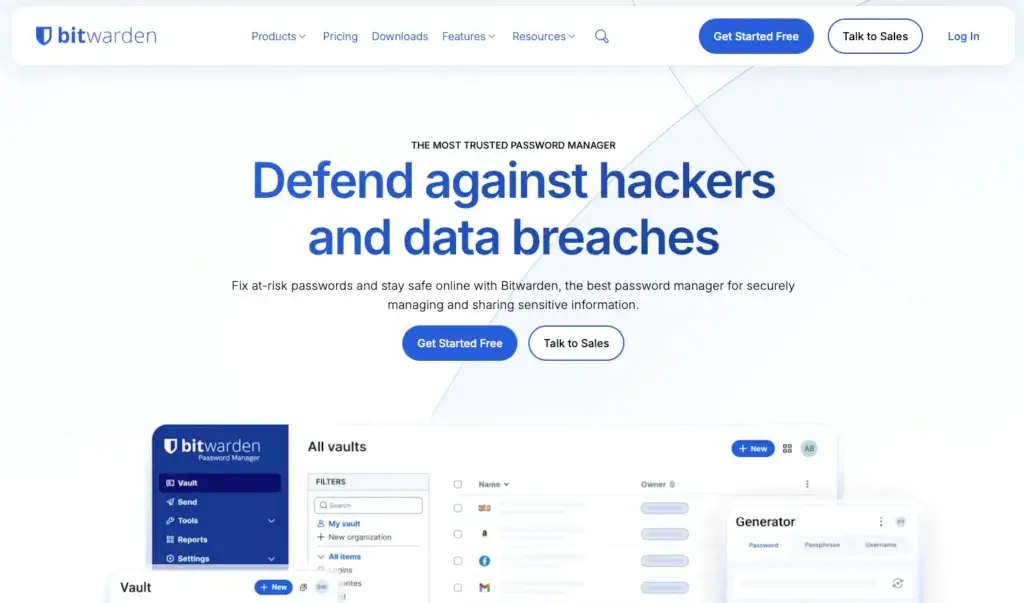
Bitwarden is one of the strongest password managers for value, transparency, and cross-platform coverage. Its main limitations are that the interface feels less premium than some competitors, and business setup may require more planning if you want to use advanced controls properly.
Positive
✅ Excellent free plan
✅ Open-source and audited security model
✅ Affordable paid plans
✅ Strong business and self-hosting options
Negatives
❌ Interface is less polished than premium rivals
❌ Some advanced features require setup knowledge
❌ Family sharing can feel less intuitive
❌ Support is not as hands-on as enterprise-first tools
Bitwarden Pros
1. Excellent free plan
Bitwarden’s free plan is one of the best in the password manager category. You can store unlimited passwords and sync them across unlimited devices, which makes it practical for real daily use rather than just a limited trial.
2. Open-source and audited security model
Bitwarden’s open-source approach gives users, researchers, and security teams more transparency into how the product works. Combined with third-party audits and public security documentation, this gives Bitwarden strong credibility.
3. Affordable paid plans
Bitwarden’s paid plans are usually much cheaper than premium competitors. This makes it a strong fit for individuals, families, nonprofits, and businesses that want serious password security without high subscription costs.
4. Strong business and self-hosting options
Bitwarden supports business features such as shared collections, event logs, directory sync, SCIM provisioning, SSO options, policies, account recovery, and self-hosting. That gives it more deployment flexibility than many consumer-focused password managers.
Bitwarden Cons
1. Interface is less polished than premium rivals
Bitwarden is easy enough to use, but it does not feel as refined as 1Password or NordPass. The design is functional rather than premium, which may matter for users who want the smoothest possible experience.
2. Some advanced features require setup knowledge
Features like self-hosting, SCIM provisioning, SSO, policies, directory sync, and business collections are powerful, but they require proper configuration. Smaller teams without IT support may need time to set everything up correctly.
3. Family sharing can feel less intuitive
Bitwarden Families offers strong value, but its sharing model may feel more technical than 1Password’s family vault experience. If you are onboarding less technical family members, the setup may require more explanation.
4. Support is not as hands-on as enterprise-first tools
Bitwarden provides documentation, community resources, and support options, but organizations that want high-touch onboarding or enterprise security consulting may prefer a more enterprise-heavy provider like Keeper.
Security
Encryption, Open Source Security, and Vault Protection
Security is the most important part of any password manager review. If a password manager cannot protect your credentials properly, its features, pricing, and design do not matter.
Bitwarden has a strong security reputation because it combines end-to-end encryption, zero-knowledge architecture, open-source transparency, third-party audits, two-step login, biometric unlocking, passkey support, and optional self-hosting.
Zero-Knowledge Encryption
Bitwarden uses a zero-knowledge security model. This means your vault data is encrypted before it reaches Bitwarden’s servers, and Bitwarden does not store or have access to your master password or cryptographic keys.
In practical terms, your sensitive vault items are not stored as readable information by Bitwarden. Your vault is designed so that only you can decrypt and access your data.
This is one of the most important qualities to look for in a password manager. You are trusting the tool with your most sensitive digital access, so encryption must happen in a way that limits provider-side visibility.
End-to-End Encryption
Bitwarden protects vault data with end-to-end encryption. Your passwords, notes, identities, cards, and other stored items are encrypted locally before syncing.
This helps protect your data both in transit and at rest. Even if encrypted data were exposed, it should not be readable without the required vault keys.
As with any password manager, your own behavior still matters. You should choose a strong master password, enable two-step login, protect your devices, and avoid approving suspicious login attempts.
Open-Source Transparency
Bitwarden is open source, which is one of its biggest advantages. Its code is available for review, which gives security researchers and technical users more visibility than closed-source password managers typically provide.
Open source does not automatically mean secure. However, it does create a higher level of transparency, especially when paired with regular audits, public documentation, and an active security community.
For technical users, developers, and security teams, this openness is a major reason to choose Bitwarden over more closed platforms.
Third-Party Audits and Compliance
Bitwarden publishes information about audits, compliance, and security certifications. This is important for businesses that need vendor review, procurement approval, and security documentation before adopting a password manager.
Enterprise teams should still review Bitwarden’s latest security documentation before purchasing, especially if they operate in regulated industries or have strict compliance requirements.
Two-Step Login and Hardware Security Keys
Bitwarden supports multiple two-step login methods, including authenticator apps, email, Duo, FIDO2 WebAuthn, and hardware security keys depending on plan and configuration.
For serious password security, you should enable two-step login immediately. A strong master password is essential, but two-step login adds another layer of protection if someone attempts to access your vault.
Hardware security keys are especially useful for high-risk users, executives, administrators, developers, and businesses that want stronger phishing-resistant authentication.
Passkeys and Passwordless Login
Bitwarden supports passkeys for saving and autofilling logins to supported services. It also supports passkey-related features for logging in to Bitwarden itself.
Passkeys can reduce phishing risk because they are linked to the legitimate website or app. They also remove the need to create and remember a traditional password for supported services.
Bitwarden’s passkey support makes it more future-ready, especially as more websites, apps, and operating systems adopt passwordless authentication.
Self-Hosting Security Considerations
Bitwarden’s self-hosting option is attractive for organizations that want more infrastructure control. However, self-hosting is not automatically more secure for every business.
If your team has strong infrastructure, patching, monitoring, backup, and security capabilities, self-hosting can provide more control. If not, Bitwarden’s cloud-hosted service may be safer and easier to maintain.
The best choice depends on your internal technical resources, compliance requirements, risk tolerance, and operational maturity.
Use Cases
Who Bitwarden Is Best For
Bitwarden works well for many types of users because it has a broad feature set and accessible pricing. Its strongest fit is anyone who values security, transparency, and affordability more than premium visual polish.
Bitwarden for Personal Use
For individuals, Bitwarden is one of the easiest password managers to recommend. The free plan is strong enough for many people, and the paid plan adds useful security features at a low cost.
You can use Bitwarden to store passwords, passkeys, secure notes, identities, cards, backup codes, software licenses, and other sensitive information.
Personal users benefit most from:
- Unlimited passwords across unlimited devices
- Password and username generation
- Browser extensions and mobile autofill
- Passkey storage and autofill
- Secure notes and encrypted vault storage
Bitwarden is especially good if you are currently storing passwords in your browser, reusing the same password across sites, or keeping credentials in spreadsheets or notes apps.
Bitwarden for Families
Bitwarden Families is a strong choice for households that want affordable shared password management. It gives family members a safer way to manage streaming logins, Wi-Fi passwords, travel accounts, insurance portals, shared shopping accounts, and other household credentials.
Each person can keep their own private vault while shared items can be stored in shared collections. This is much safer than sending passwords through messages or storing them in a shared document.
Families will benefit most from:
- Private password vaults for each person
- Shared collections for household accounts
- Emergency access
- Low annual pricing
- Cross-device support for every family member
The main drawback is usability. Bitwarden’s family sharing is powerful, but it may require more explanation than a more polished family password manager like 1Password.
Bitwarden for Businesses
Bitwarden is a strong business password manager for companies that want to improve credential security without overspending.
Teams can create shared collections, assign access to groups, manage users, monitor events, enforce policies, integrate with directories, automate provisioning, and support SSO depending on the plan.
Business users benefit most from:
- Shared collections and access controls
- Role-based permissions
- Event logs and audit visibility
- Directory sync and SCIM provisioning
- SSO options and account recovery
Bitwarden is particularly appealing for startups, agencies, nonprofits, IT teams, MSPs, and cost-conscious businesses that still need serious credential protection.
Bitwarden for Developers and Technical Teams
Bitwarden is a strong fit for developers because it offers open-source transparency, command-line tools, SSH key storage, self-hosting, and a separate Secrets Manager product for developer secrets.
Development teams often manage more than website passwords. They handle SSH keys, API tokens, infrastructure credentials, service accounts, environment variables, and deployment secrets.
Bitwarden can help reduce the habit of storing sensitive credentials in plain text, code repositories, shared notes, local files, or chat messages.
Bitwarden for Privacy-Conscious Users
Bitwarden is also a strong option for privacy-conscious users. Its open-source model, zero-knowledge design, self-hosting option, username generator, passkey support, and transparent security posture make it attractive to people who want more control over their digital security.
If you prefer tools that are transparent, widely reviewed, and less locked behind premium pricing, Bitwarden is one of the best choices in the category.
User Experience
How Bitwarden Feels in Daily Use
Bitwarden’s user experience is practical, clean, and reliable, but not luxurious. It feels like a security tool built for efficiency and transparency rather than a premium consumer app designed for maximum polish.
Browser Extension Experience
The Bitwarden browser extension is where many users will spend most of their time. It lets you save new logins, search your vault, generate passwords, autofill credentials, and access secure notes.
The extension is fast and functional. However, users coming from 1Password or NordPass may find it slightly less refined.
That said, Bitwarden’s browser extension becomes very efficient once you learn its layout and shortcuts. Technical users may even prefer it because it feels lightweight and direct.
Desktop and Mobile Apps
Bitwarden offers desktop and mobile apps across major platforms. You can access your vault, create items, edit credentials, unlock with biometrics, generate passwords, and use autofill on mobile.
The apps are consistent across devices, which makes the experience predictable. They are not the most visually impressive apps in the category, but they are dependable.
For most users, that is enough. A password manager should be secure, fast, and easy to access. Bitwarden succeeds on those essentials.
Importing Passwords from Other Tools
Bitwarden supports importing passwords from browsers and other password managers. This makes it easier to migrate from Chrome, Safari, Edge, Firefox, LastPass, 1Password, Keeper, NordPass, Dashlane, or another tool.
After importing, you should review your vault for weak, reused, and outdated passwords. This is one of the most valuable steps in moving to any password manager.
Importing passwords is not the finish line. It is the start of improving your overall account security.
Ease of Setup
For personal users, Bitwarden setup is simple. You create an account, set a strong master password, install the app and browser extension, enable two-step login, and start importing or saving credentials.
For families, setup requires a bit more planning because you need to decide what belongs in private vaults and what should be shared.
For businesses, setup should be more structured. Admins should plan collections, groups, permissions, account recovery, directory sync, policies, onboarding, and offboarding before rolling Bitwarden out broadly.
Pricing
Plans and Value
Bitwarden is one of the best-value password managers in 2026. Its free plan is strong, its premium plan is affordable, and its business pricing is competitive compared with many alternatives.
Pricing may vary by region, billing cycle, plan changes, and promotions, so you should always check the official Bitwarden pricing page before purchasing.
Personal and Family Pricing
| Plan | Typical Starting Price | Best For |
| Free | $0 | Individuals who want unlimited password storage across unlimited devices |
| Premium | Low-cost annual plan | Users who want advanced 2FA, emergency access, reports, and added security tools |
| Families | Low-cost annual family plan | Households that need shared password management for multiple users |
The Free plan is one of Bitwarden’s biggest advantages. Unlike many free password managers, it is not limited to one device type or a small number of passwords.
The Premium plan is best if you want extra security features such as advanced two-step login options, emergency access, vault health reports, and added storage or authentication tools depending on current plan details.
The Families plan is best for households that need private vaults and shared access without paying premium family pricing.
Business Pricing
| Plan | Typical Starting Price | Best For |
| Teams | Per-user monthly pricing, usually billed annually | Small and mid-sized teams that need secure sharing and basic admin controls |
| Enterprise | Higher per-user monthly pricing, usually billed annually | Organizations that need SSO, policies, account recovery, and advanced controls |
| Custom enterprise needs | Contact sales | Larger organizations with procurement, security, or compliance requirements |
The Teams plan is a practical fit for small businesses, agencies, departments, and startups that need to replace informal password sharing with controlled collections.
The Enterprise plan is better if you need SSO, SCIM provisioning, enterprise policies, account recovery, advanced user controls, and stronger administrative governance.
Bitwarden’s business pricing is one of its biggest competitive advantages. It gives teams access to serious password management features without the premium cost often associated with enterprise security tools.
Is Bitwarden Worth the Price?
Yes, Bitwarden is worth it for most users, especially if you care about value, transparency, and strong security.
The free plan is enough for many individuals. The Premium plan is one of the best low-cost upgrades in the category. The Families plan is strong for households, and the business plans are compelling for teams that want secure sharing and admin controls at a reasonable cost.
In my opinion, Bitwarden is the best password manager for budget-conscious users and technical users. It may not be the most polished option, but it is one of the most practical and trustworthy.
Alternatives Comparison
Bitwarden vs Other Password Managers
Bitwarden is one of the best password managers overall, but the right choice depends on what you value most. Some users want the cheapest strong option. Others want the smoothest interface, the best business controls, or the simplest personal experience.
For this comparison, Bitwarden is compared with three strong alternatives: 1Password, NordPass, and Keeper Security.
Best Bitwarden Alternatives by Use Case
| Use Case | Best Option | Why |
| Best free password manager | Bitwarden | Excellent free plan, open-source transparency, and unlimited password storage |
| Best premium all-around experience | 1Password | More polished interface, strong family sharing, and excellent business usability |
| Best simple beginner experience | NordPass | Clean design, easy setup, and a modern interface for everyday users |
| Best security-heavy business option | Keeper Security | Strong enterprise controls, compliance-focused features, and advanced add-ons |
Alternative 1: 1Password
1Password is the strongest Bitwarden alternative if you want a more polished password manager for personal, family, and business use.
1Password’s interface feels smoother, its family sharing experience is easier for non-technical users, and its business experience is more refined. It also has strong developer tools and advanced access management direction.
Choose 1Password if: you want a premium password manager with better usability, sharing, and onboarding.
Choose Bitwarden if: you want open-source transparency, lower pricing, a strong free plan, and self-hosting flexibility.
Alternative 2: NordPass
NordPass is a strong alternative if you want a simple, modern password manager with a clean interface.
NordPass is easier for beginners who want a product that feels lightweight and polished from the first login. It is not as flexible as Bitwarden for technical users or self-hosting, but it is easier to adopt for simple personal use.
Choose NordPass if: you want a clean, beginner-friendly password manager with minimal complexity.
Choose Bitwarden if: you want stronger value, open-source visibility, advanced configuration, and a better free plan.
Alternative 3: Keeper Security
Keeper Security is a strong business-focused password manager with deep enterprise controls, compliance features, privileged access options, secrets management, and security add-ons.
Keeper may be better for organizations that want a more enterprise-heavy platform with strong administrative depth and security governance.
Choose Keeper if: you want a security-heavy business password manager with advanced enterprise controls.
Choose Bitwarden if: you want a more affordable, open-source password manager with strong business features and self-hosting options.
Comparison Summary
| Feature Area | Bitwarden | 1Password | NordPass | Keeper Security |
| Ease of use | Good | Excellent | Excellent | Good |
| Free plan | Excellent | No permanent free plan | Limited free option | Trial-focused model |
| Open source | Yes | No | No | No |
| Family sharing | Good | Excellent | Good | Good |
| Business controls | Strong | Strong | Good | Very strong |
| Self-hosting | Yes | No | No | Limited enterprise-style deployment options |
| Best fit | Free, budget, technical, and transparent password management | Premium personal, family, and business use | Simple personal use | Security-heavy businesses |
Overall, Bitwarden is the best choice if you want the strongest combination of free features, low pricing, transparency, and deployment flexibility. 1Password is better for a polished premium experience, NordPass is better for beginners who want simplicity, and Keeper is better for security-heavy business environments.
Conclusion
Is Bitwarden Right for You?
Bitwarden remains one of the best password managers in 2026. It combines strong encryption, open-source transparency, unlimited device syncing, passkey support, secure sharing, business controls, and affordable pricing in a way few competitors match.
It is not the most polished password manager. If design and ease of onboarding matter more than pricing, 1Password or NordPass may feel better. If you need a more enterprise-heavy security platform, Keeper may be stronger.
But if you want a secure, transparent, affordable, and flexible password manager, Bitwarden is one of the easiest recommendations in the category.
Who Should Use Bitwarden?
You should use Bitwarden if you want strong password security without paying premium prices.
It is especially strong for:
- Individuals who want a powerful free password manager
- Families that need affordable shared password access
- Developers who value open-source tools and technical flexibility
- Small businesses that need secure sharing at a fair price
- Organizations that want self-hosting or transparent security documentation
Bitwarden may not be the best fit if you want the most polished interface, white-glove enterprise onboarding, or the simplest possible family sharing experience.
Is Bitwarden Worth It?
Yes, Bitwarden is worth it for most users. Its free plan is excellent, its premium plan is affordable, and its business plans offer strong value for teams.
For individuals, it gives you a secure way to stop reusing passwords and protect accounts across devices.
For families, it offers shared password management at a lower cost than many premium alternatives.
For businesses, it helps centralize credential sharing, enforce access controls, support onboarding and offboarding, and reduce password-related security risk.
Overall Assessment
Bitwarden earns a strong recommendation because it delivers what matters most: secure password storage, open-source transparency, reliable cross-platform access, affordable pricing, strong free features, and scalable business controls.
It is not the flashiest password manager, but it may be the most practical option for users who want security, transparency, and value in one platform.
Have more questions?
Frequently Asked Questions
Is Bitwarden safe to use?
Yes. Bitwarden is safe to use when configured properly. It uses end-to-end encryption, a zero-knowledge architecture, open-source code, third-party audits, two-step login options, and secure vault protection. You should still use a strong master password and enable two-step login.
Does Bitwarden have a free plan?
Yes. Bitwarden has one of the best free password manager plans. It supports unlimited password storage across unlimited devices for personal use, which makes it much more useful than many restricted free plans.
Is Bitwarden open source?
Yes. Bitwarden is open source. This means its code is available for public review, which gives users and security researchers more transparency than most closed-source password managers.
Does Bitwarden support passkeys?
Yes. Bitwarden supports passkeys for saving and autofilling logins to supported services. It also supports passkey-related login options for accessing Bitwarden itself, depending on device and configuration.
Is Bitwarden good for families?
Yes. Bitwarden Families is a strong choice for households that want affordable shared password management. It supports private vaults, shared collections, emergency access, and cross-device access for multiple users.
Is Bitwarden good for businesses?
Yes. Bitwarden is a strong business password manager with shared collections, user groups, role-based access controls, event logs, policies, directory sync, SCIM provisioning, SSO options, and account recovery.
Can Bitwarden be self-hosted?
Yes. Bitwarden supports self-hosting for organizations that want to run the server application on their own infrastructure. This is useful for teams with strict data control or compliance requirements, but it requires technical expertise.
Is Bitwarden better than 1Password?
Bitwarden is better if you want a free plan, lower pricing, open-source transparency, and self-hosting. 1Password is better if you want a more polished interface, smoother family sharing, and a premium all-around user experience.
Is Bitwarden better than NordPass?
Bitwarden is better for users who want stronger value, open-source code, self-hosting, and advanced configuration. NordPass is better for beginners who want a cleaner and simpler password manager experience.
Is Bitwarden worth it in 2026?
Yes. Bitwarden is worth it in 2026 if you want a secure, affordable, open-source password manager with strong free features, passkey support, business controls, and flexible deployment options.