Introduction
Password security is no longer something you can treat as a background task. Between reused passwords, phishing attempts, leaked databases, browser-stored credentials, and shared logins across teams, weak password habits can quickly become a serious security risk.
NordPass was built to make better password habits easier to maintain.
Created by Nord Security, the company behind NordVPN, NordPass is a password manager designed for people who want strong security without a complicated interface. It helps you store passwords, generate stronger logins, autofill credentials, manage passkeys, share sensitive data, and monitor exposed information from one encrypted vault.
What makes NordPass interesting is not that it tries to be the most complex password manager on the market. Its real value is that it makes secure password management feel simple enough for everyday use.
That matters because the best password manager is not always the one with the longest feature list. It is the one you, your family, or your team will actually use consistently.
In this NordPass review, you’ll get a clear breakdown of:
- What NordPass does well for personal and business users
- How its password vault, passkeys, sharing, and breach alerts work
- What security model NordPass uses to protect your data
- Where it is stronger and weaker than leading alternatives
- Whether NordPass is worth paying for in 2026
NordPass is especially appealing if you want a modern password manager that does not feel overly technical. It works well for individuals, families, freelancers, remote teams, and small businesses that need a safer way to manage credentials.
It is not the best choice for every advanced security use case. If you need deep developer workflows, 1Password may be stronger. If you want a full privacy suite, Proton Pass may be more attractive. If your company needs enterprise-heavy administration, Keeper Security deserves a close look.
But if your priority is a secure, polished, and easy password manager, NordPass is one of the most practical options available.
You can also compare it with other tools in our complete guide to the Best Password Managers.
Overview
What Is NordPass?
NordPass is a password manager that helps you store and manage login credentials, passkeys, credit cards, secure notes, personal data, Wi-Fi passwords, and other sensitive information.
Its main goal is simple: replace unsafe password habits with a secure vault that works across your devices.
Instead of saving passwords in your browser, writing them in documents, or reusing the same login across different accounts, you can use NordPass to create unique passwords and access them when needed through apps or browser extensions.
NordPass is available for Windows, macOS, Linux, Android, iOS, and major browsers including Chrome, Firefox, Edge, Safari, Brave, and Opera.
What separates NordPass from many older password managers is the user experience. It feels lightweight, modern, and easy to understand. You do not need to be technical to get value from it.
That makes it a strong option for users who know they need better password security but do not want to spend hours configuring a complicated system.
NordPass can help with several common password problems:
- Replacing reused passwords with unique credentials
- Keeping passwords synced across devices
- Sharing logins without using unsafe messages
- Checking whether stored credentials are weak or exposed
- Managing passkeys alongside traditional passwords
For businesses, NordPass adds admin controls, user management, shared folders, group-based access, activity logs, password policy enforcement, and security monitoring depending on the plan.
It is not trying to be a full enterprise identity platform. Instead, it focuses on a specific problem many companies still struggle with: employees need a safer and more organized way to handle shared credentials.
| Category | NordPass Details |
| Product type | Password manager for individuals, families, and businesses |
| Best for | Users who want secure password management with a simple interface |
| Main strengths | Ease of use, passkeys, breach monitoring, secure sharing, business controls |
| Free plan | Available, but advanced features require a paid plan |
| Platforms | Windows, macOS, Linux, iOS, Android, and major browsers |
Software Specification
Core Features
NordPass covers the most important password manager features without making the product feel overloaded. The focus is on secure storage, quick access, strong password creation, safer sharing, and ongoing monitoring.
Encrypted Vault for Passwords and Private Data
The NordPass vault is where your sensitive information is stored. You can use it for passwords, passkeys, payment cards, secure notes, Wi-Fi passwords, personal details, and other records you do not want scattered across browsers or documents.
This is useful because password security often fails through convenience. People reuse passwords or store them in unsafe places because they need fast access.
NordPass gives you that access without forcing you to choose between convenience and security.
For example, you can save work logins, personal accounts, streaming services, travel portals, banking-related notes, and recovery details in one organized vault.
For businesses, this reduces the need for shared spreadsheets, old onboarding documents, or informal Slack messages containing credentials.
Autofill and Password Capture
NordPass can recognize login fields and suggest saved credentials when you visit a website or app. It can also offer to save new passwords when you create an account.
This is one of the most important parts of the user experience. A password manager can have excellent security on paper, but if autofill feels clumsy, users quickly go back to weaker habits.
NordPass performs well here because the browser extension feels clean and predictable. It does not overload the screen, and most users can understand how to save, search, and fill credentials quickly.
For everyday users, this makes password management feel natural. For teams, it lowers the adoption barrier because employees do not need detailed training to start using the tool.
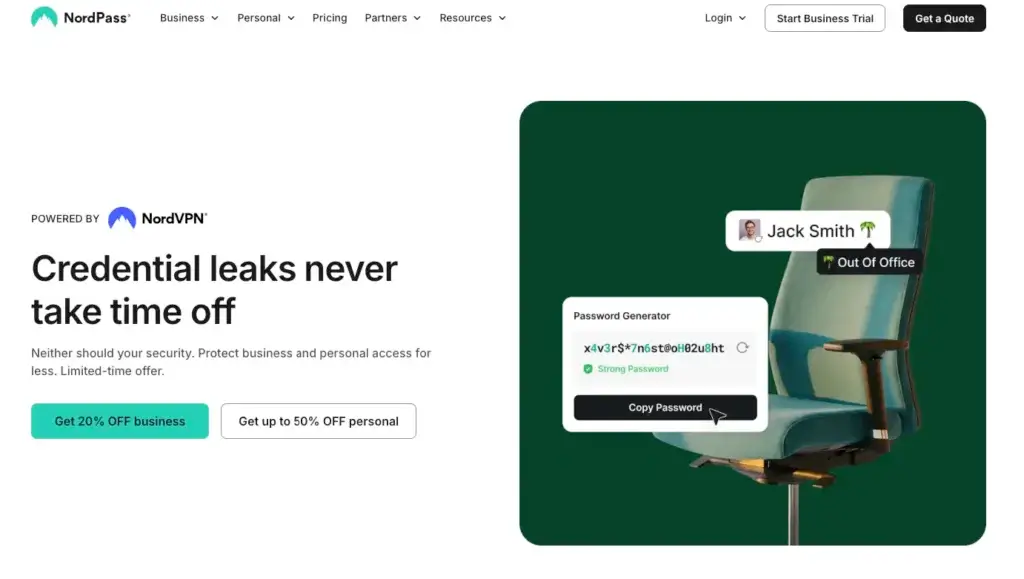
Password Generator
NordPass includes a password generator that can create long, random, and unique passwords. This is one of the simplest ways to reduce credential risk.
The problem with human-created passwords is that they are often predictable. People use names, dates, patterns, reused phrases, or small variations of old passwords.
NordPass removes that habit from the process. When you create a new account, you can generate a strong password and store it immediately.
You do not need to remember the password because NordPass remembers it for you. That is the core benefit of using a password manager properly.
Passkey Management
Passkeys are becoming an important part of online authentication. They allow users to sign in without relying on traditional passwords, and they can reduce exposure to phishing and credential reuse.
NordPass supports passkey storage and use, which makes it more future-ready than basic password vaults.
This is important because many users will be managing both passwords and passkeys for years. You may not be able to replace every password immediately, but you can start using passkeys where supported.
NordPass gives you a single place to manage both types of credentials, which makes the transition easier.
Password Health
Password Health is NordPass’s tool for identifying weak, reused, and old passwords. This helps you understand where your vault is most vulnerable.
This feature is especially valuable after importing passwords from a browser. Many users discover that they have reused the same password across dozens of accounts without realizing how risky that is.
Password Health gives you a more practical next step. Instead of guessing which accounts to fix first, you can prioritize the riskiest credentials.
For businesses, this can help admins encourage stronger password habits across teams.
Data Breach Scanner
The Data Breach Scanner checks whether your sensitive information has appeared in known data breaches. This helps you respond faster when an email, password, or other data point is exposed.
This feature turns NordPass from a passive vault into a more proactive security tool.
If an account appears in a breach, you can change the password, review the account activity, and reduce the chance of attackers using exposed credentials later.
For business users, breach monitoring is particularly valuable because one exposed employee account can create risk across multiple SaaS tools.
Secure Sharing
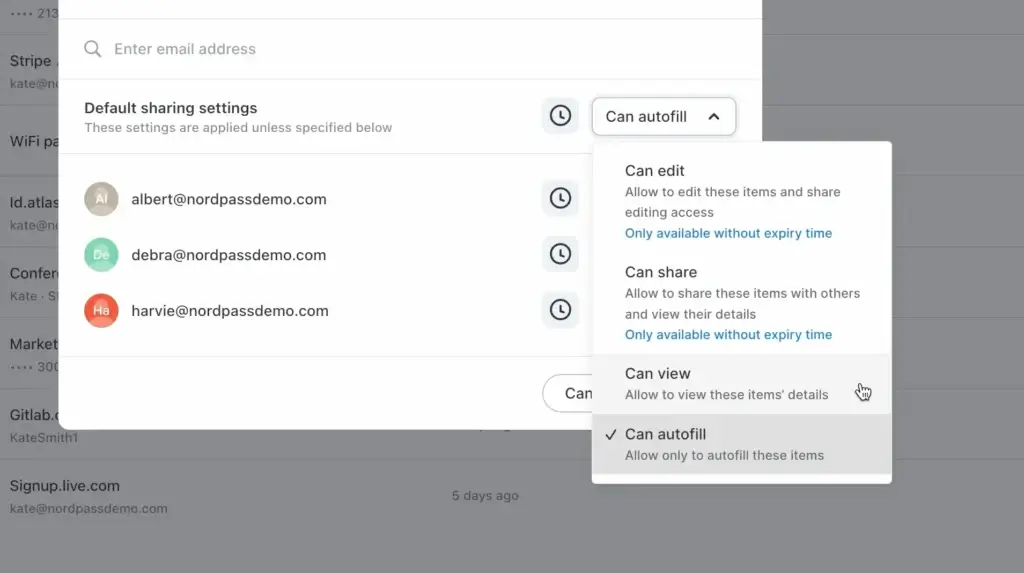
Secure sharing is one of NordPass’s most practical features. It lets you share passwords and sensitive items without sending them through email, messaging apps, screenshots, or spreadsheets.
This matters because password sharing is common, even in companies with security policies. Employees, families, and freelancers often need to share access, but they need a safer method.
NordPass supports secure item sharing and shared folders depending on the plan. This makes it easier to control who has access to what.
For families, it can help manage household subscriptions and shared accounts. For teams, it can help departments or project groups access the right credentials without exposing everything to everyone.
Business Administration
NordPass Business adds centralized management features for companies. Admins can invite users, manage groups, create shared folders, apply security policies, review activity, and monitor password-related risks.
Higher plans add more advanced capabilities such as SSO options, user provisioning, directory integrations, and security tool integrations.
This makes NordPass a good fit for businesses that need better password governance but do not want a heavy enterprise security platform.
It is especially useful for remote teams, agencies, ecommerce teams, SaaS companies, and service businesses that rely on many shared online tools.
Pros and Cons
Advantages and Disadvantages
NordPass is a strong password manager for users who want security without complexity. Its biggest advantage is usability. Its biggest limitation is that more advanced users may find competitors deeper in specific areas.
Positive
✅ Simple and beginner-friendly design
✅ Strong encryption and zero-knowledge model
✅ Good passkey and breach monitoring tools
✅ Practical plans for families and small teams
Negatives
❌ Free plan is useful but limited
❌ Not as deep for developers as 1Password
❌ Advanced business features require higher plans
❌ Some competitors offer broader privacy ecosystems
NordPass Pros
1. Simple and beginner-friendly design
NordPass is easy to understand from the first login. The interface is clean, the extension is straightforward, and the setup process does not feel intimidating.
2. Strong encryption and zero-knowledge model
NordPass uses modern encryption and a zero-knowledge architecture. This gives users a strong security foundation while keeping the product accessible.
3. Good passkey and breach monitoring tools
NordPass supports passkeys and includes breach monitoring on paid plans. These features make it more relevant for modern login security than basic password storage tools.
4. Practical plans for families and small teams
The Family plan supports up to six users, and business plans offer secure sharing, user management, and security controls without forcing smaller teams into overly complex enterprise software.
NordPass Cons
1. Free plan is useful but limited
The free plan is good for basic password storage, but many of NordPass’s strongest features are part of paid plans. Users who want full protection should compare Premium or Family pricing.
2. Not as deep for developers as 1Password
NordPass is strong for mainstream password management, but 1Password is still ahead for SSH keys, developer workflows, secrets management, and technical team use cases.
3. Advanced business features require higher plans
Some features businesses may want, such as more advanced SSO, provisioning, integrations, and deeper reporting, are tied to higher-tier plans.
4. Some competitors offer broader privacy ecosystems
NordPass is focused mainly on password and credential management. Proton Pass may be more appealing if you want password management combined with encrypted email, VPN, aliases, and cloud storage.
Security
Encryption, Privacy, and Vault Protection
NordPass has a credible security foundation. It combines modern encryption, zero-knowledge architecture, multi-factor authentication, biometric unlocking, password health checks, and breach alerts.
For most users, this is more than enough to replace browser password storage or informal password-sharing methods.
Zero-Knowledge Architecture
NordPass is designed around a zero-knowledge model. This means your vault data is encrypted before it reaches NordPass servers, and NordPass should not be able to read your stored passwords or private notes.
This is one of the most important trust signals for any password manager. You are not just storing passwords in someone else’s database. You are storing encrypted vault data that only you should be able to unlock.
However, zero-knowledge security also means you need to take your own access seriously. A strong master password is essential, and you should keep recovery options protected.
XChaCha20 Encryption
NordPass uses XChaCha20 encryption, a modern encryption algorithm designed for speed and security. This is part of how NordPass differentiates itself from password managers that mainly emphasize AES-256 encryption.
For everyday users, the exact encryption name may not matter. What matters is that NordPass is not relying on outdated protection methods.
For more security-aware users, XChaCha20 is a positive sign because it reflects a modern cryptographic approach.
Multi-Factor Authentication
NordPass supports multi-factor authentication, which adds another layer of protection to your account.
This is especially important because a password manager becomes a high-value account. If someone gets into your vault, they may gain access to many other services.
Using MFA helps reduce that risk. For businesses, enforcing MFA is one of the simplest security improvements admins can make.
Biometric Unlock
NordPass supports biometric unlocking on compatible devices. Depending on your device, you can use fingerprint or face recognition to unlock the app more quickly.
This improves daily usability. Users are more likely to keep a password manager active if unlocking it is fast and convenient.
Biometrics should not replace good account security, but they make secure behavior easier to maintain.
Password Health and Breach Protection
Password Health helps you identify risky credentials inside your vault. The Data Breach Scanner helps you see whether sensitive information has appeared in known breaches.
Together, these tools help NordPass move beyond storage. It does not only keep your passwords in one place. It also helps you understand which passwords need attention.
This is important because password risk changes over time. A password that seems safe now may become risky if it is leaked in a future breach.
Business Security Controls
NordPass Business gives admins more control over employee password habits and shared access. Depending on the plan, businesses can manage users, create groups, share folders, review activity, enforce policies, and monitor credential risk.
Higher plans can support stronger identity and security workflows, including SSO, provisioning, and integrations with security tools.
For small and mid-sized businesses, NordPass is a practical way to improve password governance without deploying a much heavier security system.
Use Cases
Who NordPass Is Best For
NordPass is best for users who want password security that feels manageable. It works across several use cases, but its strongest fit is everyday password management for individuals, families, and growing teams.
NordPass for Personal Use
For personal use, NordPass is a strong upgrade from browser password storage. It gives you a secure place to store logins, generate stronger passwords, manage passkeys, save cards, and keep private notes organized.
The main benefit is that NordPass reduces the effort required to use strong passwords. You do not need to remember every login or create passwords manually.
Personal users will benefit most from:
- Password generator and autofill
- Passkey support
- Data Breach Scanner
- Password Health reports
- Secure storage for cards and notes
NordPass is especially useful if you want something simpler than 1Password and more security-focused than browser password managers.
NordPass for Families
NordPass Family is designed for households that need both private vaults and shared access.
Each family member can manage their own passwords, while shared accounts can be handled more safely. This is useful for streaming services, travel portals, school accounts, household bills, insurance accounts, and shared subscriptions.
The family plan is a strong fit if you want:
- Up to six user accounts
- Private vaults for each person
- Secure sharing for household logins
- Emergency access options
- A simpler setup than business-grade tools
It is a much safer approach than keeping family passwords in a shared document or sending them through messaging apps.
NordPass for Freelancers and Agencies
Freelancers and agencies often manage credentials for client accounts, ad platforms, websites, hosting, analytics tools, social media platforms, and SaaS dashboards.
NordPass can help keep those credentials separate and easier to manage.
This is particularly useful when you need to share access with a contractor, team member, or client without exposing passwords through email or chat.
For small service businesses, NordPass gives you a cleaner system for handling access without immediately needing enterprise-level security tools.
NordPass for Businesses
For businesses, NordPass helps solve one of the most common operational security problems: employees need access to shared tools, but passwords are often managed inconsistently.
NordPass Business gives teams a central place to store, share, and monitor credentials. Admins can manage users, apply security settings, review activity, and reduce risky password habits.
Business users will benefit most from:
- Shared folders and groups
- Admin controls
- Company-wide security settings
- Password Health and breach monitoring
- SSO and provisioning on supported plans
NordPass is a good fit for small and mid-sized businesses that want stronger password control without complex deployment.
User Experience
How NordPass Feels in Daily Use
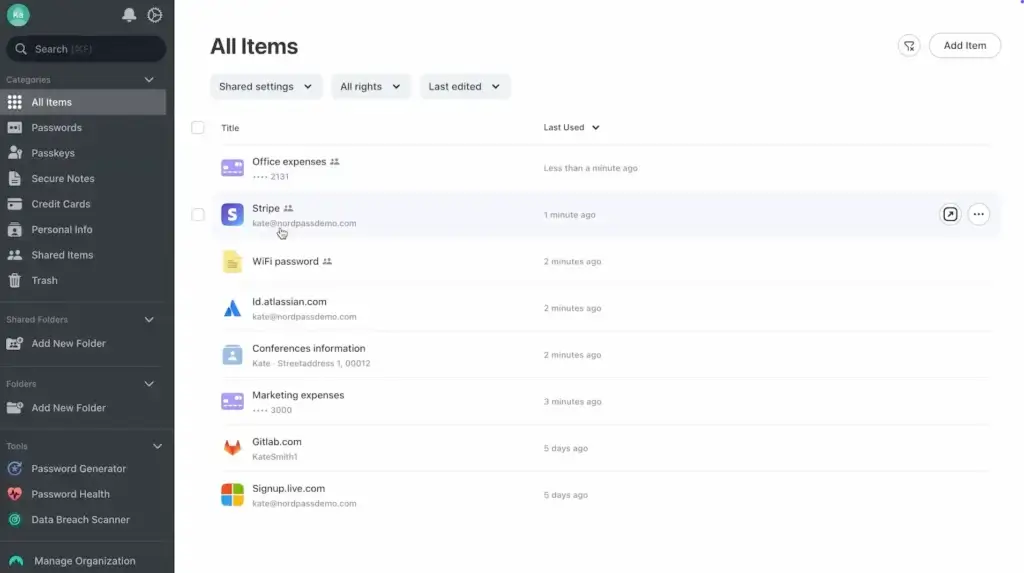
NordPass is one of the easier password managers to use. The product feels clean, lightweight, and modern, which helps it stand out in a category where some tools can feel dense or overly technical.
Browser Extension Experience
The browser extension is central to the NordPass experience. It helps you save passwords, generate new ones, autofill logins, and access vault items while browsing.
The interface is simple enough for beginners, but still useful for more experienced users who want fast access to credentials.
This matters because most password manager interactions happen in the browser. If the extension is slow, confusing, or intrusive, users stop relying on it.
NordPass keeps this part of the experience relatively smooth.
Desktop and Mobile Apps
NordPass desktop and mobile apps are designed around quick search, simple item management, and easy vault access.
The apps are not overloaded with unnecessary menus, which makes them easier to navigate than some more enterprise-oriented products.
On mobile, NordPass is useful for banking apps, ecommerce accounts, email, social media, work apps, and travel tools. Since many users manage sensitive accounts from their phones, mobile usability is not optional.
NordPass performs well for users who want their passwords available across devices without much manual effort.
Importing Passwords
NordPass supports importing passwords from browsers and other password managers. This helps reduce friction if you are switching from Chrome, Safari, Edge, LastPass, Dashlane, Bitwarden, 1Password, Keeper, or another tool.
After importing, the most important step is reviewing your vault health.
Many imported password collections include reused, weak, or outdated credentials. NordPass can help you identify which ones should be updated first.
Setup for Teams
For personal users, setup is quick. For businesses, rollout should be more deliberate.
Before inviting every employee, admins should decide how folders, groups, permissions, onboarding, and offboarding will work.
This is not because NordPass is difficult to configure. It is because poor password structure can create unnecessary access risk.
A simple rollout plan can make NordPass much more effective for teams.
Pricing
Plans and Value
NordPass pricing is one of the reasons it remains competitive. It offers a free plan, paid personal plans, a family plan, and several business options.
The exact price may change depending on billing cycle, region, promotions, taxes, and renewal terms. Because NordPass often runs discounts, you should always check the current pricing before subscribing.
Personal and Family Pricing
| Plan | Typical Structure | Best For |
| Free | Basic password management for one user | Testing NordPass or storing essential passwords |
| Premium | Paid plan for one user | Individuals who want full security features |
| Family | Paid plan for up to six users | Families that need private accounts and secure sharing |
The Free plan is a good starting point, but it is not the best long-term version of NordPass. The strongest features, including Password Health, Data Breach Scanner, emergency access, and file attachments, are connected to paid plans.
Premium is better for individuals who want NordPass as their main password manager. It gives you a more complete security experience.
The Family plan is one of the best-value options because it covers up to six users. For households, that is often more practical than paying separately for individual accounts.
Business Pricing
| Plan | Typical Structure | Best For |
| Teams | Entry business plan for small teams | Small teams that need basic secure sharing and admin controls |
| Business | Per-user business plan with stronger management features | Growing companies that need password health and breach monitoring |
| Enterprise | Advanced plan for larger organizations | Companies needing SSO, provisioning, integrations, and stronger governance |
The Teams plan is a useful entry point for small teams that want to move away from shared spreadsheets or informal credential sharing.
The Business plan makes more sense when you need deeper visibility into password health, user activity, groups, and shared access.
The Enterprise plan is for organizations that need a more controlled security setup with stronger identity and integration options.
Is NordPass Worth the Price?
NordPass is worth the price if you want a password manager that is secure, polished, and easy to adopt.
Its strongest value is for people who want better protection without complexity. That includes personal users, families, freelancers, agencies, and small to mid-sized teams.
If you only need a free password manager, NordPass Free may be enough, but Bitwarden and Proton Pass are also worth comparing. If you need premium usability with fewer distractions, NordPass Premium is a better fit.
For businesses, NordPass is most valuable when your team currently shares passwords through unsafe channels and needs a structured but manageable solution.
Alternatives Comparison
NordPass vs Other Password Managers
NordPass is not the only strong password manager. The right alternative depends on what you value most: simplicity, advanced controls, privacy tools, or business security.
For this review, the most relevant comparisons are 1Password, Proton Pass, and Keeper Security.
Best NordPass Alternatives by Use Case
| Use Case | Best Option | Why |
| Best for simple password security | NordPass | Clean interface, fast setup, strong core features, and easy adoption |
| Best for advanced all-around use | 1Password | More depth for developers, families, businesses, and access workflows |
| Best for privacy-focused users | Proton Pass | Strong fit for users who want password management inside a privacy suite |
| Best for enterprise security teams | Keeper Security | Strong administration, reporting, compliance, and enterprise controls |
Alternative 1: 1Password
1Password is a more advanced password manager than NordPass in several areas. It is especially strong for developer workflows, SSH keys, secrets management, family sharing, and business access controls.
However, that extra depth may not be necessary for everyone. If you mainly need password storage, passkeys, autofill, sharing, and breach alerts, NordPass may feel easier and more direct.
Choose NordPass if: you want a simpler password manager that is easy to use every day.
Choose 1Password if: you want a more advanced platform for technical users, businesses, and developer teams.
Alternative 2: Proton Pass
Proton Pass is a privacy-focused password manager from Proton. It fits naturally into Proton’s broader ecosystem, which includes encrypted email, VPN, cloud storage, and privacy tools.
Proton Pass is especially attractive if you want email aliases and privacy features alongside password management.
NordPass, however, feels more focused as a dedicated password manager. It may be easier to recommend if you want a straightforward vault without committing to a broader privacy ecosystem.
Choose NordPass if: you want a focused password manager with a simple user experience.
Choose Proton Pass if: you already use Proton services or want password management with stronger privacy ecosystem benefits.
Alternative 3: Keeper Security
Keeper Security is a business-focused password manager with strong enterprise controls, reporting, compliance support, and security add-ons.
Keeper may be the stronger option for organizations with stricter security requirements, complex administration needs, or compliance-driven workflows.
NordPass is easier for smaller teams that want secure password sharing and admin visibility without unnecessary complexity.
Choose NordPass if: you want a business password manager that is easy to deploy and manage.
Choose Keeper Security if: you need deeper enterprise controls, compliance features, and advanced security administration.
Comparison Summary
| Feature Area | NordPass | 1Password | Proton Pass | Keeper Security |
| Ease of use | Excellent | Excellent | Good | Good |
| Free plan | Yes, limited | No permanent free plan | Yes | Mainly trial-focused |
| Passkey support | Yes | Yes | Yes | Yes |
| Family use | Strong | Very strong | Good | Good |
| Business controls | Good | Strong | Good | Very strong |
| Developer features | Limited | Excellent | Moderate | Good |
| Privacy ecosystem | Moderate | Moderate | Excellent | Moderate |
| Best fit | Simple secure password management | Advanced all-around use | Privacy-focused users | Enterprise security teams |
Overall, NordPass is the better choice if simplicity is your priority. 1Password is better for advanced workflows, Proton Pass is better for privacy-focused users, and Keeper Security is better for enterprise security administration.
Conclusion
Is NordPass Right for You?
NordPass is a strong password manager for 2026 because it solves the most important password security problems without making the experience feel complicated.
It gives you encrypted storage, password generation, autofill, passkeys, secure sharing, password health reports, breach monitoring, and business controls in a clean and accessible platform.
Its biggest advantage is usability. NordPass feels simple enough for personal users and families, while still offering enough structure for small businesses and growing teams.
It is not the deepest option for every scenario. 1Password is better for developers and advanced all-around use. Proton Pass is better if you want a privacy ecosystem. Keeper Security is better if your organization needs enterprise-heavy administration.
But for many users, NordPass offers the right balance of security, simplicity, and value.
Who Should Use NordPass?
You should use NordPass if you want a password manager that is secure, modern, and easy to use.
It is especially strong for:
- Individuals replacing browser password storage
- Families that need safer shared access
- Freelancers managing client logins
- Small businesses improving credential control
- Teams that want password security without heavy setup
NordPass may not be ideal if you need advanced developer tools, deep enterprise customization, or a full privacy suite built around email, VPN, and cloud storage.
Is NordPass Worth It?
Yes, NordPass is worth it if you want a password manager that gives you strong protection without a steep learning curve.
For personal users, it is a major improvement over storing passwords in a browser. For families, it gives each person a safer way to manage private and shared accounts. For businesses, it helps replace risky password-sharing habits with a more controlled system.
The free plan is useful for testing, but the paid plans are where NordPass becomes much more valuable.
Overall Assessment
NordPass is one of the easiest password managers to recommend for users who want security and simplicity together. It may not be the most advanced tool in every category, but it delivers the features most people actually need in a clean, reliable, and accessible way.
Have more questions?
Frequently Asked Questions
Is NordPass safe?
Yes. NordPass is a safe password manager for most users. It uses zero-knowledge architecture, modern encryption, MFA options, biometric unlocking, password health checks, and breach monitoring on supported plans.
Does NordPass have a free version?
Yes. NordPass has a free version for basic password management. However, users who want features such as Password Health, Data Breach Scanner, file attachments, and emergency access should consider a paid plan.
What can you store in NordPass?
You can store passwords, passkeys, credit cards, secure notes, Wi-Fi passwords, personal information, and file attachments on supported plans. This makes NordPass useful as a secure vault for sensitive data.
Does NordPass support passkeys?
Yes. NordPass supports passkeys, allowing you to store and use passwordless credentials for compatible websites and apps. This helps reduce reliance on traditional passwords.
Is NordPass good for families?
Yes. NordPass is a good option for families because the Family plan supports up to six users. Each user can keep a private vault while sharing selected credentials securely.
Is NordPass good for businesses?
Yes. NordPass is a good business password manager for teams that need secure sharing, admin controls, user management, activity monitoring, password health reports, breach monitoring, and SSO options on supported plans.
Is NordPass better than 1Password?
NordPass is better if you want a simpler and more beginner-friendly password manager. 1Password is better if you need deeper developer tools, SSH key management, secrets workflows, and advanced business features.
Is NordPass better than Proton Pass?
NordPass is better if you want a focused password manager with a simple interface. Proton Pass is better if you already use Proton services or want privacy tools such as email aliases alongside password management.
Is NordPass good for small teams?
Yes. NordPass is a strong choice for small teams because it helps replace shared spreadsheets and unsafe password messages with encrypted vaults, shared folders, groups, and admin controls.
Is NordPass worth it in 2026?
Yes. NordPass is worth it in 2026 if you want a secure, modern, and easy-to-use password manager. Its paid plans offer stronger value than the free plan for most serious users.