Introduction
Password management is no longer just about remembering fewer passwords. You need a secure system that can protect logins, create stronger credentials, support passkeys, share access safely, monitor exposed passwords, and help you reduce account takeover risk.
That is where Keeper Security deserves serious attention.
Keeper is a password manager built for individuals, families, small businesses, and larger organizations that want stronger control over digital credentials. It combines encrypted password storage with secure sharing, autofill, passkey management, dark web monitoring, admin controls, and optional enterprise security add-ons.
What makes Keeper different from many password managers is its strong business security angle. While it works well for personal use, the platform becomes especially interesting when you need team vaults, role-based policies, audit logs, SSO, SCIM provisioning, compliance support, or secrets management.
In this Keeper Security review, you’ll learn how the platform performs in 2026, including:
- What Keeper Security is and who it is best for
- How Keeper’s password vault and sharing features work
- What security protections and business controls it offers
- How Keeper pricing compares with other password managers
- How Keeper stacks up against 1Password, NordPass, and Proton Pass
For personal users, Keeper is a strong option if you want reliable security, unlimited password storage, secure sharing, biometric login, and family vault sharing.
For businesses, Keeper is even more compelling. Its Admin Console, role policies, shared folders, SSO support, reporting options, BreachWatch monitoring, and Keeper Secrets Manager make it more security-focused than many simple password managers.
Keeper is not the cheapest password manager in every category, and some users may prefer the cleaner design of NordPass or the broader consumer experience of 1Password. However, if security controls, business administration, and long-term scalability matter, Keeper is one of the stronger choices in the password manager market.
If you are still comparing multiple tools, you can also read our full guide to the Best Password Managers to see how Keeper fits alongside other leading options.
Overview
What Is Keeper Security?
Keeper Security is a password manager and cybersecurity platform that helps users store, generate, autofill, share, and protect passwords and sensitive records.
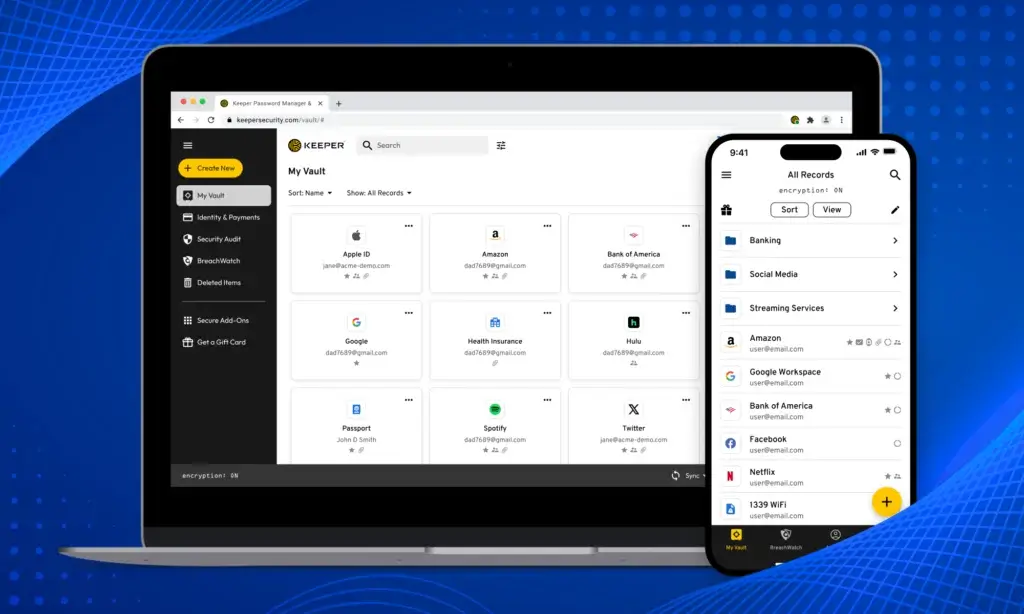
At the personal level, Keeper gives you an encrypted vault for passwords, payment cards, identities, secure notes, files, and passkeys. You can use it across desktop apps, mobile apps, browser extensions, and the web vault.
At the business level, Keeper adds centralized administration. This includes user management, shared folders, role-based access policies, security reporting, SSO, SCIM provisioning, Active Directory and LDAP sync, advanced MFA options, and audit visibility.
Keeper also offers optional security products that expand beyond standard password management. These include BreachWatch for dark web monitoring, Keeper Secrets Manager for infrastructure secrets, Keeper Connection Manager for secure remote access, and KeeperPAM for privileged access management.
This makes Keeper a strong fit if you want a password manager that can start simple but scale into a broader identity security platform.
| Category | Keeper Security Details |
| Product type | Password manager and identity security platform |
| Best for | Individuals, families, SMBs, IT teams, MSPs, and security-focused businesses |
| Main strengths | Zero-knowledge security, secure sharing, Admin Console, BreachWatch, passkeys, business controls |
| Free plan | Free trial available, limited free mobile use may be available depending on region and plan updates |
| Best alternative to | Browser password storage, spreadsheets, reused passwords, unsafe team sharing, and unmanaged vaults |
Software Specification
Core Features
Keeper includes the password manager essentials, but its real value comes from how deeply it supports secure sharing and business administration.
You can use it as a simple personal vault, but the platform becomes more powerful when you need to manage credentials across multiple people, departments, roles, and devices.
Encrypted Password Vault
Keeper gives each user a private encrypted vault for storing passwords and sensitive records.
You can save logins, secure notes, payment cards, identity information, files, and other private data. The vault syncs across devices, which means you can access your credentials from your phone, desktop, browser extension, or web app.
This is the foundation of Keeper’s value. Instead of relying on reused passwords, browser storage, spreadsheets, or memory, you can keep credentials in one organized vault.
Password Generator and Autofill
Keeper includes a password generator that helps you create strong, unique passwords for every account.
This matters because credential reuse is one of the most common causes of account compromise. If one reused password is leaked, attackers can test it across many other services.
Keeper also supports autofill through KeeperFill. This makes daily login easier because users do not need to copy and paste passwords manually.
Secure Password Sharing
Keeper allows you to share passwords and records securely with other Keeper users.
This is useful for families, freelancers, agencies, and businesses where more than one person needs access to the same account. Instead of sending passwords through email, chat, documents, or screenshots, you can share them through Keeper’s encrypted sharing system.
For business users, shared folders are especially important. Admins can organize credentials by team, department, project, client, or function.
Passkey Management
Keeper supports passkey management, helping users store and use passkeys across supported apps, websites, and devices.
Passkeys are becoming more important because they reduce dependence on traditional passwords and offer stronger phishing resistance. Keeper helps bridge this transition by keeping passkeys inside a familiar vault experience.
This is especially valuable if you want a password manager that is ready for both passwords and passwordless authentication.
BreachWatch Dark Web Monitoring
BreachWatch is Keeper’s dark web monitoring feature. It checks stored credentials against known breach data and alerts users when a password appears to be exposed or risky.
For individuals, this helps you find accounts that need immediate password changes.
For businesses, BreachWatch is more powerful because administrators can see organizational risk and guide users toward remediation. This makes it useful for companies that want password hygiene visibility across employees.
Keeper Admin Console
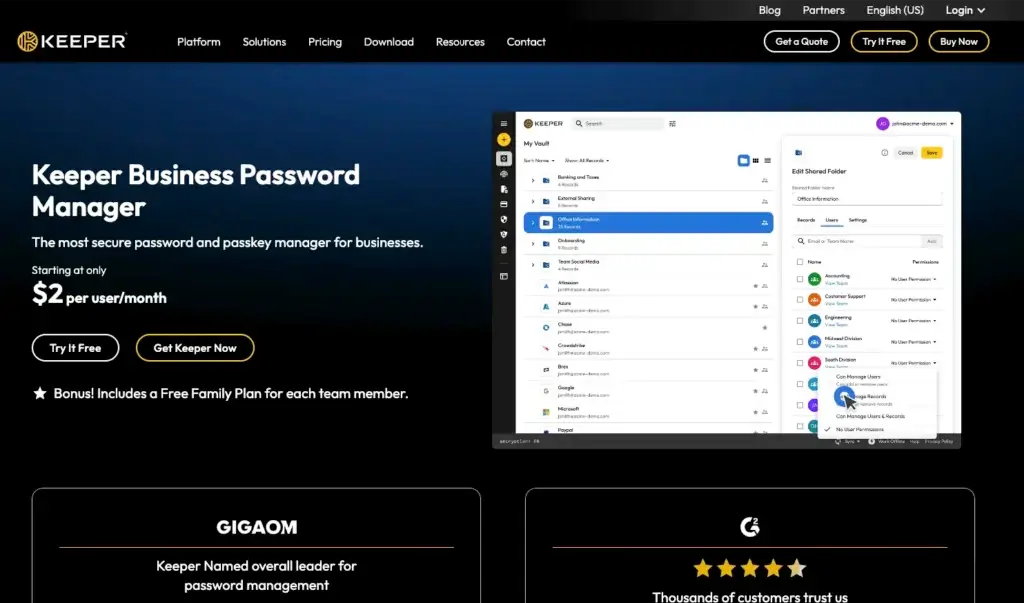
Keeper’s Admin Console is one of its biggest advantages for business use.
Admins can invite users, create teams, configure roles, enforce security policies, manage provisioning, review reports, and monitor activity. This makes Keeper more suitable for business environments than basic consumer-focused password managers.
For growing companies, the Admin Console helps password management become a controlled process rather than a loose collection of personal vaults.
Role-Based Policies and Access Controls
Keeper supports role-based policies that allow admins to define how users interact with the platform.
For example, businesses can manage rules around two-factor authentication, password creation, sharing permissions, import and export behavior, platform access, KeeperFill usage, and other vault features.
This matters because not every employee needs the same level of access. A finance team, IT team, marketing team, and contractor group may all require different rules.
Secrets Manager and PAM Expansion
Keeper is not limited to human password management. With Keeper Secrets Manager, technical teams can protect API keys, database passwords, certificates, tokens, and other infrastructure secrets.
This gives Keeper an advantage over simpler password managers when your organization needs to secure both human and non-human credentials.
KeeperPAM expands this further with privileged access management, connection management, session-related controls, and broader identity security workflows.
Pros and Cons
Advantages and Disadvantages
Keeper is one of the stronger password managers for security-conscious users and businesses. Its biggest strengths are vault security, access control, secure sharing, and business administration.
Its main limitations are cost complexity, add-on pricing, and an interface that may feel more security-focused than consumer-friendly.
Positive
✅ Strong zero-knowledge security model
✅ Excellent business administration tools
✅ Secure sharing for teams and families
✅ Strong expansion into secrets and privileged access
Negatives
❌ Add-ons can increase total cost
❌ Interface is less minimal than NordPass
❌ Free plan is limited compared with some rivals
❌ May be more advanced than some personal users need
Keeper Security Pros
1. Strong zero-knowledge security model
Keeper’s security model is one of its strongest selling points. Encryption and decryption happen locally on the user’s device, and vault records are protected using strong encryption architecture.
2. Excellent business administration tools
Keeper is particularly strong for businesses. The Admin Console, role-based policies, shared folders, SSO options, provisioning, audit logs, and reporting tools make it suitable for companies that need more than simple password storage.
3. Secure sharing for teams and families
Keeper makes secure sharing practical. Families can share household credentials, while businesses can organize access by users, teams, records, folders, and permissions.
4. Strong expansion into secrets and privileged access
Keeper can grow beyond standard password management. Keeper Secrets Manager and KeeperPAM make it more useful for IT, DevOps, security, and infrastructure teams.
Keeper Security Cons
1. Add-ons can increase total cost
Keeper’s base plans are competitive, but advanced features such as BreachWatch, secure file storage, advanced reporting, compliance reporting, and secrets management may require add-ons or higher-tier plans.
2. Interface is less minimal than NordPass
Keeper is clean enough for daily use, but it is not the most minimalist password manager. Users who want the simplest personal experience may prefer NordPass.
3. Free plan is limited compared with some rivals
Keeper offers trials and limited free access, but it is not the best option if your main goal is a generous free password manager. Bitwarden and Proton Pass are usually stronger in that area.
4. May be more advanced than some personal users need
Keeper’s business security depth is impressive, but not every personal user needs advanced policies, admin controls, secrets management, or enterprise integrations.
Security
Encryption, BreachWatch, and Business Controls
Security is the main reason to choose Keeper over basic password storage methods.
The platform is built around a zero-knowledge and zero-trust security model. In practical terms, this means Keeper is designed so your sensitive vault contents are encrypted before they leave your device, and Keeper cannot simply read your stored passwords in plain text.
Zero-Knowledge Encryption
Keeper’s zero-knowledge model is one of its most important security claims.
Each vault record is encrypted with a unique client-side generated key, and encryption and decryption occur locally. This design reduces the risk that a server-side compromise would expose readable user vault contents.
For users, this means your master password and account security habits matter. Keeper can provide strong architecture, but you still need a strong master password, multi-factor authentication, device security, and careful recovery planning.
Two-Factor Authentication and Biometric Login
Keeper supports two-factor authentication and biometric login options such as Face ID, Touch ID, and fingerprint authentication on supported devices.
This is important because your password manager protects many other accounts. If an attacker gains access to the password manager, the risk is much higher than losing access to a single account.
For businesses, requiring MFA through policy is one of the simplest ways to improve Keeper deployment security.
BreachWatch Monitoring
BreachWatch monitors stored credentials against breach data and alerts users when passwords may be exposed.
This is useful because password managers should not only store passwords. They should also help you identify weak, reused, or compromised credentials.
For business admins, BreachWatch provides visibility into organizational password risk. That makes it easier to prioritize remediation rather than waiting for users to notice risky passwords on their own.
Secure Sharing and Permission Control
Keeper’s secure sharing features are important for families, agencies, and businesses.
Instead of sending passwords through email, chat, spreadsheets, or shared notes, you can share records and folders inside Keeper. Business admins can define permissions so users only receive access to what they need.
This reduces password sprawl and gives your organization a cleaner access management process.
Admin Console and Audit Visibility
Keeper’s Admin Console gives business users control over users, roles, policies, teams, reporting, provisioning, and security settings.
This is a major reason Keeper is stronger for businesses than lightweight password managers. You can deploy Keeper across a team and manage password security as an operational process.
For IT and security teams, this visibility matters. You can see whether users are following policies, identify risky behavior, and improve credential hygiene across the organization.
Compliance and Enterprise Readiness
Keeper is positioned for businesses that care about compliance, regulated industries, and enterprise security.
Its business and enterprise plans support administrative controls, integrations, reporting, and policy enforcement. Optional reporting and compliance features can also help organizations with stricter internal or regulatory requirements.
This does not mean Keeper replaces a full security program. You still need endpoint security, phishing awareness, identity governance, device management, and access reviews.
However, Keeper can become a strong part of your broader security stack.
Use Cases
Who Keeper Security Is Best For
Keeper is flexible enough for personal and business use, but it is best when security controls matter.
If you only want a basic password vault, Keeper may feel more advanced than necessary. If you want a password manager that can scale with your family, team, or company, Keeper becomes much more attractive.
Keeper for Personal Use
Keeper works well for individuals who want a secure, reliable password manager with unlimited password storage, autofill, secure sharing, biometric access, and cross-device sync.
It is especially useful if you want to replace browser-based password storage with a dedicated vault.
For personal users, Keeper is best if you value security and do not mind paying for a premium experience.
Keeper for Families
Keeper’s family plan is useful for households that want shared access without exposing everyone’s private vault.
Family members can keep their own passwords private while sharing common records such as WiFi credentials, streaming accounts, insurance portals, banking-related notes, or emergency access details.
This is a better approach than storing household passwords in a shared spreadsheet or one person’s browser.
Keeper for Small Businesses
Small businesses often start with informal password habits. Employees share logins through Slack, email, documents, browser sync, or project management comments.
Keeper gives small businesses a more professional system.
It helps centralize credentials, assign access, enforce stronger password practices, and make employee onboarding and offboarding more controlled.
Keeper for IT and Security Teams
Keeper is particularly strong for IT and security teams because it offers more than personal vaults.
Admin policies, SSO, SCIM provisioning, directory integrations, audit reporting, advanced MFA, secrets management, and privileged access options make it suitable for technical environments.
This is where Keeper stands out most clearly from simpler password managers.
Keeper for Agencies and Service Providers
Agencies often manage client credentials across websites, ad platforms, hosting accounts, analytics tools, CRMs, social profiles, and software subscriptions.
Keeper helps agencies organize access by client, user, and project.
This makes it easier to give the right people access while reducing the risk of client passwords being stored in unsafe places.
User Experience
How Keeper Feels in Daily Use
Keeper feels professional, secure, and business-ready. It is not the lightest or most playful password manager, but it is dependable and feature-rich.
The experience is strongest when you value control over simplicity.
Initial Setup
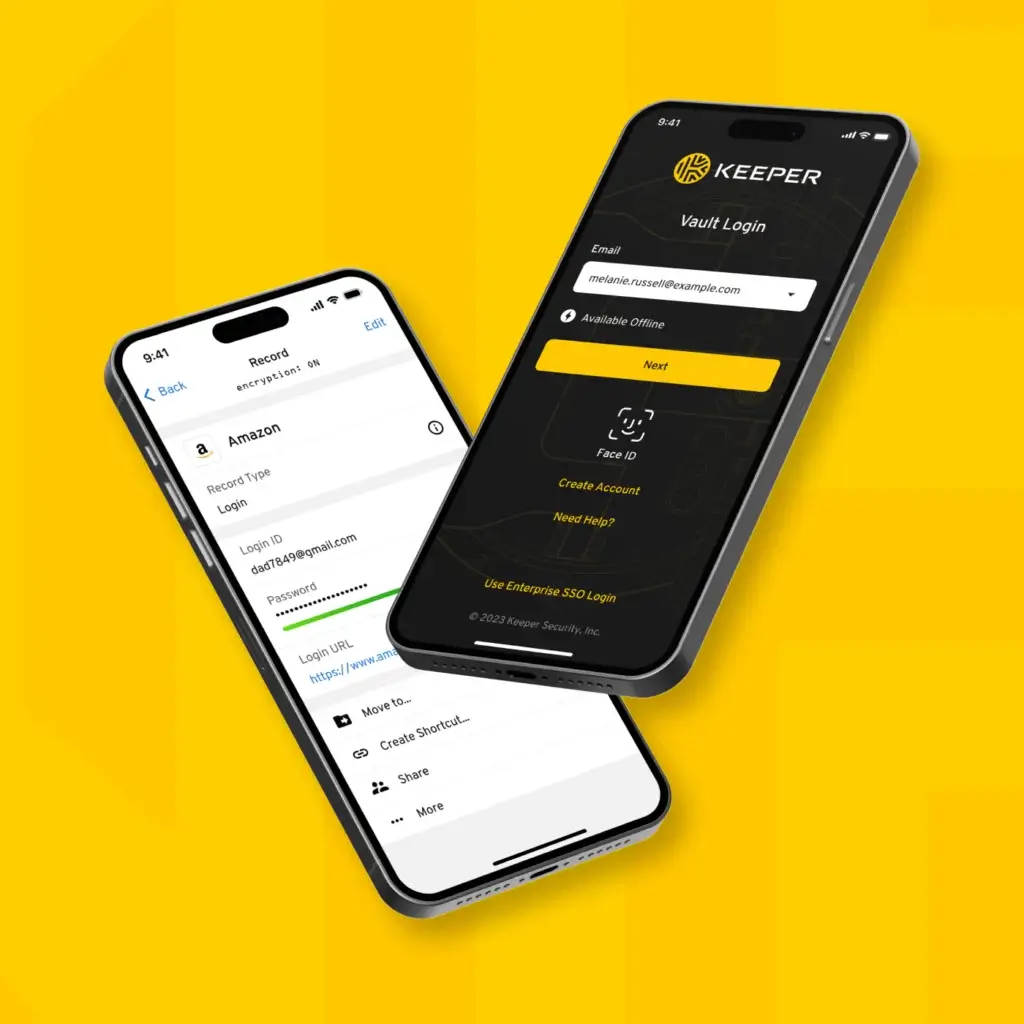
Setting up Keeper is straightforward for personal users. You create an account, install the browser extension or app, import passwords, and start saving new records.
For businesses, setup requires more planning. Admins should decide how to structure users, folders, roles, policies, MFA requirements, and shared records before rolling it out widely.
This planning is worth doing because a password manager can become messy if every employee adds credentials without rules.
Vault Organization
Keeper lets you organize records into folders and shared folders.
This is useful for individuals with many accounts, but it becomes even more important for businesses. Teams can organize credentials by department, client, application, or sensitivity level.
The vault experience is practical and clear, although NordPass may feel more modern for users who prefer a very minimal design.
Autofill Experience
KeeperFill helps users save and autofill passwords across websites and apps.
Autofill is important because users are more likely to follow secure password practices when the tool makes logging in easy. If users have to copy and paste manually every time, adoption usually suffers.
Keeper’s autofill is generally reliable, especially when users install the right browser extension and keep devices updated.
Admin Experience
The admin experience is one of Keeper’s biggest strengths.
Admins can manage users, teams, roles, policies, reports, provisioning, and security visibility from one place. This is a major advantage for organizations that need password security to be measurable and enforceable.
For non-technical teams, the number of admin options may feel like a lot at first. For IT teams, that depth is usually a benefit.
Pricing
Plans and Value
Keeper pricing depends on whether you need personal, family, business, enterprise, or add-on security features.
The personal and family plans are designed for everyday password management. Business and enterprise plans add administration, policy enforcement, shared folders, provisioning, SSO, directory integrations, reporting, and stronger controls.
Because pricing and promotional discounts can change, always check Keeper’s official pricing page before subscribing.
Keeper Pricing Plans
| Plan | Typical Positioning | Best For |
| Personal | Paid individual password manager plan | Individuals who need secure password storage, autofill, sharing, and private records |
| Family | Paid household plan for multiple users | Families that need private vaults, shared records, and secure household access |
| Business | Paid per-user business password manager | Small and mid-sized teams that need shared folders, policies, and admin control |
| Enterprise | Advanced per-user business plan or quote-based package | Organizations that need SSO, SCIM, directory sync, advanced MFA, and developer APIs |
| KeeperPAM and add-ons | Custom or add-on pricing | Security teams that need secrets management, PAM, reporting, compliance, or privileged access |
Keeper is not always the lowest-cost password manager, but it offers strong value when you use its security and administration capabilities.
If you only need a free personal password manager, Keeper may not be the best first choice. Proton Pass and Bitwarden usually offer more attractive free options.
If you need family sharing, secure file storage, business access controls, or advanced security monitoring, Keeper becomes more competitive.
Is Keeper Good Value?
Keeper is good value when you care about security depth, not only price.
For individuals, it is worth considering if you want a secure and polished password manager with strong sharing and cross-device access.
For families, it is useful if you want separate private vaults plus shared household records.
For businesses, Keeper is especially strong. Its Admin Console, shared folders, policy enforcement, provisioning, reporting, and optional add-ons make it more scalable than basic password managers.
In my opinion, Keeper’s best value is for businesses that want password management to become part of their broader security operations.
Alternatives Comparison
Keeper Security vs Other Password Managers
Keeper competes with several strong password managers, but it has a clear identity. It is more security-led than NordPass, more business-control focused than Proton Pass, and often more enterprise-oriented than 1Password.
For this comparison, I’ll compare Keeper with 1Password, NordPass, and Proton Pass.
Best Keeper Alternatives by Use Case
| Use Case | Best Option | Why |
| Best security-focused business password manager | Keeper Security | Strong admin controls, policies, reporting, BreachWatch, secrets management, and PAM expansion |
| Best premium all-around password manager | 1Password | Excellent usability, strong family features, developer tools, Watchtower, and broad ecosystem |
| Best simple password manager | NordPass | Clean interface, smooth onboarding, easy daily use, and strong consumer-friendly experience |
| Best privacy-focused password manager | Proton Pass | Strong privacy positioning, email aliases, Proton ecosystem, and generous free plan |
Alternative 1: 1Password
1Password is Keeper’s strongest all-around competitor.
It offers excellent usability, strong personal and family plans, passkey support, Watchtower alerts, developer features, business controls, and a polished experience across devices.
Keeper is stronger when your priority is business security administration, reporting, and expansion into secrets management or privileged access.
Choose Keeper if: you want deeper business controls, security administration, BreachWatch, secrets management, or PAM expansion.
Choose 1Password if: you want the best all-around password manager for individuals, families, teams, and developers.
Alternative 2: NordPass
NordPass is easier to recommend for users who want simplicity.
Its interface is clean, onboarding is smooth, and the daily login experience feels modern. NordPass is also attractive for personal users and families that want a password manager without a heavy business-security feel.
Keeper is stronger if your company needs Admin Console controls, role policies, advanced sharing, reporting, secrets management, or compliance-friendly features.
Choose Keeper if: you need stronger business administration and security controls.
Choose NordPass if: you want a simpler and more modern password manager for personal or lightweight business use.
Alternative 3: Proton Pass
Proton Pass is the best alternative if privacy and ecosystem value matter most.
It fits users who already use Proton Mail, Proton VPN, Proton Drive, or Proton Calendar. Proton Pass also stands out for email aliases and a strong free plan.
Keeper is better for business administration, policy enforcement, team access controls, and enterprise security workflows.
Choose Keeper if: you need a business-ready password manager with admin controls and advanced security options.
Choose Proton Pass if: you want a privacy-focused password manager that fits naturally into the Proton ecosystem.
Comparison Summary
| Feature Area | Keeper Security | 1Password | NordPass | Proton Pass |
| Ease of use | Good | Excellent | Excellent | Good |
| Personal use | Strong | Excellent | Excellent | Strong |
| Family use | Strong | Excellent | Strong | Good |
| Business controls | Excellent | Strong | Good | Moderate |
| Dark web monitoring | Strong with BreachWatch | Strong with Watchtower alerts | Good with Data Breach Scanner | Good with Pass Monitor |
| Passkey support | Strong | Strong | Strong | Strong |
| Privacy ecosystem | Good | Good | Good | Excellent |
| Best fit | Security-focused business use | Premium all-around use | Simple daily password management | Privacy-focused users |
Overall, Keeper is the best fit when security administration matters most. 1Password is better for the most polished all-around experience, NordPass is better for simplicity, and Proton Pass is better for privacy-focused users who want a strong free plan and email alias tools.
Conclusion
Is Keeper Security Right for You?
Keeper Security is a strong password manager for users who want more than basic password storage.
It gives individuals and families secure vaults, password sharing, autofill, passkeys, and private record storage. For businesses, it adds the administration layer that many teams need: shared folders, user policies, SSO, provisioning, reporting, BreachWatch, and optional secrets management.
The strongest reason to choose Keeper is security control. It gives you a practical way to manage passwords, shared access, and credential risk at both personal and organizational levels.
Who Should Use Keeper Security?
You should consider Keeper if you want a password manager that can grow with your needs.
It is especially suitable for:
- Individuals who want a secure premium password manager
- Families that need private vaults and shared household records
- Small businesses that need controlled password sharing
- IT teams that need policies, reporting, SSO, and provisioning
- Security teams that need secrets management or PAM expansion
Keeper may not be the best choice if you only want the simplest possible password manager or the most generous free plan.
For those users, NordPass, Proton Pass, or Bitwarden may feel more appealing.
Is Keeper Security Worth It?
Yes, Keeper Security is worth it if you want a secure, scalable password manager with strong business controls.
For personal users, it is a reliable premium option.
For businesses, it is one of the stronger choices because it combines password management with admin visibility, secure sharing, policies, breach monitoring, and optional identity security expansion.
In my view, Keeper is especially worth it for businesses that want to move away from scattered passwords, unmanaged browser storage, risky sharing habits, and weak offboarding processes.
Overall Assessment
Keeper Security is one of the best password managers for security-focused users and businesses.
It may not be the most minimal option, and add-ons can increase the total cost. However, its combination of zero-knowledge security, secure sharing, Admin Console controls, BreachWatch, passkeys, and business scalability makes it a strong long-term choice.
If you want a simple password manager for casual personal use, NordPass or Proton Pass may be easier to start with.
If you want a serious password manager that can support individuals, families, teams, IT departments, and security operations, Keeper Security is absolutely worth considering in 2026.
Have more questions?
Frequently Asked Questions
What is Keeper Security used for?
Keeper Security is used to store, generate, autofill, share, and protect passwords and sensitive records. Businesses also use Keeper to manage team access, enforce password policies, monitor credential risk, and secure secrets.
Is Keeper Security a good password manager?
Yes, Keeper Security is a good password manager, especially for users and businesses that value strong security controls, encrypted sharing, passkey support, dark web monitoring, and centralized administration.
Is Keeper Security safe?
Keeper is designed around a zero-knowledge security model where vault data is encrypted and decrypted locally on the user’s device. For best protection, users should enable multi-factor authentication and use a strong master password.
Does Keeper support passkeys?
Yes, Keeper supports passkey management on supported devices, apps, and websites. This helps users move toward passwordless login while still managing credentials from a secure vault.
What is Keeper BreachWatch?
BreachWatch is Keeper’s dark web monitoring feature. It checks stored credentials against known breach data and alerts users or admins when passwords may be exposed or risky.
Is Keeper good for businesses?
Yes, Keeper is strong for businesses because it includes shared folders, role-based policies, user management, Admin Console controls, reporting, SSO options, provisioning, and optional security add-ons.
Is Keeper better than 1Password?
Keeper is better for businesses that need advanced admin controls, reporting, BreachWatch, secrets management, and privileged access expansion. 1Password is better for users who want the most polished all-around experience.
Is Keeper better than NordPass?
Keeper is better for business security controls and advanced administration. NordPass is better if you want a simpler, cleaner password manager for everyday personal use.
Is Keeper better than Proton Pass?
Keeper is better for business administration, secure sharing, reporting, and enterprise security. Proton Pass is better for privacy-focused users who want email aliases and strong integration with the Proton ecosystem.
Is Keeper Security worth it in 2026?
Yes, Keeper Security is worth it in 2026 if you need a secure, scalable password manager with strong sharing, passkeys, admin controls, dark web monitoring, and business-ready security features.