
Introduction
Password management becomes much harder once more than one person needs access to the same accounts. A solo user can rely on a personal vault, but teams need something more structured: shared credentials, user permissions, admin control, and a safer way to manage access when people join or leave.
That is the main reason Passpack deserves attention.
Passpack is a password manager focused on business password sharing. It is not trying to be the most polished consumer password manager or the most advanced enterprise security suite. Instead, it targets a very practical problem: small teams need a secure, affordable place to store and share passwords.
This makes Passpack especially relevant if your company still manages shared logins through spreadsheets, browser password managers, Slack messages, email threads, shared notes, or undocumented internal systems.
In this Passpack review, you’ll learn how the platform performs in 2026, including:
- What Passpack is and who it is best for
- How its team password sharing features work
- What security protections and limitations to consider
- How Passpack pricing compares with premium tools
- How Passpack stacks up against 1Password, NordPass, and Keeper
For individuals, Passpack may not be the first password manager I would recommend. Tools like NordPass, Proton Pass, Keeper, and 1Password usually offer a smoother personal experience, stronger mobile-first usability, and broader consumer features.
For teams, the story is different. Passpack becomes more interesting because it focuses on shared business credentials, simple access management, and pricing that is easier to justify for smaller companies.
For agencies, startups, service providers, and lean businesses, that combination can be valuable. You get a dedicated system for team password management without immediately moving into expensive enterprise software.
If you are still comparing multiple tools, you can also read our full guide to the Best Password Managers to see how Passpack fits alongside other leading options.
Overview
What Is Passpack?
Passpack is a team-focused password manager that helps businesses keep shared credentials organized and protected. It gives you a secure place to store passwords, share access with team members, and manage business logins without relying on informal methods.
The platform is particularly useful for organizations where several people need access to the same tools. This could include social media accounts, hosting dashboards, analytics platforms, client portals, CMS logins, payment tools, vendor accounts, or internal systems.
Passpack is not as broad as some of the larger password management platforms. You will not find the same level of brand recognition, product polish, or feature depth that you get from 1Password, Keeper, or NordPass.
However, that is also part of its appeal. Passpack is more focused, more affordable, and easier to justify if your main goal is to manage shared passwords for a team.
At its core, Passpack helps you improve three areas of business password management:
- It gives teams a central password vault instead of scattered credentials
- It makes shared access easier to manage and control
- It helps reduce risky password sharing through messages and documents
For companies that have never used a dedicated password manager before, Passpack can be a practical first step. It moves password management from an informal habit into a more structured security process.
| Category | Passpack Details |
| Product type | Business password manager for team credential sharing |
| Best for | Small teams, agencies, startups, freelancers, and service businesses |
| Main strengths | Affordable plans, secure sharing, team organization, simple administration |
| Free plan | Free trial available, paid plans focus on team and business use |
| Best alternative to | Spreadsheets, shared browser passwords, email-based password sharing, and chat-based credentials |
Software Specification
Core Features
Passpack’s feature set is built around the needs of teams rather than individual password storage alone. The product is most useful when you need to organize shared logins, assign access, and keep credentials away from unsafe channels.
It does not overwhelm you with too many extras. Instead, it focuses on the essentials: storing passwords, sharing them securely, managing users, and giving businesses a controlled place to manage access.
Centralized Password Storage
Passpack gives your team one place to keep important passwords. This is a major improvement over storing credentials in browsers, spreadsheets, shared documents, or individual employees’ notes apps.
Centralization matters because password chaos creates both security and productivity problems. If nobody knows where credentials live, your team wastes time asking for access, copying passwords, and resetting accounts unnecessarily.
With Passpack, business credentials can be organized in a dedicated password management system. That makes it easier to maintain access and reduce the number of passwords floating around outside your control.
Secure Credential Sharing
Passpack’s main feature is secure password sharing. Instead of sending a password through email or chat, you can share access inside the platform.
This is useful for businesses because shared passwords are often unavoidable. Many tools still use shared admin accounts, vendor logins, client portals, or role-based credentials that more than one person needs to access.
Passpack helps you manage that reality in a safer way. It does not remove every risk, but it gives your team a better system than copying credentials into places where they can easily be exposed or forgotten.
Team Organization
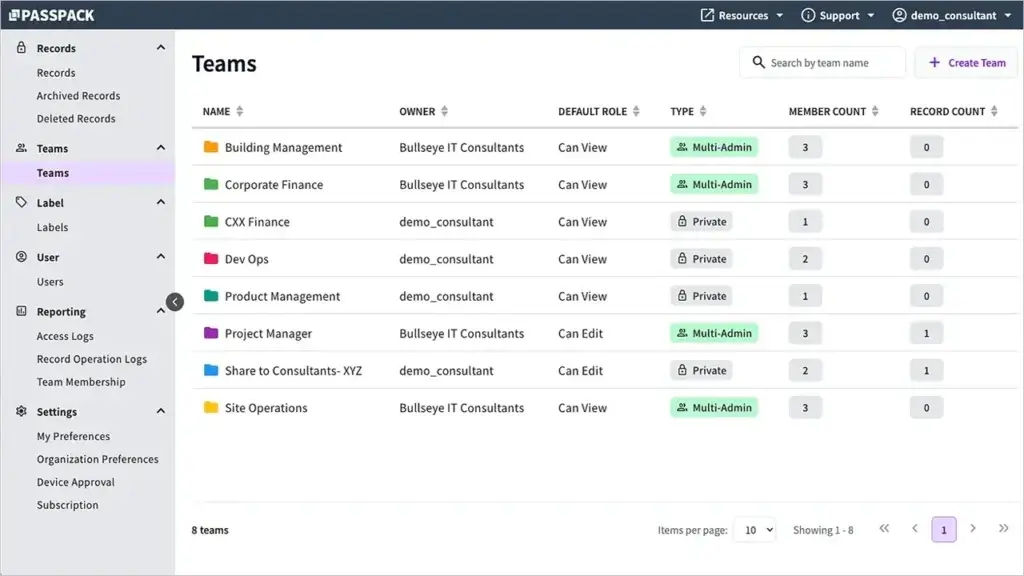
Passpack allows you to structure password access around teams. This is useful when different people need different credentials based on their role, client, department, or project.
For example, a marketing agency could separate passwords by client account. A startup could separate access for finance, operations, marketing, product, and administration.
This type of organization makes password management more scalable. You are not just storing passwords. You are building a more intentional access structure.
Password Generator
Passpack includes a password generator so users can create stronger credentials instead of inventing passwords manually.
This is one of the simplest ways to improve password hygiene. When each account has a strong, unique password, the risk of credential reuse drops significantly.
For businesses, this becomes especially important when multiple employees create accounts across SaaS tools, client portals, internal systems, and vendor platforms.
Business Administration
Passpack gives businesses administrative tools to manage users and shared credentials. This is important because password management should not depend on informal agreements or one employee’s personal storage habits.
Administrators can help organize team access, manage users, and maintain better control over shared passwords.
This is particularly useful during onboarding and offboarding. When someone joins, they can get the credentials they need more easily. When someone leaves, the business has a clearer process for reviewing access.
Single Sign-On on Business Plans
Passpack’s Business plan includes single sign-on authentication. This makes the platform more relevant for companies that want password management to fit into a broader access control process.
Single sign-on can simplify the login experience and help businesses manage authentication more consistently.
For smaller teams, this may not be essential at the beginning. For growing teams, it becomes more important as the number of users and tools increases.
Multi-Admin Support and API Access
The Business plan also includes advanced multi-administrator support and API integration. These features are useful for organizations that need more flexibility than a basic shared vault.
Multi-admin support reduces dependency on one person. API access gives technical teams more options for connecting Passpack to internal workflows.
These features make Passpack more business-ready, although it still remains simpler than more advanced enterprise platforms.

Pros and Cons
Advantages and Disadvantages
Passpack has a clear profile. It is strongest when you need affordable shared password management for a team. It is weaker when you need a highly polished personal password manager, advanced enterprise security, or a broad ecosystem of apps and extensions.
Positive
✅ Affordable team password sharing
✅ Practical for agencies and small businesses
✅ Simple access organization
✅ Business features at a low entry price
Negatives
❌ Less refined user experience
❌ Not ideal for families
❌ Fewer premium security features
❌ May be too basic for larger enterprises
Passpack Pros
1. Affordable team password sharing
Passpack’s biggest advantage is pricing. It gives small teams a dedicated password sharing system without the higher monthly costs that often come with premium business password managers.
2. Practical for agencies and small businesses
Passpack fits companies that manage many shared accounts but do not need a complex enterprise security stack. Agencies, freelancers, and service businesses can use it to organize client credentials more safely.
3. Simple access organization
The platform helps you move from scattered passwords to a more organized access system. Teams can group credentials more logically and reduce the need to ask for passwords through unsafe channels.
4. Business features at a low entry price
Passpack includes useful business capabilities such as team sharing, user management, SSO on higher plans, multi-admin support, and API integration, while keeping pricing accessible for smaller organizations.
Passpack Cons
1. Less refined user experience
Passpack is functional, but it does not feel as polished as 1Password or NordPass. If design quality, app experience, and smooth autofill are top priorities, a more premium password manager may be better.
2. Not ideal for families
Passpack is clearly built around team and business use. Families that need private vaults, household sharing, recovery options, and an easier consumer experience will usually prefer 1Password, NordPass, or Keeper.
3. Fewer premium security features
Passpack covers important password sharing needs, but it does not lead the category in advanced capabilities such as passkey management, developer secrets, dark web monitoring, privileged access workflows, or deep reporting.
4. May be too basic for larger enterprises
Large companies often need identity integrations, compliance reporting, automated provisioning, advanced policies, and detailed governance. Passpack can help with shared passwords, but enterprise-heavy teams may need a more advanced platform.
Security
Encryption, Sharing, and Vault Protection
Security is the reason to use a password manager in the first place. If the tool does not help your team protect credentials better than your current process, it is not doing its job.
Passpack’s security value comes from moving shared passwords into an encrypted, controlled environment. That is a major upgrade for teams still using manual or informal methods.
Zero-Knowledge Security Approach
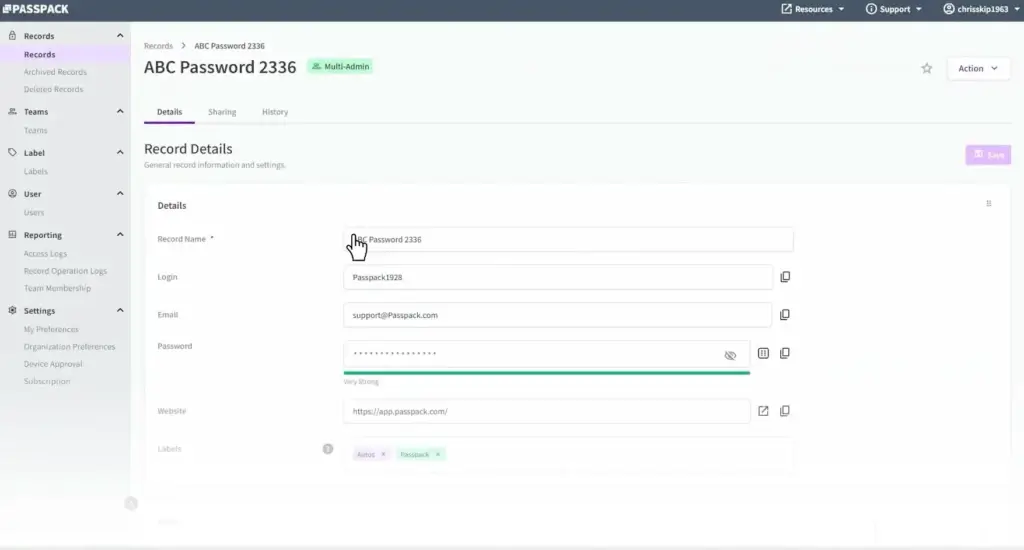
Passpack is built around a zero-knowledge model, which means the service is designed so that your sensitive password data is not readable by the provider in plain text.
For teams, this is important. Your password manager should not become a simple readable database of your company’s most sensitive logins.
However, zero-knowledge architecture does not remove your responsibility. You still need strong master passwords, secure account recovery practices, and strict controls over administrator access.
Encrypted Password Sharing
The most important security benefit of Passpack is encrypted sharing. This gives your team a safer way to distribute credentials than sending them through chat messages, email, shared documents, or project management comments.
This matters because password exposure often happens through ordinary work habits. Someone shares a login to move faster, and that credential stays visible in a message thread long after it should.
Passpack gives teams a more appropriate place to manage that exchange.
Reduced Password Sprawl
Password sprawl happens when credentials are spread across too many places: browsers, documents, spreadsheets, local notes, email inboxes, and employee devices.
This creates risk because your business may not know where critical logins are stored or who still has access to them.
By centralizing passwords inside Passpack, your team can create a clearer source of truth for business credentials.
Access Control and Offboarding
Passpack can also support better offboarding. When an employee, freelancer, or contractor leaves, your team has a better starting point for reviewing shared credentials and access.
This is especially important for agencies and service businesses that work with temporary collaborators or client-specific accounts.
A password manager does not automatically solve every offboarding issue, but it makes the process much easier than searching through messages and documents.
Multi-Factor Authentication Best Practices
For business use, Passpack should be deployed with multi-factor authentication wherever available. A password manager protects many other accounts, so the login to the password manager itself must be treated as a high-value target.
You should also use strong internal policies. Require strong account passwords, limit administrator privileges, review team access regularly, and remove inactive users quickly.
These practices matter as much as the software itself.
Security Limitations to Consider
Passpack improves password management, but it should not be viewed as a complete cybersecurity solution.
It does not replace endpoint protection, phishing training, identity management, access reviews, device security, or broader SaaS governance.
If your business needs advanced compliance reporting, privileged access management, secrets management, or enterprise-grade governance, compare Passpack carefully with Keeper and 1Password before choosing.
Use Cases
Who Passpack Is Best For
Passpack makes the most sense when your main challenge is shared access. It is less about premium personal password management and more about helping teams control business credentials.
Passpack for Small Businesses
Small businesses often have messy password habits because they grow faster than their internal security processes. One employee creates a software account, another stores the password in a spreadsheet, and someone else sends it through chat.
Passpack gives small businesses a more professional system for this stage of growth.
It is especially useful when you need:
- A central place for business logins
- Secure sharing between employees
- Lower-cost password management
- Basic admin control over team access
- A better alternative to spreadsheets
For many small businesses, this is enough to make password management significantly safer and more organized.
Passpack for Agencies
Agencies are one of Passpack’s best-fit audiences. Marketing agencies, SEO teams, web design firms, development shops, and consultants often manage large numbers of client credentials.
Those credentials may include WordPress logins, hosting panels, analytics accounts, social media profiles, ad platforms, email tools, CRM accounts, and reporting dashboards.
Without a password manager, these details can quickly become difficult to control.
Passpack helps agencies keep access organized by team, client, or project. That can reduce delays, improve security, and make client offboarding cleaner.
Passpack for Startups
Startups need password discipline early, even before they have a mature IT function. The earlier a company centralizes credentials, the easier it becomes to manage access as the team grows.
Passpack works well for startups that want an affordable solution before moving into more advanced identity or security platforms.
It can help founders and operators avoid the common problem of business-critical passwords living inside one person’s browser or inbox.
Passpack for Remote Teams
Remote teams rely heavily on SaaS tools, which means credential sharing becomes part of daily work. Without a password manager, remote employees may default to chat-based password sharing because it is fast.
Passpack gives remote teams a safer process while keeping access convenient.
This is useful for distributed companies that need shared access to business tools but do not want every login passed around manually.
Passpack for Personal Use
Passpack can store personal passwords, but it is not where the product is strongest.
If you mainly need a password manager for personal accounts, family sharing, mobile autofill, passkeys, secure notes, payment cards, and a polished daily experience, NordPass, Proton Pass, Keeper, or 1Password will usually feel better.
Passpack is most compelling when there is a team involved.
User Experience
How Passpack Feels in Daily Use
Passpack feels like a practical business utility. It is not designed to impress you with a luxury interface. It is designed to help teams manage passwords in a more organized way.
That can be a positive if you want something straightforward, but it may disappoint users who expect the smoothest password manager experience available.
Initial Setup
Passpack is easier to adopt when you plan your password structure before adding everything to the vault.
Before rollout, decide how you want to organize credentials. You may want to group passwords by client, department, team, function, or sensitivity level.
This planning matters because a password manager can become messy if every login is added without naming rules or access logic.
Daily Team Access
In daily use, Passpack helps employees find and use the passwords they are allowed to access. This reduces dependency on managers, founders, or senior employees who might otherwise become the gatekeepers for every shared login.
For a small business, this can save time quickly. Instead of asking where a password is, employees can go to one system.
The experience is more functional than premium, but the practical benefit is clear.
Sharing Workflow
Passpack’s sharing workflow is useful because it matches how teams actually work. People need credentials, but those credentials should not be copied into channels where they remain exposed forever.
By moving shared passwords into Passpack, your business reduces the number of insecure places where credentials might live.
This does not eliminate the need for good security habits, but it gives employees a better default behavior.
Admin Experience
Administrators get a more structured way to manage team password access. This is useful for businesses where employees, contractors, and client teams change over time.
The admin experience is best suited for small and mid-sized teams. Larger companies may need more advanced governance, reporting, provisioning, and policy enforcement.
For smaller organizations, however, Passpack can provide enough control without making password management feel overly technical.
Pricing
Plans and Value
Passpack’s pricing is one of the clearest reasons to consider it. Many password managers become expensive once you move from individual use to team access. Passpack keeps the entry point much lower.
This makes it attractive for businesses that know they need a password manager but do not want to pay for advanced features they may not use.
As always, pricing can change, so check the official Passpack pricing page before subscribing.
Passpack Pricing Plans
| Plan | Typical Starting Price | Best For |
| Teams | $1.50/user/month, billed annually | Small teams that need affordable shared password management |
| Business | $4.50/user/month, billed annually | Growing businesses that need SSO, multi-admin support, and API integration |
| Enterprise | Custom pricing | Organizations with larger-scale or custom requirements |
The Teams plan is the most important plan for Passpack’s positioning. It gives small teams a low-cost way to centralize and share passwords more safely.
The Business plan is the better choice when your organization needs more control. SSO, multi-admin support, and API integration make it more suitable for companies that are moving beyond basic password sharing.
The Enterprise plan is for larger organizations that need custom terms, scale, or additional support.
Is Passpack Good Value?
Passpack is good value if you judge it by the problem it is trying to solve: affordable team password sharing.
It is not the best value if you want the most advanced password manager overall. 1Password is more complete, Keeper is stronger for enterprise security, and NordPass is smoother for personal users.
But if your main goal is to stop sharing business passwords through risky channels, Passpack gives you a cost-effective upgrade.
In my opinion, Passpack’s value is strongest for teams of 5 to 30 people that need better password organization but do not need a full enterprise access management platform.
Alternatives Comparison
Passpack vs Other Password Managers
Passpack should not be compared only by feature quantity. It is more useful to compare it by role. It is a budget-friendly team password manager, while some competitors are broader, more polished, or more enterprise-focused.
For this comparison, I’ll look at Passpack against 1Password, NordPass, and Keeper Security.
Best Passpack Alternatives by Use Case
| Use Case | Best Option | Why |
| Lowest-cost team password sharing | Passpack | Strong fit for teams that need shared credentials without premium pricing |
| Best premium password manager | 1Password | Better all-around experience for individuals, families, teams, and developers |
| Best simple personal option | NordPass | Cleaner interface and smoother experience for everyday password management |
| Best for security-led businesses | Keeper Security | Stronger enterprise controls, compliance options, and security administration |
Alternative 1: 1Password
1Password is the stronger product overall. It offers a more polished experience, better personal and family plans, strong business controls, passkey support, Watchtower alerts, developer tools, and a broader ecosystem.
Passpack competes by being simpler and cheaper for team password sharing.
Choose Passpack if: your priority is affordable shared password management for a small team.
Choose 1Password if: you want a more complete password manager that can support personal use, family use, business teams, and technical workflows.
Alternative 2: NordPass
NordPass is easier to recommend for personal users and families. Its interface is cleaner, its apps feel more modern, and the everyday login experience is smoother.
For small teams, NordPass can also work well if ease of use is more important than the lowest possible business pricing.
Passpack is more appealing when your team is budget-conscious and primarily needs shared credentials rather than a premium user experience.
Choose Passpack if: you want low-cost credential sharing for work accounts.
Choose NordPass if: you want a simple and polished password manager for personal, family, or small business use.
Alternative 3: Keeper Security
Keeper Security is the better option for companies with more demanding security requirements. It offers stronger enterprise controls, compliance-friendly features, advanced administration, and security add-ons.
Passpack is more practical for smaller teams that do not need that level of depth.
Keeper is better for organizations that treat password management as part of a larger security governance strategy. Passpack is better for teams that need to replace informal password sharing quickly and affordably.
Choose Passpack if: you need a straightforward shared password manager at a lower cost.
Choose Keeper if: you need deeper business security controls, compliance support, and enterprise-grade administration.
Comparison Summary
| Feature Area | Passpack | 1Password | NordPass | Keeper Security |
| Ease of use | Good | Excellent | Excellent | Good |
| Business pricing | Very affordable | Premium | Mid-range | Premium |
| Team password sharing | Strong | Excellent | Good | Excellent |
| Personal use | Basic | Excellent | Excellent | Good |
| Family use | Limited | Excellent | Strong | Good |
| Advanced business security | Moderate | Strong | Good | Very strong |
| Best fit | Affordable team sharing | Premium all-around use | Simple personal and team use | Security-heavy business use |
Overall, Passpack is the best fit when price and team sharing matter most. 1Password is the better all-around product, NordPass is better for simplicity and personal use, and Keeper is better for organizations with advanced security requirements.
Conclusion
Is Passpack Right for You?
Passpack is a focused password manager for teams that need a safer way to store and share business credentials. It is not the most advanced or polished option in the market, but it is practical, affordable, and clearly positioned.
The strongest reason to choose Passpack is not because it has every feature. It is because it gives small teams a better alternative to poor password habits at a price that is easy to justify.
If your team currently shares passwords through spreadsheets, Slack, email, or browser profiles, Passpack can help you create a more secure and organized process.
Who Should Use Passpack?
You should consider Passpack if your main challenge is team password sharing.
It is especially suitable for:
- Small businesses that need affordable credential management
- Agencies that manage client logins
- Startups that want simple access organization
- Remote teams that share SaaS accounts
- Freelancers and consultants working with client credentials
Passpack is not the best choice if you want a premium family password manager, advanced enterprise governance, a highly polished mobile experience, or developer-focused secrets management.
Is Passpack Worth It?
Yes, Passpack is worth it for teams that want secure password sharing at a low cost.
Its value is strongest when you compare it with the risky alternatives many small teams still use: shared spreadsheets, reused passwords, browser sync, email threads, and chat messages.
For individuals and families, I would usually look at NordPass, Proton Pass, Keeper, or 1Password first.
For small teams, agencies, and budget-conscious businesses, Passpack is a practical and sensible option.
Overall Assessment
Passpack is a strong choice for affordable team password management. It does not try to be the most premium tool in the category, and that is exactly why it may appeal to smaller businesses.
If you need simple, secure, low-cost password sharing for work, Passpack is worth considering. If you need a more complete password manager with stronger personal features, passkeys, enterprise security, or developer tools, 1Password, NordPass, or Keeper will likely be better.
Have more questions?
Frequently Asked Questions
What is Passpack used for?
Passpack is used to store, organize, and share passwords securely across a team. It is especially useful for businesses that need a safer alternative to spreadsheets, shared browser passwords, email threads, or chat-based password sharing.
Is Passpack a good password manager?
Yes, Passpack is a good password manager for teams that need affordable shared credential management. It is less ideal for personal users or families that want a more polished password manager with broader consumer features.
Who should use Passpack?
Passpack is best for small businesses, agencies, startups, freelancers, remote teams, and service providers that need to manage shared business passwords in a more secure and organized way.
Does Passpack offer a free trial?
Yes, Passpack offers a free trial. Its current public plans focus on paid Teams, Business, and Enterprise options, so you should check the official pricing page for the latest details before subscribing.
How much does Passpack cost?
Passpack lists its Teams plan at $1.50 per user per month when billed annually and its Business plan at $4.50 per user per month when billed annually. Pricing can change, so always confirm the latest pricing on Passpack’s website.
Is Passpack safe for business passwords?
Passpack is designed to help teams store and share passwords securely. For best results, businesses should use strong master passwords, multi-factor authentication, limited admin access, and a clear offboarding process.
Is Passpack better than 1Password?
Passpack is better for teams that mainly want low-cost password sharing. 1Password is better if you want a more polished and complete password manager for individuals, families, businesses, developers, and advanced security workflows.
Is Passpack better than NordPass?
Passpack is better for affordable team credential sharing. NordPass is better for users who want a more modern interface, smoother personal password management, and stronger consumer-friendly features.
Is Passpack better than Keeper Security?
Passpack is better for smaller teams that want simple and affordable password sharing. Keeper Security is better for businesses that need advanced security administration, compliance features, enterprise controls, and privileged access options.
Is Passpack worth it in 2026?
Yes, Passpack is worth considering in 2026 if your team needs affordable shared password management. It is strongest for small businesses and agencies that want to replace risky password sharing habits with a centralized system.