
Choosing accounting software should not feel like choosing an ERP system.
If you run a small business, freelance operation, consulting practice, or solo service business, you probably need something simple: invoices, expenses, bank feeds, reports, tax-ready records, and a clear view of your cash flow.
That is where Kashoo can still make sense in 2026.
In this Kashoo review, you will get a practical look at its features, pricing, user experience, pros and cons, integrations, security, and top alternatives. More importantly, you will see where Kashoo fits best and where it may feel too limited compared with platforms like QuickBooks Online, Xero, FreshBooks, Zoho Books, and Wave.
Kashoo is not trying to be the most advanced accounting system on the market. Its real value is different: it gives you a clean, simple way to manage everyday accounting without burying you in menus, complex workflows, or features you may never use.
That makes it appealing if you want accounting software that feels manageable from the first login.
What Is Kashoo?
A simple accounting tool for small businesses
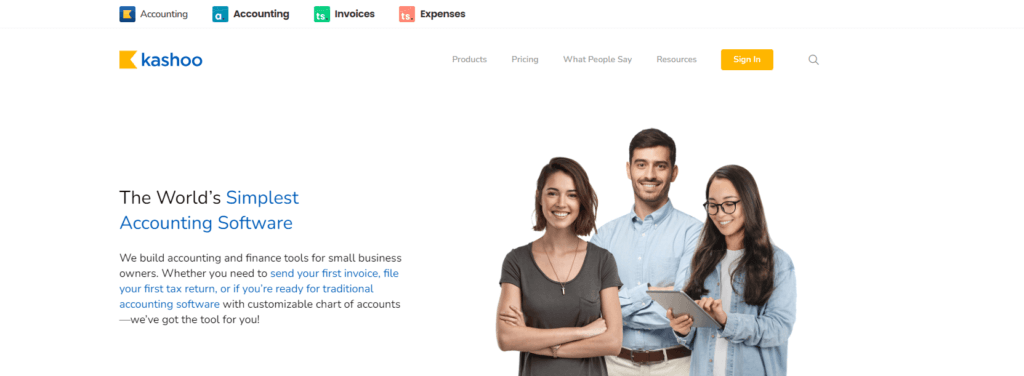
Kashoo is cloud-based accounting software built for small businesses, freelancers, consultants, and owners who want a straightforward way to manage their books.
Instead of positioning itself as a large accounting suite, Kashoo focuses on the accounting essentials you need most often:
- Sending invoices and accepting payments
- Tracking income and expenses
- Connecting bank feeds
- Reconciling transactions
- Managing basic reports
- Supporting multi-currency accounting
- Working with bookkeepers or accountants
Its strongest advantage is usability. You do not need to be an accountant to understand where things are, what to click, or how to find your numbers.
That said, Kashoo is not the best option for every business. If you need native payroll, advanced inventory, deep ecommerce integrations, detailed job costing, or a large app marketplace, you will probably be better served by QuickBooks Online, Xero, Zoho Books, or another more scalable accounting platform.
Kashoo vs TrulySmall Accounting
One important point to understand is the connection between Kashoo and TrulySmall Accounting.
TrulySmall Accounting is the lighter, automation-first product built for very small businesses that want bookkeeping without much manual setup. It is designed for owners who mainly need income tracking, expenses, sales tax, basic reports, and a true double-entry ledger.
Kashoo Accounting is the more complete product path. It gives you a fuller accounting workflow, including features commonly listed with Kashoo such as multi-currency, unlimited users, project and product tracking, and broader reporting capabilities.
In simple terms:
- Choose TrulySmall Accounting if you want the simplest possible small business bookkeeping workflow.
- Choose Kashoo Accounting if you want more flexibility, multi-currency support, and stronger accounting control.
This distinction matters because the two products are closely related, but they do not serve exactly the same buyer.
Who Is Kashoo Best For?
Find out if Kashoo fits your business needs
Kashoo is best for users who want accounting software that stays focused on the basics. It is not built for large finance teams, but it can be very useful for owners who want clarity without complexity.
Kashoo is a good fit for:
- Freelancers who need invoices, expenses, and clean tax records
- Solopreneurs who want accounting software without heavy setup
- Consultants who work with clients in different currencies
- Small businesses that need simple double-entry accounting
- Non-accountants who want less jargon and fewer confusing menus
- Owners working with bookkeepers who need shared access without extra user fees
Kashoo works especially well if you run a lean business and care more about simplicity than advanced customization.
Kashoo may not be right for:
- Inventory-heavy businesses that need stock management and purchase workflows
- Growing ecommerce brands that need Shopify, PayPal, sales channels, and automation
- Companies with payroll needs that want payroll inside the same platform
- Agencies billing by time that need native time tracking and project billing
- Finance teams that need custom reports, approvals, dashboards, and forecasting
If your accounting needs are simple, Kashoo feels efficient. If your operations are becoming more complex, the same simplicity can become a limitation.
Kashoo Features
Core accounting tools that matter in 2026
Kashoo gives you the core accounting features most small businesses need day to day. It is not packed with every possible add-on, but it does cover the foundation well.
Invoicing and online payments
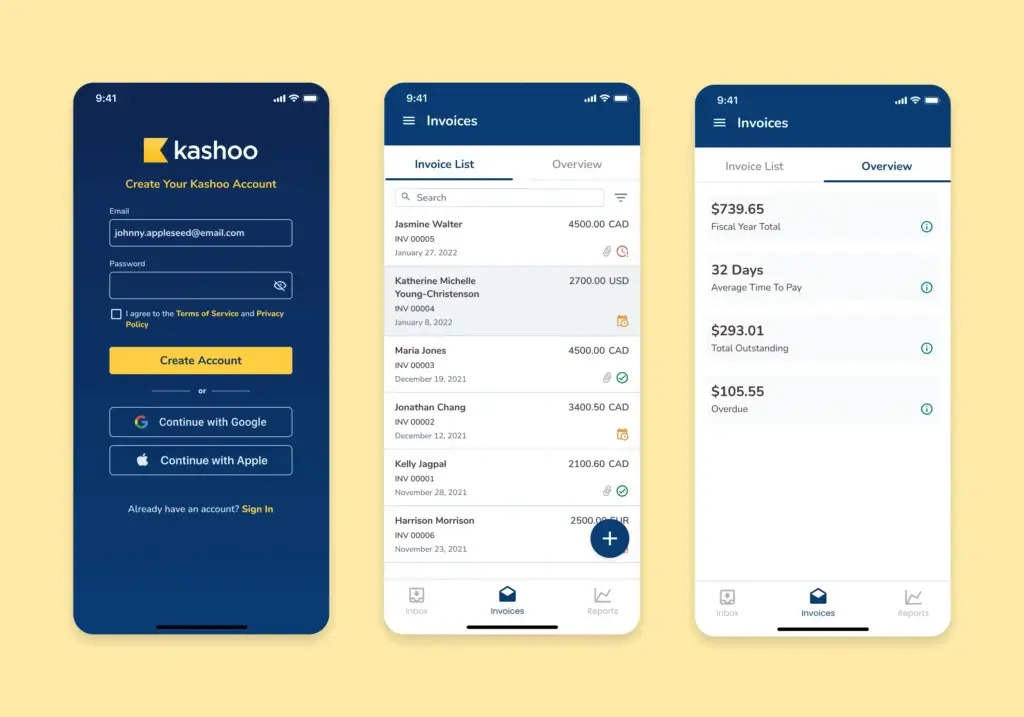
Kashoo lets you create and send professional invoices, add your logo, customize invoice details, and accept digital payments. This is useful if you want to reduce manual follow-ups and give clients an easier way to pay.
For service businesses, the invoicing workflow is one of Kashoo’s most practical strengths. It is not as polished as FreshBooks for client billing, but it is clean, fast, and easy to understand.
Expense tracking
You can track business expenses, categorize transactions, and keep your records organized for tax season. TrulySmall also emphasizes automated accounting and income and expense tracking, which supports the same simplicity-first approach.
This is helpful if you currently rely on spreadsheets, manual bank exports, or a bookkeeper who has to clean up your records at the end of the month.
Bank feeds and reconciliation
Kashoo supports bank feed connections, allowing transactions to flow into your accounting system instead of being entered manually.
This is one of the most important features in any accounting tool because it directly affects bookkeeping accuracy. With bank feeds and reconciliation, you can match transactions, reduce duplicate entry, and keep your books closer to real time.
Financial reports
Kashoo includes essential financial reports such as profit and loss, income summaries, expense reports, and balance sheet-style accounting views.
The reporting experience is clear, but not deeply customizable. For a small business owner, that may be enough. For a controller, CFO, or growing finance team, it will likely feel basic compared with QuickBooks Online, Xero, Zoho Books, or Sage.
Multi-currency accounting
Kashoo Accounting is commonly positioned with multi-currency support, making it useful if you work with international clients or vendors.
This is a meaningful advantage over very basic accounting tools, especially for consultants, freelancers, and online businesses that invoice outside their home market.
Project and product tracking
Kashoo is also commonly listed with project and product tracking capabilities. This can be useful if you want more structure than simple income and expense categories.
However, do not confuse this with advanced project management, inventory control, or job costing. Kashoo can help you organize financial activity, but it is not a full operations platform.
Unlimited users
One of Kashoo’s strongest practical advantages is that it supports unlimited users in its Kashoo Accounting plan. This is valuable if you want to invite a bookkeeper, accountant, assistant, or business partner without paying per seat.
For small businesses, this can make pricing feel more predictable than tools that charge extra as your team expands.
Mobile access
Kashoo and TrulySmall provide mobile access, but the experience can vary by product and platform. TrulySmall highlights a companion app, while Kashoo has historically emphasized mobile-friendly access for managing accounting tasks on the go.
If mobile accounting is central to your workflow, compare the current app experience before committing. QuickBooks, Xero, FreshBooks, and Zoho Books may offer stronger mobile ecosystems depending on your needs.
Pros and Cons
A balanced look at the strengths and limits
Kashoo’s value is not in being the biggest accounting platform. Its value is in being focused, approachable, and practical for smaller businesses.
That focus creates both advantages and limitations.
Positive
✅ Easy to learn
✅ Simple pricing
✅ Unlimited users
✅ Multi-currency support
✅ Clean invoicing
✅ Good for non-accountants
Negative
❌ Limited integrations
❌ Basic reporting depth
❌ No full payroll suite
❌ Not ideal for inventory
❌ Limited automation
❌ Branding can confuse users
Kashoo pros
- Easy interface: The platform is clean and approachable for non-accountants.
- Fast setup: You can get started without a long implementation process.
- Predictable pricing: Kashoo avoids complicated tier structures for its core product.
- Unlimited users: You can collaborate with others without extra seat costs.
- Multi-currency support: Useful for businesses working with international clients.
- Simple accounting workflows: Good for invoices, expenses, reports, and reconciliation.
Kashoo cons
- Limited app ecosystem: It does not compete with QuickBooks or Xero for integrations.
- Basic reporting: Reports are useful but not advanced enough for complex analysis.
- No full payroll platform: Payroll usually requires an external provider or workaround.
- Not inventory-first: Product tracking exists, but advanced inventory is not its strength.
- Limited automation: It lacks the workflow depth found in Zoho Books or QuickBooks.
- Product naming can be confusing: Kashoo and TrulySmall need clearer buyer positioning.
If you want accounting software that is easy to manage, Kashoo is compelling. If you want a full financial operations hub, it will likely feel too lightweight.
User Experience
User Interface and Operational Simplicity
Kashoo’s user experience is built around one clear idea: accounting should not intimidate the person using it.
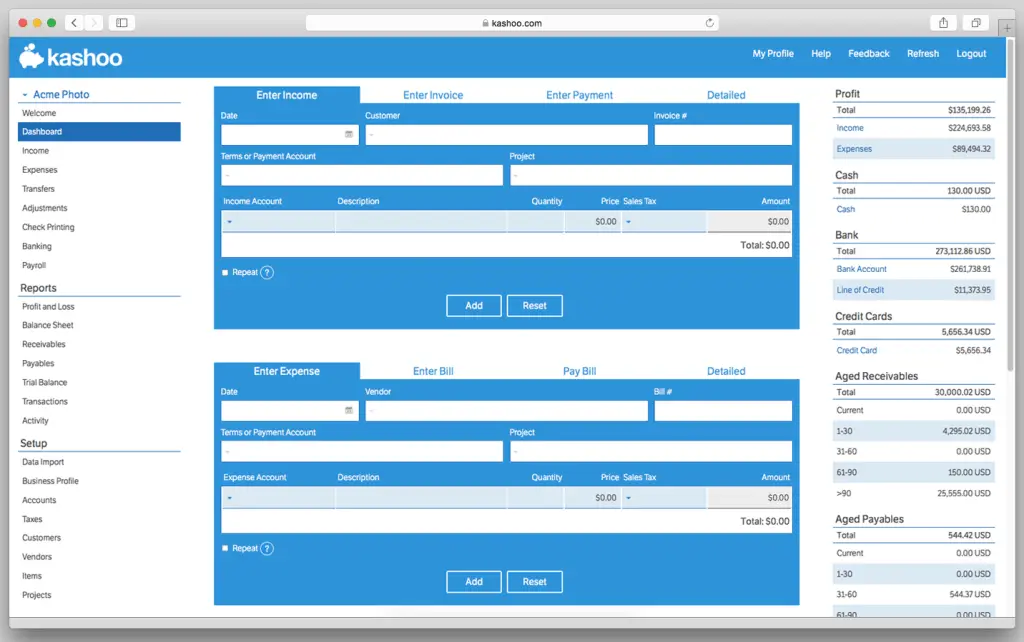
The navigation is simple, the menus are not overloaded, and the main workflows are easy to follow. You can create invoices, review transactions, check reports, and manage basic bookkeeping tasks without feeling like you are inside a large enterprise system.
What you will probably like
- Short learning curve: You can understand the main workflows quickly.
- Clean navigation: Core accounting actions are easy to locate.
- Less accounting jargon: The product feels more approachable for business owners.
- Focused workflow: It keeps attention on invoices, expenses, bank feeds, and reports.
- Good fit for bookkeeper collaboration: Unlimited users make shared access easier.
What could be better
- More dashboard customization: Growing businesses may want more control over views.
- More visual reporting: The reporting experience is functional, but not very rich.
- More guided setup: New business owners may still need accounting context.
- Clearer product separation: Kashoo and TrulySmall messaging can overlap.
From a usability perspective, Kashoo is one of the easier accounting platforms to understand. The trade-off is that you do not get the same depth, extensibility, or advanced controls that larger accounting systems provide.
Integrations and Ecosystem
Connect Kashoo to your business workflow
Kashoo’s integration ecosystem is one of the most important areas to evaluate before choosing it.
If your business only needs bank feeds, invoices, payments, and accountant access, Kashoo may be enough. If your workflow depends on ecommerce, CRM, payroll, inventory, project management, or automation tools, it may feel restrictive.
Where Kashoo is strongest
- Bank feeds: Useful for importing and reconciling transactions.
- Online payments: Helpful for getting paid through invoices.
- Square integration: Commonly listed with Kashoo’s accounting plan.
- Bookkeeper access: Unlimited users support easier collaboration.
Where Kashoo is weaker
- Ecommerce: Not as strong as QuickBooks, Xero, or Zoho Books.
- CRM: Limited native CRM connections compared with larger platforms.
- Payroll: Not a complete built-in payroll system.
- Workflow automation: Limited compared with Zoho Books or QuickBooks.
- Inventory tools: Not ideal for stock-heavy businesses.
You can still move data manually with exports, but that is not the same as a connected accounting stack.
If integrations are a major part of your buying decision, Kashoo is not the strongest choice. QuickBooks Online and Xero have broader ecosystems, while Zoho Books is better if you want accounting tied to CRM, inventory, projects, and automation inside one suite.
Pricing and Plans
How much does Kashoo cost?
Kashoo’s pricing is relatively simple compared with many accounting platforms.
There are two related product paths to understand: TrulySmall Accounting and Kashoo Accounting. Pricing can change, so you should always confirm the latest cost on the vendor’s website before subscribing.
| Plan | Typical Price | Best For | Main Features |
| TrulySmall Accounting | About $20/month | Freelancers and very small businesses | Invoices, income and expense tracking, sales tax, essential reporting, double-entry ledger |
| Kashoo Accounting | About $30/month | Small businesses needing more flexibility | Bank feeds, payments, project/product tracking, multi-currency, unlimited users, Square integration |
TrulySmall Accounting
TrulySmall Accounting is the better fit if you want simple bookkeeping without extra complexity. It is built for very small businesses that need to track income, expenses, sales tax, and essential reports.
You should consider it if you want to move away from spreadsheets but do not need advanced accounting workflows.
Kashoo Accounting
Kashoo Accounting is the better choice if you need more flexibility. It is commonly associated with features like bank feeds, invoices, payments, project tracking, product tracking, multi-currency, unlimited users, and Square integration.
This makes it more suitable for small businesses that still want simplicity but need more than entry-level bookkeeping.
Is Kashoo a good value?
Kashoo can be a good value if you use its core accounting features and take advantage of unlimited users. It becomes less compelling if you need to add several external tools for payroll, inventory, ecommerce, or advanced reporting.
For simple small business accounting, the pricing is fair. For a more connected business stack, alternatives may offer better long-term value.
Kashoo Alternatives
How Kashoo compares with leading competitors
Kashoo competes in a crowded accounting software market. Its biggest advantage is simplicity, but its biggest weakness is limited depth.
Here is how it compares against the most relevant alternatives.
| Software | Best For | Advantage Over Kashoo | Best Choice If… |
| Kashoo | Simple small business accounting | Easy setup and unlimited users | You want clean accounting without complexity |
| TrulySmall Accounting | Very small businesses and solopreneurs | Lighter bookkeeping workflow | You want the simplest accounting setup |
| QuickBooks Online | Growing businesses | Deeper features and accountant familiarity | You need payroll, inventory, reports, and integrations |
| Xero | Collaborative small business accounting | Stronger ecosystem and bank reconciliation | You want scalable cloud accounting with many add-ons |
| FreshBooks | Freelancers and service businesses | Better client billing and time tracking | You bill by project, proposal, or hourly work |
| Zoho Books | Automation-focused small businesses | Better workflows and business suite integration | You use Zoho CRM, inventory, or automation tools |
| Wave | Budget-conscious microbusinesses | Free core accounting and invoicing | You need a free starting point |
Kashoo vs QuickBooks Online
QuickBooks Online is the stronger choice for businesses that want scalability, payroll options, inventory, accountant support, deeper reporting, and a large integration marketplace.
Kashoo is easier to learn and less overwhelming. QuickBooks is more powerful and better suited for growth.
Choose Kashoo if you want simplicity. Choose QuickBooks if accounting is becoming central to your operations.
Kashoo vs Xero
Xero is better if you want a modern cloud accounting platform with stronger integrations, collaboration, and scalability.
Kashoo is more stripped down. Xero gives you more room to grow, especially if you work with accountants, ecommerce tools, payroll apps, and reporting add-ons.
Kashoo vs FreshBooks
FreshBooks is the better fit for service businesses that depend on client billing, proposals, time tracking, and project-based work.
Kashoo is more accounting-focused. FreshBooks is more client workflow-focused.
If you bill hourly or manage client projects, FreshBooks may feel more natural. If you mainly need bookkeeping, reports, and bank reconciliation, Kashoo may be cleaner.
Kashoo vs Zoho Books
Zoho Books is stronger for automation, approval workflows, client portals, inventory, and businesses already using the Zoho ecosystem.
Kashoo is simpler, but Zoho Books gives you more control as your workflow becomes more advanced.
Kashoo vs Wave
Wave is attractive because its core accounting and invoicing tools are free.
Kashoo is better if you want a paid tool with more structured accounting and fewer limits around user access. Wave is better if budget is your top priority and your accounting needs are very basic.
Security and Compliance
Your financial data deserves strong protection
Security matters when you are storing bank transactions, invoices, client data, tax records, and business financials in one system.
Kashoo and TrulySmall position themselves as cloud-based accounting tools with secure access to business data. TrulySmall states that transactions and business insights are stored securely in the cloud and that it does not store your credit card or online banking credentials.
Security features to review
- Cloud-based data access: You can access your accounting data through your login.
- Bank connection safeguards: TrulySmall states that it does not store online banking credentials.
- User access: Kashoo supports collaboration with unlimited users.
- Data privacy: Businesses should review the vendor’s privacy policy before subscribing.
For most small businesses, Kashoo should cover the basic security expectations of cloud accounting software. However, if you need formal compliance documentation, audit requirements, SOC 2 reports, HIPAA controls, or enterprise-grade security reviews, you should request current documentation directly from the vendor.
This is especially important if you manage sensitive client accounts, regulated industries, healthcare data, or finance operations with strict approval requirements.
Conclusion
Is Kashoo the right accounting tool for you?
⭐ Overall Rating: 8.0/10
Kashoo is a strong option if you want simple accounting software that does not feel intimidating.
It is best for freelancers, consultants, solopreneurs, and small business owners who want to manage invoices, expenses, bank feeds, reports, and tax-ready records without dealing with the complexity of a larger accounting suite.
Its biggest strengths are ease of use, predictable pricing, unlimited users, multi-currency support, and a cleaner learning curve than many competitors.
Its biggest weaknesses are limited integrations, basic reporting depth, no complete built-in payroll system, and weaker scalability for businesses with inventory, ecommerce, automation, or advanced finance requirements.
My take: Kashoo is worth considering if your accounting needs are simple and you value clarity over feature depth. It is not the best long-term choice for every growing business, but it can be a practical, efficient tool for owners who want to keep their books organized without overcomplicating the process.
If you expect your accounting stack to become more advanced, compare it carefully against QuickBooks Online, Xero, FreshBooks, Zoho Books, and Wave before making your final decision.
Frequently asked questions
Have more questions?
Is Kashoo free?
No. Kashoo does not offer a forever-free accounting plan. It is commonly listed with a free trial, while paid Kashoo Accounting pricing is typically shown around $30 per month. TrulySmall Accounting is usually listed separately around $20 per month.
How much does Kashoo cost?
Kashoo Accounting is commonly listed at about $30 per month or $324 per year. TrulySmall Accounting is commonly listed at about $20 per month or $216 per year. Always confirm current pricing on the vendor site before subscribing.
What is the difference between Kashoo and TrulySmall Accounting?
TrulySmall Accounting is the lighter product for very small businesses that want simple bookkeeping, income and expense tracking, sales tax, and essential reports. Kashoo Accounting is better when you need broader accounting functionality, multi-currency support, unlimited users, and more flexibility.
Is Kashoo good for freelancers?
Yes. Kashoo can be a good fit for freelancers who need simple invoicing, expense tracking, bank feeds, financial reports, and tax-ready records without learning a complex accounting system.
Does Kashoo support payroll?
Kashoo is not a full payroll platform. It may support payroll-related integrations or external workflows, but businesses that need built-in payroll should compare it carefully with QuickBooks Online, Gusto-connected systems, or other payroll-ready accounting tools.
Does Kashoo support multiple currencies?
Yes. Kashoo Accounting is commonly listed with multi-currency support, which can help small businesses that invoice international clients or work with vendors in different currencies.
Can I add my accountant to Kashoo?
Yes. Kashoo Accounting is commonly listed with unlimited users, which means you can invite an accountant, bookkeeper, assistant, or business partner without paying extra per user.
Is Kashoo better than QuickBooks?
Kashoo is easier and simpler, but QuickBooks Online is more powerful. Choose Kashoo if you want clean small business accounting. Choose QuickBooks if you need payroll, inventory, advanced reporting, accountant familiarity, and a larger app marketplace.
What are the best Kashoo alternatives?
The best Kashoo alternatives are QuickBooks Online for scalability, Xero for cloud accounting and integrations, FreshBooks for freelancers and client billing, Zoho Books for automation, and Wave for free basic accounting.
Who should avoid Kashoo?
You may want to avoid Kashoo if you need advanced inventory, built-in payroll, deep ecommerce integrations, complex approvals, detailed forecasting, or highly customizable reporting. In those cases, a more scalable accounting platform may be a better fit.