
Paylocity for Finance, formerly known as Airbase, is a modern spend management platform built for finance teams that want stronger control over company spending before it reaches the accounting system. It is not traditional accounting software like QuickBooks, Xero, or NetSuite. Instead, Paylocity for Finance helps manage the workflows around spend, including accounts payable automation, bill payments, expense management, corporate cards, guided procurement, vendor management, and accounting automation.
That distinction is important. If you need a general ledger, tax engine, payroll system, or full ERP, Paylocity for Finance will not replace your accounting platform. But if your company struggles with manual invoice approvals, scattered card purchases, slow reimbursements, disconnected procurement requests, missing receipts, or messy reconciliation, Paylocity for Finance can act as a structured spend control layer between employees, vendors, cards, payments, and your ERP.
Airbase is now part of Paylocity, which changes its broader market position. The platform is increasingly positioned under Paylocity for Finance, alongside Paylocity’s HR, payroll, workforce, and planning capabilities. This makes Paylocity for Finance especially interesting for companies that want to connect payroll and non-payroll spend visibility across finance and HR workflows.
In this review, you will learn what it does, where it fits in your finance stack, its core features, pricing structure, strengths, limitations, security considerations, and how it compares with alternatives like Ramp, Brex, BILL, Tipalti, Coupa, and SAP Concur.
Paylocity for Finance Overview and Where It Fits in Your Finance Stack
What Paylocity for Finance Does for Businesses
Paylocity for Finance is best described as a spend management and finance automation platform. It brings together accounts payable automation, employee expense management, corporate cards, guided procurement, vendor workflows, approval routing, payments, policy controls, and accounting synchronization.
For many finance teams, Paylocity for Finance sits between the business and the accounting system. Employees use it to request purchases, submit expenses, upload receipts, and use approved cards. Finance teams use it to review spend, automate approvals, pay vendors, manage documentation, enforce policy, and sync clean transaction data into the ERP.
The value is not only in paying bills faster. The bigger value is giving finance teams visibility and control earlier in the spend lifecycle. Instead of discovering problems after an invoice arrives or after an employee has already made a purchase, Paylocity for Finance helps structure requests, approvals, policy checks, and documentation before money leaves the business.
Paylocity for Finance vs Traditional Accounting Software
Paylocity is not a full accounting system. It does not replace your general ledger, financial statements, tax reporting, payroll accounting, or ERP infrastructure. You will still need accounting software such as QuickBooks, Xero, Sage Intacct, NetSuite, Microsoft Dynamics 365 Business Central, or another financial system of record.
Where Paylocity adds value is in the workflows that feed accounting. It helps capture invoices, code bills, route approvals, manage corporate card activity, automate expense documentation, process reimbursements, match purchase orders, and sync spend data into your accounting system.
That makes Paylocity useful if your accounting team spends too much time chasing approvals, fixing missing documentation, correcting GL coding, reviewing card transactions, or reconciling payables manually at month-end.
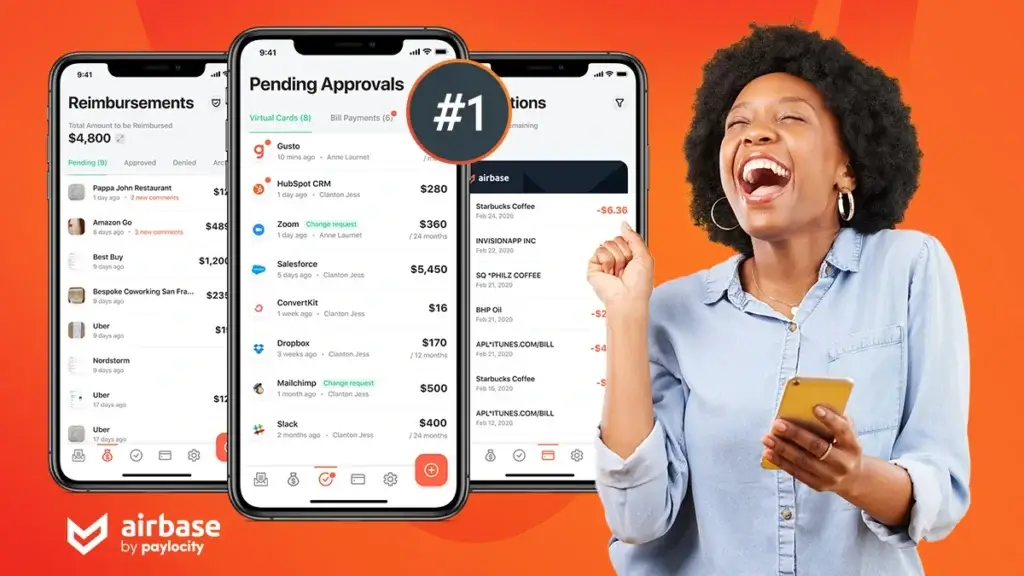
Software specification
Key Features of Paylocity for Finance
Accounts Payable Automation
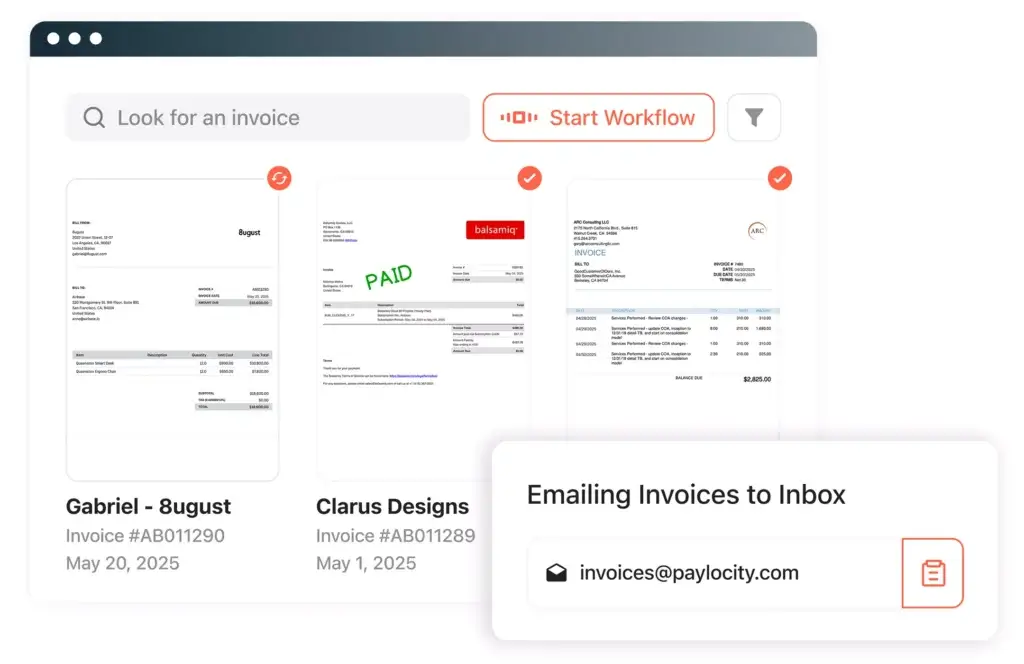
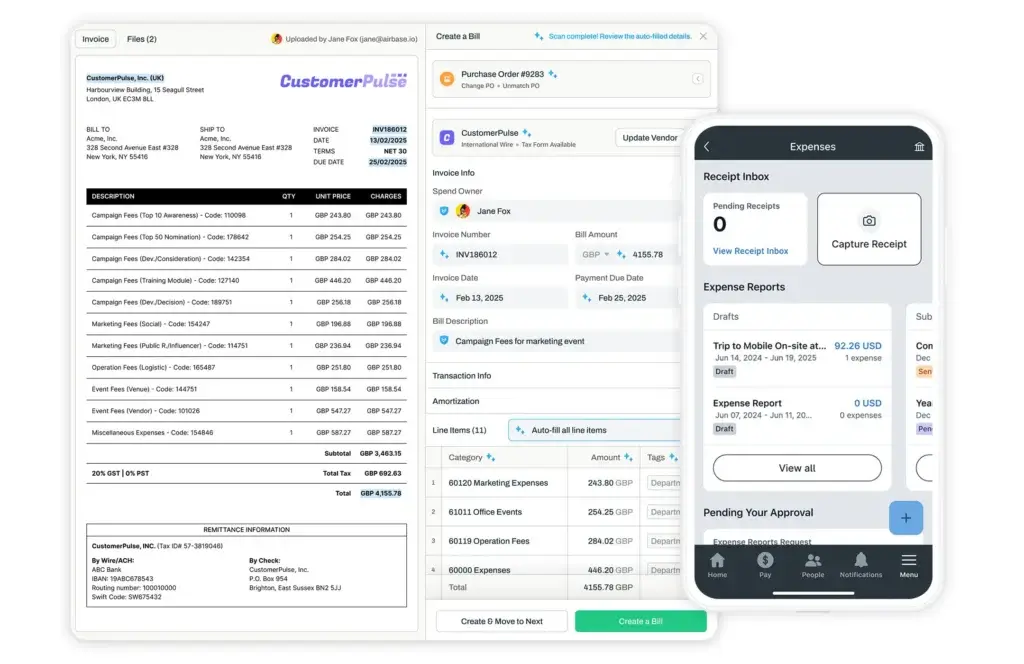
AP automation is one of Paylocity’s strongest areas. The platform helps finance teams manage the full accounts payable lifecycle, including vendor onboarding, invoice capture, bill coding, approval routing, PO matching, payment execution, reconciliation, and ERP syncing.
Paylocity for Finance is especially useful when invoices are arriving through multiple channels, such as email, shared inboxes, vendor portals, and internal requests. Instead of manually entering data, routing approvals by email, and reconciling payments later, finance teams can create a more controlled workflow from invoice intake to accounting sync.
Key strengths in this area include:
- AI-assisted invoice capture and coding
- Approval workflows based on company rules
- 2-way and 3-way PO matching
Corporate Cards and Spend Controls
Paylocity for Finance supports corporate card workflows through virtual and physical cards with built-in policy controls. This gives employees controlled purchasing flexibility while allowing finance teams to monitor, approve, and reconcile card spend more efficiently.
The platform can be useful for software subscriptions, departmental purchases, travel-related expenses, recurring vendor payments, event budgets, and other operational spend. Virtual cards are particularly valuable when you want to isolate vendor spend, limit recurring charges, or reduce the risk of unmanaged subscription payments.
Paylocity for Finance also supports card reconciliation, receipt collection, spend tracking, and accounting coding, helping finance teams reduce the manual work that often comes with corporate card programs.
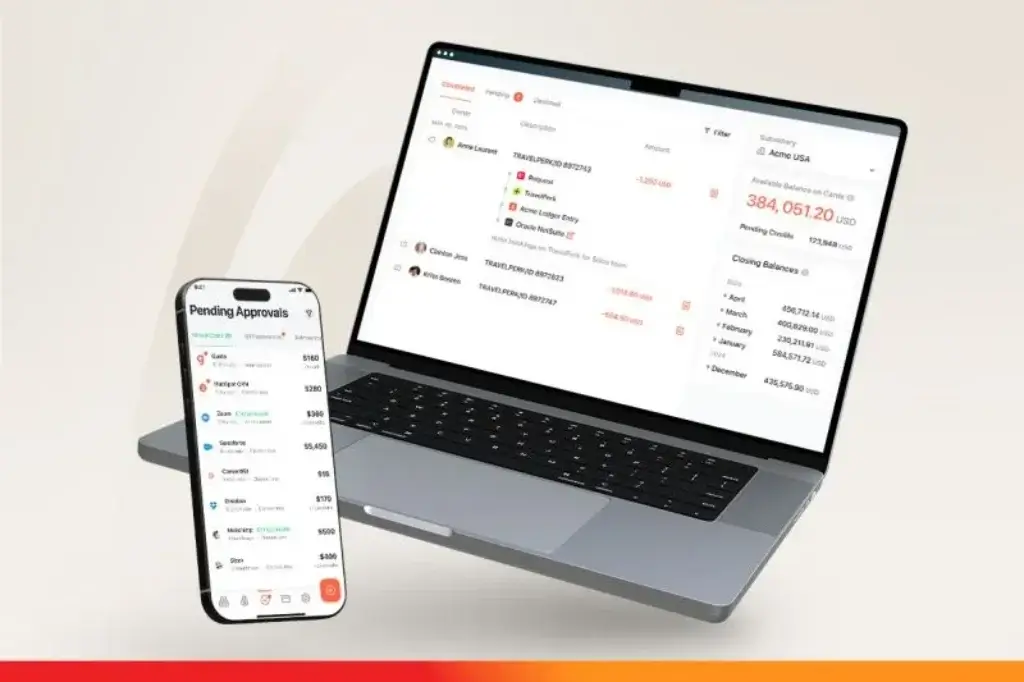
Expense Management and Reimbursements
Paylocity for Finance helps employees submit expenses, upload receipts, track mileage, and get reimbursed while giving finance teams tools for review, approval, coding, and policy enforcement.
The platform uses automation to reduce the friction of traditional expense reporting. Employees can submit expenses from a more guided workflow, while finance can apply warning and blocking policies, mandatory fields, submission windows, and budget limits by role or expense type.
This is helpful for companies where expense management has become too dependent on spreadsheets, email approvals, or after-the-fact manual checks.
Guided Procurement
Guided Procurement is one of the features that make Paylocity for Finance more than a basic expense and AP tool. It gives employees a single starting point for purchase requests, then routes those requests to the right stakeholders based on company policy.
This is especially useful for purchases that require legal review, IT approval, security assessment, finance approval, procurement input, vendor documentation, or budget validation. Instead of asking employees to guess the right process, Paylocity for Finance guides them through the request and approval path.
For companies trying to improve spend under management, this can be a major advantage. It helps shift procurement control earlier in the buying process, before the invoice appears and before the vendor relationship is already active.
Vendor Management
Paylocity for Finance includes vendor management workflows that help finance teams collect vendor details, tax information, banking data, payment preferences, and supporting documentation.
The vendor portal can reduce back-and-forth communication between vendors and AP teams. Vendors can submit information, update details, and track relevant payment activity, while finance teams gain a stronger audit trail around vendor onboarding and payments.
This is especially valuable for companies with growing vendor lists, multiple subsidiaries, or stricter internal control requirements.
Accounting Automation and ERP Sync
Paylocity for Finance is most valuable when it connects cleanly with your ERP or accounting software. It helps automate GL coding, approval documentation, transaction categorization, amortization, reconciliation, and export workflows.
Paylocity for Finance integrates with accounting and ERP systems such as NetSuite, QuickBooks, Sage Intacct, and other finance platforms. The goal is not to replace your ERP. The goal is to send cleaner, better-documented spend data into the system of record.
If your accounting team spends too much time cleaning data before close, Paylocity for Finance can help reduce manual reconciliation and improve visibility into who requested spend, who approved it, how it was coded, and when it was paid.
Spend Analytics and Reporting
Paylocity for Finance gives finance leaders better visibility into company spend across AP, cards, expenses, vendors, departments, and categories. This matters because decentralized spend can easily become difficult to track when employees are using different tools, cards, inboxes, and approval paths.
With better spend analytics, finance teams can identify bottlenecks, monitor budgets, review vendor activity, analyze payment timing, and spot policy issues earlier. For CFOs and controllers, this can support more accurate forecasting and cleaner month-end close processes.
How Paylocity for Finance Works
Setup and Uses
Setup and Onboarding
Paylocity for Finance setup depends on the modules you choose and the complexity of your finance operations. A company using only expense management and corporate cards will usually have a lighter implementation than a company rolling out AP automation, guided procurement, PO matching, multi-subsidiary approval workflows, vendor management, and ERP syncing.
Typical setup includes configuring approval workflows, connecting accounting software, defining spend policies, setting up vendors, importing employees or roles, creating card controls, mapping GL categories, and training employees on request and expense workflows.
Because Paylocity now owns Paylocity for Finance, companies already using Paylocity may also want to evaluate how finance data, HR data, payroll data, headcount planning, and workforce structures can work together over time.
Managing AP and Vendor Bills Day to Day
For AP teams, Paylocity for Finance can centralize invoice intake, vendor approvals, purchase order matching, payment scheduling, and accounting sync. This helps reduce the manual burden of chasing approvers, copying invoice data into spreadsheets, and checking whether payments were coded correctly.
Paylocity for Finance is especially strong when AP is part of a broader spend control strategy. Instead of treating invoice processing as a standalone workflow, Paylocity for Finance connects bills with procurement requests, vendors, approvals, budgets, and accounting rules.
Managing Employee Spend
For employee spend, Paylocity for Finance gives teams a structured way to handle card purchases, out-of-pocket expenses, receipt capture, mileage, reimbursement approvals, and policy checks.
This is useful for companies where employees need flexibility, but finance still needs controls. Employees get a clearer process for submitting and documenting spend, while finance gets better visibility and fewer manual follow-ups.
Managing Procurement Requests
Paylocity for Finance’s procurement workflows are designed to guide employees through purchase requests before spend is committed. That is a meaningful improvement over informal buying processes where requests happen through Slack, email, meetings, or spreadsheets.
Finance, legal, IT, procurement, and security teams can all be included in the approval workflow when needed. This helps businesses reduce risk, enforce documentation requirements, and improve compliance without turning every purchase into a slow manual process.
Using Paylocity for Finance Across Growing Finance Teams
Paylocity for Finance is generally best suited for companies that have outgrown lightweight card and expense tools but do not want to manage AP, procurement, expenses, cards, and vendor workflows in separate systems.
It is especially relevant for mid-market companies with growing invoice volume, more employees, multiple departments, stricter approval requirements, and a need for better audit trails.
Pros and Cons
A balanced view: what you’ll love and what to consider
Paylocity is a strong platform for companies that want to centralize AP automation, expense management, corporate cards, and procurement workflows. Its biggest advantage is that it manages multiple spend processes in one system, which can reduce tool sprawl and improve financial control.
However, it is not the right choice for every business. Paylocity is not accounting software, pricing is quote-based, and smaller companies with basic needs may find it more advanced than necessary.
Positive
✅ Strong Control Across the Full Spend Lifecycle
✅ Better AP Automation for Growing Companies
✅ Guided Procurement Improves Compliance
✅ Useful Connection Between Finance and HR
Negative
❌ Paylocity for Finance Is Not Accounting Software
❌ Pricing Requires a Sales Conversation
❌ It May Be More Than Small Teams Need
❌ Advanced Workflows Require Proper Setup
✅ Benefits
Strong Control Across the Full Spend Lifecycle
Paylocity is valuable because it does not treat cards, expenses, AP, and procurement as separate problems. It gives finance teams a way to manage spend from the request stage through approval, payment, documentation, and reconciliation.
This helps reduce the risk of unmanaged spend, duplicate approvals, unclear vendor ownership, missing documentation, and delayed accounting close.
Better AP Automation for Growing Companies
Paylocity is especially useful for companies that process enough invoices to need more than basic bill pay. Its AP automation workflows can support invoice capture, coding, PO matching, vendor onboarding, approval routing, payment scheduling, and audit trails.
For controllers and AP managers, that can mean less manual entry, fewer approval delays, and stronger confidence that vendor payments are properly documented.
Guided Procurement Improves Compliance
Many companies struggle because procurement begins informally. Employees may ask for tools, vendors, subscriptions, contractors, or services through email or chat, while finance only becomes involved after the invoice appears.
Paylocity’s guided procurement workflows help fix that by giving employees a clear request process and routing the right information to finance, legal, IT, procurement, and security teams before the purchase is approved.
Useful Connection Between Finance and HR
Because Paylocity is now part of Paylocity, it has a stronger long-term story for companies that want to connect spend management with workforce data, payroll, headcount planning, and organizational structures.
This matters because many spend workflows depend on employee roles, managers, departments, locations, and approval chains. When finance systems and HR systems are better aligned, companies can reduce manual maintenance and improve controls.
❌ Potential Drawbacks and Limitations
Paylocity for Finance Is Not Accounting Software
The biggest limitation is that Paylocity for Finance does not replace your accounting system. You still need a general ledger, ERP, tax workflow, financial reporting process, and accounting ownership outside Paylocity for Finance.
Paylocity for Finance should be evaluated as a spend management layer, not as the system of record for your books.
Pricing Requires a Sales Conversation
Paylocity pricing is not publicly listed as fixed monthly tiers. Pricing depends on your company size, selected modules, implementation needs, payment workflows, card usage, and finance complexity.
This can make it harder to compare Paylocity quickly against tools with transparent pricing. Before committing, you should ask for a clear breakdown of module costs, implementation fees, payment fees, card economics, support levels, and contract terms.
It May Be More Than Small Teams Need
Very small businesses may not need Paylocity’s level of workflow control. If your needs are limited to simple invoicing, basic bookkeeping, or a small number of reimbursements, tools like QuickBooks, Xero, FreshBooks, or a lightweight expense app may be easier to manage.
Paylocity becomes more compelling when spend is distributed across teams, approvers, vendors, cards, and departments.
Advanced Workflows Require Proper Setup
Paylocity can support complex approval chains, procurement routing, PO matching, and accounting workflows. But those benefits depend on thoughtful implementation.
If your company does not define policies, approvers, categories, vendor rules, and accounting mappings carefully, you may not get the full value from the platform.
Pricing and Plans
How much does Paylocity for Finance cost?
Paylocity for Finance uses custom pricing. That means you will need to contact the vendor for a quote based on your company size, selected modules, finance workflows, and implementation requirements.
This is common in the mid-market spend management category, especially for platforms that combine AP automation, procurement, cards, expense management, vendor workflows, and ERP integrations.
Expense Management
Expense Management covers employee expense reports, receipt capture, mileage, reimbursements, policy controls, approvals, and corporate card expense workflows.
This module is best for companies that want to reduce manual reimbursement processing, enforce spending policies, and give employees a simpler way to document expenses.
Corporate Cards
Corporate Cards gives companies access to virtual and physical card workflows with controls around vendors, departments, projects, approvals, policies, and reconciliation.
This module is useful if your team wants to manage employee and vendor card spend while keeping transactions connected to accounting and approval workflows.
AP Automation
AP Automation is designed for invoice intake, vendor onboarding, bill coding, approvals, PO matching, payment scheduling, ERP syncing, and audit trails.
This is likely the most important module for companies that want Paylocity for Finance primarily as an accounts payable automation platform.
Guided Procurement
Guided Procurement helps manage purchase intake, stakeholder routing, vendor documentation, contract-related information, and approval workflows before a purchase is made.
This is valuable for companies where purchasing requires review from finance, procurement, IT, legal, security, or department leaders.
Pricing Takeaway
Paylocity for Finance can offer strong value when it replaces multiple disconnected workflows. However, you should evaluate pricing based on the exact modules you need, the number of users involved, the depth of implementation, your ERP integration requirements, and any payment-related costs.
The best way to assess Paylocity for Finance pricing is to compare the full cost against the manual time saved in AP, procurement, expense management, reconciliation, vendor onboarding, and month-end close.
Pricing Comparison Table
| Module | Pricing Structure | Best For |
| Expense Management | Custom quote | Teams that need receipt capture, reimbursements, policy controls, and card expense tracking |
| Corporate Cards | Custom quote | Companies that want virtual and physical cards with spend controls and reconciliation |
| AP Automation | Custom quote | Finance teams that need invoice capture, approvals, PO matching, payments, and ERP sync |
| Guided Procurement | Custom quote | Businesses that need controlled purchase intake, stakeholder routing, and vendor documentation |
| Paylocity for Finance | Custom quote | Organizations evaluating finance workflows alongside HR, payroll, and headcount planning |
Business Fit
Who Should Use Paylocity for Finance?
Mid-Market Finance Teams
Paylocity for Finance is a strong fit for mid-market finance teams that need better control over AP, employee expenses, corporate cards, and procurement workflows.
If your company has growing headcount, more vendors, larger invoice volume, and stricter approval requirements, Paylocity can help centralize processes that often become fragmented across email, spreadsheets, accounting software, and card systems.
Companies With Complex Approval Workflows
Paylocity is especially useful when spend requires multiple stakeholders. For example, a software purchase may need budget approval from finance, contract review from legal, security review from IT, and final approval from a department leader.
Guided procurement helps manage these workflows without forcing employees to know every policy manually.
Businesses Using NetSuite, Sage Intacct, or Similar ERPs
Paylocity can be a good fit for companies that already use more advanced accounting or ERP systems and need cleaner data flowing into them.
Finance teams using NetSuite, Sage Intacct, QuickBooks, or similar platforms may find Paylocity useful for improving coding, approvals, documentation, and reconciliation before transactions reach the accounting system.
Companies Already Using Paylocity
Paylocity is now particularly interesting for companies already using Paylocity for HR, payroll, or workforce management. The broader Paylocity platform strategy creates a stronger connection between workforce data and finance workflows.
This can be valuable when approval chains, departments, managers, roles, and headcount plans affect how spend should be approved and tracked.
Who Might Need Something Else
If you only need basic bookkeeping, invoicing, payroll, or tax reporting, Paylocity is not the right standalone product. Start with accounting software first, then evaluate Paylocity when spend management becomes difficult to control manually.
If your biggest need is global supplier tax compliance, complex mass payouts, or marketplace-style payables, Tipalti may be more specialized. If your main focus is broad procurement and enterprise sourcing, Coupa may be stronger. If you want a lightweight card-first experience, Ramp or Brex may feel simpler depending on your use case.
Alternatives
Paylocity for Finance Alternatives & Competitors
Paylocity for Finance competes across several categories, including spend management, AP automation, procurement, expense management, corporate cards, and finance automation. The best alternative depends on which workflow matters most to your team.
Comparison Table: Paylocity for Finance vs Competitors
| Feature | Paylocity for Finance | Ramp | Brex | Tipalti |
| Primary focus | AP automation, procurement, corporate cards, and expenses | Spend management, cards, AP, procurement, and finance operations | Corporate cards, travel, spend management, bill pay, and business accounts | AP automation, global payables, supplier onboarding, and tax compliance |
| Corporate cards | Yes, with virtual and physical card controls | Yes, strong card and spend controls | Yes, strong global card program | Not the main focus |
| AP automation | Strong AP workflows with PO matching and approvals | Strong AP and procurement automation | Useful bill pay and AP workflows | Very strong for global payables |
| Procurement | Strong guided procurement workflows | Strong procurement and intake workflows | Available, but not always the main buying reason | More supplier-payment focused |
| Best fit | Mid-market finance teams needing AP, procurement, cards, and expenses together | Finance teams wanting broad spend visibility and automation | Startups and global teams needing cards, travel, and spend control | Companies with complex vendor payments and global supplier compliance |
Ramp: Ramp is one of the closest Paylocity for Finance competitors. Both platforms cover spend management, AP automation, cards, procurement, and accounting automation. Ramp often feels especially strong for finance operations, savings insights, and broad spend visibility. Paylocity for Finance is particularly compelling when guided procurement and AP workflows are central to your decision. You can read our Ramp review for a deeper breakdown.
Brex: Brex is a strong alternative if your business prioritizes corporate cards, travel, global spend management, business accounts, and employee-friendly spend workflows. Paylocity for Finance may be stronger when AP automation and procurement intake are the main problem. You can compare more in our Brex review.
BILL: BILL is a logical alternative for SMBs that want AP, AR, bill payments, and spend tools in a familiar ecosystem. Paylocity for Finance is more attractive for mid-market teams that need stronger procurement workflows and broader spend control.
Tipalti: Tipalti is stronger for global payables, supplier onboarding, tax form collection, payment methods, and complex vendor compliance. Paylocity for Finance is better if you want AP automation combined with corporate cards, expenses, and guided procurement. You can learn more in our Tipalti review.
Coupa: Coupa is a strong option for larger enterprises that need deep procurement, sourcing, supplier management, contract workflows, and spend governance. Paylocity for Finance may be easier to adopt for mid-market teams that want spend control without moving into a heavy enterprise procurement suite.
SAP Concur: SAP Concur is a mature enterprise option for travel, expense, and invoice workflows. It may be better for large companies already invested in SAP ecosystems, while Paylocity for Finance may feel more modern and unified for mid-market AP, card, and procurement workflows.
Integrations and Ecosystem
Connect Paylocity for Finance to your favourite apps
Accounting and ERP Integrations
Paylocity for Finance integrates with accounting and ERP systems to help finance teams sync transactions, automate coding, and keep approval documentation connected to the books.
Common accounting and ERP use cases include NetSuite sync, QuickBooks workflows, Sage Intacct connectivity, GL coding, transaction export, vendor data syncing, and reconciliation support.
This is one of the most important parts of evaluating Paylocity for Finance. The platform only delivers full value when spend data flows cleanly into your accounting system.
Workflow and Productivity Integrations
Paylocity for Finance can support approvals and collaboration in systems employees already use, including business communication and workflow tools. This helps reduce bottlenecks because approvers do not always need to log into a separate system to move work forward.
For example, procurement or AP approvals may involve finance, legal, IT, security, and department leaders. Integration with business applications can make those workflows easier to manage.
Paylocity Ecosystem Fit
Airbase’s acquisition by Paylocity gives it a broader ecosystem position. Paylocity for Finance now sits alongside Paylocity’s HR, payroll, workforce, IT, and headcount planning tools.
This matters if your company wants a more connected view of people-related costs and non-payroll spend. Payroll, headcount, employee roles, managers, and organizational data can all influence finance workflows.
Security and Compliance
Security and Compliance in Paylocity for Finance
Security is a critical part of evaluating Paylocity because the platform touches financial data, vendor details, banking information, card transactions, employee expenses, approval records, and accounting integrations.
Spend Controls and Audit Trails
Paylocity helps improve internal controls by recording the spend lifecycle from request to approval, payment, documentation, and accounting sync.
This matters for audits because finance teams need to know who requested a purchase, who approved it, which policy applied, what documentation was attached, what payment method was used, and how the transaction was coded.
Fraud Detection and Payment Controls
Paylocity includes fraud detection and payment control capabilities designed to reduce risk across vendor payments, card activity, and bank detail changes.
These controls can help finance teams identify suspicious activity, monitor payment risk, and create stronger review processes before money leaves the business.
Vendor and Banking Data Security
Because Paylocity manages vendor onboarding and payment workflows, companies should review how vendor bank details, tax information, payment permissions, and account changes are protected.
Before adopting Paylocity, your finance or security team should request current security documentation, compliance reports, data handling details, access control information, and payment process documentation.
Role-Based Permissions
Paylocity supports role-based workflows and approvals, which are essential for companies with separation-of-duties requirements.
From an accounting perspective, this helps ensure that the person requesting spend, the person approving spend, and the person releasing payments are not always the same person.
Conclusion
Final Thoughts
Paylocity for Finance is one of the stronger spend management platforms for companies that want to centralize AP automation, employee expenses, corporate cards, guided procurement, vendor management, and accounting automation.
Its biggest strength is that it helps finance teams manage spend before it becomes a reconciliation problem. Employees get clearer buying and expense workflows, approvers get better context, vendors can be managed more consistently, and accounting teams receive cleaner spend data.
Paylocity is especially compelling for mid-market businesses that have outgrown lightweight card or expense tools. If your company is managing spend through a mix of email approvals, shared inboxes, spreadsheets, corporate cards, and ERP exports, Paylocity can create a more controlled and scalable process.
The main limitation is that Paylocity is not accounting software and does not publish simple self-serve pricing. You still need an accounting or ERP system, and you should request a detailed quote based on your modules, user needs, payment workflows, and implementation requirements.
Overall, Paylocity is a strong choice if your finance team wants AP automation, procurement intake, corporate cards, and expense management in one connected platform. It is less ideal if you only need basic bookkeeping or a simple expense app. For growing companies with real spend complexity, however, Paylocity can be a practical way to improve visibility, control, compliance, and close efficiency.
Have more questions?
Frequently Asked Questions
What is Paylocity for Finance?
It is a spend management platform that helps businesses manage accounts payable automation, expense management, corporate cards, guided procurement, vendor workflows, approvals, payments, and accounting sync.
Is Paylocity for Finance accounting software?
No. It is not full accounting software. It works alongside accounting systems and ERPs to manage spend workflows before transactions reach the general ledger.
Who is Paylocity for Finance best for?
It is best for mid-market businesses and growing finance teams that need stronger control over AP automation, corporate cards, expense management, procurement requests, and vendor payments.
Does Paylocity for Finance offer corporate cards?
Yes. It supports corporate card workflows, including virtual and physical cards, spend controls, receipt capture, reconciliation, and accounting coding.
Does Paylocity for Finance include AP automation?
Yes. It includes AP automation features such as invoice capture, vendor onboarding, approval routing, PO matching, bill coding, payments, reconciliation, and ERP syncing.
What is Paylocity for Finance Guided Procurement?
It Guided Procurement gives employees a structured way to submit purchase requests while routing approvals to finance, legal, IT, procurement, security, and other stakeholders when needed.
How much does Paylocity for Finance cost?
Paylocity for Finance uses custom pricing. The cost depends on your selected modules, company size, implementation scope, payment workflows, and integration needs.
Does it integrate with NetSuite?
Yes. It is commonly used with NetSuite and other accounting or ERP systems to sync bills, expenses, card transactions, approvals, coding, and reconciliation data.
Is Paylocity for Finance part of Paylocity?
Yes. Paylocity completed its acquisition of Airbase in 2024, and Airbase is now positioned as part of Paylocity for Finance.
What are the best Paylocity for Finance alternatives?
The best Paylocity for Finance alternatives include Ramp, Brex, BILL, Tipalti, Coupa, and SAP Concur. The right choice depends on whether you need cards, AP automation, procurement, global payments, or enterprise spend management.