
Introduction
Matomo is a privacy-first web analytics platform that helps you measure traffic, campaigns, conversions, ecommerce activity, visitor journeys, and on-site behavior without giving another advertising company control of your analytics data.
Its biggest differentiator is deployment choice. You can use Matomo Cloud for a managed service, install the open-source Matomo On-Premise edition on your own infrastructure, or run Matomo for WordPress directly within a WordPress environment.
Matomo also goes much further than basic traffic reporting. Depending on your deployment and plan, you can access funnels, user flows, heatmaps, session recordings, form analytics, media analytics, A/B testing, custom reports, multi-channel attribution, tag management, raw data, APIs, AI-traffic reports, and an MCP server that connects analytics data with supported AI tools.
The main tradeoff is operational complexity. Matomo Cloud is relatively straightforward, but self-hosting shifts server capacity, database maintenance, updates, backups, security, archiving, and performance monitoring onto your team. Advanced analytics features are also included differently across Cloud and On-Premise plans.
This Matomo review examines web analytics, conversion reporting, behavioral tools, privacy, AI capabilities, Cloud and On-Premise deployment, pricing, implementation, integrations, security, scalability, and alternatives.
How We Evaluated Matomo
The evaluation follows the complete analytics lifecycle. It begins with data collection and consent, then assesses acquisition reporting, visitor behavior, conversions, ecommerce, qualitative research, experimentation, data access, privacy controls, deployment flexibility, administration, and cost at scale.
The assessment draws on current Matomo product documentation, pricing pages, release notes, privacy guidance, developer resources, and recurring themes in verified customer feedback. Scores reflect practical usefulness for marketing, analytics, technical, and compliance teams rather than the number of reports listed on a feature page.
Quick Assessment
Matomo Review Summary
Matomo is one of the strongest alternatives to Google Analytics when data ownership, self-hosting, privacy configuration, and unsampled reporting matter more than free access to Google’s advertising ecosystem.
Its most valuable advantage is control. You can decide where data is hosted, how long it is retained, whether cookies are used, how IP addresses are anonymized, which users can access reports, and whether raw data remains entirely within your own infrastructure.
Matomo is particularly well suited to governments, healthcare providers, financial organizations, universities, publishers, privacy-sensitive businesses, European companies, agencies managing several websites, and technical teams that want an open-source analytics foundation.
It is less suitable when you want the simplest possible one-page dashboard, need advanced product analytics with effortless behavioral cohorting, depend heavily on Google Ads audiences, or lack the technical resources to maintain a self-hosted analytics stack.
Matomo at a Glance
| Category | Matomo Assessment |
| Best For | Privacy-sensitive organizations that need web analytics, data ownership, or self-hosting |
| Overall Score | 9.0/10 |
| Ease of Use | 8.1/10 |
| Web Analytics | 9.3/10 |
| Privacy and Data Control | 9.8/10 |
| Behavioral Analytics | 8.6/10 |
| AI Capabilities | 8.1/10 |
| Deployment Flexibility | 9.8/10 |
| Starting Price | Free for Matomo On-Premise Community, or from €29 per month for Matomo Cloud |
| Main Strength | Full data ownership with managed Cloud and self-hosted deployment options |
| Main Limitation | Self-hosting and advanced configurations require technical administration |
Recommendation: Matomo is easy to recommend when your organization wants serious web analytics without surrendering control of visitor data. Matomo Cloud is the practical choice for most teams, while Matomo On-Premise is more appropriate when data residency, infrastructure control, unlimited core usage, or customization outweigh the operational burden.
Platform Overview
What Is Matomo?
Matomo is an open-source digital analytics platform for measuring websites, web applications, intranets, ecommerce stores, campaigns, and selected mobile or server-side interactions.
The platform records pageviews, visits, events, goals, ecommerce transactions, campaign parameters, site searches, content interactions, custom dimensions, and user identifiers. It then organizes this information into dashboards, real-time reports, visitor profiles, segments, conversion reports, and optional behavioral tools.
Matomo Cloud vs Matomo On-Premise
Matomo Cloud is hosted and maintained by Matomo. Hosting, updates, daily backups, security monitoring, and premium analytics features are included within the subscription. Data is hosted in Frankfurt, Germany, and pricing scales with monthly hits.
Matomo On-Premise is installed on infrastructure you control. The Community edition has no license fee and supports unlimited users and hits, but your organization pays for servers, databases, backups, monitoring, maintenance, and technical staff. Premium features are available through paid bundles or individual plugins.
Matomo for WordPress is another self-hosted option. It places analytics inside WordPress and is convenient for smaller sites, although Matomo recommends it for relatively modest traffic compared with a dedicated installation.
Who Should Use Matomo?
- Privacy-sensitive organizations: Keep control over hosting, retention, consent, anonymization, and raw data.
- Marketing teams: Measure campaigns, channels, landing pages, goals, revenue, and attribution.
- Public-sector and regulated teams: Support data-residency and governance requirements.
- Publishers and content businesses: Analyze pages, internal search, media, engagement, and subscriptions.
- Technical organizations: Extend an open-source platform through APIs, plugins, and custom infrastructure.
Key Features
Web Analytics, Behavioral Insights, AI Traffic, and Data Control
Matomo combines conventional web analytics with conversion optimization and qualitative behavior tools. The exact feature set depends on whether you use Cloud, the free On-Premise Community edition, or a paid On-Premise bundle.
Traffic Acquisition and Campaign Reporting
Matomo reports on search engines, websites, social networks, direct visits, campaigns, devices, locations, and other acquisition dimensions.
Campaign parameters help you compare paid search, email, affiliates, social promotions, partnerships, and offline initiatives. You can segment this traffic by behavior and conversion outcome instead of evaluating campaigns only by session volume.
Matomo does not automatically recreate every paid-versus-organic label in the same way as GA4, so consistent campaign naming and custom dimensions remain important.
Goals, Events, Ecommerce, and Content Tracking
You can configure goals around destination pages, downloads, outbound links, event conditions, time on site, or manual conversions.
Event tracking supports interactions that do not naturally create a pageview, such as video plays, button clicks, account actions, downloads, form submissions, and application features. Ecommerce tracking captures products, orders, revenue, abandoned carts, and related transaction details.
Content tracking measures impressions and interactions for banners, cards, recommendations, promotions, or other defined content blocks. Internal site-search reporting reveals what visitors are trying to find and which searches fail to produce useful results.
Funnels, Users Flow, and Transitions
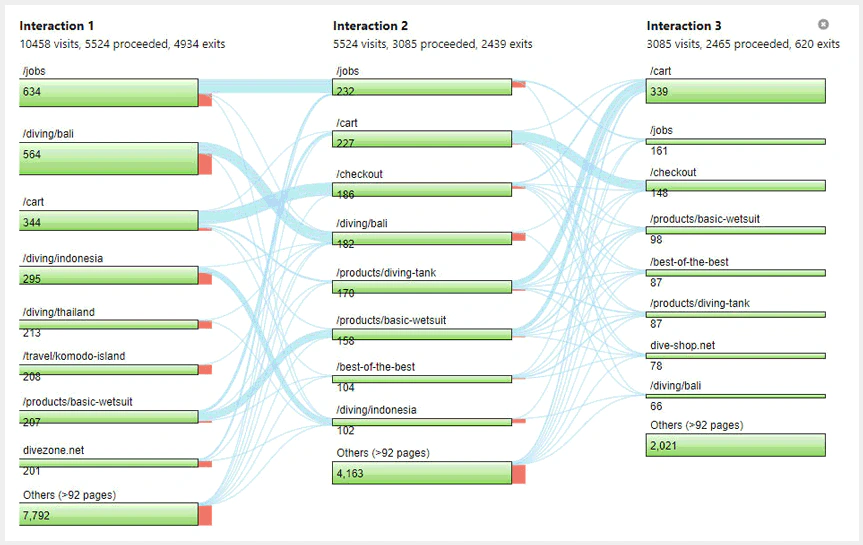
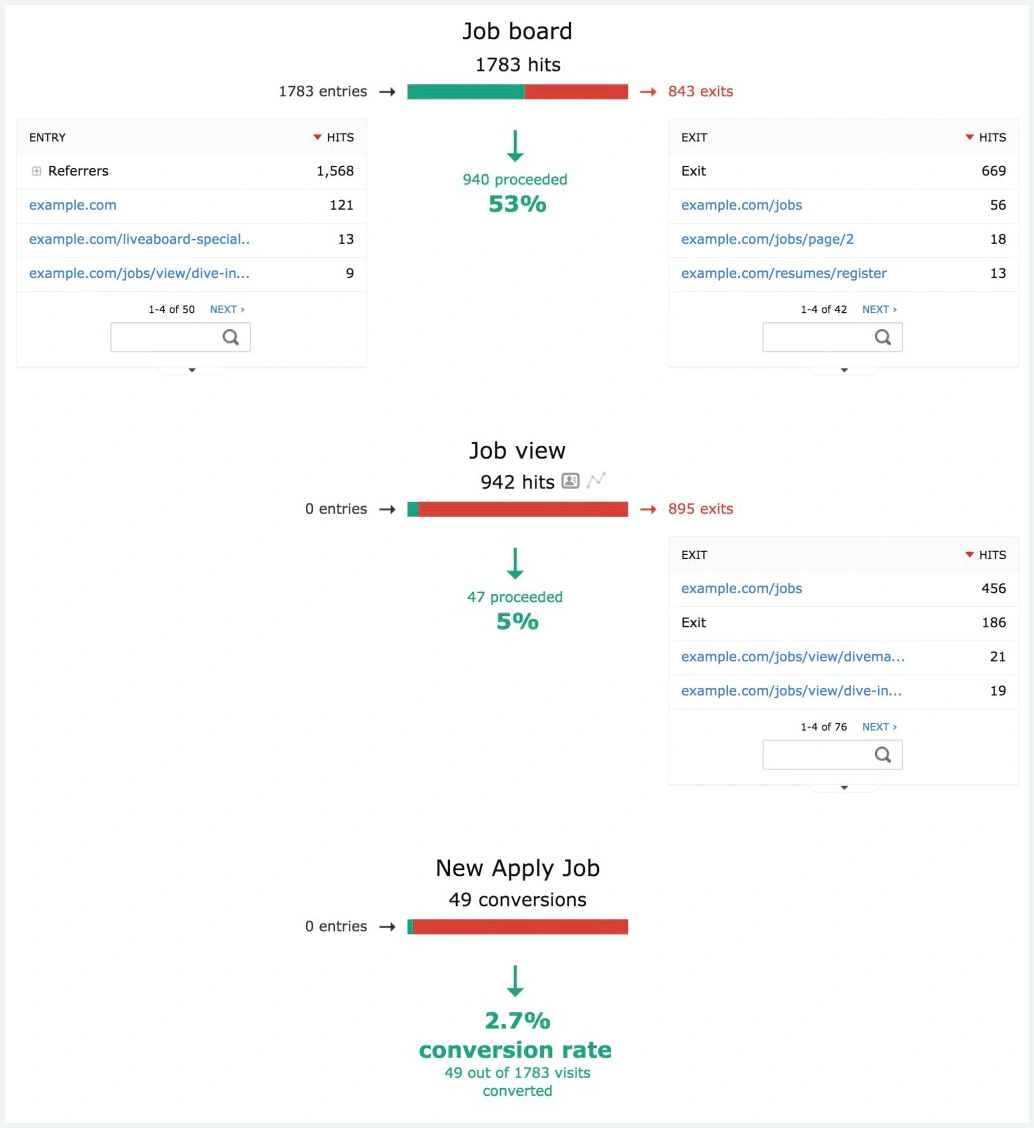
Funnels show how visitors progress through important sequences such as account creation, lead submission, checkout, subscription, or onboarding.
Users Flow visualizes common routes between pages or events. Transitions focuses on the actions immediately before and after a selected page. Together, these tools help you find abandonment, unexpected loops, and alternate paths to conversion.
Heatmaps and Session Recordings
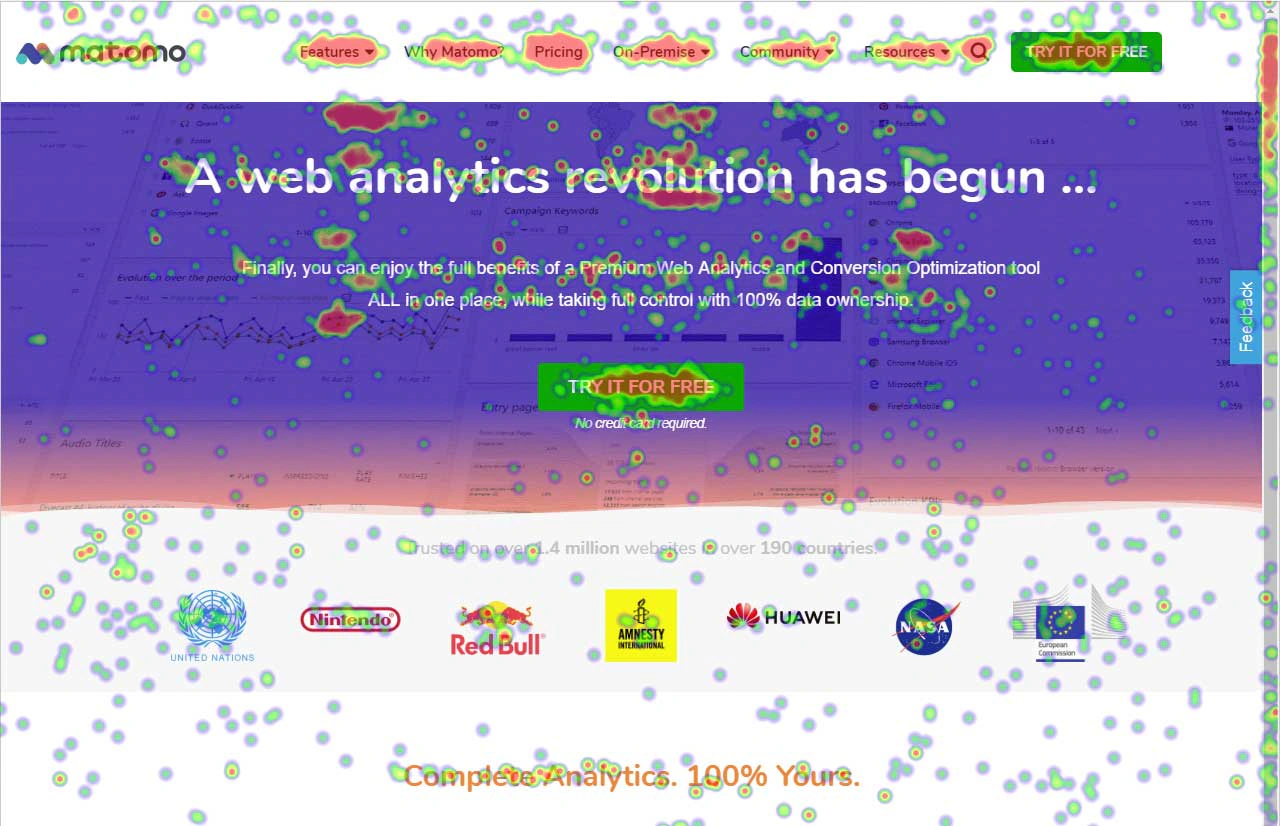
Heatmaps visualize clicks, mouse movement, and scroll activity. Session Recordings replay page changes, clicks, scrolling, form interaction, and other supported behavior.
These tools explain why a metric changed. A funnel may reveal that visitors abandon a form, while recordings can show confusing labels, repeated clicks, validation problems, or content that appears below the fold.
Replay requires stricter privacy handling than basic cookieless analytics. You should configure masking, exclusions, sampling, consent, and retention before collecting recordings.
AI Assistants and Chatbot Traffic Reports
Matomo now separates AI-related activity from conventional human traffic. Dedicated reports can identify referrals from AI assistants, requests from AI agents or chatbots, AI-related channel growth, affected pages, engagement, and conversions.
This matters because automated requests and human clicks from AI answers behave differently. Separating them helps prevent distorted traffic totals and lets you evaluate whether AI discovery contributes useful visitors or merely server activity.
Matomo MCP for Natural-Language Analytics
Matomo MCP provides a structured connection between your Matomo instance and supported external AI tools. Authorized users can ask questions about traffic, campaigns, conversions, or site performance without manually building every report.
The MCP server retrieves analytics data, while the connected AI model performs interpretation. This is useful for rapid exploration, but it also introduces a new data-processing path. Permissions, token security, scopes, privacy review, and the accuracy of AI-generated conclusions require careful management.
Matomo Feature Overview
| Feature Area | What Matomo Provides | Best For |
| Web Analytics | Traffic, pages, channels, campaigns, events, goals, ecommerce, and real-time reports | Marketing and website performance |
| Behavior Analytics | Funnels, flows, transitions, heatmaps, recordings, forms, and media | Conversion and usability research |
| Experimentation | A/B testing and personalization support | Validating website changes |
| Privacy | Anonymization, consent tools, retention controls, opt-out, and self-hosting | Privacy-sensitive measurement |
| AI Traffic | AI assistant, agent, and chatbot reporting | Measuring AI discovery and automated access |
| AI Access | MCP server for approved external AI tools | Natural-language analytics exploration |
| Data Access | APIs, exports, raw database access, and warehouse connector | Custom analysis and data integration |
Pros and Cons
Benefits and Limitations
Positive
✅ Full data ownership
✅ Cloud or self-hosted deployment
✅ Strong privacy controls
✅ Broad web analytics toolkit
Negative
❌ Self-hosting needs administration
❌ Premium packaging is complex
❌ Interface can feel dense
❌ Product analytics is less specialized
✅ Matomo Pros
- You retain ownership and can choose where analytics data is hosted.
- On-Premise Community provides a capable open-source foundation without license fees.
- Cloud combines managed hosting with advanced analytics and conversion tools.
- Privacy controls cover cookies, consent, anonymization, retention, opt-out, and access.
- Funnels, replay, forms, attribution, Tag Manager, APIs, and AI reports create broad value.
❌ Matomo Cons
- Self-hosted deployments require infrastructure, security, upgrades, backups, and database expertise.
- Cloud and On-Premise include features through different pricing structures.
- The reporting interface can feel busy when many websites, segments, goals, and plugins are enabled.
- Advanced product analytics workflows are less polished than dedicated product platforms.
- Consent-free tracking depends on configuration and legal context, not the product name alone.
Matomo delivers the most value when privacy, analytics, legal, and technical teams agree on the collection model. Data ownership is useful only when your organization also defines access, retention, deletion, security, documentation, and measurement standards.
Getting Started
Cloud Setup, Self-Hosting, and Migration
Matomo Cloud can begin collecting data after you create an account, register a website, and install the tracking code or integration. The standard trial gives you time to test real traffic without entering payment details.
On-Premise installation is more involved. You need a compatible server environment, database, HTTPS, scheduled archiving, backups, monitoring, and a secure update process.
Recommended Matomo Implementation Process
- Define the business questions, conversions, campaigns, and privacy requirements.
- Choose Cloud, dedicated On-Premise, or Matomo for WordPress.
- Document cookies, consent rules, identifiers, retention, and anonymization settings.
- Install tracking through code, Matomo Tag Manager, a CMS plugin, API, or log import.
- Configure goals, events, ecommerce, campaign parameters, and custom dimensions.
- Validate pageviews, duplicate tags, referrals, consent behavior, and conversion values.
- Create a small set of trusted dashboards, segments, alerts, and scheduled reports.
- Assign ownership for updates, privacy requests, schema changes, and data quality.
Migrating from Google Analytics
Matomo includes a Google Analytics Importer that can bring historical reporting data into Matomo. Cloud customers can use a simplified connection, while On-Premise users install and configure the importer.
The importer is useful for continuity, but it does not recreate raw historical user and event data. Imported information is aggregated, which limits features such as Visitor Log, segmentation, and some custom analysis for the imported period.
You should run Matomo and GA4 in parallel before switching reporting. Compare pageviews, sessions, campaign attribution, ecommerce, consent behavior, time zones, bot filtering, and event definitions rather than expecting identical totals.
Performance and Scalability
Hits, Archiving, Data Quality, and Infrastructure
Cloud pricing rises across hit tiers and removes most infrastructure administration. On-Premise removes license limits from the Community edition but requires enough application, database, storage, and archiving capacity to handle the workload.
Understanding Matomo Hits
A hit is not always the same as a pageview. Pageviews, events, content interactions, downloads, searches, ecommerce actions, and other tracked requests may contribute to usage.
Estimate cost from a realistic production sample. A site with heavy event tracking can generate substantially more hits than its monthly pageview number suggests.
Archiving and Query Performance
Matomo processes raw visits into archived reports. Smaller sites may archive reports on demand, but production On-Premise deployments should use scheduled archiving so users do not trigger expensive processing during report access.
Large installations may need database tuning, separate archive workers, load balancing, caching, retention rules, and careful plugin selection. Recording every low-value interaction can increase storage and maintenance without improving decisions.
Real-World Use Cases
Where Matomo Delivers the Most Value
Content, SEO, and Publishing
Publishers can analyze landing pages, traffic sources, internal search, content interactions, media completion, subscriptions, and return behavior.
The new AI-traffic reports are particularly relevant for editorial teams because they separate human referrals from AI assistants and automated chatbot requests. This helps you understand which pages are discovered, cited, accessed, and converted through AI channels.
What Users Say About Matomo
Verified reviewers frequently praise Matomo’s data ownership, privacy orientation, self-hosting, detailed visitor reports, heatmaps, funnels, and familiarity for users who worked with older web analytics platforms.
Recurring concerns include Cloud pricing at higher volumes, the work required to maintain self-hosted installations, a dense interface, email-focused support on lower tiers, and the cost of premium plugins or bundles.
Pricing and Plans
How Much Does Matomo Cost?
Matomo pricing depends on hosting, traffic, users, and advanced features.
Cloud starts from €29 per month, excluding tax, for 50,000 monthly hits on monthly billing. Annual billing includes a discount equivalent to two months free. Cloud pricing increases with traffic and includes hosting, maintenance, updates, monitoring, backups, and Matomo’s advanced feature set.
Matomo On-Premise Community is free to download and supports unlimited users and hits. Paid bundles add premium plugins, support, and user or hit allowances.
Matomo Pricing Plans
| Plan | Current Starting Price | Best For |
| Cloud Business | From €29/month for 50,000 hits | Teams wanting managed hosting and advanced features |
| Cloud Enterprise | Custom pricing | High-volume organizations needing custom limits and support |
| On-Premise Community | Free software license | Technical teams needing core analytics and full infrastructure control |
| On-Premise Team | From €275/month or €230/month equivalent annually | Up to 4 users and 5 million monthly hits |
| On-Premise Business | From €1,450/month or €1,209/month equivalent annually | Up to 20 users and 30 million monthly hits |
| On-Premise Enterprise | From €3,400/month or €2,834/month equivalent annually | Up to 50 users and 100 million monthly hits |
| On-Premise VIP | Custom pricing | Custom limits, services, security, and support |
Matomo Cloud
Cloud is the simplest way to access Matomo’s complete analytics toolkit. The standard Business plan includes allowances for websites, team members, goals, segments, custom dimensions, custom reports, tag containers, heatmaps, recordings, and other advanced features.
Raw data retention is limited by the plan, while aggregated report data can be retained longer. Confirm current allowances because traffic tiers and enterprise contracts can change.
Integrations
CMS, Ecommerce, Advertising, and Data Connections
CMS and Ecommerce Integrations
Matomo supports integrations for WordPress, WooCommerce, Drupal, Joomla, Magento, PrestaShop, Shopify-related workflows, and other content or commerce environments through official tools, plugins, or community connectors.
Implementation depth varies. Confirm whether an integration supports pageviews only or also ecommerce products, order values, refunds, consent, user IDs, and custom dimensions.
Data Protection
Security, Privacy, and Compliance Controls
Matomo’s privacy value comes from configuration and control rather than a promise that every installation is automatically compliant.
The platform provides tools for GDPR, CCPA, HIPAA-related configurations, LGPD, PECR, and other privacy requirements. Your organization remains responsible for legal basis, consent, disclosures, contracts, security, retention, and user rights.
Privacy Controls
- IP-address anonymization and additional data-minimization settings.
- Cookie controls, cookieless configurations, and configurable expiration periods.
- Consent APIs for tracking and cookie consent.
- Opt-out mechanisms and Do Not Track support.
- Raw-data and report-retention controls.
- Ability to disable Visitor Log or Visitor Profiles.
On-Premise Security Responsibility
Self-hosting gives you control but also transfers responsibility. Your team must patch the operating system, PHP environment, database, web server, Matomo core, plugins, and dependencies.
Restrict network access, protect configuration files, separate database credentials, monitor logs, scan plugins, test restoration, and update promptly after security releases.
Consent-Free Analytics Requires Careful Configuration
Some organizations may be able to use Matomo without analytics consent when they follow strict configuration requirements and applicable legal guidance.
This does not automatically cover session recordings, heatmaps, advertising tags, personal data, cross-site tracking, or every jurisdiction. Obtain qualified legal guidance before removing consent controls.
Comparison
Matomo Alternatives
The best Matomo alternative depends on whether you prioritize Google advertising, a managed privacy suite, simplicity, or deeper product analytics.
Matomo Alternatives Compared
| Platform | Main Strength | Best Fit |
| Matomo | Data ownership, self-hosting, and broad privacy-first web analytics | Privacy-sensitive and technically capable organizations |
| Google Analytics 4 | Free marketing analytics connected with Google Ads and BigQuery | Organizations centered on Google’s marketing ecosystem |
| Piwik PRO | Integrated analytics, tag management, consent, and data activation | Enterprises wanting a managed privacy and marketing suite |
| Plausible | Simple cookieless website reporting | Small teams that value clarity over analytical depth |
| Mixpanel | Fast event-based product analytics | SaaS and application teams studying feature behavior and retention |
Matomo vs Google Analytics 4
Google Analytics 4 is free, supports websites and applications, integrates deeply with Google Ads, exports events to BigQuery, and provides strong campaign and ecommerce reporting.
Matomo is better when data ownership, self-hosting, unsampled reporting, visitor-level transparency, built-in heatmaps, recordings, and privacy configuration are the main requirements. GA4 is usually better when advertising activation and Google integrations carry more weight. Read the Google Analytics 4 review for a detailed comparison.
Matomo vs Piwik PRO
Piwik PRO combines analytics, Tag Manager, Consent Manager, and data activation in a managed commercial platform.
Piwik PRO may be easier for enterprises that want formal support, integrated consent workflows, and private-cloud choices without maintaining an open-source stack. Matomo offers stronger open-source flexibility, a free Community edition, and broader self-hosting control.
Matomo vs Plausible
Plausible focuses on simple, cookieless website analytics without individual user tracking.
Plausible is easier to learn and may be sufficient for traffic, sources, pages, goals, and campaigns. Matomo is substantially deeper for visitor journeys, ecommerce, events, segmentation, heatmaps, recordings, forms, experimentation, raw data, and customization.
Matomo vs Mixpanel
Mixpanel is designed around event-based product analysis, funnels, retention, paths, cohorts, account behavior, and rapid self-service exploration.
Mixpanel is usually the better choice for product-led SaaS and mobile teams. Matomo is stronger for privacy-controlled website analytics, campaign measurement, content, self-hosting, and data sovereignty. Read the Mixpanel review for a closer look at product analytics.
For a wider comparison across web, product, and customer analytics, review the best analytics tools.
Final Thoughts
Is Matomo Worth It?
Matomo is worth considering when your analytics strategy requires more control than a conventional cloud platform provides.
Its strongest qualities are data ownership, self-hosting, privacy controls, raw-data access, unsampled reports, visitor-level analysis, campaign measurement, ecommerce, funnels, heatmaps, recordings, forms, attribution, APIs, and an active open-source ecosystem.
The platform is also adapting to changes in digital discovery. AI-assistant and chatbot reports help you separate human visits from automated activity, while Matomo MCP creates a controlled path for external AI tools to query analytics data.
The weaknesses are mostly operational. Cloud costs rise with traffic. Self-hosting requires administration. Premium On-Premise capabilities can become expensive, and the interface is not as focused as simpler privacy tools or specialized product analytics platforms.
Choose Matomo Cloud when you want privacy-first analytics without infrastructure management. Choose On-Premise Community when you have technical resources and need maximum control. Choose a paid On-Premise bundle when self-hosting, enterprise support, and advanced conversion tools are all mandatory.
Google Analytics 4 is better for Google advertising and free cross-platform measurement. Piwik PRO is attractive for a managed enterprise privacy suite. Plausible is better for simplicity, while Mixpanel is stronger for product behavior and retention.
Frequently Asked Questions
Have More Questions?
What is Matomo?
Matomo is an open-source web analytics platform for measuring traffic, campaigns, visitor behavior, goals, ecommerce, and conversions. It is available as a managed Cloud service, self-hosted On-Premise software, and a WordPress installation.
Is Matomo free?
Matomo On-Premise Community is free to download and use. You still pay for hosting, maintenance, security, backups, and technical administration. Matomo Cloud and premium On-Premise bundles are paid.
How much does Matomo cost?
Matomo Cloud starts from €29 per month for 50,000 hits on monthly billing. On-Premise Community has no license fee, while premium Team, Business, Enterprise, and VIP bundles add paid features and support.
Is Matomo better than Google Analytics 4?
Matomo is better for data ownership, self-hosting, privacy control, and built-in behavioral tools. GA4 is better for free cross-platform measurement, Google Ads integration, audiences, and BigQuery export.
Is Matomo GDPR compliant?
Matomo provides GDPR-focused controls for consent, anonymization, retention, opt-out, access, and data ownership. Compliance depends on your configuration, lawful basis, disclosures, contracts, and legal requirements.
Can Matomo work without cookies?
Yes. Matomo can be configured for cookieless analytics. This may reduce user recognition and attribution continuity. Whether consent is required depends on your data collection, configuration, features, and jurisdiction.
Does Matomo include heatmaps and session recordings?
Yes. Heatmaps and Session Recordings are included with Matomo Cloud and supported paid On-Premise bundles. You should configure masking, exclusions, consent, sampling, and retention before collecting recordings.
Does Matomo track AI traffic?
Yes. Matomo includes reports for AI assistants, agents, and chatbots. These reports help separate human visits, AI referrals, automated requests, affected pages, engagement, and conversions.
Can Matomo connect with AI tools?
Yes. Matomo MCP can connect authorized analytics data with supported external AI tools. The MCP retrieves data, while the external AI model interprets it, so permissions and privacy require review.
What are the best Matomo alternatives?
Leading Matomo alternatives include Google Analytics 4 for Google marketing integrations, Piwik PRO for a managed privacy suite, Plausible for simple cookieless analytics, and Mixpanel for product behavior analysis.