
Introduction
Mixpanel is a digital analytics platform designed to help you understand what people do inside websites, mobile applications, SaaS products, ecommerce experiences, and other digital services.
Rather than focusing mainly on traffic sources and pageviews, Mixpanel organizes analysis around users, events, properties, sessions, groups, cohorts, and business outcomes. This event-based model makes the platform especially useful when you need to investigate onboarding, activation, feature adoption, conversion, engagement, retention, monetization, and churn.
The main limitation is not the reporting interface. It is the work required to create trustworthy data. Mixpanel can answer detailed behavioral questions quickly, but only when event definitions, user identities, group properties, privacy rules, and business metrics are implemented consistently.
How We Evaluated Mixpanel
The evaluation follows the complete digital analytics workflow. It starts with collection and identity management, then assesses self-service reporting, behavioral depth, qualitative analysis, experimentation, governance, collaboration, pricing, security, and scalability.
Quick Assessment
Mixpanel Review Summary
Mixpanel is one of the strongest self-service product analytics platforms for teams that want to move quickly from a behavioral question to a usable answer.
Its core reporting experience is the main reason to consider it. Insights, Funnels, Retention, and Flows use a consistent event model, so you can begin with a broad metric, isolate a problem, compare segments, inspect affected users, and connect the finding with session recordings or an experiment.
Mixpanel at a Glance
| Category | Mixpanel Assessment |
| Best For | Product, growth, data, engineering, and marketing teams analyzing digital behavior |
| Overall Score | 9.1/10 |
| Ease of Use | 8.8/10 |
| Product Analytics | 9.6/10 |
| Session Replay | 8.8/10 |
| Experimentation | 8.7/10 |
| AI Capabilities | 9.2/10 |
| Data Governance | 8.9/10 |
| Starting Price | Free for up to 1 million monthly events |
| Main Strength | Fast, flexible behavioral analysis with an approachable report-building workflow |
| Main Limitation | Accurate results still depend on disciplined tracking, identity management, and governance |
Recommendation: Mixpanel is easy to recommend when you need deep event-based analysis without turning every product question into a SQL request. The free plan is useful for evaluation and smaller products, while Growth provides a transparent path for expanding event volume. Enterprise is most relevant when you need advanced governance, security, support, experimentation, or group-level requirements.
Platform Overview
What Is Mixpanel?
Mixpanel is an event-based digital analytics platform for measuring how people interact with digital products and websites.
An event represents an action, such as creating an account, viewing a page, adding an item to a cart, inviting a teammate, using a feature, starting a subscription, or completing a purchase.
Properties add context to those actions. You might attach device type, acquisition channel, subscription plan, product category, account size, experiment variant, geographic region, or application version to an event or user.
Where Mixpanel Fits in Your Analytics Stack
Websites and applications can send events through Mixpanel SDKs, APIs, customer data platforms, tag managers, or warehouse connectors. Mixpanel then converts that data into trends, funnels, paths, retention reports, cohorts, dashboards, replays, experiments, and alerts.
A data warehouse can remain the central source of truth for cross-functional reporting. Mixpanel is better positioned as the fast behavioral analysis layer, while Power BI, Tableau, and similar BI tools are generally better for financial, operational, and executive reporting across many business systems.
Who Should Use Mixpanel?
- Product teams: Measure onboarding, adoption, engagement, retention, and release impact.
- Growth teams: Find conversion friction and compare behavior across acquisition segments.
- Data teams: Give business users governed access to behavioral analysis.
- Engineering teams: Validate releases, inspect journeys, and connect metrics with flags or experiments.
- Marketing teams: Connect campaigns with downstream activation, retention, and revenue.
Who May Prefer Another Analytics Platform?
You may also prefer a BI platform when your priority is combining accounting, CRM, ERP, inventory, and operational data. Read the Power BI review or Tableau review for those use cases.
Key Features
Product Analytics, Replay, Experiments, and AI
Mixpanel’s value comes from the way its reports share the same events, properties, identities, and cohorts. You do not need to rebuild the analytical context every time you move from a trend to a funnel or from a cohort to a session replay.
Insights Reports and Trend Analysis
Insights is the flexible reporting workspace for measuring events, unique users, totals, averages, frequencies, ratios, and formulas over time.
Funnels and Conversion Analysis
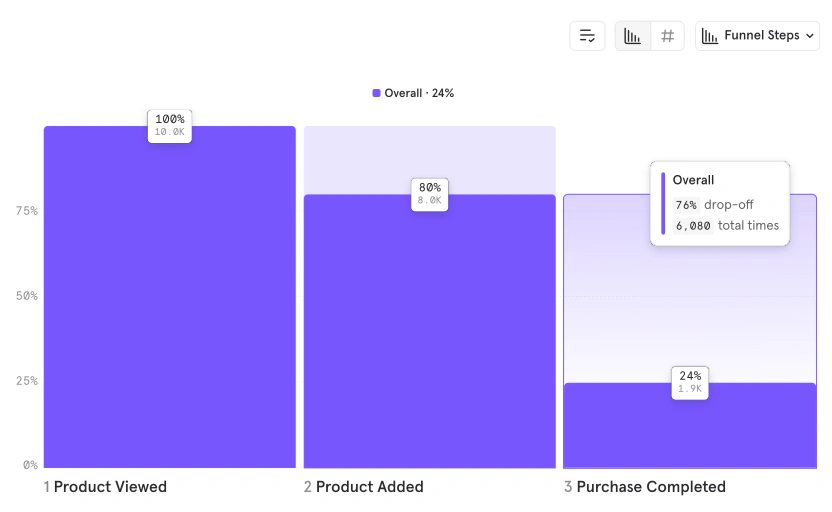
Funnels show how users progress through a defined sequence, such as registration, onboarding, checkout, upgrading, inviting teammates, or publishing a first project.
You can identify the highest-friction step, compare conversion across segments, measure time to convert, examine repeated steps, and inspect users who completed or abandoned the journey.
Flows and Journey Discovery
Flows reveal the common paths users take before or after a selected event. This is useful when real customer behavior differs from the journey your team designed.
Retention and Frequency Analysis
Retention reports measure whether users return after completing a starting action. You can compare retention curves, analyze different return behaviors, and segment results by plan, acquisition source, device, geography, or product behavior.
This helps you distinguish short-term traffic growth from durable product value. A feature that drives many first-time clicks may still be weak if users do not return to it.
Behavioral Cohorts and Group Analytics
Behavioral cohorts group users according to what they did, what they did not do, how often they acted, when they acted, or which properties describe them.
Group Analytics extends the model to companies, workspaces, households, subscriptions, or other account-level entities. It is valuable for B2B products, but it is an add-on rather than a universal inclusion across plans.
Session Replay and Heatmaps
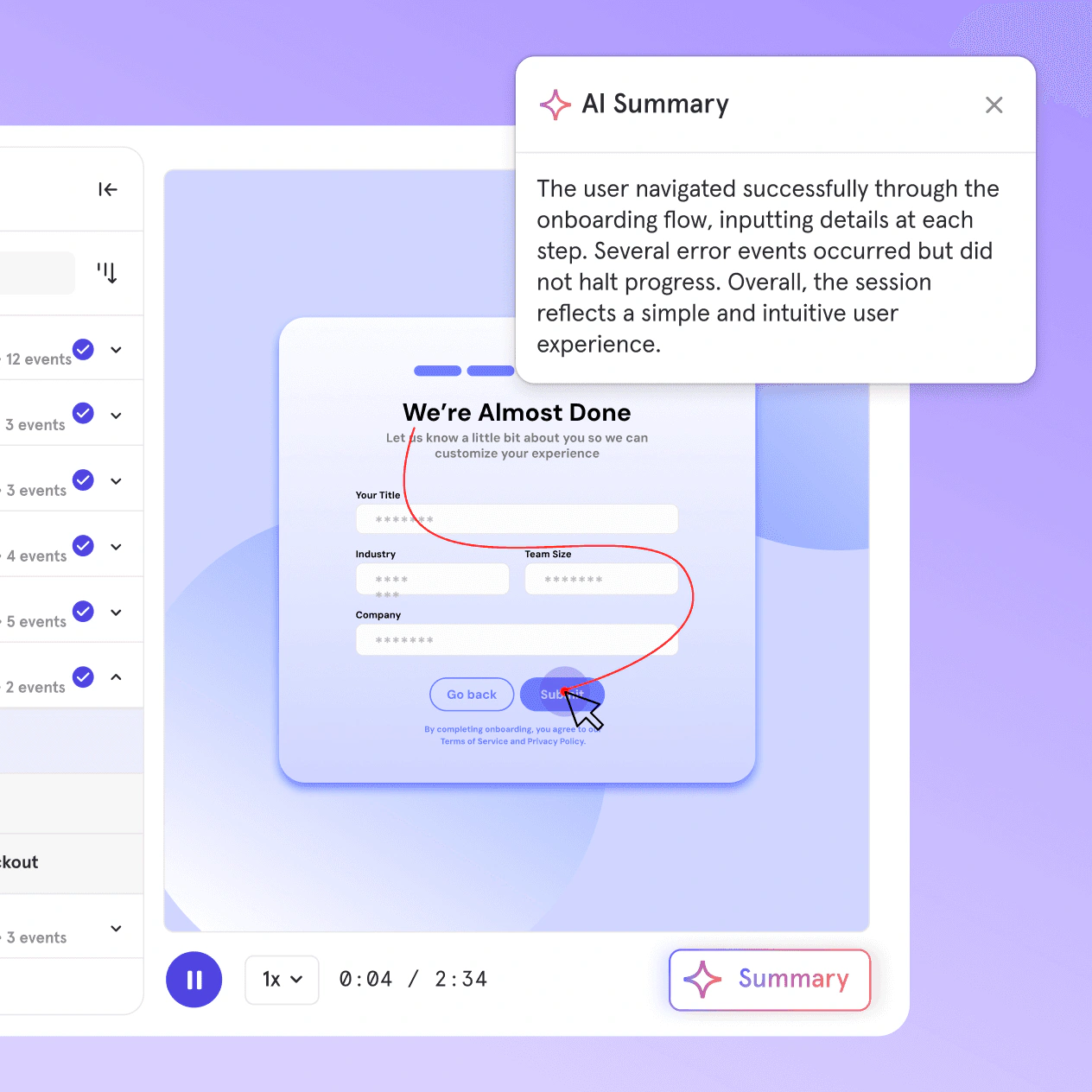
Session Replay adds qualitative context to quantitative findings. When a funnel shows a drop, you can review relevant sessions to see whether users encountered confusing navigation, errors, repeated clicks, slow responses, or unclear interface elements.
The integration with Mixpanel events is more important than replay alone. You can narrow recordings to a specific cohort, conversion outcome, device type, or user behavior instead of watching random sessions.
Web Analytics and Autocapture
Autocapture can reduce the time required to begin exploring a website, but it should not replace governed custom events for important business outcomes. Automatically collected clicks may change when the interface changes, while a custom event such as Account Activated should remain stable across redesigns.
Experiments and Feature Flags
Feature Flags control who sees a change and when. You can use them for gradual rollouts, targeted releases, kill switches, variants, and experiments. Connecting rollout control with behavioral cohorts makes it easier to test changes on relevant groups.
Impact, Signal, and Metric Trees
Impact helps measure whether a launch was adopted and whether adopters behaved differently afterward. Signal identifies events that correlate with a target outcome, such as second-week retention.
Metric Trees connect top-level goals with the drivers beneath them. A company can map revenue, activation, retention, conversion, and leading product behaviors into a shared structure so teams understand how their work relates to business outcomes.
Mixpanel Agent, MCP, and Headless
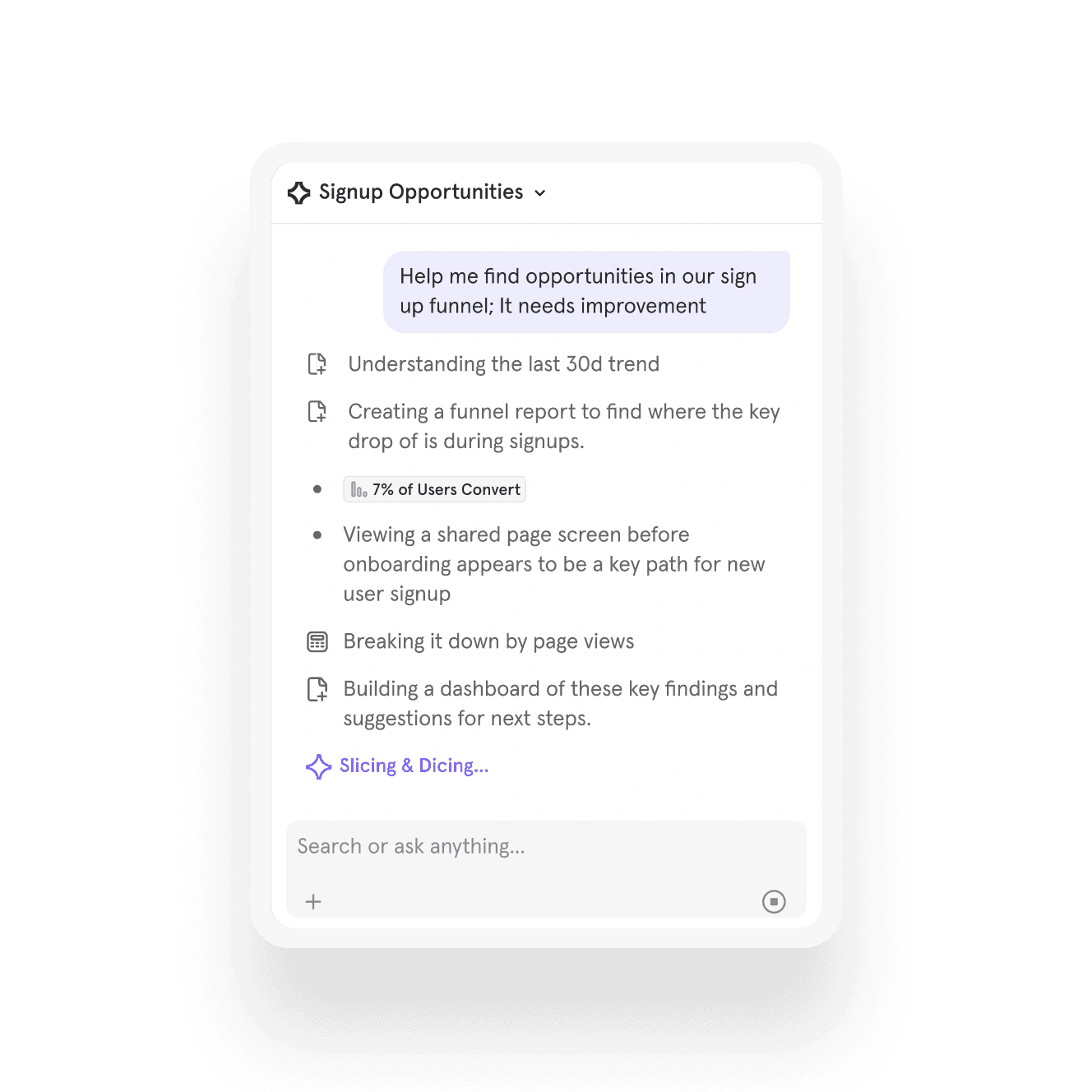
Mixpanel Agent lets you ask questions in natural language, create or modify reports, build boards, define metrics, and create cohorts inside the platform.
Lexicon and Data Governance
Lexicon acts as Mixpanel’s data dictionary for events, properties, and descriptions. Teams can document meaning, add ownership, verify data, and reduce confusion caused by similar or outdated event names.
Mixpanel Feature Overview
| Feature Area | What Mixpanel Provides | Best For |
| Product Analytics | Insights, funnels, flows, retention, formulas, cohorts, and segmentation | Understanding digital behavior |
| Experience Analytics | Session replay, heatmaps, and event-linked investigation | Explaining conversion and usability problems |
| Experimentation | Experiment reporting, feature flags, targeted rollouts, and statistical analysis | Validating product changes |
| Strategic Analytics | Impact, Signal, anomaly detection, root-cause analysis, and Metric Trees | Connecting behavior with business outcomes |
| AI | Mixpanel Agent, MCP server, and Headless Python SDK | Natural-language and programmable analytics |
| Data Management | Lexicon, warehouse connectors, APIs, lookup tables, and data pipelines | Maintaining trusted and connected data |
| Enterprise Governance | Roles, permissions, SSO, SCIM, sensitive-data controls, and audit capabilities | Scaling analytics across organizations |
Pros and Cons
Benefits and Limitations
Positive
✅ Fast self-service reporting
✅ Strong funnel and retention analysis
✅ Transparent Growth pricing
✅ Expanding AI and experimentation stack
Negative
❌ Instrumentation still requires planning
❌ Event volume can increase cost
❌ Some advanced features are add-ons
❌ Enterprise pricing remains sales-led
✅ Mixpanel Pros
- Insights, Funnels, Retention, and Flows provide an excellent self-service analysis workflow.
- Reports are fast to build and consistent enough for non-technical product teams.
- Session Replay connects directly with behavioral segments and conversion outcomes.
- The Growth plan publishes a clear event-based rate and includes unlimited reports.
- Agent, MCP, Headless, Metric Trees, experiments, and flags expand the platform’s long-term value.
❌ Mixpanel Cons
- Reliable implementation requires coordination between product, data, engineering, and privacy teams.
- High-volume events and broad autocapture can increase cost without improving decisions.
- Group Analytics, data pipelines, Metric Trees, experiments, and flags may require add-ons.
- The Free plan is limited to five saved reports per seat and omits several governance features.
- Enterprise pricing and contract-level packaging still require a sales conversation.
Getting Started
Tracking, Identity, and Team Adoption
You can begin with Mixpanel SDKs, APIs, warehouse connectors, customer data platforms, tag managers, or autocapture. The technical installation can be quick, but a trustworthy production setup requires more planning.
Recommended Mixpanel Implementation Process
- Define the product and business decisions your analytics must support.
- Identify critical events for acquisition, activation, engagement, retention, and revenue.
- Create naming standards for events, user properties, and group properties.
- Decide how anonymous visitors become identified users across devices and sessions.
- Use autocapture for broad visibility and custom events for durable outcomes.
- Validate data in a separate test project before sending it to production.
- Build a small set of trusted reports, cohorts, metrics, and boards.
- Assign ownership for data changes, privacy, quality monitoring, and cost control.
Autocapture vs Custom Events
Custom tracking is still essential for business outcomes such as finishing onboarding, activating an account, creating a project, inviting a collaborator, upgrading a plan, completing a purchase, or reaching a success milestone.
A balanced setup uses automatic collection for broad interaction context and carefully governed custom events for metrics that must survive interface changes.
Identity Management Is a Critical Design Decision
Mixpanel uses identity merging to connect anonymous behavior with known users. A poor implementation can split one person into several profiles or merge activity that should remain separate.
You should document how device IDs, user IDs, shared devices, logouts, multiple accounts, and cross-platform behavior are handled before dashboards depend on the result.
Ease of Use by Role
Product managers and growth analysts can learn standard reports relatively quickly. The interface is consistent, and common questions rarely require SQL.
Customer Support and Education
Mixpanel provides documentation, Mixpanel University, templates, community resources, webinars, and support channels.
Performance and Scalability
Event Volume, Data Quality, and Scale
Mixpanel can support large behavioral datasets, but analytics scalability involves more than query speed. You must also control event volume, taxonomy complexity, identity rules, project structure, data residency, replay quotas, warehouse costs, and permissions.
Event Volume and Cost Control
Growth pricing is based on qualifying events across projects in the organization. A single active user can generate many events, especially when background processes, repeated UI interactions, or broad autocapture are enabled.
Before scaling, audit which events support real decisions. Scrolls, mouse movements, polling, heartbeat events, and repeated system updates can create cost without adding meaningful insight.
The published rate makes forecasting easier than opaque quote-only pricing, but your estimate is only as good as your event-volume model.
Data Quality and Governance
Mixpanel can document events in Lexicon, monitor data quality, verify trusted definitions, and assign ownership on supported plans.
Warehouse and Hybrid Architectures
Warehouse Connectors can sync data from systems such as Snowflake, BigQuery, Databricks, Redshift, and Postgres into Mixpanel.
This lets teams analyze product behavior alongside subscription, revenue, support, account, or operational data without forcing business users to write warehouse queries.
Practical Scalability Checklist
- Track business-relevant behavior rather than every technical interaction.
- Document anonymous, identified, device, and group identity rules.
- Review event volume before enabling broad production autocapture.
- Create separate development and production projects.
- Archive or block low-value events and outdated properties.
- Review report ownership and remove obsolete dashboards.
Real-World Use Cases
Where Mixpanel Delivers the Most Value
SaaS Activation and Onboarding
You can define the behavior that indicates a new user has received initial value, then measure how many users reach that point and how long it takes.
Funnels show where onboarding breaks down. Cohorts compare activated and non-activated users. Retention analysis tests whether the selected activation event predicts continued use. Replay helps explain why users fail.
Feature Adoption and Product Roadmaps
Mixpanel can show which features are discovered, adopted repeatedly, used by valuable segments, or associated with retention and expansion.
Ecommerce and Subscription Conversion
Ecommerce teams can analyze product discovery, cart behavior, checkout, payment outcomes, purchases, repeat orders, and subscription upgrades.
Flows reveal unexpected paths to purchase, while replay provides context for abandonment. Experiments can test checkout steps, pricing messages, recommendations, or promotional experiences.
Identity design is especially important when users interact anonymously before registering or move between mobile and web experiences.
B2B Account and Workspace Analytics
Individual-user reporting can be misleading for collaborative software. A B2B product may need to measure workspace activation, invited teammates, seat utilization, administrator behavior, account-wide adoption, and expansion signals.
Group Analytics supports account-level analysis, but you should include the add-on cost and implementation requirements in your evaluation.
Marketing and Campaign Quality
Mixpanel can connect acquisition sources with downstream product outcomes. This helps you compare campaigns based on activation, retained usage, feature adoption, and revenue rather than registrations alone.
What Users Say About Mixpanel
Verified reviewers frequently praise Mixpanel’s intuitive reporting, real-time behavioral analysis, funnels, dashboards, segmentation, and ability to answer product questions without waiting for a data analyst.
Pricing and Plans
How Much Does Mixpanel Cost?
Mixpanel uses event-based pricing and includes unlimited seats across its current plans. This makes collaboration easier because you do not need to restrict access simply to avoid per-user charges.
The first 1 million monthly events are free. Growth then charges $0.28 per 1,000 events, with volume discounts available. Enterprise uses custom pricing and supports much higher event volumes, advanced governance, premium support, and additional capabilities.
Mixpanel Pricing Plans
| Plan | Current Price Reference | Best For |
| Free | $0 for up to 1 million monthly events | Evaluation, early-stage products, and small teams |
| Growth | First 1 million events free, then $0.28 per 1,000 events | Growing teams needing unlimited reports, cohorts, and more replay volume |
| Enterprise | Custom pricing | Organizations needing advanced governance, security, scale, support, and custom terms |
| Startup Program | First year free for qualifying early-stage companies | Eligible startups founded less than five years ago with up to $8 million in funding |
| Add-ons | Additional pricing varies | Group Analytics, data pipelines, Metric Trees, experiments, feature flags, and advanced services |
Mixpanel Free
The Free plan includes up to 1 million monthly events, unlimited seats, core Insights, Funnels, Retention, and Flows reports, integrations, templates, Mixpanel Agent, and 10,000 monthly session replays.
The most important restriction is the limit of five saved reports per seat. The plan also limits or excludes cohorts, custom properties, lookup tables, permissions, and several governance capabilities.
Mixpanel Growth
Growth includes the first 1 million events free and then charges according to event volume. It supports up to 20 million monthly events through the public self-service model.
Growth adds unlimited reports, behavioral cohorts, custom properties, stronger monitoring, more replay capacity, and other advanced analysis capabilities.
Mixpanel Enterprise
Enterprise supports much larger event volumes and adds advanced analytics, comprehensive governance, security controls, premium support, and custom commercial terms.
Startup Program
Qualifying startups can receive their first year free. Mixpanel currently describes eligibility as companies founded less than five years ago, with up to $8 million in total funding, that have not redeemed another offer.
Potential Hidden Costs
Potential additional costs include event volume beyond the free allowance, expanded session replay usage, Group Analytics, data pipelines, Metric Trees, experiments, feature flags, implementation support, data cleanup, warehouse compute, and ongoing analytics administration. You should model these costs alongside the published event rate before choosing a plan.
Data Protection
Security, Privacy, and Enterprise Controls
Mixpanel maintains a SOC 2 Type II attestation and ISO 27001 and ISO 27701 certifications. Its materials also address GDPR, CCPA, regional data residency, privacy APIs, and enterprise controls.
Access and Governance Controls
- US or EU data residency options.
- Project-level roles and permissions on supported plans.
- SAML-based SSO and SCIM provisioning for Enterprise requirements.
- Sensitive-data classification and compartmentalized access controls.
- User privacy APIs, tracking opt-out methods, and customizable retention options.
Session Replay Privacy
Mixpanel provides masking and capture controls for Session Replay. Web replay reconstructs the page from recorded DOM changes rather than storing a literal screen video.
Before enabling replay, you should review masking, sampling, consent, and collection settings. Credentials, payment information, government identifiers, private messages, and unreviewed free text should not be sent to analytics systems.
Security Incident Disclosure
Mixpanel disclosed that a smishing campaign detected on November 8, 2025 affected a limited number of customers. The company stated that it secured affected accounts, revoked sessions, rotated credentials, reset employee passwords, engaged external forensic specialists, and added controls to detect similar activity.
Comparison
Mixpanel Alternatives
The best Mixpanel alternative depends on whether you prioritize broader digital optimization, automatic capture, in-app adoption, developer control, deployment flexibility, or simpler web analytics.
Mixpanel Alternatives Compared
| Platform | Main Strength | Best Fit |
| Mixpanel | Fast self-service behavioral analytics with transparent Growth pricing | Product-led teams that want accessible funnels, retention, and segmentation |
| Amplitude | Broad digital analytics, experimentation, activation, and governance | Data-mature organizations wanting a wider optimization platform |
| Heap | Automatic capture and retroactive behavioral analysis | Teams that want broad collection with less initial manual tagging |
| Pendo | In-app guidance, onboarding, feedback, and product adoption | SaaS teams emphasizing customer education and engagement |
| PostHog | Developer-first product suite and deployment flexibility | Engineering-led teams wanting analytics and development tooling together |
Mixpanel vs Amplitude
Amplitude is Mixpanel’s closest direct competitor. Both provide event-based analytics, funnels, retention, paths, cohorts, session replay, experimentation, AI capabilities, and warehouse integrations.
Amplitude generally offers a broader digital optimization platform, while Mixpanel provides a more focused and accessible product analytics experience. Read our Amplitude Analytics review for a detailed assessment of its features, pricing, implementation requirements, and limitations.
Mixpanel vs Heap
Heap is known for automatically capturing website and application interactions so teams can define and analyze behavior after collection.
Heap is particularly useful when you want broad autocapture and retroactive event definition. Mixpanel is often more approachable for teams that prefer a structured event model and fast self-service reporting. Read our Heap review for a closer examination of its autocapture, session replay, analytics, pricing, and business fit.
Mixpanel vs Pendo
Pendo combines analytics with in-app guides, onboarding, feedback, roadmapping, and product-adoption workflows.
Pendo is the stronger option when your main priority is changing user behavior through contextual guidance and product education. Mixpanel offers greater analytical focus for funnels, retention, segmentation, and behavioral investigation. Read our Pendo review for a detailed comparison of its analytics and adoption capabilities.
Mixpanel vs PostHog
PostHog offers a developer-oriented platform that can include product analytics, session replay, feature flags, experiments, surveys, error tracking, logs, data tools, and other engineering capabilities.
PostHog is particularly compelling for technical teams that want analytics integrated with product development and release workflows. Mixpanel is generally easier for cross-functional product, growth, and marketing teams to adopt. Read our PostHog review for a closer look at its modular platform, pricing, and developer-focused features.
For broader executive dashboards, financial reporting, and cross-department business intelligence, review the best business intelligence software.
Final Thoughts
Is Mixpanel Worth It?
Mixpanel is worth considering when digital customer behavior directly influences your product strategy, growth model, and revenue performance.
Pricing is also more competitive than it once appeared. The first 1 million monthly events are free, and Growth publishes a clear usage rate. However, event volume, replay expansion, Group Analytics, pipelines, experiments, flags, and enterprise services can still raise the total cost.
Choose Mixpanel when you want fast, approachable product analytics with room to grow into AI and experimentation. Consider Amplitude for a broader digital optimization platform, Heap for autocapture-first analysis, Pendo for in-app adoption, or PostHog for a developer-first suite.
Frequently Asked Questions
Have More Questions?
What is Mixpanel?
Mixpanel is an event-based digital analytics platform for analyzing user behavior, conversion funnels, journeys, feature adoption, engagement, retention, experiments, and product growth.
Is Mixpanel free?
Yes. Mixpanel offers a free plan for up to 1 million monthly events, with unlimited seats, core analytics reports, Mixpanel Agent, and 10,000 monthly session replays.
How much does Mixpanel cost?
The Free plan costs $0. Growth includes the first 1 million monthly events free, then costs $0.28 per 1,000 events. Enterprise uses custom pricing.
Is Mixpanel difficult to implement?
Basic collection can be implemented quickly with SDKs, integrations, or autocapture. A reliable production setup still requires taxonomy planning, identity rules, validation, privacy controls, and governance.
What is Mixpanel Autocapture?
Autocapture automatically collects supported website interactions to speed up analysis. Custom events are still recommended for important and durable business outcomes.
Does Mixpanel include session replay?
Yes. Mixpanel Session Replay connects recordings with events, funnels, cohorts, and user segments. Included monthly replay volume depends on your plan.
Can Mixpanel run A/B tests?
Yes. Mixpanel supports experiment reporting and feature flags for controlled rollouts and A/B tests. Packaging may require Enterprise access or add-ons.
Does Mixpanel use artificial intelligence?
Yes. Mixpanel provides Mixpanel Agent inside the platform, an MCP server for compatible AI assistants, and Headless for Python-based agents, scripts, and notebooks.
What are the best Mixpanel alternatives?
Leading Mixpanel alternatives include Amplitude for broader digital optimization, Heap for autocapture, Pendo for product adoption, and PostHog for developer-first tooling.
Is Mixpanel worth it?
Mixpanel is worth considering when you need fast self-service product analytics, strong funnels and retention, connected replay, transparent Growth pricing, and expanding AI capabilities.