
Introduction
Google Analytics 4 is an event-based web and app analytics platform that helps you measure how people discover, engage with, and convert across your digital properties.
GA4 is often described as a website traffic tool, but that definition is too narrow. The platform combines acquisition reporting, user engagement, ecommerce measurement, audience creation, attribution, advertising analysis, predictive metrics, cross-platform identity, APIs, and raw event export to BigQuery.
Recent updates have also made GA4 more relevant to AI-era marketing. The platform can identify referrals from AI assistants, standardize messy source values, summarize important data changes, recommend configuration tasks, and provide conversational analysis through the Gemini-powered Ask Advisor experience.
The main tradeoff is usability. GA4 is free and technically capable, but a reliable implementation requires more than installing a tag. You need a measurement plan, validated events, consent settings, clean campaign parameters, ecommerce schemas, identity rules, retention choices, and a clear reporting strategy.
This Google Analytics 4 review examines event tracking, acquisition reporting, attribution, explorations, AI capabilities, audiences, ecommerce, BigQuery, pricing, privacy, implementation requirements, integrations, and leading alternatives.
How We Evaluated Google Analytics 4
The evaluation follows the complete measurement lifecycle. It begins with collection and consent, then assesses reporting, exploration, attribution, audience activation, AI assistance, data export, governance, scalability, privacy, and practical value.
The assessment draws on current Google product documentation, Analytics release notes, developer resources, public plan limits, security materials, and recurring themes in verified customer feedback. Scores reflect how effectively GA4 supports real marketing and analytics decisions, not simply how many reports appear in the navigation.
Quick Assessment
Google Analytics 4 Review Summary
Google Analytics 4 remains the default analytics foundation for many websites, mobile applications, ecommerce stores, publishers, lead-generation businesses, and advertising teams.
Its strongest advantage is the surrounding Google ecosystem. You can measure traffic and key events, connect Google Ads and Search Console, build audiences, analyze cross-channel performance, export raw events to BigQuery, create dashboards through Looker Studio, and automate reporting through the Data API.
GA4 is particularly valuable when your organization depends on Google Ads, needs a free analytics platform, manages both web and app journeys, or wants warehouse access without purchasing an enterprise analytics license.
It is less suitable when you need intuitive product analytics, built-in session replay, heatmaps, feature experimentation, self-hosted data ownership, or simple privacy-first reporting. In these cases, GA4 often works best alongside another tool rather than as the only source of behavioral insight.
Google Analytics 4 at a Glance
| Category | Google Analytics 4 Assessment |
| Best For | Marketing, ecommerce, content, advertising, and digital analytics teams |
| Overall Score | 8.9/10 |
| Ease of Use | 7.5/10 |
| Web and App Measurement | 9.3/10 |
| Marketing Attribution | 9.5/10 |
| Exploration and Segmentation | 8.5/10 |
| AI Capabilities | 8.6/10 |
| Privacy Controls | 8.2/10 |
| Value for Money | 9.7/10 |
| Starting Price | Free |
| Main Strength | Free cross-channel measurement connected with Google Ads and BigQuery |
| Main Limitation | Complex reporting, limited qualitative analytics, and implementation-sensitive data quality |
Recommendation: GA4 is easy to recommend as a core marketing analytics layer because the Standard edition is free and the Google Ads, BigQuery, Search Console, Firebase, and Looker Studio connections are difficult to replace with one product. You should not assume that the default installation is complete. The platform becomes substantially more useful after you customize events, key events, reports, audiences, attribution settings, consent behavior, and data exports around your business model.
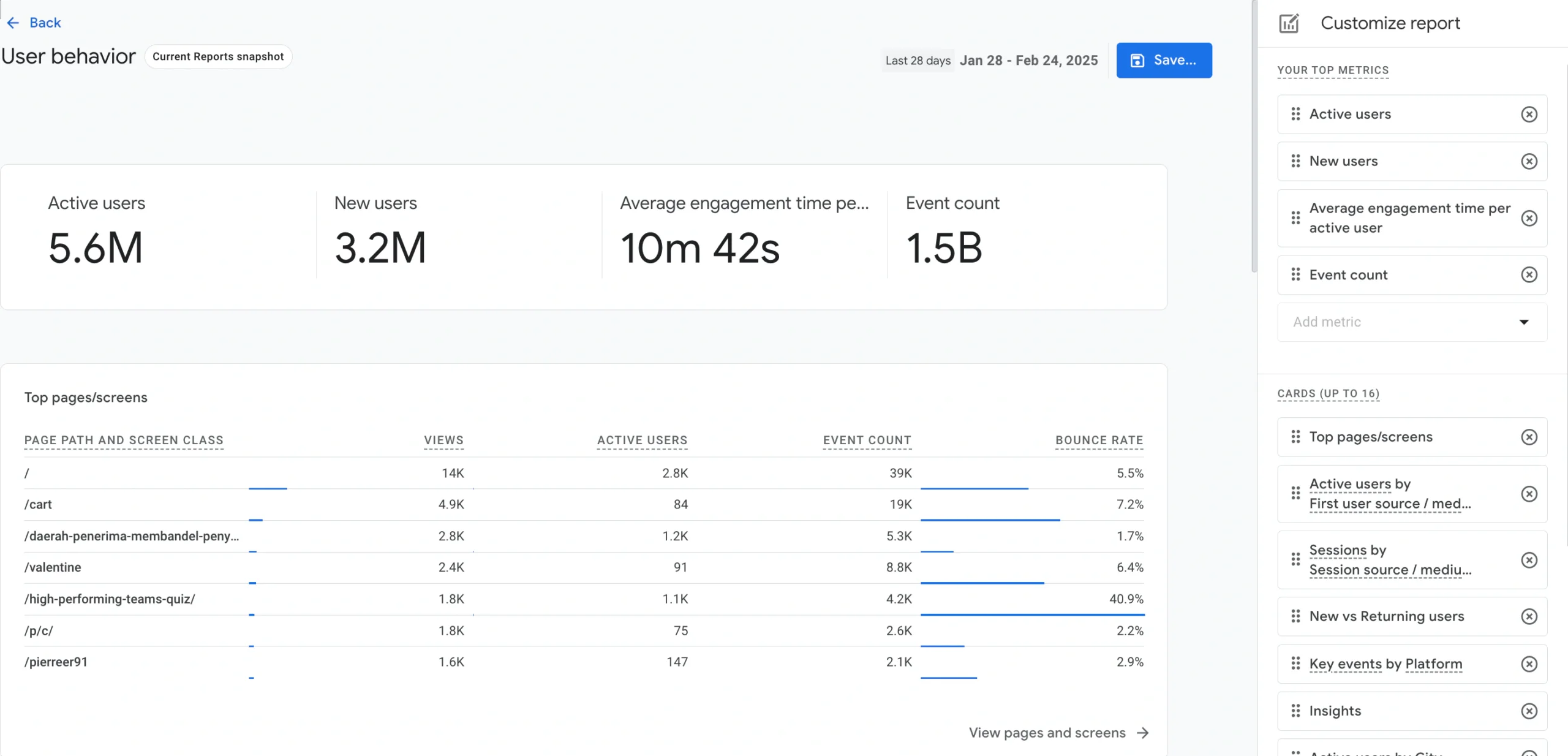
Platform Overview
What Is Google Analytics 4?
Google Analytics 4, commonly called GA4, is Google’s current analytics platform for measuring websites and mobile applications through one event-based data model.
Each interaction is recorded as an event. A page view, app open, purchase, lead submission, video start, file download, login, search, or subscription can all become events with parameters that add context.
This structure is more flexible than a reporting model centered mainly on sessions and pageviews. It allows web and app teams to describe customer behavior using a shared vocabulary, although the usefulness of the data depends on how consistently the events are implemented.
Where GA4 Fits in Your Analytics Stack
GA4 typically sits between your websites and applications, your advertising platforms, and the teams evaluating marketing and customer behavior.
The Google tag, Google Tag Manager, Firebase SDKs, Measurement Protocol, and Data Manager API can send events into GA4. The platform then turns those events into standard reports, explorations, audiences, key events, attribution analysis, advertising conversions, and exports.
GA4 is not a complete business intelligence platform. It focuses on digital interactions and marketing performance. A warehouse and BI tool may still be necessary when you need governed reporting across CRM, finance, sales, support, and operational systems. See the best business intelligence software for broader reporting options.
Key Features
Events, Attribution, Explorations, Audiences, and AI
GA4 covers the journey from data collection to reporting, advertising activation, and warehouse analysis. Its capabilities are strongest when you configure them around clear business questions rather than accepting every default.
Event-Based Measurement and Enhanced Measurement
Automatically collected events establish a basic measurement layer. Enhanced Measurement can add page views, scrolls, outbound clicks, site searches, video interactions, file downloads, and form interactions for supported web implementations.
These events are useful for rapid setup, but they do not replace a measurement plan. A form interaction is not necessarily a qualified lead, and a scroll is not proof that someone understood your content.
Recommended and custom events let you represent outcomes such as generating a lead, completing onboarding, booking a demonstration, subscribing, renewing, or reaching a meaningful product milestone. Parameters can describe value, currency, plan, content type, campaign, product, or other business context.
Explorations, Funnels, Paths, and Cohorts
Explorations provide deeper analysis through free-form tables, funnels, paths, cohorts, segment overlap, user exploration, and user-lifetime techniques.
Funnel exploration shows how users progress through ordered or open steps. Path exploration helps you discover what people do before or after an event. Cohort exploration compares groups that share an acquisition date or behavior.
Explorations are one of GA4’s strongest free features, but they have limitations. Sharing and collaboration are less polished than dedicated product analytics tools, data retention settings affect the available historical range, and high-volume queries may be sampled.
Acquisition Reporting and Cross-Channel Attribution
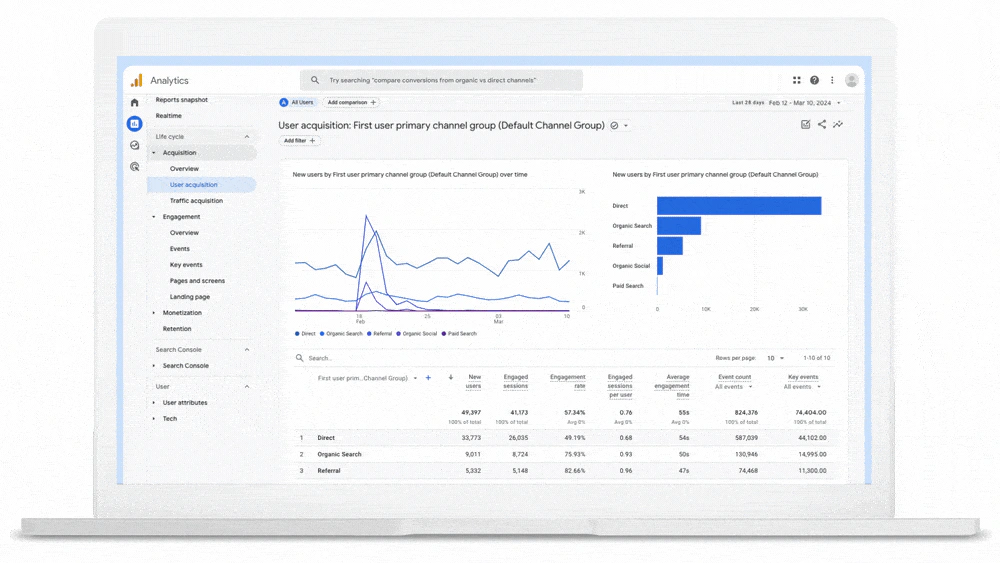
GA4 separates user acquisition from traffic acquisition. User acquisition focuses on how a person was first acquired, while traffic acquisition evaluates the source of individual sessions.
The Advertising workspace adds conversion paths, attribution comparisons, and cross-channel analysis. Recent beta improvements expand assisted-conversion analysis, early, mid, and late touchpoint reporting, and conversion-level attribution control for eligible properties.
Recent Source Group updates also standardize inconsistent source values from platforms such as Facebook, Instagram, TikTok, Pinterest, and Amazon. This reduces the manual cleanup caused by variations in campaign tagging.
AI Assistant Traffic Measurement
GA4 now includes an AI Assistant channel in its default channel reporting. Recognized referrals from services such as ChatGPT, Gemini, and Claude can be grouped under an ai-assistant medium and campaign classification.
This is strategically useful for SEO and content teams because AI referral traffic previously appeared across referral, organic, direct, or inconsistent source values.
The feature measures visits that reach your website. It does not reveal citations or brand exposure that occur inside an AI answer without a click. You still need specialized AI visibility tools to measure zero-click presence.
Audiences, Key Events, and Google Ads Activation
Audiences group users based on dimensions, metrics, event sequences, and predictive conditions. You can create groups such as visitors who viewed pricing but did not convert, high-value purchasers, returning users, or people who abandoned checkout.
Important behaviors can be marked as key events. When GA4 is connected to Google Ads, eligible actions and audiences can support campaign reporting, bidding, exclusions, and remarketing.
This connection is a major reason to use GA4 even when another tool handles product analytics. Google Ads optimization depends on reliable conversion definitions, consent configuration, and campaign tagging, so errors in GA4 can affect more than dashboards.
Ask Advisor, Generated Insights, and Task Assistant
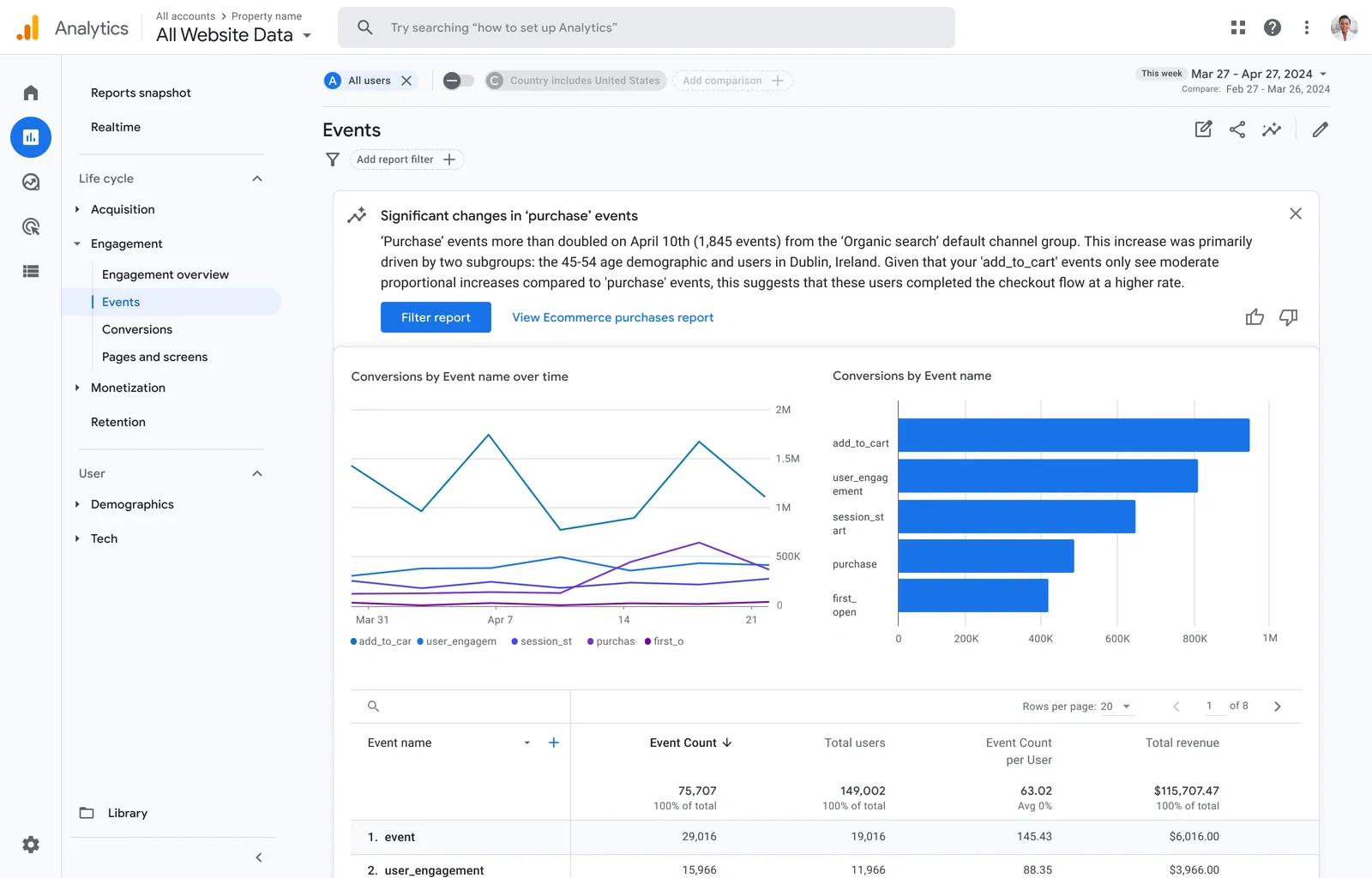
Ask Advisor is a Gemini-powered conversational experience that can answer property-level questions, create visualizations, explain performance changes, and link you to relevant reports.
The beta is most helpful when you know the business question but not the exact report configuration. Availability can depend on property eligibility and language, and AI responses should still be checked against the underlying report.
Generated insights summarize notable data changes, anomalies, seasonality, and configuration updates on the Home page. Task Assistant recommends practical actions such as improving data collection, connecting products, and fixing setup issues.
Google Analytics 4 Feature Overview
| Feature Area | What GA4 Provides | Best For |
| Collection | Google tag, Tag Manager, Firebase SDKs, Measurement Protocol, and server-to-server APIs | Web, app, and offline event measurement |
| Reporting | Acquisition, engagement, monetization, retention, user, and technology reports | Recurring marketing and performance analysis |
| Exploration | Free-form, funnel, path, cohort, user, overlap, and lifetime techniques | Ad hoc behavioral investigation |
| Advertising | Attribution, conversion paths, audiences, Google Ads connections, and budgeting betas | Campaign measurement and optimization |
| AI | Ask Advisor, Generated insights, Task Assistant, predictive metrics, and anomaly detection | Faster analysis and configuration guidance |
| Data Access | BigQuery export, Data API, Admin API, data import, and Looker Studio | Custom reporting and warehouse analysis |
| Privacy | Consent mode, retention controls, data deletion, redaction, and ads-personalization settings | Responsible collection and governance |
Pros and Cons
Google Analytics 4 Benefits and Limitations
Positive
✅ Powerful free platform
✅ Excellent Google Ads integration
✅ Free BigQuery event export
✅ Flexible web and app model
Negative
❌ Steep learning curve
❌ Reporting can feel fragmented
❌ No replay or heatmaps
❌ Thresholds and limits affect analysis
✅ Google Analytics 4 Pros
- The Standard edition provides substantial measurement and analysis capabilities without a license fee.
- Google Ads, Search Console, Firebase, BigQuery, Merchant Center, and Looker Studio connections strengthen the ecosystem.
- The event model supports websites, applications, ecommerce, lead generation, subscriptions, and custom journeys.
- Explorations make funnels, paths, cohorts, and user analysis available without purchasing Analytics 360.
- Recent AI and source-classification features reduce analysis and campaign-cleanup work.
❌ Google Analytics 4 Cons
- The interface and event model create a meaningful learning curve for occasional users.
- Default reports may not answer familiar marketing questions without customization.
- Data thresholds, sampling, cardinality, identity, and modeling can produce confusing differences.
- GA4 does not include session replay, heatmaps, surveys, or native experimentation.
- Standard user-level and exploration data retention is limited to 14 months.
GA4 provides exceptional value, but free software is not the same as low-effort software. Your total cost includes implementation, consent management, campaign governance, dashboard development, training, debugging, warehouse queries, and ongoing maintenance.
Getting Started
Implementation, Event Design, and Governance
A basic GA4 property can collect page views quickly, especially when your CMS provides a native integration. A decision-ready implementation requires more planning.
Recommended GA4 Implementation Process
- Define the business decisions, customer journeys, and marketing questions you need to support.
- Audit existing tags, events, campaign parameters, consent behavior, and ecommerce data.
- Design a measurement plan with event names, parameters, owners, and validation rules.
- Configure the Google tag or Google Tag Manager across all required domains.
- Implement recommended and custom events for leads, sales, subscriptions, and product outcomes.
- Set up consent mode, data redaction, internal traffic filters, hostname filters, and referral exclusions.
- Mark only meaningful outcomes as key events and connect approved events to Google Ads.
- Validate collection through Tag Assistant, DebugView, Realtime, standard reports, and BigQuery.
- Create audiences, custom dimensions, report collections, dashboards, and documentation.
- Assign ownership for changes, monitoring, privacy requests, and monthly data-quality reviews.
Performance and Scalability
Reporting Limits, Data Quality, and Scale
GA4 can support small websites and very large digital businesses, but scale introduces reporting, retention, export, and governance considerations.
Sampling, Thresholding, and Cardinality
Standard reports are generally designed for fast recurring analysis. Explorations may be sampled when a Standard property query exceeds 10 million events. Analytics 360 raises the threshold substantially and offers a limited unsampled-exploration allowance.
Data thresholds may hide information when a report could expose sensitive or low-volume user characteristics. Thresholds are especially relevant to demographics, audiences, and search-query data.
High-cardinality dimensions can create an “other” row or make reports harder to interpret. Page locations, search terms, user-generated IDs, and campaign values should be governed before they produce thousands of near-duplicate values.
BigQuery Export and Report Differences
BigQuery export makes raw GA4 events available for SQL analysis, data modeling, joining with CRM or revenue systems, and long-term storage.
The Standard daily export is limited to 1 million events, while streaming export is listed as unlimited. Analytics 360 supports much higher daily export volume and a Fresh Daily option.
BigQuery and the GA4 interface should not be expected to match every metric automatically. The interface applies reporting identity, attribution, processing, modeling, and efficient estimation methods, while the export contains collected event data and does not include every Google signals element.
Real-World Use Cases
Where Google Analytics 4 Creates Business Value
SEO and Content Performance
You can compare organic landing pages by engaged sessions, key-event rate, revenue, and downstream behavior instead of relying only on traffic volume.
The Search Console connection adds query and search-performance context, while GA4 shows what visitors do after arriving. The new AI Assistant channel also helps separate clicks from ChatGPT, Gemini, Claude, and other recognized AI sources.
Paid Media and Attribution
GA4 connects campaign acquisition with on-site or in-app outcomes. Google Ads teams can import conversions, build audiences, compare attribution models, and investigate assisted touchpoints.
The platform is strongest for Google media. Cross-channel reporting can include non-Google sources, but reliable comparison depends on disciplined UTM tagging, cost-data imports, and consistent conversion definitions.
Pricing and Plans
How Much Does Google Analytics 4 Cost?
Google Analytics Standard is free. Google Analytics 360 is the enterprise edition and uses custom contract pricing.
The absence of a Standard license fee is a major advantage, but your total measurement cost can include implementation, consent management, agency support, data engineering, connector subscriptions, BigQuery storage, query processing, and dashboard maintenance.
Google Analytics Pricing Plans
| Plan | Current Price Reference | Best For |
| Google Analytics Standard | $0 | Most websites, apps, ecommerce stores, and marketing teams |
| Google Analytics 360 | Custom quote through Google or an authorized sales partner | Large organizations needing higher limits, SLAs, governance, and enterprise structures |
| BigQuery | Sandbox available; storage and query charges apply beyond free allowances | Raw event analysis, long-term retention, and cross-system modeling |
| Implementation Services | Varies by internal resources, agency, and technical scope | Complex ecommerce, consent, app, server-side, and multi-domain setups |
Google Analytics Standard
The free edition includes standard reporting, Explorations, audiences, key events, predictive capabilities for eligible properties, Data API access, daily and streaming BigQuery export, and integrations with major Google products.
Important limits include 30 key events, 100 audiences, up to 14 months of user-level and event-level retention, a 10-million-event sampling threshold per Exploration query, and a 1-million-event limit for the daily BigQuery export.
Google Analytics 360
Analytics 360 raises collection, reporting, audience, API, retention, and BigQuery limits. It supports 50 key events, 400 audiences, event-data retention up to 50 months, a 1-billion-event Exploration sampling threshold, and daily BigQuery exports measured in billions of events.
Enterprise customers can also use unsampled explorations, subproperties, roll-up properties, higher custom-definition limits, service-level agreements, and expanded support.
Potential Additional Costs
BigQuery can begin with the sandbox, but production storage and query workloads create Google Cloud charges. Poorly optimized SQL, broad date ranges, duplicated tables, and repeated dashboard queries can increase cost.
Third-party connectors may charge for importing advertising costs, CRM records, call tracking, affiliate data, or data from platforms without a native GA4 connection.
Complex organizations may also need Tag Manager server-side infrastructure, a consent-management platform, implementation consulting, quality monitoring, and data engineering. GA4 is free to license, but trusted analytics still requires ownership.
Security and Governance
Privacy, Consent, and Data Protection
GA4 includes privacy and governance controls, but no analytics platform makes an organization compliant automatically. You remain responsible for deciding what to collect, obtaining consent where required, documenting purposes, controlling access, and honoring user rights.
Consent Mode and Behavioral Modeling
Consent mode lets Google tags adjust collection behavior based on consent signals for analytics storage, advertising storage, user data, and personalization.
When eligibility requirements are met, behavioral and conversion modeling can estimate activity that was not directly observed. Modeled data can improve directional reporting, but it is not a substitute for valid consent or accurate first-party measurement.
Data Collection and PII Restrictions
Google states that GA4 does not log or store IP addresses. IP information may be used during collection for location and service protection before it is discarded.
Google Analytics policies prohibit sending personally identifiable information such as email addresses, phone numbers, or government identifiers. URLs, page titles, form values, User-ID fields, and custom parameters should be reviewed carefully.
Data redaction can remove selected query parameters and attempt to redact email addresses from web data. It should be treated as a backup control, not permission to send sensitive data.
Comparison
Google Analytics 4 Alternatives
The best GA4 alternative depends on what you are trying to replace. Product analytics platforms provide deeper behavioral analysis, while privacy-first tools simplify website reporting and data ownership.
Google Analytics 4 Alternatives Compared
| Platform | Main Strength | Best Fit |
| Google Analytics 4 | Free marketing analytics connected with Google Ads and BigQuery | Marketing, ecommerce, content, and advertising teams |
| Mixpanel | Accessible event, funnel, retention, and product analysis | Product and growth teams |
| Amplitude | Deep product analytics connected with replay and experimentation | Data-mature digital product organizations |
| Matomo | Data ownership and self-hosting flexibility | Privacy-sensitive and regulated organizations |
| Plausible | Simple privacy-focused website analytics | Publishers, small businesses, and content sites |
Google Analytics 4 vs Mixpanel
Mixpanel is usually easier for product teams that need event trends, funnels, retention, cohorts, account analysis, and repeated self-service investigation.
GA4 is stronger for acquisition, campaign attribution, Google Ads activation, search and shopping integrations, and free raw event export. Many organizations use GA4 for marketing measurement and Mixpanel for product behavior. Read our Mixpanel review for a deeper assessment.
Google Analytics 4 vs Amplitude
Amplitude offers deeper product analytics, behavioral cohorts, session replay, experimentation, guides, surveys, and data governance.
GA4 provides better economic value for web marketing and a tighter connection with Google advertising. Choose Amplitude when product behavior is the main decision layer, or use both when marketing and product teams need different analytical depth. See our Amplitude Analytics review.
Final Assessment
Is Google Analytics 4 Worth Using?
Google Analytics 4 is worth using when you need a capable marketing analytics foundation without paying for a platform license.
Its strongest advantages are Google Ads integration, event-based web and app measurement, cross-channel reporting, free Explorations, audience activation, BigQuery export, APIs, and the growing set of AI-assisted features.
Recent additions make GA4 more relevant for modern acquisition analysis. AI Assistant traffic receives a dedicated channel, Source Group cleans inconsistent source values, Generated insights summarizes important changes, and Ask Advisor provides conversational access to property data.
The limitations are equally important. GA4 is not intuitive for every user, the default reports require customization, historical exploration is restricted by retention, and thresholds or sampling can complicate analysis. It also cannot explain user frustration through replay, heatmaps, surveys, or experiment results.
Choose GA4 as the primary marketing measurement layer when you rely on Google Ads, operate a website or app, and need BigQuery or API flexibility. Add Mixpanel or Amplitude for deeper product analytics, Matomo for control and self-hosting, or Plausible for simpler privacy-focused reporting.
Frequently Asked Questions
Have More Questions?
What is Google Analytics 4?
Google Analytics 4 is Google’s event-based analytics platform for measuring user acquisition, engagement, ecommerce, key events, audiences, and customer journeys across websites and mobile apps.
Is Google Analytics 4 free?
Yes. Google Analytics Standard is free. Google Analytics 360 is a paid enterprise edition with custom pricing, higher limits, longer retention, stronger governance, and service-level agreements.
How much does Google Analytics 4 cost?
The Standard platform costs $0. You may still pay for implementation, consent management, third-party connectors, BigQuery storage and queries, server-side tagging, training, or agency support.
What is GA4 best used for?
GA4 is best for marketing attribution, website and app measurement, ecommerce reporting, audience creation, Google Ads conversion tracking, campaign analysis, and raw event export to BigQuery.
Does Google Analytics 4 include AI?
Yes. GA4 includes Ask Advisor, Generated insights, Task Assistant, anomaly detection, predictive metrics, predictive audiences, and automated classification for recognized AI-assistant traffic.
Can Google Analytics 4 track ChatGPT traffic?
GA4 can classify recognized referrals from AI assistants such as ChatGPT, Gemini, and Claude under a dedicated AI Assistant channel. It cannot measure brand mentions that do not produce a website visit.
Does GA4 export data to BigQuery?
Yes. Standard and 360 properties can export event data to BigQuery. The Standard daily export has a 1-million-event limit, while storage and query charges may apply in Google Cloud.
Is Google Analytics 4 GDPR compliant?
GA4 provides consent, retention, deletion, redaction, and advertising controls, but using the tool does not guarantee compliance. You remain responsible for consent, legal basis, configuration, and data governance.
What are the best Google Analytics 4 alternatives?
Leading alternatives include Mixpanel for product analytics, Amplitude for behavioral optimization, Matomo for data ownership and self-hosting, and Plausible for simple privacy-focused web analytics.
Is Google Analytics 4 worth using?
GA4 is worth using when you need free marketing analytics, Google Ads integration, web and app tracking, audiences, attribution, APIs, and BigQuery export. It offers less value as a standalone product-experience tool.