
Introduction
Fullstory is a behavioral data and digital experience analytics platform designed to show you what users do across websites and mobile applications, where they struggle, and why important journeys break down.
Its best-known capability is Session Replay, but the platform is broader than a recording tool. Fullstory combines automatic interaction capture, product analytics, funnels, journey mapping, heatmaps, frustration signals, dashboards, mobile analytics, AI-assisted investigation, in-app guidance, surveys, data exports, and real-time activation.
The platform is especially useful when conventional analytics tells you that conversion, engagement, or retention changed but does not explain the underlying experience. You can move from a funnel drop to affected sessions, inspect errors and repeated clicks, compare segments, estimate business impact, and share evidence with product, engineering, design, support, or growth teams.
The main tradeoff is that comprehensive capture creates operational responsibilities. Privacy rules, session limits, identity management, data quality, access controls, and retention policies must be planned carefully. Fullstory also uses quote-based pricing for its paid plans, which makes long-term cost harder to compare before speaking with sales.
This Fullstory review examines Fullcapture, session replay, product analytics, heatmaps, frustration signals, StoryAI, mobile analytics, Guides and Surveys, integrations, pricing, implementation, privacy, security, and leading alternatives.
How We Evaluated Fullstory
The evaluation follows the complete digital experience workflow. It considers how Fullstory captures behavior, protects sensitive data, helps teams find problems, connects quantitative and qualitative evidence, supports collaboration, scales across web and mobile properties, and turns insights into action.
The assessment draws on current Fullstory product pages, help documentation, developer resources, pricing information, security materials, integration documentation, and recurring patterns in verified customer feedback. Scores reflect practical value and implementation requirements rather than feature count alone.
Quick Assessment
Fullstory Review Summary
Fullstory is one of the strongest platforms for understanding the experience behind a digital metric. Its combination of automatic capture, high-fidelity replay, heatmaps, frustration signals, funnels, journey analysis, and developer context makes it particularly effective for diagnosing conversion and usability problems.
StoryAI adds summaries and proactive issue discovery, while Guides and Surveys and Fullstory Anywhere extend insights into in-product action and external systems.
Fullstory is best for ecommerce, SaaS, travel, financial services, gaming, marketplaces, and other digital businesses where customer experience directly affects conversion, retention, support demand, and revenue.
It is less compelling when you only need traffic acquisition reports, your organization cannot manage session-replay privacy, or your main requirement is advanced experimentation, financial reporting, or warehouse-wide business intelligence.
Fullstory at a Glance
| Category | Fullstory Assessment |
| Best For | Product, UX, engineering, support, growth, and ecommerce teams diagnosing digital friction |
| Overall Score | 9.1/10 |
| Ease of Use | 8.8/10 |
| Session Replay | 9.8/10 |
| Product Analytics | 8.8/10 |
| AI Capabilities | 9.2/10 |
| Privacy Controls | 9.3/10 |
| Starting Price | Free for up to 30,000 sessions per month |
| Main Strength | Connecting behavioral metrics with replay, friction signals, and technical context |
| Main Limitation | Paid pricing is not public and privacy configuration requires active governance |
Recommendation: Fullstory is easy to recommend when you need to understand why users abandon, hesitate, encounter errors, or contact support. The free plan is a practical starting point for smaller web teams, while paid plans are better suited to organizations that need dashboards, advanced privacy, mobile capture, StoryAI, exports, governance, and higher session volumes.
Platform Overview
What Is Fullstory?
Fullstory is a behavioral data platform that captures digital interactions and turns them into replayable sessions, product metrics, funnels, journey maps, user segments, heatmaps, frustration signals, and AI-generated insights.
Its Fullcapture technology automatically collects supported interactions across your digital properties. This reduces dependence on manually tagging every click before you know which questions your team will ask.
Where Fullstory Fits in Your Analytics Stack
Fullstory usually sits beside web analytics, product analytics, support, experimentation, and data warehouse tools. It is strongest as the behavioral evidence layer that explains what users actually experienced.
Google Analytics 4 may show acquisition and campaign performance. Amplitude or Mixpanel may provide deeper event analysis and retention reporting. A BI platform may combine financial, CRM, operational, and product data. Fullstory adds visual and technical context to those measurements.
The platform can shorten the path from a metric or support ticket to reproducible evidence for product and engineering teams.
Who Should Use Fullstory?
- Product and UX teams: Investigate onboarding, feature adoption, navigation, and usability.
- Engineering teams: Reproduce errors and prioritize technical issues by customer impact.
- Support teams: Understand what happened before a ticket and reduce repetitive troubleshooting.
- Growth teams: Diagnose funnel abandonment, form friction, and conversion barriers.
- Ecommerce teams: Analyze product discovery, cart behavior, checkout, and revenue-impacting errors.
Who May Prefer Another Platform?
You may prefer Amplitude or Mixpanel when advanced behavioral cohorts, experimentation, and retention analysis are your main requirements. Pendo is stronger when in-app onboarding and product adoption are the center of the purchase, while PostHog may fit engineering-led teams that want analytics, feature flags, experiments, replay, and error tracking under transparent usage pricing.
For company-wide reporting across sales, finance, operations, and accounting, compare the best business intelligence software.
Key Features
Fullcapture, Replay, Analytics, and StoryAI
Fullcapture and Automatic Behavioral Data Collection
Fullcapture automatically records supported page changes, clicks, taps, scrolls, form interactions, navigation, and other behavioral details across web and supported mobile experiences.
The main benefit is retroactive analysis. You can often investigate a past interaction without waiting for new manual tracking, although teams still need to organize important elements and monitor capture volume.
Session Replay and Developer Tools
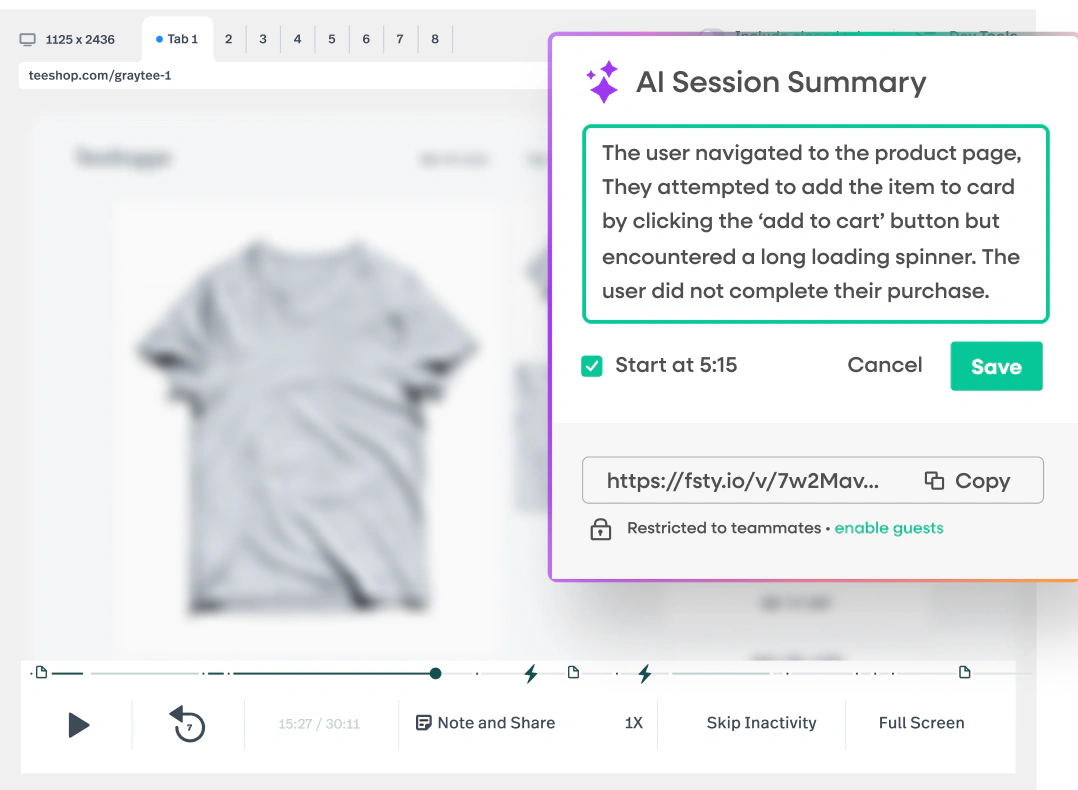
Session Replay reconstructs a user’s experience so you can see navigation, clicks, taps, scroll behavior, page changes, and moments of hesitation or frustration.
The replay becomes more useful when filtered by an outcome. Rather than watching random sessions, you can focus on users who abandoned checkout, encountered an error, repeated a click, failed a form, or completed a high-value action.
Product Analytics, Funnels, and Conversion Analysis
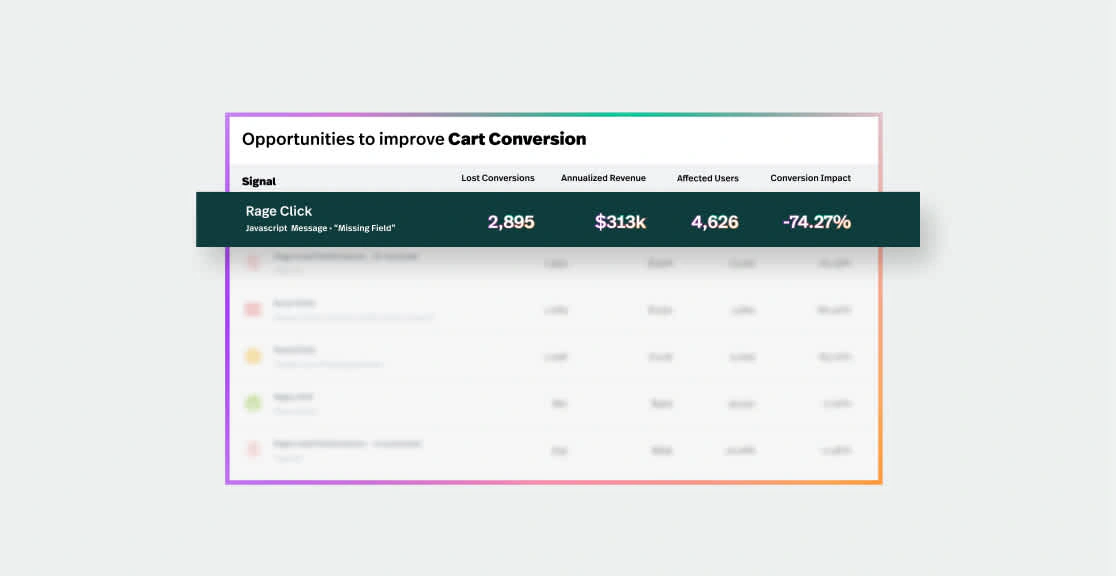
Fullstory includes dashboards, metrics, funnels, tables, user trends, event sequences, retention analysis, conversion analysis, and alerts.
Funnels help you measure progression through defined steps such as landing page to signup, trial to activation, product view to purchase, or payment attempt to confirmation. You can then open relevant sessions from a problematic step to inspect the cause of abandonment.
Journey Maps and User Segments
Journey Maps show the paths users take through a website or application. This reveals repeated loops, unexpected navigation, alternative routes to conversion, and pages that commonly appear before abandonment.
User Segments group sessions and people by behavior, attributes, devices, pages, errors, frustration signals, or conversion status.
Heatmaps and Conversion Maps
Fullstory provides click maps, scroll maps, and other visual analysis tools that show how people engage with a page. Heatmaps can help you find ignored calls to action, misleading visual elements, excessive scrolling, and interactions with content that does not behave as users expect.
Conversion and revenue context helps you prioritize elements by business impact rather than click volume alone.
Sentiment Signals and Frustration Detection
Sentiment Signals automatically surface behaviors such as rage clicks, dead clicks, error clicks, thrashed cursors, abandoned forms, network errors, and unusual zooming or scrolling.
These signals are starting points. Validate them with replay, segments, technical context, and conversion impact.
StoryAI Summaries, Opportunities, and Ask StoryAI
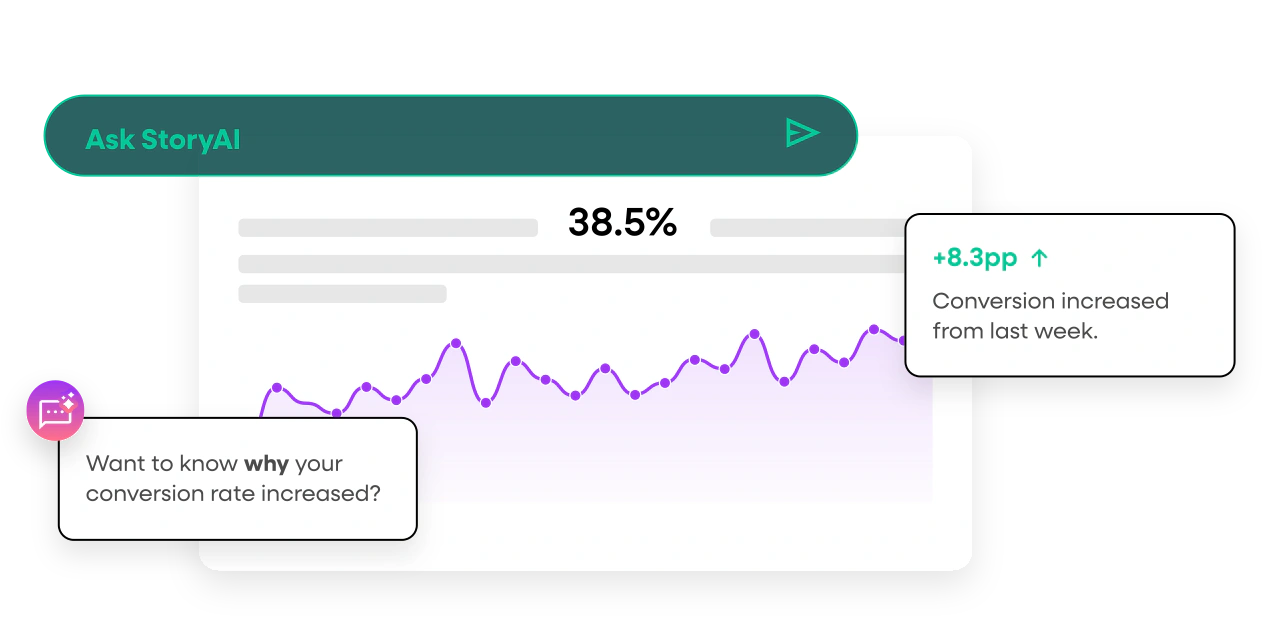
StoryAI reduces the need to review large numbers of sessions manually. Single-session and multi-session summaries condense important actions, frustration, and errors into readable narratives with links to relevant moments.
StoryAI Opportunities goes further by proactively identifying and prioritizing issues such as broken elements, slow-loading pages, error spikes, and recurring friction. Opportunities can include severity, impact, trend information, summaries, visuals, and linked sessions.
Ask StoryAI provides conversational behavioral analysis powered by Google’s Gemini models. Important recommendations should still be validated against underlying sessions and business metrics.
Mobile Analytics
Fullstory supports iOS, Android, and cross-platform mobile experiences through a mobile add-on. It recreates app sessions from draw instructions rather than storing conventional screen-recording video.
You can analyze taps, swipes, navigation, and technical issues across web and mobile, with privacy controls applied on-device.
Guides and Surveys
Guides and Surveys connects behavioral insight with in-product action. You can create product tours, onboarding checklists, smart tips, hotspot beacons, banners, NPS surveys, and contextual feedback prompts.
Targeting can use Fullstory attributes and behavior, allowing you to guide users who have not adopted a feature, struggled with a workflow, or reached a specific lifecycle stage.
The module currently supports web applications, so mobile-first teams should confirm roadmap plans.
Fullstory Anywhere and MCP
Fullstory Anywhere extends behavioral data beyond the core interface. Anywhere: Warehouse can deliver analytics-ready views or raw events to warehouses and cloud storage, helping you combine behavior with CRM, billing, support, and operational data.
Anywhere: Activation uses real-time behavioral signals to trigger personalized experiences, assistance, messaging, or downstream workflows while the user is still active.
Fullstory Feature Overview
| Feature Area | What Fullstory Provides | Best For |
| Behavior Capture | Automatic web and mobile interaction capture with retroactive analysis | Reducing manual tagging gaps |
| Session Replay | High-fidelity replay, developer context, live viewing, and session notes | Explaining errors and usability problems |
| Product Analytics | Funnels, metrics, retention, journeys, segments, dashboards, and alerts | Measuring digital behavior and conversion |
| Experience Signals | Heatmaps, rage clicks, dead clicks, form abandonment, and errors | Prioritizing digital friction |
| StoryAI | Summaries, proactive opportunities, recommendations, and conversational analysis | Accelerating investigation |
| Guides and Surveys | Tours, tips, banners, checklists, NPS, and contextual surveys | Onboarding and product adoption |
| Anywhere | Warehouse exports and real-time behavioral activation | Connecting behavior across the stack |
Pros and Cons
Benefits and Limitations
Positive
✅ Excellent session replay
✅ Strong automatic capture
✅ Useful frustration signals
✅ Advanced privacy controls
Negative
❌ Paid pricing is hidden
❌ Session limits need monitoring
❌ Privacy setup requires care
❌ Advanced modules add complexity
✅ Fullstory Pros
- Replay, funnels, segments, and frustration signals connect quantitative trends with real experiences.
- Automatic capture supports retroactive investigation when teams did not anticipate a question.
- StoryAI reduces manual replay review and helps prioritize issues by likely impact.
- Developer context can shorten bug reproduction and improve support-to-engineering handoffs.
- Private by Default, masking, exclusion, and consent controls support careful data collection.
❌ Fullstory Cons
- Business, Advanced, Enterprise, and add-on pricing require a sales conversation.
- High-traffic sites must model session capture, retention, exports, and add-ons carefully.
- Privacy rules can become outdated when interfaces and forms change.
- Teams may need separate tools for advanced experimentation or company-wide BI.
- The expanding platform requires governance so dashboards, segments, and alerts stay useful.
Getting Started
Capture Rules, Identity, and Team Adoption
Web implementation can begin with a script or tag manager, while mobile requires the relevant SDK. Production deployment should begin with privacy and business questions.
Recommended Fullstory Implementation Process
- Define the customer journeys and decisions the platform must support.
- Map sensitive pages, forms, messages, account data, and regulated information.
- Configure domains, regions, consent behavior, IP handling, and privacy rules.
- Install Fullstory in a test environment and validate masked and excluded content.
- Identify users and accounts only when your privacy and identity rules permit it.
- Create a small set of durable elements, segments, funnels, and dashboards.
- Connect Fullstory with support, issue tracking, analytics, and warehouse tools.
- Assign owners for privacy, capture volume, dashboards, and access reviews.
Private by Default vs Traditional Capture
Private by Default masks captured elements unless you explicitly unmask approved content. This reduces the risk of unintentionally collecting sensitive text while preserving enough page structure and interaction data for analysis.
Fullstory supports three main treatments: exclude, mask, and unmask. Excluded elements are not captured for replay or interaction analysis. Masked elements preserve structure and interaction context without storing the original text. Unmasked elements provide the richest replay but require the highest confidence that the content is safe to collect.
A restrictive starting point, preview sessions, consent controls, and recurring privacy audits reduce collection risk.
Ease of Use by Role
Support and product users can learn search, segments, and replay relatively quickly. Growth and UX teams need more practice with funnels, conversion maps, journey analysis, and metric definitions.
Administrators still need to manage capture rules, identity, SDK behavior, retention, and access control.
Customer Support and Education
Fullstory provides documentation, courses, privacy resources, developer guides, and professional services.
Real-World Use Cases
Where Fullstory Delivers the Most Value
Ecommerce Conversion Optimization
Heatmaps, funnels, and replay help ecommerce teams diagnose friction across discovery, carts, checkout, and payments.
SaaS Onboarding and Feature Adoption
Funnels and replay expose onboarding friction, while Guides and Surveys can provide targeted assistance.
Support and Issue Resolution
Support teams can review pre-ticket behavior and give engineers stronger escalation evidence.
Release Monitoring and Quality Assurance
After releases, teams can monitor errors, frustration, conversion, and affected segments.
What Users Say About Fullstory
Verified reviewers commonly praise the quality of session replay, flexible search, behavioral segmentation, debugging context, and the ability to uncover issues that standard analytics missed.
Common concerns include pricing transparency, privacy setup, session limits, and unstructured replay review.
Pricing and Plans
How Much Does Fullstory Cost?
Fullstory offers a permanent free plan and three quote-based paid Analytics plans. Paid cost can depend on session volume, retention, platform requirements, selected modules, exports, support, and contract terms.
Fullstory Pricing Plans
| Plan | Current Price Reference | Best For |
| FullstoryFree | $0 for up to 30,000 sessions per month | Individuals, startups, evaluation, and small web teams |
| Business | Custom pricing | Companies needing replay, analytics, and qualitative insights |
| Advanced | Custom pricing | Organizations improving journeys and funnels at scale |
| Enterprise | Custom pricing | Large data, analytics, governance, and AI programs |
| Add-ons | Custom pricing | Mobile, StoryAI, Guides and Surveys, multi-org management, and premium services |
FullstoryFree
The free plan includes 30,000 monthly sessions, 10 user seats, 5,000 server-side events per month, one year of replay retention, and one year of product analytics retention.
It does not include several advanced capabilities, including dashboards, configurable form privacy, mobile applications, and StoryAI. It is best treated as a meaningful evaluation and small-team plan rather than a complete representation of the paid platform.
Fullstory Business, Advanced, and Enterprise
Paid plans add broader analytics, collaboration, governance, export, security, and scale capabilities. Buyers should confirm session tiers, retention, seats, overages, SSO, access controls, support, and add-on terms in writing.
Potential Hidden Costs
Total cost may include Mobile, StoryAI, Guides and Surveys, multi-organization management, Anywhere, professional services, premium support, warehouse storage, and internal administration.
Model real traffic, internal activity, seasonal peaks, mobile usage, and retention before purchasing.
Integrations
Data Sources, Destinations, and Workflow Connections
Analytics and Customer Data Platforms
Fullstory integrates with analytics and data tools such as Google Analytics, Adobe Analytics, Segment, Tealium, and supported tag or data-layer workflows. These connections help you move from an aggregate report to the sessions behind a change.
Support, Product, and Engineering Tools
Integrations with platforms such as Intercom, Jira, and other support or issue-management systems can attach behavioral context to tickets and engineering work. APIs, webhooks, and replay URLs also support custom workflows.
Warehouses, Cloud Storage, and BI
Anywhere: Warehouse can deliver simplified analytics-ready tables or raw event data to supported destinations such as Snowflake, BigQuery, and cloud storage. This helps data teams combine behavioral evidence with customer, transaction, and operational data.
Personalization and Activation
Anywhere: Activation can stream real-time behavioral signals for support, personalization, fraud detection, and journey orchestration.
Data Protection
Security, Privacy, and Enterprise Controls
Session replay can expose detailed customer behavior, so privacy configuration should be treated as a product and security requirement rather than a final compliance checklist.
Fullstory documents SOC 2 Type 2 controls and ISO certifications including ISO 27001 for information security, ISO 27701 for privacy, ISO 27017 for cloud security, ISO 27018 for cloud PII protection, and ISO 42001 for AI management.
Security and Access Controls
- Encryption in transit using TLS and encryption at rest using AES-256 or comparable standards.
- SAML single sign-on, role-based access control, and multi-organization options on supported plans.
- IP, location, user-agent, and domain restrictions for controlling capture or access.
- Privacy APIs, consent controls, deletion workflows, masking, exclusion, and URL rules.
- Audit documentation and security materials through the Fullstory Trust Center.
Privacy Responsibilities
Fullstory provides strong controls, but your organization remains responsible for deciding what may be captured. Payment details, authentication secrets, health information, private messages, regulated data, and sensitive account fields should be excluded or masked according to legal and security guidance.
Revalidate privacy rules whenever forms, payments, profiles, or mobile views change.
Comparison
Fullstory Alternatives
The best Fullstory alternative depends on whether your priority is enterprise experience analytics, structured product analytics, automatic capture, in-app adoption, developer control, or transparent pricing.
Fullstory Alternatives Compared
| Platform | Main Strength | Best Fit |
| Fullstory | Session replay, friction signals, and digital experience diagnosis | Teams connecting metrics with real customer sessions |
| Contentsquare | Enterprise experience intelligence and impact prioritization | Large ecommerce and digital experience programs |
| Amplitude | Deep behavioral analytics and experimentation | Product-led growth and data-mature teams |
| Mixpanel | Fast self-service event analytics | Teams prioritizing funnels, cohorts, and retention |
| Heap | Automatic capture and retroactive product analysis | Teams reducing manual instrumentation |
| PostHog | Developer-first analytics and release tools | Engineering-led product organizations |
Fullstory vs Contentsquare
Contentsquare is Fullstory’s closest enterprise digital experience competitor. It combines journey analysis, zoning and heatmaps, replay, experience monitoring, voice of customer, and impact prioritization.
Contentsquare suits broad enterprise experience programs, while Fullstory is especially strong for replay-led investigation and debugging.
Fullstory vs Amplitude
Amplitude provides deeper product analytics, behavioral cohorts, retention analysis, experimentation, feature management, and activation workflows.
Choose Fullstory for replay-led diagnosis and Amplitude for deeper growth analytics and experimentation. Read our Amplitude Analytics review.
Fullstory vs Mixpanel
Mixpanel is focused on accessible event analysis, funnels, flows, cohorts, retention, and dashboards.
Mixpanel favors self-service event reporting, while Fullstory provides stronger replay-led diagnosis. Read our Mixpanel review.
Fullstory vs Heap
Heap also emphasizes automatic capture and retroactive analysis, making it one of the closest alternatives for teams that want broad behavioral collection.
Heap leans toward autocaptured product analysis, while Fullstory emphasizes replay and debugging. Read our Heap review.
Fullstory vs Pendo
Pendo combines analytics with mature in-app guides, onboarding, feedback, NPS, and product discovery.
Pendo leads in adoption workflows, while Fullstory offers deeper visual diagnosis. Read our Pendo review.
Fullstory vs PostHog
PostHog offers product analytics, session replay, feature flags, experiments, surveys, error tracking, and data tools for developer-led teams.
PostHog favors engineering control and release tooling, while Fullstory offers a more polished cross-functional replay workflow. Read our PostHog review.
Final Thoughts
Is Fullstory Worth It?
Fullstory is worth considering when digital experience quality has a direct effect on conversion, retention, support demand, or development priorities.
Its strongest advantage is connecting automatic capture, analytics, replay, frustration detection, and technical context.
StoryAI, Guides and Surveys, and Anywhere extend the workflow from diagnosis to action.
The limitations are important. Paid pricing is not transparent, session volume can affect cost, and responsible replay requires ongoing privacy governance. Fullstory is also not a replacement for every experimentation, attribution, or BI requirement.
Choose Fullstory when you need high-quality evidence of digital friction. Consider Amplitude or Mixpanel for deeper product analytics, Heap for autocapture-led analysis, Pendo for product adoption, Contentsquare for enterprise experience intelligence, or PostHog for developer-first product tooling.
Frequently Asked Questions
Have More Questions?
What is Fullstory?
Fullstory is a behavioral data and digital experience analytics platform. It combines automatic interaction capture, session replay, product analytics, heatmaps, frustration signals, mobile analytics, AI, guides, surveys, and data activation.
Is Fullstory free?
Yes. FullstoryFree includes up to 30,000 sessions per month, 10 user seats, 5,000 server-side events per month, and one year of replay and product analytics retention.
How much does Fullstory cost?
The free plan costs $0. Business, Advanced, Enterprise, Mobile, StoryAI, Guides and Surveys, Anywhere, and other advanced services use custom pricing based on requirements and usage.
What does Fullstory capture?
Fullstory can capture supported clicks, taps, scrolls, navigation, page changes, form interactions, errors, and other behavioral details. Your privacy configuration determines which content is excluded, masked, or unmasked.
Does Fullstory include product analytics?
Yes. Fullstory includes funnels, dashboards, metrics, journeys, user segments, conversion analysis, retention, tables, alerts, and other product analytics capabilities connected with session replay.
What is StoryAI?
StoryAI is Fullstory’s AI layer. It provides single-session and multi-session summaries, replay recommendations, proactive opportunities, impact prioritization, and conversational behavioral analysis through Ask StoryAI.
Does Fullstory work with mobile apps?
Yes. Fullstory offers mobile analytics for supported iOS, Android, and cross-platform applications as a paid add-on. It recreates sessions from draw instructions rather than traditional screen-recording video.
Is Fullstory privacy compliant?
Fullstory provides masking, exclusion, consent, deletion, access, and security controls that can support privacy programs. Compliance still depends on your configuration, consent process, data use, and legal requirements.
What are the best Fullstory alternatives?
Leading alternatives include Contentsquare for enterprise experience intelligence, Amplitude and Mixpanel for product analytics, Heap for automatic capture, Pendo for product adoption, and PostHog for developer-led tooling.
Is Fullstory worth it?
Fullstory is worth considering when you need to connect digital metrics with real customer sessions, diagnose friction, reproduce issues, and prioritize improvements. It offers less value for basic traffic reporting or general business intelligence.