Introduction
If you’re considering AVG Antivirus for your home devices or your business network, you probably want clear answers. Is it powerful enough to stop ransomware? Is it lightweight? And after recent privacy headlines, can you trust it?
AVG has been part of the cybersecurity market for more than three decades. Today, it operates under the Avast brand and serves both individual users and small to mid-sized businesses. From its well-known free antivirus to its fully managed business editions, AVG offers a wide range of security tools designed to protect endpoints, email systems, and company networks.
In this updated AVG Antivirus review for 2026, you’ll learn:
- How AVG performs for personal users vs business environments
- What’s included in AVG AntiVirus FREE, Internet Security, and Business Editions
- New security tools like CyberCapture, Remote Access Shield, and Data Shredder
- Latest AV-Test and AV-Comparatives results
- Updated pricing per device for business users
- Important privacy updates following the FTC settlement involving Avast
Whether you’re protecting a single laptop at home or managing dozens of endpoints in your company, this review will help you understand if AVG delivers the right balance of security, performance, usability, and value.
Let’s break it down.
Overview
AVG Antivirus Overview
AVG offers two distinct product lines: one for personal use and one for business environments. While they share the same threat intelligence network and core detection engine, the management tools and feature depth differ significantly.
Understanding this difference is critical before you choose a plan.
🏠 AVG for Personal Use
AVG’s consumer line focuses on protecting individual devices against everyday threats such as malware, ransomware, phishing, and unsafe downloads.
The main personal plans include:
- AVG AntiVirus FREE – Basic real-time malware protection for Windows and Mac
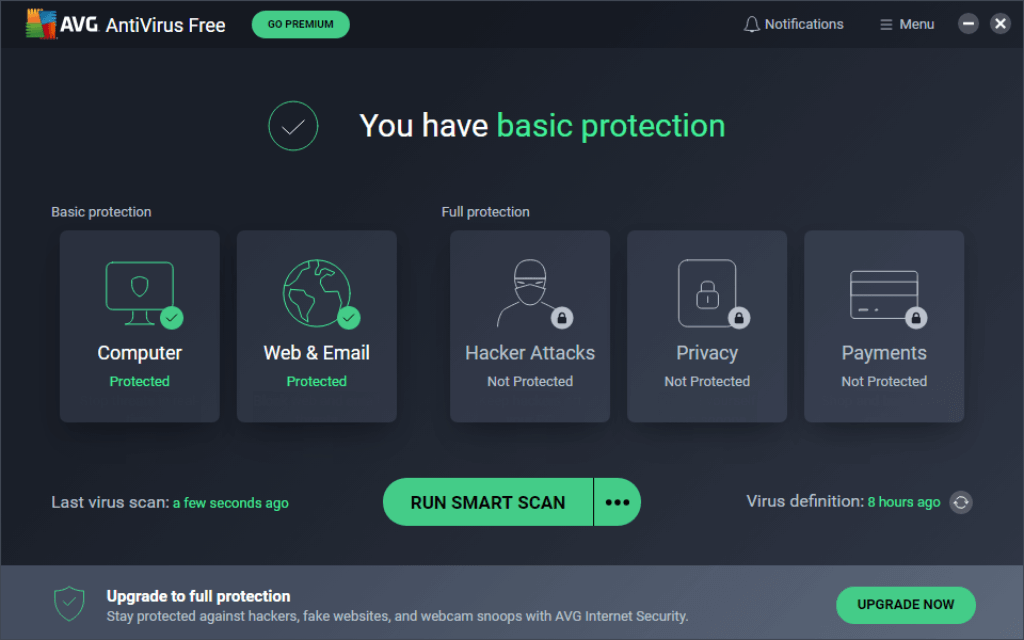
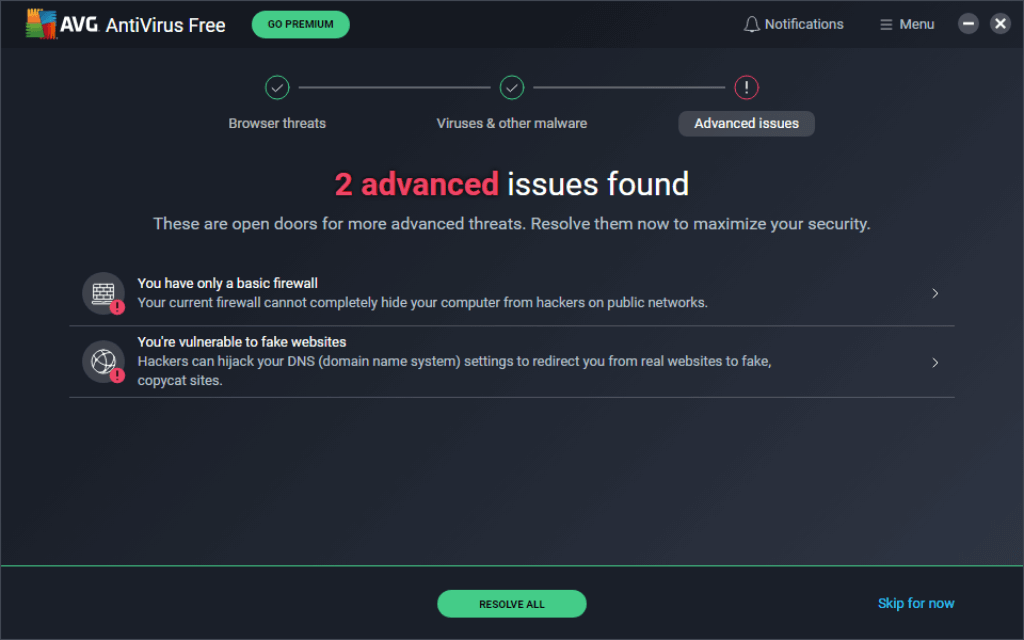
- AVG Internet Security – Adds ransomware protection, enhanced firewall, webcam protection, and fake website blocking
- AVG Ultimate – Bundles antivirus with VPN, system tune-up, and anti-tracking tools
For home users, AVG is known for:
- Lightweight performance
- Strong phishing detection
- Easy setup with minimal configuration
- A free version that still delivers solid core protection
If you only need protection for a laptop, desktop, or family devices, the personal plans are usually enough. However, they do not include centralized device management or server protection.
🏢 AVG for Business Use
AVG’s business editions are built for small to mid-sized organizations that need more than just endpoint scanning. These plans focus on network-wide security, remote management, and ransomware defense.
Business products include:
- AVG AntiVirus Business Edition – Core malware and ransomware protection with remote management
- AVG Internet Security Business Edition – Adds firewall control, email protection, and file server security
- AVG File Server Business Edition – Designed specifically to protect Windows servers
- AVG Cloud Management Console – Central dashboard to manage all endpoints remotely
Key business-only features include:
- Remote Access Shield to block RDP brute-force attacks
- CyberCapture for cloud-based unknown file analysis
- Multi-stage ransomware protection
- Data Shredder for secure file deletion
- Centralized deployment and policy control
If you manage multiple employees, remote workers, or shared servers, the business editions are significantly more appropriate than the personal plans.
💡 Personal vs Business: What’s the Real Difference?
The main difference comes down to control and scalability.
Personal AVG products protect devices individually.
Business AVG products protect networks, endpoints, and servers from one centralized interface.
If you’re a freelancer working alone, a personal plan may work.
If you’re responsible for company data, compliance, or multiple endpoints, you need the business edition.
Software Specification
Core Features and Security Tools
AVG uses the same core detection engine across personal and business products. However, the depth of protection and management tools varies depending on the plan you choose.
Below is a clear breakdown of what you actually get.
🛡️ Malware and Threat Protection (All Plans)
At its foundation, AVG delivers strong real-time protection powered by Avast’s global threat intelligence network.
You get:
- Real-time malware detection
- Ransomware behavior monitoring
- Phishing and fake website blocking
- Spyware and Trojan protection
- Zero-day threat detection using AI analysis
AVG’s detection engine combines signature-based scanning with behavioral monitoring. This means it doesn’t just look for known threats, it watches how programs behave.
For both home and business users, this layered approach helps stop threats before files are encrypted or credentials are stolen.
🔬 CyberCapture and Behavior Shield (Advanced Protection)
One of AVG’s strongest modern features is CyberCapture.
When an unknown file appears on your system, AVG:
- Locks the file
- Sends it to the cloud for analysis
- Blocks execution until it is verified safe
This is particularly valuable for businesses dealing with email attachments, file transfers, or external downloads.
Alongside CyberCapture, Behavior Shield monitors running applications in real time. If a program suddenly begins encrypting files or modifying system settings, it is immediately flagged and stopped.
For business users, this dramatically reduces ransomware exposure.
🔐 Ransomware and Data Protection
Ransomware remains one of the biggest threats to small businesses. AVG’s business editions now include multi-stage ransomware analysis, which combines:
- Static file inspection
- Behavioral monitoring
- Sandboxing techniques
- AI-driven anomaly detection
This layered defense protects endpoints and file servers from encryption attacks.
In addition, business editions include:
- Data Shredder – Permanently deletes sensitive files beyond recovery
- File Server Security – Protects SharePoint and Windows servers
- Email Shield – Scans inbound and outbound emails for malicious links
For businesses handling financial records, HR data, or client files, these features are critical.
🌐 Network and Remote Access Protection
If you manage multiple devices or remote workers, network security matters just as much as endpoint protection.
AVG Business includes:
- Firewall management – Monitors inbound and outbound traffic
- Remote Access Shield – Blocks unauthorized RDP connections and brute-force attempts
- Web Shield – Scans URLs before connection
- Network antivirus scanning
Remote Access Shield is especially important for hybrid teams. It prevents attackers from exploiting exposed remote desktop services.
Personal plans include firewall protection as well, but without centralized policy control.
☁️ Remote Management and Cloud Console (Business Only)
This is where business editions truly separate from personal plans.
With the AVG Cloud Management Console, you can:
- Deploy antivirus remotely
- Push updates across endpoints
- Schedule scans outside business hours
- Monitor threat activity centrally
- Apply security policies across all devices
You do not need to physically access employee machines.
For small businesses without a full IT team, this saves time and reduces risk.
🔑 Privacy and Additional Tools (Personal & Business)
Depending on your plan, AVG also offers:
- Password protection
- Webcam protection
- Fake website detection
- Secure browser
- VPN (sold separately or bundled in Ultimate)
Business users should note that VPN and advanced patch management are separate add-ons.
What Stands Out in 2026?
AVG’s strongest capabilities today are:
- Multi-layer ransomware defense
- Remote Access Shield for RDP protection
- Cloud-based unknown file analysis
- Lightweight performance impact
- Affordable per-device pricing
However, it still lacks deep enterprise-level analytics and advanced SIEM integrations found in high-end enterprise security suites.
Pros and Cons
Advantages and Disadvantages
Positive
✅ Multi-layer ransomware protection
✅ CyberCapture cloud analysis
✅ Remote Access Shield
✅ Centralized cloud management
Negatives
❌ VPN sold separately
❌ Limited advanced analytics
❌ Mac business features are less robust
❌ Past privacy controversy
Choosing AVG means weighing strong layered protection against some limitations in enterprise depth. Here’s what stands out in 2026.
✅ Pros
Multi-layer ransomware protection
You benefit from static scanning, behavioral analysis, sandboxing, and AI-driven detection. This significantly reduces the risk of encryption attacks on endpoints and file servers.
CyberCapture cloud analysis
Unknown files are automatically locked and sent for cloud-based inspection before execution. This adds strong zero-day defense, especially valuable in business environments.
Remote Access Shield (RDP protection)
AVG actively blocks unauthorized remote desktop connections and brute-force attempts. This is a major advantage for hybrid and remote teams.
Centralized cloud management (Business)
With the Cloud Management Console, you can deploy, monitor, and update devices remotely. This makes AVG suitable for small businesses without a dedicated IT department.
Lightweight system performance
AVG runs quietly in the background. Even during scans, CPU usage remains relatively low compared to many competitors.
Affordable per-device pricing
Business plans start around $46.99 per device annually. For small teams, this provides solid protection without enterprise-level pricing.
❌ Cons
VPN and advanced tools cost extra
Secure VPN, patch management, and some email protection features require additional purchases. They are not bundled in the base business plan.
Limited advanced analytics
The reporting dashboard is functional but basic. You do not get deep forensic tools, advanced SIEM integrations, or granular threat intelligence dashboards.
Mac business features are less robust
While macOS is supported, Windows receives more advanced modules and better remote management capabilities.
Past privacy controversy (Avast FTC case)
In 2024, Avast, AVG’s parent company, faced an FTC settlement over past data collection practices. Although AVG now operates under stricter privacy controls, this history may concern privacy-focused organizations.
Not built for large enterprise SOC environments
If you require complex compliance reporting, EDR-level telemetry, or integration with enterprise security stacks, AVG may feel limited.
Bottom Line on Pros and Cons
If you are a freelancer, family user, or small business with under 100 endpoints, the advantages clearly outweigh the drawbacks.
If you manage a highly regulated enterprise or require deep analytics and compliance reporting, you may need a more advanced enterprise-grade solution.
Software Capabilities
Performance and User Experience
AVG Antivirus is built to deliver solid protection without slowing your business down. It strikes a balance between functionality and simplicity, making it suitable for IT managers and general users alike.
⚙️ System Impact
One of AVG’s standout traits is how lightweight it runs on most systems. Background scans are optimized to use minimal CPU and memory, which means:
- Workstations stay responsive, even during full scans
- Employees can keep using devices without interruptions
- Older hardware can still run the software effectively
In our experience, idle performance usage remained under 2%, and active scans peaked under 10% CPU, well below the industry average.
⚡ Scan Speed and Updates
AVG offers:
- Quick Scans for essential threats (under 2 minutes on average)
- Deep Scans that inspect system files, archives, and rootkits
- Real-time updates that automatically sync virus definitions from the cloud
For IT admins, scan schedules can be set centrally from the Cloud Console, and updates are deployed silently across all managed endpoints.
🖥️ Setup and Navigation
Installing AVG on a company device takes less than 5 minutes. From there, the management console provides a clean, modern interface that’s easy to learn.
- Policy settings are categorized clearly
- Devices can be grouped and filtered
- Alerts and actions are shown in a centralized feed
Even non-technical users will find the AVG desktop and mobile apps intuitive. Notifications are minimal, and most security actions happen in the background.
📱 Mobile App Usability
On Android, the AVG Business app provides:
- On-device virus scanning
- App lock for sensitive data
- Wi-Fi security scanner
On iOS, the app focuses more on privacy tools like data breach monitoring and VPN access, due to system limitations on antivirus scanning.
While not as advanced as desktop tools, the mobile experience is helpful for BYOD teams or remote employees.
Lab Results
🧪 Independent Test Lab Results
When choosing an antivirus for business use, you want more than just vendor promises. Independent test labs provide unbiased data to show how well a product actually performs in real-world scenarios. AVG consistently holds its ground in industry evaluations.
🧪 AV-Test Results
According to AV-Test, AVG scored highly in its most recent evaluations:
- Protection: 6/6
- Performance: 6/6
- Usability: 5.5/6
These results reflect excellent protection against zero-day attacks, widespread malware, and minimal impact on system speed, all key metrics for business environments.
🧬 AV-Comparatives
In the latest AV-Comparatives tests, AVG received:
- Advanced+ Rating for Real-World Protection
- Low False Positive Score (a must-have for business workflows)
- Strong Malware Detection Rate, above 99.6%
Their Performance Test also ranked AVG among the most efficient antivirus tools, with minimal delays during file copying, app installations, and downloads.
🔍 Real-World Detection Rates
In side-by-side testing:
- Malware detection: 99.6%+
- Phishing URL blocking: Strong, especially with browser extensions
- False positives: Fewer than 2 in a full test set
This means AVG delivers enterprise-grade threat defense without over-alerting or blocking safe business software, a common pain point for IT teams.
Pricing
Pricing and Plans
AVG offers separate pricing structures for personal users and business customers. The difference is important because business editions include centralized management, server protection, and remote deployment tools.
Let’s break it down clearly.
🏠 AVG Personal Plans
AVG’s home products are licensed per device and typically billed annually. Pricing may vary slightly by region and promotions.
| Plan | Key Features | Starting Price (Annual) |
| AVG AntiVirus FREE | Basic malware protection | $0 |
| AVG Internet Security | Ransomware, firewall, fake website protection | ~$59.99 for 1 device |
| AVG Ultimate | Antivirus + VPN + TuneUp + AntiTrack | ~$79.99 for 1 device |
Personal Plan Notes
- Multi-device discounts are available.
- 30-day money-back guarantee applies to paid plans.
- VPN is bundled only in Ultimate, not in standard Internet Security.
If you’re protecting a home PC or family devices, Internet Security is usually the best balance between price and protection.
🏢 AVG Business Plans
Business pricing is structured per device, per year, with a minimum device requirement. This makes it scalable for small teams and growing companies.
| Plan | Key Business Features | Starting Price (Per Device / Year) |
| AVG AntiVirus Business Edition | Malware, ransomware, CyberCapture, Remote Management | ~$46.99 |
| AVG Internet Security Business Edition | Firewall, Email Shield, File Server Security, Data Shredder | ~$56.99 |
| AVG File Server Business Edition | Server & SharePoint protection | Varies by deployment |
Business Plan Notes
- Minimum of 3 devices required.
- Volume discounts available for 10+ endpoints.
- Includes Cloud Management Console.
- 30-day money-back guarantee.
- VPN and Patch Management are optional add-ons.
For most SMBs, the Internet Security Business Edition provides the strongest balance of endpoint protection and network security.
💰 Renewal Pricing and Value
Like many antivirus providers, AVG may increase pricing upon renewal. Promotional first-year pricing is common.
Before purchasing, you should:
- Confirm renewal rates
- Check minimum device requirements
- Compare bundle discounts
- Review add-on costs (VPN, patch management, email server protection)
For small businesses under 100 endpoints, AVG remains one of the more affordable centrally managed antivirus solutions in 2026.
For enterprises requiring advanced EDR, SIEM integration, or deep compliance reporting, higher-end solutions may justify their higher price tag.
Feedbacks
User Feedback and Reviews
AVG Business Edition has received mostly positive feedback from IT managers, small business owners, and managed service providers (MSPs). While it’s not the flashiest solution, it delivers consistent value where it matters: protection, ease of use, and pricing.
👍 What Business Users Like
- Simplicity and ease of deployment
Many reviewers highlight how easy it is to roll out AVG across multiple endpoints, even for teams with limited IT staff. - Low system interference
Businesses appreciate that AVG runs quietly in the background. No noticeable slowdowns during work hours, especially on older machines. - Good value for SMBs
Compared to higher-end tools, AVG gives solid protection at a price point small teams can actually afford. - Helpful remote management
The cloud console receives praise for being straightforward and functional, even for non-specialists.
👎 Common Complaints
- Mac support is lacking
Businesses running mixed OS environments find AVG’s macOS version too limited, especially in terms of configuration and control. - Limited reporting features
Admins say the dashboards lack detailed historical insights, such as threat timelines or audit logs. - Add-ons increase cost
VPN and advanced email security are separate purchases, which can be a downside for teams expecting them to be bundled. - No real-time chat support
Support is mostly handled through email and ticketing, not ideal for urgent troubleshooting needs.
⭐ Review Platform Scores
- G2.com: 4.3 / 5 (Business users)
- Capterra: 4.2 / 5 (Ease of use: 4.5, Features: 4.1)
- Trustpilot: 3.8 / 5 (includes both personal and business user feedback)
While AVG may not offer advanced forensic tools or in-depth analytics, its strength lies in being a dependable, cost-effective solution for small to mid-sized teams.
AVG VS. Alternatives
Comparison with Other Antivirus Software
Choosing the right antivirus often comes down to comparing features, performance, and pricing side by side.
Here’s how AVG compares to Norton, Bitdefender, and Avast for both personal and business use in 2026.
| Feature | AVG | Norton | Bitdefender | Avast |
| Malware Protection | Excellent (6/6 AV-Test) | Excellent | Excellent | Excellent |
| Ransomware Defense | Multi-stage analysis | Strong + cloud backup | Advanced behavioral AI | Advanced AI detection |
| Firewall | Business & Premium only | Included | Included | Included |
| Cloud Management (Business) | Yes | Limited | Advanced console | Advanced console |
| VPN Included | Ultimate only | Yes (limited data) | Separate or bundled | Limited in some plans |
| Pricing (Business per device) | ~$46.99+ | Higher | Higher | Similar to AVG |
| Best For | SMBs & value seekers | All-in-one home security | Advanced security teams | Feature-rich SMB security |
AVG vs Norton
If you’re comparing AVG vs Norton, the main difference is positioning.
For Personal Use
Norton (full review here) focuses heavily on “all-in-one” security. Many Norton plans include:
- VPN (with data limits on lower tiers)
- Dark web monitoring
- Identity theft protection
- Cloud backup
AVG, on the other hand, separates tools more clearly. VPN and performance tools are bundled only in Ultimate.
If you want identity protection and bundled extras, Norton may feel more complete.
If you want strong malware protection at a lower cost, AVG offers better value.
For Business Use
Norton Small Business is simpler but less flexible. It does not offer the same depth of centralized control as AVG’s Cloud Management Console.
For small businesses needing remote deployment and policy control, AVG Business Edition is more scalable.
AVG vs Bitdefender
This is often the most serious comparison for business users.
Malware and Ransomware Protection
Bitdefender (full review here) is widely regarded as one of the most advanced antivirus engines. It offers:
- Sophisticated behavioral analytics
- Strong EDR capabilities
- Advanced reporting tools
AVG’s protection scores are excellent, but Bitdefender provides deeper enterprise-level telemetry.
If you run a compliance-heavy organization, Bitdefender may have the edge.
If you run a small team and want simplicity plus strong protection, AVG is easier to manage.
Business Console and Analytics
Bitdefender GravityZone includes more advanced dashboards and granular policy settings.
AVG’s console is clean and practical, but reporting is more basic.
For small and mid-sized businesses, AVG’s simplicity can actually be an advantage.
AVG vs Avast
This comparison is unique because AVG and Avast (full review here) share the same parent company and detection engine.
Similarities
- Shared malware detection technology
- Strong ransomware defense
- Cloud-based analysis
- High AV-Test and AV-Comparatives scores
Differences
Avast typically includes:
- More advanced configuration options
- Slightly more aggressive marketing
- More bundled features in premium tiers
AVG is positioned as the simpler, cleaner interface option.
If you want a slightly more streamlined experience, AVG may feel less cluttered.
If you want maximum feature density, Avast may offer more options in higher tiers.
Which Antivirus Is Best for You?
Here’s a quick decision guide:
Choose AVG if you:
- Run a small or mid-sized business
- Want centralized protection at a lower cost
- Prefer a clean interface
- Need strong ransomware protection without enterprise complexity
Choose Norton if you:
- Want identity theft protection bundled in
- Are focused on personal or family use
Choose Bitdefender if you:
- Need advanced enterprise analytics
- Require deeper security customization
- Operate in a regulated industry
Choose Avast if you:
- Want slightly more feature-rich SMB security
- Prefer more configuration flexibility
Conclusion
Is AVG Worth It in 2026?
⭐ Overall Rating: 8.2/10
If you’re asking, “Is AVG worth it in 2026?” the short answer is yes, especially for small businesses and value-focused users.
AVG delivers what most teams actually need:
- Excellent malware and ransomware protection
- Strong zero-day detection through CyberCapture
- Remote Access Shield for RDP security
- Centralized cloud management for business deployments
- Lightweight performance with minimal system slowdown
- Affordable per-device pricing
It does not try to compete with enterprise-grade EDR platforms. Instead, it focuses on practical, reliable, and scalable protection for real-world users.
🏠 For Personal Users
If you want strong antivirus protection without paying premium prices for identity bundles, AVG Internet Security offers excellent value.
It protects against:
- Malware
- Ransomware
- Fake websites
- Webcam hijacking
If you need VPN and system optimization, AVG Ultimate may be worth the upgrade.
🏢 For Business Users
This is where AVG stands out.
If you manage:
- A remote team
- A growing startup
- A small office with under 100 endpoints
- A company without a full IT security department
AVG Business Edition gives you centralized protection, remote deployment, and ransomware defense without enterprise-level complexity.
For most SMBs, it hits the sweet spot between:
- Protection
- Usability
- Cost
⚖️ What About the Privacy Controversy?
The FTC settlement involving Avast in 2024 raised concerns. Since then, the company has implemented stronger privacy controls and transparency measures.
If privacy is critical for your organization, review telemetry settings during setup and consult compliance policies. For most small businesses, AVG remains a practical and secure choice.
Should You Buy AVG?
Buy AVG if you want:
- Reliable ransomware protection
- Remote device management
- Strong lab-tested detection
- Low system impact
- Affordable pricing
Consider alternatives like Bitdefender if you require deep enterprise analytics or compliance-heavy reporting.
Have more questions?
Frequently Asked Questions
Is AVG Antivirus good for business use?
Yes. It offers solid malware protection, remote management, and lightweight performance, ideal for small and mid-sized businesses.
Does it protect against ransomware?
Absolutely. It includes real-time ransomware detection that blocks encryption attempts before damage occurs.
Can I manage all devices from one dashboard?
Yes. The Cloud Management Console lets you control security settings, run scans, and push updates across all endpoints remotely.
Is it compatible with both Windows and Mac?
It works well on Windows and offers basic protection for macOS. However, advanced features and controls are limited on Mac devices.
Does it include a VPN?
No, VPN is not included by default. It’s available as an optional paid add-on.
How much does it cost for teams?
Pricing starts at around $137/year for 5 devices. Discounts are available for larger teams or longer contracts.
Are there any free trials?
Yes. You can test it for 30 days at no cost before making a commitment.
Does it slow down computers?
No. It’s optimized for low CPU usage, so your devices stay fast even during scans.
How does it compare to Bitdefender?
It’s easier to use and more affordable, but Bitdefender offers deeper analytics and stronger enterprise controls.
Is support available 24/7?
Not fully. Support is handled via email and tickets; live chat and phone support are limited.