Introduction
Choosing the right CRM software is not just about storing contacts. It is about building a system that helps your sales, marketing, and service teams understand customers, act faster, and manage revenue more predictably.
SugarCRM, now rebranded as SugarAI, is built for companies that need more than a basic CRM. It combines customer relationship management, workflow automation, sales intelligence, forecasting, and AI-powered guidance for teams with more complex sales processes.
In this SugarCRM review, you’ll learn what the platform does well, where it may feel too complex, how much it costs, and whether it is the right fit for your business in 2026.
Quick Overview
If you want a quick answer, SugarCRM is best for mid-sized and enterprise B2B teams that need customization, automation, and AI-supported sales decisions. It is less ideal for very small teams that want a simple CRM they can launch in one afternoon.
- Best for: B2B sales teams, account-based sales, complex pipelines, and revenue operations
- Not ideal for: Very small teams, beginners, or companies that need a free CRM
- Starting price: From $59/user/month, billed annually
- Main strength: Deep customization, automation, and AI-guided selling
- Main drawback: Setup takes more planning than lighter CRMs
- Best alternative for simplicity: monday CRM, Pipedrive, or HubSpot CRM
My opinion: SugarCRM is not the easiest CRM on the market, but it is one of the stronger choices if your team needs control, scalability, and a platform that can support complex customer journeys.
Key Features
SugarCRM’s Software Specification
If you are evaluating CRM platforms, you are probably not looking for a simple digital address book. You need a system that helps your team prioritize deals, automate repetitive work, understand customer behavior, and act on revenue signals.
This is where SugarCRM stands out. The platform is built for teams that want flexibility and intelligence, not just a place to store customer records.
1. 360-Degree Customer Relationship Management
SugarCRM gives you a full view of your customer relationships across sales, marketing, and service activity. Instead of switching between spreadsheets, inboxes, and support tools, your team can work from one shared customer record.
- Track contacts, accounts, leads, opportunities, calls, emails, meetings, and support cases
- View customer history across different teams and touchpoints
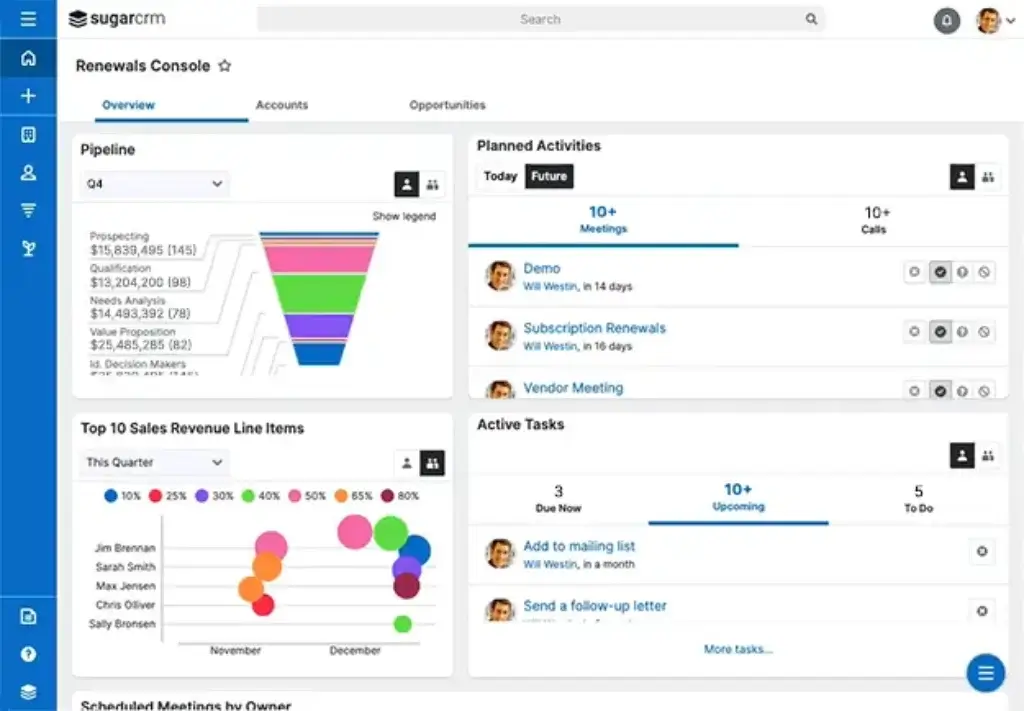
- Customize dashboards so each role sees the most relevant information
This helps your team avoid repeated questions, missed follow-ups, and disconnected customer communication.
2. Sales Automation and Pipeline Management
SugarCRM is built to help sales teams move from manual tracking to structured pipeline execution. You can automate routine tasks, assign leads, monitor opportunities, and create repeatable sales processes.
- Automate lead assignment, follow-up reminders, approvals, and pipeline updates
- Track opportunities by stage, value, probability, and expected close date
- Use reporting tools to identify stalled deals and pipeline risks
If your sales process has multiple steps, territories, or approval layers, this level of automation can make your pipeline more predictable.
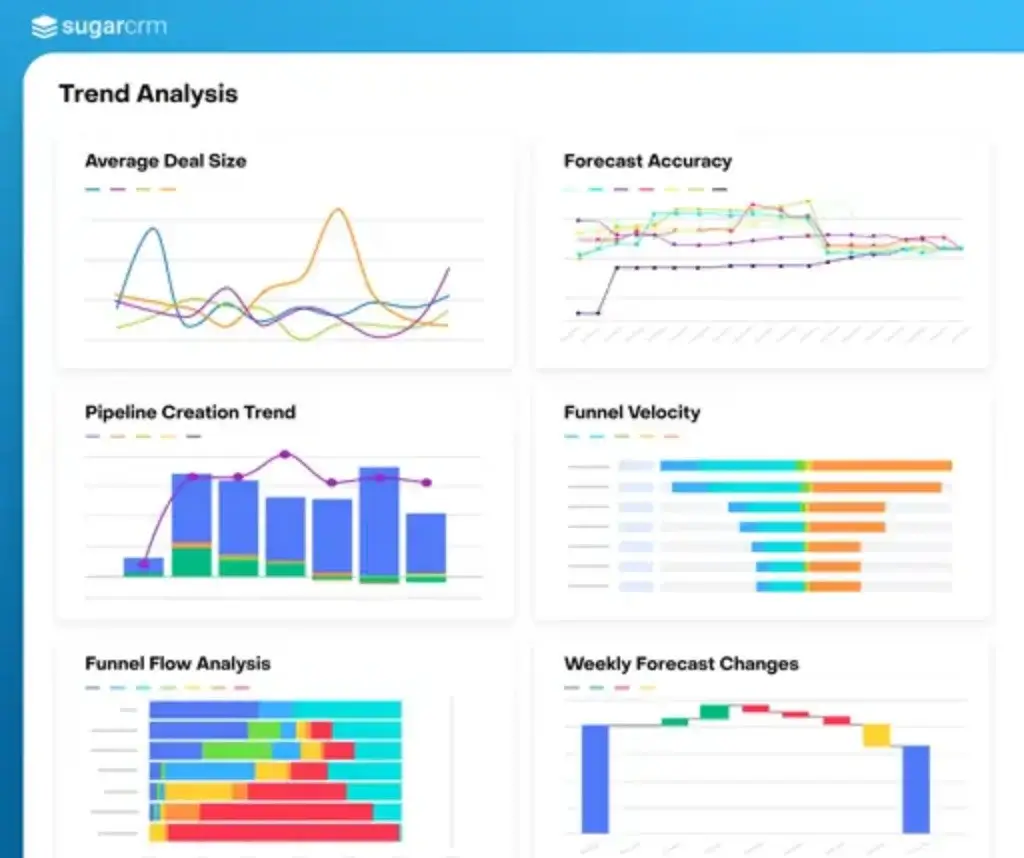
3. AI-Powered Sales Intelligence
One of the biggest updates to SugarCRM is its move toward AI-guided selling. With the SugarAI rebrand, the platform is now positioned around helping sellers know where to focus, who to engage, and what to do next.
Instead of only showing static CRM data, SugarAI is designed to surface signals from customer activity, account history, and connected business systems.
- Use AI to identify high-value opportunities and account risks
- Support lead scoring, opportunity analysis, and forecasting
- Connect CRM and ERP data for deeper customer intelligence
This makes the platform especially useful for B2B companies with long sales cycles, repeat purchases, renewals, or complex account relationships.
4. Marketing Automation with Sugar Market
Sugar Market gives your marketing team tools to build, run, and measure campaigns. It is not just for sending emails. It helps you connect marketing activity with sales readiness.
- Create landing pages, web forms, and email campaigns
- Segment contacts based on behavior, industry, lifecycle stage, or engagement
- Score leads and pass qualified prospects to sales at the right time
For teams that struggle with poor lead handoff between marketing and sales, this can create a cleaner revenue process.
5. Integrations with Business Applications
A CRM becomes more valuable when it connects with the rest of your business stack. SugarCRM supports integrations with productivity tools, communication platforms, marketing systems, and back-office applications.
- Connect with tools like Google Workspace, Microsoft 365, Slack, DocuSign, and other business apps
- Use APIs to connect ERP, billing, helpdesk, or industry-specific software
- Reduce manual data entry between sales, service, and operations
This is one reason SugarCRM appeals to companies with more complex technology environments.
6. Custom Workflows and Business Process Management
Customization is one of SugarCRM’s strongest advantages. You can adjust fields, modules, dashboards, workflows, and user permissions to match how your business actually works.
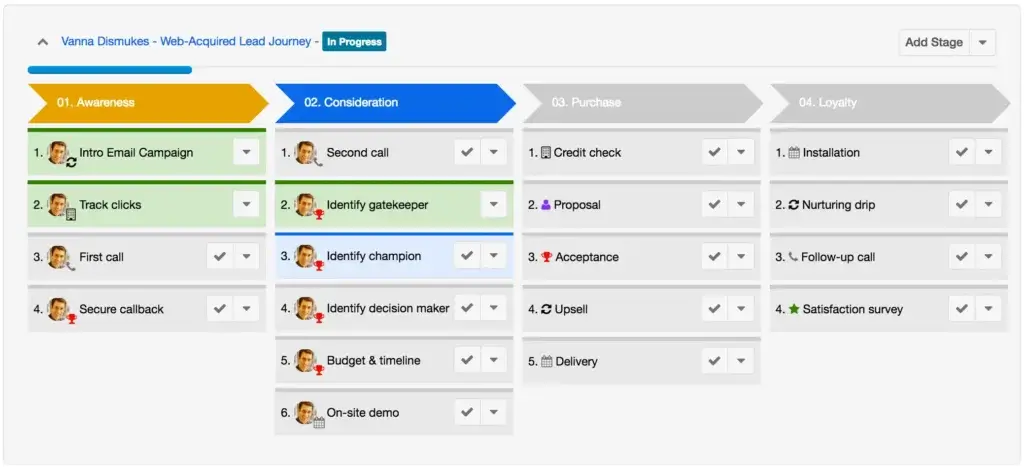
- Create custom sales stages, approval workflows, and business rules
- Use SugarBPM to automate internal processes
- Configure role-based access for sales, service, managers, and executives
This flexibility is valuable if your company has unique sales processes, regulated workflows, or complex approval requirements.
7. Mobile CRM for Field and Remote Teams
Your sales team may not spend the whole day at a desk. SugarCRM’s mobile app helps reps access important customer information from the field, during travel, or between meetings.
- Access contacts, accounts, opportunities, tasks, and notes from mobile devices
- Update records after customer meetings
- Keep field reps connected to pipeline and account data
For outside sales teams, field reps, and distributed teams, mobile access can reduce delays and improve data accuracy.
8. Knowledge Base, Training, and Support Resources
SugarCRM is a powerful system, so training matters. The platform offers documentation, community resources, training materials, and partner support to help teams implement and adopt it properly.
- Access SugarClub for community knowledge, product updates, and best practices
- Use technical documentation for admins, developers, and implementation teams
- Work with certified partners for setup, migration, and customization
This support ecosystem is important because successful CRM adoption depends on more than software features. It depends on how well your team understands and uses the system.
Key Benefits
Benefits of Using SugarAI
The main benefit of SugarCRM is that it can become a true revenue operations system, not just a sales database. When configured well, it helps your teams work from shared customer data, automate handoffs, and make better decisions.
1. Better Customer Context
Your team can see customer activity, deal history, communication records, and service details in one place. This makes conversations more relevant and reduces the risk of missing important context.
2. Less Manual Sales Administration
Automation helps your reps spend less time updating records and more time selling. You can automate reminders, assignments, approvals, and pipeline actions.
3. Smarter Lead and Account Prioritization
With AI-supported insights and reporting, your team can focus on the accounts and opportunities most likely to matter. This is especially useful when sales teams manage large account lists.
4. Stronger Collaboration Between Teams
Sales, marketing, and service teams can work from shared customer records. This improves handoffs and creates a more consistent customer experience.
5. Better Visibility for Managers
Managers can track pipeline health, rep activity, sales forecasts, and customer trends. This makes it easier to identify risk before it turns into missed revenue.
Pros and Cons
Advantages and Limitations of Using SugarAI
Positive
✅ Highly customizable workflows
✅ Strong AI and sales intelligence direction
✅ Good fit for complex B2B sales
✅ Flexible integrations and APIs
Negative
❌ Steeper learning curve
❌ Higher entry cost for small teams
❌ Setup may require expert help
❌ Not ideal for basic CRM needs
Like any CRM platform, SugarCRM has clear strengths and clear trade-offs. It is powerful when you need control, automation, and customization, but it may feel heavy if your team only needs simple contact and deal tracking.
✅ Top Pros
1. Strong Customization Options
You can customize fields, modules, layouts, dashboards, workflows, and access permissions. This is useful when your sales process does not fit into a basic CRM template.
2. Built for Complex Sales Operations
SugarCRM works well for teams with multi-step pipelines, account-based selling, territories, approvals, and long sales cycles. It gives you more control than many lightweight CRM tools.
3. Useful AI and Predictive Features
The platform’s AI direction is one of its most important updates. SugarAI is focused on helping sales teams act on customer signals, prioritize opportunities, and spot revenue risks earlier.
4. Flexible Integration Capabilities
With APIs and integration options, SugarCRM can connect with ERP systems, productivity tools, marketing platforms, and customer service software.
❌ Key Cons
1. It Takes Time to Learn
SugarCRM is not the simplest CRM for beginners. Your team will likely need onboarding, admin ownership, and a clear implementation plan.
2. It Can Be Expensive for Small Teams
The current pricing structure is better suited to teams that already have enough users and complexity to justify the investment.
3. Setup Can Require Customization Work
The flexibility is valuable, but it also means configuration can take time. Businesses with custom workflows may need help from internal admins or implementation partners.
4. It May Be Too Advanced for Simple Use Cases
If you only need basic contact management, email sync, and a simple pipeline, a lighter CRM may be easier and more cost-effective.
User Experience
User Interface and Experience
Usability matters because even the most advanced CRM fails if your team avoids using it. SugarCRM gives you a lot of control, but that control comes with a learning curve.
The experience is best for teams that are willing to configure the platform properly and train users around clear workflows.
Clean Interface, But Not the Lightest CRM
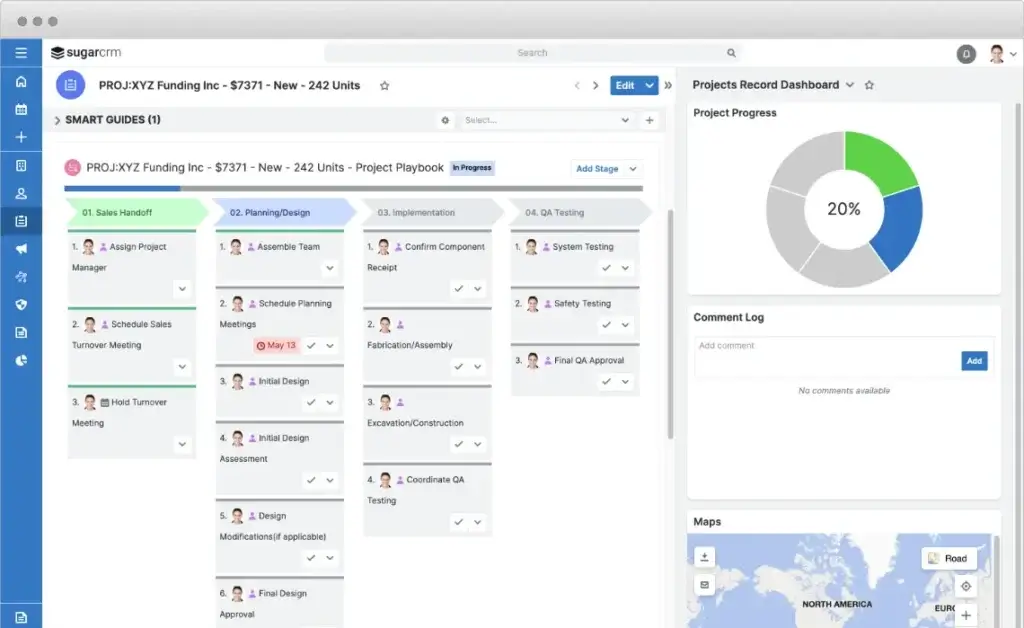
The interface is structured and functional, with areas for accounts, contacts, opportunities, reports, dashboards, cases, and workflows. It is not as simple as newer visual CRMs, but it gives experienced teams more control.
- Dashboards can be customized by role, team, or business goal
- Navigation is logical, but new users may need onboarding
- Admins have strong control over layouts, permissions, and modules
If your team has used enterprise CRM software before, SugarCRM will feel familiar. If your team is moving from spreadsheets or a lightweight CRM, expect an adjustment period.
Cross-Device Functionality
SugarCRM supports desktop and mobile use, which is important for sales teams that work from the office, home, and the field.
- Desktop users get deeper access to dashboards, workflows, and reporting
- Mobile users can manage customer records, tasks, and opportunities
- Field reps can update CRM data closer to the customer conversation
This helps reduce the common CRM problem of reps updating records days after meetings, when details are already missing.
Customization Improves the Experience
The platform becomes more valuable when it is customized around your real sales process. You can shape pipeline stages, data fields, reporting views, and workflow rules around how your business operates.
- Sales teams can create custom pipeline stages
- Support teams can configure case views and service workflows
- Managers can create dashboards for performance, forecasting, and team activity
This is one of the reasons SugarCRM is often a better fit for process-driven teams than for companies that want a simple plug-and-play system.
Support, Documentation, and Training
SugarCRM offers a strong support ecosystem, but the level of support depends on your plan and implementation approach. Larger companies often benefit from working with a certified partner.
- SugarClub provides community support, documentation, and product guidance
- Training resources help admins and users understand the platform
- Implementation partners can help with migration, configuration, and integrations
If you are moving from another CRM, I strongly recommend planning your migration before importing data. Clean data will make adoption much easier.
Performance and Reliability
For teams that rely on CRM every day, performance and reliability are critical. SugarCRM is designed for business-critical use, especially when deployed through its cloud environment.
- Cloud deployment reduces infrastructure management for your team
- Role-based access helps protect sensitive customer data
- Reporting and dashboards support daily sales management
For companies with strict IT requirements, deployment flexibility is one of the platform’s more practical advantages.
What Users Should Expect
The most satisfied users are usually teams that need advanced CRM control. They value the ability to customize processes, automate work, and connect CRM data with broader revenue operations.
The less satisfied users are often teams that expected a simple setup. If you want a fast, lightweight CRM, tools like monday CRM, Pipedrive, or HubSpot may feel easier to adopt.
Business size fit
SugarCRM for Different Business Sizes
SugarCRM can support different business sizes, but it is not equally practical for every company. Its strongest fit is usually with teams that have enough sales complexity to benefit from customization, automation, and AI insights.
For very small businesses, the platform may feel more advanced than necessary. For mid-sized and enterprise teams, it can provide the structure and control needed to manage more mature revenue operations.
| Business Size | How SugarCRM Fits | Best Recommendation |
| Small Businesses | Useful if the team needs structured sales workflows and expects to grow. | Consider carefully because pricing and setup may be too heavy for simple needs. |
| Mid-Sized Companies | Strong fit for teams that need automation, reporting, and consistent pipeline management. | Likely the best-fit segment, especially for B2B sales teams. |
| Large Enterprises | Good fit for complex workflows, role permissions, integrations, and account-based sales. | Works best with admin ownership and implementation planning. |
Pricing and Plans
How much does SugarCRM cost?
SugarCRM pricing has changed from older plan structures, so this section is important to update. The current Sugar Sell plans are organized around Standard, Advanced, and Premier, with annual billing and a 15-user minimum on the main plans.
This means the true entry cost can be higher than the per-user price suggests. If you have fewer than 15 users, you should calculate the annual minimum before comparing it with lighter CRM tools.
SugarCRM Plan Comparison
| Plan Name | Best For | Key Features | Starting Price |
| Standard | Sales teams that need core CRM and process management | Account and contact management, lead and opportunity management, quote management, pipeline management, business process management, reporting, analytics, mobility, and basic support | From $59/user/month, billed annually |
| Advanced | Teams that need stronger automation, intelligence, and service visibility | Everything in Standard, plus mail and calendar integration, case management, bug tracking, standard support, Sugar Intelligence, sales-i, and Smart Guides | From $85/user/month, billed annually |
| Premier | Enterprise and field-heavy teams with advanced sales needs | Everything in Advanced, plus geo mapping, Discover, enhanced support, more storage, and LinkedIn connector | From $135/user/month, billed annually |
Total Cost of Ownership
The monthly price is only one part of the cost. With SugarCRM, you should also consider setup, configuration, user training, data migration, integrations, and admin time.
- Implementation: More complex teams may need partner support
- Data migration: Cleaning and importing records can take time
- Customization: Workflows, dashboards, roles, and fields may need setup
- Training: Users need guidance to adopt the platform properly
- Integrations: ERP, billing, or service desk connections may add cost
My recommendation is to evaluate SugarCRM based on total value, not just software price. If the platform saves time, improves forecasting, and helps reps focus on better opportunities, the investment can make sense. If you only need simple pipeline tracking, it may be more CRM than you need.
Alternatives and Comparisons
SugarCRM vs Other CRM Software
SugarCRM competes with several major CRM platforms, but it serves a slightly different buyer. It is usually stronger for customization and complex workflows, while other CRMs may be easier, cheaper, or faster to deploy.
If you are still comparing options, start with your team’s real needs: simplicity, scalability, automation, integrations, pricing, or enterprise control.
| CRM | Best For | Where It Wins | Where SugarCRM Wins |
| SugarCRM | Mid-sized and enterprise B2B teams | Customization, AI-guided selling, workflow control | Best fit when your process is complex and needs flexibility |
| Salesforce | Large enterprises with broad app ecosystem needs | Marketplace, enterprise depth, advanced scalability | May feel more focused and less overwhelming for some mid-market teams |
| HubSpot CRM | Teams that want easier adoption and strong marketing alignment | Ease of use, inbound marketing, fast setup | Better for advanced customization and complex B2B processes |
| Zoho CRM | Cost-conscious teams that want broad functionality | Pricing flexibility and wide business app ecosystem | Stronger fit for deeper sales operations and AI-guided account intelligence |
| monday CRM | Visual teams that want simple pipeline management | Ease of use, flexible boards, quick adoption | More suitable for enterprise-grade CRM customization |
For a wider comparison, you can also review our guide to the best CRM software, where we compare leading platforms across business size, features, usability, and pricing.
Security and Compliance
Protection for Your Data
When you manage customer data, security is not optional. SugarCRM includes security controls that help teams manage access, protect records, and support compliance requirements.
This is especially important for companies in finance, healthcare, manufacturing, government, and other industries where customer data must be handled carefully.
Key Security Features
- Role-based access control: Limit what users can view, edit, or manage
- Data encryption: Help protect customer information in storage and during transfer
- Audit capabilities: Track user actions and changes for internal review
- Permission management: Create different access levels for teams and departments
- Cloud security controls: Support secure hosted deployment through SugarCloud
Privacy and Compliance Considerations
SugarCRM can support businesses with privacy and compliance requirements, but your final compliance posture depends on how the platform is configured and how your team manages data.
- Useful for organizations that need structured access control
- Helpful for teams managing sensitive customer records
- Can support privacy workflows when configured correctly
- Requires internal data governance policies for best results
Cloud vs. On-Premise Control
One advantage of SugarCRM is deployment flexibility. Many companies use the cloud version, but some organizations may prefer more control depending on IT, compliance, or data residency needs.
- Cloud deployment: Easier to manage and maintain
- On-premise or controlled deployment: Better for companies with strict infrastructure requirements
- Hybrid needs: May require partner guidance and careful planning
If security is one of your main buying criteria, do not evaluate features alone. Ask about deployment model, support level, backup processes, data residency, user permissions, and audit requirements before signing a contract.
Best Fit
Who Should Use SugarCRM?
SugarCRM is best for businesses that want a CRM they can shape around their sales process. It is not the best fit for every team, but it can be very powerful for the right use case.
✅ SugarCRM Is a Strong Fit If You:
- Manage complex B2B sales cycles
- Need custom workflows and approval processes
- Want AI-supported sales guidance and forecasting
- Use ERP or back-office data in your sales process
- Need role-based access and stronger process control
- Have enough users to justify annual CRM investment
❌ You May Want Another CRM If You:
- Need a free CRM or very low-cost plan
- Have a very small sales team
- Want a plug-and-play CRM with minimal setup
- Do not have admin resources or implementation support
- Only need simple contact management and deal tracking
In simple terms, SugarCRM is better for process-driven sales organizations than for teams that only need a lightweight pipeline board.
Conclusion
Final thoughts
⭐ Overall Rating: 7.7/10
Picking a CRM like SugarCRM is not just about managing contacts and leads. It is about choosing a platform that can support your sales strategy, improve customer visibility, and help your team act on better information.
🔍 What You’re Really Getting
Here’s a quick recap of what SugarCRM brings to the table:
- A 360-degree view of customer accounts and interactions
- Sales, marketing, and service automation for reducing manual work
- AI-powered sales intelligence through the SugarAI direction
- Custom workflows for businesses with unique processes
- Flexible integrations with business tools and ERP data
- Scalability for mid-sized and enterprise teams
If you take the time to configure it properly, SugarCRM can become more than a CRM. It can become the operating layer for your revenue team.
👥 Is It the Right Fit?
If you need a simple CRM for a small team, SugarCRM may feel heavier than necessary. You may get faster value from a simpler tool with a lower entry cost.
But if you manage a complex sales process, need custom workflows, or want AI-supported guidance for account and opportunity management, SugarCRM is a serious option.
Looking to compare it side by side with other leading tools? Check out our best CRM software guide to see how SugarCRM compares with other top platforms.
🧠 Final Word from a CRM Expert
After working with many CRM platforms, my opinion is simple: the best CRM is not always the easiest or the most popular. It is the one your team can actually use, trust, and build around.
SugarCRM requires more effort upfront than lightweight CRMs. But for teams that need deep customization, stronger automation, and better sales intelligence, that effort can pay off.
If your business has outgrown basic CRM tools and needs a platform that can support more advanced revenue operations, SugarCRM is worth serious consideration.
Frequently Asked Questions
Have more questions?
Is SugarCRM now called SugarAI?
Yes. SugarCRM has rebranded as SugarAI to reflect its stronger focus on AI-powered sales intelligence and guided selling. Many users still search for the product as SugarCRM, so both names are commonly used.
Does SugarCRM offer a free plan?
No. SugarCRM does not offer a permanent free plan. Businesses usually need to choose a paid annual plan, so smaller teams should compare the total contract cost before committing.
How long does SugarCRM implementation usually take?
Implementation time depends on your data, workflows, integrations, and user count. A simple setup may take a few weeks, while a more complex deployment with custom workflows and integrations can take longer.
Is SugarCRM good for small businesses?
It can work for small businesses that need structured sales workflows, but it is usually better for growing or mid-sized teams. Very small teams may find it more complex and costly than simpler CRM tools.
What industries use SugarCRM?
SugarCRM is commonly used by B2B companies in industries such as manufacturing, distribution, financial services, technology, professional services, and other sectors with complex account relationships.
Can SugarCRM connect with ERP software?
Yes. SugarCRM can connect with ERP and back-office systems through integrations and APIs. This is useful for companies that want sales teams to see account activity, purchase history, or customer trends.
Is SugarCRM hard to use?
SugarCRM is not the hardest CRM, but it has a steeper learning curve than lightweight tools. It becomes easier to use when the system is configured well and users receive proper onboarding.
Does SugarCRM support AI features?
Yes. SugarCRM includes AI-focused capabilities through the SugarAI direction, including sales intelligence, predictive insights, and guidance that can help teams prioritize accounts and opportunities.
What is the biggest drawback of SugarCRM?
The biggest drawback is complexity. SugarCRM is highly flexible, but that flexibility means setup, training, and configuration require more planning than simpler CRM platforms.
Who should choose SugarCRM over HubSpot or monday CRM?
Choose SugarCRM if you need deeper workflow customization, complex B2B sales processes, AI-guided selling, or integrations with ERP data. Choose HubSpot or monday CRM if ease of use is your top priority.