
Cybersecurity is no longer just about antivirus protection. If you’re managing a business or overseeing remote employees, you need a solution that protects data, devices, and identities, all at once. That’s exactly where Aura Antivirus fits in.
Updated for June 2026, this review takes a deep dive into Aura’s current offerings, including its identity theft tools, multi-device protection, and new AI-powered features for scam prevention and online privacy.
Aura is designed for:
- Small businesses and remote teams
- Professionals handling sensitive client data
- Users who want both antivirus and identity security in one platform
In this review, you’ll learn:
- What Aura offers in terms of antivirus, VPN, and threat monitoring
- How it compares to top tools like Bitdefender and McAfee
- How well it performs in real-world use, including speed and system impact
- Which plan offers the best value in 2026 for your business needs
If you’re looking for an all-in-one cybersecurity platform that’s easy to manage and built for privacy-focused teams, Aura may be the right fit.
Overview
Aura Antivirus Overview
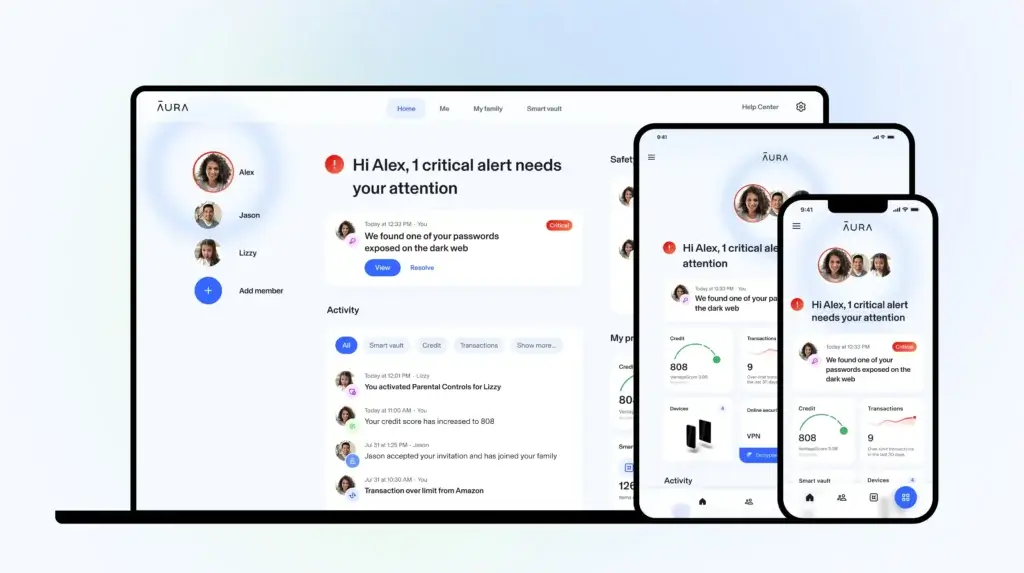
Aura started as a consumer-focused identity protection service but has grown into a comprehensive digital security platform. As of 2026, Aura offers antivirus protection, VPN, real-time scam detection, and dark web monitoring, all under a unified dashboard designed for both personal and small business use.
Company Background
Aura’s shift toward privacy-first cybersecurity reflects the growing demand from both individuals and businesses for more holistic protection. In addition to malware blocking, Aura now includes features like data broker removal, AI call filtering, and BYOD security tools, making it a relevant option for modern hybrid workforces.
Product Suites
Aura doesn’t offer traditional “Basic” or “Pro” tiers. Instead, all plans come with the full suite of features, and the difference lies in how many users or devices are covered:
| Plan | Users | Devices | Best For |
| Individual | 1 | 10 | Freelancers, consultants |
| Couple | 2 | 20 | Partners, co-founders |
| Family/Team | 5 | 50 | Small businesses, startups |
Each plan includes:
- Antivirus and real-time threat detection
- VPN with unlimited bandwidth
- Password manager
- Dark web and financial account monitoring
- AI spam call and scam protection
- 24/7 US-based customer support
Device and OS Compatibility
Aura works across all major platforms, including:
- Windows (10 and 11)
- macOS
- Android
- iOS
- Chrome and Firefox browsers (for privacy tools and anti-tracking)
There is no support for Linux or server-based protection, which may be a limitation for larger IT environments. However, for most remote teams, SMBs, and BYOD setups, the cross-platform compatibility is more than sufficient.
Software Specification
Core Features and Security Tools
Aura Antivirus has evolved into more than just a malware scanner. It now delivers a broad range of features tailored for individuals and small businesses that need streamlined, always-on protection across devices. In 2026, Aura’s platform combines real-time threat defense with privacy-first tools that safeguard both endpoints and user identity.
Malware and Threat Protection
Aura uses cloud-based threat detection to guard against known and emerging malware. You get real-time scanning, automatic updates, and AI-enhanced detection without taxing your system.
Key protections include:
- Viruses and worms
- Ransomware (via behavior-based monitoring)
- Trojans and spyware
- Phishing and fake websites (browser-level protection)
- Zero-day threats, thanks to real-time cloud signatures
Aura’s antivirus engine operates continuously in the background. For businesses, this means less downtime, fewer security incidents, and no manual intervention required.
Additional Tools and Features
What sets Aura apart is its emphasis on identity, communication, and online presence protection, especially valuable for businesses that rely on remote work, cloud apps, or client communications.
1. VPN with Unlimited Bandwidth
Every Aura plan includes a built-in VPN. It auto-activates on public Wi-Fi and encrypts data to protect employees on the go.
2. Password Manager
Helps employees store and share credentials securely. Supports autofill and password health checks.
3. Dark Web Monitoring
Constantly scans leaked databases for your business emails, employee logins, or credentials. You’ll get real-time alerts if something is exposed.
4. Spam Call and Text Filtering (New in 2026)
Aura now blocks scam calls and smishing attempts using AI. This is especially helpful for teams using work numbers or BYOD mobile devices.
5. Data Broker Removal Tool (Updated in 2026)
Lets you request the removal of your business or employee data from hundreds of data broker sites with one-click automation.
6. BYOD Device Security for MSPs and Teams
Aura has introduced support for MSPs and small businesses managing bring-your-own-device environments. It emphasizes identity-centric controls over traditional MDM, making deployment and management easier for non-technical teams.
7. Wi-Fi Security and Firewall
Monitors unsafe networks and helps block unauthorized connections.
8. Webcam and Microphone Protection
Notifies users if an app or site tries to access their webcam or mic unexpectedly.
Pros and Cons
Advantages and Disadvantages
Positive
✅ Easy multi-device setup
✅ Strong identity theft tools
✅ VPN included in all plans
✅ Low system impact
Negatives
❌ No on-demand scan scheduling
❌ Limited enterprise integrations
❌ Few customization options
❌ No Linux support
Aura delivers simplicity and broad protection, making it attractive for small to mid-sized businesses that need security without constant oversight. Here’s a closer look at its strengths and limitations:
✅ Pros
1. Easy multi-device setup
You can onboard and protect multiple devices from a single dashboard, no IT expertise required. This is ideal for small teams or remote workers.
2. Strong identity theft tools
Aura offers dark web monitoring, SSN tracking, and identity fraud alerts. These features go beyond basic antivirus, giving businesses extra peace of mind, especially those in finance, healthcare, or legal sectors.
3. VPN included in all plans
There’s no need to buy a separate VPN. Aura’s built-in VPN provides encrypted internet access, keeping remote work and client communications secure.
4. Low system impact
Aura runs quietly in the background without slowing down machines. That means your team can stay productive without interruption from heavy CPU usage.
❌ Cons
1. No on-demand scan scheduling
Unlike other antivirus tools, Aura doesn’t let you schedule custom scans. This limits flexibility for teams that want to run scans during off-hours.
2. Limited enterprise integrations
Aura lacks integrations with common business platforms (e.g., Microsoft 365, Slack, SIEM tools), which might be a dealbreaker for larger IT operations.
3. Few customization options
Advanced users might find Aura’s settings too simple. There’s little room for policy tweaking or user-based configurations.
4. No Linux support
Aura is focused on Windows, macOS, Android, and iOS. If your infrastructure includes Linux systems, you’ll need a separate solution.
Software Capabilities
Performance and User Experience
Aura is designed to be lightweight, intuitive, and accessible, a strong fit for teams without dedicated IT staff. From setup to everyday use, it focuses on simplicity while delivering robust protection in the background.
System Impact
Aura runs quietly in the background with very low CPU and RAM usage, even during full system scans. Based on recent 2026 benchmarks and tests, most users report:
- CPU usage during scans: ~15–20%
- Background usage: Typically under 5%
- No noticeable slowdown during app use, file transfers, or video conferencing
This makes Aura ideal for remote work environments or creative professionals who can’t afford slowdowns.
Scan Speed and Definitions
- Quick Scan: ~3 minutes on average
- Full Scan: 15–25 minutes, depending on system size
- Virus Definition Updates: Delivered multiple times daily via cloud sync
Updates are automatic, so there’s no need for manual downloads or intervention. You’re always protected against the latest threats without interrupting workflows.
Setup and Ease of Use
Aura’s setup is designed for non-technical users. You don’t need to configure ports, scripts, or complex policies.
- Setup takes ~5–10 minutes per device
- Users receive email invites and complete installation with one click
- Admins can view and manage devices from a single dashboard
For growing teams or founders without an IT department, this plug-and-play simplicity is a major benefit.
Mobile App Usability
Aura’s mobile apps for iOS and Android replicate the desktop experience, giving users access to:
- Identity alerts and real-time notifications
- VPN toggles with automatic activation on unsecured Wi-Fi
- Scan history and device status
Mobile usage is lightweight and battery-friendly. Employees can stay protected while working on the move, without needing additional mobile security tools.

Lab Results
Independent Test Lab Results
Unlike legacy antivirus vendors, Aura has limited participation in independent antivirus test labs such as AV-Test and AV-Comparatives. As of early 2026, the platform has not been consistently evaluated across all categories, which makes direct comparisons with tools like Bitdefender or Norton more challenging.
AV-Test and AV-Comparatives Status
- No enterprise antivirus certification from AV-Test as of June 2026
- Not listed in the most recent AV-Comparatives rankings
- Lacks formal Protection, Performance, and Usability scores from these labs
This may be a concern for enterprises that require lab-tested certification for regulatory compliance (HIPAA, PCI-DSS, ISO 27001, etc.).
In-Field Detection and Reliability
Despite limited lab data, third-party evaluations, and internal platform testing show:
- Real-world detection rates around 98–99%
- Low false positives reported across desktop and mobile platforms
- Reliable performance against phishing sites and browser-based threats
- Quick reaction time to new malware via cloud-based signature updates
Aura’s focus appears to be user-first security and identity protection, rather than high-end EDR or forensic-level malware analysis.
If you’re a small business that values simplicity and privacy protection over industry certifications, this is not a deal-breaker. But if you’re in a regulated industry, consider pairing Aura with an AV-Test-certified solution.
Pricing
Pricing and Plans
Aura’s pricing in 2026 continues to reflect its all-in-one approach. Rather than offering tiered features, Aura includes full functionality in every plan, with pricing based on the number of users and devices. This makes it easy for small businesses to scale protection without worrying about upsells or modular add-ons.
Updated Pricing (June 2026)
| Plan | Users | Devices | Monthly Price |
| Individual | 1 | 10 | $15/month |
| Couple | 2 | 20 | $29/month |
| Family/Team | 5 | 50 | $50/month |
Free Trial and Refund Policy
- 14-day free trial (no credit card required)
- 60-day money-back guarantee on annual plans
- No hidden fees, upsells, or stripped-down “basic” versions
Value Assessment
Each plan includes:
- Antivirus and malware protection
- VPN (unlimited bandwidth)
- Identity theft protection and fraud alerts
- Dark web and financial monitoring
- Password manager and spam call filtering
- U.S.-based customer support
Considering that most vendors charge separately for VPN and identity monitoring, Aura’s bundled pricing offers excellent value for SMBs, especially those who want to avoid managing multiple tools or contracts.
Feedbacks
User Feedback and Reviews
Aura maintains a strong reputation among users for its usability, identity protection features, and responsive support. While not as feature-heavy as enterprise solutions, it consistently earns high marks from customers, particularly small business users looking for simplicity and all-in-one coverage.
👍 Common Praise
Most business users appreciate:
- Simple onboarding across multiple devices
- All-in-one dashboard with identity, antivirus, and VPN in one place
- Excellent customer support, available via chat, phone, and email
- Reliable alerts for breaches, fraud attempts, and dark web exposure
The ease of managing up to 50 devices without IT expertise is frequently mentioned as a top benefit.
👎 Common Complaints
While reviews are mostly positive, some users report:
- Lack of advanced controls for IT admins
- No integrations with workplace tools like Microsoft 365 or Slack
- Occasional duplicate alerts from identity protection tools
- No Linux support for developers or technical teams
These limitations may matter more to tech-savvy users or growing businesses with complex IT needs.
⭐ Ratings Snapshot
| Platform | Rating (June 2026) | Highlights |
| Trustpilot | 4.2 / 5 | Trusted for simplicity and service |
| Google Play | 4.3 / 5 | Lightweight, well-rated Android app |
| Apple App Store | 4.4 / 5 | User-friendly iOS protection |
| G2 | 4.1 / 5 | Strong in identity monitoring and VPN |
Aura VS. Alternatives
Comparison with Other Antivirus Software
Choosing the right antivirus for your business often comes down to what you value most: deep system control, identity protection, or simplicity. Here’s how Aura stacks up against three major players in the space: Norton, Bitdefender, and Avast.
Aura vs. Norton
Norton 360 is a well-established antivirus brand that offers excellent malware protection, cloud backup, and parental controls. It also includes VPN access and identity theft protection through LifeLock.
What Norton does well:
- AV-Test certified with near-perfect scores
- Offers cloud backup, webcam protection, and firewall
- Strong parental control and file recovery tools
Where Aura has the edge:
- Simpler dashboard for managing multiple devices
- Lower-cost identity protection bundled into all plans
- More intuitive for non-technical users and small business teams
Bottom line: Norton is ideal for power users who want granular control. Aura is better for teams that want clean, privacy-first protection without complexity.
Aura vs. Bitdefender
Bitdefender consistently ranks among the best in malware detection and performance, making it a favorite among tech-savvy businesses. Its GravityZone platform is widely used in enterprise environments.
What Bitdefender does well:
- Best-in-class malware detection and prevention
- Advanced threat analytics and sandboxing
- Enterprise-grade features for large teams
Where Aura stands out:
- Bundled VPN and identity protection for one price
- No need for separate endpoint or identity tools
- Faster setup and easier daily management
Bottom line: Bitdefender is great for IT-heavy teams needing enterprise-level control. Aura offers a more streamlined experience for startups and small teams that want everything in one place.
Aura vs. Avast
Avast offers a popular free antivirus version and a suite of premium tools for individuals and small offices. It includes a firewall, sandboxing, and Wi-Fi inspection tools.
What Avast does well:
- Free antivirus option available
- Custom scan configurations and app-level sandboxing
- Wi-Fi vulnerability scans and driver updater tools
Where Aura leads:
- No ads, data-sharing, or upsells
- Full identity protection and credit monitoring included
- Stronger privacy posture with dark web alerts and data broker removal
Bottom line: Avast is a strong choice if you’re budget-conscious and need custom scan tools. Aura is a better pick for those who value privacy, support, and real-time identity monitoring.
Key Takeaway
| Tool | Best For | Notable Feature |
| Aura | Small businesses, remote teams | Identity protection + VPN combo |
| Norton | Power users and families | Cloud backup + parental controls |
| Bitdefender | Enterprise security environments | Advanced EDR and threat analysis |
| Avast | Budget-conscious individuals | Free version + sandboxing tools |
Conclusion
Is Aura Worth It?
⭐ Overall Rating: 8.0/10
Aura Antivirus is a solid all-in-one cybersecurity solution for users who want more than just malware protection. It combines antivirus, VPN, identity theft monitoring, and real-time scam protection under one clean interface.
✅ Best for Personal Use
If you’re a solo user, freelancer, or a family looking for:
- Easy multi-device protection
- Protection against financial fraud and identity theft
- Scam call and spam text blocking
- Built-in VPN without needing another subscription
Then Aura offers exceptional value. You get comprehensive security without dealing with multiple apps or complicated settings.
✅ Best for Business Use
For small businesses, remote-first teams, and startups, Aura is ideal if you:
- Manage up to 50 devices without a full-time IT person
- Need all-in-one endpoint and identity protection
- Want a privacy-focused platform that’s easy to deploy
- Care more about simplicity and coverage than enterprise-level policy control
However, Aura is not built for large enterprises, server protection, or deep integration into IT systems. If you need compliance auditing, Linux support, or advanced role-based access, you may want to pair Aura with an enterprise-grade endpoint security tool.
Aura strikes the right balance between ease of use, modern threat protection, and privacy-first tools. Whether you’re a solo professional or a growing team, it’s a reliable choice in 2026.
Still comparing options? See our guide to the best antivirus software for personal use or top antivirus platforms for small businesses for side-by-side comparisons.
Have more questions?
Frequently Asked Questions
Is Aura Antivirus good for business use?
Yes. Aura is a strong choice for small businesses, startups, and remote teams. It allows you to protect multiple users and devices from a single dashboard, while also including identity theft monitoring, VPN, and scam protection without requiring advanced IT setup.
How many devices can I protect with Aura?
Aura’s Family or Team plan supports up to 5 users and 50 devices. This makes it suitable for small businesses, distributed teams, or households with multiple devices that need centralized protection.
Does Aura include a VPN?
Yes. Every Aura plan includes an unlimited VPN. It automatically secures your internet connection, especially when using public Wi-Fi, helping protect sensitive business and personal data.
Can I use Aura on both desktop and mobile devices?
Yes. Aura works on Windows, macOS, Android, and iOS devices. It also offers browser extensions for Chrome and Firefox, allowing you to stay protected across all platforms.
Is Aura certified by AV-Test or AV-Comparatives?
As of February 2026, Aura has not been certified by AV-Test or AV-Comparatives. While it performs well in real-world usage, businesses that require independently tested antivirus solutions may prefer alternatives with certified lab results.
What identity protection features does Aura include?
Aura includes dark web monitoring, financial account alerts, SSN tracking, credit monitoring, and identity theft insurance. These tools help protect both personal and business data from fraud and breaches.
Is Aura a good choice for personal use?
Yes. Aura is an excellent option for individuals and families who want an all-in-one solution that combines antivirus, VPN, and identity protection without needing multiple subscriptions.
Can I schedule antivirus scans with Aura?
No. Aura does not currently support scheduled scans. However, its real-time protection runs continuously in the background to detect and block threats automatically.
Does Aura offer a free trial or money-back guarantee?
Yes. Aura offers a 14-day free trial with full access to all features, along with a 60-day money-back guarantee on annual plans.
Does Aura support Linux or server environments?
No. Aura does not support Linux systems or server environments. It is primarily designed for personal use, small businesses, and teams using Windows, macOS, Android, and iOS devices.