

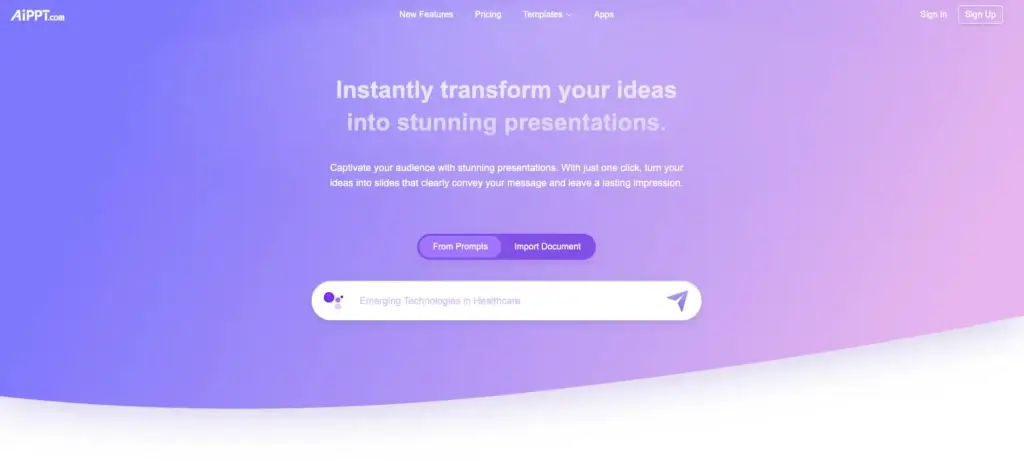
AIPPT approaches presentation creation differently. Instead of making users build every slide manually, it uses AI to turn prompts, documents, URLs, Markdown, and other inputs into structured presentations much faster.
What makes AIPPT stand out is its focus on speed, flexibility, and PowerPoint-style practicality. The platform is designed to generate full decks from multiple input sources, then let users refine them with AI editing, template replacement, additional slide generation, and export options that fit common PPT-based workflows.
In this review, you will get a full overview of AIPPT’s core features, pricing, strengths and weaknesses, ideal use cases, and how it compares to other presentation tools. You will also see where AIPPT performs especially well, and where tools like Gamma, Prezi, or Pitch may still be the better fit depending on your workflow.
Software Specification
AIPPT’s Core Features
AI-generated presentations from multiple input types
AIPPT is built around fast presentation generation. You can start from a topic, plain text, local files, Google Drive content, Markdown, mind maps, or even a webpage URL, which makes it more flexible than tools that rely mostly on short prompts alone. For users who want to move from rough material to a usable deck quickly, this is one of AIPPT’s strongest advantages.
Strong PowerPoint-oriented workflow
One of AIPPT’s more practical strengths is that it feels closely tied to PPT-style work. The platform is designed to generate slides that can be edited and exported in common presentation formats, which makes it more appealing to users who still work around PowerPoint deliverables rather than only web-based presentations.
Large template library
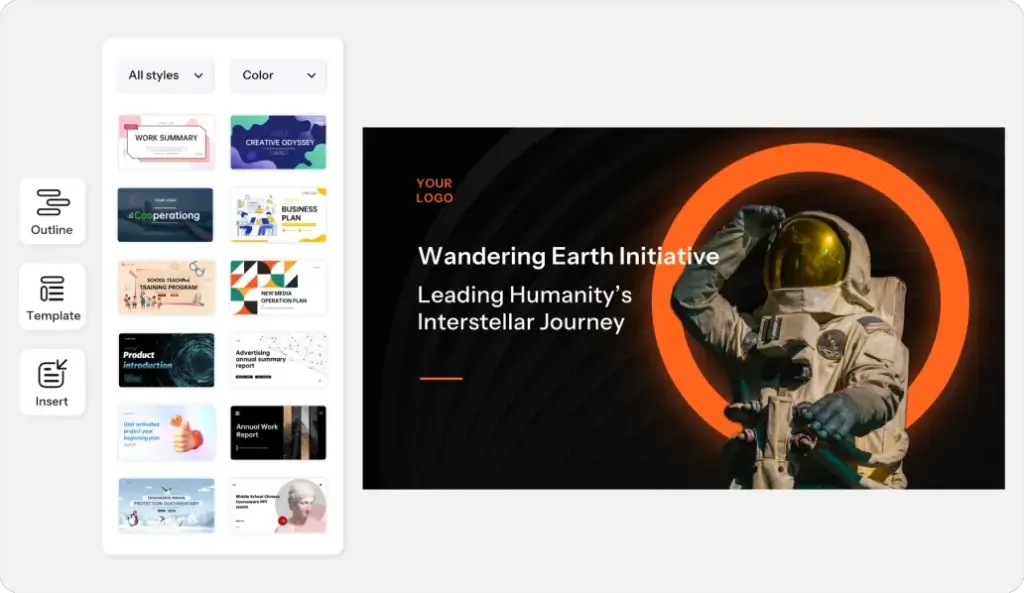
AIPPT combines AI generation with a very large presentation template library. That is important because it gives users more control over the final visual direction after the initial deck has been generated. Instead of relying only on one AI-generated style, users can browse and replace templates to better match a business, educational, marketing, or pitch context.
AI editing and slide expansion tools
The platform is not limited to first-draft generation. AIPPT also includes AI editing tools for refining slides, replacing templates, adding new slides with AI, and merging slides into a more complete presentation. In practice, that makes it more useful than a tool that simply generates a rough deck and leaves all refinement to manual editing.
Import flexibility for real-world content
AIPPT is particularly useful when your content already exists somewhere else. It supports importing from local documents, URLs, Markdown, mind maps, and Google Drive, which is a strong fit for users who already have outlines, notes, documents, or source materials and want to turn them into slides instead of starting from zero.
AI image support and visual enhancement
The platform also includes AI image credits and AI-assisted creation workflows that help users round out a presentation visually without needing a separate design tool for every asset. That does not make it a full creative suite, but it does reduce friction for users who want a reasonably polished deck in one place.
Outline-based presentation generation
AIPPT’s workflow is especially useful for users who think in terms of structure first. Since it supports outline downloads, Markdown input, and mind map imports, it feels better suited than many competitors for users who want to build a logical presentation from preexisting ideas instead of relying entirely on AI to invent the narrative.
Accessible entry pricing
Compared with some presentation tools aimed more heavily at team collaboration or advanced brand governance, AIPPT’s pricing is positioned to be accessible for individuals who mainly want AI generation, template access, and editing features without paying enterprise-style presentation software pricing from the start.
Pros and Cons
Advantages and Disadvantages
Positive
✅ Very flexible input options
✅ Affordable starting pricing
✅ Strong PowerPoint-style workflow
✅ Huge template library
Negative
❌ Less team-focused than Pitch
❌ Less distinctive live storytelling than Prezi
❌ Fewer web-native sharing advantages than Gamma
❌ Advanced governance appears limited versus enterprise tools
Pros
✅ Very flexible input options
AIPPT does a very good job of meeting users where their content already lives. It supports prompts, text, local files, URLs, Google Drive, Markdown, and mind maps, which makes it more versatile than many AI presentation tools that are centered almost entirely around short prompt-based generation.
✅ Affordable starting pricing
AIPPT’s paid plans start at a lower price point than many presentation competitors aimed at professionals and teams. That makes it easier for solo users, students, consultants, and small businesses to adopt AI presentation generation without immediately stepping into higher monthly software costs.
✅ Strong PowerPoint-style workflow
AIPPT is especially appealing for users who still think in terms of PPT deliverables. The tool is clearly built around generating and editing slide decks that fit traditional presentation expectations rather than pushing users fully into a web-only storytelling environment.
✅ Huge template library
The large template library is one of the platform’s most practical advantages. It gives users more freedom to adjust the visual feel of a generated deck and makes the tool useful both for quick AI drafting and for template-first presentation workflows.
Cons
❌ Less team-focused than Pitch
AIPPT is strong for fast creation and editing, but it does not appear as collaboration-centered as Pitch. If your workflow depends heavily on shared workspaces, team asset libraries, version-heavy collaboration, and presentation coordination across multiple contributors, Pitch still feels more mature in that area.
❌ Less distinctive live storytelling than Prezi
AIPPT is designed more around structured slide creation than memorable motion-based storytelling. If your goal is to create a more dynamic live presentation experience with visual movement and narrative zooming, Prezi remains the more distinctive option.
❌ Fewer web-native sharing advantages than Gamma
Gamma has a stronger web-native identity, especially for async sharing, modern link-based delivery, and flexible online viewing. AIPPT is stronger for PPT-style practicality, but it does not appear as differentiated for interactive web-first presentation sharing.
❌ Advanced governance appears limited versus enterprise tools
AIPPT offers useful creation and editing features, but it does not appear to position itself as heavily around enterprise-level governance, permissions, and structured brand administration as some business presentation platforms do. For large organizations with strict oversight requirements, that may matter.
User Experience
Fast, Flexible, and Very Practical
AIPPT delivers a user experience built more around fast output than around presentation theatrics. The interface and feature set appear designed for users who already have an idea, document, outline, or source page and want to turn that material into a polished deck quickly.
Creation from real source material
One of the most useful parts of the experience is that AIPPT does not force everything through a single prompt box. You can work from documents, web pages, Markdown, mind maps, and Google Drive content, which makes the platform feel more grounded in real work rather than in demo-style AI generation.
AI generation that saves setup time
The AI workflow is clearly built to remove early-stage presentation friction. Instead of creating an outline, selecting a structure, and manually laying out each slide, users can generate a first version quickly and then focus their effort on improving messaging, slide ordering, and design choices.
Editing and refinement
AIPPT appears strongest when used as a generator plus refiner. AI editing, template replacement, slide addition, and merging features help users move beyond a rough first draft. That makes the experience more practical for people who want a usable final deck, not just a proof of concept.
Template-driven polish
The large template library also improves the product experience because it helps bridge the gap between speed and presentation quality. Even when the initial AI draft is only a starting point, users have strong visual options for improving the deck without rebuilding it manually.
Best for efficiency over experimentation
In practice, AIPPT feels more like a productivity tool than a storytelling platform. Users who want to create professional presentations with minimal effort will likely appreciate that. Users who want a more dramatic, interactive, or highly collaborative experience may lean toward other tools.
Best Use Cases
Who Should Use AIPPT
AIPPT is not the perfect fit for every kind of presentation creator, but it is a strong option for users who want fast deck creation, flexible imports, and practical output without paying for a heavier collaboration platform.
Students and educators
AIPPT is a good fit for students and educators who often work from notes, outlines, documents, and topic prompts. Its ability to generate presentations from different content sources can save significant preparation time for classes, reports, and academic presentations.
Consultants and freelancers
Consultants, freelancers, and solo professionals can get strong value from AIPPT because it helps turn raw information into usable slides quickly. That is especially helpful when building client presentations, proposals, internal briefings, and early-stage pitch decks under time pressure.
Small businesses and startup teams
Smaller businesses that need presentations regularly but do not want to invest immediately in a more collaboration-heavy platform may find AIPPT appealing. It offers a strong balance of speed, flexibility, and affordability for teams that mainly need presentation production rather than deep governance.
Users with existing documents to convert
AIPPT is especially useful for people who already have the content but not the slides. If your material lives in a Word file, PDF, URL, Google Drive document, Markdown file, or mind map, the platform is built to convert that source material into a more presentation-ready format quickly.
PowerPoint-oriented users who want AI help
Many users still need presentations in familiar slide formats rather than as web-native interactive pages. In my opinion, AIPPT is particularly compelling for users in that group because it focuses on AI-powered deck creation without moving too far away from the practical expectations of PPT-based work.
Compare with Others
Alternatives to AIPPT
AIPPT is one of the more practical AI presentation makers for users who want fast slide generation from varied source material, but it is not the only strong option in this market. Gamma is better known for web-native, link-friendly presentation output, Prezi stands out for dynamic storytelling and live audience engagement, and Pitch is stronger for collaborative team-based slide workflows. AIPPT is the better fit when your priority is fast PPT-style creation, flexible import sources, and affordable access to AI presentation building.
| Feature Type | AIPPT | Gamma | Prezi | Pitch |
| Best for | Fast AI-generated PPT-style presentations from varied inputs | Fast web-native decks and async sharing | Dynamic storytelling and more engaging live presentations | Collaborative team deck creation and polished slide workflows |
| Core format | Traditional slide deck generation with template flexibility | Card-based, web-native presentations | Zoomable canvas presentation format | Traditional slide-based collaborative workspace |
| AI strength | Strong for converting topics, docs, URLs, Markdown, and mind maps into decks | Excellent for fast first-draft generation and online sharing | Strong for turning prompts or files into more visual story-driven presentations | Good for creating and refining team-ready on-brand presentations |
| Collaboration | Useful for individual and light team workflows | Good collaborative editing with strong sharing workflows | Good collaboration, but more presentation-style specific | Excellent for team collaboration, shared templates, and workspace structure |
| Sharing style | PPT/PDF export and practical presentation delivery | Excellent live-link sharing and web-first viewing | Best for live delivery and visual audience engagement | Strong sharing and presentation delivery for team environments |
| Best tradeoff | Flexibility plus affordability | Speed plus modern link-based output | Storytelling plus motion | Collaboration plus slide workflow maturity |
When to choose another tool
- Choose Gamma if you want a more web-native presentation format and care a lot about link sharing, modern online viewing, and quick AI-generated first drafts. Gamma is the better choice when async consumption matters as much as the deck itself.
- Choose Prezi if you want more movement, visual storytelling, and audience engagement during live presentations. Prezi is more distinctive when the way you present matters as much as the information you are presenting.
- Choose Pitch if your team builds presentations together and needs stronger collaboration, shared templates, version history, and more organized workspace management. Pitch feels more mature for team-driven deck production.
- Choose AIPPT if your main goal is turning existing ideas, documents, and source materials into usable PowerPoint-style presentations quickly. In my opinion, AIPPT is the better fit for users who want speed, flexible inputs, and lower-cost access to AI presentation creation without overcomplicating the workflow.
Pricing & Plans
Find the Right Fit for Your Workflow
AIPPT uses a freemium pricing model with clear limits around AI generation volume, maximum slide count, AI editing, and template usage. The main differences between plans come down to how often you can generate and edit decks, how many slides AI can produce, access to advanced AI models, and broader import and export flexibility.
Free plan
- Free – Includes 2 AI generations per day, up to 10 AI-generated slides, limited AI editing, limited template downloads, limited template replacement, and basic AI image credits. It is enough for testing the platform and handling occasional lightweight presentation work.
Plus plan
- Plus – Starts at $9 per month billed annually. This plan raises AI generation limits, template access, slide generation limits, AI editing frequency, and image credits, making it a much more practical option for regular users who build presentations often.
Pro plan
- Pro – A higher-tier paid option for heavier usage. It includes broader AI generation capacity, more image credits, more AI-generated slides per deck, unlimited AI editing, advanced AI models, and broader import flexibility. This plan is better for power users, freelancers, and professionals who create presentations frequently.
Feature highlights across paid tiers
Paid tiers include stronger support for AI generation, AI editing, template replacement, adding slides with AI, merging slides, importing from Google Drive, importing from URLs, Markdown and mind map support, and export options such as PPT, PDF, and image export. The paid experience is clearly where AIPPT becomes much more useful as a working presentation tool.
| Plan | Starting Price | Best For | Key Benefits |
| Free | $0 | Testing and occasional use | 2 AI generations/day, up to 10 slides, limited AI edit, limited template downloads |
| Plus | $9/month billed annually | Regular individual users | Higher generation limits, more AI editing, more templates, more image credits |
| Pro | Higher-tier paid plan | Power users and professionals | More slides per deck, advanced AI models, broader imports, unlimited AI editing |
How to Use AIPPT
A Step-by-Step Guide
AIPPT is relatively easy to start using, especially if you already have content to work from. A typical process looks like this:
Start with a topic, file, or other input
- Open a new project and choose whether to start from a topic, plain text, local document, webpage URL, Google Drive file, Markdown file, or mind map.
- Let the AI generate the presentation based on the content and structure it extracts from your input.
- Review the generated deck and decide whether the initial structure, style, and slide sequence match your goals.
Refine the structure
Once the first version is ready, improve the narrative and messaging. Reorder slides, remove weak sections, add missing points, and tighten the storyline so the presentation feels intentional rather than merely generated.
Adjust the design with templates
Next, switch or replace templates if needed. This is one of AIPPT’s more useful steps because the template library makes it easier to move from a functional draft to a more polished deck without rebuilding everything.
Use AI editing tools
AIPPT also lets users edit and expand decks with AI. You can refine existing slides, add new slides with AI support, and merge sections together into a more complete presentation. This is where the platform becomes more than just a generator.
Export and share
When the deck is ready, export it in the format you need, such as PPTX or PDF, or use sharing options depending on your workflow. For users working in standard presentation environments, this helps AIPPT fit smoothly into familiar delivery processes.
Conclusion
Final Thoughts
AIPPT has carved out a useful position in the AI presentation market by focusing on something very practical. It helps users turn existing content, rough ideas, and raw material into structured slide decks quickly, without demanding too much design work up front.
Its biggest strength is flexibility. The ability to generate from prompts, files, URLs, Markdown, mind maps, and Google Drive gives it a broader real-world usefulness than many AI presentation tools that are centered mainly around prompt-based demos. Add the large template library and AI editing workflow, and the platform becomes more than just a novelty generator.
At the same time, AIPPT is not the ideal choice for every scenario. Users who need more distinctive live presentation storytelling may still prefer Prezi. Teams that need deeper collaborative workspace features may lean toward Pitch. Users who prioritize web-native viewing and link-based sharing may prefer Gamma.
In my opinion, AIPPT is best for students, consultants, solo professionals, and smaller teams that want fast, flexible, PowerPoint-style presentation creation at a more accessible price point. If your goal is practical AI slide production rather than high-end storytelling or team governance, it is one of the more compelling tools to consider.
Have more questions?
Frequently Asked Questions
What is AIPPT?
AIPPT is an AI-powered presentation maker that helps you turn prompts, documents, URLs, Markdown files, and mind maps into structured slide decks much faster than traditional presentation software.
What makes AIPPT different from PowerPoint?
AIPPT focuses on AI generation and AI-assisted editing, while PowerPoint is mainly a manual slide design tool. AIPPT is better for creating a first draft quickly, while PowerPoint gives you more direct control over slide-by-slide customization.
Does AIPPT use AI to create presentations?
Yes. AIPPT uses AI to generate presentations from topics, text, documents, URLs, Markdown, and mind maps. It also includes AI editing tools that help you refine, expand, and improve your slides after generation.
Can AIPPT export to PowerPoint?
Yes. AIPPT supports exporting presentations in PPT and PDF formats, which makes it useful if you still rely on PowerPoint-compatible files for work, school, or client presentations.
Is AIPPT good for teams?
AIPPT can work for small teams and lightweight collaboration, but it appears strongest for individuals and smaller workflows focused on fast slide creation. If your team needs deeper collaboration and presentation management, Pitch may be a better fit.
Is AIPPT free?
Yes. AIPPT offers a free plan with limited AI generations, limited slide count, and restricted editing and template features. Paid plans unlock higher usage limits and broader functionality.
How much does AIPPT cost?
AIPPT’s Plus plan starts at $9 per month billed annually. It also offers a free plan and a higher Pro tier for heavier usage, with more AI generations, more editing capacity, and broader input and export options.
Can AIPPT create presentations from documents or URLs?
Yes. One of AIPPT’s biggest strengths is its ability to generate presentations from local files, webpage URLs, Google Drive content, Markdown files, and mind maps, in addition to simple text prompts.
Who should use AIPPT?
AIPPT is best for students, educators, consultants, freelancers, and small businesses that want to turn existing content into usable presentations quickly without spending too much time on manual slide design.
What are the main limitations of AIPPT?
AIPPT is less collaboration-focused than Pitch, less distinctive for live storytelling than Prezi, and less web-native in sharing style than Gamma. Its main strength is practical AI slide generation rather than advanced presentation delivery or team governance.








