Introduction
Managing employee time and attendance becomes complicated when your team works across job sites, shifts, departments, or remote locations. Paper timesheets and manual payroll checks can quickly lead to missed punches, inaccurate hours, and unnecessary admin work.
Buddy Punch is designed to solve that problem with an easy-to-use time clock, GPS tracking, geofencing, scheduling, PTO tracking, and payroll-ready reporting.
In this Buddy Punch review 2026, you’ll learn how the platform works, how much it costs, what features stand out, where it falls short, and how it compares to alternatives like Clockify, Toggl, and Hubstaff.
The short answer: Buddy Punch is a strong choice for small and mid-sized businesses that need accurate attendance tracking, especially if GPS verification and simple payroll exports are more important than deep productivity analytics or free time tracking.
| Category | Buddy Punch Review Summary |
| Best For | Small and mid-sized businesses with hourly, field, remote, or shift-based employees |
| Starting Price | $4.49/user/month annually + $19 monthly base fee |
| Free Plan | No permanent free plan, 14-day free trial available |
| Strongest Features | GPS tracking, geofencing, scheduling, PTO, payroll integrations |
| Main Limitation | GPS needs internet or phone signal, and advanced features can increase cost |
| Best Alternatives | Clockify, Toggl, Hubstaff, Jibble, Connecteam, Homebase |
What Is Buddy Punch?
Buddy Punch is a cloud-based employee time tracking and scheduling software built for businesses that need a more reliable way to track work hours, attendance, locations, time off, and payroll data.
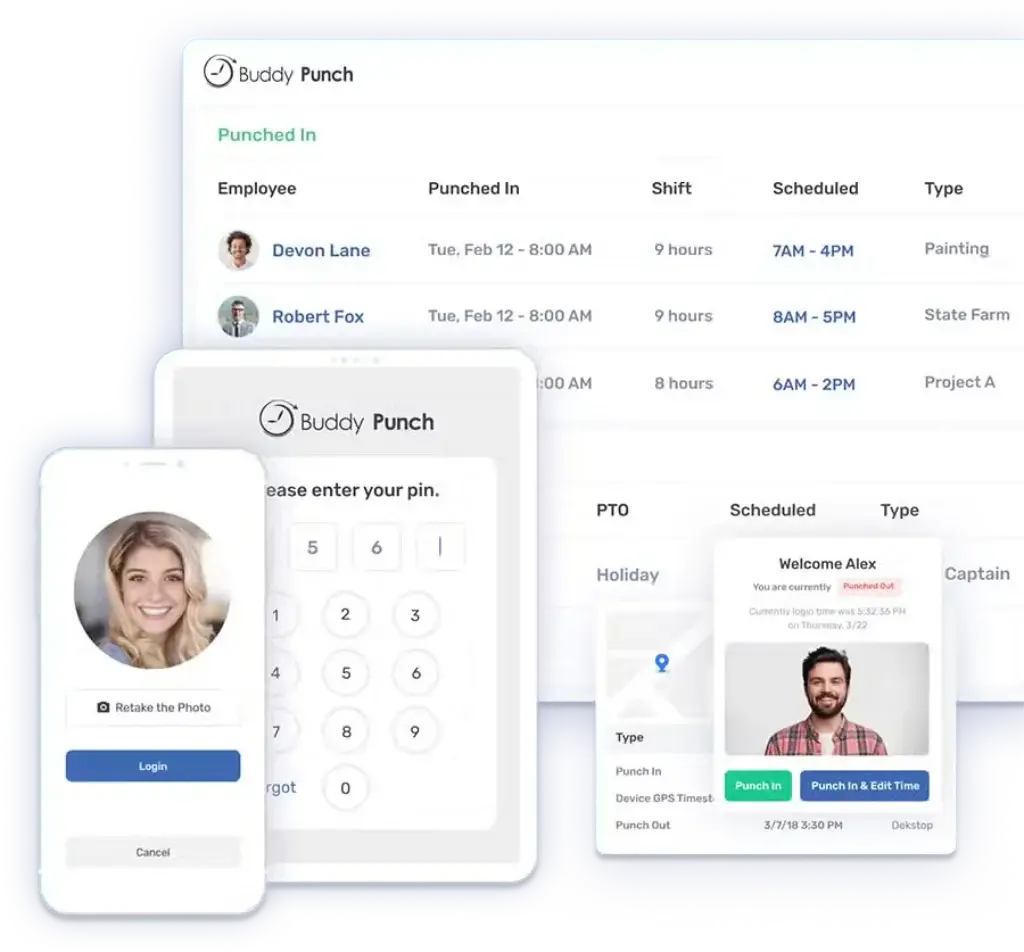
Employees can clock in and out from a web browser, mobile app, tablet kiosk, QR code, PIN, photo capture, facial recognition, text message, or group punch. Managers can then review timesheets, monitor attendance, approve PTO, export payroll reports, and verify where employees clocked in.
Founded in 2013, Buddy Punch has become a popular time clock solution for teams that want a simpler alternative to traditional punch cards, spreadsheets, and manual payroll processes.
Who Buddy Punch Is Best For
Buddy Punch is best suited for businesses that need practical time and attendance control without implementing a complex enterprise workforce management platform.
- Small and mid-sized businesses with hourly employees
- Construction, field service, landscaping, cleaning, and logistics teams
- Retail, hospitality, and shift-based businesses
- Remote or mobile employees who need GPS-verified clock-ins
- Managers replacing paper timesheets or manual payroll exports
It is less ideal if your main goal is project profitability, client invoicing, employee screenshots, or advanced productivity monitoring. In those cases, a tool like Hubstaff, Toggl, or Clockify may be a better match.
Key Features
Time Clock, GPS, Scheduling, Payroll and More
Time Clock and Punch Options
Buddy Punch gives employees several ways to clock in and out, which makes it flexible for different work environments.
Employees can punch from a desktop browser, iOS app, Android app, tablet kiosk, QR code, PIN, photo capture, facial recognition, text message, or group punch. This is useful if you have a mixed workforce where some employees work at desks, some work in the field, and others start shifts from a shared location.
The most useful options include:
- PIN and kiosk punch: Good for shared tablets in offices, warehouses, or job sites.
- QR code punching: Useful when employees need a fast clock-in method.
- Photos on punch: Helps reduce buddy punching through visual verification.
- Facial recognition: Adds another layer of identity confirmation.
- Text to punch: Useful when field employees cannot access the app.
- Group punch: Allows a supervisor or foreman to clock in a crew at once.
- Duration entry: Useful for salaried employees who enter total hours instead of punching in and out.
This variety is one of Buddy Punch’s biggest advantages over simpler time trackers that focus mostly on manual timers or browser-based entries.
GPS Tracking and Geofencing
GPS tracking is one of the main reasons businesses choose Buddy Punch. The platform can capture employee location when someone clocks in or out, which helps you verify that employees are where they should be.
With geofencing, you can create virtual boundaries around job sites, offices, buildings, or customer locations. If an employee tries to punch outside the approved area, Buddy Punch can block the punch or flag the activity for review, depending on your settings.
This is especially useful for field service companies, construction crews, cleaning businesses, home service providers, and mobile teams where employees do not report to one central office every day.
For more advanced tracking, Buddy Punch also offers real-time GPS as an add-on or as part of the Enterprise plan. This lets managers view employee locations during active shifts and review location history.
GPS Privacy and Offline Limitations
Buddy Punch is not designed to track employees all the time. Its real-time GPS tracking is intended for work hours, and location tracking stops when employees clock out.
This privacy distinction matters. GPS tracking can be helpful for attendance verification, but it should be communicated clearly to employees through a written location tracking policy.
The main limitation is offline use. Buddy Punch needs an internet connection or phone signal to capture GPS data. If employees work in areas with poor connectivity, location data may not record properly until the device reconnects.
That does not make Buddy Punch a poor tool, but it does mean you should test it carefully if your team works in rural areas, basements, construction zones, or locations with unreliable mobile coverage.
Scheduling and Shift Management
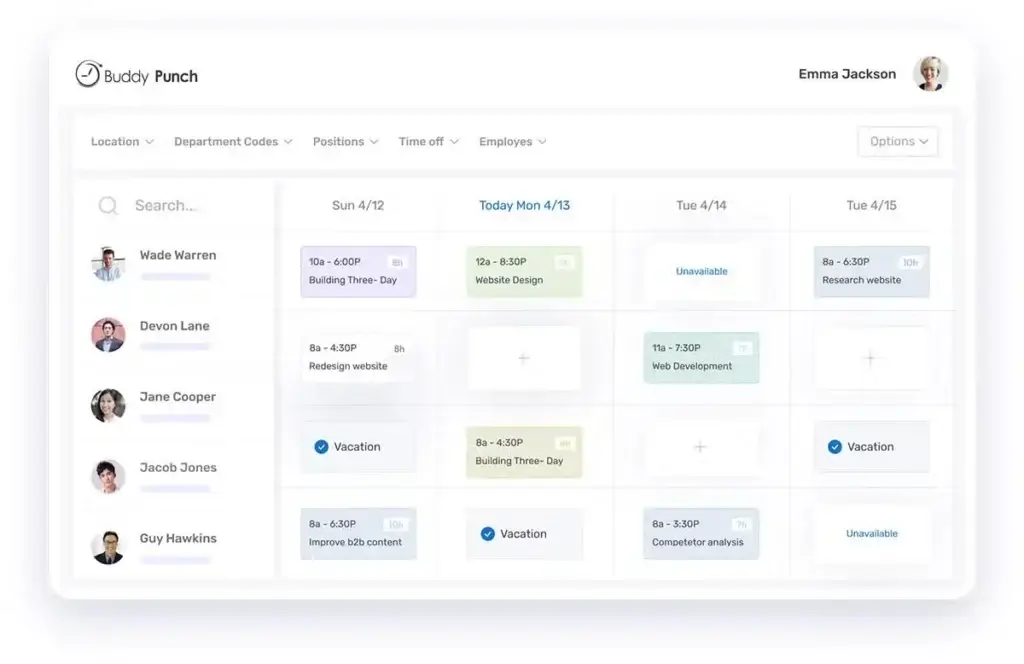
Buddy Punch includes scheduling tools that help managers create, assign, and update employee shifts from one place. You can build schedules using drag-and-drop functionality, create recurring shifts, use templates, and notify employees when schedules change.
The scheduling feature is especially valuable if you manage rotating shifts, multi-location teams, or hourly employees who need clear visibility into upcoming work.
Employees can view their schedules from the mobile app, receive updates, and stay informed about shift changes. Managers can also use early, late, and absent reporting to compare scheduled time against actual attendance.
PTO, Attendance and Labor Cost Controls
Buddy Punch goes beyond basic time entry by including several tools that help reduce labor cost leakage and improve payroll accuracy.
You can manage paid time off requests, track accruals, approve time off, and include PTO data in timesheets. This keeps attendance records, time off, and payroll reporting connected.
The platform also includes features such as overtime alerts, punch limiting, automatic punch-out, automatic breaks, and punch rounding. These controls help you avoid unplanned overtime, prevent early clock-ins, and keep timesheets more consistent.
For businesses with strict wage rules, these features can save time during payroll review and reduce manual corrections.
Reports, Dashboards and Payroll Integrations
Buddy Punch includes a stronger reporting layer than you might expect from a simple time clock tool. Reports can help you review regular hours, overtime, double-time, PTO, breaks, job codes, locations, departments, positions, attendance exceptions, and payroll totals.
For attendance-focused teams, this is one of the platform’s main advantages. You can filter reports by employee, department, location, job, date range, and time type, which makes it easier to understand labor costs and prepare payroll without relying on spreadsheets.
Buddy Punch also supports reports for job costing, PTO usage, employee errors, deleted time entries, early or late arrivals, absences, and GPS activity. Some advanced reporting options may depend on your plan or add-ons, but the core reporting features are useful for SMBs that need clean attendance and payroll data.
The software integrates with payroll and accounting platforms such as QuickBooks, Gusto, ADP, Paychex, and other providers. If your payroll provider is not supported directly, you can export reports as spreadsheet, PDF, or CSV files.
That said, Buddy Punch is not a productivity monitoring tool. It does not focus on screenshots, app usage, keyboard activity, or employee surveillance. Its reporting is best understood as time, attendance, labor cost, scheduling, PTO, GPS, and payroll reporting.
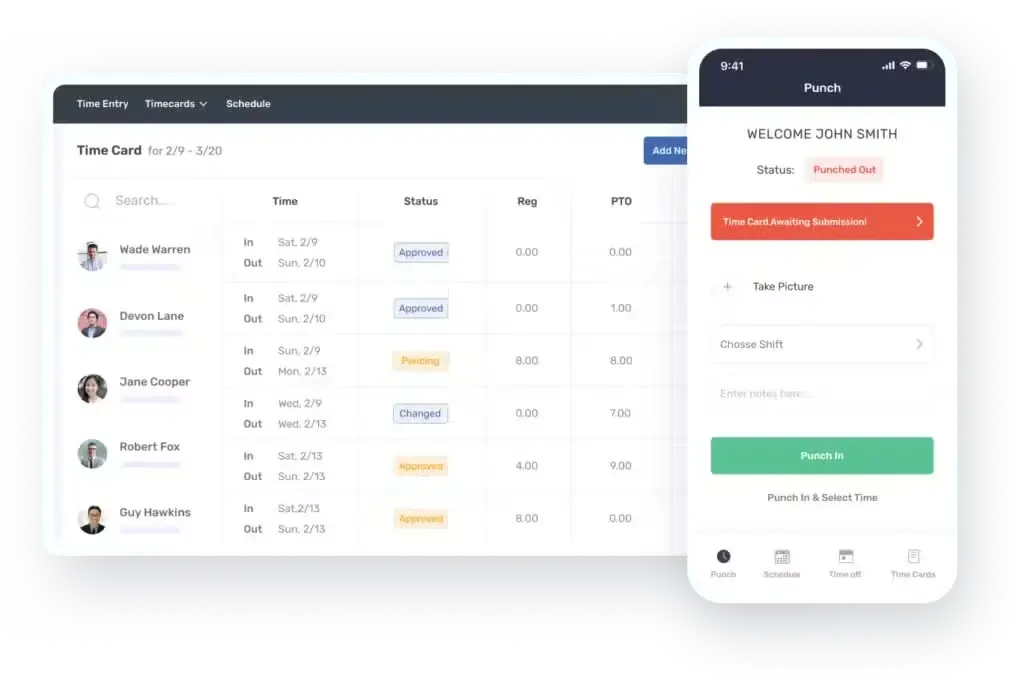
User Experience
Ease of Use, Mobile App and Interface
Buddy Punch’s biggest strength is simplicity. The interface is clean, the setup process is approachable, and employees do not need much training to start clocking in and out.
The admin dashboard gives managers a clear view of time entries, employee status, schedules, PTO requests, and reports. You do not need to move through too many screens to perform common tasks.
Dashboard and Navigation
The dashboard is designed for daily use. Managers can quickly see who is punched in, review pending timesheets, check PTO requests, and monitor attendance exceptions.
The navigation is straightforward enough for non-technical teams. This is one reason Buddy Punch tends to appeal to small and mid-sized businesses rather than only HR or operations specialists.
Employee Mobile Experience
The mobile app lets employees clock in and out, view schedules, submit time off requests, check PTO balances, and receive notifications.
For field employees, GPS tagging and geofencing create accountability without making the clock-in process overly complicated. However, the quality of the experience depends on mobile connectivity, especially when GPS tracking is required.
Customization and Controls
Buddy Punch offers useful administrative settings, including permissions, punch methods, overtime rules, rounding rules, break rules, geofences, IP address restrictions, and notifications.
The customization is practical rather than overly complex. That is positive for most SMBs, but larger enterprises may want more advanced dashboards, workflows, or analytics.
What Real Users Say About Buddy Punch
Public user reviews frequently mention Buddy Punch’s ease of use, quick employee adoption, reliable time tracking, GPS/photo accountability, and responsive support.
The most common criticisms involve occasional mobile syncing issues, limited customization in reporting, features locked behind higher plans or add-ons, and challenges when employees work in poor connectivity areas.
Overall, the user feedback pattern is positive. Buddy Punch appears strongest when a business needs a dependable attendance tool, not a complex productivity suite.
Pros and Cons
Real-World Advantages and Disadvantages
Positive
✅ Easy setup and clean interface
✅ Strong GPS and geofencing tools
✅ Flexible punch options for different teams
✅ Scheduling, PTO, and payroll integrations
✅ Useful labor cost controls
Negative
❌ No permanent free plan
❌ Base fee increases cost for very small teams
❌ GPS needs internet or phone signal
❌ Advanced features can require add-ons
❌ Not Built for Productivity Monitoring
What You’ll Like About Buddy Punch
1. Easy Setup and User-Friendly Interface
Buddy Punch is one of the easier time clock platforms to implement. You can create employee profiles, configure punch rules, set up locations, and begin tracking time without a long onboarding process.
This is important for small businesses that do not have an internal systems administrator or HR technology specialist.
2. Strong GPS and Geofencing Features
Buddy Punch works especially well for businesses that need location-based attendance tracking. GPS on punch helps verify where employees start and end shifts, while geofencing helps prevent offsite clock-ins.
For field teams, this can reduce time theft, improve accountability, and make payroll review easier.
3. Flexible Clock-In Methods
Not every employee clocks in the same way. Buddy Punch supports mobile punches, kiosk punches, QR codes, PINs, facial recognition, photo capture, text to punch, group punch, and duration entry.
This flexibility makes it suitable for office staff, field teams, crews, shift workers, and salaried employees.
4. Helpful Scheduling and PTO Management
The scheduling tools make it easier to create recurring shifts, notify employees, manage availability, and compare scheduled time against actual attendance.
PTO tracking also helps centralize leave requests, approvals, accruals, and paid time off hours inside the same system used for timesheets.
5. Payroll-Ready Reports and Integrations
Buddy Punch reduces payroll friction by letting you export approved time data to payroll and accounting systems. For teams moving away from spreadsheets, this can save several hours every pay period.
The tool is particularly useful if you already use systems like QuickBooks, Gusto, ADP, or Paychex.
What Could Be Better About Buddy Punch
1. No Permanent Free Plan
Buddy Punch offers a free trial, but it does not provide a free forever plan. If you need a free time tracker for freelancers or a small team, Clockify or Toggl may be more attractive.
2. Base Fee Can Be Expensive for Very Small Teams
The per-user pricing is reasonable, but the monthly base fee makes Buddy Punch less cost-effective for teams with only a few employees.
For example, a 3-person team pays the same base fee as a larger team, which increases the real monthly cost per employee.
3. Offline GPS Is Limited
Buddy Punch needs an internet connection or phone signal to capture GPS data. If your team works in areas with poor connectivity, you may experience missing or delayed location data.
This is one of the most important limitations to test during the free trial.
4. Add-Ons Can Increase Total Cost
Some advanced capabilities, including real-time GPS, payroll, scheduling on lower tiers, and extended data retention, may add to the monthly cost.
This does not make Buddy Punch overpriced, but it does mean you should calculate your full setup before comparing it with alternatives.
5. Not Built for Productivity Monitoring
Buddy Punch has useful reporting for attendance-focused teams, including regular hours, overtime, PTO, job costing, labor costs, GPS activity, and payroll exports. For many SMBs, this is more than enough to manage accurate timesheets and reduce payroll errors.
Where it is more limited is productivity monitoring. If you want screenshots, app usage tracking, activity levels, or detailed productivity analytics, Hubstaff is likely a stronger fit.
In other words, Buddy Punch is better described as a time, attendance, scheduling, and payroll reporting tool, not a productivity surveillance platform.
Pricing and Plans
How Much Does Buddy Punch Cost?
Buddy Punch pricing is based on a per-user fee plus a monthly base fee. It does not offer a permanent free plan, but it does provide a 14-day free trial with no credit card required.
Pricing can change, so you should confirm the latest rates before purchasing. At the time of this update, Buddy Punch lists three main plans: Starter, Pro, and Enterprise.
| Plan | Annual Price | Monthly Price | Base Fee | Best For |
| Starter | $4.49/user/month | $5.49/user/month | $19/month | Basic time tracking, PTO, reports, GPS on punch, and payroll integrations |
| Pro | $5.99/user/month | $6.99/user/month | $19/month | Growing teams that need geofencing, QR codes, kiosk punch, webcam punches, and scheduling |
| Enterprise | $10.99/user/month | $11.99/user/month | $19/month | Larger teams that need API access, SSO, priority support, and real-time GPS included |
While Buddy Punch does not offer a permanent free plan, its paid pricing is positioned for SMBs that need attendance accuracy, GPS verification, scheduling, and payroll-ready reporting rather than a basic free timer.
Buddy Punch Add-Ons and Extra Costs
The base pricing is only part of the cost. Depending on your plan and needs, you may also pay for add-ons.
| Add-On | Price | Notes |
| Scheduling | $1/user/month | Included in Pro and Enterprise plans |
| Real-Time GPS | $2/user/month | Included in Enterprise plans |
| Payroll | $6/user/month + $39 base fee/month | Adds integrated payroll, tax filings, direct deposit, and employee onboarding |
| Data Retention | $2/user/month + $39 base fee/month | Extends retention for timecard, time off, scheduling, and availability data |
The pricing is reasonable for businesses that need GPS-based attendance and payroll workflow support. However, very small teams should pay attention to the $19 base fee, because it makes the effective per-user cost higher when you only have a few employees.
If you need a free plan, compare Buddy Punch with Clockify or Toggl. If you need productivity monitoring and activity tracking, compare it with Hubstaff.
Buddy Punch vs Alternatives
Clockify, Toggl, Hubstaff and More
Buddy Punch is not the only time tracking tool worth considering. The right choice depends on whether you prioritize attendance accuracy, project billing, GPS monitoring, employee scheduling, or productivity analytics.
Here is how Buddy Punch compares with several common alternatives.
| Tool | Best For | Where It Beats Buddy Punch | Where Buddy Punch Wins |
| Buddy Punch | GPS-based time clock, attendance, scheduling, and payroll-ready reports | Not applicable | Simple employee clock-ins, geofencing, PTO, payroll exports, and SMB usability |
| Clockify | Free time tracking and project-based work | Free plan, project tracking, billable hours, and broader productivity workflows | Better GPS attendance controls and geofencing for field teams |
| Toggl | Freelancers, agencies, and teams tracking billable work | Cleaner project time tracking and reporting for client work | Better fit for hourly attendance, scheduling, and location verification |
| Hubstaff | Remote teams needing productivity monitoring | Screenshots, activity tracking, app usage, and productivity insights | Simpler for attendance-focused SMBs and less monitoring-heavy |
| Jibble | Free time clock with face recognition and attendance tracking | Strong free plan and modern attendance features | More mature scheduling, PTO, and payroll-focused workflows |
| Connecteam | Deskless teams needing operations, communication, and scheduling | Broader employee management suite | More focused time clock and payroll workflow experience |
| Homebase | Restaurants, retail, and hourly teams at physical locations | Scheduling and team management for location-based businesses | Better for GPS-based field attendance and offsite verification |
Buddy Punch vs Clockify
Clockify is a better choice if you need a free plan, project time tracking, billable hours, and reports for client work.
Buddy Punch is stronger if you manage hourly employees and need GPS, geofencing, shift planning, PTO, and payroll exports.
Buddy Punch vs Hubstaff
Hubstaff is stronger for remote productivity monitoring, screenshots, app usage, and activity levels.
Buddy Punch is easier for teams that mainly need attendance, scheduling, location verification, and payroll accuracy without employee monitoring features that may feel intrusive.
Buddy Punch vs Toggl
Toggl is better for professionals, agencies, and consultants tracking billable project hours.
Buddy Punch is better for operations managers who care more about accurate employee attendance, shift coverage, PTO, and payroll-ready timesheets.
For a broader comparison, visit our Best Time Tracking Tools guide.
Best Use Cases and Buyer Fit
Who Should Use Buddy Punch?
Buddy Punch is a good fit when your business needs reliable attendance data, but does not want a complicated workforce management system.
Best For: Businesses That Need Accurate, Location-Based Time Tracking
Buddy Punch is strongest for teams where attendance accuracy, location verification, and payroll preparation matter more than project profitability or productivity monitoring.
- Construction and field service teams: Confirm who worked at each job site and when.
- Cleaning and maintenance companies: Verify employee presence across client locations.
- Retail and hospitality: Manage shifts, breaks, PTO, and late arrivals.
- Transportation and logistics: Track mobile employees and job-based hours.
- Small and mid-sized businesses: Replace manual timesheets with a structured time clock.
Not Ideal For: Teams That Need Advanced Analytics or Free Time Tracking
Buddy Punch is not the best option for every use case. You may want an alternative if you need a free plan, complex productivity reports, screenshots, billing workflows, or offline GPS tracking in low-signal areas.
- Use Clockify if you need free time tracking and project-based reporting.
- Use Toggl if you track client work and billable hours.
- Use Hubstaff if you need productivity monitoring and activity tracking.
- Use Homebase if you mainly manage restaurant or retail schedules at fixed locations.
- Use Jibble if you need a generous free attendance tool.
Ideal Business Profile
| Business Size | Small to mid-sized teams, roughly 5-200 employees |
| Industry Fit | Construction, field service, cleaning, retail, logistics, hospitality, home services |
| Work Model | Hourly, mobile, field, hybrid, or shift-based teams |
| Primary Goal | Accurate time tracking with GPS, geofencing, scheduling, PTO, and payroll exports |
| Budget Fit | Teams willing to pay for a practical, paid time clock instead of using a free basic tracker |
Tips and Best Practices
How To Get The Most Out of Buddy Punch
Buddy Punch is simple to use, but you’ll get better results if you configure the platform properly from the start. These best practices can help you improve accuracy, reduce payroll errors, and avoid employee confusion.
1. Set Up Locations, Geofences and Job Codes Before Launch
Before employees begin punching in, create your locations, geofences, departments, and job codes. This ensures time data is organized correctly from day one.
If you operate job sites, use a small buffer around the exact location to account for normal GPS variation.
2. Choose the Right Punch Method for Each Team
Not every employee needs the same clock-in method. Office teams may use kiosk punch or IP locks, field employees may use mobile GPS, and crews may benefit from group punch.
Matching the punch method to the work environment will reduce friction and improve adoption.
3. Use Facial Recognition or Photos for High-Accountability Roles
If buddy punching is a concern, use photo capture or facial recognition. These features help verify that the correct employee is clocking in.
This is especially useful in environments with shared devices, high turnover, or multiple employees starting shifts at the same time.
4. Connect Buddy Punch to Payroll Early
Integrate Buddy Punch with your payroll provider before your first pay period ends. This helps you test exports, confirm overtime rules, and avoid last-minute payroll errors.
5. Review Reports Weekly, Not Only Before Payroll
Do not wait until payday to review timesheets. Weekly checks help you catch missing punches, unexpected overtime, incorrect job codes, and attendance patterns before they become payroll problems.
6. Communicate GPS Tracking Clearly
If you use GPS or real-time location tracking, explain what is tracked, when it is tracked, and why it is being used. Employees should understand that location tracking is tied to work hours and attendance verification.
7. Train Managers on Exceptions and Approvals
Managers should know how to review flagged punches, approve PTO, edit timesheets, and handle exceptions. Buddy Punch is simple, but inconsistent manager behavior can still create payroll confusion.
8. Test the Mobile App in Real Work Conditions
If your team works in the field, test the mobile app from real job sites during the free trial. Check GPS accuracy, mobile signal, punch speed, and employee comfort before rolling it out company-wide.
Conclusion
Final Thoughts – Is Buddy Punch Worth It in 2026?
Buddy Punch is worth considering if your business needs a straightforward, reliable time tracking system for hourly employees, field teams, or shift-based staff.
Its biggest strengths are ease of use, GPS tracking, geofencing, scheduling, PTO management, and payroll-ready reporting. These features make it a strong option for businesses that want to reduce manual timesheet work and improve attendance accountability.
The main drawbacks are the lack of a permanent free plan, the monthly base fee, the cost of add-ons, and limited offline GPS functionality. It is also not the best choice if you need advanced productivity analytics, screenshots, or client billing workflows.
Our Summary
| Category | Rating | Notes |
| Ease of Use | 9.2/10 | Simple setup, clean dashboard, and easy employee adoption |
| Features | 8.8/10 | Strong GPS, geofencing, scheduling, PTO, and punch options |
| Pricing | 8.2/10 | Reasonable for SMBs, but base fee and add-ons matter |
| Integrations | 8.7/10 | Good payroll integrations and export options |
| Mobile Experience | 8.4/10 | Good for field employees, but depends on connectivity |
| Overall Score | 8.8/10 | Best for SMBs that need GPS-based attendance and payroll-ready time tracking |
If you manage mobile, hourly, or field employees, Buddy Punch is a practical and dependable choice. If you need free time tracking or more project-based analytics, compare it with Clockify, Toggl, and Hubstaff before deciding.
Frequently Asked Questions
Buddy Punch FAQs
What is Buddy Punch used for?
Buddy Punch is used for employee time tracking, attendance management, scheduling, PTO tracking, GPS verification, geofencing, and payroll-ready timesheet reporting.
How much does Buddy Punch cost?
Buddy Punch starts at $4.49 per user per month when billed annually, plus a $19 monthly base fee. Monthly billing starts at $5.49 per user per month plus the same base fee.
Does Buddy Punch have a free plan?
No. Buddy Punch does not offer a permanent free plan. It offers a 14-day free trial, which lets you test the platform before choosing a paid plan.
Does Buddy Punch support GPS tracking?
Yes. Buddy Punch can capture GPS location when employees clock in and out. Real-time GPS tracking is also available as an add-on or included with the Enterprise plan.
Does Buddy Punch work offline?
Buddy Punch needs an internet connection or phone signal to capture GPS data. If employees work in low-connectivity areas, you should test the app carefully during the free trial.
Can Buddy Punch prevent buddy punching?
Yes. Buddy Punch helps prevent buddy punching with features such as PINs, QR codes, photo capture, facial recognition, GPS tracking, geofencing, and IP address restrictions.
Does Buddy Punch integrate with QuickBooks?
Yes. Buddy Punch integrates with QuickBooks and other payroll providers. It also supports report exports if your payroll provider is not available as a direct integration.
Is Buddy Punch good for small businesses?
Yes. Buddy Punch is a strong fit for small and mid-sized businesses that need an easy time clock, GPS verification, scheduling, PTO tracking, and payroll reports.
What are the best Buddy Punch alternatives?
The best Buddy Punch alternatives include Clockify, Toggl, Hubstaff, Jibble, Connecteam, Homebase, QuickBooks Time, and When I Work. The right option depends on your budget, team size, and tracking needs.
Is Buddy Punch worth it?
Buddy Punch is worth it if you need simple, accurate employee time tracking with GPS, geofencing, scheduling, PTO, and payroll exports. It may not be the best choice if you need a free plan or advanced productivity monitoring.