Introduction
If you are looking for a simple, reliable way to understand where your work hours actually go, this updated Toggl Track review will help you decide whether it is the right time tracking tool for you in 2026.
Toggl Track is a clean, privacy-first time tracking platform built for freelancers, agencies, consultants, creative teams, software teams, and remote knowledge workers. It helps you track billable hours, monitor project profitability, review team capacity, and create useful reports without adding unnecessary complexity to your workday.
Unlike employee monitoring platforms, Toggl Track does not focus on screenshots, keystroke tracking, location monitoring, or surveillance. Its main strength is trust-based time tracking – making it a strong fit if you want accurate data without making your team feel watched.
That said, Toggl Track is not the best fit for every business. If you need GPS tracking, geofencing, shift scheduling, payroll automation, or field workforce management, tools like Atto or Hubstaff may be more suitable.
If you want a time tracking tool that is fast, flexible, and respectful of privacy, Toggl Track remains one of the strongest options in the category.
Quick Overview
What Is Toggl Track?
Toggl Track is a time tracking and reporting platform that helps you capture work hours across tasks, projects, clients, and teams. You can track time manually, use a one-click timer, review your calendar, create reports, and analyze billable versus non-billable work.
Its biggest advantage is simplicity. You can start tracking within minutes, assign entries to projects or clients, and use the data later for billing, productivity analysis, profitability reviews, or team planning.
Toggl Track is especially useful when your work is project-based. If you manage clients, deliverables, retainers, hourly services, or internal team capacity, it gives you the visibility you need without turning time tracking into a heavy administrative process.
Toggl Track Overview and Core Purpose
Toggl Track is designed to answer one important question: where does your time go?
You can use it to track work by project, client, task, tag, team member, billable rate, and date range. Over time, this gives you a more accurate picture of productivity, profitability, and workload.
Common Toggl Track use cases include:
- Freelancers tracking billable hours for clients
- Agencies measuring project budgets and retainers
- Consultants reviewing utilization and profitability
- Software teams tracking development and support time
- Remote teams improving accountability without surveillance
- Managers reviewing project estimates versus actual hours
The platform is not trying to replace a full project management system. Instead, it works best as a focused time tracking layer that connects with the tools you already use.
Supported Platforms: Web, Desktop, Mobile, and Browser Extensions
Toggl Track works across most major devices and operating systems, which makes it easy to track time from wherever you work.
- Web app: Best for dashboards, reports, workspace setup, and admin controls
- Desktop apps: Available for Windows, macOS, and Linux
- Mobile apps: Available for iOS and Android
- Browser extensions: Available for Chrome, Firefox, and Edge
- Calendar integrations: Connects with Google Calendar and Outlook Calendar
This cross-platform coverage is one of Toggl Track’s practical strengths. You can start a timer from your desktop, check time from your phone, and later review detailed reports from the web app.
How Toggl Track Works
At the basic level, Toggl Track works like a smart timer. You click start, describe what you are working on, assign the entry to a project, and stop the timer when you finish.
You can also add time manually if you forget to track something, move entries around in Calendar view, or use the desktop Timeline feature to privately review your activity and decide what should be turned into a time entry.
The key point is that Toggl Track gives you flexibility. You can use it as a lightweight personal productivity tool, a client billing system, or a team reporting platform depending on how your workflow is structured.
Toggl Track Features
What You Actually Get
Toggl Track includes more than a basic stopwatch. Its feature set covers time capture, calendar review, reporting, project budgeting, team management, invoicing, integrations, and privacy-first analytics.
Below are the features that matter most when evaluating Toggl Track in 2026.
Time Tracking, Manual Entries, and Offline Tracking
Toggl Track gives you several ways to capture time accurately. You can use a real-time timer, add manual entries, continue working offline, or edit past entries when your schedule changes.
- One-click timer: Start and stop time tracking quickly
- Manual entries: Add time after the fact when needed
- Offline tracking: Track time offline and sync later
- Idle detection: Clean up entries when you step away
- Reminders: Get prompted when you forget to track
- Pomodoro mode: Use focused work intervals to manage attention
This makes Toggl Track suitable for people who do not want time tracking to interrupt their work. The tool is easy enough for daily use, but flexible enough for teams that need cleaner time data.
Timeline and Auto-Tracking
Toggl Track’s Timeline feature helps you reconstruct your day by privately recording app and browser activity on your device. This is useful when you forget to start a timer or need to remember what you worked on earlier.
The important privacy detail is that Timeline data is private to you. It is not visible to managers or other users, and you choose which activity should become a time entry.
This is one of the main differences between Toggl Track and more invasive employee monitoring platforms. Toggl helps you improve tracking accuracy, but it does not turn your device into a surveillance system.
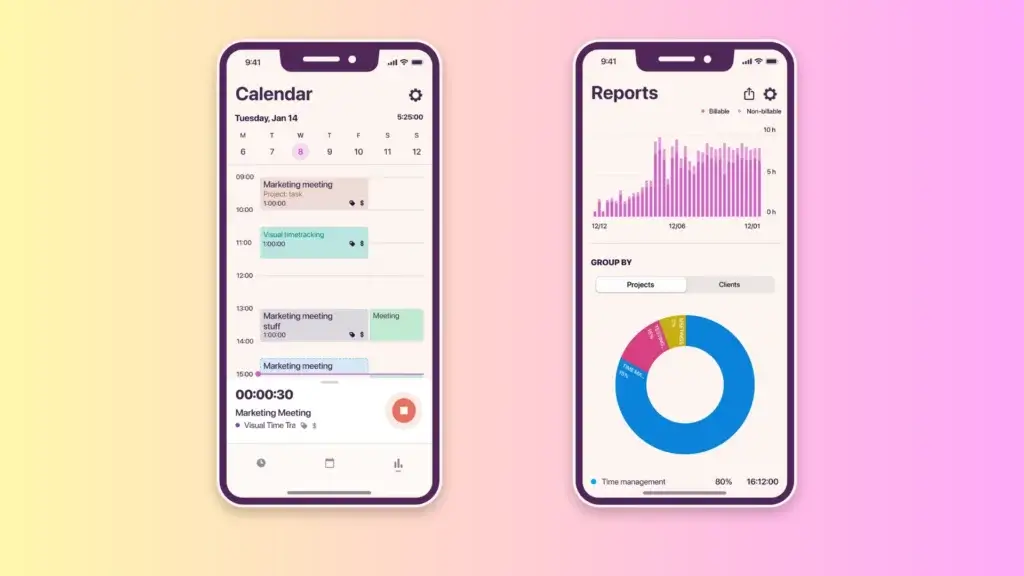
Calendar View and Timesheets
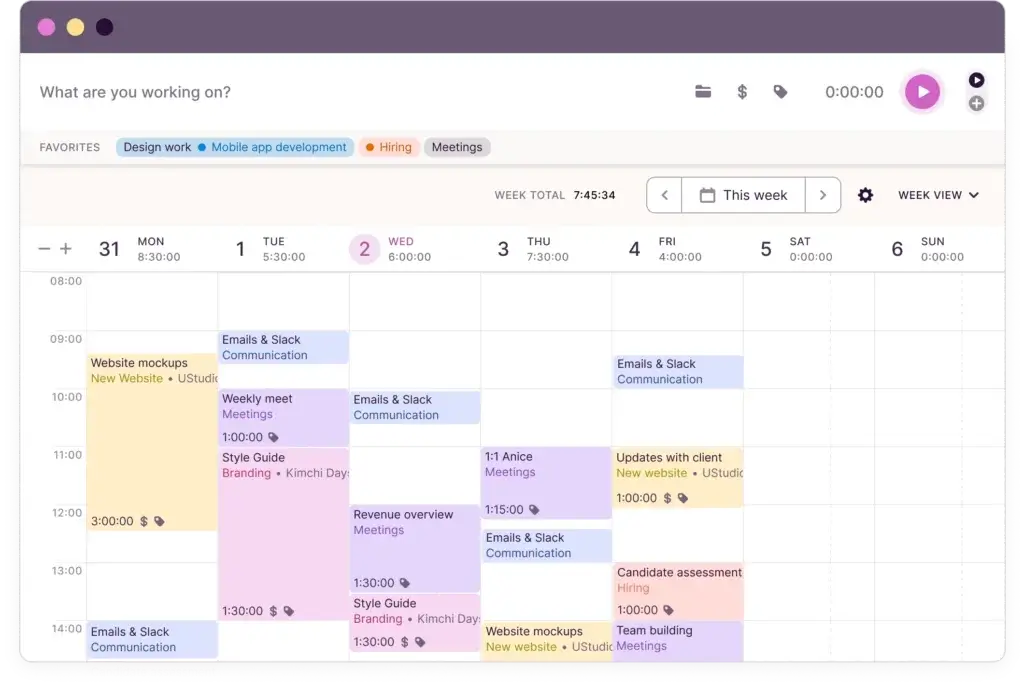
Calendar view makes Toggl Track easier to understand visually. Instead of only seeing a list of time entries, you can view your tracked time as blocks across the day or week.
You can connect Google Calendar or Outlook Calendar, compare meetings with tracked work, and adjust time blocks when your day does not match your original plan.
For teams, Toggl Track also supports timesheet workflows on higher plans. Managers can review submissions, check whether entries are complete, and approve time before it is used for billing, reporting, or internal analysis.
Projects, Clients, Tasks, Budgets, and Billable Rates
Toggl Track becomes more valuable when you organize time around clients and projects. You can assign work to clients, create projects, add tasks, set billable rates, and compare estimated time against actual tracked hours.
This is particularly helpful if you run an agency, consulting business, freelance operation, or internal service team. You can see which projects are profitable, which ones consume too much time, and where estimates need to improve.
- Clients and projects: Organize time by customer and workstream
- Tasks: Break projects into smaller trackable units
- Billable rates: Apply rates by workspace, project, user, or task
- Project estimates: Compare planned versus actual hours
- Budget alerts: Spot projects that are approaching limits
- Fixed fee projects: Track profitability even when billing is not hourly
If you often ask, “Did this project actually make money?”, Toggl Track gives you a clearer answer than spreadsheets or manual time logs.
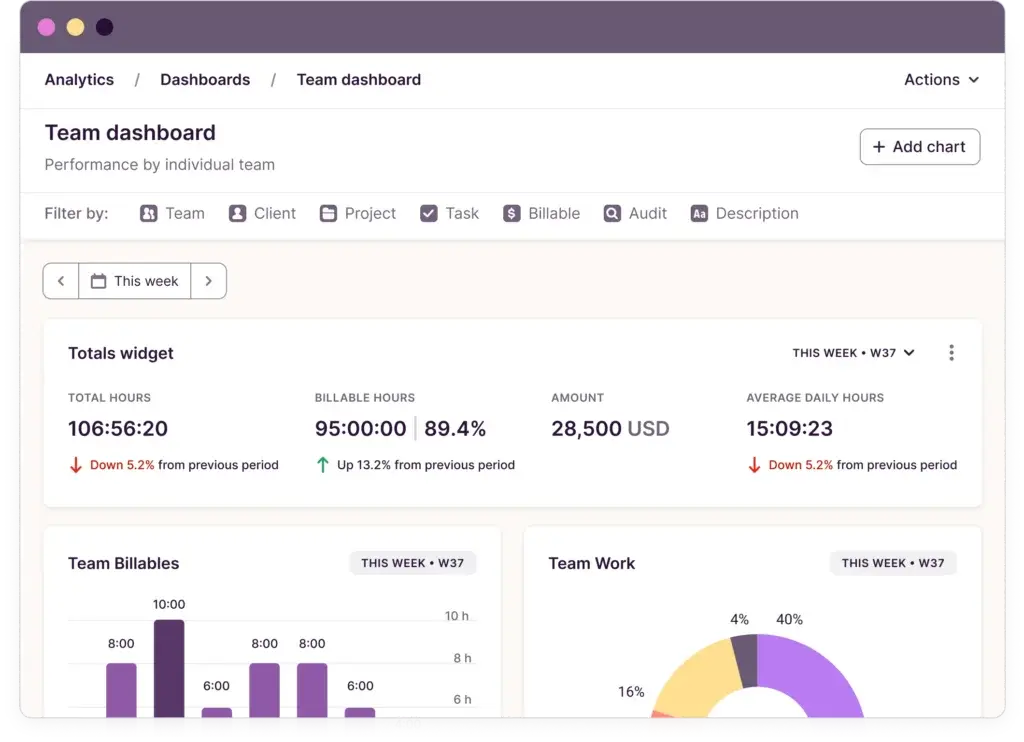
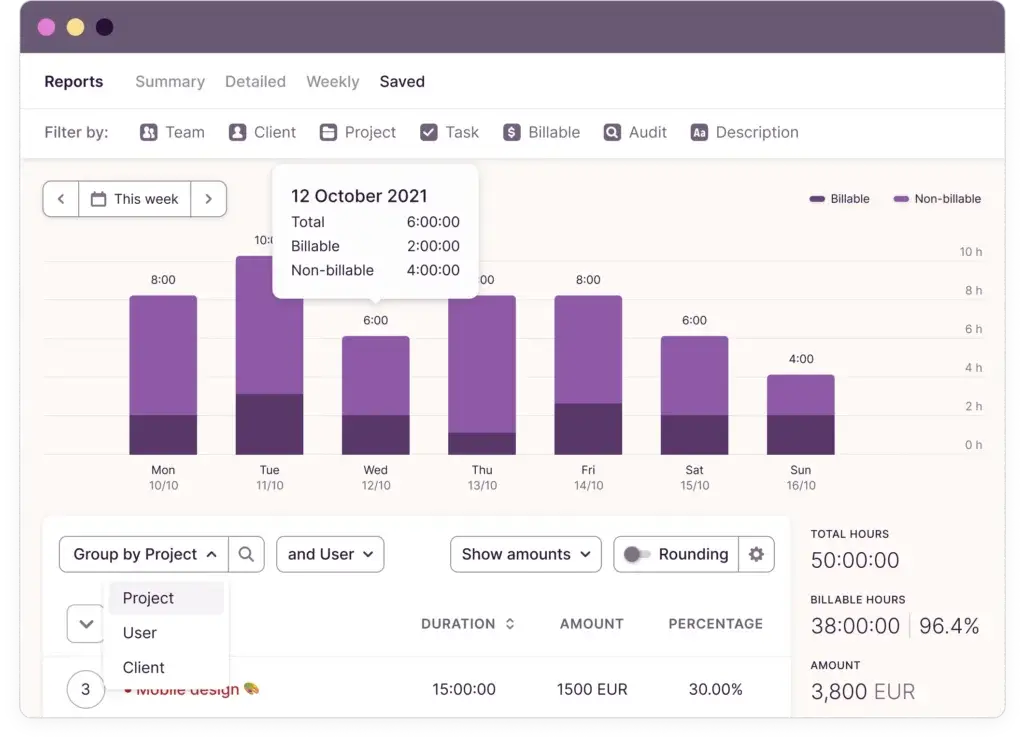
Reporting, Analytics, and Profitability Insights
Reporting is one of Toggl Track’s strongest areas. You can filter, group, export, schedule, and share reports based on the data that matters most to you.
Reports can show time by client, project, task, team member, tag, billable status, or date range. This gives you both operational visibility and financial insight.
- Summary reports: High-level view of hours by project, client, or user
- Detailed reports: Entry-level view with descriptions, tags, and time logs
- Analytics: Custom dashboards for deeper performance analysis
- Profitability reports: Compare revenue, labor cost, and margin
- Scheduled reports: Send recurring updates to managers or clients
- Exports: Export data to PDF, CSV, or Excel-compatible formats
For freelancers, reports can support client billing. For agencies, they can support utilization and profitability reviews. For managers, they can show where teams are overextended or underutilized.
Invoicing and QuickBooks Online
Toggl Track has become more useful for billing workflows. You can generate invoices in Toggl Track based on tracked time and use the QuickBooks Online integration to send invoices generated from Summary Reports directly to QuickBooks.
This is a meaningful update because older reviews often described Toggl’s invoicing as limited or beta-style. It is still not a full accounting platform, but it is now more useful for businesses that want to move from time tracking to billing with fewer manual exports.
If invoicing is a major part of your workflow, you may still prefer dedicated accounting tools or client billing platforms. For example, some users may pair Toggl Track with FreshBooks, QuickBooks, Xero, or another accounting system depending on their billing process.
Integrations, API, and Workflow Automation
Toggl Track integrates with 100+ tools through its browser extensions and native integrations. You can track time from platforms like Asana, Trello, Jira, Salesforce, Gmail, Notion, and ClickUp without constantly switching tabs.
It also supports API access, webhooks, Zapier, and Make, which makes it useful if you want to automate reporting or connect time data with your internal systems.
For larger teams, the Jira and Salesforce integrations are especially relevant because they connect time tracking with product, development, sales, and customer workflows.
User Experience
What It Feels Like to Use Toggl Track
Toggl Track’s user experience is one of the biggest reasons people choose it over more complex time tracking tools. It feels lightweight, fast, and focused.
The interface does not overwhelm you with unnecessary menus. The main timer is easy to find, recent entries are easy to reuse, and reports are clear enough for non-technical users.
Clean Dashboard with Minimal Friction
When you open Toggl Track, the core workflow is straightforward. You enter what you are working on, assign it to a project, add a tag if needed, and start the timer.
You can keep things simple or add more structure over time. This makes Toggl suitable for both beginners and experienced teams that need more detailed reporting.
Fast Daily Tracking
Daily use is where Toggl Track performs particularly well. You can start a timer from the app, browser extension, desktop app, or integrated workflow.
If you repeat similar work, Toggl’s autocomplete and favorites help you reuse previous entries. If you forget to track, manual entries and Calendar view make it easy to correct your logs later.
Mobile and Desktop Experience
The mobile app is useful for tracking time away from your desk, while the desktop app is better for deeper focus workflows, idle detection, reminders, Timeline, and Pomodoro sessions.
For most users, the web app will be the best place to manage projects, clients, reports, and team settings.
Customization Without Complexity
Toggl Track gives you enough customization to be useful without turning setup into a project of its own.
- Use colors to organize projects
- Add tags for meetings, design, development, admin, or research
- Create project templates for recurring work
- Filter reports by team, client, project, task, or billable status
- Set reminders and idle detection rules for cleaner data
This balance is important. Many time tracking tools become too complex when they try to manage every detail of work. Toggl Track stays focused on time, reporting, and profitability.
Pros and Cons
Real-World Advantages and Limitations
Toggl Track is one of the strongest tools in the time tracking category, but it has a specific point of view. It prioritizes simplicity, privacy, and accurate reporting over workforce surveillance and field team controls.
Positive
✅ Very easy to use
✅ Strong free plan
✅ Excellent reports
✅ Great for billable work
✅ Privacy-first approach
Negative
❌ No GPS tracking
❌ No shift scheduling
❌ Advanced features require paid plans
❌ Invoicing is useful but not full accounting
❌ Not ideal for field teams
Pros: Where Toggl Track Performs Best
Toggl Track is exceptionally easy to use. You do not need a long setup process or training session to start tracking time. The timer is simple, the interface is clean, and the reporting structure is easy to understand.
It is strong for billable work. If you charge clients by the hour or need to understand project profitability, Toggl Track gives you clean reporting, billable rates, estimates, and exportable data.
It respects privacy. Toggl Track does not take screenshots, record keystrokes, monitor webcams, or track employee location. This makes it better suited for trust-based teams that want adoption without resentment.
It works across platforms. The web app, desktop apps, mobile apps, browser extensions, calendar integrations, and third-party integrations make it easy to fit Toggl into your existing workflow.
It scales from solo use to team reporting. You can start as a freelancer on the Free plan, then upgrade into more advanced reporting, profitability, approvals, and team management as your needs grow.
Cons: Where Toggl Track Falls Short
Toggl Track is not built for field workforce management. It does not include GPS tracking, geofencing, route tracking, or location-based clock-ins. If you manage construction crews, delivery teams, cleaners, technicians, or field staff, Atto or Hubstaff may be a better fit.
It is not a full project management platform. You can track time against projects and tasks, but Toggl Track does not replace ClickUp, Asana, monday.com, Jira, or other work management platforms.
Some of the best business features are on paid plans. If you need scheduled reports, approvals, profitability analysis, custom reports, SSO, or Jira and Salesforce integrations, you will likely need Premium.
Invoicing is helpful, but not a full billing system. Toggl Track can generate invoices and connect with QuickBooks Online, but businesses with complex billing, taxes, payment collection, or accounting workflows may still need dedicated financial software.
Pricing
Plans, Costs, and Value in 2026
Toggl Track offers four main pricing tiers: Free, Starter, Premium, and Enterprise. The Free plan works well for individuals and small teams, while paid plans add more billing, reporting, collaboration, approval, and admin features.
As of this update, Toggl Track’s annual pricing starts at $9 per user/month for Starter and $18 per user/month for Premium. Monthly billing is usually higher, so always check the official pricing page before making a final decision.
Toggl Track Pricing Overview
| Plan | Annual Price | Best For | Key Features |
| Free | $0 | Individuals and small teams | Basic time tracking, projects, clients, tags, reports, and limited team use |
| Starter | $9/user/month | Freelancers, consultants, and small teams | Billable rates, project estimates, alerts, revenue analysis, tasks, and team collaboration |
| Premium | $18/user/month | Agencies and growing teams | Profitability analysis, fixed fee projects, scheduled reports, approvals, custom reports, Jira, Salesforce, and SSO |
| Enterprise | Custom pricing | Larger organizations | Dedicated onboarding, tailored workflows, priority support, multiple workspaces, and volume discounts |
The Free plan is one of Toggl Track’s biggest selling points. It gives solo users and small teams enough functionality to track time without paying immediately.
The Starter plan is the best fit if you bill clients or need better project-level reporting. Premium is the better option if you need approvals, scheduled reports, profitability data, custom reporting, SSO, or integrations like Jira and Salesforce.
Which Toggl Track Plan Should You Choose?
Choose Free if you are tracking time for yourself, testing the tool, or managing a very small team with basic reporting needs.
Choose Starter if you bill clients, manage several projects, need project estimates, or want revenue and productivity analysis without paying for advanced admin controls.
Choose Premium if you manage a team, agency, or service business where time data affects billing, profitability, capacity, and operational decisions.
Choose Enterprise if your organization needs dedicated onboarding, tailored workflows, multiple workspaces, priority support, or volume pricing.
Is Toggl Track Good Value for Money?
Toggl Track is not always the cheapest time tracking tool. Clockify, for example, is often more appealing for teams that want a broader free plan or lower-cost admin features.
However, Toggl Track offers strong value if ease of use matters. A time tracker only works if people actually use it consistently, and Toggl’s clean interface helps reduce adoption friction.
For freelancers and agencies, the tool can pay for itself if it helps recover missed billable hours, improve estimates, or identify unprofitable work before it becomes a bigger problem.
Security and Privacy
A Trust-Based Alternative to Employee Monitoring
Security and privacy are now important buying criteria for time tracking software, especially if you manage remote teams, contractors, client data, or billable work.
Toggl Track is stronger than many lightweight time trackers in this area. It publicly highlights security and compliance measures such as ISO 27001 certification, SOC 2 Type 1 compliance, GDPR compliance, CCPA compliance, SAML SSO, encryption, and uptime commitments.
For larger teams, this gives Toggl more credibility as a business-ready time tracking tool. It is still important to review the latest security documentation before procurement, but Toggl’s public security posture is a clear advantage over less mature tools.
No Screenshots, Keystrokes, Webcam Monitoring, or Location Tracking
One of Toggl Track’s clearest differentiators is its anti-surveillance position. Toggl Track does not support screenshot monitoring, keystroke logging, screen recording, webcam monitoring, or location tracking.
This matters because time tracking software can easily become intrusive. Toggl’s approach is different: it helps you collect useful time data while keeping the relationship between managers and employees more trust-based.
If your team is made up of professionals who value autonomy, this is a major benefit. If you require strict clock-in enforcement, field verification, or employee monitoring, it is a limitation.
Private Timeline Data
Toggl Track’s Timeline feature can help you remember what you worked on, but the data remains private to the user. Other team members and managers do not see Timeline activity.
This creates a useful middle ground. You get better tracking accuracy without turning Toggl into a monitoring tool.
Toggl Track vs Alternatives
How It Compares With Atto, Hubstaff, Clockify, and Harvest
The best time tracking tool depends on your workflow. Toggl Track is excellent for privacy-first time tracking, billable work, reporting, and knowledge teams. It is weaker for GPS tracking, field teams, payroll, and employee monitoring.
Here is how Toggl Track compares with several popular alternatives.
Feature Comparison Overview
| Feature | Toggl Track | Atto | Hubstaff | Clockify | Harvest |
| Best For | Freelancers, agencies, and remote knowledge teams | Field teams and mobile workforces | Remote workforce monitoring and productivity oversight | Budget-conscious teams needing broad tracking | Client billing and invoicing workflows |
| GPS Tracking | No | Yes | Yes | Available on some plans | No |
| Employee Monitoring | No | Limited | Yes | Available depending on setup | No |
| Invoicing | Yes, with QuickBooks Online support | Payroll-focused | Yes, depending on plan | Available on paid plans | Strong native invoicing |
| Project Profitability | Strong on paid plans | Limited | Good for workforce cost tracking | Good on higher plans | Strong for client work |
| Ease of Use | Excellent | Good for mobile teams | More complex | Good | Good |
| Privacy-First Approach | Excellent | Moderate | Lower | Moderate | Strong |
Toggl Track vs Atto
Atto is built for hourly, mobile, and field-based teams. It is a better choice if your employees work across job sites and you need GPS verification, location-aware time tracking, shift visibility, or payroll-oriented workflows.
Toggl Track is better if your team is desk-based, remote, creative, consulting-focused, or project-based. It gives you a cleaner experience and stronger privacy positioning, but it does not offer the field controls that Atto provides.
Choose Atto if you need GPS tracking and field team accountability. Choose Toggl Track if you need simple, privacy-first time tracking for professional work.
👉🏼 Read the Full Atto review here or visit Atto
Toggl Track vs Hubstaff
Hubstaff is stronger for companies that want time tracking plus productivity monitoring. It includes features such as screenshots, activity levels, GPS tracking, scheduling, payments, and workforce oversight depending on the plan.
Toggl Track takes the opposite approach. It avoids employee surveillance and focuses on clean time data, project reporting, and trust-based accountability.
Choose Hubstaff if you need monitoring, screenshots, GPS, scheduling, or payroll-connected workforce management. Choose Toggl Track if you want time tracking that your team is more likely to accept and use consistently.
👉🏼 Read Full Hubstaff review here or visit Hubstaff
Toggl Track vs Clockify
Clockify is one of Toggl Track’s closest competitors, especially for teams that want a generous free plan and lower-cost access to core time tracking features.
Clockify can be a better fit if price is your top priority or you need a broad time tracking system for a larger group. Toggl Track is often better if you care more about user experience, clean reporting, adoption, and privacy-first positioning.
Choose Clockify if you want a budget-friendly tool with broad functionality. Choose Toggl Track if you want a more polished, focused experience for freelancers, agencies, and knowledge workers.
Toggl Track vs Harvest
Harvest is a strong alternative if invoicing and client billing are your main priorities. It is built around the workflow of tracking time, turning it into invoices, and managing client payments through accounting and payment integrations.
Toggl Track has improved its invoicing and QuickBooks Online support, but Harvest still feels more billing-first. Toggl Track is better if you want flexible time tracking, productivity reporting, and profitability analysis with a lighter interface.
Choose Harvest if your workflow revolves around invoicing. Choose Toggl Track if you want stronger time tracking simplicity and privacy-first reporting.
Best Use Cases
Who Should Use Toggl Track?
Toggl Track is not trying to serve every possible time tracking use case. It is best for people and teams that need clean tracking, accurate reports, and better visibility into project time.
Best for Freelancers and Consultants
Toggl Track is an excellent fit if you bill clients by the hour, work across multiple projects, or need clean reports to support invoices.
You can track time by client, project, task, and tag, then export reports when it is time to bill or review your work. The Free plan is also useful if you are just starting out and want to keep costs low.
Best for Agencies and Professional Services Teams
Agencies can use Toggl Track to understand project profitability, retainer usage, team utilization, and budget performance.
This is where the Starter and Premium plans become more valuable. Billable rates, project estimates, fixed fee projects, scheduled reports, approvals, and profitability analysis can help you make better decisions about pricing and staffing.
Best for Remote and Hybrid Knowledge Teams
Toggl Track works well for remote teams because it gives managers visibility without heavy surveillance.
You can see whether work is being tracked, how time is distributed across projects, and where capacity is going. At the same time, your team does not have to deal with screenshots, keystroke monitoring, or location tracking.
Not Ideal for Field Teams or Shift-Based Workforces
Toggl Track is not the best option if your business depends on clock-in locations, route tracking, job site verification, weekly shift scheduling, or payroll enforcement.
In those cases, tools like Atto, Hubstaff, or other workforce management platforms may fit better.
Setup Tips and Best Practices
How to Get the Most Out of Toggl Track
Toggl Track is simple, but your setup still matters. A clean structure will give you better reports, cleaner billing, and more useful insights.
1. Start with a Simple Client and Project Structure
Do not overbuild your workspace on day one. Start with clients, projects, and a small set of tags.
- Create clients for each major customer
- Create projects for active workstreams
- Use tasks only when you need deeper detail
- Use tags for cross-project categories like meetings or admin
This gives you cleaner reports without creating too much tracking friction.
2. Set Billable Rates Early
If you bill clients or analyze profitability, set billable rates before your team starts tracking heavily.
You can apply rates at different levels depending on your plan and setup. This helps you avoid manual cleanup later and gives you more accurate revenue reports.
3. Use Reminders and Idle Detection
Even disciplined users forget to start timers. Toggl Track’s reminders and idle detection can help you keep time entries more accurate.
This is especially useful for consultants, designers, developers, writers, and managers who switch between meetings, deep work, and admin tasks throughout the day.
4. Review Reports Weekly
Time tracking is only useful if you review the data. Set a weekly routine to check project time, billable percentages, non-billable work, and budget progress.
This makes Toggl Track more than a timer. It becomes a decision-making tool for pricing, workload planning, and process improvement.
5. Integrate Toggl Track With Your Existing Tools
You will get more value from Toggl Track when it fits naturally into your existing workflow.
- Install the browser extension for your daily apps
- Connect Google Calendar or Outlook Calendar
- Use Jira or Salesforce integrations if relevant
- Use Zapier, Make, API, or webhooks for custom workflows
The goal is to reduce switching. The less effort tracking requires, the more accurate your data will be.
Conclusion
Final Thoughts – Is Toggl Track Worth It in 2026?
⭐ Overall Rating: 8.5/10
Toggl Track is worth it if you want simple, accurate, privacy-first time tracking for freelancers, agencies, consultants, and remote knowledge teams.
Its biggest strengths are ease of use, clean reporting, billable time tracking, project profitability features, broad integrations, and a clear anti-surveillance approach. It gives you the data you need without making your team feel micromanaged.
It is not the right tool if your business needs GPS tracking, shift scheduling, geofencing, route tracking, payroll automation, or strict employee monitoring. For those workflows, Atto or Hubstaff may be better choices.
Final Recommendation
Choose Toggl Track if you want a time tracking tool that is easy to adopt, strong for reporting, useful for billing, and respectful of privacy.
Choose another tool if your priority is field workforce control, GPS-based clock-ins, employee monitoring, scheduling, or payroll operations.
For most freelancers, consultants, agencies, and remote teams, Toggl Track remains one of the best time tracking tools available in 2026.
Frequently Asked Questions
Have more questions?
What is Toggl Track used for?
Toggl Track is used to track work hours across tasks, clients, projects, and teams. It is commonly used for billable time tracking, project reporting, productivity analysis, team accountability, and profitability reviews.
Is Toggl Track free?
Yes. Toggl Track offers a Free plan for individuals and small teams that need basic time tracking, projects, clients, tags, and reports. Paid plans unlock more advanced billing, reporting, approvals, integrations, and admin features.
How much does Toggl Track cost?
Toggl Track has a Free plan, a Starter plan starting at $9 per user per month on annual billing, a Premium plan starting at $18 per user per month on annual billing, and custom Enterprise pricing. Always check the official pricing page before buying because pricing can change.
Is Toggl Track good for freelancers?
Yes. Toggl Track is one of the best time tracking tools for freelancers because it is easy to use, includes a useful Free plan, supports billable hours, and creates clear reports that can support client billing.
Is Toggl Track good for teams?
Yes. Toggl Track works well for remote teams, agencies, consulting teams, and professional services teams that need visibility into tracked hours, project budgets, team workload, and profitability without using invasive employee monitoring.
Does Toggl Track take screenshots?
No. Toggl Track does not take screenshots, track keystrokes, record webcams, or monitor screens. It is designed as a privacy-first time tracking tool rather than employee surveillance software.
Does Toggl Track have GPS tracking?
No. Toggl Track does not include GPS tracking, geofencing, or route tracking. If you manage field employees or need location-based clock-ins, tools like Atto or Hubstaff may be a better fit.
Can Toggl Track create invoices?
Yes. Toggl Track can generate invoices from tracked time and supports QuickBooks Online for sending invoices based on Summary Reports. However, it is not a full accounting system, so businesses with complex billing may still need dedicated invoicing software.
What are the best Toggl Track alternatives?
The best Toggl Track alternatives include Clockify for budget-conscious teams, Harvest for invoicing, Hubstaff for monitoring and GPS tracking, and Atto for mobile field teams. The best option depends on whether you prioritize privacy, billing, workforce control, or price.
Is Toggl Track worth it in 2026?
Toggl Track is worth it if you want clean, reliable, privacy-first time tracking for freelancers, agencies, consultants, and remote knowledge teams. It is less suitable if you need GPS tracking, shift scheduling, payroll, or employee monitoring.