Introduction
Meeting notes are no longer just a personal productivity habit. For many teams, they are the raw material behind customer follow-ups, product decisions, project updates, recruiting feedback, sales handoffs, and leadership alignment.
The problem is that taking useful notes while staying fully present in a conversation is difficult. You may capture action items but miss context, or focus on the discussion and forget important details. That is exactly where AI meeting assistants have become valuable.
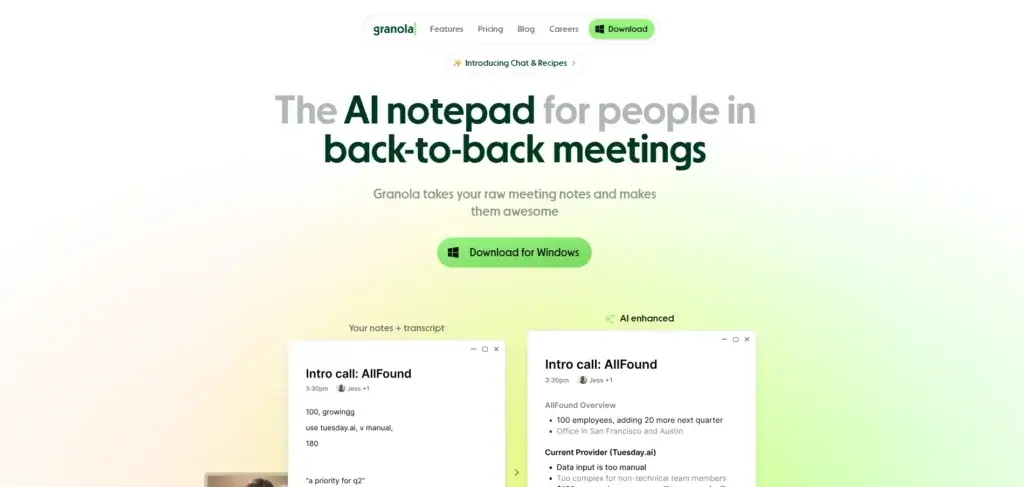
Granola AI is an AI meeting notes app built around a simple but powerful idea: you take rough notes, Granola listens in the background, and then AI enhances everything into a structured summary. Unlike many AI note-taking tools, Granola does not send a bot into your Zoom, Google Meet, or Microsoft Teams call. It captures your device audio instead, which makes the experience feel more private, lightweight, and natural.
In this Granola AI review, you’ll learn how the platform works, what has changed in 2026, how much Granola costs, where it performs well, where it falls short, and how it compares with alternatives such as Fireflies.ai, Krisp, Otter.ai, Fathom, and ClickUp AI Note-Taker.
By the end, you’ll know whether Granola is the right AI note taker for your workflow or whether another meeting assistant is a better fit.
What Is Granola AI?
AI Meeting Notes Without a Meeting Bot
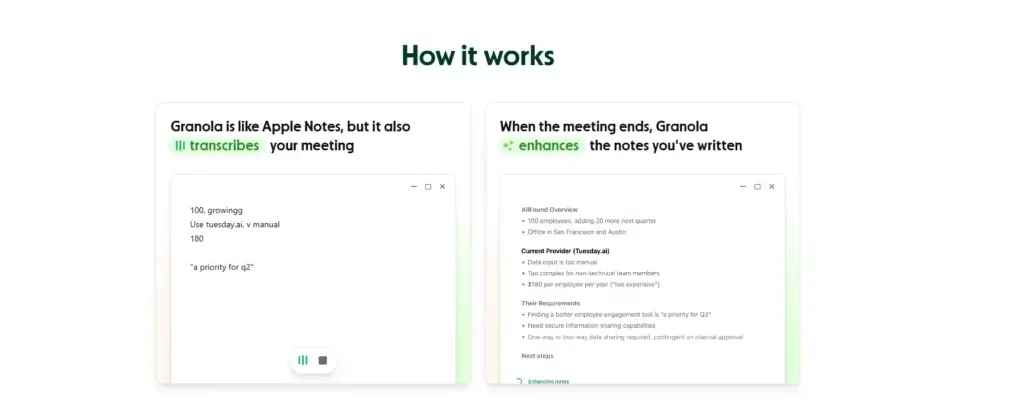
Granola AI is an AI note-taking app for professionals who spend a large part of their week in meetings. It works like a smart notepad that combines your own rough notes with a transcript of the conversation, then turns both into organized meeting summaries.
The biggest difference between Granola and many other AI meeting assistants is that Granola does not join meetings as a visible bot. Instead, it listens to your microphone and computer audio from your device. This allows it to work across common meeting platforms without adding another participant to the call.
That makes Granola especially appealing for meetings where a bot might feel awkward, such as client calls, investor discussions, user interviews, leadership meetings, recruiting conversations, or sensitive internal updates.
However, bot-free does not mean consent-free. You should still inform participants when you use transcription or AI note-taking, especially in regulated industries or locations with recording and consent requirements.
What’s new with Granola AI in 2026?
Granola has changed significantly since many early reviews were published. It is no longer just a simple meeting notes app for individuals. It is moving toward a broader company-context and team knowledge platform.
In March 2026, Granola announced a $125M Series C at a $1.5B valuation. The company framed this around helping teams use meeting context across the organization, not only capturing individual notes. That matters because it signals a stronger push into enterprise workflows, shared knowledge, APIs, team spaces, and AI-powered work automation.
Granola has also expanded its product with iPhone support, phone-call notes, API access, MCP integration, Zapier, advanced integrations, shared spaces, and stronger admin controls on higher-tier plans.
For this reason, the better way to evaluate Granola now is not only as an AI note taker. You should also consider whether it can become part of your wider meeting knowledge system.
Core Features of Granola AI
Main Features Breakdown
Real-time transcription and AI summaries
Granola transcribes your meeting while you work. On desktop, it captures both your microphone and the meeting audio from your computer. Because it does not need to join your call, it can work with Zoom, Google Meet, Microsoft Teams, and other meeting platforms.
After the meeting, Granola enhances your notes into a structured summary. Instead of leaving you with a long transcript, it organizes the conversation into key topics, decisions, questions, follow-ups, and next steps.
Why it matters: Most professionals do not need another transcript to manage. They need a clean summary that helps them act faster. Granola is strongest when you want a meeting recap that feels readable, practical, and close to how a human operator would summarize the call.
Human notes plus AI enhancement
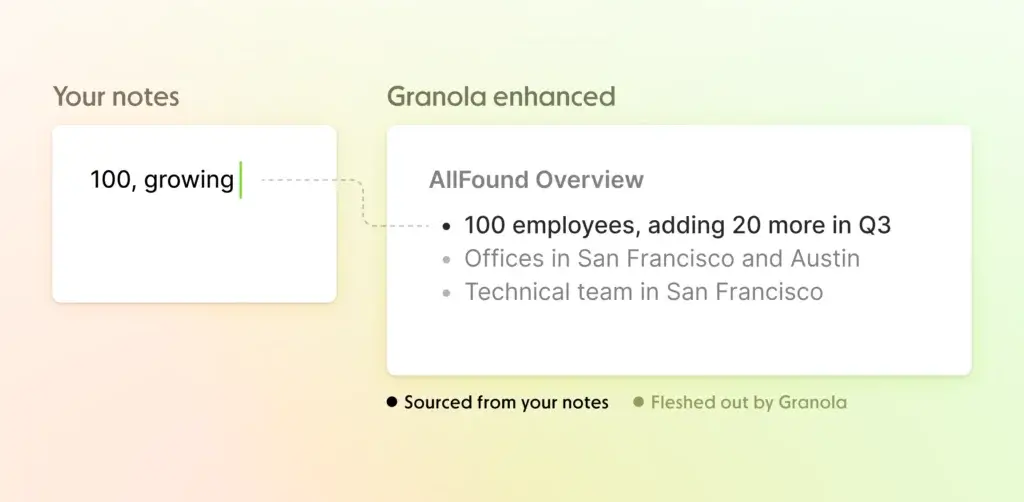
Granola’s workflow is different from fully automated note takers. It encourages you to write short notes during the meeting, then uses those notes as signals for what matters most.
For example, you might write “budget concern,” “follow up next week,” or “customer mentioned onboarding friction.” After the meeting, Granola uses the transcript to expand those notes with context, detail, and structure.
This hybrid approach is one of Granola’s best product decisions. It reduces the risk of generic AI summaries because the final notes are guided by what you actually cared about during the conversation.
Customizable templates for different meeting types
Granola includes templates for common meeting types such as sales calls, user interviews, stand-ups, 1:1s, hiring calls, and project updates. You can also create custom templates for your own workflow.
This is useful if your team wants consistency. A sales team may want sections for pain points, budget, decision process, objections, and next steps. A product team may want sections for customer feedback, feature requests, problems, quotes, and research themes.
Templates also make Granola more useful for repeatable workflows. Instead of editing every summary from scratch, you can give the AI a structure that matches the way your team already works.
Ask Granola AI chat
Granola includes an AI chat assistant that can answer questions about your meetings. You can ask things like “What action items did we agree on?”, “What objections did the customer mention?”, or “What did Sarah say about timeline?”
The value here is speed. Instead of scanning a transcript manually, you can query your meeting notes and get a contextual answer.
Granola’s newer positioning also makes this feature more important across meetings. On current plans, Granola supports AI chat within and across meetings, which makes it more useful for recalling context over time.
Limitations: AI answers should still be reviewed before you rely on them in client-facing emails, legal notes, or executive decisions. Like any AI meeting assistant, Granola can summarize well but may miss nuance, misread intent, or overemphasize the wrong point if the transcript is unclear.
Spaces, folders, and shared meeting context
Granola now puts more emphasis on organizing meeting notes across a team. Spaces and folders help you structure notes around teams, projects, customers, departments, or topics.
This is important because meeting notes become more valuable when they are not trapped inside one person’s account. A customer success manager can share context with sales. A product manager can collect research calls. A founder can review investor discussions. A recruiting team can organize candidate feedback.
Granola’s direction is clear: it wants to help teams turn meeting conversations into searchable organizational memory.
Integrations, Zapier, API access, and MCP
Granola integrates with several tools that matter in modern work management and sales workflows. Its current pricing page lists advanced integrations with Attio, Notion, Slack, HubSpot, Affinity, and Zapier. The Business plan also includes API access and MCP integration.
This is a major update compared with older reviews that described Granola as having limited or no public API access. Granola now provides API documentation for programmatic access to meeting notes, transcripts, and AI summaries.
For teams, this creates useful workflow options:
- Slack: Share meeting summaries with channels or teammates.
- Notion: Send notes into a team knowledge base.
- HubSpot: Add call context to customer and prospect records.
- Attio and Affinity: Support CRM-style relationship workflows.
- Zapier: Connect Granola to thousands of other apps.
- API access: Build custom reporting, knowledge, or automation workflows.
- MCP: Connect meeting context to AI-enabled tools and workflows.
Granola is still not a full project management platform, CRM, or customer success tool. But its integrations make it easier to move meeting context into the tools where work actually happens.
Granola for iPhone and phone calls
Granola is available for macOS, Windows, and iPhone. The iPhone app is useful for in-person meetings, conferences, coffee chats, interviews, and conversations that happen away from your laptop.
Granola also supports phone-call notes on iPhone for outbound calls in supported countries. This means you can make a call through Granola, then receive AI-powered notes after the conversation.
There are still limitations. Granola’s documentation says inbound phone calls are not currently supported. Android support is also not available at the time of writing.
Security and Privacy
How Granola Handles Meeting Data
Security and privacy are central to any AI meeting notes app. You may be capturing customer calls, internal strategy discussions, hiring feedback, financial conversations, or product roadmaps. That means you should understand how Granola handles your meeting data before using it across a team.
Does Granola store meeting audio?
Granola says it does not store audio from meetings. On macOS and Windows, it transcribes in real time. On iOS, it may use temporarily cached audio after the meeting, but stores the transcript and notes rather than keeping the audio recording.
This is a meaningful advantage if you do not want a full archive of audio or video recordings. It also reduces the burden of managing large recording files.
However, this is also a limitation. If you need to replay the exact call, verify tone, extract verbatim quotes, or maintain a formal recording archive, Granola is not the best fit.
Does Granola use third-party AI providers?
Yes. Granola uses transcription and AI providers to process and summarize meetings. Its security page mentions providers such as Deepgram, Assembly, OpenAI, and Anthropic.
Granola says third-party AI providers are not allowed to train their models on customer data. That is reassuring, but teams with strict data policies should still review Granola’s Data Processing Agreement, privacy policy, and security documentation before rolling it out widely.
Model training and opt-out controls
Granola says it may train on anonymized user data to improve the product, but users can opt out in settings. Enterprise customers have model training turned off by default.
This is one of the most important settings to check before using Granola for sensitive meetings. If your team discusses client data, legal matters, HR issues, financial information, product strategy, or confidential customer details, you should review the model training settings before adoption.
SOC 2, GDPR, encryption, and admin controls
Granola states that it meets SOC 2 Type 2 standards and is committed to GDPR compliance, with a Data Processing Agreement available upon request.
Granola also says notes are stored in a US-hosted AWS Virtual Private Cloud and encrypted at rest and in transit. Enterprise plans add stronger controls such as SSO, usage analytics, org-wide auto-deletion periods, admin controls for sharing and API access, and organization-wide model training opt-out.
For larger companies, these enterprise controls are important. The question is not only whether Granola is secure in general, but whether your administrators can govern how notes are shared, retained, accessed, and connected to other tools.
Privacy settings you should review before using Granola
Granola’s bot-free experience can feel more private, but you should not treat it as a reason to skip governance. In April 2026, The Verge reported concerns around Granola’s default note-sharing settings and model training opt-out behavior for non-enterprise users.
Before using Granola in sensitive environments, review these settings:
| Setting | Why It Matters | Recommended Action |
| Default link sharing | Shared note links may expose sensitive meeting summaries if handled carelessly | Set sharing to private or company-only when possible |
| Model training | Non-enterprise users may need to manually opt out | Turn off model improvement if you handle sensitive data |
| Auto-deletion | Meeting notes may conflict with retention policies | Use enterprise deletion controls for regulated workflows |
| API access | API keys can expose note data if mismanaged | Restrict scopes and require admin oversight |
| Participant consent | Bot-free transcription can be less visible to attendees | Tell participants when transcription is being used |
My recommendation is simple: Granola can be privacy-friendly, but only if you configure it properly. For individual productivity, the default setup may be enough. For business use, you should treat Granola like any other system that stores operational knowledge.
User Experience and Interface
How Does Everyday Work with Granola Look?
Desktop and mobile apps
Granola runs as a lightweight desktop app on macOS and Windows. The interface is intentionally minimal, which is part of the appeal. It does not try to become a full meeting workspace, video recorder, CRM, or task manager.
During a meeting, you can write rough notes while Granola transcribes in the background. After the call, you generate enhanced notes and edit the output before sharing it.
The iPhone app extends that workflow to in-person conversations and outbound phone calls in supported regions. This makes Granola more flexible than desktop-only tools, especially for founders, recruiters, consultants, journalists, and product researchers who frequently meet outside formal video calls.
Onboarding and setup
Granola works with Google Workspace or Microsoft login and integrates with your calendar. This is an important correction from older versions of this review that positioned Granola mainly around Google Workspace.
Setup is straightforward. You install the app, sign in, connect your calendar, grant the necessary permissions, and start taking notes in meetings. Granola does not auto-join your meetings, which helps keep you in control of when transcription begins.
Some users may still need to test compatibility carefully. If your organization uses strict device controls, custom calendar setups, compliance tools, or locked-down permissions, your rollout may require admin review.
Collaboration and sharing
Granola lets you share notes with teammates, organize notes into folders and spaces, and move summaries into tools like Slack, Notion, HubSpot, Attio, Affinity, or Zapier workflows.
This is where Granola becomes more useful for teams. A note can move from a private recap into a shared source of context. For example, a sales call can become a CRM update, a product interview can become research evidence, and a leadership meeting can become a clean executive summary.
Still, sharing needs discipline. You should define what types of meetings can be shared, who can access notes, and what should remain private.
Search and meeting memory
Granola’s AI chat within and across meetings helps you retrieve context faster. Instead of searching manually through notes, you can ask questions about past conversations and use meeting context as a lightweight memory layer.
This is especially useful for people in back-to-back meetings. You can quickly prepare for a follow-up call, check what was agreed previously, or remind yourself what a customer said last month.
For deeper analytics, however, Granola is still not as advanced as some conversation intelligence or revenue intelligence platforms. It is better for clean notes and context retrieval than for coaching dashboards, talk-time analytics, sentiment tracking, or sales pipeline intelligence.
Granola AI Pros and Cons
Advantages and Disadvantages
Positive
✅ Bot-free meeting notes
✅ Strong AI summaries
✅ Clean and lightweight interface
✅ API, MCP, Zapier, and CRM integrations
Negative
❌ No audio or video playback
❌ Privacy settings need review
❌ No Android app
❌ Less advanced analytics than some alternatives
Granola AI pros
- Bot-free experience: Granola does not add a visible bot to your meetings.
- Excellent summary workflow: Human notes plus AI enhancement creates practical outputs.
- Clean interface: The app stays focused on notes rather than unnecessary complexity.
- Works across meeting platforms: It captures device audio instead of depending on platform-specific bots.
- Useful integrations: Slack, Notion, HubSpot, Attio, Affinity, Zapier, API access, and MCP improve workflow flexibility.
- No stored audio recordings: Granola stores notes and transcripts rather than full meeting audio.
- Good fit for executives and founders: It helps people in back-to-back meetings capture context quickly.
- iPhone support: Granola can capture in-person conversations and supported outbound phone calls.
Granola AI cons
- No audio or video playback: You cannot replay the original conversation from Granola.
- Privacy settings need review: Link sharing and model training settings should be checked before business use.
- No Android app: Mobile use is currently focused on iPhone.
- Limited meeting analytics: It is not built for coaching dashboards or deep conversation intelligence.
- Speaker identification may vary: Multi-person conversations can still require manual review.
- Not a project management tool: You need integrations to turn notes into tasks and workflows.
- Not ideal for formal recording needs: Legal, compliance, journalism, or training teams may need tools with recording playback.
Granola AI Pricing
How Much Does Granola Cost?
Granola offers three main plans: Basic, Business, and Enterprise. All prices below are listed per user per month, based on Granola’s current pricing page at the time of writing.
Basic plan
The Basic plan is free and gives you a way to test Granola before paying. It includes AI meeting notes, limited meeting history, AI chat within and across meetings, shared folders, customized note templates, multi-language support, and the ability to opt out of model training.
This plan is best for individuals who want to try Granola on a few meetings before committing to a paid plan.
Business plan
The Business plan costs $14 per user per month. It includes everything in Basic, plus unlimited meeting notes and history, advanced AI models and features, advanced integrations, centralized billing, user management, MCP integration, and API access.
This is the plan most professionals and small teams should evaluate first. It gives you the unlimited meeting history and workflow integrations that make Granola more useful beyond occasional note-taking.
Enterprise plan
The Enterprise plan costs $35 per user per month. It includes everything in Business, plus enterprise-grade security and admin controls, SSO, priority support, usage analytics, org-wide auto-deletion periods, admin controls for sharing and API access, org-wide model training opt-out, and an org-wide notification pilot.
This plan is best for larger organizations that need centralized governance, stronger compliance controls, and better administrative oversight.
Granola AI pricing table
| Plan | Best For | Key Features | Price |
| Basic | Individuals testing Granola | AI meeting notes, limited history, AI chat, shared folders, templates, multi-language support | $0/user/month |
| Business | Individuals and small teams | Unlimited notes and history, advanced AI models, integrations, Zapier, MCP, API access, billing and user management | $14/user/month |
| Enterprise | Larger companies | SSO, admin controls, usage analytics, auto-deletion, API controls, org-wide model training opt-out, priority support | $35/user/month |
Is Granola AI worth the price?
Granola’s Business plan is competitively priced for users who attend many meetings and want unlimited history, integrations, and advanced AI features. At $14 per user per month, it is especially attractive if your main priority is clean, bot-free meeting notes rather than full recordings or advanced analytics.
The free Basic plan is useful for testing, but serious users will likely outgrow limited meeting history. Enterprise is worth considering when your organization needs SSO, sharing controls, auto-deletion, model-training governance, and API access controls.
Who Should Use Granola AI?
Is Granola the Right Fit for Your Workflow?
Best for founders, executives, and managers
Granola is excellent for people who move from one meeting to another and need a fast way to preserve context. Founders, executives, department heads, and managers can use it to capture decisions, follow-ups, and strategic discussions without spending time rewriting notes manually.
Its clean interface is a major advantage here. You do not need to manage a complicated dashboard while trying to run a meeting.
Best for product managers and user researchers
Granola is also a strong fit for product discovery, user interviews, and customer research. You can take short notes during the conversation, then use the transcript to enrich them afterward.
This is useful for capturing customer language, objections, product requests, pain points, and qualitative feedback. You can then move insights into Notion, Slack, or a research repository.
Best for consultants, agencies, and client-facing teams
Consultants and agencies often need to summarize calls quickly and professionally. Granola helps you turn client discussions into clear recaps, next steps, and internal handoffs.
The bot-free experience can also feel less disruptive in client calls. Instead of explaining why a meeting bot joined the room, you can keep the meeting experience clean while still capturing notes.
Best for lean sales and customer success teams
Granola is useful for sales discovery calls, onboarding conversations, renewal discussions, and customer check-ins. Its HubSpot, Attio, and Affinity integrations make it easier to move meeting context into customer records.
That said, Granola is not a full revenue intelligence tool. If your team needs call scoring, coaching, talk ratios, pipeline analytics, or full recording review, Fireflies.ai, Gong-style platforms, or other sales-focused meeting tools may be a better fit.
Who should avoid Granola AI?
Granola may not be the right tool if you need exact audio/video replay, advanced meeting analytics, Android support, or formal recording archives.
You may also want a different tool if your organization requires strict evidence-grade records, complex compliance workflows, or detailed conversation intelligence dashboards.
Granola AI Alternatives
Comparison With Other AI Note Takers
Granola AI is one of the best options if you want a quiet, bot-free AI notepad. But it is not the best tool for every workflow.
Some alternatives offer stronger recording, deeper search, richer analytics, better collaboration, or tighter project management integration. Here are the most relevant Granola AI alternatives to consider.
Granola AI vs Fathom
Fathom is a strong alternative if you want a generous AI meeting assistant with recording, summaries, and easy sharing. It is especially popular with individuals and sales professionals who want fast meeting recaps without much setup.
Granola wins if you prefer a bot-free, note-first experience. Fathom is stronger if you want more traditional meeting recording and a highly accessible free option.
Granola AI vs Fireflies.ai
Fireflies.ai is better for teams that want recording, searchable transcripts, workflow automation, and broad meeting intelligence. It is particularly useful for sales, customer success, recruiting, and operations teams.
Granola wins on simplicity and meeting experience. Fireflies wins on automation, recording, and structured team workflows around call libraries.
Granola AI vs Krisp
Krisp is best known for AI-powered noise cancellation, but it also offers meeting transcription and summaries. If your biggest problem is background noise, poor audio quality, or hybrid-meeting clarity, Krisp may solve a more immediate pain point.
Granola is better if your priority is thoughtful notes and meeting memory. Krisp is better if you need audio cleanup plus transcription.
Granola AI vs Otter.ai
Otter.ai is a better fit if you want collaborative live transcripts, audio playback, and shared note-taking during meetings. It is often used by teams, educators, interviewers, and users who want visible transcripts during the conversation.
Granola is cleaner and less intrusive. Otter is stronger when live collaboration, recording, and transcript search are more important than a bot-free experience.
Granola AI vs ClickUp AI Note-Taker
If your team already manages projects in ClickUp, the ClickUp AI Note-Taker can be more practical. It connects meeting notes directly with tasks, docs, projects, and workflows.
Granola is better as a focused AI notepad. ClickUp is better if you want meeting notes to become project work inside the same platform.
Granola AI alternatives comparison table
| Tool | Main Strength | Best For | Where Granola Wins |
| Granola AI | Bot-free AI notes and clean summaries | Founders, executives, consultants, product teams | Best note-first experience |
| Fathom | Fast AI meeting notes and recording | Individuals, sales calls, simple recaps | Less intrusive meeting experience |
| Fireflies.ai | Recording, transcript search, automation | Sales, CS, recruiting, operations | Simpler and quieter workflow |
| Krisp | Noise cancellation and transcription | Hybrid teams and noisy environments | Stronger note enhancement |
| Otter.ai | Live collaborative transcripts | Teams needing shared transcripts and playback | Cleaner bot-free experience |
| ClickUp AI Note-Taker | Meeting notes inside project workflows | Teams already using ClickUp | Better standalone meeting notes app |
Setup Guide
Getting Started with Granola
Signing up and installing
- Visit Granola: Go to the Granola website and download the desktop app for macOS or Windows.
- Create an account: Sign in with Google Workspace or Microsoft login.
- Connect your calendar: Allow Granola to detect upcoming meetings and organize notes around your schedule.
- Grant permissions: Give Granola access to your microphone and system audio where required.
- Install the iPhone app: Use it for in-person meetings, conferences, and supported outbound phone calls.
Starting a meeting note
- Open Granola: Start Granola manually when your meeting begins.
- Write rough notes: Add short bullets, questions, decisions, or moments you want the AI to prioritize.
- Let Granola transcribe: The app captures meeting audio from your device in the background.
- Enhance notes: After the meeting, let Granola turn your rough notes and transcript into a structured summary.
- Review before sharing: Edit the summary, correct mistakes, and remove anything sensitive before sending it to others.
Sharing and exporting notes
- Choose who can view the note: Review link-sharing settings before sending anything externally.
- Share internally: Send summaries to teammates or team spaces.
- Push to work tools: Use Slack, Notion, HubSpot, Attio, Affinity, Zapier, API access, or MCP workflows.
- Delete when needed: Remove notes that should not remain in your workspace.
Tips and Best Practices
How to Get the Most Out of Granola
Use Granola as an AI notepad, not just a recorder
Granola works best when you actively guide it. Write short notes during the meeting so the AI understands what you consider important.
This makes the final summary more useful than a generic AI recap because it reflects your priorities, not just the transcript.
Create templates for repeatable workflows
If you use Granola for sales calls, customer interviews, hiring calls, or project updates, create templates for each meeting type.
This helps you standardize outputs across your team. It also makes it easier to compare meetings because every note follows a similar structure.
Review summaries before sending them
Granola can produce excellent summaries, but you should still review them. AI-generated notes may miss nuance, summarize unclear audio incorrectly, or create phrasing that sounds more certain than the original conversation.
Before sharing notes with clients, candidates, executives, or partners, check action items, names, numbers, dates, commitments, and sensitive details.
Set privacy controls before team rollout
Before your team starts using Granola broadly, review sharing, model training, API access, and retention settings.
For individual productivity, this may only take a few minutes. For company-wide use, involve IT, security, legal, or operations stakeholders before using Granola for confidential conversations.
Connect notes to your work management system
Granola is strongest when its summaries do not stay isolated. Push action items and decisions into the tools your team already uses.
For example, you can send project updates to Slack, store research notes in Notion, sync customer details to HubSpot, or use API access to build a custom meeting knowledge workflow.
Conclusion
Final Thoughts – Is Granola AI Worth It in 2026?
Granola AI is one of the most interesting AI meeting notes apps because it does not simply copy the bot-based meeting assistant model. It gives you a quieter, more natural workflow: write rough notes, let Granola capture the conversation, and then use AI to turn everything into a structured summary.
Its biggest strengths are the bot-free experience, clean interface, strong AI summaries, customizable templates, iPhone support, and expanding integrations. The addition of API access, MCP, Zapier, and stronger enterprise controls also makes Granola more serious as a business tool than it was in earlier versions.
However, Granola is not perfect. It does not store audio or video playback, Android support is missing, and teams must review privacy settings carefully. It is also less suitable if you need deep analytics, formal recordings, sales coaching dashboards, or advanced conversation intelligence.
Overall, Granola is best for founders, executives, consultants, product teams, researchers, and client-facing professionals who want clean AI meeting notes without the friction of a meeting bot. If your priority is lightweight, privacy-conscious, note-first meeting capture, Granola is one of the strongest tools to consider in 2026.
If you need recordings, searchable call libraries, or advanced meeting analytics, compare it with Fireflies.ai, Otter.ai, Krisp, Fathom, or ClickUp AI Note-Taker before making a final decision.
Frequently Asked Questions
Have more questions?
What is Granola AI?
Granola AI is an AI meeting notes app that transcribes conversations from your device audio and enhances your rough notes into structured summaries. It is designed for professionals who want clean meeting notes without adding a bot to the call.
How does Granola AI work?
Granola captures your microphone and meeting audio from your device, transcribes the conversation, and then uses AI to enhance your notes after the meeting. You can write short notes during the call to guide what the AI prioritizes in the final summary.
Is Granola AI free?
Yes. Granola offers a free Basic plan with AI meeting notes, limited meeting history, AI chat, shared folders, custom templates, multi-language support, and model training opt-out. Paid plans add unlimited history, advanced integrations, API access, MCP, and admin controls.
How much does Granola AI cost?
Granola AI has three main plans: Basic at $0 per user per month, Business at $14 per user per month, and Enterprise at $35 per user per month. Pricing may change, so you should confirm details on Granola’s official pricing page before purchasing.
Does Granola AI join meetings as a bot?
No. Granola does not join meetings as a bot. It captures audio from your computer or device, which makes it work across platforms like Zoom, Google Meet, and Microsoft Teams without adding another participant to the call.
Does Granola AI record audio or video?
Granola says it does not store meeting audio or video. On desktop, it transcribes in real time. On iOS, it may use temporarily cached audio after the meeting, but it stores the transcript and notes rather than a permanent audio recording.
Is Granola AI secure?
Granola states that it meets SOC 2 Type 2 standards, supports GDPR compliance, encrypts notes at rest and in transit, and stores notes in a US-hosted AWS Virtual Private Cloud. Enterprise plans add controls such as SSO, admin settings, usage analytics, auto-deletion, and org-wide model training opt-out.
Does Granola AI train on my meeting data?
Granola says third-party AI providers do not train on your data. Granola may use anonymized data to improve its own models unless you opt out in settings. Enterprise customers have model training turned off by default.
Does Granola AI have an API?
Yes. Granola now provides API access on the Business plan and above. The API allows programmatic access to meeting notes, transcripts, and AI summaries, which can help teams build custom workflows and reporting systems.
What are the best Granola AI alternatives?
The best Granola AI alternatives include Fireflies.ai for recording and automation, Fathom for simple AI meeting notes, Otter.ai for live collaborative transcripts, Krisp for noise cancellation and transcription, and ClickUp AI Note-Taker for teams that want meeting notes connected to project workflows.