

Introduction
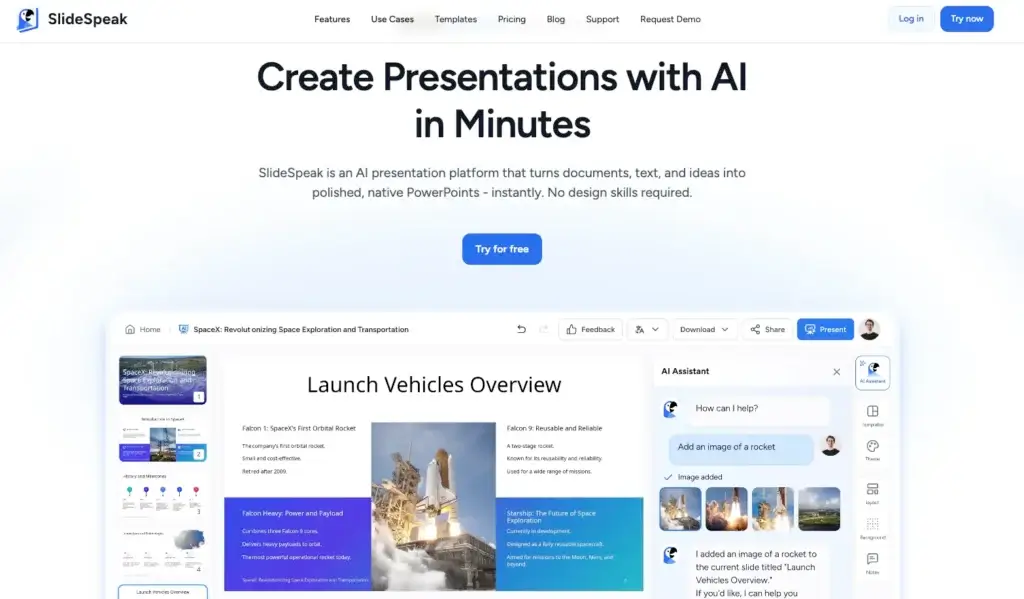
SlideSpeak approaches AI presentation creation from a more practical workflow angle than many design-first competitors. Instead of focusing mainly on visual experimentation, it is built to turn prompts, PDFs, Word files, Excel spreadsheets, websites, and existing presentation content into editable PowerPoint-style presentations quickly.
What makes SlideSpeak stand out is its strong focus on transforming source material into working decks with minimal manual effort. It is not just a text-to-slides generator. The platform also includes AI document chat, presentation summarization, branded presentation workflows, translation, and even AI video generation from presentations, which makes it feel more like a broader presentation productivity platform than a simple slide maker.
In this review, you will get a full overview of SlideSpeak’s core features, pricing, strengths and weaknesses, ideal use cases, and how it compares with other presentation tools. You will also see where SlideSpeak performs especially well, and where tools like Gamma, Prezi, or Pitch may still be the better fit depending on your workflow.
Software Specification
SlideSpeak’s Core Features
AI-generated presentations from prompts and source files
SlideSpeak is built around AI presentation generation, but its real strength is the range of inputs it can work from. You can create presentations from text prompts, PDFs, Word documents, Excel files, website URLs, and existing presentation materials, which makes it much more useful than a basic blank-page generator. For users who regularly turn raw information into decks, that flexibility is one of the platform’s biggest advantages.
Strong document-to-presentation workflow
One of SlideSpeak’s most practical capabilities is how directly it converts source material into structured presentations. Instead of manually pulling points out of reports or spreadsheets, users can upload documents and let the AI generate an initial deck, complete with summarized content and, in Excel-based workflows, chart-oriented presentation output. This is especially useful for consultants, marketers, analysts, and teams that build internal or client-ready decks from existing files.
AI presentation editing with Charles
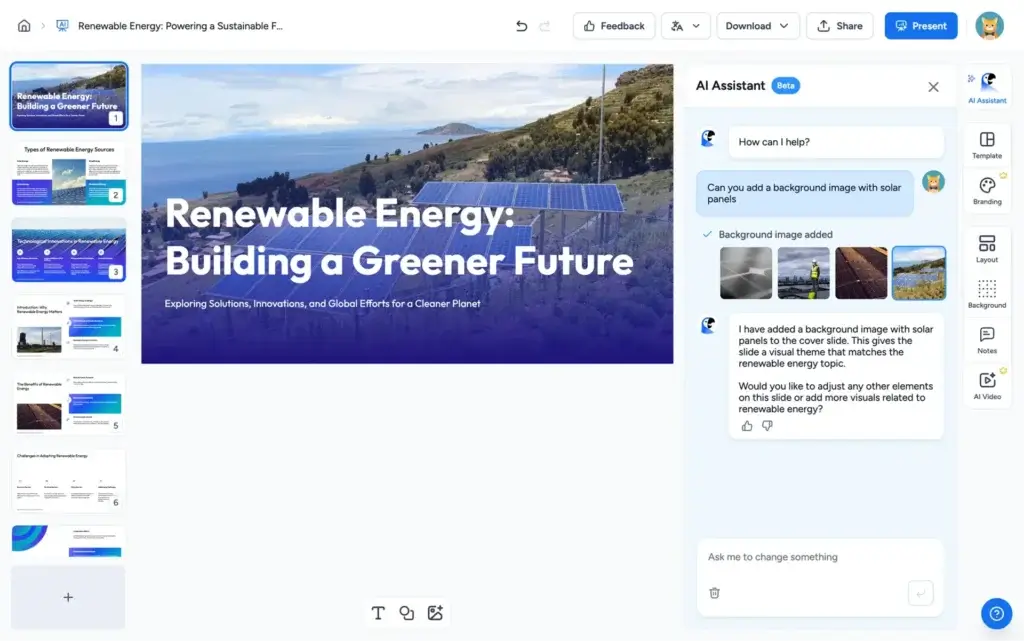
SlideSpeak includes an AI presentation assistant called Charles, which helps users rewrite slides, restructure presentations, refine content, generate images, and make editing changes through chat-style instructions. This matters because it makes the editing process feel less manual than in traditional presentation software. Instead of only dragging elements around, users can also guide presentation revisions conversationally.
Editable PowerPoint-style output
A major practical benefit of SlideSpeak is that it focuses on creating editable presentation output rather than locking users into a rigid web-only format. For many business users, that is important. It means SlideSpeak feels less like a presentation experiment and more like a useful production tool for decks that may still need review, refinement, or downstream sharing in familiar formats.
Branded templates and on-brand redesign
SlideSpeak also supports branded presentations and custom templates, including an add-on that allows users to upload their own PowerPoint template and generate AI presentations inside that brand structure. The platform also promotes the ability to redesign off-brand slides into a template-aligned format. For companies that care about presentation consistency, this is one of the more valuable parts of the product.
Presentation summarization and AI document chat
SlideSpeak is not limited to creating slides. It also lets users summarize PowerPoint, Word, and PDF documents and interact with uploaded materials through an AI document chat workflow. This expands its usefulness beyond pure presentation design. In practice, it becomes a productivity layer for understanding source files before or while turning them into presentation content.
Translation and multilingual presentation support
The platform supports presentation translation and promotes support for more than 150 languages. This makes it more attractive for international teams, agencies, consultants, and businesses that need to repurpose decks across multiple markets. It is a strong differentiator compared with tools that focus only on English-first generation.
AI video generation from presentations
SlideSpeak goes beyond standard slide creation by letting users turn presentations into AI-narrated videos. That gives the product additional value for training, async communication, internal enablement, and educational workflows. In a market where many AI presentation makers stop at the deck itself, this extra output format makes SlideSpeak more versatile.
API access for product and workflow integration
For more advanced use cases, SlideSpeak also offers an API for AI presentation generation. That will not matter to every user, but it does make the platform more relevant for SaaS products, internal tooling, and companies that want to automate presentation creation at scale rather than only using the web app manually.
Pros and Cons
Advantages and Disadvantages
Pros
✅ Excellent document-to-deck workflow
SlideSpeak is especially strong when you already have material to work from. PDFs, Word documents, Excel spreadsheets, website URLs, and prompts can all become starting points for a presentation. That makes it more useful than many AI presentation tools that are strongest only when you begin from a short prompt.
✅ Useful AI editing and summarization tools
The addition of AI document chat, summarization, and the Charles presentation assistant gives the platform more day-to-day practicality. It is not just about generating a first draft. You can also use AI to understand source content, refine slides, rewrite structure, and improve the presentation after generation.
✅ Strong multilingual and translation support
SlideSpeak is a solid option for international presentation work. The platform highlights translation support and broad language coverage, which can be very valuable for teams adapting decks across regions or building presentation workflows for global audiences.
✅ Good fit for branded business presentations
With custom templates, branded presentation support, and off-brand slide redesign capabilities, SlideSpeak is clearly trying to serve real business workflows rather than only quick personal presentation use. For consultants, agencies, and companies that care about brand consistency, this makes the product much more relevant.
Cons
❌ Design variety feels narrower than some rivals
In my opinion, SlideSpeak is more practical than visually ambitious. That can be a strength, but it also means users who want a wide range of presentation themes, highly polished design exploration, or more visually distinctive outputs may find Gamma or Prezi more exciting.
❌ Best branding workflows cost extra
Custom template workflows are not simply included as a standard part of every plan. SlideSpeak treats this as an add-on, which is understandable from a business perspective, but smaller teams may see it as an extra cost on top of the main subscription.
❌ Collaboration is less central than Pitch
SlideSpeak is very good at creation and transformation, but it does not position collaboration as aggressively as Pitch does. If your main priority is shared team deck building, real-time presentation workflows, and collaborative review inside a dedicated team presentation environment, Pitch still feels stronger.
❌ No ISO 27001 or SOC 2 certification yet
SlideSpeak states that it has implemented security measures and compliance-minded practices, but it also clearly says it does not yet have ISO 27001 or SOC 2 certification. For many users this will not be a dealbreaker, but for some larger organizations it could matter during vendor evaluation.
User Experience
Practical AI Presentation Creation With Strong Source Handling
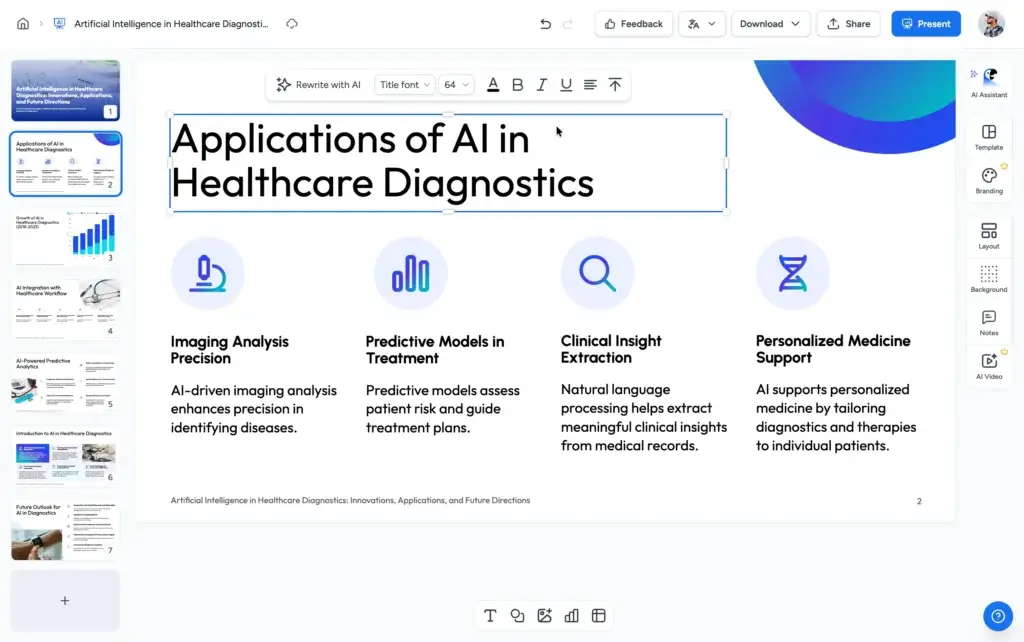
SlideSpeak delivers a user experience that feels more workflow-driven than design-driven. The interface is built around helping users move from source material to presentation output quickly, and that changes how the product feels compared with presentation tools that start with a blank visual canvas.
Simple, guided creation flow
One of SlideSpeak’s better qualities is that it keeps the creation process relatively straightforward. Users can start from a prompt, upload a file, or paste a website URL, then follow a guided workflow to generate a first draft. That makes the platform approachable for beginners and useful for professionals who care more about output speed than design experimentation.
Built around source material, not just ideas
The biggest difference in the user experience is that SlideSpeak is especially comfortable when you already have something to work from. Reports, proposals, spreadsheets, web pages, and existing decks can all become the raw material for presentation creation. In practice, this makes the product feel efficient for business users who are not trying to invent a presentation from scratch every time.
Conversational editing with Charles
The AI assistant adds a more modern editing layer to the experience. Instead of relying only on manual slide editing, users can ask the assistant to rewrite text, adjust layout direction, restructure sections, or generate supporting content. This is one of the areas where SlideSpeak feels genuinely AI-native rather than simply AI-branded.
Useful beyond initial generation
Some AI presentation makers are impressive in the first minute and less useful afterward. SlideSpeak is more practical than that because the summarization, document chat, translation, branding, and video features add value after the initial deck is created. That broader utility is part of what makes the product worth considering.
Better for efficiency than presentation theater
SlideSpeak is not the most theatrical or visually dynamic presentation platform in this category. It is better described as a fast, business-oriented AI presentation tool focused on editable output, source transformation, and productivity. In my opinion, that makes it more useful for many real teams, even if it is less visually distinctive than some competitors.
Best Use Cases
Who Should Use SlideSpeak
SlideSpeak is not the perfect fit for every kind of presenter, but it is a strong option for users who want to turn existing information into editable presentations quickly and with less manual effort.
Consultants and analysts
Consultants, analysts, and strategy teams often need to turn reports, spreadsheets, and client material into presentation-ready decks. SlideSpeak is particularly strong here because it can generate presentations from structured source content rather than forcing users to start from a blank slide.
Marketing and business teams
Marketing, sales, operations, and internal communications teams can benefit from SlideSpeak’s ability to turn briefs, summaries, campaign documents, or research into presentations faster. It is a practical fit when the goal is speed, clarity, and editable business output.
Agencies and client-facing teams
Agencies and service providers that need branded presentations under time pressure should find SlideSpeak appealing, especially if they use custom templates or want to standardize deck production. The custom branding direction is one of the product’s stronger business-oriented features.
Global teams and multilingual users
Because translation and broad language support are part of the platform’s positioning, SlideSpeak is a better fit than many rivals for teams that need to adapt presentation content across markets or produce multilingual deliverables without rebuilding every deck manually.
Users who want AI help without learning complex design tools
If you want presentation AI to help with the real work of summarizing, drafting, restructuring, and repackaging information, SlideSpeak is a very sensible option. Users looking for efficiency will likely get more value here than users who mainly want a flashy presentation design playground.
Compare with Others
Alternatives to SlideSpeak
SlideSpeak is one of the better AI presentation tools for turning source material into editable decks, but it is not automatically the best choice for every workflow. Gamma is stronger for fast web-native storytelling and modern async sharing, Prezi is better for dynamic live presentations and visually distinctive delivery, and Pitch remains one of the most compelling options for teams that prioritize collaborative slide creation, on-brand workspaces, and modern presentation workflows.
| Feature Type | SlideSpeak | Gamma | Prezi | Pitch |
| Best for | Turning files, URLs, and prompts into editable business presentations | Fast AI-generated web-native decks and async sharing | Dynamic storytelling and more memorable live presentations | Collaborative team deck creation and on-brand slide workflows |
| Core format | AI-generated editable presentation workflow with source-file inputs | Card-based, web-native presentation format | Zoom-based presentation canvas | Traditional slide-based collaborative workspace |
| AI strength | Excellent for document-to-deck creation, summarization, and guided editing | Excellent for fast first-draft generation and modern content packaging | Strong for AI-assisted storytelling and live presentation structure | Strong for AI-assisted team deck creation and slide refinement |
| Branding | Strong with custom templates and branded presentation workflows | Good brand controls and polished web output | Good visual styling, but less brand-governance focused | Very strong template and team branding workflows |
| Collaboration | Useful, but not the main product identity | Good collaboration with strong sharing | Good collaboration with presentation-centered workflows | Excellent collaboration, feedback, and team workspace controls |
| Best tradeoff | Productivity plus practical source handling | Speed plus modern presentation output | Storytelling plus audience engagement | Collaboration plus brand control |
When to choose another tool
- Choose Gamma if you want a faster web-native presentation workflow and prefer link-based sharing over traditional deck production. Gamma is the better choice when presentation speed, polished AI drafting, and modern async viewing matter most.
- Choose Prezi if your goal is to make live presentations feel more dynamic and memorable. Prezi is stronger when narrative movement, visual flow, and audience engagement matter more than converting source documents into standard decks.
- Choose Pitch if your team creates presentations collaboratively and needs a more mature shared workspace for on-brand slides, templates, editing, and presentation delivery. Pitch is the better fit for presentation operations inside teams.
- Choose SlideSpeak if your main priority is turning documents, spreadsheets, website content, and prompts into editable presentations quickly. In my opinion, SlideSpeak is the better fit for users who care more about practical input-to-deck efficiency than about flashy presentation formats.
Pricing & Plans
Flexible Plans for Different Workloads
SlideSpeak has a more varied pricing structure than some AI presentation tools because it tries to serve free users, professional users, power users, and enterprise teams, while also offering extra branded-template functionality as an add-on.
Free plan
- Free – $0. Includes 3 credits at sign-up, presentation sharing, AI Presentation Assistant Charles, AI document chat, support for 150+ languages, and a 50 MB file size limit. It is enough to test the platform, but clearly not intended for heavier professional use.
Premium plan
- Premium – Starts at $29 per month billed annually, or about $30 per month billed monthly. It includes 50 credits per month, export to PDF, PPT, and more, Charles, SlideSpeak AI 4.0, AI video generation, custom presentation length, AI document chat, no file size limit, and support for 150+ languages.
Premium Plus plan
- Premium Plus – Starts at $34 per month billed annually, or about $40 per month billed monthly. It includes unlimited credits, exports, Charles, SlideSpeak AI 4.0, AI video generation, custom presentation length, AI document chat, no file size limit, 150+ languages, branded presentations, and a custom brand image library.
Enterprise plan
- Enterprise – Custom pricing. This plan adds features such as unlimited credits, multiple custom templates, SSO, priority support, and broader organizational deployment options. It is the most relevant choice for companies that want SlideSpeak as part of a larger presentation workflow.
Custom template add-on
- Custom Template Add-on – $129. This add-on allows users to upload their own PowerPoint template so generated presentations can follow a specific branded structure. For brand-sensitive organizations, this is an important part of the value proposition.
| Plan | Starting Price | Best For | Key Benefits |
| Free | $0 | Testing the platform | 3 credits, sharing, Charles, AI document chat, 150+ languages |
| Premium | $29/month annually or $30/month monthly | Professional users | 50 credits, exports, Charles, AI 4.0, video generation, no file size limit |
| Premium Plus | $34/month annually or $40/month monthly | Power users | Unlimited credits, branded presentations, custom brand image library, exports |
| Enterprise | Custom pricing | Organizations | SSO, multiple templates, unlimited credits, priority support |
| Custom Template Add-on | $129 | Brand-sensitive teams | Use your own PowerPoint template for AI-generated presentations |
How to Use SlideSpeak
A Step-by-Step Guide
SlideSpeak is relatively easy to start using, especially if you already have source material ready. A typical workflow looks like this:
Start with a prompt, file, or URL
- Open a new presentation workflow and choose whether to begin from a text prompt, PDF, Word document, Excel spreadsheet, website URL, or another supported source.
- Upload or paste your content so the AI can extract the structure, key points, and material for the first draft.
- Generate the presentation and review the deck that SlideSpeak creates from your content.
Refine with AI
Once the first draft is ready, use Charles to rewrite slides, improve structure, adjust tone, fix wording, create supporting visuals, or make broader presentation edits. This is one of the parts of the workflow where SlideSpeak becomes most useful.
Apply branding or templates
If brand consistency matters, add branded elements or use a custom template workflow. This helps align generated presentations with company standards and is particularly useful for agencies, client work, and internal enterprise use.
Translate or repurpose if needed
For multilingual teams, SlideSpeak can also be used to translate presentation content into other languages. If your workflow includes async viewing or training content, you can also turn the deck into an AI-narrated video.
Export and share
When the deck is ready, export it in the format you need, share it online, or continue refining it for downstream PowerPoint-based workflows. Because the platform is geared toward editable output, it fits better into normal business presentation processes than some more closed AI tools.
Conclusion
Final Thoughts
SlideSpeak has carved out a useful place in the AI presentation market by focusing on a real business problem. It helps users turn existing content into presentations quickly, and that makes it more practical than many tools that feel impressive only in short demos.
Its biggest strength is not purely AI generation. It is the combination of source-file handling, AI editing, summarization, branded presentation support, translation, and presentation repurposing that makes the product genuinely useful. For teams and professionals who build decks from reports, proposals, spreadsheets, and documents, SlideSpeak solves a very real workflow challenge.
At the same time, SlideSpeak is not the most visually adventurous tool in the category. Users who want more interactive storytelling may still prefer Gamma or Prezi, and teams whose main priority is collaborative slide creation may still lean toward Pitch. It also helps to understand that some of the more brand-specific value comes through higher plans or add-ons.
In my opinion, SlideSpeak is best for professionals and teams that want an efficient, practical, AI-assisted path from source material to editable presentation output. If your presentation workflow starts with content rather than design, SlideSpeak is one of the more sensible tools to consider.
Have more questions?
Frequently Asked Questions
What is SlideSpeak?
SlideSpeak is an AI presentation maker that helps you create editable presentations from prompts, PDFs, Word files, Excel spreadsheets, websites, and other source materials. It also includes AI editing, summarization, translation, and presentation video features.
What makes SlideSpeak different from other AI presentation tools?
SlideSpeak stands out for its strong document-to-presentation workflow. Instead of only generating slides from short prompts, it can turn reports, spreadsheets, websites, and existing files into structured, editable presentations more efficiently.
Can SlideSpeak create presentations from documents?
Yes. SlideSpeak can generate presentations from PDFs, Word files, Excel spreadsheets, website URLs, and text prompts. This makes it especially useful if you already have source content and want to turn it into a deck quickly.
Does SlideSpeak support branded presentations?
Yes. SlideSpeak supports branded presentations and offers a custom template add-on that lets you use your own PowerPoint template for AI-generated decks. Higher plans also include more branding-related features.
Can SlideSpeak translate presentations?
Yes. SlideSpeak includes AI translation support and promotes support for more than 150 languages, which makes it useful for multilingual teams and businesses working across international markets.
Can SlideSpeak turn presentations into videos?
Yes. SlideSpeak includes AI video generation, allowing you to turn presentations into narrated video content for training, async communication, or internal knowledge sharing.
Does SlideSpeak have a free plan?
Yes. SlideSpeak offers a free plan with limited credits and core access to features like AI document chat and the presentation assistant. It is useful for testing the platform before upgrading to a paid plan.
How much does SlideSpeak cost?
SlideSpeak offers a free plan, a Premium plan starting at $29 per month billed annually, a Premium Plus plan starting at $34 per month billed annually, and custom Enterprise pricing. It also offers a $129 custom template add-on.
Is SlideSpeak good for teams?
SlideSpeak can work well for teams that need to turn documents and source material into presentations quickly, especially when branding matters. However, teams focused mainly on collaborative slide creation may still prefer a tool like Pitch.
Is SlideSpeak secure?
SlideSpeak says it uses encryption, audits, and other security measures to protect user data. However, it also states that it does not currently have ISO 27001 or SOC 2 certification, which may matter for some enterprise buyers.








