
Introduction
If you manage a remote, hybrid, or client-facing team, time tracking is no longer just about recording hours. You need to understand where work time goes, how much client work is actually billable, whether projects are profitable, and whether your team has enough visibility to stay accountable without constant manual check-ins.
That is where TimeBee project time tracker software comes in. TimeBee combines time tracking, screenshots, app and website monitoring, attendance logs, payroll support, billable hours, and project cost insights into one employee monitoring platform.
Unlike simple time trackers that focus only on timers and timesheets, TimeBee is built for teams that want clearer performance visibility. That can be helpful if you manage freelancers, consultants, agencies, contractors, remote employees, or teams working across different client projects.
However, TimeBee is not the right tool for every business. If your team prefers a privacy-first time tracker with no screenshots or activity monitoring, a tool like Toggl Track may feel more natural. If you need full project management, ClickUp will offer more structure. If you want a more mature workforce management suite, Hubstaff may be a stronger alternative.
In this TimeBee review, you will see what TimeBee does well, where it falls short, how its pricing should be evaluated, and how it compares with leading time tracking tools.
Quick Overview
What Is TimeBee?
Quick Summary
TimeBee is best understood as a time tracking and employee monitoring platform for teams that need more than a basic timer. It gives managers visibility into tracked hours, screenshots, app usage, websites, attendance, billable hours, payroll, and project costs.
That makes it especially useful for businesses that need proof of work, better billing records, and clearer productivity reporting. It is less suitable for teams that want minimal tracking or a purely trust-based productivity system.
| Category | TimeBee Review Summary |
| Best For | Remote teams, agencies, consultants, freelancers, contractors, and SMBs needing monitored time tracking |
| Main Strengths | Screenshots, app and website monitoring, billable hours, payroll exports, project costing, and attendance tracking |
| Main Limitations | No Linux support, pricing is not fully transparent, and monitoring may feel too heavy for privacy-first teams |
| Free Trial | TimeBee promotes a 14-day free trial |
| Best Alternatives | Hubstaff, Clockify, Toggl Track, Insightful, and DeskTime |
What Is TimeBee?
TimeBee is a time tracking and employee monitoring software platform designed to help you measure how work hours are spent across projects, tasks, clients, and teams.
At its core, TimeBee tracks employee work hours through a desktop app and web dashboard. Team members can track work against projects and tasks, while managers can review activity, screenshots, attendance, productivity patterns, payroll data, and project-level reports.
The platform is built around transparency and operational control. Instead of relying only on manual timesheets, TimeBee collects work data automatically and turns it into reports that help you understand productivity, billing accuracy, and project profitability.
This makes TimeBee relevant for businesses that want to maximize business productivity through better time visibility, especially when managing remote workers or client-facing work.
How TimeBee Works
To start using TimeBee, you create an organization, invite your team, configure tracking settings, and ask users to install the desktop app. TimeBee is currently available for Windows and macOS, but not Linux, which is important to note if your team includes developers or technical users who rely on Linux machines.
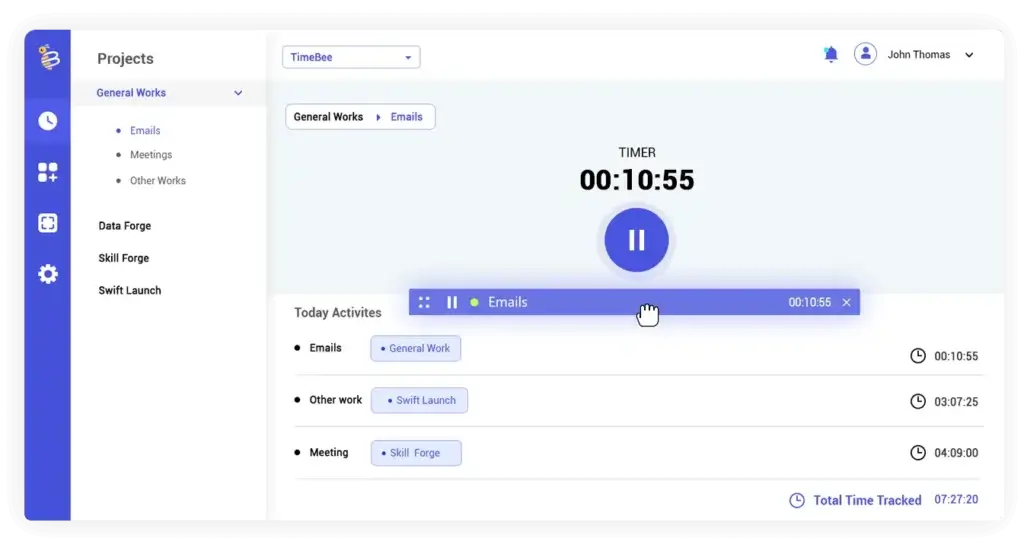
Once the setup is complete, employees can start tracking work using a one-click timer. They can assign time to specific projects and tasks, while managers review data in the TimeBee dashboard.
You can configure settings at both the organization and user level, including:
- Time zone and working days
- Screenshot frequency and screen monitoring rules
- Timeout and idle time settings
- Mouse and keyboard activity thresholds
- Shift start and end times
- Late arrival and early departure margins
- Minimum daily work hours
- Leave allowances and attendance rules
- Currency, hourly rates, billing rates, and payroll settings
This flexibility is useful because not every role should be tracked the same way. A creative team, development team, support team, and field team may all need different monitoring rules.
For best results, you should configure TimeBee based on how your team actually works instead of applying one strict setup to everyone.
Core Features
Main Features Breakdown
TimeBee’s feature set is built around visibility. You can track time, review screenshots, monitor websites and apps, separate billable from non-billable work, manage attendance, calculate payroll, and analyze project costs from one platform.
This makes it more advanced than a basic stopwatch-style tracker, but also more monitoring-heavy than privacy-first tools.
Project Time Tracking
TimeBee lets users track work by project and task. This is useful if you need to understand not only how many hours were worked, but where those hours went.
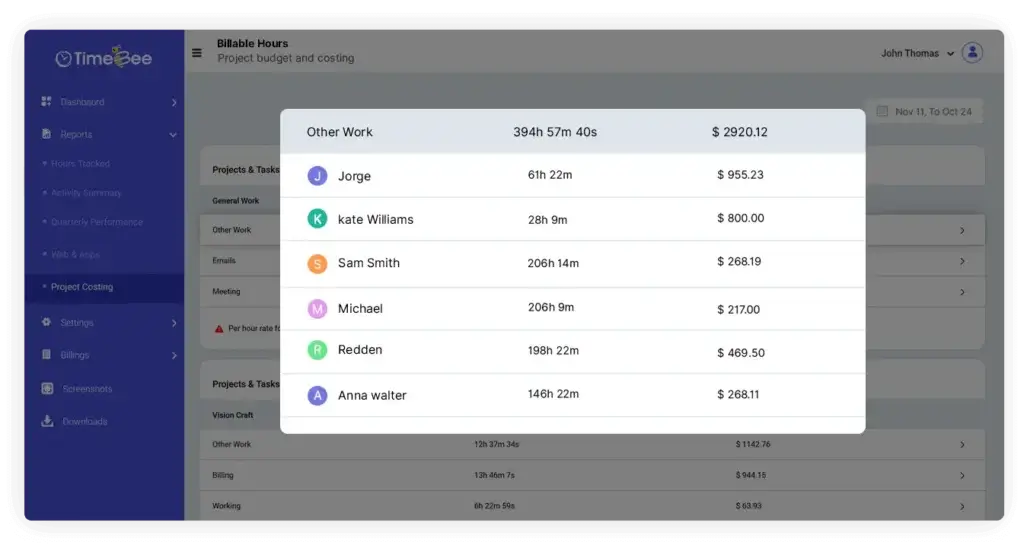
For agencies, consultants, and service businesses, this is especially valuable. You can see how much time each client project consumes, which tasks take longer than expected, and whether your team is spending too much time on non-billable work.
Managers can use project reports to review total tracked time, task-level contribution, and manual versus automated time entries. This gives you a clearer view of project progress and helps support better task management.
Web and App Monitoring
TimeBee tracks websites and applications used during work sessions. Managers can classify apps and websites as productive, unproductive, or neutral, then use those classifications to understand how work time is being spent.
This is helpful when productivity depends heavily on digital behavior. For example, Slack may be productive for a support team, neutral for a finance team, and distracting for a deep-work development team. The same app can mean different things depending on the role.
The best approach is to customize categories by department instead of applying one generic productivity score to everyone. That makes reports more accurate and fair.
Screenshot and Screen Monitoring
Screenshot monitoring is one of TimeBee’s most important features. Admins can customize screenshot frequency for individual users or the whole organization. Available intervals include every 2, 3, 5, 10, 15, 20, or 30 minutes, and screenshots can also be turned off.
TimeBee can capture screenshots with timestamps, user information, active websites or apps, and multi-screen activity. Managers can filter screenshots by user, group, or time range, then review them using slideshow or zoom options.
This feature is useful for teams that need proof of work for billing, outsourcing, remote operations, or compliance. However, it should be used carefully. Screenshot tracking can damage trust if employees do not understand why it is being used.
Before enabling screenshots, you should create a clear policy that explains what is tracked, when tracking happens, who can access the data, and how screenshots will be used.
Billable and Non-Billable Hours
TimeBee separates billable and non-billable work so you can understand which hours directly generate revenue. This is useful for client services, agencies, legal work, consulting, development, accounting, and other hourly billing environments.
Invoice disputes are a common challenge for service businesses, and transparent time records can help reduce confusion around client billing. According to altLINE, invoice disputes are a widespread business problem, which makes accurate documentation valuable.
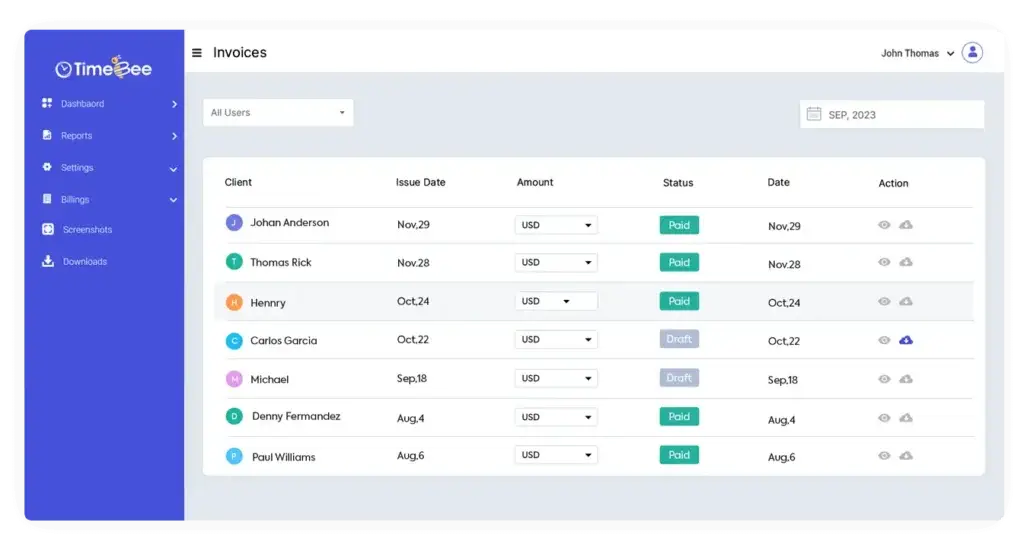
With TimeBee, you can use tracked time, screenshots, project records, and hourly rates to support more accurate billing. This can help you avoid underbilling, overbilling, and vague client conversations about where time was spent.
Payroll and Overtime Tracking
TimeBee includes payroll-related functionality that connects tracked hours with employee rates. You can calculate pay based on recorded work time, apply adjustments, and export payroll data in CSV format for accountants, finance teams, or payroll providers.
The platform also supports overtime tracking by comparing logged hours against shift rules, required daily hours, and work schedules. This matters because overtime can become a compliance and payroll accuracy issue when teams rely on manual reporting.
Research from CIPHR shows that unpaid overtime remains a common workplace issue. A system like TimeBee can help you create a clearer record of hours worked, although you should still confirm legal requirements with local labor counsel.
Attendance, Shifts, and Leave Tracking
TimeBee also helps you track attendance details such as clock-ins, clock-outs, late arrivals, early departures, absences, short shifts, and total hours worked.
This is useful for hourly employees, remote employees, agencies, contractors, and distributed teams that need accurate attendance visibility. Managers can set working days, minimum required hours, start and end times, and late arrival margins.
For more flexible teams, you can configure attendance rules to focus on total required hours rather than fixed start and end times. That makes TimeBee more adaptable for remote teams that work across time zones.
Project Cost Management
TimeBee’s project cost features help you connect tracked time with labor costs, client rates, project budgets, and profitability. This is one of the stronger reasons to consider TimeBee if you run a service-based business.
Instead of only asking whether people are working, you can ask better business questions:
- Which projects are profitable?
- Which clients consume too much non-billable time?
- Which tasks regularly exceed estimates?
- Which team members are overloaded or underused?
- Where are payroll costs affecting margins?
For agencies and consultants, these insights can be more useful than simple activity scores because they connect productivity data to revenue and cost control.
Reports, Dashboards, and Data Visualization
TimeBee organizes tracking data into dashboards and visual reports. You can review tracked hours, productivity activity, websites, apps, screenshots, attendance, payroll, and project costs from the web app.
The reporting experience is useful for managers who want a quick overview of team activity without manually checking individual timesheets. You can use the reports for weekly reviews, client billing, payroll reconciliation, project planning, and performance discussions.
The main benefit is that TimeBee gives you structured data instead of scattered screenshots, manual spreadsheets, and disconnected time logs.
Integrations
TimeBee promotes 60+ integrations and highlights tools such as Slack, Asana, ClickUp, GitHub, Zoho, and Trello on its site.
That said, you should verify the exact integrations you need before choosing TimeBee. Some time tracking tools promote many integrations, but the real value depends on whether they support your workflows, whether data sync is one-way or two-way, and whether integrations are available on your plan.
If integrations are central to your workflow, compare TimeBee carefully with Hubstaff, Clockify, and ClickUp before making a decision.
User Experience and Interface
What’s It Like to Use TimeBee?
TimeBee is designed to make work tracking visible without forcing managers to build complex reports manually. The web dashboard gives you access to tracked hours, screenshots, app usage, project reports, payroll data, and attendance records.
The desktop app is central to the experience. Employees use it to track time, while managers use the dashboard to review the collected data.
Dashboard and Navigation
The dashboard is built around practical management data. You can review who worked, what they worked on, which projects consumed time, which apps and websites were used, and whether attendance rules were met.
This is helpful if you manage multiple people and do not want to check every employee manually. The dashboard gives you a central place to review performance patterns and spot issues early.
Desktop App Experience
TimeBee works best when team members use the desktop app consistently. The timer is simple, but the tracking behind it is more advanced because it can capture screenshots, app activity, website activity, and offline work.
For employees, the experience is straightforward: choose the project or task, start tracking, and stop the timer when work ends. For managers, the value comes from the structured data created in the background.
Offline Tracking
TimeBee can continue tracking time when internet connectivity is interrupted, then sync the data once the connection returns. This is useful for remote employees, field teams, and workers who occasionally deal with unstable connections.
However, syncing still requires internet access eventually, so managers should not expect real-time dashboard visibility while an employee is fully offline.
Privacy and Transparency
TimeBee should not be rolled out as a hidden surveillance tool. The best implementation is transparent, documented, and role-specific.
You should tell employees what TimeBee tracks, when it tracks, why you are using it, who can access the data, and how the information will affect performance reviews, payroll, and client billing.
When implemented well, TimeBee can create clarity. When implemented poorly, it can feel like micromanagement. The difference comes down to policy, communication, and how managers use the data.
Pros and Cons
Real-World Advantages and Disadvantages
TimeBee has a strong feature set for businesses that need visibility into remote work, client billing, and employee activity. However, its monitoring-focused approach also creates limitations, especially for teams that prefer less intrusive time tracking.
Positive
✅ Strong time tracking and task-level visibility
✅ Screenshot, app, and website monitoring
✅ Useful billable and non-billable hour reporting
✅ Payroll exports and project cost insights
✅ Good fit for remote teams and agencies
✅ Flexible monitoring settings
✅ Clear dashboards for managers
Negative
❌ No Linux desktop support
❌ Pricing is not fully transparent
❌ Monitoring may feel intrusive if poorly implemented
❌ Not a full project management platform
❌ Advanced setup takes planning
Pros: Where TimeBee Performs Well
Comprehensive time tracking: TimeBee tracks work hours by project and task, giving you better context than a basic timer.
Strong monitoring features: Screenshots, app usage, website monitoring, mouse activity, and keyboard activity help managers verify work patterns when accountability is required.
Useful for client billing: Billable and non-billable hour tracking makes TimeBee useful for agencies, consultants, freelancers, and outsourced teams.
Payroll and cost visibility: TimeBee can connect tracked hours with hourly rates, payroll exports, and project costs, which helps reduce manual admin work.
Flexible configuration: You can adjust screenshot frequency, time zones, shift rules, attendance settings, and user-level tracking rules.
Cons: Where TimeBee Can Improve
No Linux support: TimeBee currently supports Windows and macOS, but not Linux. This can be a problem for development teams or technical teams using Linux workstations.
Pricing transparency could be better: TimeBee promotes a free trial, but buyers should verify current pricing directly because plan costs are not clearly summarized in a simple public table.
Monitoring requires careful rollout: Screenshots and app tracking can be useful, but they can also create employee resistance if you do not communicate expectations clearly.
Not a full project management tool: TimeBee can track project time and costs, but it does not replace platforms like ClickUp for planning, task dependencies, collaboration, and workflow management.
Pricing and Tiers
How Much Does TimeBee Cost?
TimeBee promotes a 14-day free trial, but its full self-serve pricing is not clearly presented in a simple public pricing table. Because of that, you should confirm the latest TimeBee pricing directly on the official website before buying.
This is an important update because the previous version of this review included a pricing table that referenced Toggl Track and listed plan prices that should not be treated as verified TimeBee pricing.
Based on TimeBee’s public pages and documentation, the safest way to describe pricing is that TimeBee offers a free trial, plan-based billing, and organizational licenses, but final pricing should be checked with TimeBee directly.
| Pricing Detail | What You Should Know |
| Free Trial | TimeBee promotes a 14-day free trial |
| Public Pricing | Fixed per-user prices are not clearly listed in a simple public table |
| Billing Model | TimeBee appears to support organization-based licensing and user-based billing |
| Best Step | Visit TimeBee or request a quote to confirm current plan costs |
| Buyer Tip | Compare pricing against Hubstaff, Clockify, and Toggl Track before committing |
If you are evaluating TimeBee for a business, do not compare it only by monthly price. Compare it by the value you get from screenshots, attendance data, payroll exports, project costing, and billing accuracy.
A cheaper time tracker may be enough for simple timesheets. TimeBee becomes more valuable when you need proof of work, activity visibility, and project-level financial insight.
TimeBee VS Alternatives
How Does It Compare?
TimeBee competes most directly with time tracking and employee monitoring tools. It should not only be compared with basic time trackers, because its strongest features include screenshots, activity monitoring, attendance tracking, payroll exports, and project cost visibility.
The most relevant alternatives are Hubstaff, Clockify, Toggl Track, Insightful, and DeskTime. ClickUp is also worth mentioning, but mainly as a project management alternative rather than a direct monitoring alternative.
| Tool | Best For | Monitoring Level | Best Reason to Choose It |
| TimeBee | Remote teams, agencies, and client-facing teams | High | Screenshots, app monitoring, billing, payroll, and project cost tracking |
| Hubstaff | Remote, hybrid, and field teams | High | Workforce analytics, GPS, payroll, screenshots, and app/URL tracking |
| Clockify | Teams needing affordable time tracking | Medium | Simple timesheets, reports, and optional screenshot recording |
| Toggl Track | Privacy-first teams and freelancers | Low | Clean time tracking without screenshots or app usage monitoring |
| ClickUp | Project and task management | Low | Tasks, docs, dashboards, goals, and workflow management |
TimeBee vs Hubstaff
Hubstaff is one of TimeBee’s strongest direct competitors. It includes time tracking, screenshots, app and URL tracking, idle time tracking, payroll, attendance, GPS time tracking, workforce analytics, and many integrations.
Choose TimeBee if you want a focused time tracking and monitoring tool with billing, payroll, screenshots, and project cost visibility. Choose Hubstaff if you need a broader workforce management platform with stronger field team, GPS, and operational analytics features.
👉🏼 Read the full Hubstaff review or visit Hubstaff directly.
TimeBee vs ClickUp
ClickUp is not a direct TimeBee replacement. It is a full project management and work management platform with tasks, docs, dashboards, goals, forms, automation, and collaboration features.
TimeBee is better for monitored time tracking. ClickUp is better for planning and managing the work itself.
Choose TimeBee if you need screenshots, app monitoring, billable hours, and productivity visibility. Choose ClickUp if you need a complete project management system.
TimeBee vs Clockify
Clockify is one of the most popular time tracking tools because it is simple, flexible, and accessible for individuals and teams. It is a strong option if your main goal is tracking time, filling timesheets, and generating reports.
Clockify also supports screenshot recording through its desktop app when enabled, but TimeBee is more directly positioned around employee monitoring, attendance, payroll, and project cost visibility.
Choose TimeBee if you need deeper monitoring and accountability. Choose Clockify if you want a simpler and more widely adopted time tracker.
👉🏼 Read Full Clockify review here or visit Clockify
TimeBee vs Toggl Track
Toggl Track is almost the opposite of TimeBee in terms of monitoring philosophy. Toggl Track focuses on clean, simple, privacy-first time tracking and does not support screenshots or app usage monitoring.
That makes Toggl Track a better fit for teams that trust employees to log work without surveillance. TimeBee is better for teams that need proof of work, screenshots, and activity visibility.
Choose TimeBee if your priority is visibility and accountability. Choose Toggl Track if your priority is simplicity, trust, and a non-intrusive tracking experience.
👉🏼 Read Full Toggl Track review here or visit Toggl Track
Is TimeBee For You?
Who Should Use TimeBee?
TimeBee is best for teams that need visibility into work hours, productivity patterns, project costs, and client billing. It is not trying to replace every project management or HR platform. Instead, it focuses on time accountability and operational clarity.
TimeBee Is Best For
- Remote and hybrid teams that need transparent work tracking
- Agencies that bill clients by the hour
- Consultants managing multiple clients or projects
- Freelancers who work with contractors or subcontractors
- Managers who need screenshots and activity visibility
- Businesses that want payroll-ready time records
- Teams that need project cost and profitability insights
TimeBee May Not Be Best For
- Teams that do not want screenshots or monitoring
- Linux-heavy technical teams
- Companies that need full project management features
- Businesses that require advanced HR, scheduling, or workforce planning
- Solo users who only need a lightweight timer
If your team values transparency and is comfortable with monitored time tracking, TimeBee can be a practical choice. If your culture is built around deep autonomy and minimal oversight, a tool like Toggl Track may be a better fit.
Tips & Best Practices for Using
How To Get The Most Out of TimeBee
TimeBee works best when it is implemented as a productivity and accountability tool, not as a punishment system. The goal should be to improve visibility, reduce billing confusion, and help teams work more efficiently.
1. Create a Clear Tracking Policy
Before you invite employees, explain exactly what TimeBee tracks and why. Cover screenshots, app usage, websites, time logs, attendance, payroll, and who can access each type of data.
This reduces confusion and helps employees understand that the tool is used for clarity, not hidden surveillance.
2. Customize Screenshot Settings by Role
Do not apply the same screenshot frequency to every employee automatically. Some roles may need frequent screenshots for client proof, while others may only need basic time logs.
Use TimeBee’s screenshot settings to balance accountability with trust.
3. Define Productive and Unproductive Apps Carefully
App and website monitoring is only useful when categories are accurate. For example, YouTube may be unproductive for one team but productive for a marketing or training team.
Review categories by department and update them regularly.
4. Use Project and Task Naming Consistently
TimeBee’s reports become more useful when project and task names are clean. Use consistent naming rules for clients, internal work, retainers, and one-time projects.
This helps you compare work accurately across teams and reporting periods.
5. Review Billable and Non-Billable Time Weekly
For agencies and consultants, non-billable time can quietly reduce profitability. Use TimeBee to review where time is going each week.
Look for repeated admin work, unclear scope, over-servicing, or client work that should be billed but is not being captured.
6. Connect Payroll and Project Costs
Use employee rates, project rates, and payroll exports to connect time tracking with financial decisions. This makes TimeBee more than a productivity tool.
It becomes a way to understand project margins, labor costs, and profitability.
7. Use Reports for Coaching, Not Micromanagement
TimeBee gives you a lot of data, but data needs context. Low activity may indicate distraction, but it may also reflect meetings, research, strategy work, or offline work.
Use reports as a starting point for better conversations, not as the only measure of performance.
Conclusion
Final Thoughts – Is TimeBee Worth It in 2026?
Final Thoughts – Is TimeBee Worth It in 2026?
TimeBee is worth considering if you need a time tracking tool that goes beyond basic timesheets. It combines time tracking, screenshots, app and website monitoring, attendance logs, billable hours, payroll exports, and project cost insights in one platform.
Its strongest use case is monitored time tracking for remote teams, agencies, consultants, freelancers, and service businesses that need better proof of work and billing clarity.
However, TimeBee is not the best choice for every team. It may feel too monitoring-heavy for privacy-first workplaces, and the lack of Linux support can be a limitation for technical teams. Pricing should also be verified directly before you compare it against alternatives.
TimeBee Is a Strong Choice If You Need:
- Time tracking with screenshots
- App and website monitoring
- Remote employee activity visibility
- Billable and non-billable hour reports
- Payroll-ready time data
- Attendance and overtime tracking
- Project cost and profitability insights
Consider Alternatives If You Need:
- Full project management, choose ClickUp
- Broader workforce management, choose Hubstaff
- Simple time tracking, choose Clockify
- Privacy-first time tracking, choose Toggl Track
Overall Rating
⭐ 4.2 / 5
TimeBee earns a strong rating for its monitoring depth, billing features, payroll support, and project cost visibility. It loses points for unclear public pricing, no Linux support, and the fact that screenshot-based monitoring requires careful communication to avoid employee trust issues.
Final recommendation: TimeBee is a good fit if you want transparent, monitored time tracking for remote teams and client-based work. It is not the best fit if you only need a simple timer or if your company culture strongly avoids employee monitoring.
Frequently Asked Questions
Have more questions?
What is TimeBee?
TimeBee is a time tracking and employee monitoring platform that helps teams track work hours, screenshots, app usage, website activity, attendance, billable hours, payroll, and project costs from one dashboard.
Is TimeBee good for remote teams?
Yes. TimeBee is a good fit for remote and hybrid teams that need visibility into tracked hours, screenshots, attendance, app usage, websites, and productivity patterns. It is especially useful for managers who need proof of work and billing clarity.
Does TimeBee take screenshots?
Yes. TimeBee can take screenshots during tracked work sessions. Admins can customize screenshot frequency or turn screenshots off entirely, depending on company policy and team requirements.
Can TimeBee track websites and apps?
Yes. TimeBee can track websites and applications used during work sessions. Managers can classify activity as productive, unproductive, or neutral to create more useful productivity reports.
Is TimeBee available on Linux?
No. TimeBee currently supports Windows and macOS, but it is not available on Linux. This is an important limitation for development teams or technical teams that rely on Linux workstations.
Can TimeBee be used offline?
Yes. TimeBee can continue tracking time offline and sync the data once the internet connection is restored. Real-time dashboard updates still require internet access.
Does TimeBee support payroll?
TimeBee includes payroll-related features that connect tracked hours with employee rates. Payroll data can be exported in CSV format for finance teams, accountants, or payroll providers.
How much does TimeBee cost?
TimeBee promotes a 14-day free trial, but its full public pricing is not clearly displayed in a simple pricing table. You should confirm the latest plan costs directly with TimeBee before buying.
Is TimeBee better than Hubstaff?
TimeBee may be better if you want focused time tracking, screenshots, billing, payroll exports, and project cost visibility. Hubstaff is usually stronger if you need broader workforce management, GPS tracking, payroll workflows, and more mature operational analytics.
What are the best TimeBee alternatives?
The best TimeBee alternatives include Hubstaff, Clockify, Toggl Track, Insightful, DeskTime, and ClickUp. Hubstaff and Time Doctor are closest for employee monitoring, while Clockify and Toggl Track are better for simpler time tracking.