

Introduction
Time tracking is no longer just about logging hours. If you manage a remote, mobile, or field-based team, you already know how quickly time data can become messy. Missed clock-ins, incomplete timesheets, unclear job locations, forgotten breaks, and last-minute payroll corrections can drain hours from your week.
That is where Atto becomes relevant.
Atto is a mobile-first time tracking and workforce management app built for businesses with employees in the field. It helps you track work hours, verify locations with GPS, manage schedules, approve timesheets, track mileage, prepare payroll data, and communicate with your team from one simple platform.
In this Atto review for 2026, we will look at what the platform does well, where it falls short, how its pricing works, and how it compares with tools like Toggl Track, Hubstaff, Jibble, Clockify, and ClockShark.
Atto is especially relevant for construction teams, home service companies, cleaning businesses, landscaping crews, delivery operations, security teams, maintenance providers, and other businesses where employees do not sit behind a desk all day.
This in-depth review explores:
- What Atto does and how it works
- Key features, including GPS tracking, scheduling, mileage, and payroll
- Atto pricing, including monthly and annual plan costs
- Pros and cons based on real-world use cases
- How Atto compares with other time tracking apps
If you are tired of paper timesheets, unreliable manual entries, and payroll preparation that takes too long, Atto may be the GPS-powered upgrade your team needs.
| Atto Review Summary | Details |
| Best for | Field teams, contractors, cleaning companies, landscaping crews, construction teams, and hourly mobile workers |
| Starting price | $6.95/user/month, with lower annual pricing available |
| Free plan | No full free plan, but a free trial is available |
| Strongest feature | GPS time tracking and mobile clock-ins for field teams |
| Main limitation | Limited integrations and less desktop-focused functionality than some competitors |
| Best alternatives | Jibble, Clockify, Hubstaff, Toggl Track, ClockShark, QuickBooks Time, Connecteam |
Overview
What is Atto, and how does it work?
If you have ever struggled to keep track of when and where your team is working, Atto is built for that exact problem. It is a mobile-first time tracking app that helps businesses manage hourly employees, field teams, schedules, location data, and payroll-ready timesheets from one place.
Atto is not trying to replace your project management software or CRM. Instead, it focuses on the operational side of work: clock-ins, job locations, breaks, overtime, schedules, mileage, and timesheet approvals.
That makes it especially useful for teams that work across job sites, client locations, routes, and shifts.
Atto Overview & Core Purpose
At its core, Atto helps you:
- Track employee work hours from mobile, web, or kiosk workflows
- Verify clock-in and clock-out locations with GPS
- Manage schedules, time off, shifts, and team availability
- Approve timesheets before payroll
- Track mileage and job-related travel
- Export or prepare time data for payroll and reporting
You do not need extra hardware for most workflows. Employees can use the mobile app, while managers can use the web dashboard to review activity, approve time, and run reports.
Expert tip: Atto works best when your team works across multiple locations. If your biggest issue is not knowing who worked where, when they arrived, or whether their hours are accurate, Atto solves a real operational pain point.
Platforms Supported: Mobile, Web & Admin Dashboard
Atto is a mobile-first platform, which means most employee actions happen through the iOS or Android app.
It supports:
- iOS and Android mobile apps for employees
- A browser-based web dashboard for managers and admins
- Time Clock Kiosk for shared clock-in workflows on supported plans
- Web access for management, reporting, and timesheet review
The key point is that Atto is not a desktop-first time tracker like Toggl Track or Clockify. If your employees mostly track work from laptops, another tool may feel more natural.
But if your team clocks in from job sites, vehicles, client locations, or shared work areas, Atto’s mobile-first design is a strength.
Time Tracking Methods: One-Tap Clock-In, Manual Entry & GPS Verification
Atto gives your team several practical ways to track time:
- One-tap clock-in and clock-out for fast mobile time tracking
- Manual time entries for missed punches or approved corrections
- Break tracking for paid and unpaid breaks
- Overtime tracking based on your configured rules
- GPS verification to confirm where time entries happen
- Offline time tracking for areas with weak connectivity
There is no Pomodoro timer, idle detection, or desktop activity monitoring. That is not Atto’s purpose. Atto is built for practical workforce visibility, not desk-based productivity analysis.
Core Features
Main Features Breakdown
Atto does not try to be everything for everyone. That is part of its appeal.
Instead, it focuses on the features that matter most to hourly and field-based teams: accurate time tracking, GPS verification, scheduling, payroll-ready timesheets, mileage tracking, and simple reporting.
Here is what Atto does best.
Time Tracking & Automated Timesheets
Atto makes daily time tracking simple for employees and easier to manage for business owners.
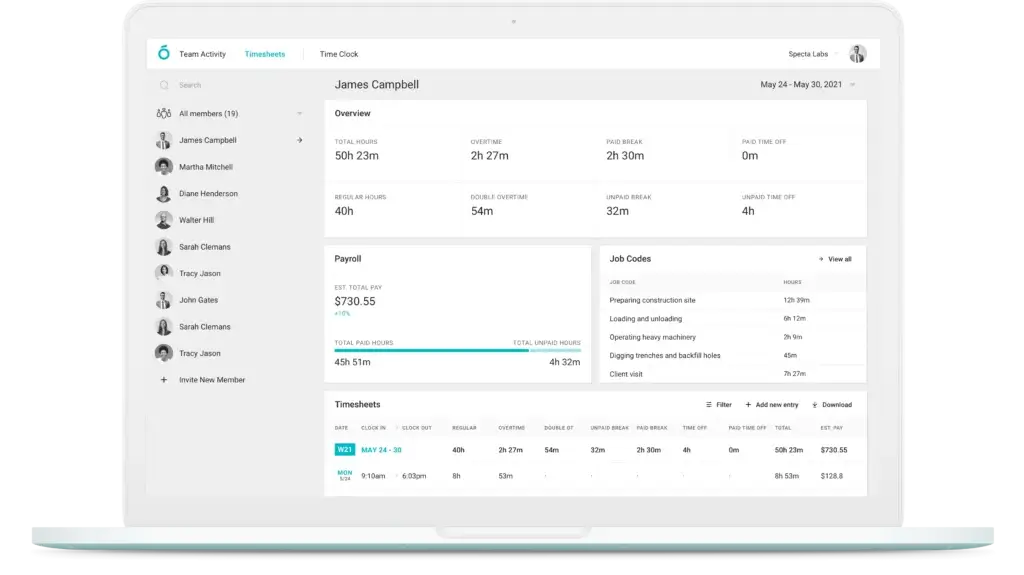
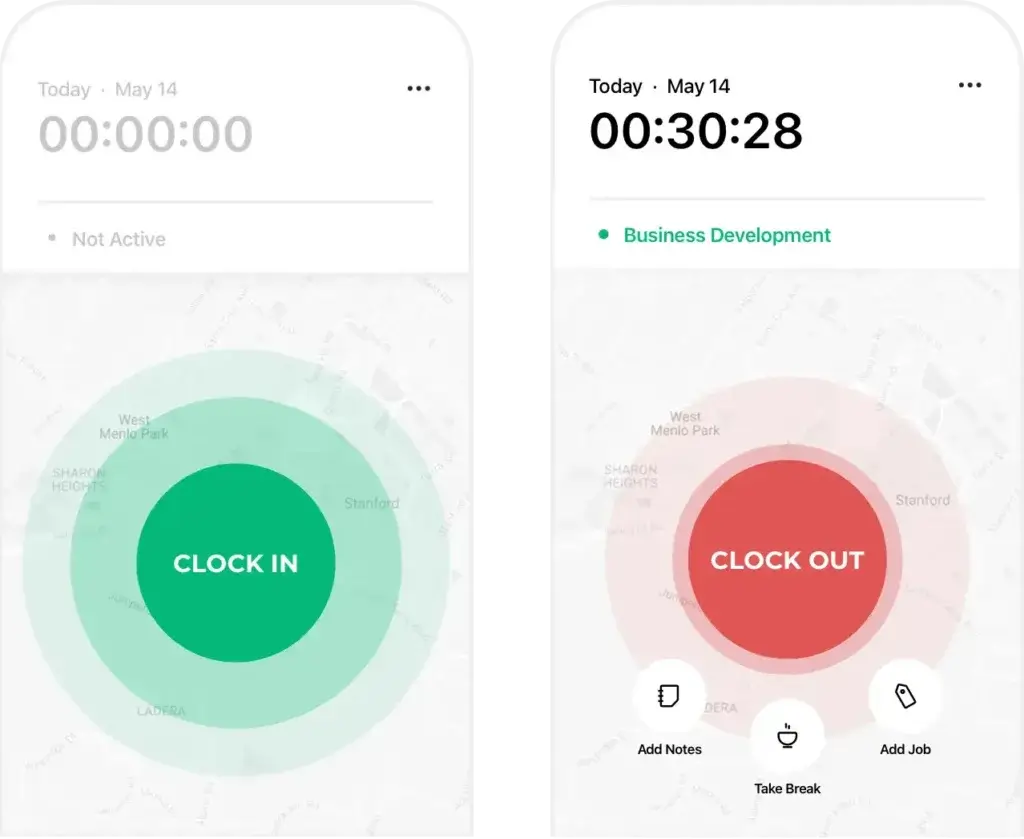
Your team can clock in and out from the mobile app, log breaks, add notes, switch job codes, and submit time entries without filling out manual timesheets.
- Track clock-ins and clock-outs from mobile devices
- Log breaks, notes, jobs, and overtime
- Use manual edits for approved corrections
- Review automated timesheets before payroll
- Export approved time data for payroll or reporting
For businesses that still rely on handwritten time cards or weekly spreadsheet updates, this alone can remove a lot of friction.
Timesheets, Calendar View & Approvals
Managing hours does not stop when employees clock out. Atto gives managers a more structured way to review time before it becomes payroll data.
You can:
- Review employee timesheets by day, week, job, or team
- Check breaks, overtime, notes, and job codes
- Edit entries when corrections are needed
- Approve timesheets before running payroll
- Export reports for accounting or HR workflows
This is one of Atto’s strongest business benefits. It helps you catch errors before they become payroll issues.
GPS Location Tracking and Job Site Verification
GPS tracking is the main reason many businesses choose Atto over general-purpose time trackers.
When employees clock in and out, Atto can verify the location attached to those entries. This helps you confirm whether someone started work at the right job site, whether they were near the expected location, and whether field activity matches scheduled work.
This is valuable for construction, cleaning, field service, maintenance, and delivery teams because location accuracy directly affects accountability, payroll accuracy, and customer trust.
Project & Task Tracking, Rate and Budget Management
Atto is not a full project management system, but it does support basic job-based tracking.
You can use job codes to organize time by:
- Project
- Client
- Location
- Service type
- Cost center
You can also set hourly pay rates and use time data to estimate labor costs. This is helpful if you need better visibility into which jobs take the most time or where labor costs are increasing.
If you need advanced budgeting, project forecasting, or billable utilization reports, Atto may feel limited. But for basic field job tracking, it covers the essentials well.
Mileage Tracking
Mileage tracking is useful for employees who drive between job sites, client appointments, or work locations.
Atto can help you track work-related travel so you can review routes, mileage, and reimbursement values more clearly. This feature is especially helpful for home service teams, delivery workers, field technicians, and mobile crews.
If mileage reimbursement is part of your payroll or job costing workflow, the Advanced plan is likely more relevant than the Starter or Plus plan.
Reporting and Dashboards: Export and Filter Options
Atto’s reporting is practical rather than overly complex. You can filter and export data by employee, job, team, date range, location, and pay-related fields.
Common reporting use cases include:
- Total hours by employee or team
- Hours by job, project, or location
- Breaks, overtime, and paid time data
- Payroll-ready timesheet exports
- Mileage and job-related travel records
Atto is strong for everyday operations, payroll prep, and field accountability. It is less suitable if you need advanced dashboards, deep productivity analytics, or custom reporting automation.
Other Features: Scheduling, Kiosk, Payroll & Team Chat
Atto also includes several supporting features that make it more useful as a lightweight workforce management tool.
- Shift scheduling helps you plan who should work and when
- Time-off management keeps absence requests closer to timesheets
- Team chat gives employees and managers a simple communication channel
- Kiosk mode lets multiple employees clock in from a shared device
- Payroll features help you move from approved hours to pay data faster
Some of these features are only available on higher-tier plans, so the right plan depends heavily on how much operational control you need.
Recent Updates and Product Direction
What’s New in Atto in 2026?
Atto has become broader than a simple GPS time clock. The product now positions itself as an all-in-one workforce management solution for hourly teams, with stronger emphasis on time tracking, GPS, scheduling, payroll, mileage, timesheets, overtime, and team communication.
This matters because older Atto reviews often focus only on clock-ins and GPS. For 2026, the article should reflect that Atto is now competing more directly with field workforce management tools, not only basic time tracking apps.
More Focus on Payroll and Payroll-Ready Timesheets
Atto now places more emphasis on payroll workflows. The platform helps you move from clock-ins and breaks to approved timesheets and pay data more efficiently.
This can save time if your payroll process currently depends on spreadsheets, manual calculations, or employees submitting hours late.
However, payroll availability and exact processing capabilities may depend on your location and plan. Before choosing Atto specifically for payroll, you should confirm supported countries, tax handling, payroll processing availability, and any extra requirements directly with Atto.
Shift Scheduling, Time Off, Trades and Covers
Atto now does more than record time after the work happens. It also helps you plan shifts, coordinate availability, manage time-off requests, and keep employees aligned with schedule changes.
This is useful because field teams usually need both planning and proof. You need to know who was scheduled, who actually showed up, when they started, where they clocked in, and whether the final timesheet is correct.
Better Fit for Mobile Workforce Management
Atto’s current feature set makes it more useful for mobile teams that need a lightweight workforce management system. It is still simpler than larger platforms, but it now covers more of the daily workflow around hourly work.
That includes scheduling, GPS tracking, team chat, mileage tracking, time-off requests, timesheet approvals, and payroll preparation.
User Experience and Interface
What’s It Like to Use Atto?
Ease of use is one of the most important factors in time tracking software. The best tool is not the one with the most features. It is the one your employees will actually use consistently.
Atto performs well here because the employee experience is simple, mobile-first, and focused on daily actions.
🧭 Mobile-First Design Prioritized
Atto is built around mobile usage. Employees can clock in, take breaks, switch jobs, add notes, and clock out from their phones.
The interface is clean and direct, which is important for field workers who may not have time to navigate a complex app during a busy shift.
This mobile-first approach is one of Atto’s biggest strengths for field teams, but it is also why the platform may not be ideal for desk-based teams.
💻 Manager Dashboard (Web)
Managers and admins can use the browser-based dashboard to monitor workforce activity, review timesheets, approve hours, manage schedules, configure job codes, and export reports.
From the web dashboard, you can:
- View employee time entries and GPS-related activity
- Review and approve timesheets
- Manage schedules, jobs, pay rates, and overtime settings
- Export reports for payroll and accounting
- Track hours by employee, job, team, or date range
The dashboard is not overloaded. That makes it approachable for small business owners who need visibility without a steep learning curve.
👥 Onboarding & Setup
Getting started with Atto is relatively simple. You can invite employees, create jobs, configure rules, set pay rates, and begin tracking time without a long implementation process.
For larger or more complex teams, the Expert plan includes concierge onboarding and custom implementation. That may be useful if you need API access or support building a more structured workflow.
📱 Daily Usage for Employees
For employees, the daily workflow is straightforward:
- Open the mobile app
- Clock in from the job site
- Add a job code or note if required
- Take breaks as needed
- Clock out at the end of the shift
This simplicity is important. If your team is not highly technical, Atto is easier to roll out than many broader workforce platforms.
🚧 Any Friction?
The main friction comes from permissions, connectivity, and expectations around GPS tracking.
Employees need to understand why location access is required, when tracking happens, and how corrections are handled. If you do not explain this clearly, GPS tracking can create unnecessary tension.
Atto also depends on employees using the app consistently. Missed clock-ins can still happen, so managers should create clear rules for manual edits and approvals.
Bottom line: Atto’s user experience is strong for mobile teams. It is simple, focused, and practical. But it works best when your team is properly trained and your time tracking policy is clearly documented.
Pros And Cons
Real-World Advantages and Disadvantages
No time tracking tool is perfect. What matters most is how well the product fits your actual workflow.
Atto’s strengths are very clear: mobile time tracking, GPS visibility, simplicity, scheduling, and payroll-ready timesheets. Its limitations are also clear: it is not the best choice for desktop-first teams, deep integrations, or advanced analytics.
Positive
✅ Designed for field teams
✅ Strong real-time GPS tracking
✅ Simple mobile app for employees
✅ Scheduling, time off, and team chat
✅ Payroll-ready timesheets and pay data
✅ Mileage tracking and kiosk mode on Advanced
Negative
❌ No full free plan
❌ Real-time GPS is not included in Starter
❌ Limited integrations compared with larger platforms
❌ Not ideal for desktop-first teams
❌ Reporting is practical but not deeply advanced
✅ Pros
1. Designed for field teams
Atto is clearly built for teams that work away from a desk. If your crew is on construction sites, driving routes, servicing homes, cleaning buildings, or moving between locations, the mobile-first workflow makes sense.
2. Strong real-time GPS tracking
You can verify where employees clock in and out, which improves accountability and reduces confusion around job-site attendance.
3. Easy to use, even for non-tech teams
Atto keeps the employee experience simple. Clocking in, logging breaks, switching jobs, and clocking out can be done from a phone without a complicated interface.
4. Scheduling and time-off tools add operational value
Atto is not only a timer. It also helps you plan shifts, manage time off, and reduce missed clock-ins through more structured workforce scheduling.
5. Payroll-ready timesheets reduce admin work
Atto helps you prepare cleaner timesheets with hours, breaks, overtime, job codes, and pay data. This can reduce payroll errors and save time at the end of each pay period.
6. Mileage tracking and kiosk mode support real field workflows
The Advanced plan adds features that matter for mobile and shared-location teams, including mileage tracking and kiosk mode.
⚠️ Cons
1. No full free plan
Atto offers a free trial, but not a permanent free plan. If you need free time tracking, Clockify, Jibble, or Toggl Track may be better starting points.
2. Real-time GPS tracking is not on the Starter plan
Since GPS tracking is one of Atto’s main advantages, most field teams should expect to start with Plus or higher.
3. Limited integrations compared with larger platforms
Atto is not as integration-heavy as Toggl Track, Hubstaff, or Clockify. API access is available on Expert, but smaller teams may find native integrations limited.
4. Not ideal for desktop-first teams
Atto supports web management, but it is not built around a full desktop tracker, browser extension, idle detection, or app usage monitoring.
5. Reporting is useful but not advanced
You get practical reports for timesheets, jobs, payroll, mileage, and labor visibility. But if you need deep analytics or custom dashboards, Atto may feel lightweight.
Overall, Atto delivers the most value when your top priority is knowing who worked, where they worked, and whether their hours are ready for payroll.
Pricing and Tiers
How Much Does Atto Cost?
Atto uses per-user pricing with four paid plans: Starter, Plus, Advanced, and Expert.
This is an important update. The previous article referred to the $12.95 plan as Premium, but the current plan name is Advanced. You should update this everywhere in the article, schema, tables, FAQ, and any comparison snippets.
Atto offers monthly pricing and lower annual pricing. Here is the updated plan breakdown.
💰 Atto Pricing Table
| Plan | Monthly Price | Annual Price | Key Features Included |
| Starter | $6.95/user/month | $5.65/user/month | Time tracking, shift scheduling, automated timesheets, job codes, breaks, notes, and overtime |
| Plus | $9.95/user/month | $7.95/user/month | Everything in Starter, plus team chat, real-time GPS tracking, time off management, and hourly pay rates |
| Advanced | $12.95/user/month | $10.75/user/month | Everything in Plus, plus mileage tracking, time clock kiosk, job pay rates, and advanced overtime |
| Expert | $19.95/user/month | $16.55/user/month | Everything in Advanced, plus priority support, concierge onboarding, custom implementation, and API access |
🧠 Which Plan Should You Choose?
Here is the practical way to think about Atto pricing.
- Choose Starter if you only need basic time tracking and timesheets
- Choose Plus if GPS tracking is important to your field team
- Choose Advanced if you need mileage tracking, kiosk mode, and advanced overtime
- Choose Expert if you need API access, custom implementation, and priority support
For most field-based teams, Plus is the real starting point because it unlocks real-time GPS tracking. If your business also needs mileage tracking or shared device clock-ins, Advanced is the better value.
The Starter plan is affordable, but it may feel too limited for teams choosing Atto mainly for GPS accountability.
Does Atto Have a Free Plan?
Atto does not offer a full free plan for ongoing business use. You can test the platform with a free trial, but you will need a paid subscription to keep using it after the trial period.
If a permanent free plan is important, you may want to compare Atto with tools like Clockify, Jibble, or Toggl Track.
User Feedback and Review Signals
Atto Reviews and Ratings
Atto receives stronger signals from mobile app users than from some smaller business software review datasets. That makes sense because Atto is primarily a mobile-first product.
When evaluating Atto reviews, it is important to separate two things:
- How employees experience the mobile app day to day
- How managers evaluate pricing, reporting, support, and integrations
| Review Source | What to Look For | How to Interpret It |
| Apple App Store | Mobile app satisfaction and ease of use | Useful for understanding employee-facing experience |
| Google Play | Android adoption, GPS, scheduling, and mobile reliability | Useful for field teams with Android-heavy workforces |
| Capterra | Pricing, features, customer service, and business buyer feedback | Useful, but review volume may be smaller than major platforms |
| GetApp | Plan details, feature comparisons, and SMB software fit | Useful for comparing Atto against other business tools |
| G2 | Software positioning and business review context | Helpful, but check review volume before relying on it too heavily |
My interpretation is simple: Atto is strongest for teams that value mobile simplicity and GPS accountability. It is weaker for teams that want a deep software ecosystem, advanced dashboards, or many native integrations.
Atto VS Alternatives
How Does It Compare?
Atto competes in a crowded category. It overlaps with time tracking apps, GPS time clock tools, employee scheduling software, payroll preparation tools, and field workforce management platforms.
To understand whether Atto is right for you, it helps to compare it with both desktop-focused tools and field-team alternatives.
🆚 Atto vs. Toggl Track
Toggl Track is a better fit for freelancers, consultants, agencies, and digital teams that need a clean desktop timer, project tracking, tags, clients, billable hours, and integrations.
Atto is stronger for field teams because it focuses on mobile clock-ins, GPS verification, job sites, scheduling, and payroll-ready time data.
| Feature | Atto | Toggl Track |
| Best for | Field teams and hourly mobile workers | Freelancers, agencies, consultants, and desk-based teams |
| GPS tracking | Yes, built for field workflows | Not the main focus |
| Kiosk mode | Yes, on higher-tier plans | No |
| Project/task management | Basic job codes and reports | Stronger clients, projects, tags, and billing workflows |
| Integrations | Limited, with API on Expert | Much broader integration ecosystem |
| Desktop experience | Not desktop-first | Strong desktop and browser tracking |
| Free plan | No full free plan | Yes |
Summary:
If your team needs GPS tracking and job-site accountability, Atto is the better fit. If you need flexible project time tracking for desk-based work, Toggl Track is stronger.
👉🏼 Read Full Toggl Track review or visit Toggl Track directly here
🆚 Atto vs. Hubstaff
Hubstaff is a more advanced workforce tracking platform. It includes GPS tracking, but it also focuses on productivity analytics, screenshots, activity rates, app and URL usage, payroll, and integrations.
Atto is simpler and less invasive. It is better if you want GPS time tracking for field teams without employee productivity surveillance.
| Feature | Atto | Hubstaff |
| Best for | Mobile field teams | Remote, hybrid, and distributed teams needing deeper oversight |
| GPS tracking | Yes | Yes |
| Activity monitoring | No | Yes, including screenshots and activity levels |
| Payroll features | Payroll-ready timesheets and payroll-related workflows | Broader payroll and workforce management ecosystem |
| Productivity analytics | Limited | Strong |
| Setup complexity | Simple | Moderate |
| Best choice | Choose Atto for GPS field tracking | Choose Hubstaff for productivity monitoring and deeper analytics |
Summary:
Hubstaff is better if you need advanced productivity monitoring and remote workforce analytics. Atto is better if you want a simpler GPS-first app for field employees.
👉🏼 Read Full Hubstaff review here or visit Hubstaff website
🆚 Atto vs. Other Time Tracking Alternatives
Atto should also be compared with tools that are closer to field team management, not only general time trackers.
| Alternative | Better For | Why You Might Choose It Over Atto |
| Jibble | Free attendance and time tracking | Better if you want a strong free plan and attendance-focused workflows |
| Clockify | Free or low-cost time tracking | Better if budget is your top priority and you do not need strong field GPS workflows |
| ClockShark | Construction and contractor teams | Better if you need a more contractor-focused workforce platform |
| QuickBooks Time | QuickBooks payroll and accounting users | Better if your accounting workflow already depends on QuickBooks |
| Connecteam | Deskless workforce operations | Better if you need forms, training, communication, scheduling, and operations in one app |
| Buddy Punch | Employee time clock and attendance | Better if you want a broader attendance system with simpler clock-in controls |
Final thoughts?
Atto holds its own with strong GPS tracking and simplicity, but it is not meant to replace every time tracking or workforce management tool. It is best for mobile crews that need reliable time, location, schedule, and payroll visibility without complex setup.
Privacy, Trust, and Location Data
Is Atto Safe for GPS Employee Tracking?
GPS employee tracking can improve accountability, but it should be handled carefully.
If you use Atto to track employee locations, you should create a clear internal policy that explains:
- When location tracking is active
- Why GPS data is being collected
- Who can access location records
- How manual edits and disputes are handled
- How long time and location records are stored
This is not just a compliance issue. It is also a trust issue.
Employees are more likely to accept GPS tracking when they understand that it is used for timesheet accuracy, dispatching, safety, customer proof, and payroll clarity, not unnecessary surveillance.
Best practice: use GPS tracking only for work-related activity and explain the rules clearly during onboarding.
Is Atto For You?
Who Should Use Atto?
Atto is not trying to be everything to everyone, and that is exactly why it works well for the right teams.
This app is best for field-based, hourly, and mobile-first teams that need reliable GPS time tracking without a complicated software rollout.
✅ Best For
1. Field service teams
If your team works on-site, including construction, cleaning, landscaping, HVAC, delivery, security, or maintenance, Atto gives you better visibility into where work happens and how long it takes.
2. Small businesses on the move
Business owners managing small distributed teams can track time, review schedules, approve timesheets, and prepare payroll data without a heavy enterprise system.
3. Contractors and mobile crews
Atto helps you track job-site activity, breaks, overtime, mileage, and location-based attendance more accurately.
4. Businesses with payroll headaches
If payroll prep involves chasing employees for hours or fixing manual logs, Atto can reduce the admin burden by creating cleaner timesheets.
❌ Not Ideal For
1. Office-based teams or agencies
Atto does not offer the same desktop tracking, project billing, Pomodoro timers, or browser-based timer workflows you get with tools like Toggl Track or Clockify.
2. Companies needing deep integrations
If you rely heavily on Jira, Slack, Trello, accounting systems, or custom workflows, Atto may feel limited unless you are on a higher-tier plan with API access.
3. Organizations with complex approval chains
Atto supports timesheet approvals, but companies needing advanced multi-level approvals, audit trails, and enterprise compliance workflows may need a more robust workforce platform.
4. Teams that need productivity monitoring
If you want screenshots, app usage tracking, URL monitoring, or activity levels, Hubstaff is a better match.
Bottom line:
If you manage a small to mid-sized field team and value simplicity, GPS visibility, scheduling, and payroll-ready timesheets, Atto is a strong match.
Tips & Best Practices for Using
How To Get The Most Out of Atto
Atto works best when you configure it around your real workflow, not just as a digital punch clock.
Here are practical ways to get better results from the platform.
🧭 1. Set Up Job Codes from Day One
Job codes make your reports much more useful.
You can organize tracked time by:
- Projects
- Clients
- Locations
- Services
- Cost centers
When job codes are set up early, you get better visibility into labor costs, payroll data, and billable work.
📲 2. Train Your Team to Use the Mobile App Properly
Atto is simple, but you should still train employees before launch.
Make sure your team knows how to:
- Clock in and out
- Log breaks correctly
- Switch jobs during a shift
- Add notes when needed
- Enable location permissions
A short onboarding session can prevent many time tracking issues later.
📅 3. Use Scheduling to Reduce Missed Hours
If your team works assigned shifts, use Atto’s scheduling tools to create better visibility before the workday starts.
Scheduling helps you:
- Reduce missed clock-ins
- Improve attendance visibility
- Coordinate team availability
- Compare scheduled hours with actual hours
📤 4. Export Reports Weekly, Not Monthly
Do not wait until payroll day to review timesheets.
Weekly checks help you:
- Catch missing hours while details are fresh
- Identify overtime issues early
- Fix incorrect job codes before payroll
- Reduce last-minute payroll corrections
This habit alone can make Atto much more valuable.
🗂️ 5. Customize Pay Rates for More Accurate Labor Costing
If your team has different hourly rates, overtime rules, or job-based pay, configure those details inside Atto as early as possible.
Better pay-rate setup leads to more accurate labor cost reporting and cleaner payroll preparation.
🔒 6. Use Kiosk Mode in Shared Job Sites
Kiosk mode is useful when multiple employees clock in from the same location using a shared device.
This can work well for:
- Construction trailers
- Warehouses
- Cleaning teams
- Central job hubs
- Shared work sites
It reduces the need for every employee to use their own phone while still keeping attendance organized.
🔁 7. Automate Reminders and Notifications
Use reminders to reduce common errors like missed punches and late timesheet submissions.
Enable alerts for:
- Clock-in reminders
- Clock-out reminders
- Missed punch reviews
- Timesheet approvals
- Schedule updates
The more you automate routine reminders, the less time you spend chasing employees for basic time data.
In short: The more you tailor Atto to your team’s workflow, with job codes, GPS rules, schedules, reminders, mileage, and pay settings, the more admin time you can save.
Conclusion
Final Thoughts – Is Atto Worth It in 2026?
Atto is worth considering if you manage a team that works away from a fixed desk and you need a better way to track time, verify locations, manage schedules, and prepare payroll data.
It is not a bloated platform filled with features you may never use. Instead, it focuses on practical workforce management for hourly and field-based teams.
Atto is strongest for:
✅ Mobile time tracking
✅ Real-time GPS location verification
✅ Shift scheduling and time-off coordination
✅ Payroll-ready timesheets
✅ Mileage tracking and kiosk workflows
✅ Simple setup for small and mid-sized teams
Is it perfect? No.
Atto lacks the deep integrations of Toggl Track, the productivity analytics of Hubstaff, and the broad free-plan appeal of Clockify or Jibble. But that is not necessarily a weakness. Atto is designed for a more specific use case.
⭐ Final Recommendation
- If you need fast GPS-powered clock-ins, job-site visibility, scheduling, and cleaner payroll data, Atto is a strong fit.
- If you manage freelancers, office-based teams, or remote knowledge workers, Toggl Track, Clockify, or Hubstaff may be better options.
- If you need a full deskless workforce suite with forms, training, operations, and communication, compare Atto with Connecteam.
Atto shines brightest in industries like:
- Construction
- Home services
- Cleaning and maintenance
- Landscaping
- Delivery and logistics
- Security and field operations
Bottom line: If you are managing time and location for teams in the field, Atto is one of the more practical, no-fuss options to consider in 2026.
Frequently Asked Questions
Have more questions?
What is Atto used for?
It is used for employee time tracking, GPS clock-ins, automated timesheets, shift scheduling, time-off management, mileage tracking, team communication, and payroll-ready reporting. It is mainly built for field-based and hourly teams.
Is Atto good for field teams?
Yes. It is a strong fit for field teams because it focuses on mobile clock-ins, GPS location tracking, job codes, scheduling, mileage, and timesheet approvals. It works especially well for construction, cleaning, landscaping, HVAC, maintenance, delivery, and home service teams.
How much does Atto cost?
Pricing starts at $6.95 per user/month for the Starter plan. Plus costs $9.95 per user/month, Advanced costs $12.95 per user/month, and Expert costs $19.95 per user/month. Annual billing reduces the effective monthly price.
Does Atto have a free plan?
No. It does not offer a full free plan for ongoing business use. It offers a free trial, so you can test the platform before choosing a paid subscription.
Does Atto offer GPS tracking?
Yes. It offers GPS tracking for mobile teams. Managers can verify where employees clock in and out, review location-related activity, and use GPS data to improve field visibility and timesheet accuracy.
What is the difference between Atto Starter, Plus, Advanced, and Expert?
Starter covers basic time tracking, timesheets, jobs, breaks, notes, overtime, and scheduling. Plus adds real-time GPS tracking, team chat, time off management, and hourly pay rates. Advanced adds mileage tracking, kiosk mode, job pay rates, and advanced overtime. Expert adds priority support, concierge onboarding, custom implementation, and API access.
Does Atto include payroll?
It supports payroll-ready timesheets and payroll-related workflows. It can help you calculate hours, breaks, overtime, and pay data. Before using it as your payroll system, confirm payroll processing availability, supported locations, tax handling, and plan requirements directly with Atto.
Can Atto be used offline?
Yes. It supports offline time tracking. Employees can continue logging time when internet access is unavailable, and the data can sync once the device reconnects.
Is Atto better than Hubstaff?
It is better if you want a simpler GPS time clock for field teams. Hubstaff is better if you need productivity monitoring, screenshots, app usage tracking, deeper analytics, and broader remote workforce management features.
What are the best Atto alternatives?
The best Atto alternatives include Jibble, Clockify, ClockShark, QuickBooks Time, Hubstaff, Toggl Track, Connecteam, Workyard, Timeero, and Buddy Punch. The best option depends on whether you need GPS tracking, scheduling, payroll, desktop tracking, integrations, or a free plan.

- 1Overview
- 2Core Features
- 3Recent Updates and Product Direction
- 4User Experience and Interface
- 5Pros And Cons
- 6Pricing and Tiers
- 7User Feedback and Review Signals
- 8Atto VS Alternatives
- 9Privacy, Trust, and Location Data
- 10Is Atto For You?
- 11Tips & Best Practices for Using
- 12Conclusion
- 13Frequently Asked Questions








