
Introduction
If you are looking for an AI meeting assistant that improves your meetings while they are happening, not only after they end, Krisp deserves serious attention.
Krisp started as one of the best-known AI noise cancellation tools, but in 2026, it is no longer just a background noise remover. It has evolved into a broader Voice AI platform that combines real-time noise cancellation, bot-free meeting notes, transcription, recording, AI summaries, action items, and accent-related voice AI.
That combination makes Krisp different from many AI note-taking apps. Tools like Fireflies, Otter, and MeetGeek mainly focus on capturing and analyzing the meeting. Krisp also improves the quality of the conversation itself by reducing noise, removing echo, and helping you stay present while it captures the important details in the background.
This matters if you spend your day in Zoom calls, Google Meet sessions, Microsoft Teams meetings, sales demos, support calls, interviews, lectures, or client conversations. A meeting assistant is useful, but a meeting assistant that also helps you sound clearer during the call can be even more valuable.
Quick Overview
What is Krisp
Krisp Review: Quick Summary
Krisp is best understood as an AI meeting assistant built around voice clarity. Its strongest advantage is that it improves your live meeting experience while also producing searchable transcripts, recordings, summaries, and action items.
| Category | Krisp Review Summary |
| Best for | Remote workers, sales calls, support teams, consultants, educators, and global teams |
| Main strength | Real-time AI noise cancellation combined with bot-free meeting notes |
| Standout feature | Noise cancellation, AI transcription, AI summaries, and Accent Conversion |
| Best plan for most users | Core, especially if you want unlimited notes and noise cancellation |
| Key limitation | Not as deep as sales intelligence tools for coaching, pipeline analytics, or revenue workflows |
| Best alternative | Fireflies for sales workflows, Fathom for generous free AI notes, Otter for live collaboration |
My overall impression is that Krisp is one of the most practical AI meeting tools for professionals who care about clear communication. It is less of a heavy analytics platform and more of a clean, focused assistant for better meetings, better audio, and faster follow-up.
What Is Krisp?
Krisp is a Voice AI platform that helps you run clearer and more productive conversations. It combines AI noise cancellation, meeting transcription, recording, AI notes, action items, and voice enhancement features such as Accent Conversion.
The company was founded in 2017 by Davit Baghdasaryan and Artavazd Minasyan. Krisp became popular because of its real-time noise cancellation, especially among remote workers, sales teams, customer support agents, podcasters, and professionals who take calls from imperfect environments.
Over time, Krisp moved beyond noise removal. In 2026, it is positioned as an AI meeting assistant for online and in-person conversations, with products for individuals, teams, call centers, and developers.
How Krisp Works
Krisp works as a virtual audio layer between your microphone, speaker, and meeting app. Instead of depending only on a bot that joins your call, Krisp can capture and process the meeting from your device.
This makes the experience feel more discreet. You do not need an extra participant entering the room, and you do not need to explain why a bot is joining a sensitive client call.
In a typical workflow, you install Krisp, choose it as your microphone and speaker in your meeting app, enable the features you need, and let it work in the background.
Where Krisp Fits in the AI Note-Taking Market
Most AI note-taking tools focus on what happens after the meeting: transcript, summary, search, and follow-up. Krisp does that too, but its stronger angle is what happens during the meeting.
It helps you reduce background noise, improve audio clarity, capture the conversation, and turn the meeting into structured notes. That makes it especially useful if your meetings are affected by typing sounds, dogs barking, traffic, shared workspaces, echo, poor microphones, or inconsistent audio quality.
If your main need is revenue intelligence, deal coaching, or CRM-heavy sales analytics, Krisp may not be the deepest option. But if you want cleaner calls and useful meeting notes without a disruptive meeting bot, Krisp is one of the strongest tools in the category.
Core Features
Main Features Breakdown
Krisp’s feature set is strongest when you look at it as a full meeting layer: it improves your audio, captures the conversation, creates notes, and helps you follow up faster.
AI Noise Cancellation
Noise cancellation is still Krisp’s best-known feature, and it remains one of the biggest reasons to use the tool.
Krisp can remove background sounds from your microphone and speaker audio, which means it can help both sides of the call feel cleaner. It is useful for remote workers, support agents, online teachers, consultants, podcasters, and anyone who joins calls from shared or unpredictable environments.
- Removes common background noise such as typing, traffic, fans, and barking dogs
- Reduces echo and improves voice clarity during live calls
- Works with major meeting platforms through the virtual microphone and speaker setup
- Helps you sound more professional without buying expensive audio equipment
This is where Krisp has a real edge over many AI note takers. Fireflies, Fathom, and Otter can capture meetings, but they do not focus as strongly on improving the live audio experience.
Bot-Free AI Meeting Notes
Krisp’s bot-free approach is one of the most important reasons to consider it. Instead of sending a bot into the meeting as a separate participant, Krisp can capture notes through your device.
This is especially helpful for client calls, executive meetings, legal conversations, finance discussions, HR interviews, and any meeting where an extra bot could feel awkward or intrusive.
For teams that frequently meet with external stakeholders, this small detail can make a big difference. You can still get the value of AI notes without changing the social dynamic of the meeting.
Real-Time Transcription and Meeting Recording
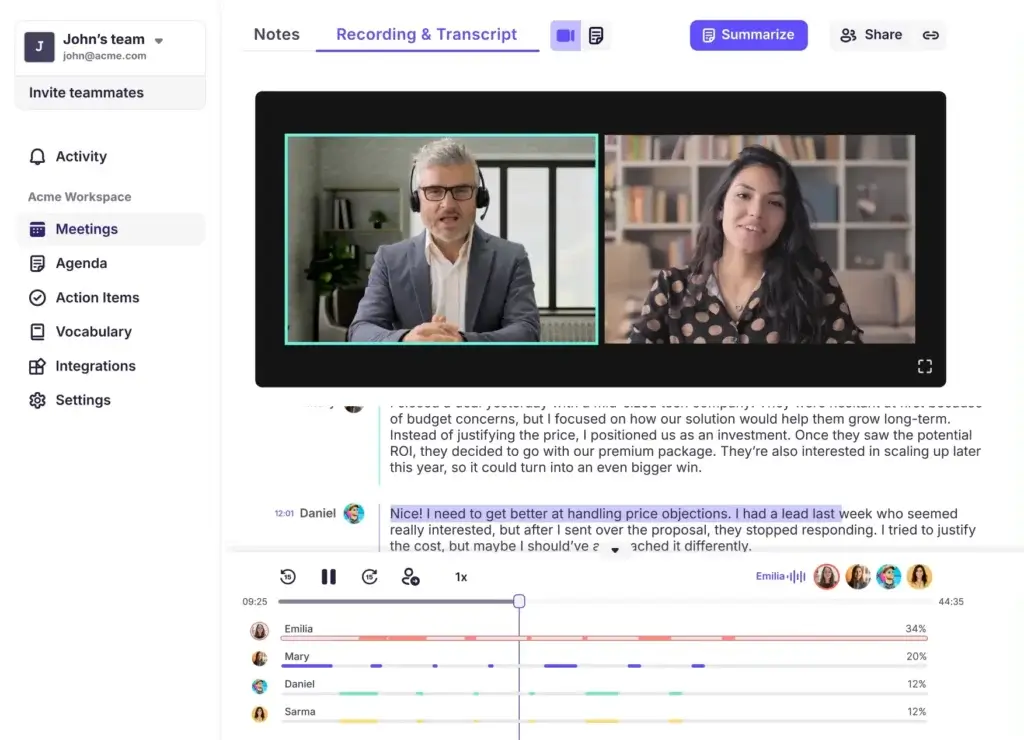
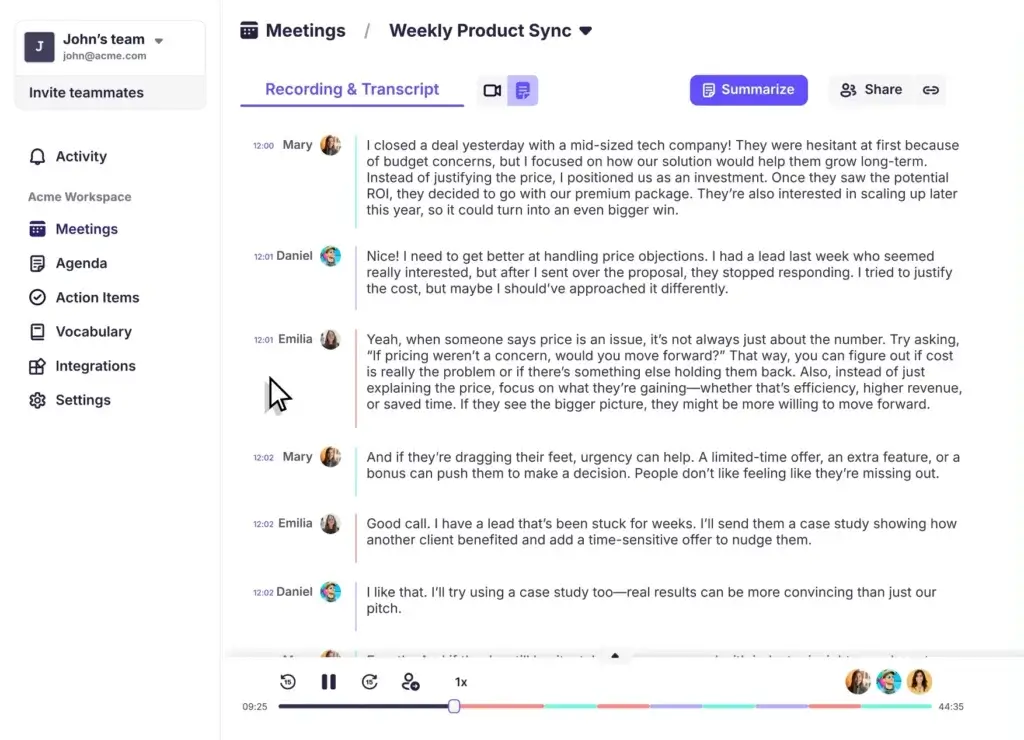
Krisp can record, transcribe, and summarize online and in-person meetings. The transcription experience is useful for reviewing decisions, finding exact wording, and turning spoken discussions into written documentation.
As with any AI transcription tool, quality depends on audio clarity, speaker overlap, accents, technical terms, and background conditions. Krisp performs best when the conversation is structured and participants avoid speaking over each other.
- Real-time transcription helps you follow the conversation as it happens
- Speaker labels make meeting notes easier to review
- Recordings help you revisit important details later
- Searchable transcripts reduce the need to rewatch full meetings
Krisp is a strong fit if you want meeting documentation without manually typing notes during the conversation.
AI Summaries and Action Items
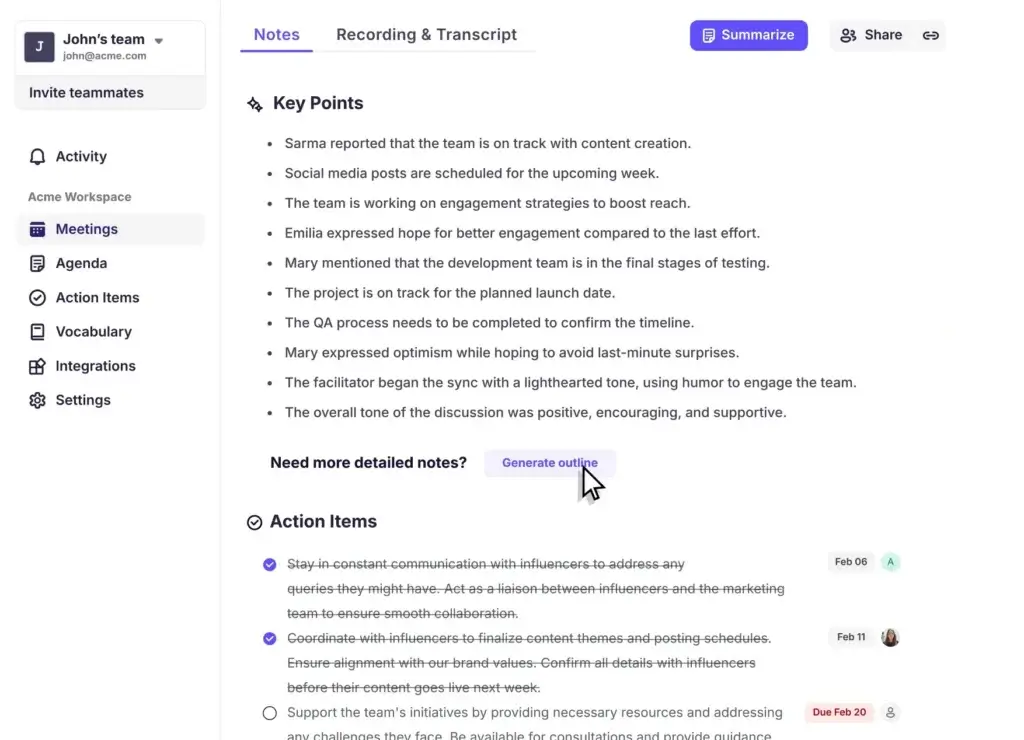
After a meeting, Krisp can generate AI notes, summaries, and action items. This is useful when you need to turn a long discussion into decisions, next steps, and follow-up tasks.
The best way to use this feature is to treat Krisp as a first draft of your meeting recap. It can save significant time, but you should still review the output before sending it to a client or using it as an official record.
- Summaries highlight the main discussion points
- Action items help you identify responsibilities and follow-ups
- AI notes reduce the need for manual recap writing
- Editable outputs let you refine details before sharing
This feature is especially useful for team leads, consultants, sales professionals, customer success managers, and anyone responsible for sending post-meeting recaps.
AI Accent Conversion
AI Accent Conversion is one of the most important additions to Krisp’s product direction. It is designed to help accented English sound clearer in real time while preserving the speaker’s natural voice characteristics.
This feature is especially relevant for global teams, BPOs, contact centers, sales teams, and international support organizations. When used carefully, it can reduce repetition, improve understanding, and make conversations smoother between people with different accents.
At the same time, this is a sensitive feature. Accent conversion should be positioned as a communication aid, not as a way to erase identity or pressure employees to sound a certain way. From a business perspective, it is most valuable when it improves clarity while respecting the speaker.
Mobile App for In-Person Meetings
Krisp is now available on mobile, including iOS and Android. The mobile app is useful for recording and transcribing in-person meetings, interviews, lectures, and voice notes.
However, there is an important limitation: Krisp’s mobile app does not currently support noise cancellation. If your main goal is live noise cancellation, you should use the desktop app.
This distinction should be clear in the article because mobile availability and mobile noise cancellation are not the same thing.
Integrations and Workflow Automation
Krisp works with major meeting apps because it functions as a virtual microphone and speaker. This makes it broadly compatible with common conferencing tools.
Krisp also supports workflow integrations that help you move meeting information into the rest of your stack.
- Meeting tools: Zoom, Google Meet, Microsoft Teams, Webex, Slack calls, and similar platforms
- CRM tools: HubSpot, Pipedrive, Affinity, Salesforce on higher plans
- Productivity tools: Slack, Zapier, Asana, Jira, monday.com, and related workflows
- Automation: Webhooks, Zapier, and API-related options depending on plan
The strongest workflow is simple: capture the meeting with Krisp, review the AI summary, then push decisions and next steps into your task manager, CRM, or team communication tool.
User Experience and Interface
How Does Everyday Work with Krisp Look Like
Krisp is easy to use because it does not try to become your entire workspace. It works quietly alongside your existing meeting tools.
That is one of its biggest strengths. You do not need to move your team into a new collaboration suite, and you do not need to change your calendar or conferencing habits. You install Krisp, configure your audio settings, and use it during your normal meetings.
Desktop Experience
The desktop experience is where Krisp is strongest. You can use the app on Windows and macOS to manage noise cancellation, transcription, recording, and meeting notes.
The interface is designed around simple controls rather than complicated dashboards. You can turn features on or off depending on the meeting, which is helpful when you do not need every meeting recorded or transcribed.
- Simple controls for microphone and speaker noise cancellation
- Meeting assistant features for transcription and notes
- Works across meeting platforms instead of being locked to one app
- Useful for both solo professionals and teams
Mobile Experience
The mobile app is best for in-person capture. You can use it for face-to-face meetings, lectures, interviews, brainstorming sessions, and voice notes.
The important limitation is that mobile noise cancellation is not currently supported. For live call audio cleanup, the desktop app remains the better choice.
Bot-Free Meeting Experience
Many AI meeting assistants join your call as a visible bot. That can be useful, but it can also create friction, especially when the meeting includes clients, prospects, legal topics, or internal strategy.
Krisp’s bot-free experience feels more natural. It lets you capture notes without adding another participant to the meeting room. For many professionals, that is a major advantage.
Accessibility and Visual Comfort
Krisp is built for regular daily use, so the experience matters. The interface is clean, settings are easy to understand, and the tool generally stays out of your way.
If you are managing back-to-back calls, that simplicity becomes important. You do not want an AI meeting assistant that creates more admin work than it removes.
Privacy and Security
What to Know Before Using Krisp
Privacy is one of Krisp’s strongest selling points, but it should be explained carefully. The current article should avoid absolute claims like “your conversations never go to the cloud” unless the statement is tied to a specific feature or setting.
Krisp is more privacy-conscious than many bot-based AI note takers because it can work without sending a bot into your meeting. It also emphasizes on-device processing for parts of its AI Meeting Assistant architecture.
However, some meeting data can be stored in Krisp’s cloud when meeting notes, transcripts, recordings, or summaries are enabled and stored. That does not make Krisp unsafe, but it does mean the privacy section should be precise.
What Krisp Does Well for Privacy
- Bot-free capture can reduce meeting disruption and visibility concerns
- On-device processing is valuable for security-conscious users
- Enterprise security materials include compliance and encryption references
- Admins can evaluate security controls before deploying Krisp across teams
What You Should Still Check
If you work in legal, healthcare, finance, HR, government, or another regulated environment, you should review Krisp’s security documentation, data retention settings, consent requirements, and enterprise controls before using it for sensitive meetings.
You should also confirm whether your use case requires recording consent. Even if the technology is easy to use, meeting recording and transcription may create legal or internal policy obligations.
The practical takeaway is simple: Krisp is a strong option for privacy-conscious meeting capture, but your article should present it as a nuanced security advantage rather than an unlimited privacy guarantee.
Pros And Cons
Real-World Advantages and Disadvantages
Choosing the right AI meeting assistant is not only about feature lists. The real question is how the product behaves during daily work, where meetings are messy, noisy, fast-moving, and often full of follow-up tasks.
Positive
✅ Excellent AI noise cancellation
✅ Bot-free meeting notes
✅ Strong for live meeting clarity
✅ Useful AI summaries and action items
✅ Works across major meeting tools
✅ Mobile app for in-person capture
Negative
❌ Not the deepest sales analytics tool
❌ Mobile app does not support noise cancellation yet
❌ Some advanced features require higher plans
❌ Transcripts still need review for complex calls
❌ Privacy settings should be reviewed before sensitive use
Pros
1. Excellent noise cancellation for real-world meetings
Krisp is still one of the strongest tools if your main problem is call clarity. It can reduce distracting background sounds and help you sound more professional during meetings.
2. Bot-free AI notes feel less intrusive
The bot-free experience is a major advantage for client calls, executive meetings, interviews, and privacy-sensitive conversations. You can capture meeting notes without adding another visible attendee.
3. Strong combination of live clarity and post-meeting productivity
Krisp does not only produce notes after the call. It also improves the quality of the conversation while it happens, which makes the transcript and summary more useful afterward.
4. Useful AI summaries and action items
The AI summary feature helps you move from conversation to execution faster. You can review key points, clarify decisions, and turn follow-ups into tasks.
5. Broad compatibility with common meeting apps
Because Krisp works as an audio layer, it is not limited to one meeting platform. This makes it useful if your week includes Zoom, Google Meet, Microsoft Teams, Webex, Slack calls, or multiple client tools.
6. Good fit for global teams
With noise cancellation and Accent Conversion, Krisp is increasingly relevant for distributed teams, customer support teams, and call centers that need clearer communication across accents and environments.
Cons
1. Not as deep as dedicated sales intelligence platforms
Krisp is useful for sales calls, but it is not the same as a full revenue intelligence platform. If you need deal risk scoring, sales coaching dashboards, playbooks, and pipeline analytics, tools like Leexi, Gong-style platforms, or Fireflies may fit better.
2. Mobile noise cancellation is not supported yet
The mobile app is useful for recording and transcribing in-person meetings, but it is not a replacement for the desktop noise cancellation experience.
3. Some advanced features require higher plans
Advanced controls, deeper integrations, security options, and enterprise-level management are tied to higher tiers. This is normal for the category, but smaller teams should review plan limits carefully.
4. Transcripts are not perfect
Krisp can generate useful transcripts, but technical jargon, overlapping speech, uncommon names, and poor input audio can still create errors. Important meeting notes should be reviewed before sharing externally.
5. Privacy needs to be configured and understood
Krisp has meaningful privacy advantages, but teams should still review cloud storage, retention, compliance, and consent requirements before using it for sensitive meetings.
Pricing and Tiers
How Much Does Krisp Cost?
Krisp pricing has changed, so this section should be updated carefully. The current pricing structure is built around a Free Trial, Core, Advanced, and Enterprise.
The best plan depends on whether you only need to test the product, use it as an individual professional, manage a team, or deploy it across an enterprise or contact center.
Krisp Pricing Overview
| Plan | Price | Best For | Key Features |
| Free Trial | $0 | Testing Krisp before choosing a paid plan | Access to core Krisp features for evaluation |
| Core | $16/user/month monthly or $8/user/month annually | Individuals and small teams | Unlimited AI note taker, unlimited noise cancellation, integrations, webhooks, mobile app, and storage |
| Advanced | $30/user/month monthly or $15/user/month annually | Teams that need more controls and advanced workflows | More Accent Conversion, advanced admin controls, CRM integrations, comments, trimming, manager view, and more storage |
| Enterprise | Custom | Large organizations, call centers, and security-conscious teams | SSO, SCIM, advanced security, reports, dedicated support, private transcription options, and enterprise controls |
Which Krisp Plan Should You Choose?
Choose Free Trial if you want to test Krisp before committing. This is the right starting point if you are evaluating noise cancellation, AI meeting notes, and the general workflow.
Choose Core if you are an individual, freelancer, consultant, student, remote worker, or small team member who wants unlimited AI notes and unlimited noise cancellation.
Choose Advanced if you manage a team and need stronger controls, more storage, deeper integrations, and more advanced voice AI capabilities.
Choose Enterprise if you need advanced security, SSO, SCIM, reporting, private transcription options, dedicated support, or call center deployment.
For most professionals, Core is the best starting point. It gives you the main value of Krisp without requiring enterprise complexity.
Who Is It Best For?
Is Krisp The Right Fit For Your Workflow?
Krisp is not the right AI meeting assistant for every use case. It is strongest when clear audio, low-friction meeting capture, and practical summaries matter more than deep sales analytics.
Remote Workers and Hybrid Teams
If you work from home, coworking spaces, shared offices, or noisy environments, Krisp can make your calls sound more professional. The AI note-taking layer also helps you stay focused instead of typing throughout the meeting.
Consultants, Freelancers, and Client-Facing Professionals
Client calls require clarity and professionalism. Krisp helps you reduce distractions while giving you a written record of the conversation. This is useful for proposals, project recaps, scope discussions, and next-step emails.
Sales and Customer Success Teams
Krisp is useful for sales and customer success teams that want cleaner calls and faster follow-ups. It can capture demos, onboarding calls, Q&A sessions, and customer feedback.
However, if your sales team needs deep pipeline analytics, deal coaching, and call scoring, Krisp should be compared with more sales-focused alternatives.
Support Teams and Contact Centers
Krisp is becoming more relevant for support and contact center environments because of its focus on noise cancellation, Accent Conversion, agent assistance, and speech analytics.
This is one of the most important B2B angles to add to the article. Krisp is no longer only a productivity app for remote workers. It is also moving deeper into contact center voice AI.
Students, Educators, Journalists, and Creators
If you record lectures, interviews, webinars, or content planning sessions, Krisp can help you create transcripts and summaries without manually reviewing the full recording.
The mobile app is especially useful for in-person recording and transcription in these scenarios.
Krisp for Call Centers and Global Support Teams
One of the most important updates to add is Krisp’s growing focus on call centers and enterprise voice AI.
Krisp is not only targeting individual productivity users. It now has products and features for contact centers, including noise cancellation, Accent Conversion, voice translation, Agent Assist, call summaries, speech analytics, call scoring, and compliance-related monitoring.
This gives the article a stronger B2B angle. If your audience includes support teams, BPOs, sales teams, customer experience leaders, and operations managers, this section can help you capture more commercial-intent traffic.
Why Krisp Matters for Contact Centers
Call centers deal with background noise, inconsistent home office setups, agent accents, customer accents, compliance expectations, and high call volumes. Krisp’s voice AI direction is built around solving these problems in real time.
For customer-facing teams, the value is not only better notes. It is better communication quality during the call itself.
Krisp Alternatives
Comparison With Other AI Note Takers
There are many AI note-taking tools in 2026, but they are not all designed for the same job. Krisp is strongest for live voice clarity and bot-free notes, while competitors may be better for CRM workflows, collaboration, or project management.
Here is a practical comparison of Krisp against several relevant alternatives.
| Tool | Best For | Main Strength | Main Limitation |
| Krisp | Clear meetings, bot-free notes, remote teams, support teams | Noise cancellation, AI notes, transcription, Accent Conversion | Less advanced for deep sales intelligence |
| Fireflies.ai | Sales teams and meeting knowledge management | Meeting search, CRM workflows, collaboration, analytics | Bot-based experience may feel intrusive in some meetings |
| Fathom | Free AI meeting notes and call summaries | Generous free plan and simple meeting recaps | Less focused on live audio enhancement |
| Otter.ai | Live transcription and collaborative notes | Real-time transcript collaboration and AI chat | Lower plans may have usage limits |
| MeetGeek | Structured meeting automation | Templates, summaries, meeting insights, team workflows | Less differentiated for live noise cancellation |
| Leexi | Sales enablement and call coaching | Coaching, analytics, CRM workflows | More sales-focused and less general-purpose |
Krisp vs Fireflies.ai
Fireflies.ai is one of the best-known AI meeting assistants. It is strong for meeting search, CRM workflows, collaboration, and sales-oriented meeting intelligence.
Where Krisp wins: Krisp is better if you want bot-free meeting capture, live audio cleanup, and a more discreet experience during meetings.
Where Fireflies wins: Fireflies is stronger if your team wants a searchable meeting knowledge base, broad integrations, and deeper post-call workflows.
What we think: Choose Krisp for cleaner live meetings and privacy-conscious capture. Choose Fireflies if your priority is meeting intelligence, searchable transcripts, and CRM-connected follow-up.
👉🏼 Read full Fireflies AI review or visit Fireflies AI here
Krisp vs Fathom
Fathom is a strong AI note-taking tool for users who want fast meeting recaps, highlights, and summaries. It is especially attractive for users who want a generous free option.
Where Krisp wins: Krisp wins on real-time noise cancellation, bot-free meeting capture, and broader live audio improvement.
Where Fathom wins: Fathom is compelling if your main goal is free meeting notes and you do not need Krisp’s voice enhancement layer.
What we think: Choose Krisp if meeting clarity is part of the problem. Choose Fathom if you mainly want a simple, cost-effective AI meeting note taker.
👉🏼 Read Full Fathom review here or visit Fathom website
Krisp vs ClickUp Note Taker
ClickUp Note Taker is best for teams already using ClickUp for tasks, projects, docs, and internal collaboration.
Where Krisp wins: Krisp works across your meeting environment, improves live audio, and does not require your work to live inside ClickUp.
Where ClickUp wins: ClickUp wins when meeting notes need to be immediately tied to tasks, docs, projects, and internal workflows.
What we think: Use ClickUp Note Taker if ClickUp is already your operating system. Use Krisp if you want a broader meeting assistant that works across calls and improves audio quality.
👉🏼 Read full ClickUp Note Taker review or visit ClickUp directly.
Krisp vs Leexi
Leexi is more sales-focused. It is useful for sales coaching, CRM-connected conversations, call analysis, and team performance review.
Where Krisp wins: Krisp is easier for general business users, cleaner for live meetings, and better if you do not need a sales-heavy platform.
Where Leexi wins: Leexi is stronger if your goal is sales coaching, deal follow-up, call analytics, and CRM-driven workflows.
What we think: Choose Krisp for clear meetings and general AI notes. Choose Leexi if you are building a sales performance workflow.
👉🏼 Read The Leexi review or visit Leexi here
Krisp vs Otter.ai
Otter.ai is a strong option for real-time transcription, collaborative notes, and users who want to interact with meeting content during and after the call.
Where Krisp wins: Krisp is better for audio cleanup, bot-free meetings, and users who want less visible meeting capture.
Where Otter wins: Otter is better if live transcript collaboration, AI chat around meetings, and team knowledge sharing are your top priorities.
What we think: Krisp is the better choice for meeting quality and discreet capture. Otter is better for collaborative transcript workflows.
Krisp vs MeetGeek
MeetGeek is a meeting automation platform with structured notes, summaries, templates, and insights for teams.
Where Krisp wins: Krisp is more differentiated for live voice clarity, noise cancellation, and bot-free capture.
Where MeetGeek wins: MeetGeek may be stronger if you want structured meeting templates, meeting scoring, and deeper automation around recurring meeting types.
What we think: Krisp is better for live meeting quality. MeetGeek is better for teams that want more structured meeting operations.
Setup
How to Set Up Krisp and Winning Tips
Krisp is simple to set up because it works alongside the tools you already use. You do not need to rebuild your meeting workflow around it.
Step 1: Create an Account
Visit Krisp and create an account using your work email, Google account, or Microsoft account.
Step 2: Install the Desktop App
For the full Krisp experience, install the Windows or macOS desktop app. This is the best option if you want noise cancellation during live calls.
Step 3: Choose Krisp as Your Microphone and Speaker
Open your meeting app and select Krisp as your microphone and speaker. This allows Krisp to process your audio while you continue using Zoom, Google Meet, Teams, Webex, or another platform.
Step 4: Enable the Features You Need
Turn on noise cancellation, transcription, recording, or AI notes based on the meeting. You may not need every feature for every call.
Step 5: Review the Summary After the Meeting
After the meeting, review the transcript, summary, and action items. Correct names, technical terms, or sensitive details before sharing the notes with others.
Tips for Getting Better Results from Krisp
Krisp works best when you combine the software with good meeting habits. A few small changes can improve the quality of your transcripts and summaries.
Use a Clear Agenda
A structured meeting makes AI summaries more useful. Start with a clear agenda, define decisions, and summarize next steps before the call ends.
Reduce Speaker Overlap
AI transcription tools struggle when multiple people speak at the same time. Encourage participants to pause briefly before responding, especially in larger meetings.
Review Notes Before Sharing
Krisp can save time, but you should still review meeting notes before sending them externally. This is especially important for client work, legal discussions, finance meetings, or technical calls.
Connect Krisp to Your Workflow
Meeting notes become more valuable when they turn into action. Add summaries and tasks to tools like ClickUp, Asana, Notion, Slack, Jira, monday.com, or your CRM.
Use Desktop for Noise Cancellation
If your main goal is noise cancellation, use the desktop app. The mobile app is better for in-person recording and transcription, not live noise removal.
Conclusion
Final Thoughts – Is Krisp Worth It in 2026?
Krisp is worth it if you want an AI meeting assistant that improves the meeting experience before it turns the conversation into notes.
Its biggest strengths are clear: excellent noise cancellation, bot-free meeting capture, AI transcription, useful summaries, and a growing set of voice AI features such as Accent Conversion.
It is not the deepest tool for sales analytics, and it is not the best choice if you only want a free AI note taker. But if you care about sounding clearer, reducing meeting friction, and capturing useful notes without adding a visible bot, Krisp is one of the best options in the category.
Use Krisp if you:
- Want cleaner audio during meetings
- Prefer bot-free meeting notes
- Run frequent client, sales, support, or team calls
- Need AI summaries and action items after meetings
- Work in global teams where audio clarity and accents matter
Consider an alternative if you:
- Need deep CRM and sales coaching analytics
- Want the most generous free AI note-taking plan
- Need collaborative live transcript editing as your main workflow
- Already manage all work inside one project management platform
Final Score: 9.0/10
Krisp earns a strong score because it solves a real meeting problem from two angles: it improves the conversation and documents it afterward. That makes it more differentiated than many AI note takers that only focus on post-meeting summaries.
👉 Ready to try it out?
Start with Krisp’s free trial and test how it performs in your real meeting environment.
Have more questions?
Frequently Asked Questions
What is Krisp?
Krisp is a Voice AI platform and AI meeting assistant that helps you remove background noise, record meetings, transcribe conversations, generate AI notes, and create action items. It is best known for combining live audio clarity with meeting productivity features.
Is Krisp free?
Krisp offers a Free Trial that lets you test the platform before upgrading. For ongoing professional use, the main paid plans are Core, Advanced, and Enterprise, with features and usage limits depending on the plan.
How much does Krisp cost?
Krisp Core is listed at $16 per user per month when billed monthly, or $8 per user per month when billed annually. Advanced is listed at $30 per user per month monthly, or $15 per user per month annually. Enterprise pricing is custom.
Does Krisp work without a meeting bot?
Yes. One of Krisp’s strongest advantages is its bot-free meeting experience. It can capture meetings through your device, which makes it less intrusive than AI note takers that join meetings as visible bot participants.
Does Krisp record meetings?
Yes. Krisp can record meetings, transcribe conversations, and generate summaries and action items. You should still review your company policies and local recording consent requirements before recording meetings.
Is Krisp good for noise cancellation?
Yes. Noise cancellation remains one of Krisp’s strongest features. It is especially useful if you work from home, take calls from shared spaces, or need to reduce background sounds such as typing, traffic, echo, or nearby conversations.
What is Krisp Accent Conversion?
Krisp Accent Conversion is a real-time voice AI feature designed to make accented English easier to understand while preserving the speaker’s natural voice characteristics. It is especially relevant for global teams, customer support, and contact centers.
Is Krisp secure?
Krisp has strong privacy and security positioning, including bot-free capture, on-device processing for certain workflows, encryption, and enterprise security materials. However, teams should review cloud storage, data retention, compliance, and consent settings before using it for sensitive meetings.
Does Krisp work on mobile?
Yes. Krisp has mobile apps for in-person recording and transcription. However, the mobile app does not currently support noise cancellation, so the desktop app is still the better option for live call audio cleanup.
What is the best Krisp alternative?
The best Krisp alternative depends on your use case. Fireflies is stronger for searchable meeting intelligence and CRM workflows, Fathom is strong for free AI meeting notes, Otter is useful for live collaboration, and Leexi is better for sales coaching.
“`