
Introduction
Creating a podcast has never been more accessible. With the right software, you can record, edit, publish, and promote your show without mastering complex audio engineering. Alitu brands itself as The Podcast Maker because it streamlines the entire production process. Whether you are a first‑time podcaster or a busy entrepreneur looking to save hours each week, Alitu promises to remove technical barriers and help you focus on your message.
This review takes you through everything you need to know about the platform. You will learn what Alitu is, explore its key features and automated editing tools, evaluate its strengths and weaknesses, compare pricing options, see who it suits best, and discover alternatives if your workflow demands more control. You will also find practical best‑practice tips to make the most of Alitu and answers to common questions.
What Is Alitu?
Alitu is a web‑based podcast production suite that brings recording, editing, cleanup, hosting, and publishing into a single dashboard. Instead of juggling separate applications and subscriptions for recording software, audio editors, music libraries, transcription services, and hosting providers, you can use Alitu to manage your entire podcast pipeline.
Working in your browser means there is nothing to install or maintain. You record solo episodes or invite guests via a shareable studio link. Once your audio is captured, Alitu automatically cleans up background noise, levels volume, and applies light equalisation. A drag‑and‑drop episode builder lets you assemble clips, insert intros and outros, add music or sponsor messages, and arrange segments in the desired order. When you are happy with the result, you can publish directly to major podcast hosts or export the episode for manual distribution.
Alitu’s hallmark is simplicity. It focuses on automating routine tasks so you spend less time trimming silence or removing filler words and more time creating content. For beginners, the intuitive interface and built‑in tutorials lower the learning curve. For experienced creators, the time saved may justify the subscription if advanced audio manipulation is not a priority.

Recording and Production
Key Features for Recording and Production
Recording Modes
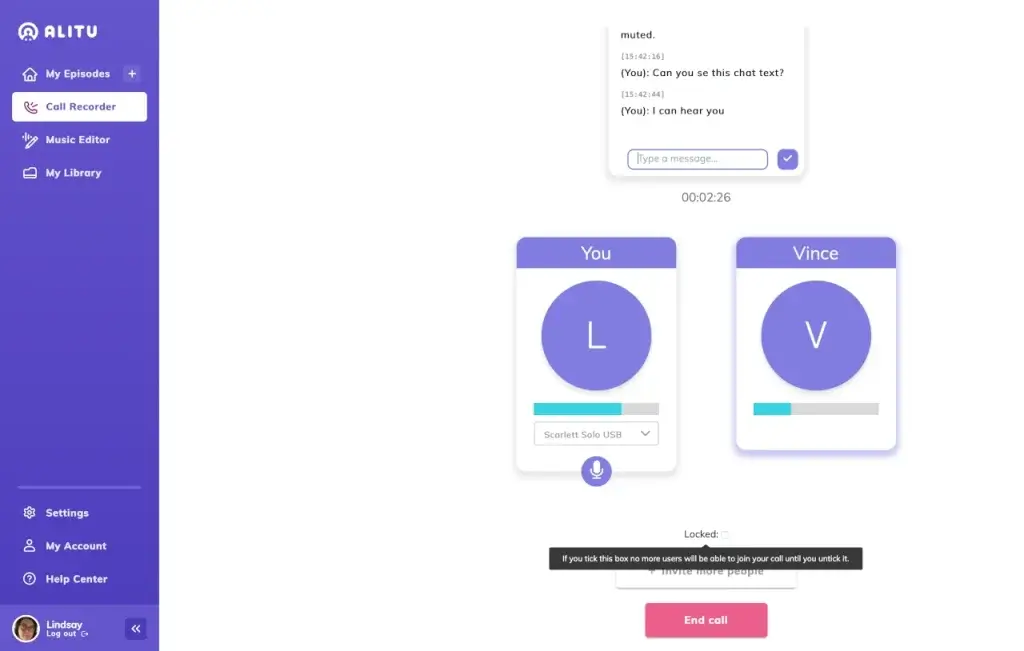
Alitu supports both solo and interview recordings directly in the browser. You can:
- Solo recording: capture your own voice for monologues, teaching sessions or narrative podcasts.
- Remote interviews: invite up to ten guests using a personal studio link. All participants join via a web browser, with no software installation required.
- Local backups: each participant’s track is saved locally before uploading to the cloud. This ensures high‑quality audio even if someone’s internet connection dips during the call.
Audio Cleanup and Automated Mixing
After recording or uploading your raw audio, Alitu automatically processes it to improve sound quality. The platform removes background noise such as hums or street sounds, evens out volume differences between speakers, and applies basic equalisation to make voices clearer. You can upload multiple files (for example, separate tracks recorded on Zoom) and Alitu will link them together, saving you from manually synchronising tracks. The cleaning process happens in the cloud, so you do not need to learn complex audio tools.
Drag‑and‑Drop Episode Builder
Alitu’s episode builder presents your clips on a timeline. You can drag and drop segments to reorder them, insert new audio clips or sponsorship messages, and trim sections by selecting and cutting. Fade transitions, crossfades, and volume adjustments are available via simple controls. You can also set default intros and outros that automatically attach to each new episode. This feature is useful for maintaining consistent branding without repetitive manual work.
Music Library and Branding Tools
Alitu includes a royalty‑free music library with jingles, transition sounds, and theme music. You can search for tracks and preview them directly in the editor. Once you find a suitable piece, drag it into your episode. The platform also allows you to upload your own music or sound effects.
For branding, Alitu lets you add your show’s logo and colour palette. These assets are applied to audiograms and any generated video clips, ensuring visual consistency across platforms.
Hosting and Distribution
Alitu’s built‑in hosting service provides an RSS feed, basic analytics, and a simple podcast website. You can host up to 1,000 downloads per month on the standard plan, with options to upgrade if your audience grows. If you prefer to continue with your existing host, Alitu integrates with Buzzsprout, Captivate, Podbean, and others. You can publish directly from the editor without downloading files.

AI‑Powered Editing
AI‑Powered Editing and Repurposing Tools
Magic Filters for Noise and Filler Words
Alitu offers automated tools that tidy your audio with minimal input. The Magic Filters automatically remove unwanted background noise and balance volume. You can also enable filters to cut long pauses and filler words like “um” or “uh,” which speeds up editing. These tools are useful when you want to tighten pacing without manually scanning through waveforms.
Transcript‑Based Editing and Show Notes
For a more precise editing workflow, Alitu converts your audio into a transcript. You can highlight words or sentences in the transcript to remove or rearrange them, and the corresponding audio is edited automatically. This text‑based editing approach is similar to what you find in tools like Descript, but simplified for podcast creators.
Alitu also generates automated show notes and summaries. These drafts can save time when writing descriptions for podcast directories or blog posts. You should still review and edit the AI‑generated notes for accuracy and tone, but they provide a helpful starting point.
Video Support and Audiograms
Although Alitu is primarily an audio tool, it offers basic video support in beta. You can record video alongside audio and export a 1080p MP4 file. There is also an audiogram generator that turns an audio clip into a video file with a moving waveform and your artwork. This is useful for sharing highlights on social media platforms like YouTube or Instagram.
Additional Resources and Courses
Subscription to Alitu gives you access to educational resources. The platform provides courses, video lessons, and blog articles covering planning, recording, editing, and promoting your podcast. If you are completely new to podcasting, these resources can accelerate your learning curve. The courses cover topics such as choosing the right microphone, planning content, and using tools like Trello for project management.
Pros and Cons
Advantages and Limitations
Positive
✅ Easy to use
✅ Automated audio cleanup
✅ All‑in‑one workflow
✅ Unlimited guests
Negative
❌ Limited multitrack editing
❌ Browser only
❌ Performance considerations
❌ Not for advanced producers
When evaluating Alitu, it helps to weigh the benefits against the potential limitations. Here is a balanced summary:
✅ Pros
- Easy to use: The interface is intuitive, with drag‑and‑drop controls and text‑based editing. You do not need prior experience with audio software.
- Automated audio cleanup: Noise reduction, volume levelling and basic equalisation happen automatically, saving significant time.
- All‑in‑one workflow: Recording, editing, music library, hosting, and publishing live inside one platform.
- Unlimited guests: You can invite multiple guests to your recording sessions without extra fees.
- Built‑in courses: Access to courses and tutorials helps beginners grow their podcasting skills quickly.
❌ Cons
- Limited multitrack editing: Alitu does not offer advanced audio effects or precise multitrack mixing found in professional digital audio workstations.
- Browser only: You must use the web interface; there is no desktop app, and offline editing is not supported.
- Performance considerations: Uploading large files may be slow on weaker internet connections, and processing times can vary.
- Pricing vs features: Some users find the subscription high compared with the basic feature set, especially if they do not use the hosting.
- Not for advanced producers: Creators who want fine control over EQ, compression or plugin effects may prefer tools like Adobe Audition or Hindenburg.
Pricing and Plans
How much does Alitu cost?
Overview of Pricing
Alitu keeps its pricing structure simple. There is one primary plan with monthly or annual billing and a free trial.
- 7‑day free trial: You can test the full feature set for a week without entering payment details. The trial includes up to 2 hours of processed audio.
- Monthly subscription: Approximately $38 per month gives you access to all recording, editing, and hosting features.
- Annual subscription: Pay annually to receive a discount, bringing the monthly equivalent down to roughly $32. Annual plans include two months free.
- Download limits: The hosting plan covers up to 1,000 downloads per month. For higher traffic (up to 10,000 downloads), an extra fee is charged per month.
- 30‑day guarantee: After the trial and initial charge, you have a full month to request a refund if you decide Alitu is not right for you.
What’s Included in the Subscription
Your subscription includes:
- Recording of high‑quality audio and 1080p video.
- Automatic noise removal, mixing, and filler‑word elimination.
- Drag‑and‑drop episode builder and music library.
- Show notes generator, transcripts, and AI editing tools.
- Podcast hosting with an RSS feed, analytics, and a basic website.
- Access to educational courses and support from the Alitu team.
Free Trial and Guarantee
When you start your trial, you can explore Alitu’s features without committing. You will know exactly how the platform fits into your workflow before paying. If you subscribe and then realise Alitu is not the right fit, the 30‑day guarantee allows you to cancel and get a refund. This risk‑free period makes testing the platform straightforward.
Best Use Cases
Who Should Use Alitu
Podcasters and Coaches
Alitu shines for solo creators, coaches, and entrepreneurs who want a streamlined path from idea to published episode. If you want to focus on delivering your message instead of learning complex audio tools, the platform’s automation and simple interface will help you produce professional‑sounding episodes quickly. The ability to record interviews directly and invite multiple guests makes it suitable for coaching calls or expert interviews.
Educators and Consultants
Educators who share lessons, workshops, or tutorials can benefit from Alitu’s recording and editing features. Transcript‑based editing is useful for cutting mistakes and rearranging segments, while the music library lets you add theme tunes or transitions to keep students engaged. Consultants creating content for clients can save time by using Alitu’s one‑click publishing and automated show notes.
Who Alitu May Not Suit
Alitu may not be the best choice if you:
- Require sophisticated audio manipulation, such as multiband compression or advanced sound design.
- Already use a professional digital audio workstation and prefer granular control over your mix.
- Need extensive video editing or intend to produce high‑end video podcasts beyond basic 1080p exports.
- Want to edit offline or prefer a native desktop application.
For these cases, tools like Adobe Audition, Hindenburg, Reaper, or a combination of dedicated recording and editing software may be more appropriate.
Set Up and Best Practices
Best Practices for Using Alitu
Starting a New Episode
To get started, log in to your Alitu dashboard and click the Record button. You can choose between a solo recording and the call recorder for interviews. Before starting, enter your episode title, number, and author; you can edit these details later. After recording or uploading audio files, the platform performs automatic cleanup.
Preparing Guests and Recording Tips
For interview recordings, share your personal studio link with guests. Encourage them to:
- Use a good microphone or at least a headset to avoid echo.
- Find a quiet environment to minimise background noise.
- Use a modern browser on a desktop or laptop, as mobile recording is not currently supported.
Send a brief preparation guide ahead of time so guests know what to expect. Alitu records locally on each participant’s device and uploads the files after the session. Leave the browser tab open until uploads finish.
Using Editing and Publishing Features
After the automated cleanup, use the episode builder to arrange your content. Trim mistakes by selecting parts of the transcript or clipping the waveform. Drag in music or ads, and apply fade transitions to smooth out changes. Once you are satisfied, generate show notes and choose whether to publish directly or download the final MP3/MP4 for external use.
Optimizing Output and Workflow
To make the most of Alitu:
- Set default intros, outros, and sponsor messages so they attach automatically to new episodes.
- Use the transcript search to find and remove filler words quickly.
- Export audiograms or video clips to promote episodes on social media.
- Schedule publishing times to batch your workflow and maintain consistency.

Competitors
Alternatives to Alitu
While Alitu is an excellent all‑in‑one tool for many podcasters, it is not the only option. Depending on your priorities, editing control, price, remote recording quality, or live streaming, you might consider other platforms. Below is a comparison of some popular alternatives.
Tool Best for Key strengths Alitu Automated editing & one‑stop workflow Easy recording, cleanup, episode builder, hosting & AI show notes Riverside High‑quality remote interviews Local 4K recording, separate tracks, live streaming & AI clips Descript Editing‑heavy workflows Transcript‑based editing, overdub voice cloning & multitrack control Zencastr Remote interviews & podcast growth Multitrack 1080p recording, AI editing, hosting & social clips Audacity Free audio editing Open‑source waveform editor with effects & plugin support Hindenburg Professional storytelling Drag‑and‑drop editing, clipboard features & advanced mixing StreamYard Live streaming & broadcasts Browser‑based live video with branding overlays & audience interaction
Choosing the Right Alternative
- Select Riverside if you prioritise broadcast‑quality recordings and multi‑destination live streaming.
- Choose Descript when text‑based editing and powerful audio manipulation are more important than recording quality.
- Opt for Zencastr if you want a balanced combination of remote recording, AI editing and growth tools at a lower entry price.
- Use Audacity or GarageBand for completely free editing; however, you will need separate tools for recording and hosting.
- Try Hindenburg or Adobe Audition for professional sound design and multitrack mixing, but be prepared for a steeper learning curve.
Conclusion
Final thoughts
Alitu positions itself as a streamlined, all‑in‑one solution for podcast creation. By combining recording, automated editing, episode assembly, music resources, hosting, and publishing under one subscription, it removes many of the friction points that trip up new podcasters. You simply record, let the platform clean up your audio, arrange your clips, and press publish.
For coaches, educators, solo entrepreneurs, and any creator who values speed and simplicity over granular control, Alitu offers significant time savings. Its unlimited guest support and built‑in courses further strengthen its appeal. However, if you need advanced editing, offline capabilities, or high‑end video production, you may prefer more specialised tools.
Ultimately, Alitu delivers on its promise: it helps you produce clean, professional podcasts without the technical hassle. Use it to accelerate your workflow, focus on your message, and grow your audience.
Have more questions
Frequently Asked Questions
Is Alitu suitable for complete beginners?
Yes. Alitu is designed for users with little or no audio editing experience. The interface is intuitive, and the platform automates tasks like noise reduction and volume levelling. If you are just starting your podcasting journey, Alitu removes many technical barriers.
Does Alitu support video podcasts?
Alitu includes basic video recording and editing in beta. You can record video along with audio and export a 1080p MP4 file. However, advanced video editing features and 4K exports are not available; if those are essential, consider tools like Riverside or dedicated video editors.
How many guests can I invite to an Alitu recording?
You can invite up to ten guests using your personal studio link. Each guest joins via a web browser. There are no additional fees for extra participants, and all tracks are recorded separately for better control in post-production.
What happens after the 7-day free trial?
After the trial ends, you will be asked to choose a subscription plan. If you decide not to subscribe, your account will revert to inactive, and you will lose access to the editing and hosting features. If you do subscribe, you still have a 30-day guarantee to request a refund if it does not meet your needs.
Can I host my podcast elsewhere?
Absolutely. While Alitu offers built-in hosting, you are not locked in. The platform integrates with popular hosts like Buzzsprout, Captivate, Podbean, and others. You can export your final episode and upload it manually or connect your host to publish directly from Alitu.
Does Alitu create transcripts?
Yes. Alitu generates transcripts of your recordings, which you can edit like a document. These transcripts are useful for content repurposing, accessibility, and SEO. You can also use them to create show notes automatically.
Are there hidden costs?
The main subscription covers recording, editing, and hosting up to 1,000 downloads per month. If your show exceeds this download limit or you need additional storage, extra fees may apply. Video editing is currently limited, and any third-party music or plugin costs would be separate.
Does Alitu work offline?
No. Alitu is a cloud-based service. You need an internet connection to record, upload, edit, and publish. There is no desktop application or offline mode.
What support options are available?
Alitu offers a knowledge base, live chat during business hours, and access to courses and tutorials. If you encounter issues, you can reach out to the support team or consult the educational resources. There is also a community of podcasters sharing tips and experiences.
Is Alitu worth the price?
If you value convenience and want to minimise the time spent on technical tasks, Alitu’s subscription can be a worthwhile investment. The cost consolidates multiple services, recording, editing, music, transcription, and hosting, into one. However, if you prefer full control over audio processing or already pay for separate tools, evaluate whether Alitu’s automation justifies the expense.