
Introduction
Meetings create a lot of valuable information, but most teams do not have a reliable way to capture, organize, and reuse that information after the call ends. Important customer objections, product feedback, project decisions, and follow-up tasks often stay buried in personal notes, chat messages, or long recordings that nobody has time to rewatch.
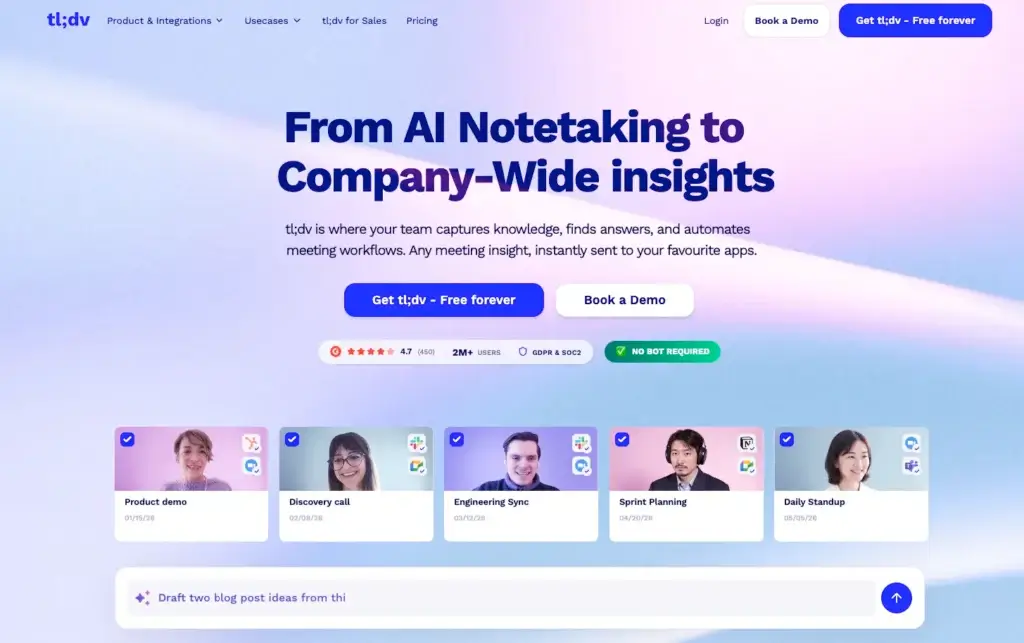
tl;dv is an AI meeting note taker designed to solve that problem. It records, transcribes, summarizes, clips, and analyzes meetings across Zoom, Google Meet, and Microsoft Teams. Instead of treating meeting notes as a simple transcript, tl;dv turns conversations into searchable knowledge, AI summaries, action items, CRM updates, and shareable video moments.
In this tl;dv review, you’ll learn what the platform does well, where it falls short, how much it costs, which teams benefit most, and how it compares with other AI note-taking tools. By the end, you should have a clear view of whether tl;dv is the right AI meeting assistant for your workflow.
Core Features of tl;dv
Main Features Breakdown
AI meeting recording and transcription
tl;dv records and transcribes meetings across Zoom, Google Meet, and Microsoft Teams. This is one of its biggest strengths because it does not lock your team into one video conferencing platform. If your sales team uses Zoom, your internal team uses Google Meet, and your enterprise clients prefer Microsoft Teams, tl;dv can still centralize the meeting record.
The platform supports transcription in more than 30 languages, which makes it useful for global teams, remote companies, agencies, and customer-facing teams working across regions. The transcripts are searchable, speaker-attributed, and connected to the recording, so you can move from a written note to the exact video moment when needed.
Why it matters: A transcript alone is not enough. The real value comes when your team can search past meetings, find exact moments, review context, and turn conversations into follow-up work without relying on memory.
AI summaries, notes, and action items
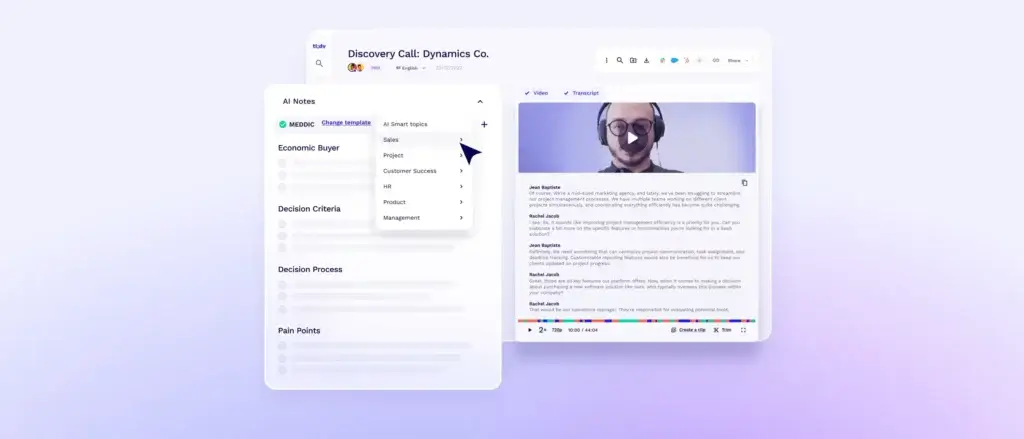
tl;dv automatically generates AI meeting notes after each call. These notes can include summaries, key takeaways, action items, decisions, objections, pain points, and next steps. Instead of spending 20 minutes cleaning up meeting notes after every call, you get a structured output that can be reviewed, edited, shared, and synced into other tools.
The summaries are especially useful for people who join many calls per week. Sales reps can capture deal context. Customer success managers can document risks and renewal signals. Product managers can collect customer feedback. Managers can review what happened without attending every meeting live.
For teams that need more control, tl;dv also supports custom prompts and templates. This is important because a sales discovery call, hiring interview, user research session, and internal project meeting should not produce the same type of summary. The better the structure, the easier it is to reuse the meeting output later.
Clips, highlights, and shareable moments
One of tl;dv’s strongest differentiators is its ability to turn meeting recordings into shareable clips. Instead of sending someone a 45-minute recording and asking them to find the relevant part, you can highlight a specific transcript section and create a short clip.
This feature is valuable for product teams, research teams, sales teams, and customer success teams. For example, a product manager can share a customer’s exact feature request with engineering. A sales manager can share a strong objection-handling moment with the team. A customer success leader can send a specific customer concern to leadership without forcing everyone to watch the full call.
Expert take: This is where tl;dv feels more useful than many basic note takers. It does not only summarize meetings, it helps you package and distribute the most important parts of the conversation.
Ask tl;dv and multi-meeting intelligence
tl;dv includes AI search and question-answering features that help you ask questions across your meeting history. Instead of opening separate transcripts one by one, you can ask questions such as “What objections came up in calls with enterprise prospects?” or “Which customers mentioned onboarding issues?”
This moves tl;dv closer to a meeting intelligence platform, not just a note-taking app. For managers, this can be extremely useful because the insights are not limited to one meeting. You can identify patterns across multiple calls, accounts, reps, customers, or projects.
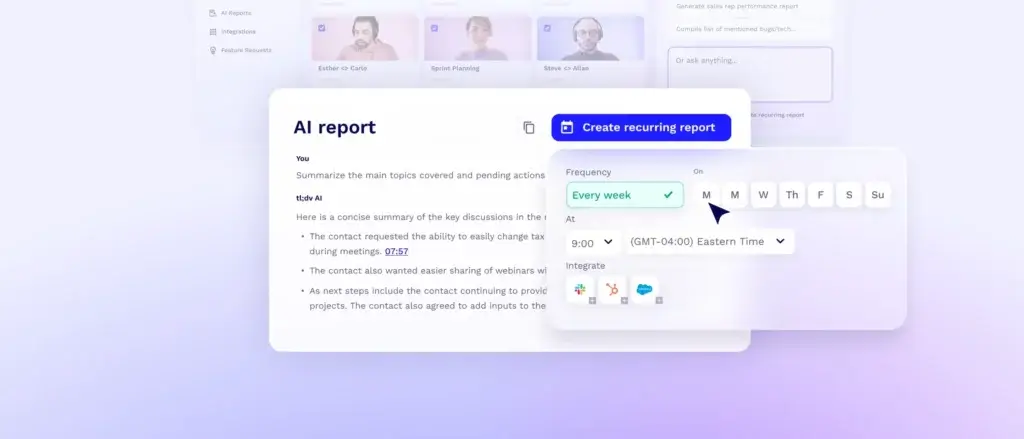
The depth of this feature depends on your plan. For simple note-taking, the free or Pro plans may be enough. For sales coaching, recurring reports, CRM field mapping, and deeper multi-meeting insights, the Business or Enterprise tiers are more relevant.
CRM, Slack, and workflow integrations
tl;dv integrates with a wide range of tools, including CRMs, calendars, project management tools, documentation platforms, and storage apps. Its integration library includes tools such as HubSpot, Salesforce, Pipedrive, Zoho, Slack, Google Docs, Notion, OneDrive, Box, Dropbox, Miro, Greenhouse, and Zapier-based workflows.
This matters because meeting notes are only useful if they move into the systems where work actually happens. A sales call summary should not sit in a separate meeting library if your team manages deals in HubSpot or Salesforce. A project decision should not stay inside a transcript if your team tracks delivery in a project management tool.
For sales and customer success teams, the CRM sync is one of the most important reasons to consider tl;dv. It can reduce manual CRM updates, improve account history, and make customer conversations easier to review before the next call.
Security, privacy, and compliance
tl;dv is based in Europe and positions itself as a privacy-conscious meeting platform. The company states that it is GDPR-compliant and SOC 2 Type 1 compliant. It also says data is encrypted, connections use SSL, and data centers are located in Europe.
From a business perspective, this is important because AI meeting assistants handle sensitive information. Sales calls, hiring interviews, strategy meetings, customer escalations, and product discussions can all contain private or commercially sensitive details. Before rolling out any meeting recorder, you should review consent requirements, internal recording policies, retention settings, admin controls, and access permissions.
Practical advice: tl;dv is more suitable for teams that want a structured meeting knowledge base, but you should still define clear rules for what gets recorded, who can access recordings, and when recordings should be deleted.
User Experience and Interface
How Does Everyday Work with tl;dv Look?
Setup and meeting capture
Getting started with tl;dv is relatively straightforward. You create an account, connect your calendar or video conferencing platform, and choose how you want tl;dv to join and record meetings. You can use it with Google Meet, Zoom, and Microsoft Teams, which gives it broad coverage for most business users.
For teams, the setup becomes more powerful when admin rules are configured properly. You can decide which meetings should be recorded, how recordings are shared, who receives summaries, and where outputs should be sent. This is especially important for organizations that want to avoid random recording behavior across departments.
Meeting library and search experience
After meetings are captured, tl;dv stores them in a searchable meeting library. You can browse recordings, read transcripts, review summaries, jump to timestamped moments, and create clips. This makes tl;dv useful not only for people who attended the meeting, but also for people who need to catch up later.
The search experience is one of the platform’s core advantages. Instead of asking someone to “check the call from last Tuesday,” you can search by keyword, participant, topic, or account context. For busy teams, this saves time and reduces dependency on scattered notes.
Sharing and collaboration
tl;dv makes it easy to share meeting outcomes with teammates. You can send summaries, clips, and recordings to stakeholders without forcing them to watch the entire meeting. This is useful for cross-functional collaboration, especially between sales, product, marketing, customer success, and leadership.
For example, a sales rep can share a prospect’s exact objection with the sales manager. A customer success manager can share a customer risk signal with the account team. A product marketer can extract voice-of-customer clips for messaging research. This makes tl;dv more collaborative than a simple transcript tool.
Ease of use
tl;dv is fairly easy to use once the recording workflow is configured. The interface is built around recordings, transcripts, highlights, and AI outputs, so most users can understand the core workflow quickly.
However, there is a learning curve if you want to use the deeper features. Custom AI prompts, CRM mapping, multi-meeting reports, coaching features, and playbooks require more setup than basic meeting recording. For individual users, this may feel like more than they need. For sales and customer success teams, those advanced features can be the reason to choose tl;dv over lighter tools.
Pros And Cons
Advantages and Disadvantages
Positive
✅ Strong meeting platform coverage
✅ Strong free plan for recordings
✅ Searchable meeting knowledge
✅ Clips and highlights
Negative
❌ Advanced setup takes time
❌ Business plan can be expensive
❌ Recording consent must be managed
❌ Not the best option for simple personal notes
✅ Pros
- Strong meeting platform coverage: tl;dv works with Zoom, Google Meet, and Microsoft Teams, making it flexible for teams that do not use one single meeting platform.
- Strong free plan for recordings: The free plan is unusually generous compared with many AI note-taking tools that limit minutes or recordings.
- Searchable meeting knowledge: Transcripts, summaries, participants, and topics can be searched, which helps teams find past decisions and customer insights quickly.
- Clips and highlights: You can share only the most important meeting moments instead of sending full recordings.
❌ Cons
- Advanced setup takes time: Basic recording is easy, but CRM sync, custom prompts, coaching reports, and team workflows require more configuration.
- Business plan can be expensive: The Business tier is better suited for teams that need sales coaching and meeting intelligence, not casual note-taking.
- Recording consent must be managed: Because tl;dv records meetings, teams need clear consent practices and internal policies.
- Not the best option for simple personal notes: If you only want lightweight meeting summaries without recordings, a simpler bot-free tool may feel less intrusive
Pricing and Tiers
How Much Does tl;dv Cost?
tl;dv offers a free plan and several paid plans. Pricing can change, so you should always check the official pricing page before purchasing. Based on current public pricing information, the main plans are Free, Pro, Business, and Enterprise.
Free Plan
- Price: $0
- Core features: Meeting recordings, transcriptions, basic AI notes, and limited AI usage.
- Best for: Individuals, freelancers, and small teams that want to test meeting recording and transcription before committing to a paid plan.
- Main limitation: AI usage and advanced workflow features are limited compared with paid plans.
Pro Plan
- Price: Commonly listed from $18 per user/month when billed annually, with higher monthly billing.
- Core features: Unlimited AI meeting notes, Ask tl;dv, multi-meeting reports, shared folders, global search, CRM integrations, and workflow automation.
- Best for: Managers, consultants, agencies, and internal teams that want reliable AI meeting notes and searchable call history.
- Why upgrade: Pro removes many of the practical AI limits that make the free plan better for testing than heavy everyday usage.
Business Plan
- Price: Commonly listed from $59 per user/month when billed annually, with higher monthly billing.
- Core features: Everything in Pro plus advanced sales coaching, playbooks, speaker insights, recurring reports, CRM field mapping, and deeper meeting intelligence.
- Best for: Sales teams, customer success teams, revenue teams, and managers who want to analyze calls across reps, accounts, and pipelines.
- Why upgrade: Business is less about simple note-taking and more about turning meeting data into coaching, performance, and customer intelligence.
Enterprise Plan
- Price: Custom pricing
- Core features: Advanced security, enterprise controls, custom support, privately hosted AI options, and larger-scale deployment support.
- Best for: Larger organizations with stricter compliance, governance, and admin requirements.
Pricing table
| Plan | Key Features | Best For | Price |
| Free | Recordings, transcripts, basic AI notes, limited AI usage | Testing, individuals, occasional users | $0 |
| Pro | Unlimited AI notes, Ask tl;dv, global search, integrations, shared folders | Managers, consultants, internal teams | From $18/user/month annually |
| Business | Sales coaching, playbooks, speaker insights, CRM field mapping, recurring reports | Sales, CS, revenue teams | From $59/user/month annually |
| Enterprise | Enterprise security, admin controls, custom support, private AI options | Larger organizations | Custom |
Who Is It Best For?
Is tl;dv The Right Fit For Your Workflow?
For sales teams
tl;dv is a strong fit for sales teams that want more than simple meeting notes. It can capture discovery calls, demo calls, pricing objections, competitor mentions, next steps, and buying signals. When connected to a CRM, it can also help reduce manual admin work and improve deal history.
The Business plan is especially relevant for sales teams because of coaching, playbooks, objection tracking, and rep performance insights. If your team wants to understand why deals move forward or stall, tl;dv can provide much more value than a basic transcript tool.
For customer success teams
Customer success teams can use tl;dv to track onboarding calls, renewal conversations, support escalations, expansion opportunities, and customer sentiment. The ability to search across meetings is valuable because customer issues often repeat across accounts.
For CS managers, tl;dv can help identify common friction points. If multiple customers mention onboarding complexity, missing features, pricing confusion, or support gaps, those insights can be shared with product, marketing, support, and leadership.
For product and research teams
tl;dv is highly useful for product teams and user researchers because it supports video clips, searchable transcripts, and customer evidence. Instead of summarizing user interviews manually, researchers can capture the full conversation and share specific moments with stakeholders.
This is useful when product teams need to validate patterns. A short clip from a real customer often communicates the problem better than a rewritten bullet point in a research document.
For managers and team leads
Managers can use tl;dv to stay informed without joining every meeting. Summaries and clips make it easier to review updates, decisions, blockers, and customer-facing conversations asynchronously.
This is especially helpful for remote teams. When a manager cannot attend every call, tl;dv creates a record that can be reviewed later without slowing down the team.
Who should avoid it?
tl;dv may not be the best fit if:
- You only need a private note-taking app and do not want recordings.
- Your company has strict policies against meeting recording.
- You want a very simple personal assistant with no team setup.
- You do not use Zoom, Google Meet, or Microsoft Teams.
- You need offline note-taking for in-person meetings.
- You do not want to manage recording consent across regions or teams.
tl;dv VS Alternatives
Comparison With Other AI Note Takers
tl;dv is one of the stronger AI note takers if you want recordings, transcripts, clips, search, and meeting intelligence in one platform. However, it is not always the best choice for every workflow. Some users may prefer a lighter, bot-free tool. Others may want deeper project management integration, stronger live collaboration, or a simpler personal note-taking experience.
1. Granola AI – Best for bot-free personal meeting notes
Granola AI is a better fit if you want a lightweight, bot-free note-taking experience. It listens through your device and enhances your notes without joining the call as a visible meeting participant.
Why choose Granola instead of tl;dv?
- Bot-free meeting capture
- Cleaner personal note-taking workflow
- Less emphasis on recording and video clips
- Good for executives, consultants, and solo professionals
Where tl;dv wins:
- Stronger video recording and clip sharing
- Better for sales and customer success teams
- More useful for searchable meeting libraries
- Stronger CRM and multi-meeting intelligence use cases
2. Fireflies.ai – Best for broad meeting automation
Fireflies.ai is a strong alternative if you want recording, transcription, search, and workflow automation across a wide range of tools. It is especially popular with sales, recruiting, operations, and customer-facing teams.
Why choose Fireflies instead of tl;dv?
- Strong meeting search and automation
- Broad integration ecosystem
- Useful for recurring internal meeting documentation
- Good fit for teams that want a mature meeting assistant
Where tl;dv wins:
- Better video clip workflow
- Stronger customer insight sharing
- Cleaner focus on meeting moments
- Better for product research and voice-of-customer evidence
3. Otter.ai – Best for live transcription and collaboration
Otter.ai remains a strong option for live transcription, collaborative notes, and real-time meeting documentation. It is easy to use and works well when meeting participants need to follow the transcript during the call.
Why choose Otter.ai instead of tl;dv?
- Strong live transcription experience
- Simple collaborative notes
- Good for education, interviews, and general business meetings
- Easy to understand for non-technical users
Where tl;dv wins:
- More useful video clips and highlights
- Stronger multi-meeting intelligence
- Better fit for sales and customer success workflows
- More advanced CRM-related use cases
4. ClickUp AI Note-Taker – Best for teams already using ClickUp
If your team already manages work inside ClickUp, its AI note-taking capabilities may be more convenient. The main benefit is that meeting notes can connect directly to tasks, docs, projects, and workflows.
Why choose ClickUp AI Note-Taker instead of tl;dv?
- Built inside a full work management platform
- Connects meetings directly to tasks and projects
- Useful for internal project follow-up
- Reduces the need for a separate meeting tool
Where tl;dv wins:
- Stronger dedicated meeting recording experience
- Better for video clips and customer call review
- More flexible across customer-facing teams
- Better if meetings are a standalone knowledge source
Features comparison table
| Tool | Main Strength | Best For |
| tl;dv | Meeting recordings, transcripts, clips, and AI insights | Sales, CS, research, product teams |
| Granola AI | Bot-free AI notes | Executives, consultants, solo professionals |
| Fireflies.ai | Meeting automation and searchable transcripts | Sales, recruiting, operations |
| Otter.ai | Live transcription and collaboration | Teams needing real-time notes |
| ClickUp AI Note-Taker | Meeting notes inside project workflows | Teams already using ClickUp |
Setup Guide
Getting Started with tl;dv
Signing up and connecting your tools
- Create your tl;dv account: Sign up on the tl;dv website and choose the plan that matches your needs.
- Connect your calendar: Sync your calendar so tl;dv can detect upcoming meetings and support automatic recording workflows.
- Connect your meeting platform: Set up tl;dv for Zoom, Google Meet, or Microsoft Teams.
- Review recording settings: Decide whether tl;dv should join meetings automatically or whether users should start recordings manually.
- Set sharing permissions: Define who can access recordings, transcripts, summaries, and shared clips.
Recording and reviewing meetings
- Start or allow recording: tl;dv records the meeting based on your selected settings.
- Review the transcript: After the call, open the transcript and check speaker labels, key points, and important details.
- Read the AI summary: Use the generated meeting notes to quickly understand decisions, action items, and next steps.
- Create clips: Highlight important sections and turn them into shareable video moments.
- Share or sync: Send the summary to Slack, update the CRM, or share clips with teammates.
Setting up team workflows
- Create folders: Organize meetings by team, customer, project, topic, or deal stage.
- Build templates: Customize summaries for sales calls, customer success calls, interviews, user research, or internal meetings.
- Map CRM fields: For customer-facing teams, connect meeting outputs to CRM records where possible.
- Use recurring reports: Review trends across multiple meetings to identify common objections, risks, or opportunities.
Tips & Best Practices for Using
How To Get The Most Out of tl;dv
Use templates for different meeting types
Do not use the same summary structure for every call. A sales discovery call should focus on pain points, budget, decision process, objections, and next steps. A user research call should focus on user goals, frustrations, feature requests, and direct quotes. A project meeting should focus on decisions, blockers, owners, and deadlines.
The more specific your templates are, the more useful your AI outputs become.
Create clips for evidence, not just documentation
One of the best ways to use tl;dv is to share short customer clips instead of long summaries. This is especially powerful for product, marketing, and sales enablement teams. A real customer explaining a pain point can be more persuasive than a rewritten note.
Connect tl;dv to your CRM
If your team uses tl;dv for sales or customer success, connect it to your CRM early. Otherwise, meeting notes may become another information silo. The goal is not just to record calls, it is to make account history more complete and easier to act on.
Review AI outputs before relying on them
AI summaries are helpful, but they are not perfect. Review important action items, technical details, pricing discussions, legal statements, and customer commitments before sending them to stakeholders or syncing them into official systems.
Set clear recording policies
Every team using tl;dv should define rules for consent, storage, access, and deletion. This is especially important for customer calls, hiring interviews, legal discussions, and internal strategy meetings.
Use multi-meeting insights for patterns
The real value of tl;dv grows when you analyze more than one meeting. Look for recurring themes across sales calls, onboarding calls, product interviews, churn discussions, and support escalations. These patterns can help leadership make better decisions.
Conclusion
Final Thoughts – Is tl;dv Worth It in 2026?
tl;dv is a strong AI meeting note taker for teams that want to do more than capture basic notes. Its biggest advantage is the combination of recordings, transcripts, AI summaries, searchable meeting history, clips, CRM integrations, and multi-meeting insights. This makes it especially valuable for sales, customer success, product research, and cross-functional teams that rely heavily on customer conversations.
The free plan is generous enough for testing and light usage, while the Pro plan is likely the best fit for most teams that need unlimited AI notes and stronger integrations. The Business plan becomes more relevant when you want sales coaching, playbooks, recurring reports, speaker insights, and deeper CRM workflows.
However, tl;dv is not the simplest tool in the market. If you only want private notes without recordings, a tool like Granola may feel cleaner. If your company has strict recording limitations, tl;dv may require more policy work before adoption. But if your team wants to turn meetings into searchable knowledge, reusable clips, CRM context, and customer insight, tl;dv is one of the stronger options in the AI meeting assistant category.
Have more questions?
Frequently Asked Questions
What is tl;dv?
tl;dv is an AI meeting note taker that records, transcribes, summarizes, and analyzes meetings across Zoom, Google Meet, and Microsoft Teams. It helps teams create searchable meeting records, AI summaries, clips, action items, and CRM-ready insights.
Is tl;dv free?
Yes. tl;dv offers a free plan that includes meeting recordings and transcriptions. However, AI usage, advanced integrations, multi-meeting insights, and team features are more limited than on the paid plans.
Which meeting platforms does tl;dv support?
tl;dv works with Zoom, Google Meet, and Microsoft Teams. This makes it a flexible option for teams that use multiple video conferencing tools.
Does tl;dv support multiple languages?
Yes. tl;dv supports transcription in more than 30 languages, making it useful for international teams, multilingual customer calls, and distributed organizations.
Can tl;dv create video clips?
Yes. tl;dv lets you highlight moments from a transcript and turn them into shareable clips. This is useful for customer feedback, sales coaching, product research, and stakeholder updates.
Is tl;dv good for sales teams?
Yes. tl;dv is especially useful for sales teams because it can capture calls, summarize objections, identify next steps, sync notes to CRMs, support coaching workflows, and help managers review patterns across multiple meetings.
Is tl;dv secure?
tl;dv states that it is GDPR-compliant and SOC 2 Type 1 compliant. It also uses encryption and European data hosting. Still, companies should review tl;dv’s security documentation and set clear recording, retention, and access policies before rollout.
How is tl;dv different from Granola AI?
tl;dv is more focused on meeting recordings, video clips, searchable transcripts, CRM workflows, and team intelligence. Granola AI is more focused on lightweight, bot-free note-taking. Choose tl;dv if you need a full meeting knowledge base. Choose Granola if you want a simpler personal note-taking experience.
Does tl;dv integrate with CRMs?
Yes. tl;dv integrates with CRMs and workflow tools, including HubSpot, Salesforce, Pipedrive, Zoho, and other platforms through direct integrations or automation tools like Zapier.
Who should use tl;dv?
tl;dv is best for sales teams, customer success teams, product teams, user researchers, managers, agencies, and remote teams that need to capture, search, share, and analyze meeting content.