
Introduction
If you are searching for a private email provider that focuses on encrypted communication, aliases, custom domains, and a cleaner alternative to ad-supported inboxes, StartMail is one of the most practical options available today. It is built for users who want stronger privacy than Gmail, Outlook, or Yahoo Mail, but who still want a familiar inbox experience without a steep learning curve.
StartMail is especially relevant for professionals, freelancers, consultants, founders, legal teams, finance-related teams, journalists, researchers, and privacy-conscious small businesses. Its biggest strengths are simple: private email, PGP encryption, password-protected messages, unlimited aliases, custom domain support, IMAP/SMTP compatibility, and no advertising or tracking inside the mailbox.
Unlike Proton Mail or Tuta, StartMail does not try to become a full encrypted productivity suite with VPN, cloud storage, documents, spreadsheets, and password management. It is more focused. The product is mainly about private email, strong alias management, encrypted messages, and making secure email feel approachable for everyday use.
That focus is both StartMail’s advantage and limitation. It is easier to understand than many privacy-first platforms, but it is not as broad as Proton Mail, not as polished as Fastmail for traditional email productivity, and not as low-cost as some basic domain email hosts. In this StartMail review, we will cover its features, user experience, pricing, privacy model, pros and cons, and how it compares with Proton Mail, Tuta, and Fastmail.
Company Background
StartMail is a privacy-focused email provider developed by the same privacy-minded team behind Startpage, a private search engine known for positioning itself as an alternative to search engines that rely on tracking and profiling. This background matters because StartMail is not only selling email hosting. It is selling a privacy-first approach to communication.
The company is based in Europe and promotes a private, ad-free, and GDPR-aligned email experience. Its positioning is clear: users should be able to communicate without email content being used for advertising, behavioral profiling, or unnecessary tracking.
StartMail’s core product is secure email with PGP encryption, unlimited aliases, custom domain support, advanced spam protection, and IMAP/SMTP access. This makes it different from privacy providers that lock users into a fully closed email environment. StartMail is more flexible for people who want privacy but still prefer using apps such as Apple Mail, Thunderbird, or other email clients.
In short, StartMail is best understood as a private email provider for users who want strong alias control, encrypted messages, and a familiar email workflow. It is not a complete office suite, and it is not trying to replace Google Workspace or Microsoft 365. Instead, it gives privacy-conscious users a secure inbox with practical tools for daily communication.
Software Specification
Core Features Breakdown
StartMail is built for users who want secure email without making email management overly complicated. Its feature set includes PGP encryption, password-protected emails, unlimited aliases, custom domain email, spam protection, IMAP/SMTP support, filters, folders, contact lists, out-of-office replies, and business account management. The result is a private email provider that feels familiar while adding stronger privacy controls than most standard inboxes.
1. PGP Email Encryption
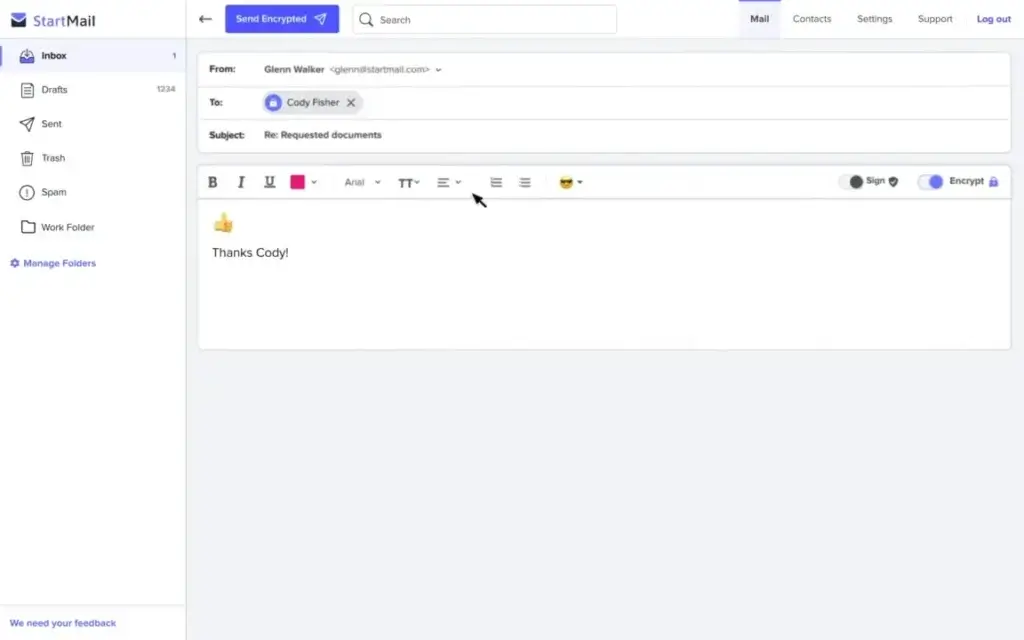
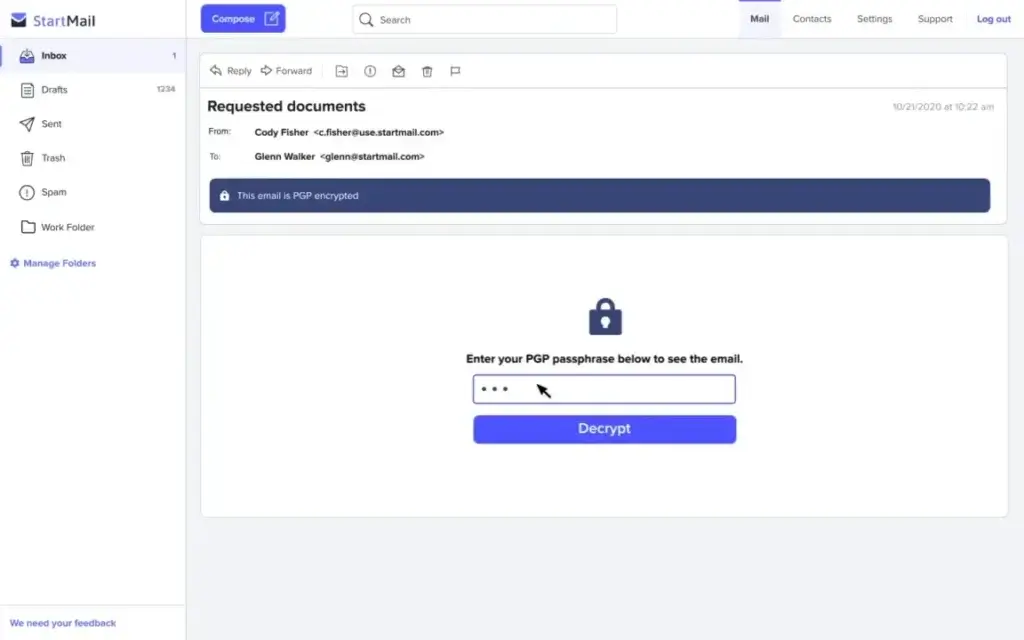
StartMail supports PGP encryption, which is one of the most established methods for securing email content. Users can encrypt emails to other PGP users, manage encrypted communication, and send secure messages without needing to turn email privacy into a complex technical project.
The key value is that StartMail makes encrypted communication more accessible. Traditional PGP can be intimidating for non-technical users, but StartMail simplifies much of the process through its webmail interface and encryption tools.
This makes StartMail useful for professionals who share sensitive information by email, including contracts, invoices, business documents, client notes, financial details, and legal or operational communication.
2. Password-Protected Emails
StartMail allows users to send password-protected encrypted emails to recipients who do not use StartMail or PGP. This is one of its most practical privacy features because most email communication still happens with people using Gmail, Outlook, Yahoo Mail, Apple Mail, or business email accounts.
Instead of requiring the recipient to create a StartMail account, the sender can protect the message with a password. This gives users a way to send confidential messages outside the StartMail ecosystem while keeping the process simple for the recipient.
This feature is especially useful for client-facing professionals who need secure communication but cannot control which email provider the recipient uses.
3. Unlimited Email Aliases
StartMail’s alias system is one of its strongest advantages. Users can create unlimited aliases, which are additional email addresses that protect the main address from exposure. These aliases can be created, used, and deleted as needed.
Aliases are useful when signing up for SaaS tools, newsletters, online services, trial accounts, vendors, communities, directories, and ecommerce sites. Instead of using a primary email address everywhere, users can create a separate alias for each service.
This creates better privacy and better inbox control. If one alias starts receiving spam, the user can identify the source and remove the alias without changing the main email address. For professionals who test many tools, manage multiple brands, or sign up for many online services, this is a major advantage.
4. Custom Domain Email
StartMail supports custom domain email, which allows users to create professional email addresses such as name@company.com, hello@company.com, support@company.com, or billing@company.com. This makes StartMail suitable for freelancers, consultants, agencies, founders, and small businesses that want privacy-focused email without using Google Workspace or Microsoft 365.
Custom domains are especially important for business credibility. A branded email address looks more professional than a generic consumer address, and it gives the business more control if it changes providers in the future.
As with any custom domain email provider, proper DNS setup is important. SPF, DKIM, and DMARC should be configured carefully to improve deliverability and reduce spoofing risk.
5. Unlimited Domains on Business Plans
StartMail’s business plan is designed for users and teams that manage multiple domains. This can be helpful for agencies, affiliate marketers, founders, consultants, ecommerce operators, software reviewers, and businesses with several brands or subbrands.
The ability to add multiple domains gives StartMail more flexibility than basic email plans that charge heavily for each domain or limit domain usage to higher-tier enterprise plans.
For users who manage more than one online business, this can simplify email operations because several domain identities can be managed from a privacy-focused email setup.
6. Shared Aliases for Teams
StartMail supports shared aliases for business and group use cases. This allows multiple team members to send and receive email from the same alias address, such as support@company.com, sales@company.com, press@company.com, or billing@company.com.
This is useful for small teams that do not need a full help desk platform but still want a unified email identity. For example, a support alias can be shared between two or three people, while a sales alias can be used by the team member responsible for new inquiries.
StartMail is not a replacement for advanced shared inbox platforms like Front, Help Scout, or Zendesk. However, for privacy-conscious small teams, shared aliases provide a simple way to manage team-facing email identities.
7. IMAP and SMTP Support
One of StartMail’s biggest practical advantages is IMAP/SMTP support. This allows users to connect StartMail to desktop and mobile email clients such as Apple Mail, Thunderbird, Outlook, and other standard mail apps.
This makes StartMail more flexible than some encrypted email providers that require a bridge app or restrict third-party client access. Users who prefer traditional email workflows may find StartMail easier to integrate into existing habits.
There is an important tradeoff: using third-party email clients can reduce some of the simplicity and privacy control available inside StartMail’s web interface. For maximum privacy and full feature access, the webmail experience is usually the safest default.
8. Spam Protection and Tracker Blocking
StartMail includes privacy and security tools designed to reduce spam, tracking, and unwanted inbox exposure. The platform promotes advanced spam protection, no ads, and no tracking as part of its privacy-first approach.
This matters because email privacy is not only about encryption. Tracking pixels, malicious links, newsletters, spam campaigns, and exposed addresses can create privacy and security risks. StartMail’s alias system and spam controls work together to reduce this exposure.
For business users, fewer unwanted emails also means less time spent cleaning the inbox and fewer opportunities for phishing messages to distract employees.
9. Migration Tools
StartMail includes migration support for users moving from another provider. This is important because switching email providers can be stressful, especially when years of contacts, client conversations, invoices, login records, and business communication are stored in the old inbox.
For individuals, migration tools make it easier to test StartMail without starting from zero. For businesses, they reduce the operational friction of moving away from mainstream providers.
Still, businesses should test migration carefully before fully switching. Domain records, aliases, deliverability, team access, and client-facing email workflows should be checked before moving important communication.
10. Business Subscription Management
StartMail offers business account management features for teams. Subscription managers can add users, manage account access, configure shared aliases, and use custom domains for professional communication.
Additional user accounts are offered at a discount, which can make StartMail more affordable for small teams compared with buying separate accounts at full price.
This makes StartMail a realistic option for small businesses that want privacy-focused email but do not need the full productivity suite of Google Workspace, Microsoft 365, or Zoho Workplace.
User Experience
StartMail User Experience
Clean and Familiar Email Interface
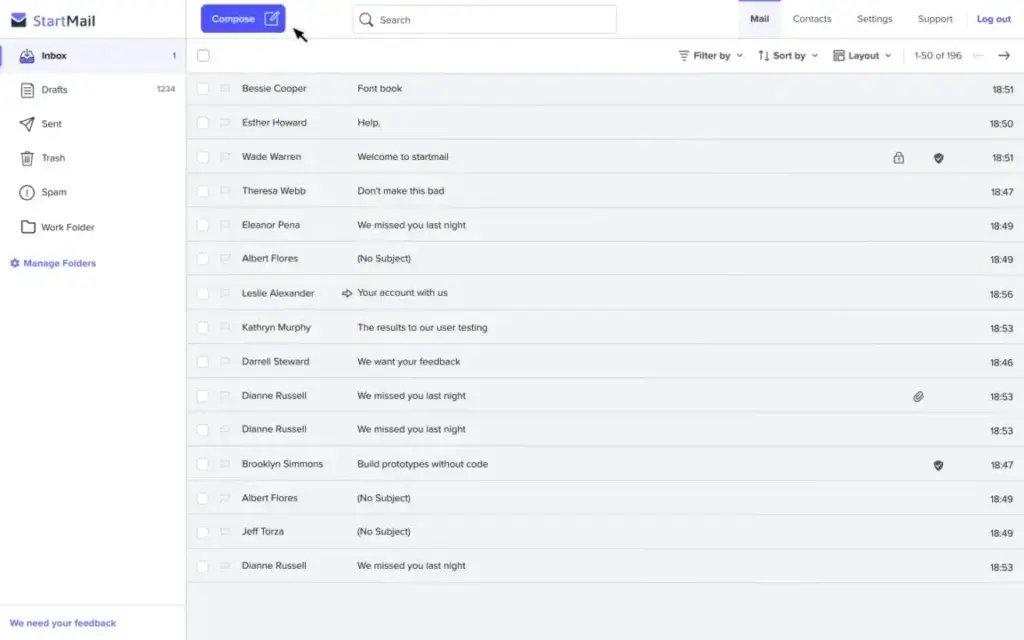
StartMail’s interface is designed to feel familiar. Users coming from Gmail, Outlook, Yahoo Mail, Fastmail, or other webmail platforms should understand the basic layout quickly. The inbox includes standard email elements such as folders, messages, search, composing, settings, contacts, filters, and account controls.
This is one of StartMail’s biggest strengths. Many privacy tools feel technical, but StartMail keeps the experience close to traditional email. It does not overload users with complex dashboards or unnecessary productivity features.
Strong Experience for Alias-Based Privacy
The alias workflow is one of the most practical parts of StartMail. Users can create separate addresses for different services, projects, vendors, departments, or websites. This is useful for people who want to protect their main address and reduce unwanted email.
For example, a user can create one alias for newsletters, another for software trials, another for banking-related communication, and another for client onboarding. If any address starts receiving spam, the source is easier to identify.
This makes StartMail especially useful for privacy-conscious professionals, affiliate marketers, SaaS reviewers, founders, and consultants who frequently sign up for new tools and services.
Good Fit for Traditional Email Client Users
StartMail’s support for IMAP and SMTP makes it a practical choice for users who want to keep using a preferred email client. This is a meaningful advantage over some privacy-first email providers that are more restrictive with third-party access.
Users who work mainly inside Apple Mail, Thunderbird, Outlook, or another mail client may find StartMail easier to adopt than providers that require a dedicated bridge application or a closed app experience.
However, the most privacy-focused workflow is usually StartMail’s own web interface, because third-party clients may not support every privacy feature in the same way.
Mobile and Desktop Access
StartMail can be used through the browser and connected to mobile and desktop email clients using standard mail protocols. This gives users flexibility across devices.
- Access StartMail through webmail
- Use StartMail with supported IMAP/SMTP clients
- Manage aliases from the StartMail account
- Send password-protected emails to non-StartMail recipients
- Use custom domain email for professional communication
- Organize messages with folders and filters
Less Ecosystem Complexity
StartMail does not try to become an entire productivity suite. It does not include a built-in VPN, password manager, cloud storage suite, document editor, spreadsheet editor, or video meeting tool. For some users, this is a limitation. For others, it is a benefit.
The benefit is simplicity. StartMail is easier to evaluate because it focuses on email privacy. The limitation is that users who want a complete privacy ecosystem may prefer Proton Mail.
Customer Support and Documentation
StartMail provides support resources for account setup, domains, aliases, encryption, migration, and email client configuration. For most individuals, the support documentation should be enough to get started.
Businesses should still test the platform before a full migration. Email is business-critical, and small configuration errors can affect deliverability, domain authentication, and client communication.
Pros and Cons
Advantages and Disadvantages
Pros
✅ Unlimited aliases for privacy
✅ PGP encryption and password-protected emails
✅ Custom domain support
✅ IMAP/SMTP support for email clients
Cons
❌ No permanent free plan
❌ Less complete than Proton Mail
❌ Not as polished as Fastmail for email productivity
❌ Limited collaboration suite features
StartMail is a strong choice for users who want private email without moving into a large productivity ecosystem. Its biggest advantage is the combination of unlimited aliases, encryption, custom domain support, and compatibility with standard email clients. However, it is not the best choice for every user. Teams that want deep collaboration, shared documents, office apps, or advanced workflow integrations may need a broader solution.
✅ Strengths
- Unlimited aliases: StartMail’s alias system is one of its most valuable features. It helps users protect their main address, reduce spam, and separate identities across websites and services.
- PGP encryption: StartMail supports encrypted email communication through PGP, making it useful for users who need stronger message privacy.
- Password-protected emails: Users can send secure messages to people who do not use StartMail, which makes encrypted communication more practical in real-world business communication.
- Custom domain support: StartMail can be used with a professional domain, which makes it suitable for freelancers, consultants, creators, and small businesses.
- IMAP/SMTP compatibility: StartMail works well for users who prefer traditional email clients such as Apple Mail, Thunderbird, or Outlook.
- Ad-free and tracking-free inbox: StartMail’s business model is based on paid subscriptions, not advertising inside the mailbox.
- Useful for privacy-conscious professionals: The platform is a good fit for users who handle sensitive communication but do not want a complicated encrypted email setup.
❌ Weaknesses
- No permanent free plan: StartMail offers a trial, but it does not offer a long-term free account like Proton Mail or Tuta. Users who want free private email may prefer another provider.
- Less complete than Proton Mail: StartMail focuses on email. It does not include Proton-style extras such as VPN, password management, cloud storage, documents, spreadsheets, or video meetings.
- Not as polished as Fastmail for productivity: Fastmail remains stronger for users who want a premium traditional email experience with excellent speed, calendar, contacts, and usability.
- Limited collaboration tools: StartMail is not a full business workspace. Teams that need shared documents, internal chat, task management, or deep admin controls may need additional software.
- Encryption still requires good user habits: No email provider can protect against weak passwords, phishing, infected devices, or recipients who mishandle sensitive information.
Overall, StartMail is strongest for users who want private email, aliases, encryption, and custom domains in a simple package. It is less suitable for teams that want a full productivity suite or the lowest possible email hosting cost.
Pricing and Plans
How Much Does StartMail Cost?
StartMail uses a paid subscription model rather than a permanent free plan. The service offers a 7-day free trial, but after the trial, users need to choose a paid plan. This fits StartMail’s privacy positioning because the product is funded by subscriptions rather than advertising, inbox scanning, or data monetization.
At the time of writing, StartMail offers two main plans: Personal and Business. The Personal plan costs $4.99 per month when billed annually, which equals $59.88 per year. The Business plan costs $6.99 per month when billed annually, which equals $83.88 per year. Month-to-month billing is also available at a higher rate, with Personal priced at $6.99 per month and Business priced at $8.99 per month.
StartMail also offers a 25% discount on additional accounts, which is useful for families, small teams, agencies, and businesses that need more than one mailbox. Bitcoin payment is available on annual plans, which may appeal to users who want more privacy in their billing process.
| Plan | Monthly Price | Annual Billing Price | Storage | Best For | Key Features |
| Personal | $6.99/month | $4.99/month, billed annually at $59.88/year | 20 GB | Individuals, freelancers, consultants, and privacy-conscious professionals | Email address with StartMail domain or one custom domain, unlimited aliases, PGP encryption, password-protected emails, IMAP/SMTP support, no ads, no tracking |
| Business | $8.99/month | $6.99/month, billed annually at $83.88/year | 30 GB | Small businesses, teams, agencies, entrepreneurs, and users managing multiple domains | Custom domain email, unlimited aliases, 30 GB storage, unlimited domains, shared aliases with custom domains in group subscriptions, business subscription management, IMAP/SMTP support |
| Additional Accounts | 25% discount | 25% discount | Depends on selected account type | Families, teams, and businesses that need multiple private inboxes | Add more users to a group subscription at a discounted rate, useful for small teams and multi-user email setups |
What You Get Across StartMail Plans
StartMail’s pricing is simple compared with many email providers. There are no complicated bundles, productivity-suite tiers, or enterprise-only feature gates. The main difference between Personal and Business is storage, domain flexibility, and team-focused controls.
| Feature | Personal | Business |
| Free trial | 7 days | 7 days |
| Annual price | $4.99/month, billed at $59.88/year | $6.99/month, billed at $83.88/year |
| Monthly price | $6.99/month | $8.99/month |
| Storage | 20 GB | 30 GB |
| Private ad-free email | Yes | Yes |
| No tracking inside the mailbox | Yes | Yes |
| PGP encrypted email | Yes | Yes |
| Password-protected emails | Yes | Yes |
| Unlimited email aliases | Yes | Yes |
| StartMail email address | Yes | Mainly designed for custom domain use |
| Custom domain email | One custom domain | Yes |
| Unlimited custom domains | No | Yes |
| Shared aliases with custom domain | No | Yes, in group subscriptions |
| IMAP/SMTP access | Yes | Yes |
| Advanced spam protection | Yes | Yes |
| Migration support | Yes | Yes |
| Folders and filters | Yes | Yes |
| Contact lists | Yes | Yes |
| Out-of-office response | Yes | Yes |
| Discounted additional accounts | 25% off | 25% off |
| Bitcoin payment | Available on annual plans | Available on annual plans |
| Permanent free plan | No | No |
Which StartMail Plan Offers Better Value?
The Personal plan is the best option for most individual users. At $4.99 per month when billed annually, it gives users 20 GB of storage, unlimited aliases, encrypted email, password-protected messages, one custom domain, and IMAP/SMTP support. This is enough for freelancers, consultants, privacy-conscious professionals, and users who want a secure personal inbox.
The Business plan is better for users who manage multiple domains or need team-friendly features. At $6.99 per month when billed annually, it adds 30 GB of storage, unlimited domains, and shared aliases with custom domains in group subscriptions. This makes it more suitable for small businesses, agencies, entrepreneurs, and teams that need branded private email across more than one domain.
StartMail is not the cheapest email provider, but it is competitively priced for users who value privacy, aliases, encryption, and custom domain support. Zoho Mail is cheaper for basic business email, Fastmail is stronger for traditional email productivity, and Proton Mail is broader as a privacy ecosystem. StartMail’s strongest value is its focused private email experience, especially for users who depend heavily on aliases.
Security and Privacy
How StartMail Protects Your Data
Security and privacy are the main reasons to choose StartMail. The platform is built around encrypted email, private aliases, no advertising, no tracking, and a paid subscription model that does not depend on monetizing user attention.
1. PGP Encryption
StartMail supports PGP-based encrypted email communication. PGP is a widely recognized encryption method for protecting email content, especially when both sender and recipient use compatible encryption tools.
For users who communicate with other privacy-aware contacts, PGP gives StartMail a strong security foundation. It is especially useful for professional communication where sensitive content should not be left exposed in a standard inbox.
2. Password-Protected Messages
One of StartMail’s most user-friendly security features is password-protected email for recipients who do not use encryption. This helps solve a common problem with secure email: not every recipient uses the same provider or understands PGP.
Password-protected emails make StartMail more practical for everyday use. A professional can send confidential information to a client, vendor, or partner without requiring the recipient to switch providers.
3. Alias Protection
StartMail’s unlimited aliases are not only a convenience feature. They are also a privacy and security feature. Using aliases reduces the exposure of the main email address and makes it easier to isolate spam, phishing attempts, and unwanted contact.
Aliases are especially valuable for users who sign up for many online services. If a specific alias starts receiving unwanted email, it can be removed without affecting the main mailbox.
4. No Ads and No Tracking
StartMail promotes an ad-free and tracking-free email experience. This is important for users who want to avoid email services that analyze inbox activity for advertising, personalization, or behavioral profiling.
A paid privacy email provider is usually more aligned with privacy-conscious users because the product is funded by subscriptions rather than targeted advertising.
5. European Privacy Positioning
StartMail is positioned as a European privacy email provider. For users who care about jurisdiction, GDPR alignment, and avoiding major ad-funded ecosystems, this can be part of the decision-making process.
Jurisdiction alone should not be the only buying factor. The stronger question is whether the provider combines good legal positioning with sound technical protections, user-friendly controls, and transparent privacy practices.
6. IMAP Encryption Workflows
StartMail supports IMAP and SMTP access, and users can configure OpenPGP-based encryption with supported clients. This gives technical users more flexibility while still allowing non-technical users to rely on StartMail’s webmail experience.
This is an important distinction. StartMail is more open to traditional email workflows than some encrypted email providers, which can make adoption easier for users who already depend on a specific mail client.
7. Security Limitations to Understand
StartMail improves privacy, but it does not eliminate every email security risk. No email provider can fully protect users from phishing, weak passwords, malware, unsafe devices, careless recipients, or poor domain configuration.
Users should still enable two-factor authentication when available, use strong unique passwords, avoid suspicious links and attachments, configure domain authentication properly, and use aliases thoughtfully. Email security is strongest when provider protections are combined with good user behavior.
Comparison with Competitors
StartMail vs Top Alternatives
StartMail competes with several types of email providers. Some focus on maximum privacy, some focus on smooth traditional email workflows, and others focus on broader business productivity. For this comparison, three useful alternatives are Proton Mail, Tuta, and Fastmail.
Proton Mail is the best comparison for users who want a larger encrypted privacy ecosystem. Tuta is a close comparison for users who want encrypted email and calendar at a leaner price point. Fastmail is the best comparison for users who want premium email productivity, excellent usability, and strong support for standard email workflows.
StartMail vs Proton Mail
| Feature | StartMail | Proton Mail |
| Main positioning | Private email provider with strong aliases, PGP encryption, and custom domains | Privacy-first encrypted email and broader encrypted workspace |
| Encryption model | PGP encryption and password-protected emails | End-to-end encryption and zero-access encryption |
| Free plan | No permanent free plan, trial available | Yes, free private email plan available |
| Custom domains | Yes, with strong domain and alias support | Available on paid plans |
| Aliases | Unlimited aliases | Hide-my-email aliases and additional addresses depending on plan |
| Storage | 20 GB on Personal, 30 GB on Business | 1 GB free, 15 GB on Mail Plus, 500 GB on Proton Unlimited |
| Third-party email clients | IMAP/SMTP support | Usually requires Proton Mail Bridge for paid users |
| Broader ecosystem | Email-focused | Mail, Calendar, Drive, Pass, VPN, Meet, Docs, Sheets, and more |
| Best for | Users who want private email with excellent alias flexibility | Users who want a complete privacy-focused ecosystem |
Summary: Proton Mail is the stronger choice for users who want a full privacy ecosystem. It includes encrypted email, calendar, cloud storage, VPN, password management, documents, spreadsheets, meetings, and other privacy-focused tools.
StartMail is better for users who mainly want private email, unlimited aliases, custom domains, and easier compatibility with standard email clients. It is simpler, more focused, and especially attractive for users who do not need Proton’s broader suite.
Best choice: Choose StartMail for alias-heavy private email and traditional email client flexibility. Choose Proton Mail for a broader encrypted workspace and long-term privacy ecosystem.
StartMail vs Tuta
| Feature | StartMail | Tuta |
| Main positioning | Private email with aliases, PGP encryption, custom domains, and IMAP/SMTP support | Encrypted email and calendar with strong privacy architecture |
| Free plan | No permanent free plan | Yes, free plan available |
| Encryption model | PGP encryption and password-protected emails | End-to-end encrypted email and calendar |
| Aliases | Unlimited aliases | Extra email addresses depending on plan |
| Custom domains | Yes, including strong business domain support | Available on paid plans |
| Storage | 20 GB to 30 GB depending on plan | 1 GB free, 20 GB on Revolutionary, 500 GB on Legend |
| Calendar | Not a major product focus | Encrypted calendar included |
| Third-party email clients | IMAP/SMTP support | More closed than StartMail for traditional IMAP/SMTP workflows |
| Best for | Users who want private email with aliases and open client compatibility | Users who want encrypted email and calendar in a privacy-first platform |
Summary: Tuta is a strong StartMail alternative for users who want encrypted email and calendar in one privacy-first service. It is especially attractive for users who want a free plan or a lower-cost encrypted email option.
StartMail is stronger for users who prioritize unlimited aliases, PGP workflows, custom domain flexibility, and traditional email client compatibility. It feels more like a private version of standard email, while Tuta feels more like a closed encrypted communication platform.
Best choice: Choose StartMail for alias management and IMAP/SMTP flexibility. Choose Tuta for a lower-cost encrypted email and calendar solution.
StartMail vs Fastmail
| Feature | StartMail | Fastmail |
| Main positioning | Private email with encryption and unlimited aliases | Premium email, calendar, contacts, and productivity-focused inbox |
| Privacy focus | Strong privacy positioning with no ads, no tracking, PGP, and aliases | Private paid email, but not an encryption-first provider like StartMail or Proton |
| Free plan | No permanent free plan | No permanent free plan, trial available |
| Custom domains | Yes | Yes |
| Aliases | Unlimited aliases | Strong masked email and alias features |
| Calendar and contacts | Basic email-focused workflow | Very strong calendar and contacts experience |
| Third-party clients | IMAP/SMTP support | Excellent standard email client support |
| Best for | Users who want private email and alias-based protection | Users who want the smoothest traditional paid email experience |
Summary: Fastmail is the better choice for users who want the most polished traditional email experience. It offers excellent speed, reliability, calendar tools, contacts, custom domains, masked email, and email client compatibility.
StartMail is the stronger choice if privacy and encryption are more important than productivity polish. Its unlimited aliases, PGP encryption, and password-protected messages give it a stronger privacy angle than Fastmail.
Best choice: Choose Fastmail for premium email productivity. Choose StartMail for private email with stronger encryption and alias protection.
Which One Should You Choose?
StartMail is the best fit when the main priority is private email with excellent alias control, encrypted messaging, custom domain support, and standard email client compatibility. It is especially strong for users who want privacy without moving into a large ecosystem.
Proton Mail is stronger for users who want an all-in-one privacy suite. Tuta is a strong alternative for users who want encrypted email and calendar at a leaner price point. Fastmail is the better option for users who want a fast, polished, traditional email experience with excellent calendar and contact tools.
For privacy-conscious professionals who care most about aliases, custom domains, and a focused private inbox, StartMail is one of the strongest options. For users who want a full encrypted workspace, Proton Mail is more complete. For users who want the smoothest email workflow, Fastmail is stronger. For users who want a low-cost encrypted email and calendar provider, Tuta deserves serious consideration.
Conclusion
Is StartMail Worth It in 2026?
⭐ Overall Rating: 8.0/10
StartMail is worth it if private email, aliases, custom domains, and encrypted communication are more important than having the cheapest email account or the broadest productivity suite. It is a strong option for users who want to reduce tracking, protect their main email address, and communicate more securely without making email overly complicated.
Its biggest advantage is focus. StartMail does not try to compete with Google Workspace, Microsoft 365, or Proton’s entire privacy ecosystem. Instead, it concentrates on private email, PGP encryption, password-protected messages, unlimited aliases, custom domains, and compatibility with standard email clients.
That makes StartMail especially useful for professionals who sign up for many online services, manage multiple identities, use custom domains, or want a private email provider that still works with traditional email apps. The unlimited aliases alone can make StartMail very valuable for users who care about spam control, privacy, and inbox organization.
However, StartMail is not perfect. It does not offer a permanent free plan, it is not a full productivity suite, and it is not as broad as Proton Mail. It also does not match Fastmail’s level of traditional email polish or Tuta’s encrypted calendar focus.
Final Thoughts
StartMail is an excellent choice for:
- Privacy-conscious professionals who want a secure email alternative
- Freelancers and consultants who need private custom-domain email
- Users who want unlimited aliases to protect their main address
- Small businesses that want branded email with stronger privacy controls
- Professionals who need password-protected messages for external recipients
- Users who prefer IMAP/SMTP support and traditional email clients
- People who want private email without a complex productivity ecosystem
StartMail is easy to recommend for users who want a focused private email provider. It is not the best choice for every team, but it is a strong choice when email privacy, alias management, and custom domain control are central to the buying decision.
Frequently Asked Questions
Have more questions?
1. What is StartMail?
StartMail is a private email provider focused on secure communication, unlimited aliases, custom domains, PGP encryption, password-protected emails, and an ad-free inbox. It is designed for users who want stronger privacy than standard email providers without making email difficult to use.
2. Is StartMail free?
StartMail does not offer a permanent free plan. It offers a trial so users can test the service before choosing a paid subscription. Users who need a long-term free encrypted email plan may prefer Proton Mail or Tuta.
3. Is StartMail good for business email?
Yes, StartMail can be a good business email provider for small businesses, consultants, agencies, freelancers, and privacy-conscious professionals. It supports custom domains, unlimited aliases, shared aliases, encrypted emails, IMAP/SMTP access, and business subscription management.
4. Does StartMail support custom domains?
Yes, StartMail supports custom domain email. This allows users to create professional addresses such as hello@yourcompany.com or name@yourcompany.com while using StartMail’s privacy and encryption features. Business users can also benefit from stronger domain flexibility and shared alias options.
5. Does StartMail offer unlimited aliases?
Yes, StartMail offers unlimited email aliases. Aliases help protect the main email address, reduce spam, separate online identities, and identify which websites or services may be exposing an address to unwanted messages.
6. Can StartMail send encrypted emails to non-StartMail users?
Yes, StartMail can send password-protected emails to recipients who do not use StartMail. This makes encrypted communication more practical because the recipient does not need to switch email providers to read a protected message.
7. Does StartMail work with Outlook, Apple Mail, or Thunderbird?
Yes, StartMail supports IMAP and SMTP access, which allows users to connect it with supported third-party email clients such as Outlook, Apple Mail, Thunderbird, and other standard mail apps. Some privacy features may be easiest to manage through the StartMail web interface.
8. Is StartMail better than Proton Mail?
StartMail is better for users who want a focused private inbox, unlimited aliases, custom domain email, and traditional email client compatibility. Proton Mail is better for users who want a larger privacy ecosystem with encrypted email, calendar, cloud storage, VPN, password management, documents, spreadsheets, and more.
9. Is StartMail better than Fastmail?
StartMail is stronger for privacy, aliases, PGP encryption, and password-protected messages. Fastmail is stronger for users who want the most polished traditional email experience, including excellent speed, calendar, contacts, masked email, and productivity-focused email management.
10. Who should use StartMail?
StartMail is best for privacy-conscious individuals, freelancers, consultants, small businesses, founders, journalists, and professionals who need private email, custom domains, unlimited aliases, and encrypted communication. It is less ideal for users who want a full productivity suite or a permanent free email plan.