Introduction
Remember when email was just a digital version of your mailbox-simple, straightforward, and mostly quiet? That era is long gone.
Today, your inbox has evolved into the nerve center of your digital life. It manages your appointments, filters AI-generated clutter, connects to your productivity tools, and if you’re not careful-becomes a hotspot for privacy vulnerabilities.
Choosing the right email provider isn’t just about sending messages. It’s about shaping how you interact with the online world: securely, efficiently, and on your own terms.
In this guide, we’re cutting through the noise to uncover the 7 best email providers for a variety of needs-from privacy-first individuals to fast-moving teams. Whether you’re tired of ad-riddled inboxes or seeking a clean, professional setup, this article will help you find the provider that fits your workflow and your values.
What Are Email Providers?
At their core, email providers are platforms that allow you to send, receive, organize, and secure electronic messages. But in 2026, that’s just the beginning.
Modern email services double as productivity suites, personal CRMs, encrypted file vaults, and smart inboxes powered by machine learning. Some offer custom domains for branding, while others emphasize zero tracking and end-to-end encryption.
Your choice of provider directly affects:
- How safe your communication is
- How efficiently you work
- How cluttered (or clean) your digital space becomes
🛠️ Top Features to Look For in an Email Provider
Before we dive into the top contenders, here’s what separates a great email provider from the rest:
- Privacy & Security: Look for TLS encryption, zero-knowledge policies, and server jurisdiction outside the US (like Switzerland or Germany).
- Custom Domain Support: Especially useful for freelancers and businesses wanting a branded, professional email address.
- Integrated Calendar & Contacts: A truly unified workspace helps you avoid jumping between tabs.
- AI & Smart Inbox Features: Priority filtering, predictive replies, and inbox categorization can save hours every week.
- Cross-Platform Accessibility: Seamless experience across desktop, mobile, and web, without compromising speed or features.
7 Best Email Providers to Organize, Secure & Streamline Your Digital Life
Fastmail

🔍Unique Features of Fastmail
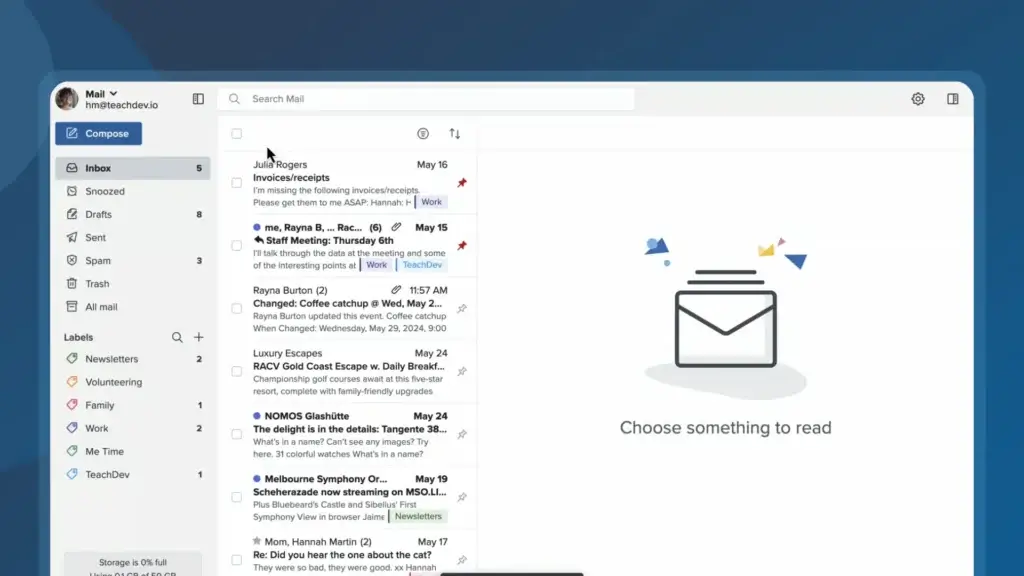
- Custom Domain Hosting: Fastmail lets you bring your own domain or purchase one directly, allowing you to create professional, branded email addresses effortlessly.
- No Ads, Ever: Unlike many free providers, Fastmail operates on a subscription model, your data is never mined for advertising, and your inbox stays completely ad-free.
- Built-in Calendar, Contacts & Notes: Fastmail combines core productivity tools in one dashboard, letting you manage your day without toggling between apps.
- Masked Email Aliases: Create disposable or masked email addresses with a single click to protect your identity while signing up for new services.
- JMAP Support: As co-creators of the JMAP (JSON Meta Application Protocol), Fastmail offers faster syncing and better performance across devices compared to traditional IMAP.
💡 Why Choose Fastmail?
If you’re tired of bloated inboxes, vague privacy policies, or corporate surveillance, Fastmail offers a refreshing alternative. Based in Australia and outside the reach of invasive data-sharing agreements like the U.S. CLOUD Act, Fastmail gives you control over your communication.
It’s designed for users who want a streamlined experience with modern features, without compromising privacy or performance. Whether you’re a solo freelancer, a small business owner, or someone who simply values a clean digital workspace, Fastmail delivers both functionality and trust.
Pricing Overview 💰
- Individual Plan: $6/month per user, includes 50 GB storage, custom domains, and full access to productivity tools.
- Duo Plan: $10/month for two users, each with 50 GB storage, shared domains, and collaborative features.
- Family Plan: $14/month for up to six users, each with 50 GB storage, shared calendars, and address books.
- Basic Business Plan: $4/month per user, offering 5 GB storage, suitable for minimal storage needs.
- Standard Business Plan: $6/month per user, includes 50 GB storage, custom domains, and integration with third-party apps.
- Professional Business Plan: $10/month per user, offering 100 GB storage and advanced features like email retention archives
All plans come with a 30-day free trial, allowing users to explore features before committing.
Pros and Cons ⚖️
Positive
✅ Clean, ad-free experience
✅ Strong stance on user privacy
✅ Seamless custom domain support
✅ Fast sync and reliable uptime
Negatives
❌ No free plan available
❌ Basic Filtering Options
❌ Fewer third-party integrations
❌ No Built-In Chat
Fastmail – Final Score 9.4/10 🏆
Fastmail strikes the perfect balance between privacy, performance, and usability. While it doesn’t offer full encryption, its clean interface, custom domain support, and zero ads make it the best all-around email provider for professionals and privacy-conscious users alike.
Neo Mail


🔍Unique Features of Neo Mail
- Free AI Website Builder: Neo Mail also comes with a built-in AI website builder that lets you quickly create a simple business website. It’s a great option for entrepreneurs who want to launch a basic online presence without hiring a developer.
- Built-in Email Tracker & Read Receipts: Neo Mail includes a built-in email tracker that shows when someone opens your email. For small business owners and entrepreneurs, this is extremely helpful when sending proposals, outreach emails, or client follow-ups.
- Free Domain for Professional Email: Neo Mail provides a free domain so users can create professional email addresses like name@yourbusiness.com. This helps new businesses look more credible and professional from day one.
- Business-Friendly Email Tools: Features like Send Later, Follow-up Reminders, and Priority Inbox help small business owners and entrepreneurs manage communication and stay on top of important conversations.
- Simple Setup for New Businesses: Neo Mail is designed to be beginner-friendly, allowing users to set up a professional email, a domain, and a website in just a few steps.
💡 Why Choose Neo Mail?
Neo Mail is designed specifically for small business owners and entrepreneurs who want more than just a basic inbox. Instead of using multiple tools, Neo Mail combines professional email with business-friendly features that help you communicate better and establish your online presence.
What makes Neo Mail appealing is how quickly you can get started. You can set up a professional email address, secure a domain, and build a simple website all in one place. For new businesses looking for a Gmail alternative without the complexity of large ecosystems, Neo Mail offers a straightforward and practical solution.
Pricing Overview 💰
Neo Mail offers simple pricing plans that work well for individuals and growing teams:
Starter Plan – $1.99/user/month
Includes professional email hosting, a free domain, and essential productivity tools.
Standard Plan – $3.99/user/month
Adds more storage, advanced productivity features, and improved collaboration tools for growing businesses.
Max Plan – $7.99/user/month
Includes higher storage limits and additional advanced features designed for teams that rely heavily on email communication.
Pros and Cons ⚖️
Positive
✅ Built-in email tracker and read receipts
✅ Free AI website builder included
✅ Free domain for professional email
✅ Easy setup for small business owners and entrepreneurs
Negatives
❌ Doesn’t integrate as deeply with tools like Google Drive
❌ Smaller ecosystem compared to Google Workspace or Microsoft 365
Neo Mail – Final Score 9.2/10 🏆
Neo Mail is a strong Gmail alternative for small business owners and entrepreneurs who want a simple way to set up a professional email and build their online presence. With built-in email tracking, a free domain, and an AI website builder, it provides practical tools that make it easy for small businesses to get started and grow.
Proton Mail

🔍 Unique Features of ProtonMail
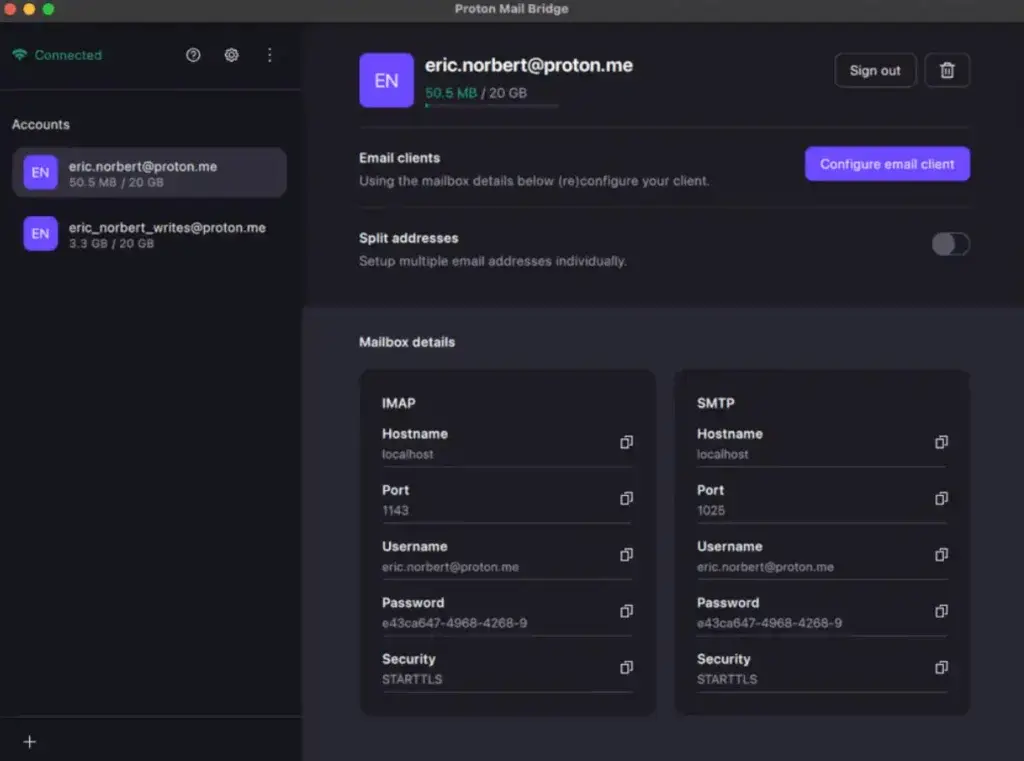
- End-to-End Encryption by Default: Emails between ProtonMail users are encrypted from sender to recipient, ensuring no one, not even Proton, can read your messages.
- Swiss-Based Data Hosting: ProtonMail is headquartered in Switzerland, where strict privacy laws provide extra legal protection against government surveillance.
- No Personal Information Required: You can create an account without providing your real name, phone number, or secondary email, preserving anonymity from day one.
- Self-Destructing Messages: ProtonMail lets you set expiration dates on emails, automatically deleting them from the recipient’s inbox after a specified time.
- Open Source Transparency: The platform’s code is available for public review and audit, making it easier to trust its security promises.
💡 Why Choose ProtonMail?
ProtonMail is built for those who believe privacy is a fundamental right. Unlike mainstream providers that monetize your data, Proton’s business model is subscription-based, and its infrastructure is designed from the ground up with encryption in mind.
It’s the go-to choice for journalists, political activists, lawyers, and any user who needs maximum confidentiality and minimal data exposure. If you’re looking for a secure Gmail alternative that doesn’t cut corners on encryption, ProtonMail is your best bet.
Pricing Overview 💰
ProtonMail offers both free and paid plans, catering to personal and business use:
- Free Plan – €0/month
Includes 1 email address, 1 GB storage, 150 messages/day, and limited support. - Mail Plus – €3.99/month (or €47.88 billed annually)
15 GB storage, 10 email addresses, custom domain support, and advanced filters. - Proton Unlimited – €9.99/month (or €119.88 annually)
Combines ProtonMail, Proton Drive, Proton Calendar, and Proton VPN. Includes 500 GB storage, priority support, and up to 15 email aliases. - Proton Business Plans – Starting from €7.99/user/month
Custom domain email for teams, enhanced admin controls, and enterprise-grade support.
All paid plans come with end-to-end encryption, advanced features, and access to other Proton services.
Pros and Cons ⚖️
Positive
✅ Built-in end-to-end encryption
✅ Free tier available with no ads
✅ Swiss-based servers for strong data privacy
✅ Open-source and independently audited
Negatives
❌ Limited storage on free plan
❌ No custom domain support on free plan
❌ Less polished interface
❌ Email search is limited
ProtonMail – Final Score: 8.9/10
A powerhouse for encrypted communication and anonymity. Ideal for users with strict privacy needs, though it trades off some usability and flexibility.
Spacemail


🔍 Unique Features of Spacemail
- Custom domain business email: Spacemail is built specifically for email on your own domain, helping businesses create professional addresses that match their brand.
- Built-in calendar: In addition to email hosting, Spacemail includes calendar functionality, which makes it more useful for day-to-day business communication than a basic inbox-only service.
- AI email assistant: All current plans include an AI email assistant, which can help users draft and manage messages more efficiently.
- Aliases, forwarding, and catch-all: Depending on the plan, Spacemail includes alias support, plus forwarding and catch-all options that help teams organize inbound messages and manage shared communication more effectively.
- Simple setup with Spaceship ecosystem: Spacemail is designed to work closely with Spaceship domains and related products, making setup easier for users already managing their site or domain there.
- Third-party email client support: Spacemail can now connect with external email apps through IMAP/SMTP, which adds flexibility for users who prefer Outlook, Spark, Apple Mail, or similar tools.
💡 Why Choose Spacemail?
Spacemail makes the most sense for users who want professional email hosting without being pushed into a larger productivity suite they may not need. It focuses on the core business email essentials: custom domain email, built-in calendar, aliases, security features, and a simple interface, while keeping pricing notably lower than many mainstream business email providers.
It is particularly appealing for freelancers, small businesses, startups, and side projects that want branded communication at a low entry cost. Spacemail is not positioned as the most advanced collaboration suite on the market, but that is exactly why it stands out. It offers a leaner, more affordable option for users who care more about professional email and straightforward setup than about a full office ecosystem.
Pricing Overview 💰
Spacemail keeps its pricing simple, with three main plans that scale from solo use to small business needs. Current annual pricing starts with a 30-day free trial on all plans.
Pro Plan: $0.63/month billed annually at $7.60/year after trial. Includes 1 mailbox, 5 GB storage per mailbox, 10 aliases per mailbox, email and calendar for your domain, 2FA protection, and AI email assistant. Renews at $9.88/year.
Business Plan: $1.18/month billed annually at $14.16/year after trial. Includes 3 mailboxes, 10 GB per mailbox, 50 aliases per mailbox, email and calendar for your domain, 2FA protection, and AI email assistant. Renews at $18.88/year.
Advanced Plan: $1.73/month billed annually at $20.80/year after trial. Includes 5 mailboxes, 15 GB per mailbox, unlimited aliases, email and calendar for your domain, 2FA protection, and AI email assistant. Renews at $28.88/year.
Overall, the pricing is one of Spacemail’s strongest advantages, especially for users who want branded business email and useful core features without paying for a larger productivity suite.
Pros and Cons ⚖️
Positive
✅ Very affordable entry pricing
✅ Custom domain email included
✅ Built-in calendar on all plans
✅ Aliases, forwarding, and catch-all support
Negatives
❌ Less established than bigger email brands
❌ Lower storage than some premium providers
❌ Best experience is within Spaceship ecosystem
❌ Not a full collaboration suite like Google Workspace or Microsoft 365
Spacemail – Final Score 8.7/10 🏆
Spacemail stands out for its low pricing, custom domain support, and useful built-in features like calendar, aliases, and AI tools. It is a smart choice for solopreneurs and small businesses that want professional email without paying for a full workspace suite.
Tuta (Formerly Tutanota)

🔍 Unique Features of Tuta
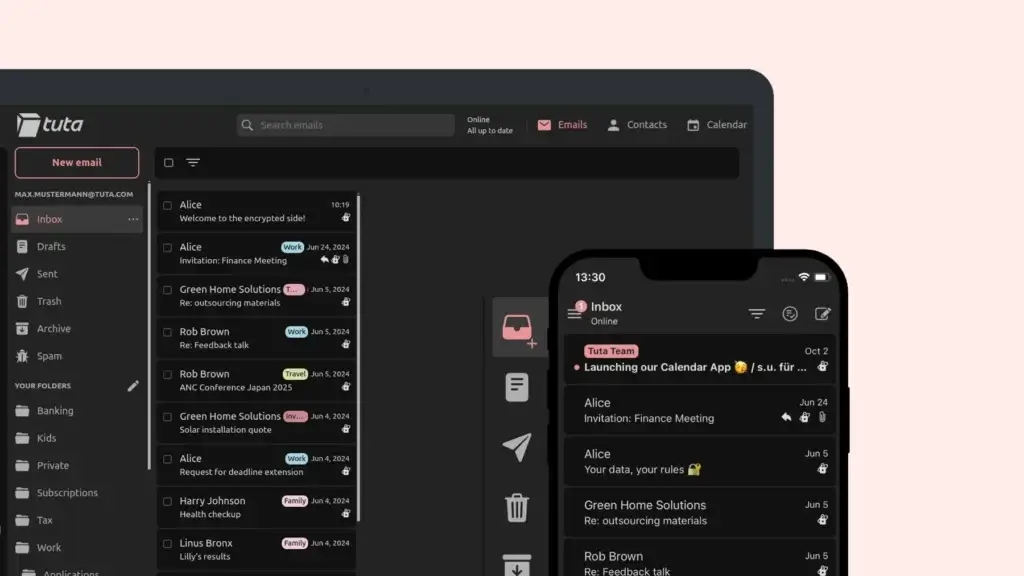
- End-to-End Encrypted Mailbox & Contacts: Tuta Mail encrypts your entire mailbox, including subject lines, attachments, and your contact list, something few other providers do.
- Open-Source Architecture: The platform’s code is fully open for public review, which helps build trust through transparency and community-driven development.
- Built-In Encrypted Calendar: Tuta offers a fully encrypted calendar that’s native to the platform, allowing you to schedule without compromising privacy.
- No Ads, Ever – Even on Free Plan: Even with a free account, Tuta guarantees an ad-free experience. They monetize through subscriptions, not user data.
- Green Hosting in Germany: Tuta operates its servers in Germany using 100% renewable energy and benefits from strict EU data protection laws.
💡 Why Choose Tuta?
Tutan mail is built for users who want true end-to-end privacy without participating in Big Tech ecosystems. It’s minimal, secure, and transparent, with privacy not just baked in, but prioritized across every layer of the service. If you’re someone who wants encryption beyond email content, such as calendars and metadata, Tuta is a standout.
It’s especially suited for activists, researchers, or privacy-conscious users who don’t mind trading integrations and storage for peace of mind.
Pricing Overview 💰
Tuta mail is one of the few secure email providers offering long-term use on a free plan, with several upgrade options:
- Free Plan – €0/month
1 GB storage, Tuta domain email, limited search, and basic support. - Premium Plan – €1/month (or €12/year)
1 GB storage, custom domains, inbox rules, and advanced search. - Teams Plan – €4/month per user
10 GB storage, multiple calendars, shared mailboxes, and multi-user access. - Pro Plan – €6/month per user
15 GB storage, priority support, white labeling, custom branding. - Add-ons – Additional storage and features (e.g., aliases, whitelabeling) can be purchased à la carte.
Tuta accepts payments via credit card, PayPal, and even anonymous methods like Bitcoin.
Pros and Cons ⚖️
Positive
✅ Full end-to-end encryption
✅ 100% open-source
✅ Free plan with no ads
✅ Encrypted calendar and mobile apps included
Negatives
❌ No IMAP/SMTP support
❌ Limited integrations
❌ Very basic UI
❌ Lacks productivity tools like notes, tasks, or chat
Tuta – Final Score: 8.6/10
A strong privacy-first platform with full encryption and a clean mission. While it lacks the polish and flexibility of mainstream tools, it excels where it matters most: protecting your data from the ground up.
Zoho Mail

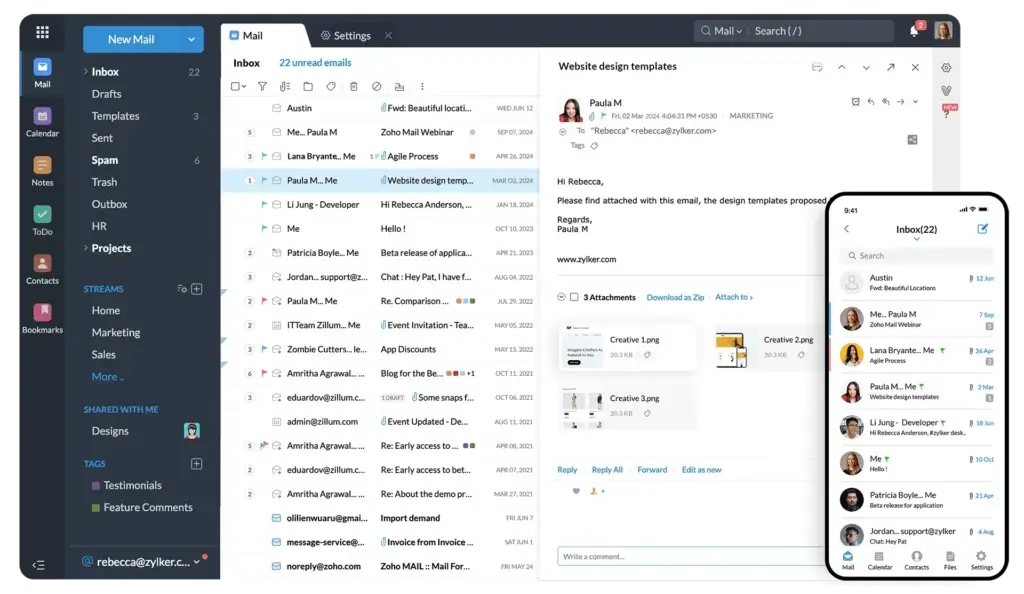
🔍 Unique Features of Zoho Mail
- Custom Domain Email Hosting: Zoho Mail allows you to set up professional email addresses using your business domain at no extra cost, even on the free tier.
- Zoho Workplace Integration: Comes tightly integrated with the entire Zoho ecosystem, including CRM, Docs, Sheets, and Zoho Projects, offering a complete business suite out of the box.
- Streams (Team Collaboration): Instead of traditional email threads, Streams allows team members to share emails, tag colleagues, and comment in a social-media-style feed.
- Advanced Admin Panel: Granular user management, email policies, and role-based access controls make it perfect for growing teams and regulated industries.
- Email Retention & eDiscovery (Business Plans): Includes built-in compliance tools like audit logs, retention policies, and eDiscovery search for legal and operational transparency.
💡 Why Choose Zoho Mail?
Zoho Mail is designed for modern teams that need more than just a simple inbox. It’s ad-free, privacy-respecting, and incredibly robust in features for professional use. What sets it apart is the seamless integration with the broader Zoho ecosystem, allowing businesses to manage communication, documents, CRM, and workflows in one unified platform.
If you’re looking for a Gmail or Outlook alternative for your company, with better control and zero ad profiling, Zoho Mail delivers incredible value.
Pricing Overview 💰
Zoho Mail offers a generous free plan for businesses and several affordable paid plans:
- Mail Free Plan – $0/month (up to 5 users)
5 GB/user, email for a single domain, web access only, limited features. - Mail Lite – $1/user/month (5 GB) or $1.25/user/month (10 GB)
IMAP/POP access, mobile apps, domain aliases, and email recall. - Mail Premium – $4/user/month
50 GB storage, email backup, eDiscovery, white labeling, and huge attachments (up to 1 GB). - Zoho Workplace Bundle – Starting at $3/user/month
Combines Zoho Mail with productivity tools: Docs, Sheet, Writer, Meetings, and more.
All plans are ad-free and include calendar, contacts, and task tools.
Pros and Cons ⚖️
Positive
✅ Free plan with custom domain support
✅ No ads, even on free tier
✅ Excellent admin tools
✅ Streams feature makes internal team comms smoother
Negatives
❌ Interface can feel dated
❌ Migration tools can be a bit technical
❌ Learning curve
❌ Limited third-party integrations outside Zoho ecosystem
Zoho Mail – Final Score: 8.5/10
Zoho Mail is a feature-rich, business-ready platform with outstanding value for small teams. It may not be the sleekest, but for privacy, price, and control, it’s an excellent choice for growing companies.
StartMail
🔍 Unique Features of StartMail
- Unlimited Disposable Aliases: Create one-click burner email addresses to protect your real identity when signing up for services or newsletters.
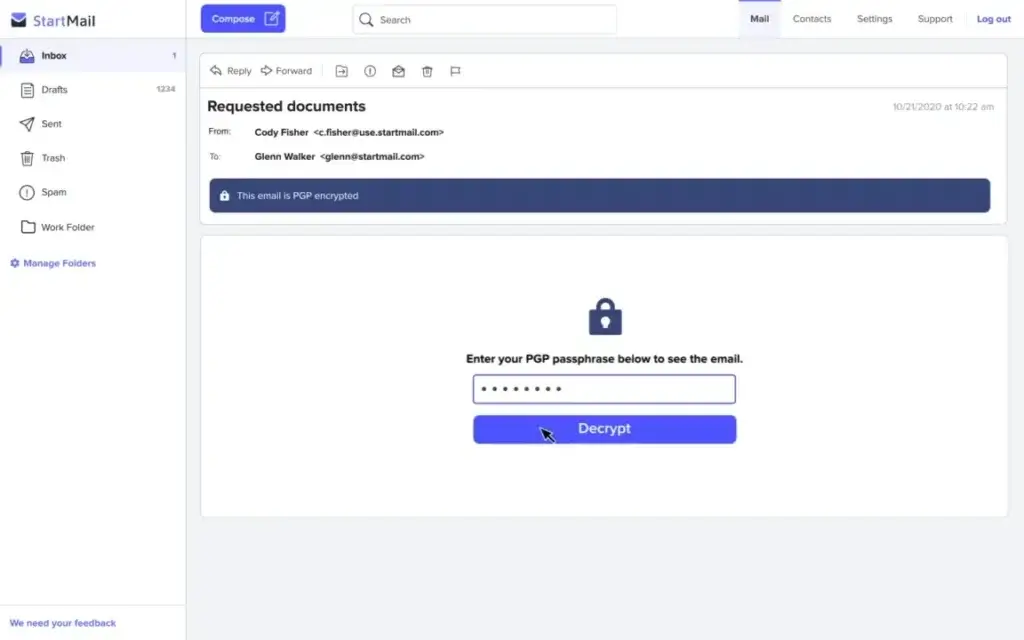
- PGP Email Encryption Made Easy: StartMail simplifies OpenPGP encryption, letting you send encrypted emails even to people without StartMail accounts.
- No Ads, No Tracking, Ever: StartMail is fully ad-free, doesn’t log user activity, and doesn’t analyze your inbox for marketing purposes.
- Based in the Netherlands: Operating under strict Dutch and EU privacy laws, StartMail is protected from intrusive data-sharing requests common in the U.S.
- One-Click Account Deletion: StartMail lets you permanently delete your account, including backups and server logs, in one step, with no hidden hoops.
💡 Why Choose StartMail?
StartMail is a balanced solution between privacy and usability. It’s perfect for users who care about security but don’t want to navigate overly technical platforms like ProtonMail or Tuta mail. With an interface similar to traditional email clients, it’s easy to get started, yet packed with privacy features like alias generation and simplified encryption.
If your inbox is a frequent target for spam or you often register for online tools and services, StartMail’s alias system alone makes it a powerful upgrade.
StartMail offers a straightforward, premium-only pricing model with a 7-day free trial:
- Personal Plan – $59.95/year
Includes 10 GB storage, unlimited aliases, PGP encryption, and 1 custom domain. - Business Plan – Custom pricing (based on number of users)
Adds admin dashboard, shared domains, email migration tools, and centralized billing.
StartMail accepts credit cards and privacy-respecting payment methods (like Bitcoin). There is no free plan, which helps support its commitment to zero ads and zero data tracking.
Pros and Cons ⚖️
Positive
✅ Unlimited email aliases
✅ Simplified encryption
✅ Clean and familiar user interface
✅ No advertising, data profiling, or trackers
Negatives
❌ No free plan
❌ Limited storage
❌ No built-in calendar
❌ PGP support is limited to email content
StartMail – Final Score: 8.0/10
StartMail is ideal for users who want strong privacy tools with minimal friction. It doesn’t try to reinvent email, but it does make it safer, quieter, and more respectful of your identity.
Quick Comparison
Which Email Provider Fits You Best?
Choosing the right email service can depend on whether you prioritize privacy, productivity, team collaboration, or ease of use. The table below offers a side-by-side breakdown of the top five email providers we’ve reviewed, helping you quickly compare features like encryption, domain support, and storage to find the one that matches your workflow.
| Email Provider | Best For | Free Plan | Encryption Type | Custom Domains | Aliases | Storage (Base Tier) | Final Score |
| Fastmail | Privacy + Productivity | ❌ | Encrypted in transit (TLS) | ✅ | ✅ | 50 GB | 9.4/10 |
| Neo Mail | Small business owners and entrepreneurs | ❌ | Encrypted in transit (TLS) | ✅ | ✅ | 50 GB | 9.2/10 |
| ProtonMail | End-to-end privacy | ✅ | End-to-end (PGP) | ✅ (paid only) | ✅ | 15 GB (Mail Plus) | 8.9/10 |
| Spacemail | Budget-friendly business email | ❌ | Encrypted in transit (TLS) | ✅ | ✅ | 5 GB | 8.7/10 |
| Tuta | Open-source encryption | ✅ | Full mailbox encryption | ✅ (paid only) | ✅ | 1–15 GB | 8.6/10 |
| Zoho Mail | Business email + suite | ✅ | Encrypted in transit (TLS) | ✅ | ✅ | 5–50 GB | 8.5/10 |
| StartMail | Alias-based privacy | ❌ | PGP (Email content only) | ✅ | ✅ (unlimited) | 10 GB | 8.0/10 |
Conclusion
The Best Email Isn’t One-Size-Fits-All
Email is more than just a communication tool, it’s a reflection of how you manage your digital life. Whether you’re focused on privacy, professionalism, or just escaping the noise of mainstream platforms, there’s a provider that fits your needs.
Fastmail emerged as our top pick overall, offering an ideal mix of speed, custom domains, privacy protection, and day-to-day usability. If you want a clean inbox that works as hard as you do, without ads or Big Tech tracking, it’s hard to beat.
Neo Mail is a great option for small business owners and entrepreneurs, thanks to features like built-in email tracking, a free domain, and an AI website builder that help businesses quickly establish a professional online presence.
Spacemail stands out as a strong budget-friendly choice for solopreneurs and small businesses that want branded email, built-in calendar tools, and useful mailbox features without paying for a full workspace suite.
For those who put encryption and anonymity above all else, ProtonMail and Tuta are unmatched in their security-first approach. Meanwhile, Zoho Mail shines for businesses that want powerful admin tools and collaboration features at a reasonable cost. StartMail hits a sweet spot for users who need simple encryption and unlimited aliases with zero data profiling.
💡 Your next step? Consider your top priorities, whether it’s privacy, integrations, or team use, and choose the platform that aligns with your workflow, not just the trend.
FAQs
What is the best email provider overall?
Fastmail is the best overall email provider for most professionals because it offers a strong mix of privacy, speed, custom domain support, clean usability, and an ad-free experience. It is especially useful for users who want a reliable inbox without the complexity of a larger business suite.
What is the best email provider for small businesses?
Neo Mail, Spacemail, and Zoho Mail are strong options for small businesses. Neo Mail is ideal for entrepreneurs who want professional email, a free domain, and business-friendly tools. Spacemail is better for budget-conscious businesses that mainly need custom domain email. Zoho Mail is a better fit for teams that want email, admin controls, and productivity tools in one ecosystem.
Which email provider is best for privacy?
Proton Mail and Tuta are the best choices for privacy-focused users. Proton Mail is a strong option for encrypted communication and anonymous sign-up, while Tuta goes further by encrypting the mailbox, contacts, and calendar. Both are better suited for users who prioritize privacy over third-party integrations.
Is a paid email provider better than a free one?
A paid email provider is usually better if you want stronger privacy, custom domain support, more storage, better security features, and no advertising. Free email plans can work well for basic personal use, but businesses and professionals usually benefit from a paid plan because it gives them more control and a more professional setup.
What should I look for when choosing an email provider?
The most important factors are privacy, security, storage, custom domain support, spam filtering, ease of use, mobile access, and integrations with other productivity tools. Businesses should also look for admin controls, team management, email retention, migration support, and reliable uptime.
Which email provider is best for custom domain email?
Fastmail, Neo Mail, Spacemail, Zoho Mail, and StartMail all support custom domain email. Fastmail is the best all-around option for professionals, Neo Mail is strong for new businesses, Spacemail is one of the most affordable choices, and Zoho Mail is useful for teams that want broader business features.
Are secure email providers harder to use?
Secure email providers can sometimes feel less flexible than mainstream inboxes because encryption may limit search, integrations, or third-party app support. However, providers like Proton Mail, Tuta, and StartMail have become much easier to use. The main trade-off is that you may give up some convenience in exchange for stronger privacy.
What is the best Gmail alternative?
Fastmail is the best Gmail alternative for users who want a clean, ad-free, professional inbox. Proton Mail is better for users who want end-to-end encryption, Zoho Mail is stronger for business teams, and Neo Mail is a good option for entrepreneurs who want email, domain, and simple business tools in one place.