
Introduction
The question on every parent’s mind nowadays is no longer about how long their child has spent on the phone. Over time, it has evolved into a more persistent concern surrounding what is happening on it during constant usage.
Think about it like this: nearly half of US teens are almost constantly online. Given the extent, the Xnspy child monitoring app makes sense.
But the question still remains whether Xnspy is worth considering. So, in this Xnspy review, you will get a detailed breakdown of:
- How Xnspy works and what makes it different;
- Which device-use patterns it can monitor using its features;
- How easy the app is to install and use from the parent dashboard;
- What Xnspy does well and where it falls short.
But before I get into that, you need to know that rather than focusing mainly on screen time limits, Xnspy is designed to give parents detailed insights into online activity patterns. As a result of that, this guide is most useful for parents who want deeper monitoring.
Let’s take a closer look at what Xnspy offers.
Overview
XNSPY Overview
Xnspy entered the mobile monitoring market in 2014, initially serving parents with features such as call, message, email, and location tracking through an online dashboard.
Over the years, however, it has evolved into a more comprehensive monitoring platform by adding social media tracking, screen recording, instant alerts, activity analysis, and remote commands.
Today, Xnspy is positioned as a child monitoring app for families who want detailed insights into how their child uses their phone.
Xnspy App
Xnspy is not designed as a lightweight timer. Instead, it is a monitoring-first tool that gives parents deeper visibility into a child’s phone activity from its web dashboard.
Once installed on the target phone, it continues its background activity to ensure new device activity is captured and then uploaded to the dashboard for parents to view.
Who Xnspy Is Best For?
Xnspy is best for parents who want:
- Detailed monitoring insights,
- More activity context for recognizing patterns,
- Broader monitoring capabilities for Android devices,
- Access to some remote commands while focusing on monitoring.
However, it may be less suitable for families that only need basic screen time limits or content restrictions.
Software Specification
How XNSPY Works and What Makes It Different
Xnspy does not operate like some of the other parental control apps discussed on our site because of its monitoring approach. But what is different apart from the feature range? Here is what else makes it different and how it works.
Continuous Logging
When Xnspy is installed on the target phone and granted the requested permissions, it begins recording all supported activities from the device. These activities, depending on various factors, include:
- Calls and text messages,
- Social media chats,
- Browser activity,
- GPS location history,
- Periodic screenshots,
- Keystrokes,
- Screen time.
During testing, most of the logs appeared on the dashboard shortly after they were collected from the target phone.
Remote Access
Parents access the collected information remotely through Xnspy’s online dashboard, so they do not need to repeatedly handle the monitored phone after setup.
In addition to reviewing activity, they can also create alerts from the dashboard and execute commands remotely.
Why Its Approach Works Well for Families
Screen time logs alone cannot flag the online risks that your child might come across. Be it cyberbullying, contact with strangers, explicit conversations, scams, etc., most og these risks only become noticeable for parents when they can review the complete phone activity.
Xnspy’s detailed logs can therefore help parents recognize warning signs that might otherwise go unnoticed.
However, Xnspy does not automatically determine whether every interaction is dangerous. Parents still need to interpret the information carefully and use it to support informed conversations.
Software Capabilities
Core Features and Monitoring Capabilities
While the Xnspy child monitoring app had around 30 features, I worked through the most important ones to ensure its usability for parents. Below, I have broken my findings down in detail.
Call and SMS Logs
When started with call and SMS logs on Xnspy, I first checked if Xnspy made communication patterns easy to review. For that, I checked 32 different call entries and 18 SMS threads, some already in the phone, others created solely for testing purposes.
Upon sifting through these logs, I found calls easy to interpret due to both the list view and the analysis tab, which included top callers and durations, along with their call activity punchcard.
The details offered, like the user’s name, number, call type, duration, timestamp, and recording, also simplified the monitoring process and pattern recognition.
SMS, on the other hand, had a list and chat view, which made it easier to not only see the most recent messages but also read complete chat threads with the user’s name, number, message content, and timestamp.
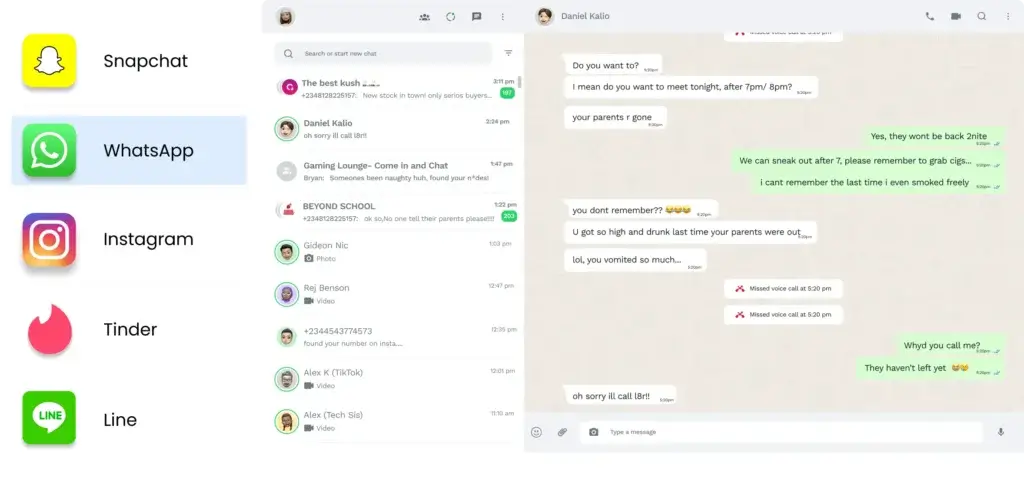
Social Media Monitoring
Going into social media monitoring, I was rather skeptical due to Xnspy’s claim to monitor 13+ chat platforms and have direct app access.
Upon testing, the apps’ claims to be correct, but I could not verify whether Xnspy had direct access to the apps in question. Nonetheless, I observed the app’s behavior when logging messages and found the performance to be consistent.
During the testing window, I did not come across missing logs and faulty functionalities. The logs I could see, however, only included a detailed list and chat view with message content, timestamps, and the other user’s name.
Having the username there, too, would have made it easier for parents to look up the concerned individual and identify any red flags.
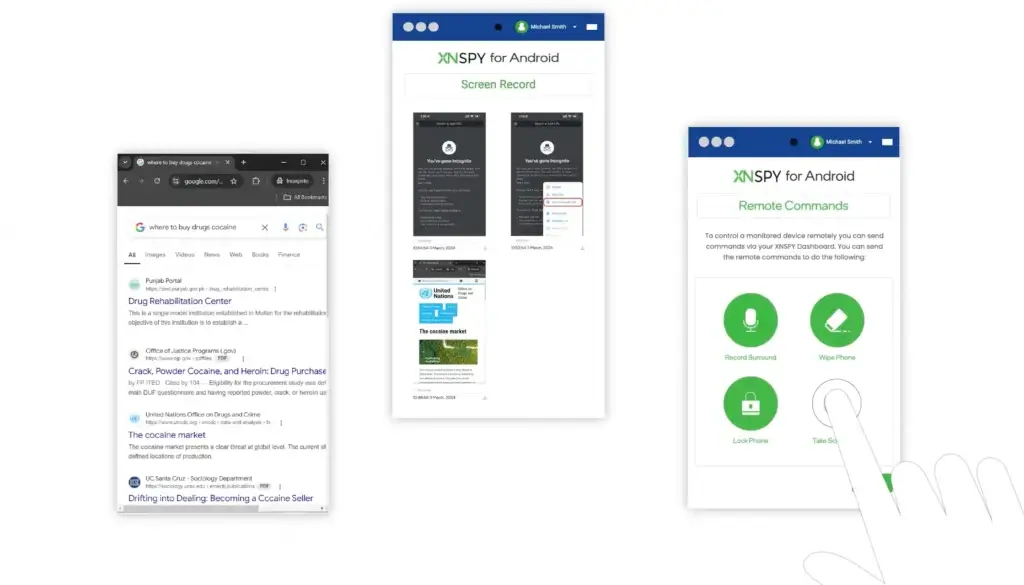
Screen Recording
To be honest, Xnspy’s screen recorder is more like a screenshot capture tool that takes snapshots every 5-10 seconds. When I went about testing it, apart from a few times where internet connectivity led to a few screenshots being missed, there were no major concerns.
Throughout a phone use session, it collected screenshots and then uploaded them within specific subcategories within the Screen Recorder on its dashboard.
All in all, I believe the screen recorder can be useful for parents of those 95% kids who use social media platforms since the logs provide visibility into the kind of content being consumed and interactions taking place outside of direct messages.
GPS Tracking
Xnspy also tracks the GPS location of the target phone. Upon checking this feature, I found both the phone’s live location and history in a list view and on a map interface.
The details included the exact location addresses, timestamps, the “See on Map button, and the location’s coordinates.
While testing location logs, I remained particularly mindful of the consistency of location updates. The results showed that all logs arrived on the dashboard quickly and were useful for quick checks.
But note that the overall value still came less from a single location and more from comparing where the device had been throughout the day.
Keylogger
While I understand that some parents really need features like the keylogger, I cannot help but mention that it is intrusive when used without a specific need.
Regardless, when I tested this feature, the app logged my keystrokes across browsers, apps, note apps, and even default phone apps.
As far as the functionality is concerned, it is nice, but the amount of data provided is something I could not move past. Even with the app and time filter offered, I think sifting through these activity logs can be difficult for parents.
Overall, if it included an analysis like the call logs, I would have appreciated it.
Screen Time
Kids’ and their need for entertainment through screens has become a monumental concern for parents because it has now reached above 8 hours a day for 41% of teens. To offer insights into time spent on the phone and specific apps, Xnspy has its screen time feature.
In total, the feature functioned very smoothly and collected time logs even for apps that were deployed momentarily on the phone.
Moreover, the data display was very systematic and insightful, even at first glance.
Remote Controls
Xnspy has 5 remote controls, i.e., app blocking, surround recording, ambient screenshot capturing, phone locking, and data wiping.
While I found that app blocking took a minute or two to take effect, the overall functionality was simple to understand; toggling the block button on made an app inaccessible.
Surround recording, on the other hand, was slightly hard for me to work through and even performed conditionally.
Upon executing the command, an error occurred because the phone was in a call, and then when I did record, the audio quality depended highly on where the phone was placed.
Moving on, Xnspy’s ambient screenshot capture feature lets me take a live screenshot of the phone, which I found a bit redundant given the depth of screen recording.
Though the two commands I found useful were the phone locking and remote wiping. For phone lock, I was able to activate it by changing the phone password directly from the dashboard, and it came into effect right afterward.
Remote wiping, while I believed to be helpful in instances of data breach and online scams, I could not test it due to the nature of the command.
Instant Alerts
On Xnspy, I found three types of alerts: keywords, contacts, and geofence.
Upon setting each alert for specific words, contacts, and locations, I received immediate updates via email when the flagged logs were detected, though it would have been better if they were integrated within the dashboard.
Nonetheless, the feature can be useful for insights that require a parent’s instant attention.
Compatibility
Device Compatibility and Setup
The single most important thing to understand about Xnspy is that it should be evaluated by platform first, feature list second.
Android and iPhone
In terms of compatibility, Xnspy runs well on Android 4.x through 16 and iOS through 17.0.3. While the app performed similarly on both platforms, during testing, it became evident to me that the feature range was slightly limited for iOS.
Setup
Moving forward, I found Xnspy’s setup to be rather straightforward. For the whole process, I had to choose a plan, install the app, set it up, and then log into the parental dashboard.
Overall, it took me about 10 minutes, most of which were spent granting permissions to ensure smooth functioning. Once done, the data began appearing on my dashboard within a few minutes.
But as is evident, non-tech-savvy parents should go through the installation process carefully, as missing any step can impact the app’s performance.
Pros and Cons
Advantages and Disadvantages
Positive
✅ A simple installation process
✅ Makes pattern recognition easier
✅ Performs consistently even when used daily
Negatives
❌ Some features feel intrusive
❌ A few remote commands only work conditionally
❌ Internet loss delays data syncing
Detailed below are the pros and cons of Xnspy.
✅ Pros
1. A simple installation process
XNSPY can track a wide range of phone activity, including calls, messages, locations, app usage, browsing activity, social media data, and multimedia files. This gives it more depth than many standard parental control apps.
2. Makes pattern recognition easier
Android is generally where XNSPY is most useful. If the monitored device is an Android phone, you are more likely to get the broadest feature coverage.
3. Performs consistently even when used daily
Location tracking and geofencing can help parents confirm a child’s whereabouts or help employers manage company-owned phones used by mobile teams.
❌ Cons
1. Some features feel intrusive
XNSPY gives deeper visibility than tools like Bark, Qustodio, or Norton Family. That may be useful in some cases, but it can also be too invasive for many families.
2. A few remote commands only work conditionally
If your goal is to guide a child’s online behavior while respecting privacy, Bark is usually a better fit. XNSPY is more direct and more surveillance-oriented.
3. Internet loss delays data syncing
XNSPY supports iOS, but Apple’s restrictions can limit available features. iPhone users should verify compatibility carefully before buying.
User Experience
Performance and User Experience
For a child monitoring app, performance and usability directly decide how helpful the tool can be for parents. Therefore, in addition to other functionalities, I also assessed Xnspy based on its dashboard and overall reliability during regular use.
Parent Dashboard
After installation, I believe the Xnspy dashboard is one of the more important parts of the product since it centralizes all the collected data. Overall, the control panel was user-friendly and well-organized. Not only that, but I also found all the buttons and app’s layout to be responsive.
Update Frequency
New activity updates appear on Xnspy’s dashboard in about a minute, but it can take longer if there is no internet connection or permissions are disabled.
Performance Consistency
Throughout the process, the app performed consistently, and I only had to momentarily face hiccups when there were issues with internet connectivity. All in all, there were no glitches, lags, missing logs, or misplaced entries.
Pricing
Pricing and Plans
Xnspy has a Basic and Premium plan with monthly, quarterly, and annual billing options.
XNSPY Pricing Overview
| Plan | Key Features | What It Is Best For |
| Basic | Call and SMS logs, contacts, browsing activity, location history, installed apps, and stored media | Parents who need insights into basic phone activity without advanced monitoring |
| Premium | Basic features alongside social media logs, alerts, screen recording, keylogging, and remote commands | Parents who want detailed monitoring and some control over the monitored phone |
Xnspy Basic Plan
The Basic plan is available at the following prices:
- Monthly: $29.99,
- Quarterly: $41.99, equivalent to $13.99 per month,
- Annually: $59.99, equivalent to $4.99 per month.
Xnspy Premium Plan
The Premium plan is available at:
- Monthly: $35.99,
- Quarterly: $59.99, equivalent to $19.99 per month,
- Annually: $89.99, equivalent to $7.49 per month.
Is Xnspy Worth the Price?
Xnspy offers significantly better value on its annual subscriptions, as the monthly plans cost considerably more over time.
Between the two tiers, Premium better represents what the app is designed to do because it provides the broader monitoring depth, alerts, and remote features that distinguish Xnspy from basic parental control apps.
However, neither plan may be worthwhile for families that only need screen time limits and basic device rules.
Feedbacks
User Feedback and Reviews
Parents’ feedback on Xnspy tends to vary depending on how much visibility they expect from the monitoring app. For example, parents who want detailed activity records mostly appreciate its depth, while those looking for simpler controls find the amount of information excessive.
👍 What Users Mostly Like About Xnspy
✅ Detailed monitoring across phone activity
Xnspy includes calls, messages, social media chats, browsing logs, locations, screenshots, and much more. Therefore, parents like the kind of access it offers.
✅ Stronger monitoring capabilities on Android
The app has more features available on Android, in comparison to the iPhone. As a result, parents monitoring an Android phone believe Xnspy offers a more complete experience.
✅ Organized dashboard and timely updates
Xnspy’s parental dashboard collects all new phone activity within a minute and makes it accessible to parents in one place, within their particular subcategory.
👎 Common User Complaints
❌ The iPhone experience is more limited
Although Xnspy supports both Android and iPhone, its monitoring capabilities are not identical across the two platforms. Therefore, parents using iOS do not have some features.
❌ Large amounts of data can become difficult to review
Detailed monitoring can result in extensive logs, particularly when using features such as screen recording and keylogging. As a result, parents need to spend time reviewing and interpreting the information.
XNSPY VS. Alternatives
Comparison with Other Parental Control Apps
Xnspy is best recognized for the amount of activity it records, but another parental control app may suit your family better if your priorities do not align with the app.
Bark – Best for risk-based alerts
Bark is a better fit for parents who want to be notified about potentially concerning content rather than review complete activity logs themselves.
Xnspy, however, is more suitable when parents want direct access to detailed calls, messages, screenshots, locations, and other activities rather than isolated activity alerts.
Qustodio – Best for parental controls
Qustodio is a solution best suited for families that only want screen time limits, app blocking, web filtering, and other parental controls.
However, when compared to Xnspy, it lacks the monitoring depth it offers.
Google Family Link – Best for free basic controls
Google Family Link is a viable option for families that want to manage their under-13-year-olds devices for free. The provided features include screen time management, app approval, permission adjustment, and general Android device supervision.
However, it is only appropriate for basic device management, not detailed supervision.
Which One to Choose?
Choose Xnspy if you want:
- Comprehensive monitoring
- Better support for recognizing patterns over time
- Access to alerts and remote commands
Choose Bark if you want:
- Risk-based alerts
- An app that focuses on a child’s online behavior
Choose Qustodio if you want:
- Screen time limits
- App blocking and web filtering
Choose Google Family Link if you want:
- A free Android-first option
- Basic phone management
Conclusion
Is XNSPY Worth It?
The short answer? Yes. The long one? Xnspy is worth considering for parents who want complete visibility into their child’s phone activity. However, for those who want to focus more on rules, there are better options available in the market.
Who Should Choose Xnspy?
Xnspy can be a good choice for:
- Parents who need visibility,
- Kids who use Android phones,
- Individuals who can afford the Premium plan.
Overall Rating
Features: 4.5/5
Xnspy offers extensive monitoring, alerts, and remote commands, although some features are more practical than others.
Ease of use: 4.5/5
While the dashboard is well-organized and highly responsive, the volume of logs can be a hassle to review.
Setup: 4.5/5
The overall installation process takes no more than 10 minutes, though permissions should be granted very carefully.
Value: 4/5
The annual Premium plan of Xnspy offers the best value for money since the monthly subscriptions are rather expensive.
Performance: 4.5/5
The app’s performance is consistent, with syncing delays only occurring when the phone is offline.
Overall rating: 4.4/5
Xnspy is a monitoring-focused solution built for parents who want to remotely access detailed activity insights.
Bottom Line
If I were to reduce the whole decision to one sentence, it would say that Xnspy child monitoring app is best for parents who want monitoring, not just rules.
Regardless, I need to mention that it is intended solely for legal use. Therefore, parents should monitor only children under 18 on devices they own, after a proper discussion with them.
Apart from the app’s legality, given the level of detail provided, parents must use these insights responsibly and only with the intent of family safety. To replace this with conversation is something I will never recommend.
FAQs
Have more questions?
Can Xnspy work if the target phone is offline?
Yes, Xnspy can continue to work on the target phone even when it is offline and then upload all collected activity to its dashboard once the internet connection is restored.
How often does Xnspy update the dashboard?
New activity updates appear on Xnspy’s dashboard in about a minute, but it can take longer if there is no internet connection or permissions are disabled.
Can Xnspy monitor deleted messages?
When an activity occurs on the target phone, it appears immediately on the Xnspy dashboard. Therefore, even if a message is later deleted by the child, it remains visible to the parent.
Does Xnspy affect phone battery life?
Xnspy is low-resource-intensive, which means it does not consume much of the target phone’s battery.
Can one Xnspy account monitor multiple phones?
Xnspy plans are tied to device licenses, so parents who want to monitor more than one child’s phone have to purchase separate subscriptions.
Is Xnspy better than basic parental control apps?
Whether Xnspy is better than a basic parental control app depends entirely on the parent’s specific needs. It can be better for parents who need detailed monitoring, while basic parental controls can prove more helpful for families that only want to reinforce rules.
Is Xnspy worth buying?
Xnspy can be worth paying for only if your goal is to get complete visibility into your child’s offline and online activities.
Does Xnspy work better on Android or iPhone?
While Xnspy works well on both, it offers slightly more features for Android when compared to iPhone. Therefore, it is more worthwhile for Android phones.
Is Xnspy easy to install?
Xnspy is easy to install, with the whole process taking less than 10 minutes. However, the only complication is the requirement to carefully grant all permissions since not doing so might result in a less smooth experience with the app.
Is Xnspy legal to use?
Yes, Xnspy is legal and intended only for lawful monitoring of kids. If you own the target phone or want the app for children you are allowed to supervise, there is no problem in employing it. However, it is always recommended that you consult with your local law to ensure compliance.