
Introduction
Choosing the right parental control app is no longer just about setting screen time limits. You need a tool that can help you monitor risky digital behavior, block inappropriate content, manage device use, and stay informed without turning parenting into full-time surveillance.
That’s where Bark comes in.
Bark has become one of the most recognized parental control platforms for families that want a better balance between safety and trust. Instead of showing you every message your child sends, Bark uses AI-powered monitoring to scan texts, email, social media, web activity, and other digital interactions for signs of serious issues like cyberbullying, predators, self-harm, explicit content, or threats.
In this Bark review, you’ll get a complete breakdown of:
- How Bark works and what makes it different from traditional parental control apps
- What Bark can monitor on Android, iPhone, computers, and tablets
- How Bark Jr, Bark Premium, Bark Phone, and Bark Watch compare
- What Bark does well, where it falls short, and who it is best for
- Whether Bark is worth the price in 2026
If your goal is to protect kids online without reading every private message, Bark has one of the most distinctive approaches in this category.
It is especially relevant for families with tweens and teens, where online safety risks often come from social media, DMs, search behavior, and risky conversations rather than just too much screen time.
Whether you are trying to manage a younger child’s device habits or protect an older child from more serious online risks, this review will help you decide if Bark is the right fit for your family.
If you are still comparing options, you can also link this article to your broader guide to the best parental control apps and related reviews for tools like Qustodio, Google Family Link, and Aura.
Let’s dive into the details.
Overview
Bark Overview
Bark is a family safety platform built around alert-based parental monitoring. Instead of letting you read everything your child does online, it scans for potentially serious risks and sends alerts only when something needs attention.
That approach is what makes Bark different from many other parental control apps. It is not designed to act like a hidden spy tool. It is designed to help you step in when there is a meaningful risk, while still allowing your child some privacy.
Bark App
The Bark app is the company’s main software product. It adds monitoring and parental controls to your child’s existing devices and is available in two main tiers:
- Bark Jr – entry-level controls for screen time, filtering, and location features
- Bark Premium – full Bark experience with alerts, monitoring, screen time, blocking, and location tools
For most families reading this review, Bark Premium is the plan that matters most because it gives you access to Bark’s full monitoring system.
Bark Phone
Bark also offers its own kid-safe smartphone line. The Bark Phone has Bark built directly into the device, which means it is harder for kids to remove or work around than a regular phone running a third-party app.
That makes it a stronger option for parents who want tighter controls, approval settings, and a more tamper-resistant setup.
Bark Watch
The Bark Watch is a standalone device for younger kids who may not be ready for a full smartphone. It adds talk and text, GPS-related features, emergency options, and parental controls in a simpler wearable format.
For many families, it works as a bridge between no device and a first phone.
Who Bark Is Best For
Bark is best for parents who want:
- Monitoring for serious risks, not full message-by-message spying
- Parental controls across multiple devices in one household
- Good coverage for social media, texts, email, and web activity
- A better fit for tweens and teens than basic screen time tools alone
It is especially compelling if your child uses Android, because Bark’s monitoring depth is generally stronger there than on iPhone.
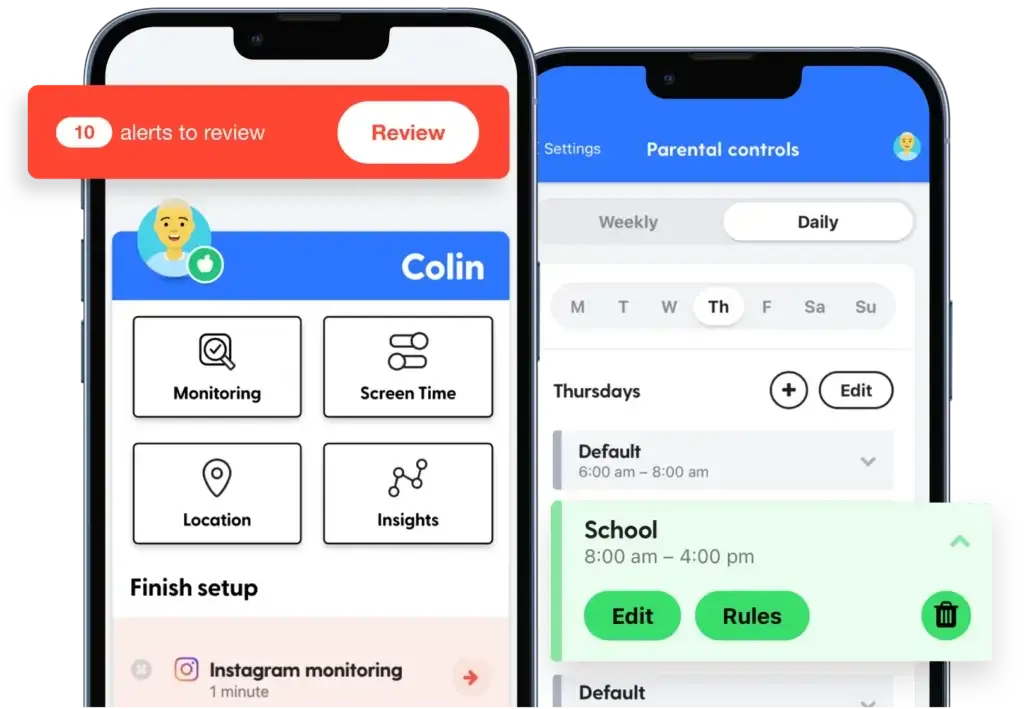
Software Specification
How Bark Works and What Makes It Different
Bark’s biggest differentiator is its monitoring philosophy. Most parents do not actually want to read every conversation their child has. What they want is early warning when something potentially dangerous is happening.
That is what Bark is built to do.
AI-Powered Alerts Instead of Full Surveillance
Bark scans your child’s digital activity using machine learning and sends alerts when it detects issues such as:
- Cyberbullying
- Online predators
- Self-harm or suicidal ideation
- Violence or threats
- Drugs, sexual content, and other risky behavior
Instead of giving you unrestricted access to everything, Bark highlights what may require a closer look. For many parents, this feels more practical and more respectful than a full surveillance model.
Monitoring Across Apps, Text, Email, and Browsers
Bark Premium is built to monitor texts, email, YouTube, web searches, photos and videos, and 30+ apps and platforms. That is one of the reasons it stands out in the parental control category.
Its broader monitoring coverage is especially useful if your main concern is what happens inside social apps and private conversations, not just how long a screen is being used.
Screen Time, Blocking, and Location Tools
Bark is not just a monitoring tool. It also includes more traditional parental controls, such as:
- Screen time schedules
- App blocking
- Website filtering
- Location alerts and check-ins
That means Bark can cover both sides of digital parenting. It helps you manage day-to-day device use, and it helps you spot higher-risk issues before they escalate.
Why This Approach Works Well for Families
If you are parenting an older child, full surveillance can damage trust quickly. Bark’s model is more balanced. You still get visibility into serious issues, but you are not expected to monitor every harmless conversation.
That makes Bark one of the better parental control apps for families who want safety guardrails without turning the parent-child relationship into constant monitoring.
Software Capabilities
Core Features and Parental Controls
Bark combines AI-powered monitoring with traditional parental controls. That mix is what makes it a serious option for families, especially once kids start using messaging apps, social platforms, and search more independently.
Monitoring Alerts for Serious Risks
Bark’s strongest feature is still its alert system. It scans for issues that most parents care about most, including bullying, predators, explicit content, depression-related language, and threats.
This is where Bark often feels more advanced than basic parental control apps that mostly focus on blocking websites and timing device access.
Screen Time Management
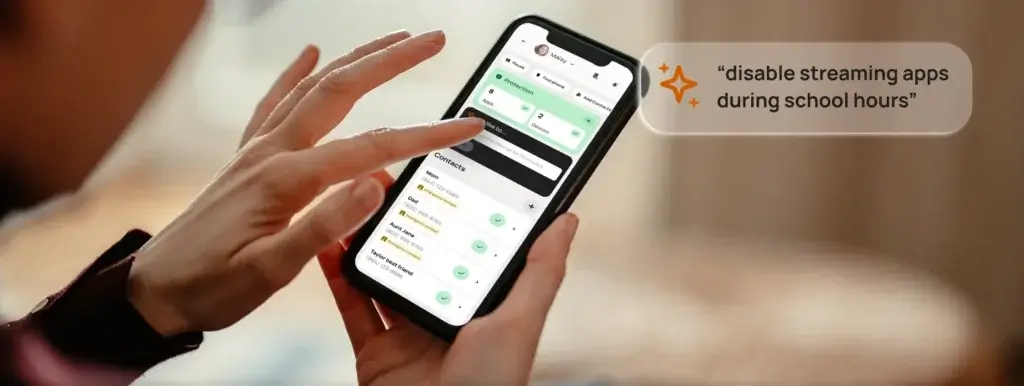
Bark lets you create schedules and limits to manage how and when devices can be used. This is useful for:
- Bedtime device shutdowns
- Homework hours
- School-day restrictions
- General limits for younger kids
If you are moving from built-in phone controls to something more flexible, Bark gives you more family-focused control without becoming overly complicated.
Website and App Blocking
Bark includes web filtering and app blocking, which helps parents reduce exposure to inappropriate or distracting content. This is one of the areas where Bark Jr can still be useful for younger kids, even if you do not need the full monitoring depth of Bark Premium.
For parents with elementary-age kids, this can be enough to cover the basics before social media monitoring becomes a bigger priority.
Location Alerts and Check-Ins
Bark also includes family safety features that help you track where your child is and receive notifications for key locations. This works well for parents who want arrival and departure alerts for school, home, or other important places.
Location tools are helpful, but they are not really the reason to buy Bark. The main reason to choose Bark is still digital monitoring and online safety alerts.
Bark Phone Exclusive Advantages
The Bark Phone adds features that go beyond the standard app experience, including:
- Contact approvals
- App install approvals
- Remote alarms
- Daily screen time limits
- Tamper-resistant settings
If you want stronger enforcement and fewer workarounds, Bark Phone is more compelling than installing Bark on a standard child smartphone.

Compatibility
Device Compatibility and Setup
Device compatibility is one of the most important parts of any Bark review. This is where many parents make the right or wrong buying decision.
Bark works across a broad range of devices, but the setup and monitoring depth vary by platform.
Android
Android is generally Bark’s strongest platform.
If your child uses Android, Bark can usually deliver the most complete experience, including monitoring, screen time, app management, content filtering, and location tools. This is the platform where Bark is most competitive against other parental control apps.
iPhone and iPad
Bark can work on iPhone and iPad, but iOS is more limited because of Apple’s system restrictions.
Parents should pay attention here. For deeper iOS monitoring, Bark may require the Bark Kids app plus a Windows or Mac desktop app, or Bark Home as an alternative for certain monitoring workflows. That makes iPhone setup less convenient than Android for many households.
If your family is mostly on iPhone, Bark can still be useful, but you should not expect the same coverage and simplicity you would get on Android.
Windows, Mac, and Chromebook
Bark also works with computers and Chromebooks, which is useful because kids often move between phones, laptops, tablets, and school devices.
Computer coverage helps Bark feel more like a family ecosystem and less like a single-device solution.
Amazon Fire and Bark Home
Bark supports Amazon Fire tablets and also offers Bark Home for in-home filtering and monitoring support on compatible networks and devices. This gives families extra flexibility if their setup includes shared home devices or iOS households that need more support.
Setup Difficulty
Setup is not overly difficult, but it does require more attention than a basic screen time app, especially if you are working with iPhones. If you want the easiest possible setup, Bark Phone is often the cleaner route.
If you want the strongest monitoring on devices your child already owns, Android is the smoother path.
Pros and Cons
Advantages and Disadvantages
Positive
✅ Excellent monitoring for serious online risks
✅ Strong coverage across apps and messages
✅ Good balance between safety and privacy
✅ Useful screen time, blocking, and location tools
Negatives
❌ iPhone setup and monitoring are more limited
❌ Not ideal for parents who want complete tracking
❌ Some families may find the alerts noisy
❌ Best value depends on your household setup
Before choosing any parental control app, it is important to weigh both the strengths and the trade-offs. Bark has a clear point of view, and that helps it stand out, but it also means it will not fit every family equally well.
✅ Pros
1. Excellent monitoring for serious online risks
Bark is stronger than many parental control apps when it comes to alerts around bullying, explicit content, predators, threats, and other high-priority issues. That is the main reason many families choose it.
2. Strong coverage across apps and messages
Bark’s monitoring breadth is one of its biggest advantages, especially on Android. It covers far more than just browser usage or total screen time.
3. Good balance between safety and privacy
Bark is not designed to expose every harmless message. For many parents, that makes it easier to protect children without crossing into constant spying.
4. Useful screen time, blocking, and location tools
Screen time controls, website blocking, app blocking, and location alerts give Bark more day-to-day usefulness than a monitoring-only app would have.
❌ Cons
1. iPhone setup and monitoring are more limited
Bark can still work on iPhone and iPad, but the setup is less seamless and the monitoring experience is not as comprehensive as it is on Android.
2. Not ideal for parents who want complete tracking
Bark’s philosophy is built around alerts, not full visibility. If you want total browsing history, constant live surveillance, or access to every conversation, another tool may suit you better.
3. Some families may find the alerts noisy
Because Bark scans aggressively for potential issues, some parents may feel that the alerts require tuning over time before they become fully useful.
4. Best value depends on your household setup
Bark becomes much more compelling when the devices and age range in your home match what it does best. It is not a one-size-fits-all winner for every family.
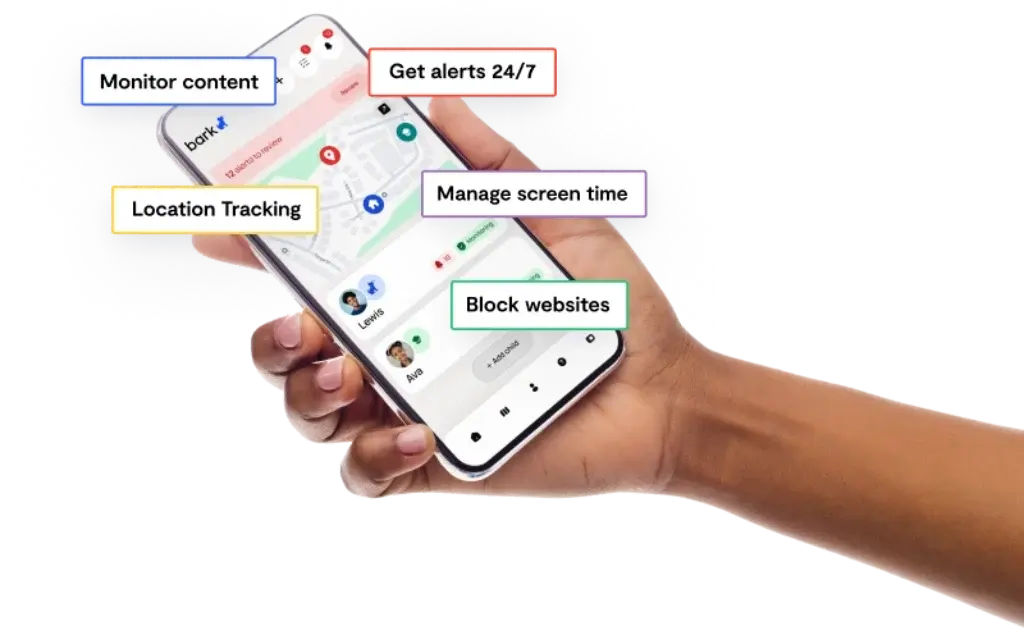
User Experience
Performance and User Experience
Bark’s interface is one of the reasons it remains popular. The platform is built for parents, not IT administrators, and that matters a lot in this category.
Parent Dashboard
The parent dashboard is generally clean and easy to navigate. You can review alerts, manage rules, check recent activity, and update settings without feeling buried in technical menus.
That simplicity is important because parental control tools often fail when they are too complicated for everyday use.
Alert Experience
Bark’s alerts are designed to show you what needs attention without flooding you with every small detail. In practice, the usefulness of alerts depends on your child’s age, device type, and how you tune your settings over time.
For the right family, the alert system is a major strength. For the wrong family, it may feel too selective or occasionally too noisy.
Setup and Ongoing Management
Once Bark is configured correctly, day-to-day management is relatively easy. The bigger challenge is the initial setup, especially if your child uses an iPhone and you need a desktop app or Bark Home to expand monitoring.
Android households will usually have the smoother experience.
How It Feels in Daily Use
Bark works best as a background family safety tool. You set the rules, review alerts, and make changes when needed. It is not the kind of app you need to constantly babysit.
That makes it more realistic for busy parents than products that require frequent manual checking.
Pricing
Pricing and Plans
Bark’s pricing is easier to understand than many family software products, but it is still worth breaking down clearly because the company now sells both app subscriptions and hardware-based products.
Bark App Plans
Bark’s software app comes in two core tiers.
| Plan | What You Get | Best For |
| Bark Jr | Screen time controls, website filtering, location tools | Younger kids who need basic device management |
| Bark Premium | Monitoring alerts, screen time, app blocking, web filtering, location tools | Families who want the full Bark experience |
Bark Premium is the real value plan for most review readers. Bark Jr makes more sense if your child is still young and you mainly care about managing access and limits rather than monitoring social and messaging risks.
Bark App Pricing
- Bark Jr – $5/month or $49/year
- Bark Premium – $14/month or $99/year
- Both plans include a 7-day free trial
- One subscription covers every child and device in your family
The unlimited family coverage is one of Bark’s stronger pricing advantages, especially for households with multiple kids.
Bark Phone Pricing
Bark Phone pricing has two parts: the device payment and the required wireless plan.
- Bark Phone – $10/month for 24 months for the device
- Bark Phone Pro – $25/month for 24 months for the device
- Starter wireless plan – $29/month
- Advanced wireless plans – from $39/month to $79/month depending on data
The wireless plan includes a Bark Premium subscription for the entire family, which improves the overall value if you have more than one child.
Bark Watch Pricing
The Bark Watch costs $22/month total, which includes:
- $7/month device installment over 24 months
- $15/month for cell service and parental controls
This is not the cheapest route, but it can make sense if you want a first connected device without handing over a full smartphone.
Is Bark Worth the Price in 2026?
If you only need simple screen time limits, Bark may feel like more than you need.
If you want a parental control app that can monitor real digital risks across apps, texts, email, and browsers, Bark’s pricing is quite reasonable, especially because the family subscription is not limited by the number of kids or devices.
In my view, Bark Premium is the most compelling offer in the lineup. Bark Phone becomes more attractive when you want stricter control, and Bark Watch makes the most sense for younger kids who are not ready for a smartphone.
Feedbacks
User Feedback and Reviews
Bark is generally well regarded by parents who want smarter digital safety alerts rather than a full spy-style monitoring experience. That said, the same qualities that some parents love can frustrate others.
👍 What Users Tend to Like
✅ Strong monitoring across modern apps
Bark stands out because it is built around the platforms kids and teens actually use. That makes it feel more relevant than parental controls that mostly focus on website blocking.
✅ More trust-based than covert monitoring tools
Many parents appreciate that Bark does not require them to read every conversation. It can feel more ethical and more sustainable for older kids.
✅ Good value for multi-child households
Since one subscription covers all children and devices in the family, Bark can offer better value than tools that price by device or by child.
✅ Bark Phone strengthens the ecosystem
Families that want a more controlled experience often see Bark Phone as a meaningful upgrade because it reduces workarounds and simplifies enforcement.
👎 Common Complaints
❌ iPhone limitations come up often
This is one of Bark’s most repeated pain points. Parents using Apple devices may feel the experience is less complete than the marketing suggests, especially compared with Android.
❌ Some alerts may feel too broad
Bark’s monitoring can occasionally surface alerts that parents later decide are not serious. That means the app may require some patience and adjustment at the start.
❌ Not the right fit for parents who want total visibility
Some families want more direct access to browsing history, messages, and constant tracking. Bark’s approach intentionally does not go all the way in that direction.
Bark VS. Alternatives
Comparison with Other Parental Control Apps
Bark is one of the strongest parental control apps for message monitoring and risk alerts, but another tool may be a better fit depending on your family’s priorities.
Qustodio – Better for Traditional Controls
Qustodio is often the better choice if your top priority is structured screen time control, web filtering, and a more traditional parental control dashboard.
Bark is stronger if your main concern is risky conversations, social media behavior, and AI-based alerts.
Google Family Link – Better for Free Basic Controls
Google Family Link is useful if you want a free, simple way to manage Android devices. It is not nearly as advanced as Bark for monitoring risk across texts, email, and social platforms, but it can still work for basic family management.
Bark is the stronger product if you need more than just app approvals and screen time rules.
Aura – Better for Families Wanting Broader Digital Safety Bundles
Aura may appeal more if you want parental controls bundled with identity protection, antivirus, and broader household digital safety features.
Bark is usually the better choice if your core focus is child monitoring and alert-driven parental controls rather than a broader family security suite.
Who Bark Beats Most Clearly
Bark is most compelling when:
- Your child uses social media, messaging apps, and YouTube often
- You care more about warning signs than about spying
- You want one subscription for multiple children and devices
- You are open to Android or Bark Phone for stronger coverage
Conclusion
Is Bark Worth It?
Bark is one of the most distinctive parental control platforms on the market in 2026. It is not trying to be the most invasive surveillance app, and it is not trying to win only on screen time features. Its real strength is helping families catch serious problems early while still allowing some trust and independence.
For the right family, that approach works extremely well.
Bark is especially strong if you want:
- Monitoring for texts, social apps, email, and risky digital behavior
- Screen time, app blocking, and website filtering in the same platform
- Family-wide coverage under one subscription
- A better fit for tweens and teens, not just younger kids
It is less compelling if you want:
- Full surveillance and complete browsing histories
- The simplest possible iPhone-only experience
- A cheap tool focused only on basic time limits
Who Should Choose Bark
You should seriously consider Bark if your child is active online and you want better visibility into meaningful risks without reading every private conversation.
In my view, Bark Premium is the best place to start for most families. Bark Jr works for younger kids, Bark Watch is useful as a first connected device, and Bark Phone is the strongest choice if you want more built-in control and fewer loopholes.
Overall Rating
Features: 4.5 / 5
Excellent for monitoring and family safety, especially for social and messaging risks.
Ease of Use: 4.2 / 5
Clean parent experience, though setup can be more demanding on iPhone.
Value: 4.4 / 5
Strong pricing for multi-child households, especially with Bark Premium.
Overall: 4.4 / 5
One of the best parental control apps for families who want smart alerts, not constant spying.
Bottom Line
If your main goal is to protect kids from the kinds of online risks that actually matter today, Bark is a strong choice. It combines modern monitoring, practical parental controls, and a more balanced philosophy than many competing apps.
It will not be perfect for every device setup, and Android users still get the better overall experience. But for many families, Bark is one of the smartest parental control tools you can buy in 2026.
FAQs
Have more questions?
Is Bark worth it for parents?
Yes, especially if your main concern is risky online behavior rather than just screen time. Bark is most valuable when you want alerts about serious issues like bullying, predators, or explicit content.
What is the difference between Bark Jr and Bark Premium?
Bark Jr focuses on basic parental controls like screen time, website filtering, and location features. Bark Premium adds Bark’s full monitoring and alert system, which is what most families want from the platform.
Does Bark work on iPhone?
Yes, but Bark is generally more limited on iPhone than on Android. Some iPhone monitoring setups also require a desktop app or Bark Home for deeper coverage.
Does Bark work better on Android?
Yes. Android usually gives Bark its most complete monitoring and control experience, which is why many reviews consider it Bark’s strongest platform.
Does Bark read all of my child’s messages?
No. Bark scans content for issues and sends alerts when something potentially concerning is detected. It is not designed to show you every harmless message or conversation.
Can Bark block apps and websites?
Yes. Bark includes app blocking, website filtering, and screen time tools in addition to its monitoring features.
How much does Bark cost?
Bark Jr costs $5/month or $49/year, and Bark Premium costs $14/month or $99/year. Bark also offers Bark Phone and Bark Watch with separate device and service pricing.
Is Bark good for younger kids?
Yes, especially Bark Jr or Bark Watch. These options make sense for younger children who need basic controls and safety features without a full smartphone experience.
Is Bark good for teenagers?
Yes. Bark is especially useful for tweens and teens because it focuses on the types of risks that become more relevant as kids start using messaging apps, social platforms, and search more independently.
Is Bark better than Qustodio?
That depends on your priorities. Bark is better for alert-based monitoring and digital risk detection, while Qustodio is often better for more traditional screen time and web control workflows.