
Introduction
Why families need broader online protection
Choosing the best online protection software for families is no longer just about installing antivirus software on one laptop. Your household likely uses phones, tablets, laptops, shared browsers, streaming devices, and school or work accounts every day. That creates more entry points for phishing, scam texts, malicious downloads, account takeovers, and inappropriate content.
This is why family online protection now sits at the intersection of scam prevention, identity monitoring, safe browsing, and parental controls. A strong family security tool should help you block dangerous links before someone clicks, alert you if personal data appears in a breach, and make it easier to manage protection across multiple devices.
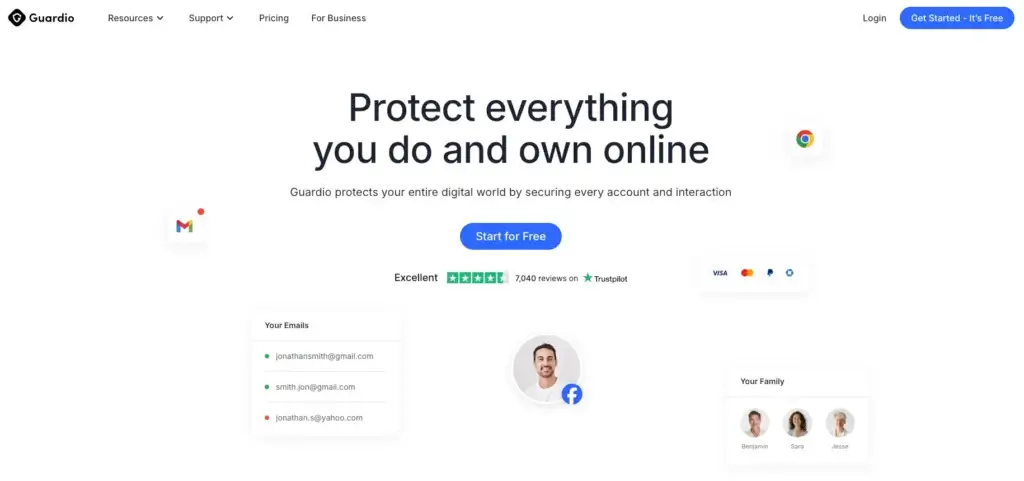
For this specific angle, Guardio stands out as one of the strongest options. It is not a traditional antivirus suite, and that limitation matters. But for families that want practical protection against phishing, scam messages, harmful sites, and account exposure across mobile and desktop, Guardio is one of the most relevant tools on the market. Its Duo and Family plans make it especially easy to position as a household safety solution rather than a purely technical cybersecurity product.
That said, it should not be the only tool you consider. Some families need heavier device-level security, while others care more about child monitoring, credit protection, or parental controls. This guide compares the best online protection software for families so you can choose the right fit for your household.
What we looked for
To rank the tools in this guide, I focused on the features that matter most for families, not just individual power users. That includes scam and phishing protection, identity or breach alerts, multi-device coverage, ease of setup, family-friendly pricing, and child safety features where relevant.
- Scam, phishing, and malicious website blocking
- Coverage for parents, kids, and shared devices
- Identity monitoring or breach alerts
- Parental controls or child safety tools
- Value for households, not just single users
Best online protection software for families
| Tool | Best For | Why It Stands Out |
| Guardio | Everyday family scam protection | Strong phishing, scam, and browsing protection across mobile and desktop |
| Aura | Identity protection for households | Combines device security, fraud monitoring, and family identity coverage |
| Norton 360 Deluxe | Full device-level protection | Traditional antivirus, VPN, parental controls, and dark web features |
| Bark | Monitoring kids’ digital activity | Deep visibility into texts, social media, and online behavior |
| Qustodio | Parental controls and screen time | Strong app controls, web filtering, routines, and family location tools |
| Bitdefender Family Pack | Large multi-device households | Robust antivirus coverage with a strong security reputation |
If your goal is to protect your family from the kinds of threats they are most likely to face every day, fake sites, scam texts, phishing messages, malicious downloads, and exposed accounts, Guardio is the most natural first recommendation. If your priority is broader device security or stronger parental controls, Aura, Norton, Bark, and Qustodio are all worth serious consideration.
Guardio

Why Guardio ranks first
Guardio earns the top spot because it aligns closely with what many families actually need help with. Most households are not dealing with advanced malware infections every week. They are dealing with fake delivery texts, phishing emails, scam websites, unsafe search results, suspicious pop-ups, and account exposure. Guardio focuses directly on those risks.
That focus makes it easier to recommend in a family context than in a pure antivirus roundup. The platform is built around safer browsing, scam prevention, breach alerts, and account protection across devices. Guardio also offers Duo and Family plans, which help you protect more than one person without managing separate subscriptions.
Key features and strengths
Guardio’s premium plans include scam and phishing protection, data leak alerts, account security insights, and 24/7 support. The company’s pricing page also highlights coverage for mobile and desktop, which is important for households that move between phones and laptops all day.
Another point in Guardio’s favor is accessibility. It is easier for non-technical users to understand than many traditional antivirus suites. You do not need to think in terms of scan engines, firewalls, or quarantine logs. Instead, the product is framed around keeping everyday digital life safer, which is a better fit for many families.
Guardio’s mobile app is available on iOS and Android, and its help documentation specifically supports text message filtering and family-member management on eligible plans. That gives it more household relevance than older browser-only positioning might suggest.
Where Guardio is limited
Guardio is still not a full antivirus suite. If you want deep system scans, ransomware remediation, firewall controls, or a bundled VPN, you will get more from Norton or Bitdefender. That matters if your family shares Windows PCs, downloads a lot of files, or wants an all-in-one security stack.
Still, for the specific search intent behind “best online protection software for families,” Guardio is one of the cleanest recommendations because it addresses the threats most families encounter most often.
Best for
Guardio is best for families who want simpler, modern protection against phishing, scams, malicious sites, suspicious texts, and exposed accounts across multiple devices.
Positive
✅ Browser-first protection
✅ Strong phishing defense
✅ Helpful extension monitoring
✅ Good fit for families
Negatives
❌ Not a full antivirus suite
❌ Fewer bundled extras
❌ Best as a browser layer
❌ Less ideal if you want deep device tools
Aura

Why Aura is a top family choice
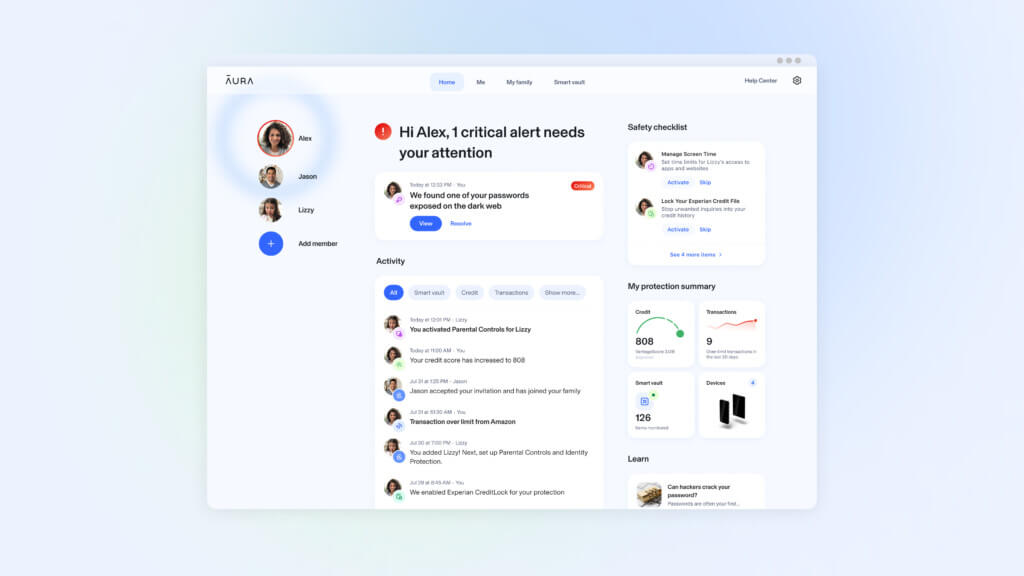
Aura is one of the strongest alternatives if your idea of online family protection goes beyond phishing and browsing safety. Its family offering is built around identity theft protection, financial fraud monitoring, device security, and parental controls. That makes it broader than Guardio, though also more expensive and more identity-focused.
Aura’s family plan is designed for up to five adults and unlimited children, and the company positions it around identity and credit monitoring, unlimited device security, advanced parental controls, and up to $5 million in identity theft insurance. For families worried about fraud, credit misuse, or account takeovers, Aura brings more depth than most antivirus-first tools.
Key features and strengths
The main reason to choose Aura is coverage breadth. You are not just getting safer devices. You are also getting a family identity protection layer, which becomes more important if you are managing finances, shared accounts, or children’s personal information online.
Aura also offers a dedicated parental controls product with screen time limits, website and app blocking, and real-time alerts about risks like cyberbullying or predators in online games. That makes it one of the better hybrid options if you want both household cybersecurity and child online safety in one ecosystem.
Who should choose Aura
Aura is best for families who want identity protection, device security, and parental controls under one subscription, and are comfortable paying more for a broader all-in-one platform.
Positive
✅ Up to 5 adults plus kids
✅ Strong identity protection
✅ Device security included
✅ Useful parental controls
Negatives
❌Higher price point
❌ More than some families need
❌ Less focused on browser scams than Guardio
❌ Best value is in family tiers
Norton 360 Deluxe

Why Norton still matters
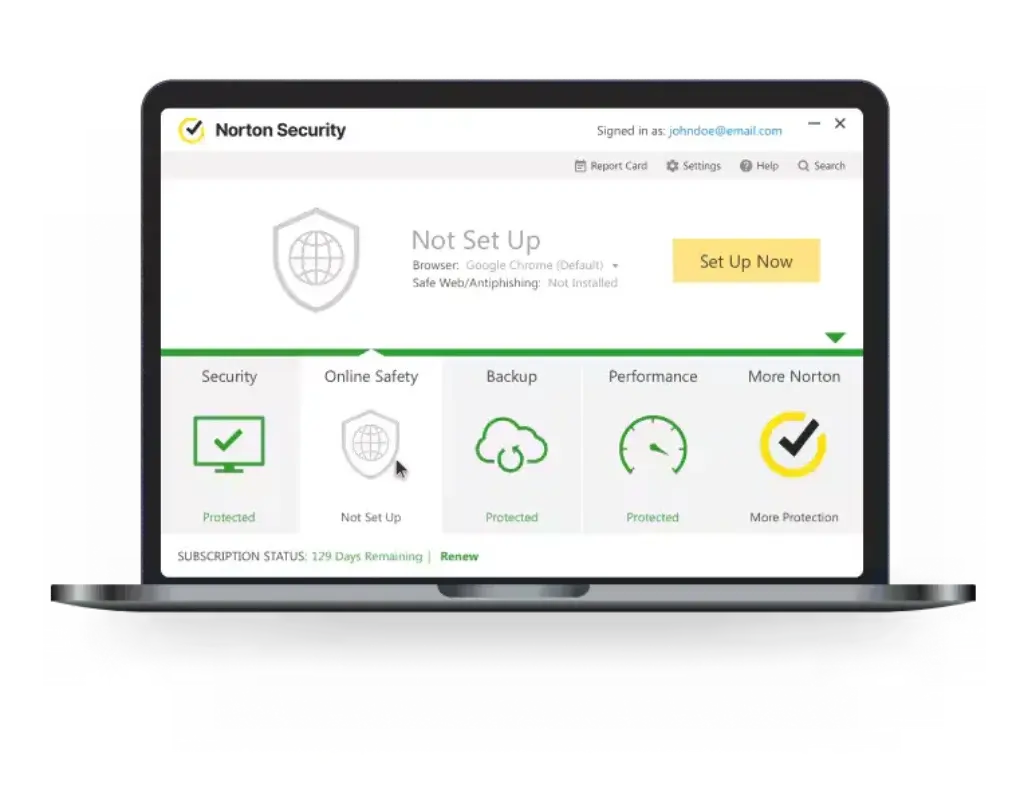
Norton 360 Deluxe is the strongest option here if you want a more traditional security suite. It protects up to five devices and includes features like Secure VPN, parental controls, and cloud backup. This is the right direction if your family uses shared Windows PCs, downloads files regularly, or wants stronger device-level coverage than Guardio can offer.
Norton’s biggest advantage is breadth. It covers the browser risks that Guardio focuses on, but it also adds classic antivirus capabilities, which many households still need. That matters if you want one subscription that feels more comprehensive out of the box.
Key features and strengths
Norton 360 Deluxe is positioned as multi-layer protection for multiple devices, with VPN, scam protection, and parental controls. Norton also supports monitoring and management across Windows, Mac, iOS, and Android, which makes it more flexible for mixed-device households.
The tradeoff is complexity. Norton is more feature-heavy, more like a classic security suite, and sometimes less elegant for users who mainly want scam prevention without all the extra security terminology.
Who should choose Norton
Norton is best for families who want full antivirus coverage, device scans, VPN access, and parental controls in one product, especially in homes with several PCs and a mix of desktop and mobile usage.
Positive
✅ Strong full-device protection
✅ Includes VPN
✅ Includes parental controls
✅ Great for mixed-device homes
Negatives
❌Heavier than Guardio
❌ More complex UI
❌ Renewal pricing can climb
❌ More than some casual users need
Bark


Why Bark belongs in this list
Bark is not a Guardio replacement in the traditional sense, but it absolutely belongs in a family online protection list. It is built for a different layer of the problem: helping parents monitor risky digital behavior, conversations, and content exposure.
Bark scans texts, emails, web activity, and more than 30 apps and platforms. It also offers alerts for issues such as cyberbullying, predators, suicidal ideation, and other high-risk content categories. For parents of tweens and teens, that type of monitoring can be more valuable than another antivirus dashboard.
Where Bark fits best
Bark works best as a child-safety layer, not as your only family cybersecurity product. It is most effective when paired with a broader tool such as Guardio, Norton, or Aura. That way, one product helps block scams and malicious sites, while Bark helps you understand how your children are actually interacting online.
If your biggest concern is not malware but what your kids may encounter, share, or receive online, Bark is one of the strongest options available.
Positive
✅ Deep child monitoring
✅ Strong alerts across apps
✅ Helpful for tweens and teens
✅ Includes screen time tools<
Negatives
❌Not a full cybersecurity suite
❌ Less useful for adult-only households
❌ Best as a companion tool
❌ More parenting-focused than security-focused
Qustodio


Why Qustodio is worth considering
Qustodio is one of the strongest parental control platforms for families who want more structure and device rules. Its feature set includes content and app filtering, activity monitoring, time limits, routines, location tools, call and SMS tracking, and AI-powered alerts for concerning behavior in searches and supported social channels.
Compared with Bark, Qustodio is often the better choice if your main goal is control rather than deep monitoring. It gives you more of the operational side of family digital safety: what can be used, when it can be used, and how long it can be used.
Who should choose Qustodio
Qustodio is best for families with younger children or families that want a stronger structure around device use, app access, location, and web filtering. It is also one of the easiest tools to understand if you are coming at this from a digital well-being angle instead of a cybersecurity angle.
Positive
✅ Excellent parental controls
✅ Great screen time tools
✅ AI alerts supported
✅ Family location features
Negatives
❌Not a full cybersecurity suite
❌ Not a replacement for antivirus
❌ Less focused on scam blocking
❌ Better for child safety than family-wide security
How to choose the right online protection software for your family
The right tool depends on what kind of risk you are actually trying to reduce. If your family mainly needs help avoiding scams, phishing links, fake sites, and suspicious messages, Guardio is the most direct fit. It solves the problem most households face most often, and it does it in a way that is easy to understand and easy to deploy.
If you want broader protection that includes identity theft monitoring, device security, and stronger household-wide coverage, Aura is the better fit. If you want a classic all-in-one security suite with parental controls and VPN access, Norton makes more sense.
If your top concern is your kids’ digital behavior, Bark and Qustodio are better answers than either Guardio or Norton alone. Bark is stronger for behavioral monitoring, while Qustodio is stronger for controls, routines, and screen time management.
That is why Guardio works so well as the lead recommendation in this article. It is the most consumer-friendly answer for families looking for modern online protection, while the other tools support more specific or more advanced household needs.
Guardio vs Aura vs Norton for families
If you narrow the decision to three tools, Guardio, Aura, and Norton cover the three most common household priorities.
Choose Guardio if you want a lightweight, practical solution focused on scam blocking, phishing protection, breach alerts, and safer browsing for the whole family.
Choose Aura if you want stronger identity protection, credit-related coverage, and a more complete family safety stack that includes parental controls.
Choose Norton if you want full antivirus, device-level protection, VPN, and a more traditional security suite that covers more technical threats.
| Category | Best Pick | Why |
| Everyday family scam protection | Guardio | Most relevant protection for phishing, scam messages, and unsafe sites |
| Identity and fraud protection | Aura | Broader family coverage for adults and children |
| Full antivirus and device security | Norton | Best for households that want a classic all-in-one suite |
Conclusion
The best online protection software for families is the one that matches the risks your household actually faces. For most families, those risks are no longer limited to old-school viruses. They are phishing texts, fake shopping sites, harmful downloads, account exposure, and unsafe online behavior across mobile and desktop devices.
That is why Guardio earns the top recommendation in this roundup. It speaks directly to the modern family threat model. It is easy to set up, easy to understand, and focused on the threats ordinary households encounter every day. It does not try to be everything, and that is part of why it works so well.
Still, the best choice is not always the same for every family. Aura is better if identity theft and fraud monitoring are higher priorities. Norton is better if you want full device-level security. Bark and Qustodio are better if your biggest concern is your children’s digital lives. But if you want the most natural blend of family-friendly usability and modern online threat protection, Guardio is one of the smartest places to start.
For more research before you choose, you can also compare our guides to Guardio, Norton, and Aura.
Frequently Asked Questions
What is the best online protection software for families?
For this specific use case, Guardio is one of the best options because it combines family-friendly pricing with strong protection against phishing, scam sites, suspicious texts, and exposed accounts. Families that need deeper identity or parental features may prefer Aura, Bark, or Qustodio.
Is Guardio good for families?
Yes. Guardio is particularly well-suited to families because it offers Duo and Family plans, mobile and desktop coverage, and protection against the everyday threats families are most likely to face online.
Does Guardio include parental controls?
Not in the same way as Bark or Qustodio. Guardio is stronger for scam prevention and safer browsing than for structured child monitoring, app limits, or screen time rules.
What is better for families, Guardio or Norton?
It depends on your needs. Guardio is better for simpler scam and phishing protection across the household. Norton is better if you want full antivirus, VPN, parental controls, and device-level security in one suite.
What is better for families, Guardio or Aura?
Guardio is the better pick for lighter, more practical scam protection. Aura is the better pick if you want identity protection, fraud monitoring, and more advanced family coverage under one subscription.
What is the best app to protect kids online?
Bark and Qustodio are among the strongest options for protecting kids online. Bark is better for monitoring risky behavior and conversations, while Qustodio is better for app controls, web filtering, and screen time management.
Do families need both antivirus and parental controls?
In many cases, yes. Antivirus and online protection tools block malicious files, phishing, and scam sites. Parental control tools help you manage content access, time limits, and child behavior online. They solve different problems.
Can one family security app protect every device?
Some can cover most of your household, but not every tool covers every type of risk equally well. Norton is strongest for full device security, Aura is strong for identity and household protection, and Guardio is strong for modern scam prevention across mobile and desktop.
Is family identity theft protection worth it?
Yes, especially for households with children. Child identity theft can go unnoticed for years, and family-focused identity monitoring tools can help you catch problems earlier.
How should I choose the right family protection software?
Start with your main priority. Choose Guardio for scam prevention, Aura for identity protection, Norton for all-in-one device security, Bark for monitoring teens, and Qustodio for parental controls and screen time management.