
Introduction
Capturing useful notes from meetings, lectures, research sessions, client calls, and online content can quickly become overwhelming. You may record a conversation, save a PDF, bookmark a web page, take screenshots, and still end up with scattered information that is difficult to review later.
HyNote tries to solve this problem by combining AI transcription, summarization, multimodal capture, and searchable notes in one workspace. Instead of focusing only on meeting transcription, it gives you a broader AI note-taking system that can process audio, meetings, PDFs, images, web pages, YouTube videos, and text.
That makes HyNote especially interesting if you want more than a meeting bot. It is designed for people who want to turn multiple sources of information into structured notes, action items, summaries, and reusable knowledge.
In this HyNote review, you will learn what HyNote does well, where it still has limitations, how much it costs, and whether it is the right AI note-taking app for your workflow in 2026.
What Is HyNote?
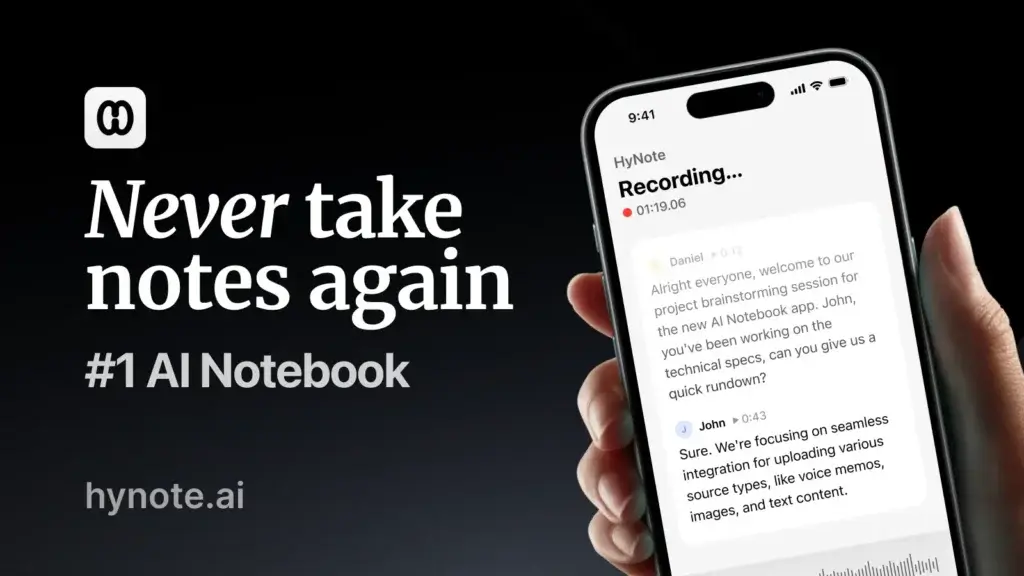
HyNote is an AI note-taking app that helps you record, transcribe, summarize, organize, and search information from different content sources. You can use it for online meetings, in-person conversations, audio recordings, PDFs, images, YouTube videos, web pages, and written notes.
The platform works across web, mobile, tablet, Chrome extension, and supported Apple devices, which makes it useful if your work does not happen in one place. You can capture a meeting on your laptop, record a quick note from your phone, summarize a PDF later, and keep everything synced in the same note library.
Its core promise is simple: stop treating notes as static documents and turn them into an AI-powered knowledge base you can search, summarize, and act on.
A Brief History and Purpose
HyNote is part of a new generation of AI productivity tools that go beyond traditional note-taking. Instead of asking you to manually write and organize everything, it uses AI to capture raw information and transform it into structured outputs.
The product is positioned for professionals, students, founders, researchers, sales teams, product managers, creators, and business users who need to process large amounts of information quickly. Its broader purpose is to reduce manual note-taking, improve recall, and help you convert conversations and content into usable next steps.
Core Features
Main Features Breakdown
HyNote is strongest when you treat it as a flexible AI note-taking workspace rather than a single-purpose transcription tool. Its feature set covers capture, transcription, summarization, search, organization, export, and team use.
AI Meeting Transcription Without a Traditional Bot
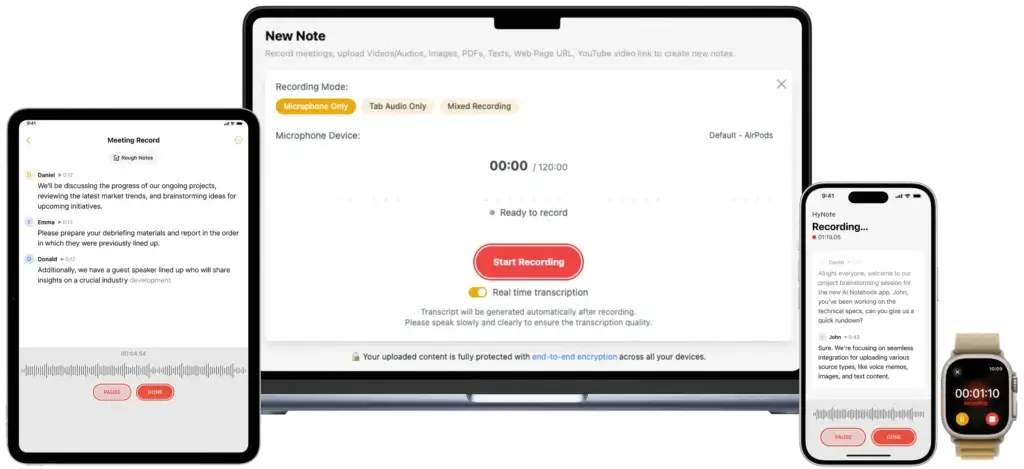
HyNote can help you capture meetings from platforms like Zoom, Google Meet, Microsoft Teams, and Webex. A major advantage is that HyNote emphasizes recording from your device rather than relying only on a visible meeting bot.
This matters because some teams dislike AI bots joining meetings as separate participants. A bot-free workflow can feel more natural, especially for internal meetings, interviews, product discussions, or sensitive client conversations.
- Meeting capture – Record online meetings and convert them into structured notes.
- Speaker labels – Identify speakers and organize the transcript by conversation flow.
- Timestamps – Review key moments without replaying the full meeting.
- Action items – Extract next steps from the discussion automatically.
For meeting-heavy teams, this is the core reason to consider HyNote. It lets you focus on the conversation while still keeping a record of what was discussed, decided, and assigned.
Multimodal Capture for Audio, PDFs, Images, Web Pages, and YouTube
HyNote’s biggest differentiator is its multi-format capture. Many AI note takers are built mainly for meetings. HyNote goes further by letting you capture and summarize different types of information inside one note system.
You can use it to summarize PDFs, extract text from images, process audio recordings, capture web pages, and summarize YouTube videos. This makes it practical for research, learning, sales preparation, content planning, and knowledge management.
- Audio and video – Record live or upload files for transcription and summaries.
- PDFs and documents – Turn long documents into structured notes.
- Images and screenshots – Extract text and summarize visual content.
- YouTube and web pages – Convert online content into searchable notes.
This is where HyNote becomes more useful than a standard meeting recorder. If your workflow includes research materials, calls, saved links, PDFs, and voice memos, you can centralize more of that information in one place.
AI Summaries, Key Points, and Meeting Minutes
HyNote generates AI summaries from meetings, documents, recordings, and other sources. Instead of giving you only a transcript, it can turn raw content into summaries, key points, action items, and structured minutes.
This is useful because transcripts are often too long to read. A good AI summary should help you understand the main message, decisions, risks, and next steps in a few minutes.
- Brief summaries – Get a concise overview of the source content.
- Key points – Identify the most important ideas or decisions.
- Action items – Turn conversations into next steps.
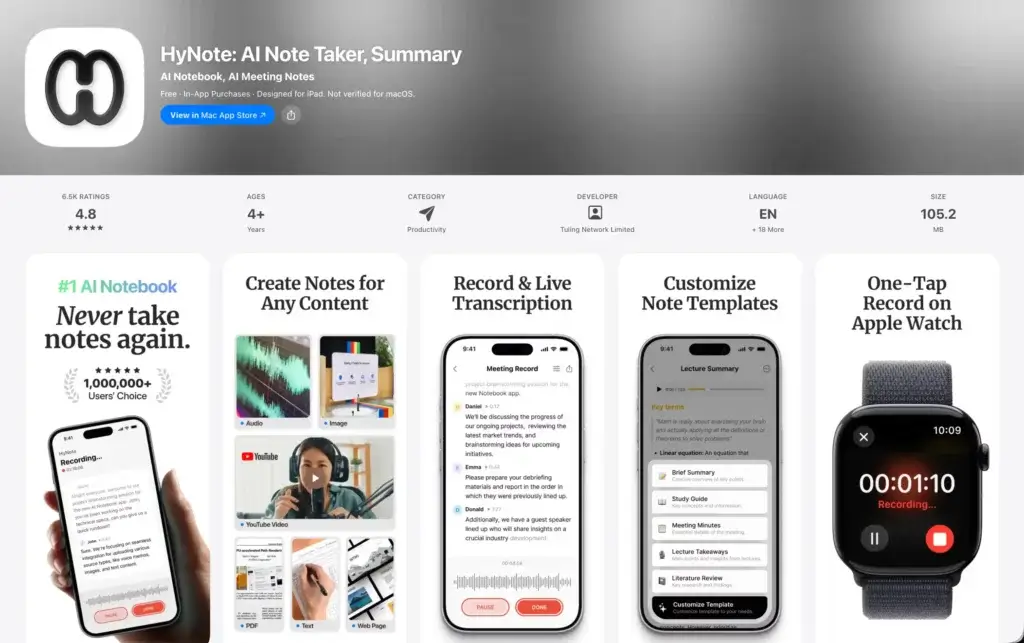
- Professional templates – Use formats for interviews, SWOT, case studies, study notes, and more.
The template library is helpful because different notes require different structures. A sales call summary should not look like a lecture summary, and a brainstorming session should not look like formal meeting minutes.
Chat With Notes and Searchable Knowledge
One of HyNote’s more valuable AI features is the ability to chat with your notes. Instead of manually searching through folders, you can ask questions based on your saved content.
For example, you can ask what a client requested during a call, what follow-up items were mentioned in a meeting, or what a PDF said about a specific topic. This turns HyNote into a lightweight knowledge assistant.
- Ask questions – Query notes, transcripts, and uploaded materials.
- Find decisions – Locate important outcomes from past meetings.
- Review research – Pull answers from saved PDFs, links, and web content.
- Reduce manual search – Spend less time opening old notes one by one.
This feature is especially useful if you collect a lot of information but struggle to retrieve it later. The more you use HyNote consistently, the more valuable your note library becomes.
Professional Templates and Study Tools
HyNote includes a broad set of templates for business, research, education, and productivity. These templates help you create more consistent notes without building every format from scratch.
You can use templates for meeting notes, interview notes, study notes, reading notes, case studies, brainstorming, SWOT analysis, follow-up emails, outlines, flashcards, quizzes, and more.
- Business templates – Meeting minutes, follow-ups, brainstorming, and SWOT notes.
- Study templates – Lecture summaries, quizzes, flashcards, and study plans.
- Content templates – Outlines, reports, summaries, and reusable note formats.
- Productivity templates – To-do lists, action items, and structured task notes.
This makes HyNote a stronger option for students, consultants, creators, and professionals who want structured outputs rather than plain transcripts.
Export, Sync, and Integrations
HyNote supports exporting notes and moving content into external tools. The most relevant integrations are Google Docs, Notion, Google Calendar, and Apple Calendar, with additional sharing options through mobile devices.
It is not as integration-heavy as tools like Fireflies or Otter for deep CRM and conversation intelligence workflows, although higher-tier plans mention CRM integration. Still, the Google Docs and Notion export options are practical for many teams.
- Google Docs export – Move notes into shared documents.
- Notion transfer – Add summaries and transcripts to your knowledge base.
- Calendar sync – Connect meetings with your note workflow.
- PDF and TXT downloads – Save notes outside the platform.
If your workflow is already built around Notion or Google Docs, HyNote can fit nicely. If you need complex CRM automation, sales call analytics, or revenue intelligence, you may need to compare it carefully with more sales-focused alternatives.
Security, Privacy, and Data Control
AI note-taking tools handle sensitive information, so security should not be an afterthought. HyNote’s security messaging focuses on encrypted storage, user ownership, export control, deletion control, and a claim that user content is not used to train its models.
It also states that data is hosted on Google Cloud Platform and protected with encryption in transit and at rest. These are important signals for business users, although larger organizations should still review HyNote’s security documentation, data processing terms, and compliance requirements before using it for regulated information.
- User ownership – HyNote says you own your data.
- No model training on content – The platform states it does not use your content to train models.
- Export and deletion – You can export notes and delete data when needed.
- Encryption – HyNote lists TLS in transit and AES-256 at rest.
For most individuals and small teams, these controls are reassuring. For legal, healthcare, finance, or enterprise use cases, you should still validate security controls directly with HyNote before adoption.
User Experience and Interface
How Does Everyday Work with HyNote Look?
A good AI note-taking app needs to be easy enough to use every day. HyNote performs best when you make it part of your capture routine: record meetings, upload files, summarize content, tag notes, and search later.
Clean Workflow for Capturing Information
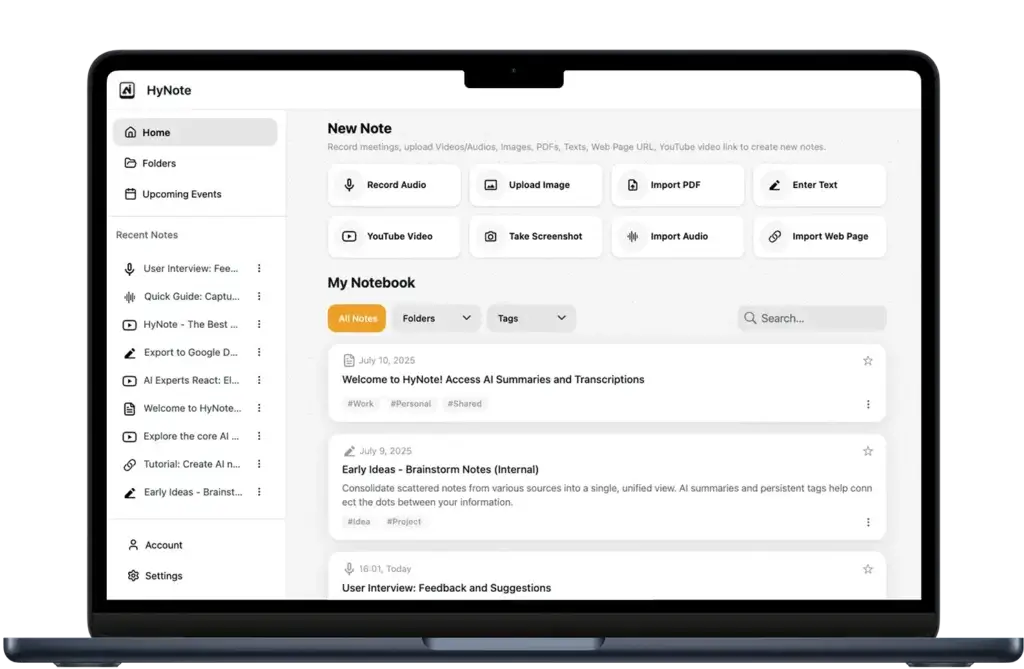
HyNote’s workflow starts with capture. You can create a new note from different inputs, such as recorded audio, phone calls, uploaded files, images, screenshots, PDFs, web pages, and YouTube links.
This makes the tool feel less like a meeting recorder and more like an AI inbox for information. Whenever you find something important, you can capture it and let HyNote structure it.
Fast Summaries for Busy Users
After content is captured, HyNote can create summaries and action items. This is useful when you do not have time to review a full transcript or document.
For example, a product manager can summarize a feedback call, a student can summarize a lecture, and a consultant can turn a client conversation into follow-up tasks.
Cross-Device Note Access
HyNote works across web, mobile, tablet, Chrome extension, and supported Apple devices. This matters if your notes come from different contexts.
You may capture a voice memo while walking, summarize a PDF from your desktop, and review meeting notes from your phone. HyNote’s cross-device approach makes that more practical than tools that are focused only on desktop meetings.
Organization Through Tags, Folders, and Snippets
HyNote includes note organization features such as tags, folders, and snippets. These help you keep related notes together and avoid building a messy AI archive.
This is important because AI note tools can become cluttered quickly. The more meetings, recordings, PDFs, and links you add, the more you need a clean structure.
Where the User Experience Could Improve
The main UX limitation is that HyNote’s broader feature set can feel slightly less focused than a dedicated meeting assistant. If you only want automatic Zoom notes and CRM sync, a more meeting-specific tool may feel simpler.
However, if you want one place for meetings, documents, voice notes, images, and web content, HyNote’s broader interface becomes a strength.
Pros And Cons
Advantages and Disadvantages
Positive
✅ Multimodal note capture
✅ Bot-free meeting workflow
✅ Strong template library
✅ Affordable annual pricing
Negative
❌ Less mature for deep sales analytics
❌ Best features are paid
❌ CRM options are plan-dependent
❌ Enterprise details require direct review
Like any productivity tool, HyNote has clear strengths and limitations. It is not the best fit for every user, but it offers a strong mix of flexibility, affordability, and AI-powered note organization.
✅ Pros
• Multimodal capture – HyNote can process meetings, audio, PDFs, images, YouTube videos, web pages, text, and more, making it broader than many AI meeting assistants.
• Bot-free meeting experience – The tool can record from your device, which may feel less intrusive than inviting a meeting bot.
• Good for both work and study – Business templates, study tools, flashcards, quizzes, and document summaries make it useful beyond meetings.
• Affordable paid plans – Annual pricing is competitive compared with several AI meeting note competitors.
• Useful templates – The template library helps turn raw content into structured outputs for different use cases.
• Cross-device availability – Web, mobile, tablet, Chrome extension, and Apple device support make capture easier in different contexts.
• Clear security positioning – HyNote states that user content is not used for model training and highlights encryption and data control.
❌ Cons
• Not as specialized for sales teams – Tools like Fireflies and Otter may offer deeper team analytics, CRM workflows, or conversation intelligence.
• Some features require higher plans – Live translation, speaker identification, CRM integration, and unlimited transcription are not all available on lower tiers.
• Plan structure can feel complex – Pro, Plus, Unlimited, and Teams tiers may require careful review before buying.
• Limited public enterprise detail – Larger companies should verify compliance, support, SSO, admin controls, and contract terms directly.
• Notion and Google Docs are stronger than broader app automation – If you need advanced automation across many SaaS tools, you may need Zapier-style workflows or a different tool.
• Accuracy still depends on audio quality – Like all transcription tools, background noise, accents, overlapping speech, and poor microphones can affect results.
Pricing and Tiers
How Much Does HyNote Cost?
Pricing and Plans
HyNote offers a free plan and several paid plans. Pricing can change, so you should always check the official pricing page before purchasing, but the current annual pricing structure makes HyNote relatively affordable for individuals and small teams.
The paid plans are mainly separated by transcription limits, session length, translation, speaker identification, export options, CRM integration, storage, and team controls.
| Plan | Annual Price | Best For | Key Features |
| Free | $0/month | Testing HyNote and light note capture | Audio recording, transcription, templates, file uploads, cross-device sync, calendar integration, secured storage |
| Pro | $6.66/month, billed annually | Individuals who need more transcription capacity | 1,200 transcription minutes per month, up to 60 minutes per session, note translation, transcript export |
| Plus | $10.83/month, billed annually | Users who need live transcription and speaker ID | Real-time audio transcription, speaker identification, up to 120 minutes per session, live translation, transfer to Google Docs and Notion |
| Unlimited | $15.83/month, billed annually | Heavy users and professionals with frequent meetings | Unlimited real-time audio transcription, unlimited secure storage, CRM integration, up to 120 minutes per session |
| Teams | $15 per seat/month, billed annually | Small teams that need shared controls | Starts from 2 seats, team templates, admin controls, priority support, advanced features from Unlimited |
Which HyNote Plan Offers the Best Value?
For most individual users, the Plus plan offers the best balance because it adds real-time transcription, speaker identification, longer sessions, live translation, and note transfer options.
The Pro plan is better if you mainly upload or record shorter content and want a low-cost way to access more than the free plan.
The Unlimited plan is the better choice if you have frequent meetings, need unlimited real-time audio transcription, and want CRM integration. For teams, the Teams plan is the obvious path because it adds admin controls and shared templates.
Is the Free Plan Enough?
The Free plan is useful for testing the interface, recording occasional notes, and understanding whether HyNote fits your workflow. However, it is not the best option for heavy meeting users or professionals who need consistent exports, longer sessions, live translation, or unlimited transcription.
If you plan to rely on HyNote weekly, you will likely need a paid plan.
Who Is It Best For?
Is HyNote The Right Fit For Your Workflow?
HyNote is best for users who need to capture and organize information from multiple sources, not only meetings. If your work involves calls, documents, research, videos, screenshots, voice notes, and web content, HyNote gives you a practical way to centralize that knowledge.
Best Fit Profiles
HyNote is a strong fit for the following types of users:
- Product managers who need structured meeting notes and research summaries
- Sales professionals who want call notes, follow-ups, and customer insights
- Students who need lecture summaries, flashcards, quizzes, and study notes
- Consultants who handle client calls, PDFs, and research documents
- Founders who need board notes, investor call summaries, and action items
- Researchers who collect information from papers, interviews, and web sources
- Content creators who summarize YouTube videos, articles, and source materials
- Small teams that need shared templates, admin controls, and consistent notes
Why These Users Benefit Most
You benefit from HyNote most when you want to reduce manual information processing. Instead of creating notes from scratch, you can capture content and let AI create the first structured version for you.
This is valuable because the bottleneck in modern work is often not access to information. It is turning scattered information into something you can search, understand, share, and act on.
Where HyNote May Not Be the Best Fit
HyNote may not be the best choice if your main priority is advanced sales call scoring, deep CRM automation, coaching analytics, or enterprise-grade governance across a large organization.
It may also be more than you need if you only want a simple free meeting recorder. In that case, Fathom may be easier to start with, while Otter or Fireflies may be better if you want a more established meeting transcription workflow.
HyNote VS Alternatives
Comparison With Other AI Note Takers
HyNote competes with several strong AI note-taking and meeting transcription tools. The best alternative depends on whether you want a multimodal note workspace, a dedicated meeting assistant, a free meeting recorder, or a team collaboration system.
Top Alternatives to HyNote
You can consider the following HyNote alternatives if you want different strengths:
- Fireflies AI – Better for teams that need meeting collaboration, integrations, and conversation workflows
- Fathom – Excellent for users who want generous free meeting recording and summaries
- Granola AI – Strong for bot-free meeting notes and lightweight team workflows
- Otter.ai – A well-known option for live meeting transcription and team notes
HyNote’s advantage is breadth. It is stronger than many competitors for multimodal capture because it handles notes from meetings, audio, PDFs, images, YouTube, web pages, and text.
Its weakness is specialization. Some alternatives are more mature for sales teams, enterprise collaboration, or meeting-specific workflows.
HyNote vs Competitors: Comparison Table
| Tool | Best For | Key Strength | Best Limitation to Know |
| HyNote | Multimodal AI note-taking | Captures meetings, PDFs, images, web pages, YouTube, audio, and text | Less specialized for deep sales analytics |
| Fireflies AI | Team meeting collaboration | Strong meeting transcription, summaries, integrations, and team features | Advanced features can depend on plan and AI credits |
| Fathom | Free AI meeting notes | Generous free meeting recording, transcription, and summaries | More focused on meetings than broad multimodal notes |
| Granola AI | Bot-free meeting notes | Clean meeting workflow, templates, and strong AI note experience | Less focused on PDF, image, and multi-source capture |
| Otter.ai | Live transcription and team notes | Established meeting transcription platform with collaboration features | Minute limits and imports vary by plan |
My Recommendation
Choose HyNote if you want one AI workspace for meetings, documents, audio, images, web pages, YouTube videos, and personal notes.
Choose Fathom if you mostly want a free AI meeting assistant. Choose Fireflies if your team needs stronger meeting collaboration and sales workflows. Choose Granola if you want a polished bot-free meeting notes experience with minimal friction.
Setup Guide
Getting Started with HyNote
If you decide to try HyNote, the setup process is straightforward. The key is to start with one or two repeatable workflows instead of trying every feature at once.
- Create your account – Sign up through HyNote and choose whether to start with the free plan or a trial of a paid plan.
- Install the right apps – Add HyNote on the devices you use most, such as web, mobile, tablet, or Chrome extension.
- Connect calendars – Sync Google Calendar or Apple Calendar if you want meetings connected to your notes.
- Capture your first source – Record a meeting, upload audio, summarize a PDF, or save a YouTube video.
- Review the AI output – Check the transcript, summary, speaker labels, and action items.
- Organize the note – Add tags, move it into a folder, or create a reusable snippet.
- Export or transfer – Send notes to Google Docs, Notion, PDF, or TXT when needed.
The best way to test HyNote is to use it on a real workflow. For example, summarize a meeting, a PDF, and a YouTube video in the same week. That will show whether its multimodal approach fits your daily work.
Tips & Best Practices for Using
How To Get The Most Out of HyNote
HyNote becomes more valuable when you build consistent habits around capture, review, organization, and follow-up.
- Use templates intentionally – Choose templates based on the type of note you need, such as interviews, sales calls, study notes, or meeting minutes.
- Improve audio quality – Use a clear microphone and reduce background noise for better transcripts.
- Review summaries quickly – AI summaries are useful, but you should still check action items and important decisions.
- Create a folder system – Organize notes by client, project, course, content topic, or team.
- Use tags for retrieval – Add tags for recurring themes, decisions, customer feedback, or research topics.
- Export important notes – Move finalized notes to Notion, Google Docs, or your project workspace.
- Be careful with sensitive content – Confirm consent before recording and review security settings for confidential meetings.
For business users, I recommend creating standard templates for recurring workflows. For example, use one template for sales calls, one for internal meetings, one for research summaries, and one for customer feedback.
Conclusion
Final Thoughts – Is HyNote Worth It in 2026?
HyNote is worth considering if you want an AI note-taking app that goes beyond meeting transcription. Its biggest strength is the ability to capture and summarize many different information sources, including meetings, audio, PDFs, images, YouTube videos, web pages, and text.
That makes it a strong choice for professionals and students who want to build a searchable AI-powered note library. It is especially useful if your knowledge work is scattered across calls, documents, links, screenshots, and recordings.
HyNote is not the most specialized tool for sales analytics or large enterprise meeting intelligence. However, it is a compelling option if you want a flexible, affordable, cross-device AI note taker that can support both business and learning workflows.
Overall, HyNote is best for users who want one tool for capturing, summarizing, organizing, and reusing information across multiple formats. If that describes your workflow, it deserves a place on your shortlist in 2026.
Frequently Asked Questions
Have more questions?
What is HyNote?
HyNote is an AI note-taking app that records, transcribes, summarizes, and organizes information from meetings, audio, PDFs, images, YouTube videos, web pages, and text. It helps you turn scattered information into searchable notes, summaries, action items, and structured knowledge.
Is HyNote only for meeting notes?
No. HyNote can be used for meeting notes, but it also supports PDFs, images, screenshots, web pages, YouTube videos, audio recordings, phone calls, and study materials. This makes it broader than many AI meeting assistants.
Does HyNote have a free plan?
Yes. HyNote offers a free plan that includes audio recording and transcription, templates, file uploads, synced notes across devices, calendar integration, and private secured storage. Paid plans unlock higher usage limits and more advanced features.
How much does HyNote cost?
HyNote has several paid plans. Annual pricing starts with Pro at $6.66 per month, Plus at $10.83 per month, Unlimited at $15.83 per month, and Teams at $15 per seat per month. Pricing may change, so check the official HyNote pricing page before buying.
Does HyNote work with Zoom, Google Meet, and Microsoft Teams?
Yes. HyNote can help you record and summarize meetings from platforms such as Zoom, Google Meet, Microsoft Teams, and Webex. It focuses on recording from your device rather than relying only on a visible meeting bot.
What languages does HyNote support?
HyNote states that it supports transcription in more than 50 languages. This makes it useful for multilingual meetings, lectures, research calls, and international teams that need AI-generated notes from spoken content.
Can HyNote summarize PDFs and YouTube videos?
Yes. HyNote supports multimodal capture, including PDFs, images, screenshots, YouTube videos, web pages, audio files, and text. This is one of its biggest advantages compared with meeting-only transcription tools.
Is HyNote secure?
HyNote states that it uses encrypted storage, protects data in transit and at rest, hosts data on Google Cloud Platform, and does not use user content to train its models. Businesses with strict compliance needs should still review HyNote’s security documentation directly.
What are the best HyNote alternatives?
The best HyNote alternatives include Fireflies AI, Fathom, Granola AI, and Otter.ai. Fireflies is strong for meeting collaboration, Fathom is excellent for free meeting notes, Granola is strong for bot-free notes, and Otter is well known for live transcription.
Who should use HyNote?
HyNote is best for professionals, students, researchers, product managers, sales teams, consultants, founders, and creators who want to capture information from meetings, documents, videos, audio, web pages, and images in one searchable AI note workspace.