
Introduction
Heap is a digital insights and product analytics platform designed to help you understand how people use websites, web applications, and mobile products.
Its defining capability is Autocapture. Instead of requiring your team to decide in advance which clicks, pageviews, taps, swipes, and form interactions to track, Heap begins collecting a broad set of behavioral data after you install its snippet or software development kit. You can then define meaningful events later and analyze historical behavior that was already captured.
Heap also combines funnels, retention reports, Journeys, behavioral segments, dashboards, data science recommendations, Sense AI, session replay, heatmaps, warehouse exports, governance, and activation integrations. However, several experience analytics capabilities are sold as add-ons, and advanced pricing is not publicly fixed.
This Heap review examines Autocapture, product analytics, Sense AI, session replay, heatmaps, data governance, pricing, implementation, integrations, security, scalability, user feedback, and the best Heap alternatives.
How We Evaluated Heap
The evaluation follows the complete digital analytics workflow. It starts with data capture and event definition, then assesses behavioral exploration, conversion analysis, journey discovery, retention, qualitative evidence, AI assistance, governance, activation, security, and commercial scalability.
Quick Assessment
Heap Review Summary
Heap is one of the best analytics platforms for teams that want broad behavioral visibility before they know every question they will need to answer.
Autocapture reduces the risk of discovering that an important interaction was never instrumented. Visual event labeling then lets analysts and product managers convert raw interactions into reusable business events without editing application code for every definition.
Its biggest limitations are commercial and strategic. Session replay, heatmaps, and error analysis are not included in the Free or Growth plans, advanced tiers use custom session pricing, and Heap does not provide the same native experimentation or in-app guidance depth as some competitors.
Heap at a Glance
| Category | Heap Assessment |
| Best For | Product and growth teams that want automatic behavioral capture and retroactive analysis |
| Overall Score | 8.9/10 |
| Ease of Use | 8.7/10 |
| Autocapture | 9.8/10 |
| Product Analytics | 9.1/10 |
| Session Replay | 8.8/10 |
| AI Capabilities | 8.7/10 |
| Data Governance | 9.0/10 |
| Starting Price | Free for up to 10,000 monthly sessions |
| Main Strength | Automatic capture and retroactive event definition |
| Main Limitation | Opaque paid pricing and add-on packaging for experience analytics |
Recommendation: Heap is a strong choice when your organization needs flexible product analytics without manually instrumenting every client-side interaction in advance. It provides the most value when you combine Autocapture with a disciplined event taxonomy, custom business events, and clear ownership for governance.
Platform Overview
What Is Heap?
Heap is a digital insights platform that captures and analyzes customer behavior across websites and applications. It is part of the Contentsquare group and combines quantitative product analytics with optional experience analytics.
Most product analytics systems depend heavily on predefined events. You decide that a particular action matters, ask engineering to track it, deploy the code, and begin collecting data from that point forward.
Heap changes that sequence. It first captures a broad behavioral dataset, then lets you define events on top of the captured interactions. This virtualization model means a newly defined event can often be analyzed historically rather than only after it is created.
Where Heap Fits in Your Analytics Stack
Heap usually sits between your digital products and the teams responsible for product decisions, conversion optimization, customer experience, and growth.
A warehouse can remain the source of truth for financial, operational, and cross-functional reporting. Heap Connect sends behavioral data to supported warehouses, while Heap itself provides the faster self-service layer for analyzing digital behavior.
Who Should Use Heap?
- Product managers: Investigate onboarding, adoption, engagement, and release performance.
- Growth teams: Find conversion friction and compare successful and unsuccessful journeys.
- Design and research teams: Connect behavioral patterns with replay and heatmap evidence.
- Data teams: Govern behavioral definitions and distribute self-service analysis.
- Customer success teams: Build segments and account-health signals from product usage.
Who May Prefer Another Platform?
Heap may be excessive when you only need traffic acquisition, campaign reporting, and standard ecommerce metrics. A web analytics platform may be easier and less expensive for that narrower requirement.
Key Features
Autocapture, Journeys, Sense AI, and Replay
Heap’s feature set is built around a simple idea: collect a broad behavioral foundation first, then help teams discover which actions, paths, and experiences influence outcomes.
Autocapture and Smart Capture
Autocapture records supported client-side interactions after a lightweight installation. On web properties, this can include pageviews, clicks, form submissions, and related interaction context. Heap also supports automatic mobile capture for supported native and cross-platform frameworks.
Visual Event Labeling and Retroactive Definitions
Heap’s visual labeling tools let you identify an interface element and create a named event without writing a separate tracking call. Definitions sit on top of the raw captured dataset, so you can update naming, combine interactions, or revise logic as the product evolves.
This reduces routine engineering dependency, but it does not eliminate governance. Similar buttons, reused components, changing selectors, and single-page application behavior can produce ambiguous definitions unless an administrator validates the event carefully.
Charts, Funnels, and Conversion Analysis
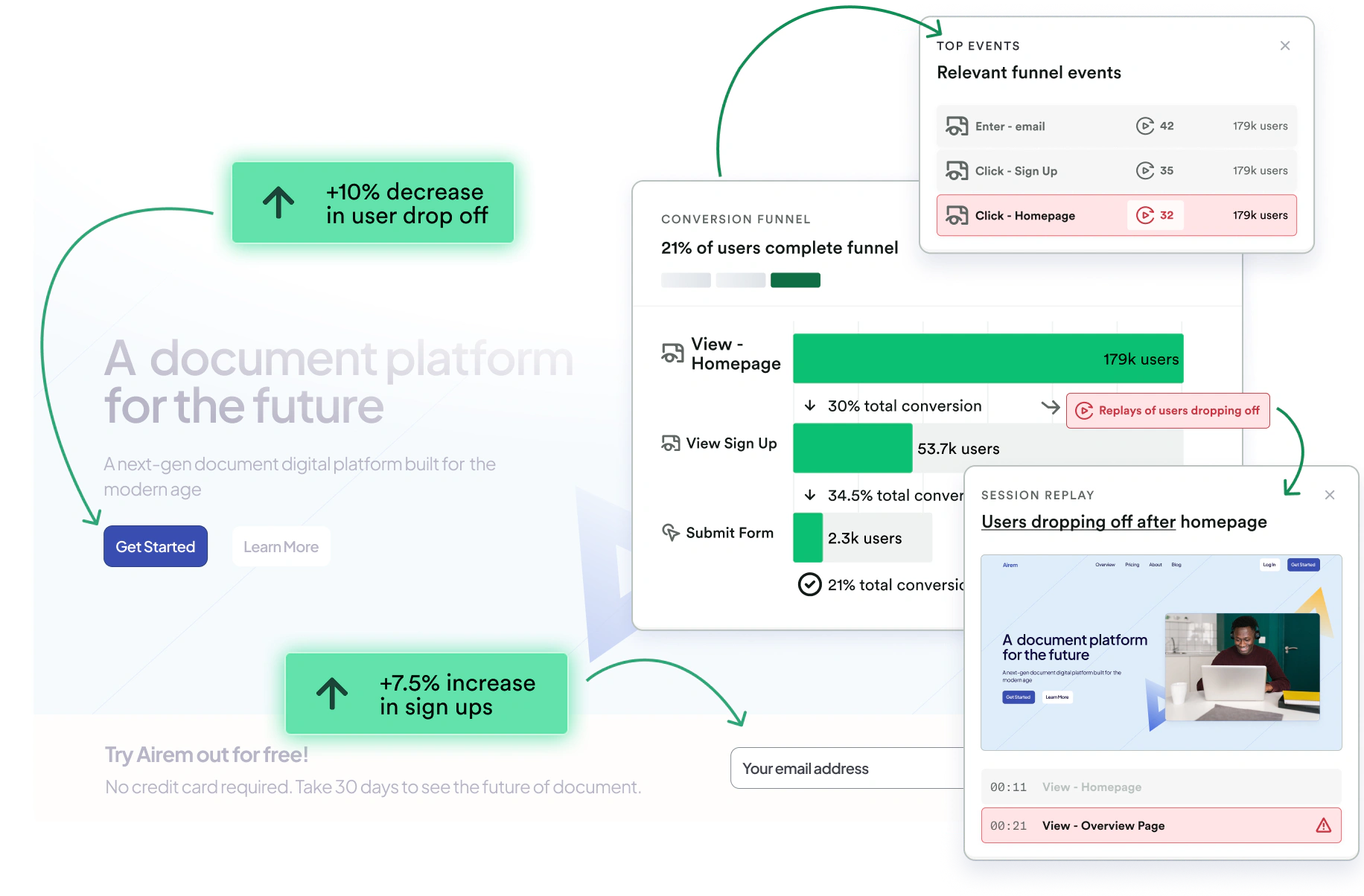
Heap includes event charts, funnels, retention analysis, user segments, dashboards, and big-number cards. You can filter by user, account, session, event, device, campaign, geography, and enriched business properties.
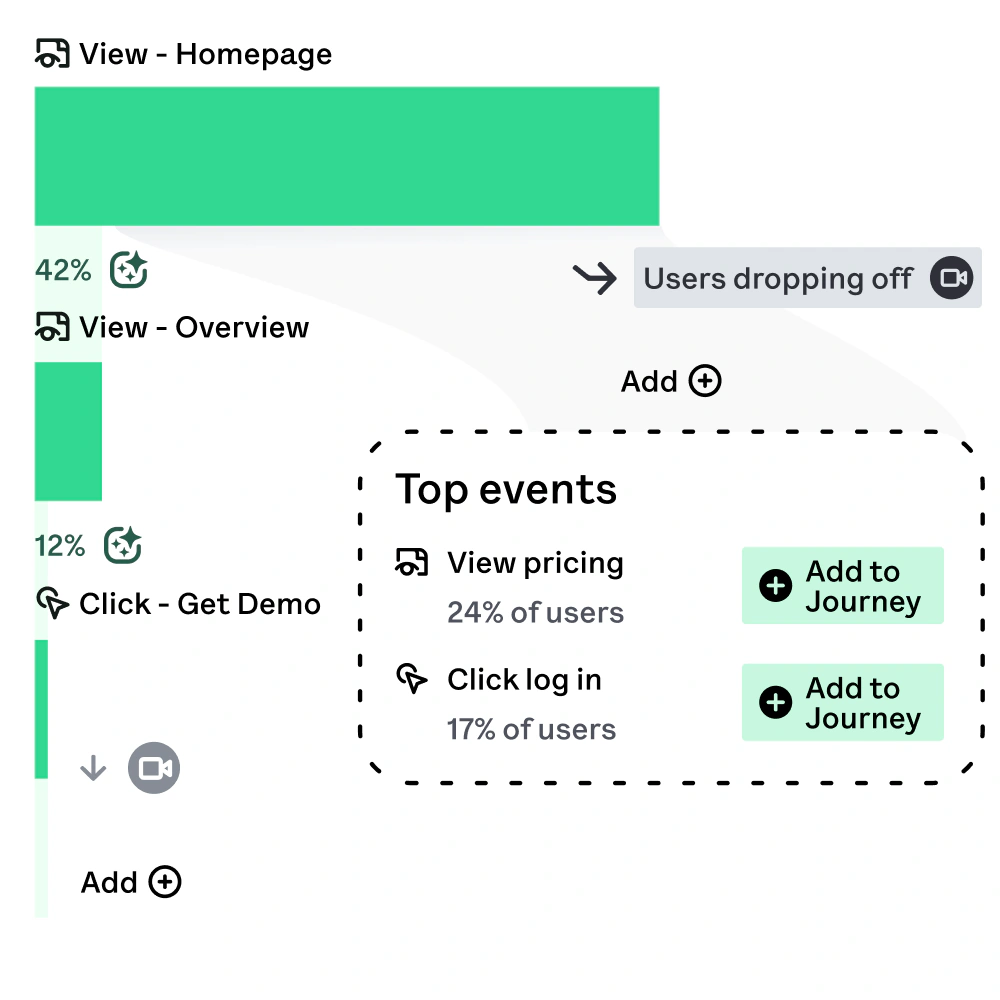
Funnels reveal how users progress through signup, onboarding, checkout, activation, upgrades, or other multi-step flows. You can compare segments, inspect time to convert, identify drop-off points, and connect an unexpected result with the surrounding journey.
Journeys and Path Discovery
Journeys visualizes the routes users take through a digital experience, including alternate paths, conversion rates, and suggested actions. This is more useful than a rigid path report when users can reach the same outcome through several workflows.
Heap Illuminate and Influence Analysis
Heap Illuminate applies data science to highlight behavioral differences and potential friction. Influence analysis helps you examine which actions are associated with conversion, retention, or another outcome.
Retention, Engagement, and Account Analytics
Retention reports show whether users return and repeat meaningful actions over time. Segments let you define cohorts based on behavior, properties, sequences, frequency, or inactivity.
Pro and Premier plans add account-based analytics and an engagement matrix. These capabilities are useful for B2B software because a workspace, customer account, or organization may matter more than an individual user.
Sense AI
Sense is Heap’s generative AI assistant. It lets you ask behavioral questions in natural language, receive summaries, run analyses, ask follow-up questions, and inspect how the system reached an answer.
Sense can make analytics more accessible when a user does not know which report, event, property, or segment to choose. It can also speed up exploratory work for experienced analysts.
Session Replay, Heatmaps, and Error Analysis
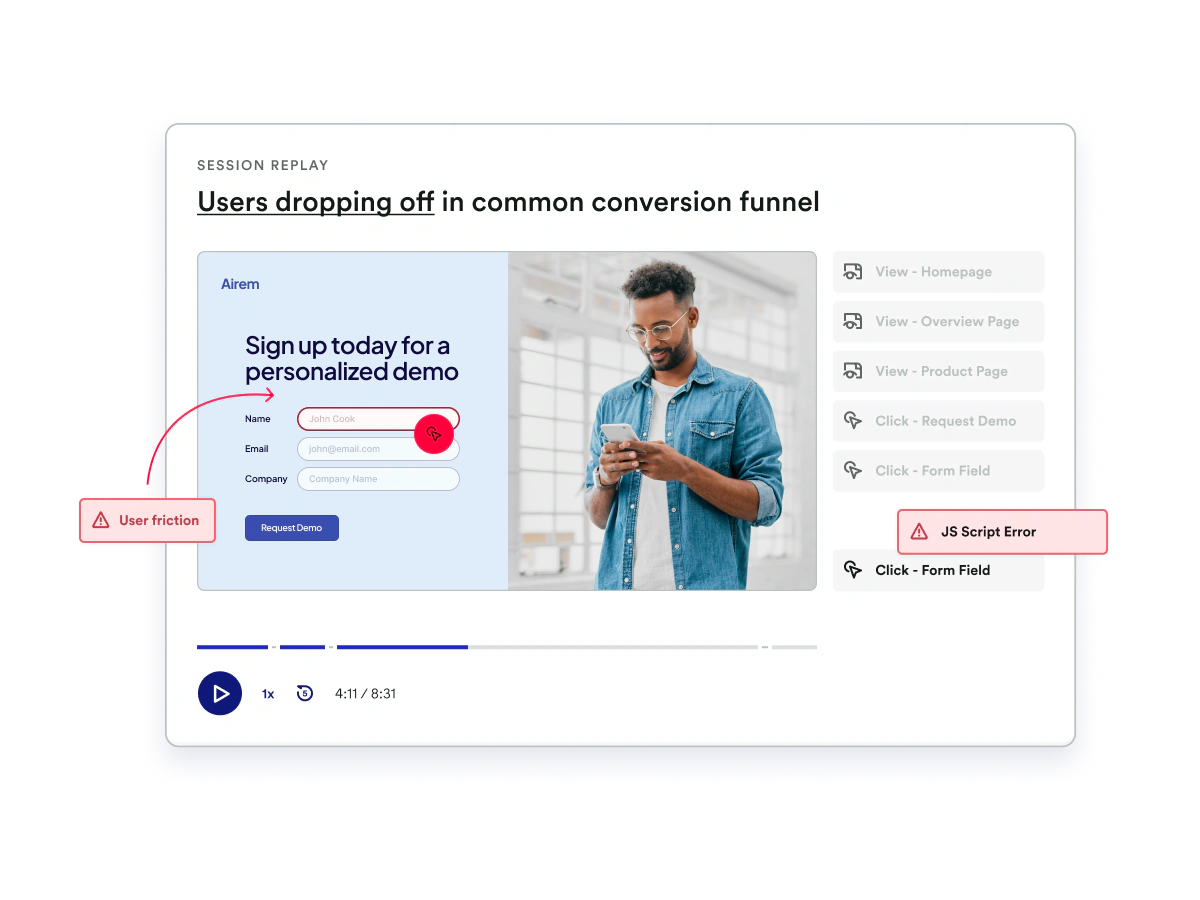
Heap’s Experience Analytics add-on combines session replay, heatmaps, and error analysis for Pro and Premier customers.
Session Replay is integrated with Heap events and funnels. You can jump from a drop-off point to recordings cued around the relevant event, search client-side and server-side activity, and share examples with design or engineering teams.
Heap Feature Overview
| Feature Area | What Heap Provides | Best For |
| Data Capture | Autocapture, Smart Capture, custom events, APIs, and server-side events | Building a flexible behavioral foundation |
| Product Analytics | Charts, funnels, retention, segments, dashboards, and alerts | Measuring conversion, adoption, and engagement |
| Journey Analysis | Visual Journey maps and suggested user actions | Discovering successful and unsuccessful paths |
| Data Science | Illuminate recommendations, Influence, and engagement analysis | Finding behaviors associated with outcomes |
| AI | Sense Chat, summaries, and follow-up analysis | Making self-service analytics more accessible |
| Experience Analytics | Session replay, heatmaps, and error analysis add-on | Explaining friction and usability problems |
| Data Management | Visual labeling, dictionary, governance, Connect, and Activate | Maintaining trusted definitions and operationalizing insights |
Pros and Cons
Benefits and Limitations
Positive
✅ Excellent automatic capture
✅ Retroactive event analysis
✅ Strong journey discovery
✅ Accessible governance tools
Negative
❌ Opaque paid pricing
❌ Replay requires an add-on
❌ Event libraries can become messy
❌ No native feature experimentation
✅ Heap Pros
- Autocapture reduces the risk of missing important client-side interactions.
- Retroactive event definitions let you answer new questions with previously collected data.
- Funnels, Journeys, retention, and Influence provide strong behavioral depth.
- Visual labeling helps non-engineering teams define and refine useful events.
- Sense AI, governance, warehouse exports, and activation extend the platform beyond reporting.
❌ Heap Cons
- Growth, Pro, and Premier pricing is not fully transparent on the official pricing page.
- Session replay, heatmaps, and error analysis require Pro or Premier plus an add-on.
- Automatic capture can produce a large, confusing event library without governance.
- Heap is not a native feature-flagging or experimentation platform.
- Longer data history, warehouse syncs, activation, and additional environments may increase cost.
Heap’s automatic data foundation creates flexibility, but flexibility can become clutter. The best implementations maintain a lean, approved layer of business events on top of the broader raw dataset so users can find trusted definitions quickly.
Getting Started
Setup, Event Design, and Team Adoption
Installing Heap on a website can be fast. Once the snippet is active, supported interactions begin entering the platform, and your team can use the live data feed and visual labeling tools to define events.
Recommended Heap Implementation Process
- Define the product and growth decisions Heap should support.
- Install Autocapture in a controlled development or staging environment.
- Configure privacy rules before broad production collection begins.
- Document anonymous, identified, cross-device, and account identity behavior.
- Add custom and server-side events for critical business outcomes.
- Create a lean naming standard for approved events and properties.
- Validate funnels, Journeys, segments, and retention reports against known data.
- Assign administrators to review definitions, permissions, and event changes.
Autocapture vs Custom Tracking
Autocapture is best for broad interaction visibility and retroactive exploration. Custom tracking is best for durable business concepts that should not depend on interface structure.
For example, a click on an upgrade button can be automatically captured, but a successful subscription upgrade should usually be confirmed through a backend event. The click represents intent, while the server-side event represents the completed business outcome.
A hybrid implementation gives you the speed of automatic collection and the accuracy of explicit business instrumentation.
Customer Support and Learning Resources
Heap provides a help center, Heap University, community resources, implementation content, and professional services. Basic technical support begins on Growth, standard support is included with Pro and Premier, and Premier adds premium support options and a dedicated customer success manager.
Performance and Scalability
Session Volume, Data Quality, and Scale
Heap prices its current plans around monthly sessions rather than the number of tracked events. This can be easier to understand than event-based billing because a single session can contain many interactions.
Session-Based Cost Management
Heap defines a web session as a period of activity that ends after 30 minutes without a pageview. Mobile sessions end after five minutes of inactivity. Your product usage pattern therefore affects billable volume.
Data History and Retention
The Free plan includes six months of data history, while Growth includes 12 months. Pro and Premier include one year with options to purchase additional history, and an add-on can extend analysis to three years.
Data Governance at Scale
Heap includes visual event labeling, custom event properties, definition history, live event feeds, shared spaces, and a governance lifecycle for defining, validating, monitoring, and evolving events.
Practical Scalability Checklist
- Separate raw captured interactions from approved business events.
- Use server-side events for revenue, subscriptions, and irreversible outcomes.
- Exclude internal traffic and unnecessary environments where appropriate.
- Monitor session volume before major campaigns or product launches.
- Review data history requirements before selecting a plan.
- Archive or retire definitions that no longer match the product.
Real-World Use Cases
Where Heap Delivers the Most Value
SaaS Onboarding and Activation
Heap can map the steps between account creation and the first meaningful product outcome. Funnels show where users leave, Journeys reveal alternate paths, and segments compare activated and non-activated users.
Feature Adoption and Product Decisions
Product teams can measure discovery, first use, repeated use, account penetration, and the relationship between a feature and retention.
Ecommerce Conversion Optimization
Ecommerce teams can analyze product discovery, filters, search, product detail pages, cart behavior, checkout, payment errors, and repeat purchases.
B2B Account Health and Expansion
Account analytics helps collaborative products measure organizations, workspaces, teams, or subscriptions. You can assess active users, feature breadth, administrator behavior, seat utilization, and usage decline.
Marketing Quality Beyond Acquisition
Heap can connect campaign and referrer properties with downstream product behavior. This lets marketing teams compare channels based on activation, retention, feature adoption, or revenue rather than registration volume alone.
What Users Say About Heap
Verified reviewers frequently praise automatic event capture, visual event creation, accessible dashboards, fast ad hoc reporting, and the ability to answer product questions without repeated engineering work.
Pricing and Plans
How Much Does Heap Cost?
Heap offers Free, Growth, Pro, and Premier plans. The Free plan publishes a usage allowance, while Growth provides an estimate after installation and Pro and Premier use custom session pricing.
Heap Pricing Plans
| Plan | Current Price Reference | Best For |
| Free | $0 for up to 10,000 monthly sessions | Evaluation, small products, and early product-market fit |
| Growth | Session-based estimate after installing the snippet | Startups needing AI, exports, customization, and longer history |
| Pro | Custom session pricing | Scaling teams needing account analytics, alerts, and support |
| Premier | Custom session pricing | Large organizations needing advanced permissions, projects, storage, and activation |
| Experience Analytics | Paid add-on for Pro and Premier | Session replay, heatmaps, and error analysis |
Heap Free
The Free plan includes core analytics charts, Autocapture, APIs, Journeys, funnels, retention, Influence, visual event labeling, governance tools, SSO, six months of data history, and up to 10,000 monthly sessions.
Sense AI, session replay, heatmaps, report alerts, Heap Connect, and Heap Activate are not included. The plan is useful for testing the automatic capture model with real data, but the six-month history and session allowance limit long-term use for growing products.
Heap Growth
Growth adds Sense AI, unlimited users and reports, chart customization, CSV exports, 12 months of data history, email support, and professional services availability.
Heap Pro
Pro adds account analytics, the engagement matrix, report alerts, multiple projects, standard support, training, and a customer success manager.
Heap Premier
Premier is designed for large organizations. It adds unlimited projects, advanced user permissions, audit logs, SCIM, region-specific storage, premium support options, Heap Connect, and Heap Activate.
Additional Costs to Consider
Beyond subscription fees, costs may include engineering implementation, identity design, taxonomy governance, privacy review, data cleanup, server-side tracking, professional services, extended history, additional environments, warehouse storage, and analyst administration.
Integrations
Sources, Destinations, and Workflow Connections
SDKs, APIs, and Data Sources
Heap supports web and mobile capture, custom client-side events, server-side events, and APIs for enriching users, accounts, and events.
Customer Data and Engagement Platforms
Heap Activate sends behavioral segments into downstream systems so teams can trigger email, in-app guidance, support, advertising, or retention workflows. Activate is an add-on for Pro and included with Premier.
Data Warehouses and Business Intelligence
Heap Connect provides managed exports to supported destinations such as Snowflake, BigQuery, Redshift, and Amazon S3.
Warehouse exports are useful when you need to combine product behavior with revenue, CRM, support, finance, or operational data in tools such as Tableau, Looker, or Power BI.
Experimentation and In-App Guidance Integrations
Heap can measure experiment variants and send behavioral segments to external testing or guidance platforms. This works well when you already have a dedicated experimentation or digital-adoption tool.
Data Protection
Security, Privacy, and Enterprise Controls
Heap publishes support for GDPR and CCPA requirements, SOC 2 controls, and ISO 27001, 27701, 27017, and 27018 certifications. It also states that it can sign business associate agreements for qualifying healthcare customers.
Access and Administration Controls
- Single sign-on is available across all current plans.
- Basic project permissions are included on every plan.
- Custom user permissions, audit logs, and SCIM are available on Premier.
- Region-specific storage is included with Premier.
- User Privacy APIs and data privacy controls are available across plans.
Collection and Privacy Controls
You can configure capture rules, block sensitive elements, disable IP address or geolocation collection, and process supported deletion or access requests through privacy tools and APIs.
Form fields, payment details, health information, authentication data, private messages, and other regulated information should be blocked unless your legal and security teams explicitly approve the collection design.
Comparison
Heap Alternatives
The best Heap alternative depends on whether you prioritize deeper product analytics, faster self-service reporting, native experimentation, in-app adoption, developer control, or more transparent pricing.
Heap Alternatives Compared
| Platform | Main Strength | Best Fit |
| Heap | Automatic capture and retroactive event analysis | Teams with changing questions and limited tagging capacity |
| Amplitude | Deep behavioral analytics, experimentation, and activation | Data-mature product-led businesses |
| Mixpanel | Fast and accessible self-service product analytics | Teams prioritizing funnels, retention, and reporting speed |
| Pendo | In-app guides, feedback, and product adoption | SaaS teams improving onboarding and user education |
| PostHog | Developer-first analytics, replay, flags, and experiments | Engineering-led teams wanting an integrated product stack |
Heap vs Amplitude
Amplitude provides deeper native experimentation, broader activation capabilities, and sophisticated behavioral analysis for product-led organizations.
Choose Amplitude for a connected analytics and experimentation platform. Choose Heap when missing an untracked interaction is the greater risk. Read our Amplitude Analytics review for a detailed comparison.
Heap vs Mixpanel
Mixpanel is a strong alternative for teams that want fast funnels, retention reports, cohorts, dashboards, and increasingly broad web and experience analytics.
Choose Mixpanel for focused, approachable product analytics. Choose Heap for automatic collection and retroactive exploration. Read our Mixpanel review for more detail.
Heap vs Pendo
Pendo combines analytics with in-app guides, onboarding, feedback, roadmapping, and software-adoption workflows.
Choose Pendo for product adoption and in-app education. Choose Heap for behavioral discovery and analytics flexibility. Read our Pendo review for the complete assessment.
Heap vs PostHog
PostHog offers product analytics, session replay, feature flags, experiments, surveys, and developer tooling with transparent usage-based pricing and open-source options.
Choose PostHog when engineering teams want analytics, experimentation, feature delivery, and debugging tools in one platform. Choose Heap when automatic capture and retroactive behavioral analysis are the main priorities. Read our PostHog review for a detailed assessment.
For broader executive reporting and cross-department analysis, compare the best business intelligence software.
Final Thoughts
Is Heap Worth It?
Heap is worth considering when your product changes quickly, analytics questions are difficult to predict, and your team wants to reduce its dependence on manual client-side tagging.
Autocapture and retroactive definitions are the central reasons to choose Heap. They let you investigate interactions that were collected before anyone decided to turn them into a named event.
The analytics layer is also strong. Funnels, Journeys, retention, segments, Influence, account analytics, Sense AI, and warehouse connections provide a practical path from raw behavior to product decisions.
The limitations should influence your buying process. Paid pricing is not fully transparent, experience analytics is an add-on for advanced plans, and native experimentation or in-app guidance requires another platform.
Choose Heap when automatic capture and flexible behavioral discovery matter more than an all-in-one experimentation stack. Consider Amplitude for analytics plus experimentation, Mixpanel for focused self-service reporting, Pendo for product adoption, or PostHog for a developer-first suite.
Frequently Asked Questions
Have More Questions?
What is Heap?
Heap is a digital insights and product analytics platform that automatically captures supported user interactions and helps teams analyze funnels, journeys, retention, engagement, and conversion.
Is Heap free?
Yes. Heap offers a Free plan for up to 10,000 monthly sessions. It includes core analytics, Autocapture, funnels, Journeys, retention, governance tools, SSO, and six months of data history.
How much does Heap cost?
Heap Free costs $0. Growth uses a session-based estimate after installation, while Pro and Premier require custom quotes. Add-ons can increase the total cost.
What is Heap Autocapture?
Autocapture records supported interactions such as pageviews, clicks, taps, swipes, and form activity after installation, reducing the need to manually tag every client-side event.
Can Heap analyze events retroactively?
Yes. Heap can define virtual events on top of previously captured behavioral data, allowing you to analyze some interactions from before the event definition was created.
Does Heap include session replay?
Heap offers session replay through its Experience Analytics package. It is an add-on for Pro and Premier rather than a standard feature on Free or Growth.
Does Heap have AI features?
Yes. Heap Sense lets users ask questions in natural language, receive summaries, run behavioral analyses, ask follow-up questions, and inspect how answers were produced.
Is Heap suitable for mobile analytics?
Yes. Heap supports automatic and custom mobile capture across supported native and cross-platform frameworks, plus cross-device identity and behavioral analysis.
What are the best Heap alternatives?
Leading Heap alternatives include Amplitude for analytics and experimentation, Mixpanel for focused self-service reporting, Pendo for product adoption, and PostHog for developer-first tooling.
Is Heap worth it?
Heap is worth considering when automatic capture, retroactive analysis, and flexible journey discovery are priorities. It is less compelling when you require transparent pricing or native experimentation.