
Introduction
PostHog is an open-source product development platform that combines analytics, session replay, feature delivery, experimentation, feedback, data infrastructure, and engineering observability.
Its advantage is the shared context between tools. You can identify a weak onboarding step, inspect affected sessions, find related errors, release a fix behind a flag, run an experiment, and measure the outcome without rebuilding audiences across separate systems.
This breadth appeals to product engineers, technical founders, growth teams, and data teams. It also creates more concepts, settings, usage meters, and implementation decisions than a focused analytics product.
This PostHog review examines its main products, pricing, deployment choices, security, integrations, implementation requirements, and alternatives.
How We Evaluated PostHog
The evaluation follows the product-development lifecycle, from data collection and identity design to analysis, replay, release control, experimentation, debugging, privacy, scale, and cost.
It draws on current documentation, public pricing, open-source materials, security resources, implementation guidance, and verified customer feedback. Scores reflect practical fit rather than feature count.
Quick Assessment
PostHog Review Summary
PostHog is one of the strongest choices for engineering-led companies that want to understand users and ship changes from the same platform.
Its analytics, replay, flags, experiments, error tracking, data tools, and AI observability share a common event layer. Each product has a monthly free allowance, seats are unlimited, and billing limits can be set independently.
It is less suitable for non-technical teams that want guided reporting, white-glove implementation, or executive BI across finance and operations.
PostHog at a Glance
| Category | PostHog Assessment |
| Best For | Product engineers, technical product teams, startups, and software companies |
| Overall Score | 9.1/10 |
| Ease of Use | 8.1/10 |
| Product Analytics | 9.2/10 |
| Session Replay | 9.1/10 |
| Feature Flags and Experiments | 9.5/10 |
| Developer Experience | 9.6/10 |
| Data Infrastructure | 9.0/10 |
| Starting Price | Free within monthly product allowances |
| Main Strength | Analytics, delivery, debugging, and data tools connected in one developer-first stack |
| Main Limitation | Broad functionality creates technical and operational complexity |
Recommendation: PostHog is easy to recommend for technical teams that want to consolidate product analytics and product-engineering workflows. Start with a focused implementation, activate only the products you need, and set billing limits before expanding collection.
Platform Overview
What Is PostHog?
PostHog is a developer-first platform for analyzing digital behavior, observing user experiences, releasing features, running experiments, collecting feedback, monitoring application errors, and connecting product data with operational systems.
It began as an open-source product analytics platform, but its scope now reaches far beyond charts. The current product family includes product analytics, web analytics, session replay, feature flags, experiments, surveys, error tracking, a managed warehouse, data pipelines, AI observability, logs, workflows, and AI-assisted analysis.
Where PostHog Fits in Your Product Stack
PostHog sits inside your website, application, backend services, and development workflow. SDKs capture events, identify users, evaluate flags, record sessions, and collect exceptions.
It can also import business data and export behavioral data to warehouses and operational tools. Specialist BI, infrastructure monitoring, and customer-engagement platforms may remain stronger in their own domains, but PostHog excels when product behavior and software delivery must stay connected.
Who Should Use PostHog?
- Product engineers: Analyze behavior, debug problems, control releases, and test changes.
- Technical founders: Consolidate several early-stage product tools without buying large contracts.
- Product and growth teams: Measure activation, retention, conversion, and feature adoption.
- Data teams: Query events with SQL, connect warehouse sources, and govern data movement.
- AI product teams: Track LLM prompts, traces, costs, latency, errors, and user outcomes.
Who May Prefer Another Platform?
Choose a simpler or more specialized platform when marketers need independent reporting, in-app onboarding is the priority, or company-wide BI matters more than product engineering. PostHog delivers its best results when engineering remains actively involved.
Key Features
Analytics, Replay, Delivery, Data, and AI
PostHog’s strongest differentiator is the connection between products. A session recording can include feature-flag exposure and an exception. The same exception can be analyzed in a funnel. A cohort can target a survey, experiment, or destination.
Product Analytics
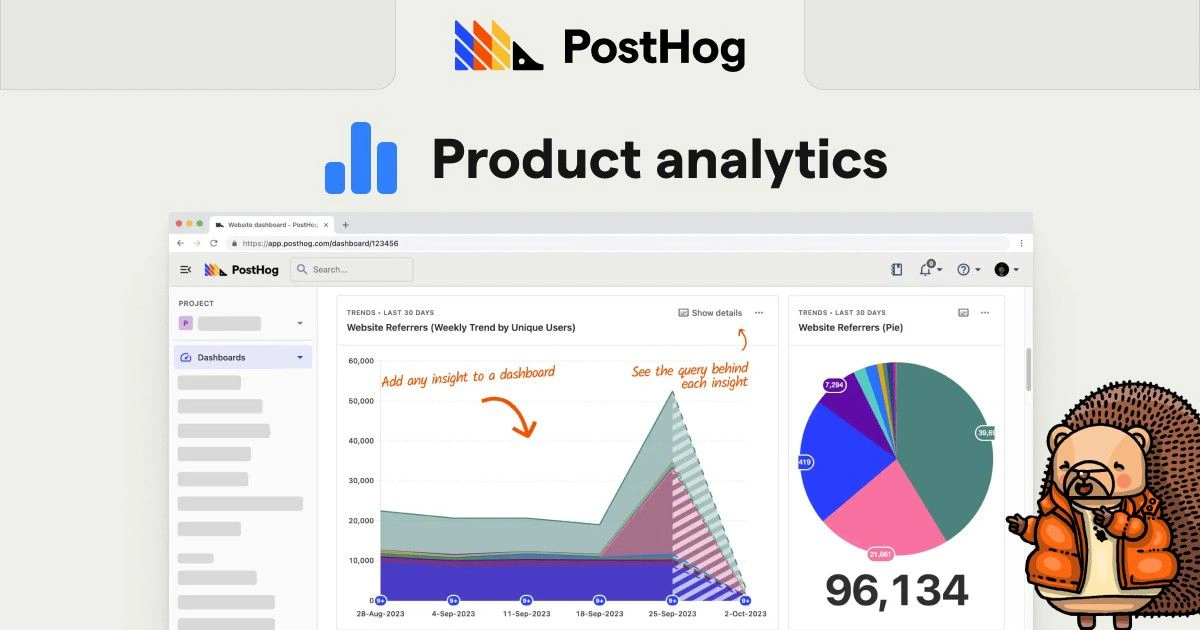
PostHog Product Analytics supports trends, funnels, retention, paths, stickiness, lifecycle analysis, cohorts, dashboards, formulas, and SQL insights.
You can analyze anonymous or identified users, compare behavioral segments, create reusable actions, and add company or workspace-level measurement for B2B products. The reporting experience is flexible but less guided than some competitors.
Web Analytics
Web Analytics provides a streamlined view of visitors, pageviews, sessions, referrers, channels, devices, geography, paths, goals, and web vitals. It uses the same underlying events as product analytics, so you can move from aggregate acquisition data into individual product behavior.
It provides one implementation across your marketing site and application, connecting campaign parameters with signup, activation, retention, and revenue. It is not a complete advertising-attribution suite.
Session Replay and Heatmaps
Session Replay records user interactions and connects them with events, people, flags, surveys, and errors.
Recordings can include timelines, console information, network requests, performance details, and heatmaps. Filters by event, property, frustration, flag exposure, or error make replay useful for both usability research and debugging.
Feature Flags and Remote Configuration
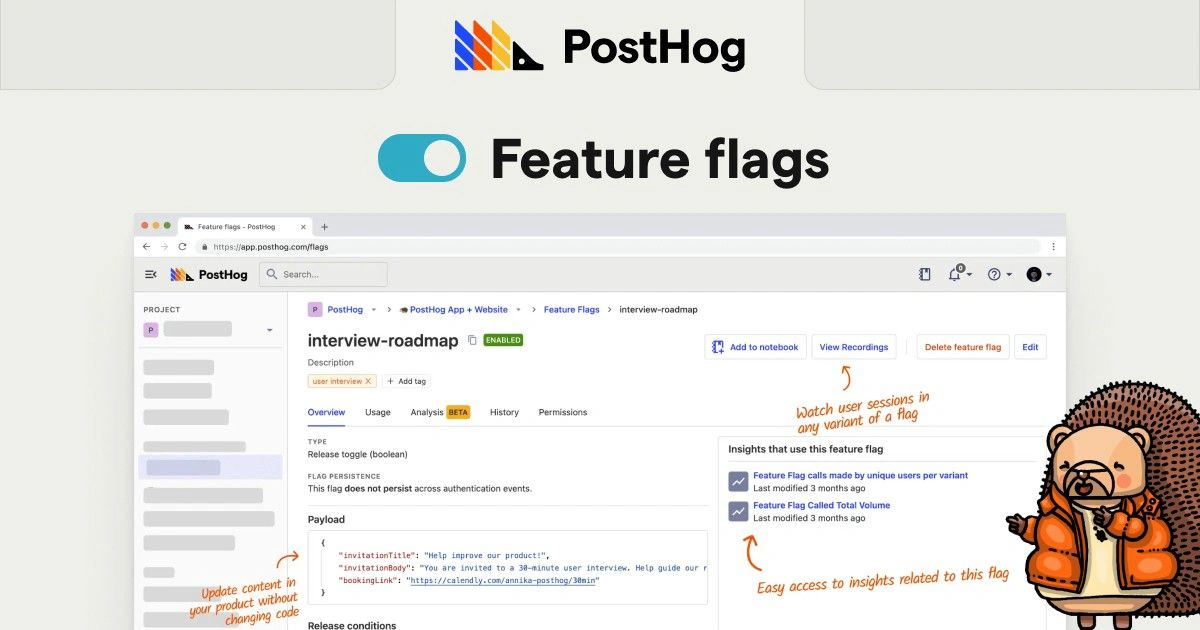
Feature flags let you release functionality to selected users, groups, cohorts, or traffic percentages without deploying another code change.
Boolean and multivariate flags support gradual rollouts, beta programs, entitlements, kill switches, and experiment variants. Remove stale flags after rollout because permanent checks increase code complexity and billable requests.
Experiments
PostHog Experiments runs on top of feature flags and supports product, web, redirect, holdout, fake-door, A/A, A/B/n, LLM, and warehouse-based testing workflows.
You can define metrics, allocate traffic, inspect exposures, and analyze results with Bayesian or frequentist methods. CUPED can reduce variance. The platform is best for teams that can implement variants in code rather than relying on a no-code visual editor.
Surveys and Product Feedback
Surveys support popovers, hosted links, embedded forms, feedback buttons, and custom interfaces through the API.
Free-text, rating, and choice questions can be targeted by URLs, selectors, events, properties, groups, or feature flags. This lets you collect feedback after a failed workflow or from users exposed to a specific change.
Error Tracking and Logs
Error Tracking captures exceptions, groups them into issues, displays stack traces, supports source maps, tracks releases, assigns owners, sends alerts, and integrates with development tools.
Because exceptions are standard events, you can measure their effect on conversion or retention, open related replays, and use flags to target a fix. Logs add application context, although specialist observability suites may remain deeper.
Data Warehouse and Data Pipelines
The managed warehouse imports external business data alongside events. Data pipelines add transformations, real-time destinations, and batch exports for filtering, anonymization, automation, and warehouse delivery.
HogQL and Hog functions provide extensive customization, but they add another technical language and governance surface.
AI Observability
AI Observability captures LLM generations, traces, spans, sessions, inputs, outputs, token usage, latency, errors, and calculated costs.
It supports major model providers, agent frameworks, OpenTelemetry, and manual capture. AI events work with normal analytics, replay, and error tracking, helping you compare cost, latency, failures, and product outcomes.
PostHog AI, MCP, and Developer Workflows
PostHog AI can create insights, analyze experiments, summarize surveys, investigate traces, debug errors, and generate Hog functions. MCP gives compatible coding agents access to PostHog context.
AI assistance accelerates exploration but cannot repair poor event definitions, identity gaps, weak metrics, or uncontrolled collection.
PostHog Feature Overview
| Feature Area | What PostHog Provides | Best For |
| Product Analytics | Trends, funnels, retention, paths, lifecycle, cohorts, groups, and SQL | Understanding user and account behavior |
| Web Analytics | Traffic, channels, pages, goals, geography, paths, and web vitals | Connecting acquisition with product outcomes |
| Session Replay | Recordings, timelines, heatmaps, network, console, and performance context | Explaining friction and reproducing problems |
| Feature Delivery | Flags, targeting, percentage rollouts, payloads, and kill switches | Controlled releases and entitlement management |
| Experiments | A/B tests, holdouts, Bayesian and frequentist analysis, and CUPED | Measuring the impact of product changes |
| Engineering | Error tracking, logs, releases, source maps, and issue workflows | Connecting technical failures with user impact |
| Data | Warehouse sources, SQL, transformations, destinations, and batch exports | Building a connected product-data stack |
| AI | LLM observability, PostHog AI, MCP, trace analysis, and evaluations | Monitoring and improving AI-powered products |
Pros and Cons
Benefits and Limitations
Positive
✅ Connected product-engineering stack
✅ Generous usage-based free tiers
✅ Excellent developer experience
✅ Strong data flexibility
Negative
❌ Interface can feel crowded
❌ Several usage meters to forecast
❌ Self-hosting is operationally demanding
❌ Less approachable for non-technical teams
✅ PostHog Pros
- Analytics, replay, flags, experiments, surveys, and errors share the same user context.
- Unlimited seats make cross-functional adoption easier.
- Transparent usage pricing and billing limits support low-risk evaluation.
- SDKs, APIs, SQL, MCP, and open-source code appeal to technical teams.
- Warehouse and pipeline features reduce dependence on separate data tools.
❌ PostHog Cons
- The broad interface can overwhelm occasional users.
- Costs must be forecast across events, recordings, flags, surveys, rows, and other meters.
- Self-hosting requires security, backup, scaling, and upgrade expertise.
- Advanced administration and enterprise controls may require additional platform packages.
- Some newer products and AI features are still evolving quickly.
PostHog delivers the most value when you consolidate workflows gradually. Basic pageview reporting underuses the platform, while enabling every product at once creates avoidable complexity.
Getting Started
Implementation, Identity, and Team Adoption
You can begin with a snippet, framework integration, mobile SDK, server library, reverse proxy, or data platform. Autocapture collects common web interactions, but production use still requires decisions about identities, events, privacy, environments, groups, and ownership.
Recommended PostHog Implementation Process
- Define the product questions and decisions the implementation must support.
- Choose a small set of activation, engagement, retention, and revenue events.
- Document event names, properties, users, groups, and anonymous identity rules.
- Install the appropriate client and server SDKs.
- Configure privacy, consent, masking, sampling, and data-retention requirements.
- Validate events and identities before building reports.
- Create trusted dashboards, funnels, cohorts, and replay filters.
- Add flags, experiments, surveys, or error tracking only when a workflow requires them.
- Set billing limits and review usage by product.
Autocapture vs Custom Events
Autocapture provides quick visibility and retroactive exploration, but can increase volume and noise. Use governed custom events for durable outcomes such as activation, collaboration, upgrades, payments, and success milestones.
Identity, Groups, and Environments
You should decide when anonymous users become identified, how identities merge across devices, and whether backend events use the same distinct ID as client events.
B2B products should also define groups such as organizations, workspaces, accounts, or projects. Separate development, staging, and production data so test activity does not contaminate business metrics.
Ease of Use by Role
Engineers usually adapt quickly. Product managers and analysts become productive after learning the event model, while marketers and executives often need curated dashboards, clear naming, and training.
Documentation and Support
PostHog provides extensive documentation, tutorials, community resources, a public handbook, and active repositories. Free users receive community support, pay-as-you-go adds email support, and higher packages can add onboarding and account management.
Scalability
Usage, Performance, and Deployment Choices
PostHog can support large event volumes, but scale affects cost, query complexity, replay storage, feature-flag requests, warehouse rows, destination traffic, logs, and operational governance.
Usage and Cost Control
Each product has its own meter. Control volume by sampling replay, suppressing repetitive exceptions, removing stale flags, filtering technical noise, and limiting warehouse imports.
Set separate billing limits before production traffic grows, then review usage trends regularly.
Data Quality and Query Performance
Duplicate events, changing property types, high-cardinality values, and identity gaps reduce trust. Use transformations before storage and document reusable warehouse definitions rather than rebuilding logic in every dashboard.
PostHog Cloud vs Self-Hosted PostHog
Self-hosting provides infrastructure control, but PostHog describes it as unsupported. You manage security, upgrades, backups, data-loss risk, and scale, while some paid cloud features remain unavailable.
Choose it only when infrastructure management is a core competency or cloud regions cannot meet a specific requirement. Cloud is usually more practical after engineering time is included.
Practical Scalability Checklist
- Separate production, staging, and development projects.
- Define event and identity ownership.
- Sample replay rather than recording every session.
- Remove stale flags and suppress repetitive errors.
- Set billing limits for every activated product.
- Review warehouse syncs, transformations, and destinations regularly.
Real-World Use Cases
Where PostHog Delivers the Most Value
SaaS Activation and Retention
You can measure signup, onboarding, first value, collaboration, upgrades, and long-term engagement in one event model.
Funnels reveal abandonment, replay explains friction, cohorts compare activated and non-activated users, and surveys collect direct feedback from users who fail to reach a milestone.
Product Experimentation
PostHog can connect the experiment assignment, product experience, technical performance, and business outcome.
You can compare conversion and retention metrics, inspect replay for each variant, evaluate errors, and use warehouse data for downstream outcomes that do not exist in the application event stream.
Debugging High-Impact Errors
Instead of prioritizing an issue only by exception count, you can identify which customers were affected and whether the error blocked activation, payment, or another important action.
Replay, event history, releases, flags, and source-mapped stack traces create a stronger debugging context than an isolated error message.
AI Product Monitoring
AI teams can compare models by cost, latency, error rate, token usage, feedback, and product outcomes.
Traces help investigate multi-step agent behavior, while product analytics shows whether an AI feature improves adoption or retention. This connection between technical observability and user value is one of PostHog’s most distinctive capabilities.
What Users Say About PostHog
Verified reviewers frequently praise the broad feature set, replay, feature flags, developer experience, transparent pricing, and tool consolidation. Common concerns include the learning curve, crowded navigation, technical setup, advanced-reporting complexity, and self-hosting burden.
Pricing and Plans
How Much Does PostHog Cost?
PostHog pricing is usage-based. You can start without a credit card and use each product up to its monthly free allowance.
Adding a payment method preserves the free allowances while enabling higher usage, more projects, longer retention, and email support.
PostHog Pricing Overview
| Product | Monthly Free Allowance | Initial Paid Rate After Free Usage |
| Product Analytics | 1 million events | From $0.00005 per event |
| Session Replay | 5,000 web recordings | From $0.005 per recording |
| Feature Flags | 1 million requests | From $0.0001 per request |
| Surveys | 1,500 responses | From $0.10 per response |
| Managed Warehouse | 1 million rows plus free historical syncs | From $0.000015 per row |
| Error Tracking | 100,000 exceptions | From $0.00037 per exception |
| AI Observability | 100,000 events | Usage-based after the free allowance |
| Logs | 50 GB ingested | From $0.25 per GB |
Rates decrease at higher volumes, so the pricing calculator is more accurate than multiplying the first paid tier across all usage.
Free
The Free plan includes one project, one-year retention, unlimited team members, API access, community support, and monthly product allowances. Usage stops at the limits unless billing is enabled.
Pay-as-You-Go
Pay-as-you-go starts at $0 when usage stays below the allowances. It adds up to six projects, seven-year retention, email support, and metered overage. Billing caps can be set separately by product.
Platform Packages
Platform packages add administration, support, security, and governance. Public pricing lists Boost at $250 per month, Scale at $750, and Enterprise by quote. Confirm which package provides SAML, RBAC, audit logs, onboarding, and account management.
Hidden and Indirect Costs
Indirect costs include SDK implementation, server events, flags, source maps, warehouse connectors, privacy work, and experiment development. Self-hosting adds infrastructure and recovery responsibilities.
Estimate production traffic across every activated meter before purchasing. Consolidation does not automatically produce a lower bill.
Integrations
SDKs, Warehouses, and Workflow Connections
Client and Server SDKs
PostHog offers SDKs for major web, mobile, backend, game, and application frameworks. Feature support varies, so verify replay, surveys, flags, errors, and AI capabilities for your exact environment.
Warehouse Sources and Data Import
External tables from databases, payment systems, CRM products, and advertising tools can be joined with events and users for revenue, subscription, support, account, and cost analysis.
Destinations, Exports, and Automation
Real-time destinations send selected events to operational systems, while webhooks and batch exports support custom endpoints and large datasets. Transformations can anonymize, enrich, rename, filter, or reject data before storage and should be reviewed like production code.
Development and Collaboration Integrations
Error tracking connects with development and collaboration tools for assignment and alerts. MCP, APIs, Terraform, the CLI, and open-source code support infrastructure-as-code and agent-assisted workflows.
Data Protection
Security, Privacy, and Enterprise Controls
PostHog can collect detailed behavioral, technical, and conversational data, so privacy must be designed before launch. The Trust Center states that cloud products are covered by SOC 2 Type II and provides GDPR, CCPA, and HIPAA guidance.
Cloud Regions and Compliance Support
Cloud is available in US and EU regions, with the EU environment hosted in Frankfurt. PostHog states that a Business Associate Agreement can be arranged for HIPAA-compliant cloud use, but you remain responsible for collection decisions and configuration.
Access and Administration Controls
- Two-factor authentication and social SSO are available across standard plans.
- Organization, project, and resource-level access controls support data separation.
- Advanced SAML, RBAC, audit logs, and SSO enforcement may require a platform package.
- US and EU cloud regions support different residency requirements.
- APIs support person and event deletion workflows.
Collection and Replay Privacy
Configure consent, opt-out logic, masking, blocked selectors, IP handling, replay sampling, and filters before launch. Do not capture credentials, payment fields, private messages, health information, or regulated data without explicit approval.
Self-Hosted Security Responsibility
Self-hosting transfers security, backups, monitoring, upgrades, incident response, and recovery to your team. More control is not automatically safer because a poorly maintained private deployment can create additional risk.
Comparison
PostHog Alternatives
The best alternative depends on whether you prioritize analytics depth, ease of use, automatic capture, in-app adoption, or enterprise governance.
PostHog Alternatives Compared
| Platform | Main Strength | Best Fit |
| PostHog | Developer-first analytics, delivery, debugging, data, and AI stack | Engineering-led software teams |
| Amplitude | Deep behavioral analytics and enterprise governance | Data-mature product organizations |
| Mixpanel | Fast, focused self-service product analytics | Product teams prioritizing accessible analysis |
| Heap | Automatic capture and retroactive behavioral analysis | Teams that want broad collection with less tagging |
| Pendo | Product adoption, guidance, feedback, and portfolio management | Organizations focused on onboarding and adoption |
PostHog vs Amplitude
Amplitude is more analytics-centered, with deep behavioral exploration and enterprise governance. PostHog is more developer-oriented and adds flags, errors, pipelines, AI observability, and open-source flexibility. Read our Amplitude Analytics review.
PostHog vs Mixpanel
Mixpanel offers a more focused analytics experience for funnels, retention, journeys, and cohorts. PostHog is stronger when flags, debugging, replay, and data workflows matter equally. Read our Mixpanel review.
PostHog vs Heap
Heap emphasizes automatic capture and retroactive event definition. PostHog also offers Autocapture but adds a broader engineering and experimentation stack. Read our Heap review.
PostHog vs Pendo
Pendo is stronger for in-app guidance, onboarding, feedback, and portfolio adoption. PostHog offers more developer control, transparent usage pricing, observability, and open-source flexibility. Read our Pendo review.
For cross-department dashboards, financial metrics, and executive reporting, review the best business intelligence software.
Final Thoughts
Is PostHog Worth It?
PostHog is worth considering when engineering is central to how your organization learns from customers and improves the product.
Its advantage is workflow continuity, from funnel analysis and replay to errors, flags, experiments, surveys, and warehouse outcomes. Usage-based pricing supports startups, while SQL, pipelines, groups, and enterprise packages support mature teams.
You still need disciplined event design, identity management, privacy rules, cost controls, and ownership. Choose PostHog for a developer-first product stack, or consider Amplitude, Mixpanel, Heap, and Pendo for more specialized priorities.
Frequently Asked Questions
Have More Questions?
What is PostHog?
PostHog is an open-source, developer-first platform that combines product and web analytics, session replay, feature flags, experiments, surveys, error tracking, data pipelines, warehouse tools, and AI observability.
Is PostHog free?
Yes. PostHog offers monthly free allowances for its main products without requiring a credit card. Usage stops at the free limits unless you enable pay-as-you-go billing.
How much does PostHog cost?
PostHog uses usage-based pricing. Product Analytics includes 1 million free monthly events, Session Replay includes 5,000 free web recordings, and Feature Flags include 1 million free requests.
Is PostHog open source?
Yes. PostHog provides an MIT-licensed open-source deployment. However, self-hosting is unsupported, requires infrastructure expertise, and does not include every paid cloud capability.
Can PostHog replace Google Analytics?
PostHog can replace basic web analytics while adding product behavior, user identity, replay, experiments, and feature flags. Dedicated advertising attribution may still be needed for complex marketing reporting.
Does PostHog include session replay?
Yes. PostHog Session Replay connects recordings with events, feature flags, surveys, errors, network activity, performance context, and user properties.
Can PostHog run A/B tests?
Yes. PostHog runs experiments using feature flags and supports A/B/n tests, holdouts, redirect tests, fake-door tests, Bayesian and frequentist analysis, and CUPED.
What is PostHog AI Observability?
AI Observability tracks LLM generations, traces, spans, prompts, outputs, token usage, latency, costs, errors, evaluations, and user context for AI-powered applications.
What are the best PostHog alternatives?
Leading alternatives include Amplitude for enterprise behavioral analytics, Mixpanel for focused self-service analysis, Heap for automatic capture, and Pendo for product adoption and in-app guidance.
Is PostHog worth it?
PostHog is worth considering for engineering-led teams that want analytics, replay, feature delivery, experimentation, debugging, data, and AI tools in one platform. It is less suitable for teams seeking a simple, non-technical reporting experience.